

'%3e%3cpath%20d='M8%200C12.4183%200%2016%203.58172%2016%208C16%2012.4183%2012.4183%2016%208%2016C3.58172%2016%200%2012.4183%200%208C0%203.58172%203.58172%200%208%200ZM11.6162%204.38379C11.2257%203.99337%2010.5927%203.99338%2010.2021%204.38379L8%206.58594L5.79785%204.38379C5.40732%203.99334%204.77429%203.99329%204.38379%204.38379C3.99331%204.77429%203.99335%205.40733%204.38379%205.79785L6.58594%208L4.38379%2010.2021C3.99348%2010.5927%203.99341%2011.2257%204.38379%2011.6162C4.77426%2012.0066%205.40734%2012.0065%205.79785%2011.6162L8%209.41406L10.2021%2011.6162C10.5927%2012.0066%2011.2257%2012.0067%2011.6162%2011.6162C12.0067%2011.2257%2012.0066%2010.5927%2011.6162%2010.2021L9.41406%208L11.6162%205.79785C12.0066%205.40735%2012.0066%204.77429%2011.6162%204.38379Z'%20fill='%23080E17'%20fill-opacity='0.46'/%3e%3c/g%3e%3cdefs%3e%3cclipPath%20id='clip0_3761_713'%3e%3crect%20width='16'%20height='16'%20fill='white'/%3e%3c/clipPath%3e%3c/defs%3e%3c/svg%3e)




'%3e%3cpath%20fill-rule='evenodd'%20clip-rule='evenodd'%20d='M21.4999%2010.9993C21.4999%205.20009%2016.7986%200.498901%2010.9993%200.498901C5.19994%200.498901%200.498657%205.20009%200.498657%2010.9993C0.498657%2016.2404%204.33858%2020.5844%209.35855%2021.3722V14.0346H6.69238V10.9993H9.35855V8.68594C9.35855%206.05427%2010.9262%204.60062%2013.3248%204.60062C14.4736%204.60062%2015.6753%204.80571%2015.6753%204.80571V7.38979H14.3512C13.0468%207.38979%2012.64%208.19921%2012.64%209.0296V10.9993H15.5523L15.0867%2014.0346H12.64V21.3722C17.66%2020.5844%2021.4999%2016.2404%2021.4999%2010.9993Z'%20fill='%231568EA'/%3e%3c/g%3e%3c/svg%3e)


'%3e%3cpath%20d='M2.42045%2022.1876H6.31818V12.7217L0.75%208.54553V20.5171C0.75%2021.4414%201.49892%2022.1876%202.42045%2022.1876Z'%20fill='%234285F4'/%3e%3cpath%20d='M19.682%2022.1876H23.5797C24.5041%2022.1876%2025.2502%2021.4387%2025.2502%2020.5171V8.54553L19.682%2012.7217'%20fill='%2334A853'/%3e%3cpath%20d='M19.682%205.48293V12.7216L25.2502%208.54543V6.31816C25.2502%204.25236%2022.8921%203.07469%2021.2411%204.31361'%20fill='%23FBBC04'/%3e%3cpath%20d='M6.31824%2012.7217V5.48303L13.0001%2010.4944L19.6819%205.48303V12.7217L13.0001%2017.733'%20fill='%23EA4335'/%3e%3cpath%20d='M0.75%206.31816V8.54543L6.31818%2012.7216V5.48293L4.75909%204.31361C3.10534%203.07469%200.75%204.25236%200.75%206.31816Z'%20fill='%23C5221F'/%3e%3c/g%3e%3cdefs%3e%3cclipPath%20id='clip0_2954_7305'%3e%3crect%20width='24.5'%20height='18.375'%20fill='white'%20transform='translate(0.75%203.8125)'/%3e%3c/clipPath%3e%3c/defs%3e%3c/svg%3e)


Deleting a contact on an iPhone does not erase the number for good: the Contacts app keeps removed entries for 30 days and iCloud holds archived copies of the whole address book. Start with the two recovery routes below, which take minutes, and finish with the backup that means you never need them again.
How to Retrieve Deleted Phone Numbers on iPhone: Free Recovery Methods
Check Recently Deleted in the Contacts App First
This route is the quickest because it runs entirely on the phone: no iCloud sign-in, no computer and no software. On recent iOS versions every contact you delete or lose during a bad sync is parked in a holding list before it is removed for good.
Open the Contacts app and tap Edit in the top right corner.
Scroll to the bottom and tap Recently Deleted.
Restore one entry or all of them. Tap the contact you want, or use Recover All Contacts to put the whole list back in one move.
Entries only sit there for 30 days. If the phone was reset or restored since the deletion the list is empty, and if the thirty days have passed the numbers are gone from the phone itself, so continue with the cloud archive instead.
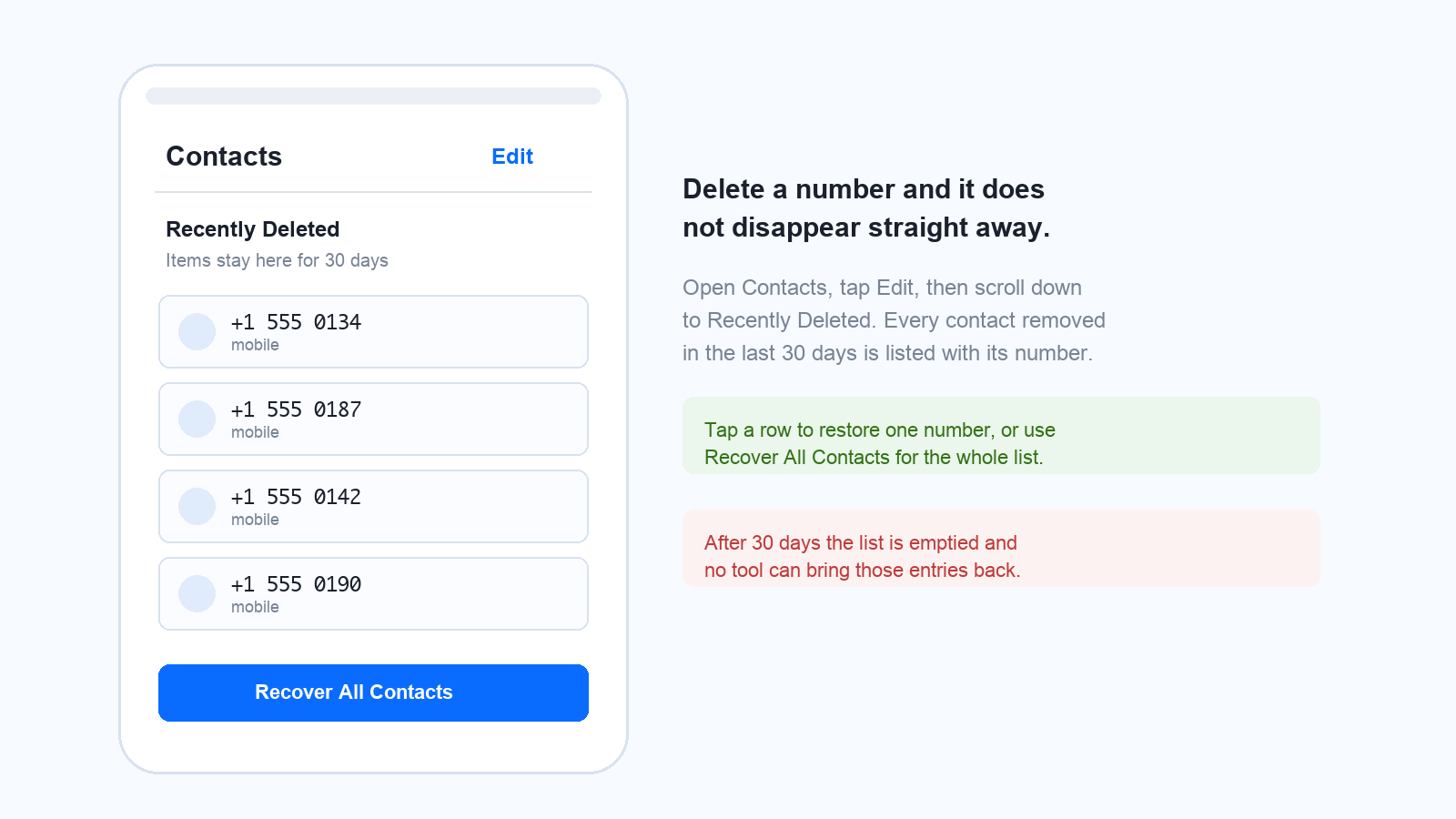
Recently Deleted contacts list on iPhone


Restore Deleted Numbers from the iCloud Archive
iCloud archives your address book automatically, and the archive page lets you move the entire contact list back to an earlier point in time. It is the most reliable fix once the on-device list is empty.
Sign in at iCloud.com with the same Apple Account and open Account Settings.
Find Data Recovery and choose Restore Contacts.
Pick an archive dated before the deletion and confirm with Restore.
Wait for the confirmation notification and email before you change anything else.
Two things are worth knowing before you press that button. The version you choose replaces the contacts on every device signed in to the account, and iCloud archives your current list first, so you can switch back if the result is not what you expected. While the restore runs, edits made in iCloud are not saved, so pause and let it finish.
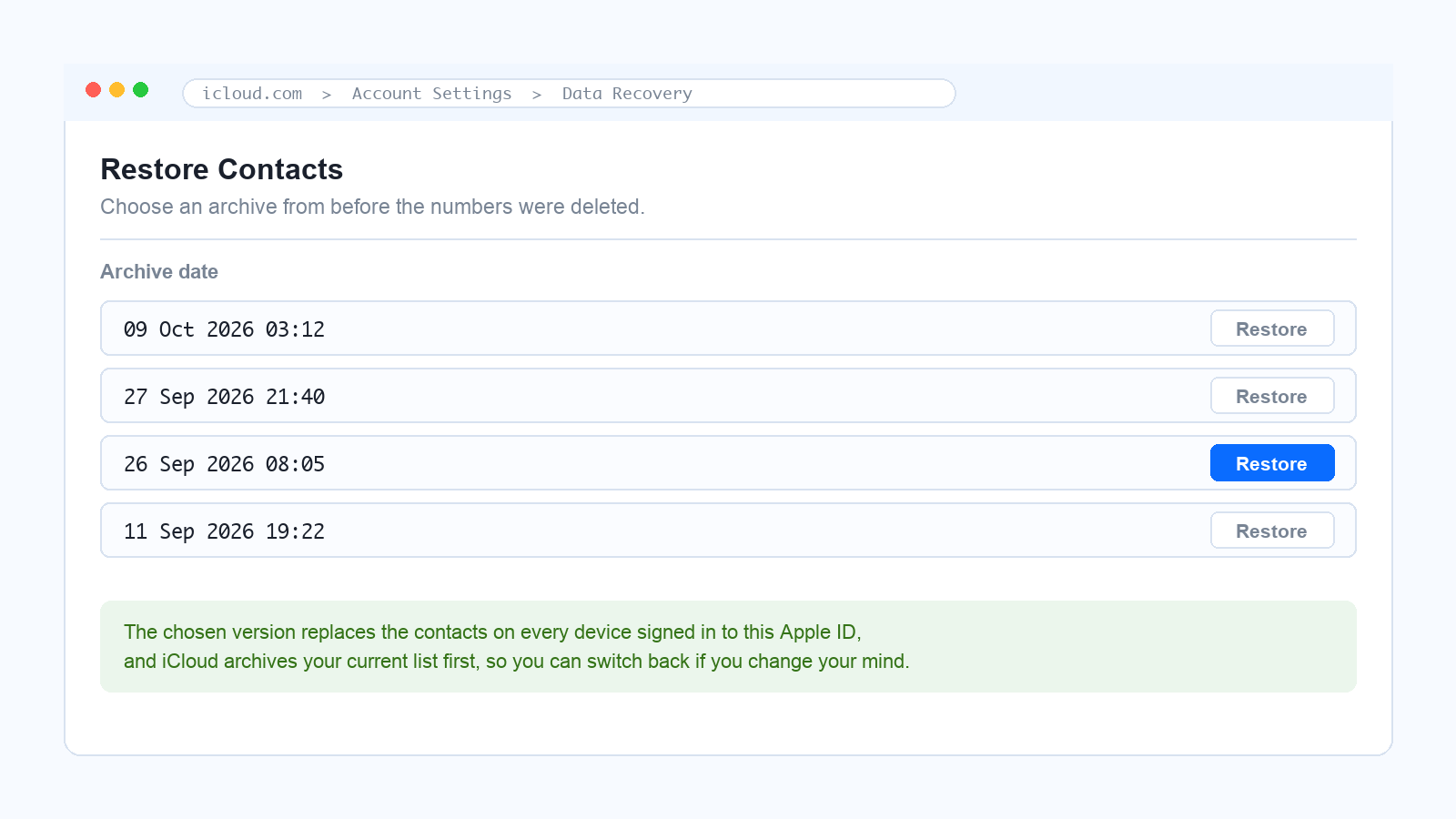
iCloud restore contacts archive screen
Force a Contacts Merge When Numbers Simply Vanish
Contacts that vanish all at once after an iOS update or a sign-out are usually a sync problem rather than a deletion, and a forced merge often refills them from the cloud copy without touching the archive.
Open Settings, tap your name at the top and choose iCloud.
Turn Contacts off and tap Keep on My iPhone when the prompt appears, so nothing is removed from the device.
Wait a few seconds, then turn Contacts back on.
Tap Merge, never Replace. The two lists are combined and the missing numbers reappear.
That single choice matters. Replace overwrites the phone with the cloud version, which is exactly the wrong move when the missing numbers are the ones that never synced in the first place.
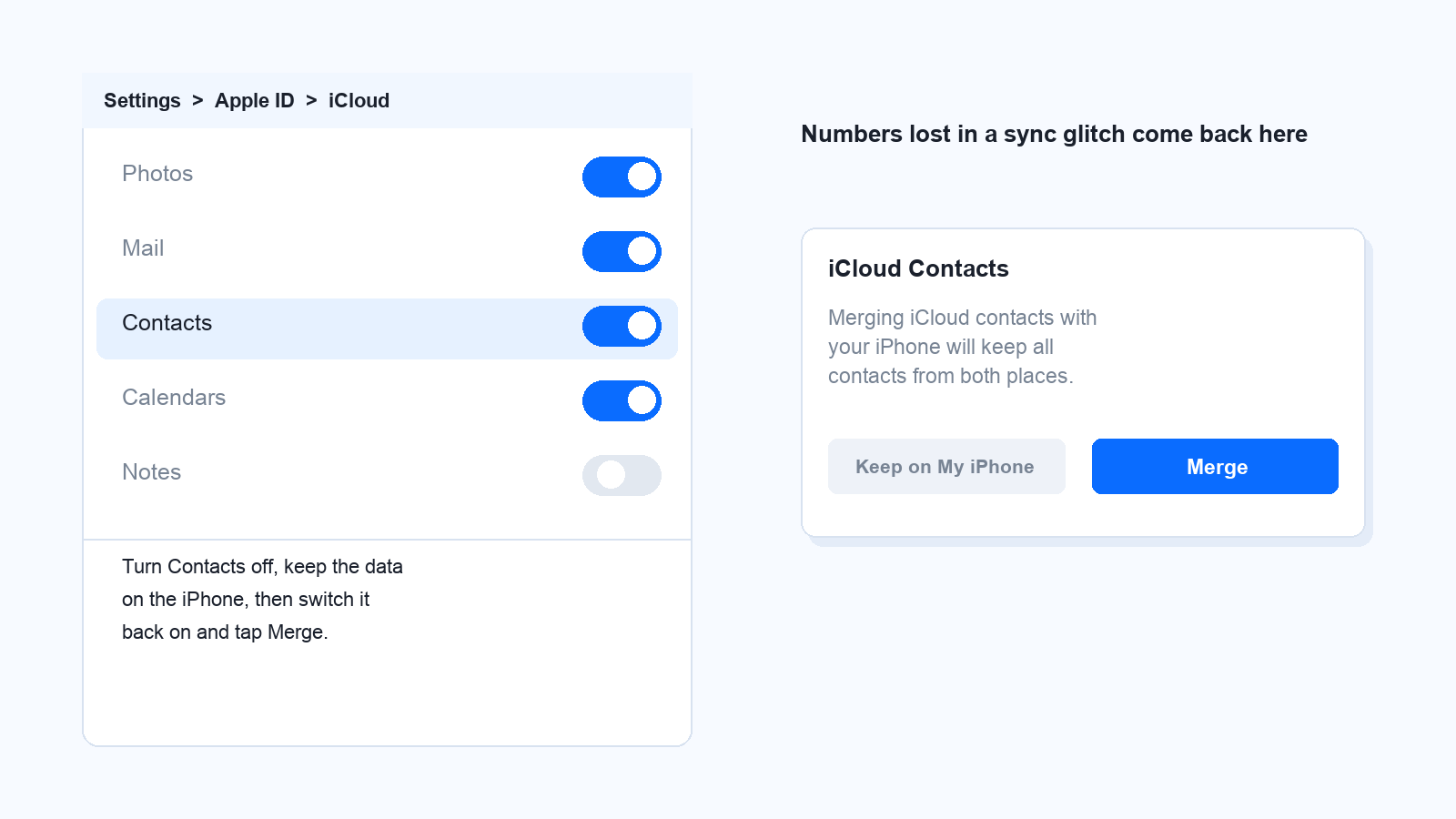
iCloud contacts merge prompt on iPhone
Recover Numbers from Google Contacts, a Backup or the SIM
If the archive is empty and the merge changes nothing, the number is still likely to exist in an account or a backup you already own.
Google Contacts: when a Gmail account shares contacts with the iPhone, open contacts.google.com and use Undo changes to roll the list back to a point before the deletion. Export a copy first if you only lost one entry, because the rollback affects the whole list.
A computer backup: a backup taken before the deletion still contains the number. Connect the iPhone, open its summary in Finder or iTunes and choose Restore Backup. The restore replaces everything added since that date, so note down recent items first.
The SIM card: Settings, then Contacts, then Import SIM Contacts copies the basic name-and-number pairs still stored on the SIM. Capacity is small and modern iPhones do not save new contacts to the SIM, so treat this as a long shot.
A data recovery tool: read the privacy terms before installing one. These apps scan for residual data and belong at the end of the list, when there is no archive and no backup.
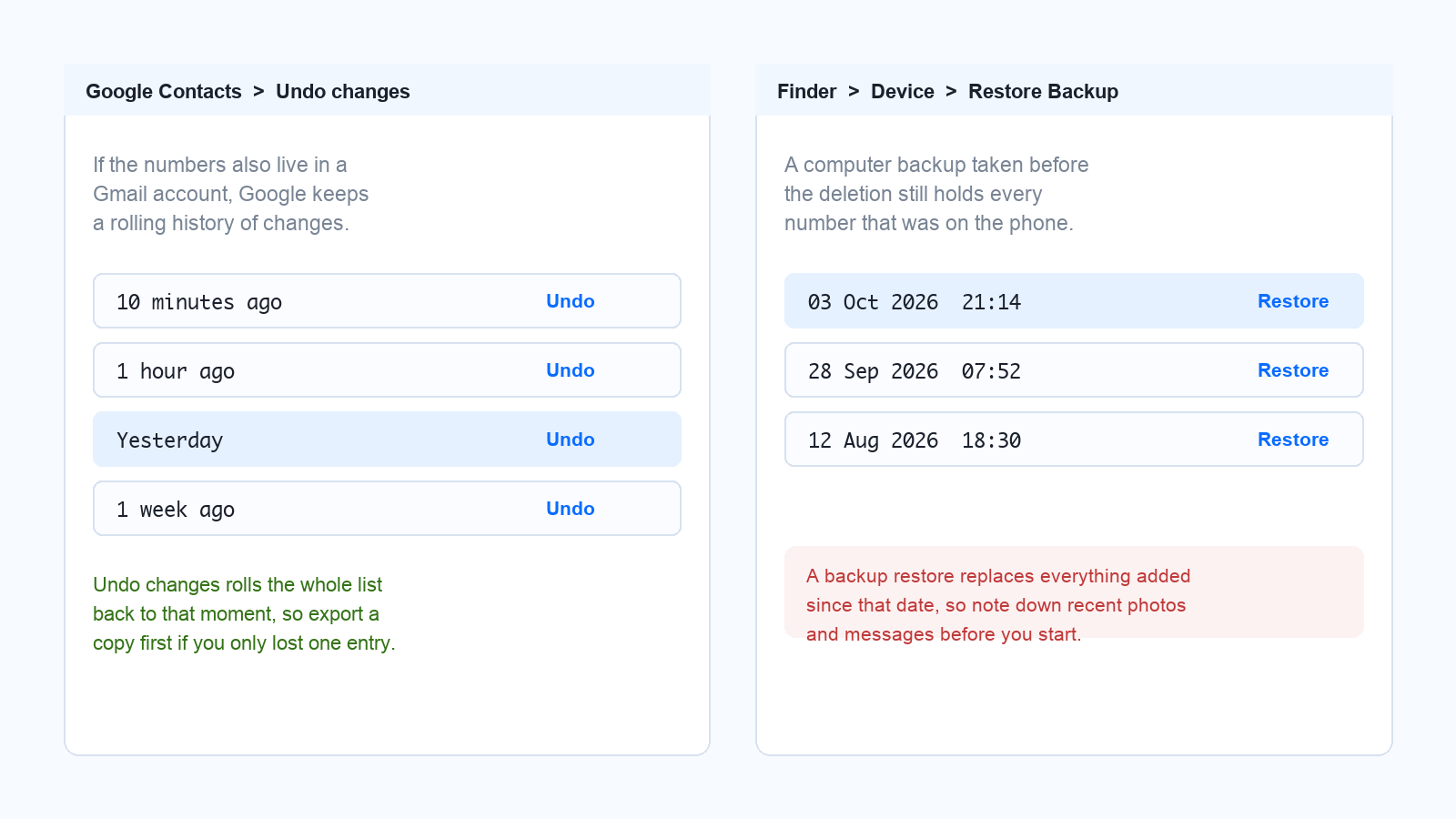
Google Contacts undo and backup restore
Where a Deleted Number Still Lives on Your iPhone
Even with no archive and no backup, the number is often sitting in plain sight elsewhere on the phone.
Phone app: Recents keeps incoming, outgoing and missed calls, so a number you called once is usually still there.
Messages: the conversation shows the number in its header even after the contact card is gone, and older texts may contain it in the body.
Mail and accounts: signatures, order confirmations and account pages are full of old numbers.
Chat apps: WhatsApp, Telegram and similar apps display the number for anyone who is not in your address book.
Documents: invoices, contracts and contact lists saved in WPS Office often carry the number with the name attached.
Copy what you find into a spreadsheet before you clear the thread or the call log, and save the number as a new contact straight away with the right name attached.
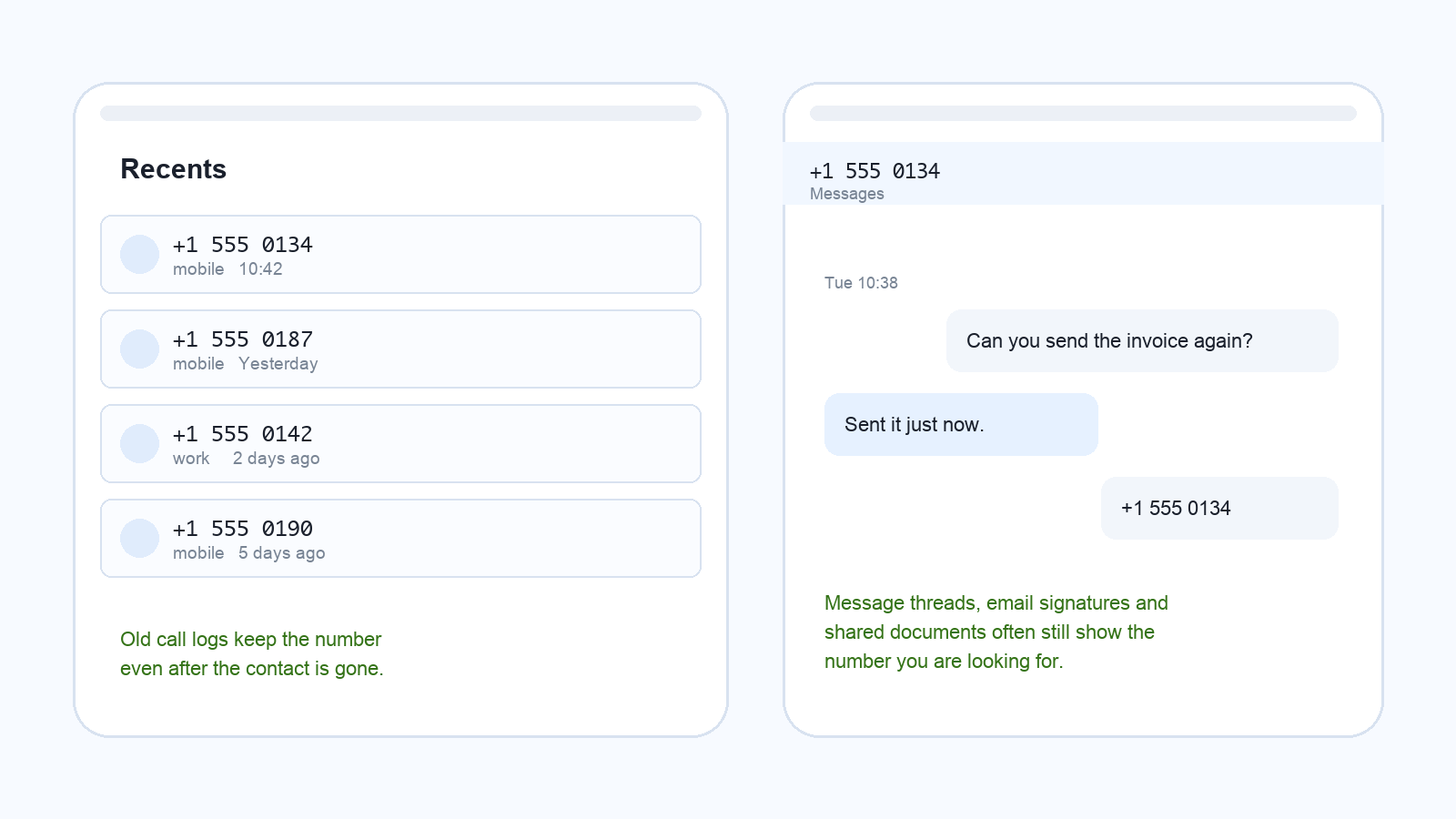
iPhone call history and message thread
Back Up Contacts to a Spreadsheet So It Never Happens Again
Recovery is a rescue; a backup is insurance. Export your contacts once and keep the file somewhere you can open it, which also makes duplicates and formatting easy to repair before you import the list back.
Export from the cloud. On iCloud.com or contacts.google.com, select all contacts and choose Export, which gives you a vCard or CSV file.
Open the CSV in WPS Spreadsheet and add a clean header row with Name, Phone and Email.
Save it to the cloud so the copy lives on the phone, the desktop and the laptop at the same time instead of on one device only.
If you would rather build the list from scratch on the phone, the workflow for editing a spreadsheet on iPhone is the same one you would use to keep a contact list tidy. A five-minute backup turns next year's accident into a non-event.
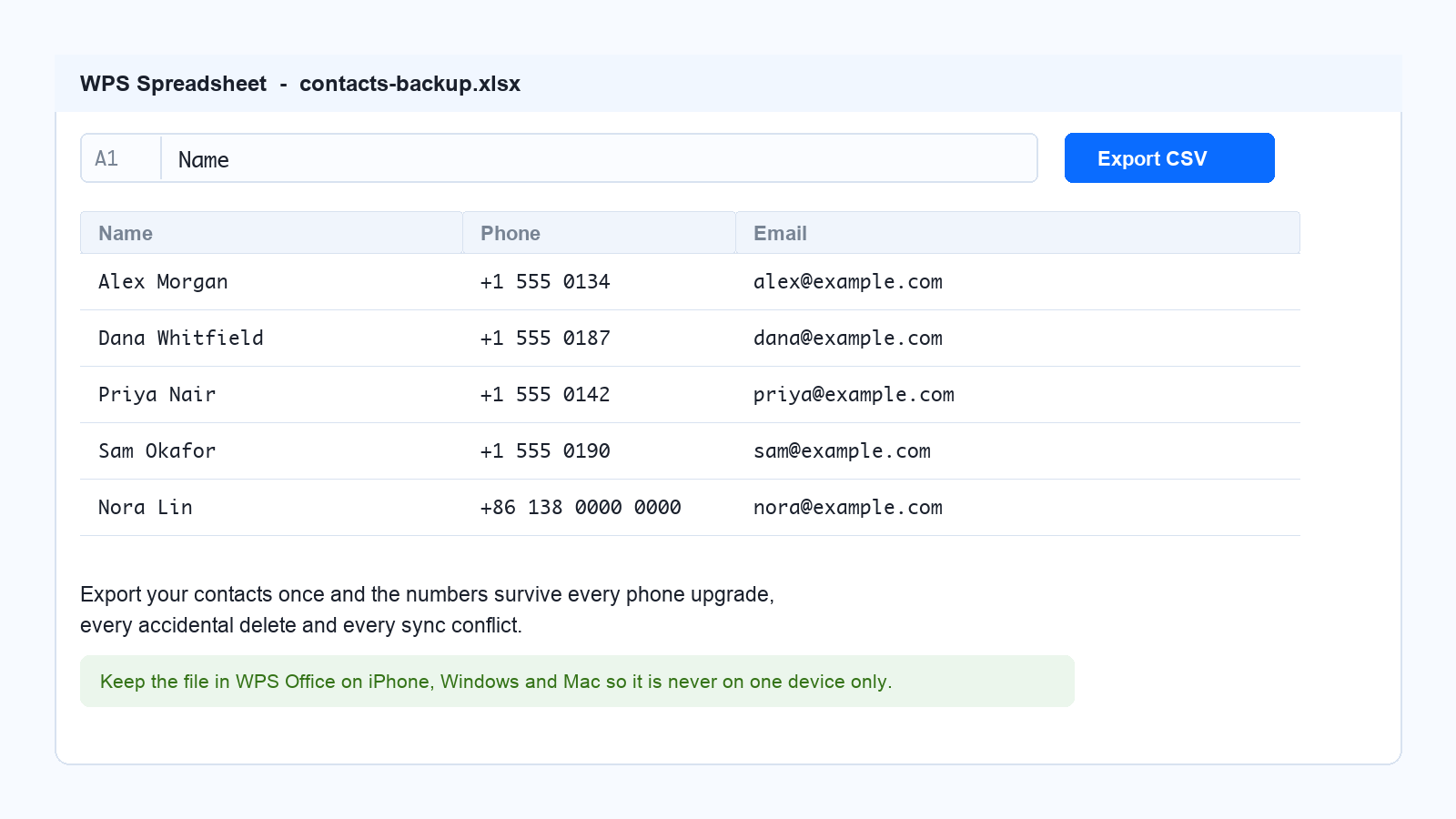
Contact list backed up in spreadsheet
The Best Free Alternative: WPS Office
WPS Office is free on iPhone, Android, Windows and macOS, and it opens the .xlsx contact backup you just made without a subscription. That matters more than it sounds, because some office suites restrict editing on a phone to a paid plan, while WPS Writer, Spreadsheet and Presentation let you edit for free and keep the same file in sync across devices. A contact list you fix on the phone is therefore correct on the desktop a second later, and the app is available from the WPS Office for iOS page.
WPS Office spreadsheet with ad-free badges
FAQs
1. Can I recover a deleted phone number without iCloud?
Yes. Check Recently Deleted inside the Contacts app first, which works offline. If the entry is gone from there, look in Recents in the Phone app, in a message thread, or import the number from a SIM card that still stores it.
2. How long do deleted contacts stay recoverable on an iPhone?
The Recently Deleted list in Contacts keeps them for 30 days. iCloud archives earlier versions of the whole address book for longer, and a computer backup keeps the numbers until you delete that backup, so recovery does not depend on a single window.
3. Will restoring an iCloud archive delete contacts I added recently?
It can. The archive version you choose replaces the contact list on every device signed in to that account, although iCloud stores your current list first so you can switch back. Export a copy before restoring if you are unsure.
4. Why did every contact disappear at once?
A sync interruption, a sign-out or an iOS update usually causes this rather than a deletion, which is why a forced merge brings the numbers back without overwriting the phone. Choose Merge rather than Replace when the prompt appears.
5. Does restoring a backup delete photos or messages?
Yes. A backup restore returns the phone to the state it was in when the backup was made, so anything added afterwards is lost. Note down important photos, messages and downloads before you start.


'%3e%3cpath%20d='M19.9911%204.11386V6.471H18.5894C18.0775%206.471%2017.7322%206.57814%2017.5536%206.79243C17.3751%207.00671%2017.2858%207.32814%2017.2858%207.75671V9.44421H19.9019L19.5536%2012.0871H17.2858V18.8639H14.5536V12.0871H12.2769V9.44421H14.5536V7.49779C14.5536%206.39064%2014.8632%205.53201%2015.4822%204.92189C16.1013%204.31177%2016.9257%204.00671%2017.9554%204.00671C18.8304%204.00671%2019.509%204.04243%2019.9911%204.11386Z'%20fill='%23333333'/%3e%3c/g%3e%3cdefs%3e%3cclipPath%20id='clip0_2938_8199'%3e%3crect%20width='16'%20height='16'%20fill='white'%20transform='translate(8%204.00671)'/%3e%3c/clipPath%3e%3c/defs%3e%3c/svg%3e)
'%3e%3cpath%20d='M17.5237%2010.7813L23.4811%204H22.0699L16.8949%209.88693L12.7648%204H8L14.2469%2012.9029L8%2020.0133H9.4112L14.8725%2013.7952L19.2352%2020.0133H24M9.92053%205.04213H12.0885L22.0688%2019.0224H19.9003'%20fill='%23333333'/%3e%3c/g%3e%3cdefs%3e%3cclipPath%20id='clip0_2938_8200'%3e%3crect%20width='16'%20height='16.0134'%20fill='white'%20transform='translate(8%204)'/%3e%3c/clipPath%3e%3c/defs%3e%3c/svg%3e)


