

'%3e%3cpath%20d='M8%200C12.4183%200%2016%203.58172%2016%208C16%2012.4183%2012.4183%2016%208%2016C3.58172%2016%200%2012.4183%200%208C0%203.58172%203.58172%200%208%200ZM11.6162%204.38379C11.2257%203.99337%2010.5927%203.99338%2010.2021%204.38379L8%206.58594L5.79785%204.38379C5.40732%203.99334%204.77429%203.99329%204.38379%204.38379C3.99331%204.77429%203.99335%205.40733%204.38379%205.79785L6.58594%208L4.38379%2010.2021C3.99348%2010.5927%203.99341%2011.2257%204.38379%2011.6162C4.77426%2012.0066%205.40734%2012.0065%205.79785%2011.6162L8%209.41406L10.2021%2011.6162C10.5927%2012.0066%2011.2257%2012.0067%2011.6162%2011.6162C12.0067%2011.2257%2012.0066%2010.5927%2011.6162%2010.2021L9.41406%208L11.6162%205.79785C12.0066%205.40735%2012.0066%204.77429%2011.6162%204.38379Z'%20fill='%23080E17'%20fill-opacity='0.46'/%3e%3c/g%3e%3cdefs%3e%3cclipPath%20id='clip0_3761_713'%3e%3crect%20width='16'%20height='16'%20fill='white'/%3e%3c/clipPath%3e%3c/defs%3e%3c/svg%3e)



'%3e%3cpath%20fill-rule='evenodd'%20clip-rule='evenodd'%20d='M21.4999%2010.9993C21.4999%205.20009%2016.7986%200.498901%2010.9993%200.498901C5.19994%200.498901%200.498657%205.20009%200.498657%2010.9993C0.498657%2016.2404%204.33858%2020.5844%209.35855%2021.3722V14.0346H6.69238V10.9993H9.35855V8.68594C9.35855%206.05427%2010.9262%204.60062%2013.3248%204.60062C14.4736%204.60062%2015.6753%204.80571%2015.6753%204.80571V7.38979H14.3512C13.0468%207.38979%2012.64%208.19921%2012.64%209.0296V10.9993H15.5523L15.0867%2014.0346H12.64V21.3722C17.66%2020.5844%2021.4999%2016.2404%2021.4999%2010.9993Z'%20fill='%231568EA'/%3e%3c/g%3e%3c/svg%3e)


'%3e%3cpath%20d='M2.42045%2022.1876H6.31818V12.7217L0.75%208.54553V20.5171C0.75%2021.4414%201.49892%2022.1876%202.42045%2022.1876Z'%20fill='%234285F4'/%3e%3cpath%20d='M19.682%2022.1876H23.5797C24.5041%2022.1876%2025.2502%2021.4387%2025.2502%2020.5171V8.54553L19.682%2012.7217'%20fill='%2334A853'/%3e%3cpath%20d='M19.682%205.48293V12.7216L25.2502%208.54543V6.31816C25.2502%204.25236%2022.8921%203.07469%2021.2411%204.31361'%20fill='%23FBBC04'/%3e%3cpath%20d='M6.31824%2012.7217V5.48303L13.0001%2010.4944L19.6819%205.48303V12.7217L13.0001%2017.733'%20fill='%23EA4335'/%3e%3cpath%20d='M0.75%206.31816V8.54543L6.31818%2012.7216V5.48293L4.75909%204.31361C3.10534%203.07469%200.75%204.25236%200.75%206.31816Z'%20fill='%23C5221F'/%3e%3c/g%3e%3cdefs%3e%3cclipPath%20id='clip0_2954_7305'%3e%3crect%20width='24.5'%20height='18.375'%20fill='white'%20transform='translate(0.75%203.8125)'/%3e%3c/clipPath%3e%3c/defs%3e%3c/svg%3e)


Almost every "photo won't open" or "upload rejected" problem comes down to format and file size, not the camera. The short answer: keep ordinary photos as JPG, use PNG only when you need transparency, convert HEIC from an iPhone to JPG before sharing, and compress in WPS instead of installing another tool.
Image File Formats: A Guide to Choosing and Converting Them
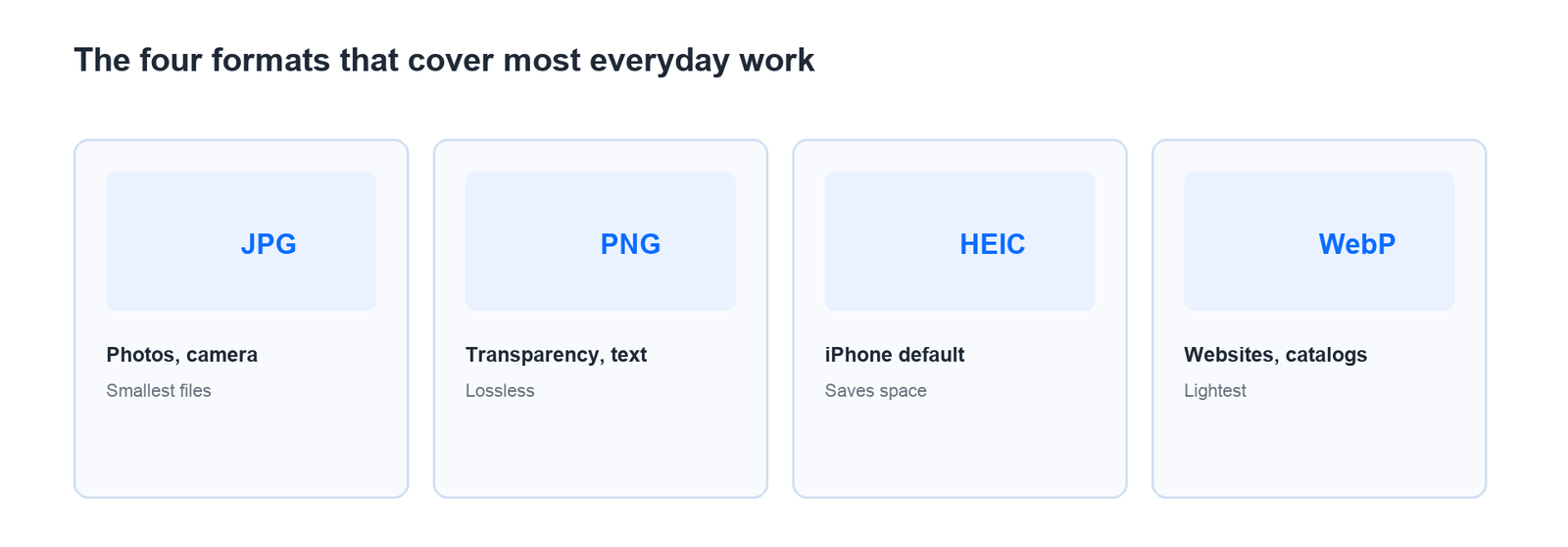


How to Choose Among Image File Formats in Three Questions
Choose by destination, not by which format sounds most advanced. Three questions settle nearly every case.
Will this be printed, or only viewed on a screen? For a print larger than 4 x 6 inches, keep a high-quality JPG or a TIFF. For screens and social posts, a compressed JPG or a WebP is enough.
Does the background need to be transparent? Only PNG and SVG support transparency. If nothing sits behind the subject, PNG just adds weight to the file.
Will the file be sent to someone else? Send JPG. HEIC often fails to open on the recipient's device, and RAW will not open at all without dedicated software.
For print work, check resolution too: aim for 300 DPI at final size, roughly 2000 pixels on the long edge for A4. A blurry print is a pixel problem, not a format problem.
Keep two versions: one original (RAW or maximum-quality JPG) in an archive folder, and one small copy for sharing, so you never try to raise the quality of an already-compressed file.
On a website the work continues past the extension: resize to 1600 pixels wide, give the file a descriptive name, and write alt text that describes the subject. A 4 MB hero image is the most common reason a page feels slow on a phone, and search engines read the file name and the alt text.
For online selling, one product photo needs three versions: a large original for the archive, a 1200-pixel JPG for the catalog, and a WebP under 200 KB for the fast-loading page. Scanned documents and receipts belong in PDF, where pages keep a fixed size and print cleanly.
How to Compress Photos Without Losing Detail
Upload forms commonly cap files at 2 MB, while one phone photo can reach 4 MB. A single compression pass at sensible settings fixes that without cropping the picture.
Compress first, resize later. Compression lowers file size without changing the pixel count, so the result can still be printed if needed.
Reduce dimensions only if the file is still too large. For web upload, 1600 pixels wide covers almost every requirement.
Inspect fine detail afterwards. Zoom into an area with text or a smooth gradient. If blocky artifacts appear, raise the quality one step and export again.
Keep the original separate. Compression is permanent in the file you save; the archive copy is the only way back.
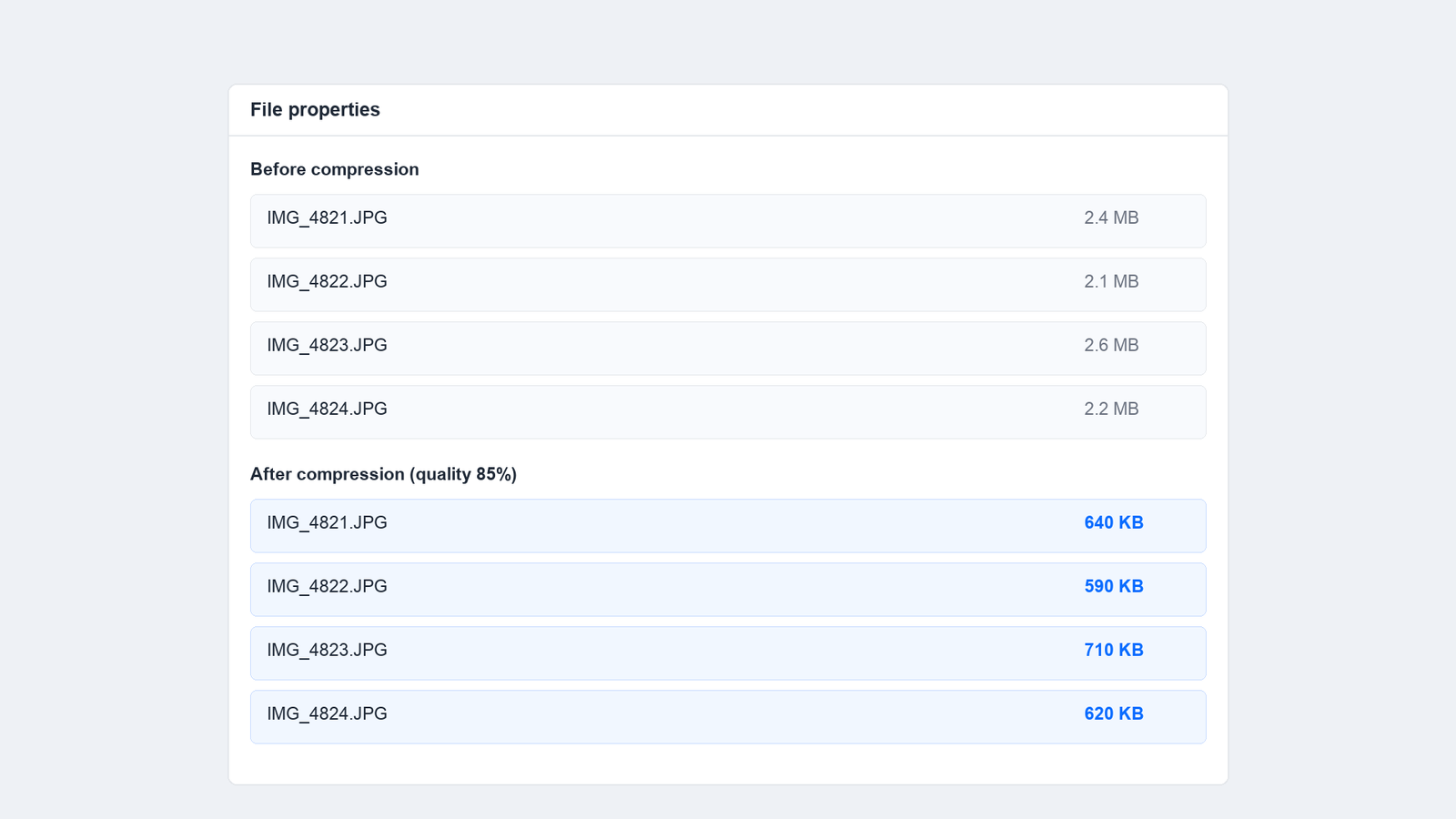
File size before and after one compression pass
Most bad results come from the order of operations, not the tool. Four mistakes account for nearly all of them.
Compressing a file that was already compressed. Each round removes detail again. Keep one original and start from it every time.
Changing the extension instead of the format. A .heic renamed to .jpg is still HEIC inside, and some apps will show a broken thumbnail.
Saving screenshots as JPG. Small text turns fuzzy. For screenshots and slides, PNG is always sharper.
Sending photos through a chat app without checking size. Many apps shrink images automatically and the original is gone. Send as a file attachment when quality matters.
FAQs
Which image file format is safest to send?
JPG. It opens on every device, stays small, and avoids the compatibility problems that HEIC and RAW still cause on older machines.
How do I convert HEIC to JPG?
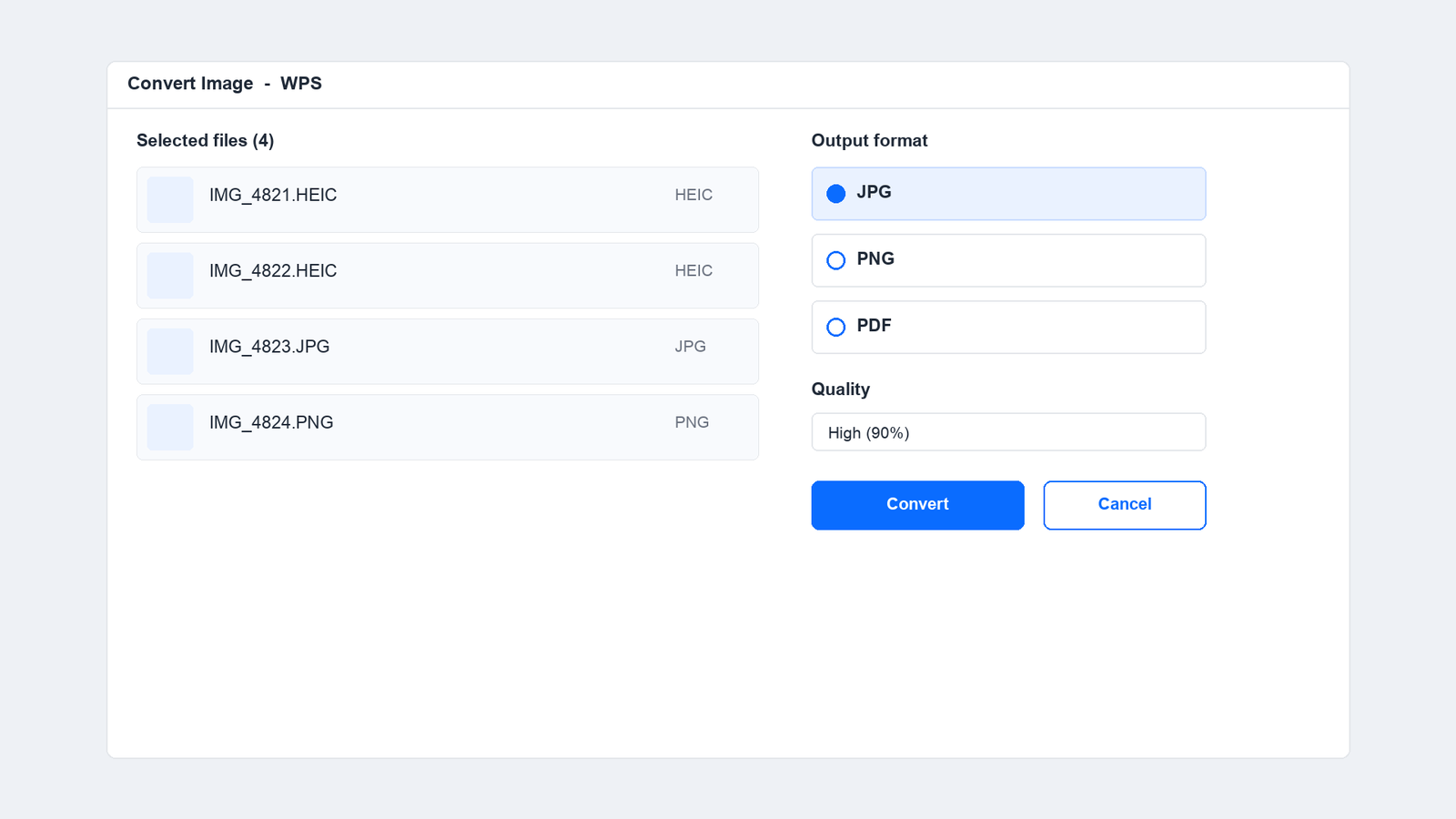
Open the HEIC files in WPS, choose the image converter, and export as JPG at 85 to 90 percent quality. A whole batch can be converted in one pass.
Does compressing a photo reduce its quality?
Yes, but at 85 to 90 percent the difference is hard to see on a screen. The real damage comes from compressing the same file repeatedly.
What file size should a photo be for an online form?
Under 2 MB for most forms, with the long edge around 1600 pixels. If the form still rejects it, compress once more at a medium quality setting.
Is PNG always better than JPG?
No. PNG wins for transparency and crisp text, but the file is far larger. For an ordinary photograph, JPG is the more efficient format.

Summary

'%3e%3cpath%20d='M19.9911%204.11386V6.471H18.5894C18.0775%206.471%2017.7322%206.57814%2017.5536%206.79243C17.3751%207.00671%2017.2858%207.32814%2017.2858%207.75671V9.44421H19.9019L19.5536%2012.0871H17.2858V18.8639H14.5536V12.0871H12.2769V9.44421H14.5536V7.49779C14.5536%206.39064%2014.8632%205.53201%2015.4822%204.92189C16.1013%204.31177%2016.9257%204.00671%2017.9554%204.00671C18.8304%204.00671%2019.509%204.04243%2019.9911%204.11386Z'%20fill='%23333333'/%3e%3c/g%3e%3cdefs%3e%3cclipPath%20id='clip0_2938_8199'%3e%3crect%20width='16'%20height='16'%20fill='white'%20transform='translate(8%204.00671)'/%3e%3c/clipPath%3e%3c/defs%3e%3c/svg%3e)
'%3e%3cpath%20d='M17.5237%2010.7813L23.4811%204H22.0699L16.8949%209.88693L12.7648%204H8L14.2469%2012.9029L8%2020.0133H9.4112L14.8725%2013.7952L19.2352%2020.0133H24M9.92053%205.04213H12.0885L22.0688%2019.0224H19.9003'%20fill='%23333333'/%3e%3c/g%3e%3cdefs%3e%3cclipPath%20id='clip0_2938_8200'%3e%3crect%20width='16'%20height='16.0134'%20fill='white'%20transform='translate(8%204)'/%3e%3c/clipPath%3e%3c/defs%3e%3c/svg%3e)


15 years of office industry experience, tech lover and copywriter. Follow me for product reviews, comparisons, and recommendations for new apps and software.


