

'%3e%3cpath%20d='M8%200C12.4183%200%2016%203.58172%2016%208C16%2012.4183%2012.4183%2016%208%2016C3.58172%2016%200%2012.4183%200%208C0%203.58172%203.58172%200%208%200ZM11.6162%204.38379C11.2257%203.99337%2010.5927%203.99338%2010.2021%204.38379L8%206.58594L5.79785%204.38379C5.40732%203.99334%204.77429%203.99329%204.38379%204.38379C3.99331%204.77429%203.99335%205.40733%204.38379%205.79785L6.58594%208L4.38379%2010.2021C3.99348%2010.5927%203.99341%2011.2257%204.38379%2011.6162C4.77426%2012.0066%205.40734%2012.0065%205.79785%2011.6162L8%209.41406L10.2021%2011.6162C10.5927%2012.0066%2011.2257%2012.0067%2011.6162%2011.6162C12.0067%2011.2257%2012.0066%2010.5927%2011.6162%2010.2021L9.41406%208L11.6162%205.79785C12.0066%205.40735%2012.0066%204.77429%2011.6162%204.38379Z'%20fill='%23080E17'%20fill-opacity='0.46'/%3e%3c/g%3e%3cdefs%3e%3cclipPath%20id='clip0_3761_713'%3e%3crect%20width='16'%20height='16'%20fill='white'/%3e%3c/clipPath%3e%3c/defs%3e%3c/svg%3e)




'%3e%3cpath%20fill-rule='evenodd'%20clip-rule='evenodd'%20d='M21.4999%2010.9993C21.4999%205.20009%2016.7986%200.498901%2010.9993%200.498901C5.19994%200.498901%200.498657%205.20009%200.498657%2010.9993C0.498657%2016.2404%204.33858%2020.5844%209.35855%2021.3722V14.0346H6.69238V10.9993H9.35855V8.68594C9.35855%206.05427%2010.9262%204.60062%2013.3248%204.60062C14.4736%204.60062%2015.6753%204.80571%2015.6753%204.80571V7.38979H14.3512C13.0468%207.38979%2012.64%208.19921%2012.64%209.0296V10.9993H15.5523L15.0867%2014.0346H12.64V21.3722C17.66%2020.5844%2021.4999%2016.2404%2021.4999%2010.9993Z'%20fill='%231568EA'/%3e%3c/g%3e%3c/svg%3e)


'%3e%3cpath%20d='M2.42045%2022.1876H6.31818V12.7217L0.75%208.54553V20.5171C0.75%2021.4414%201.49892%2022.1876%202.42045%2022.1876Z'%20fill='%234285F4'/%3e%3cpath%20d='M19.682%2022.1876H23.5797C24.5041%2022.1876%2025.2502%2021.4387%2025.2502%2020.5171V8.54553L19.682%2012.7217'%20fill='%2334A853'/%3e%3cpath%20d='M19.682%205.48293V12.7216L25.2502%208.54543V6.31816C25.2502%204.25236%2022.8921%203.07469%2021.2411%204.31361'%20fill='%23FBBC04'/%3e%3cpath%20d='M6.31824%2012.7217V5.48303L13.0001%2010.4944L19.6819%205.48303V12.7217L13.0001%2017.733'%20fill='%23EA4335'/%3e%3cpath%20d='M0.75%206.31816V8.54543L6.31818%2012.7216V5.48293L4.75909%204.31361C3.10534%203.07469%200.75%204.25236%200.75%206.31816Z'%20fill='%23C5221F'/%3e%3c/g%3e%3cdefs%3e%3cclipPath%20id='clip0_2954_7305'%3e%3crect%20width='24.5'%20height='18.375'%20fill='white'%20transform='translate(0.75%203.8125)'/%3e%3c/clipPath%3e%3c/defs%3e%3c/svg%3e)


In 2026, content is everywhere, and keeping up often means relying on AI to cut through the noise. Tools like NoteGPT do a solid job of turning long videos and dense articles into concise summaries, saving hours of review time. The problem comes next. Those summaries usually stop at bullet points, leaving you to figure out how to turn raw notes into clear reports, presentations, or polished deliverables on your own. This guide will help you understand what NoteGPT is and introduces a free NoteGPT alternative that fits into your workflow far more smoothly.
What Is NoteGPT?
NoteGPT is an AI-powered learning tool built to help users process information faster. Rather than acting as a general chatbot, it focuses specifically on knowledge capture, summarizing YouTube videos, web articles, and PDF documents.

Among its core strengths, NoteGPT features include timestamped video summaries, AI-powered chat for contextual questions, and organized note management. These tools are designed to help you move quickly from content consumption to understanding, without manually scrubbing through long videos or documents. This makes it possible to understand a one-hour lectureor a lengthy research paper in just minutes.
Key capabilities include:
YouTube Summarization: Generates time-stamped summaries and transcripts.
AI Chat: Allows users to ask questions about the specific content they are viewing.
Note Management: distinctive features for saving and organizing snippets of information
NoteGPT AI Detector: Analyzes text to estimate whether content is AI-generated, helping users verify originality and assess AI usage in academic or professional writing.
Pros and Cons of NoteGPT
Not every AItool delivers the same value in practice. What matters most is how well it fits into the way you actually work. NoteGPT AI is strong when it comes to quickly digesting large amounts of content, but it also has clear limitations. The breakdown below highlights where it performs well and where it may fall short, depending on your workflow.
Pros
Summarizes long videos and articles in seconds
Captures screenshots directly from videosinto notes
Offers a seamless browser extension for quick access
Features a clean and intuitive user interface
Generates mind maps to visualize key concepts
Supports timestamped transcripts for easy navigation
Cons
Summaries can miss nuances in complex technical documents
Lacks options to export directly to professional slides
Does not support live meeting transcription
Struggles to interpret charts and data tables in PDFs
Free plan includes restrictive daily usage quotas
Requires an active internet connection to function
NoteGPT Pricing Explained
Understanding NoteGPT pricing is essential if you’re going to be a regular user. The platform generally operates on a freemium model designed to be accessible to students while offering power features for professionals.
Free Plan: typically allows users to access basic summarization features with daily quota limits. It is ideal for casual users who only need to summarize a few videos or articles per week.
Pro/Paid Plan: unlocks higher usage quotas, faster processing speeds, and access to more advanced AI models (often GPT-4). This tier is best suited for researchers and power users who rely on the tool daily for deep learning and extensive content management.
Note: Specific pricing tiers can change, so it is recommended to check the official website for the most current rates.
How to Use NoteGPT Step by Step
NoteGPT’s main strength is how it simply reduces complex content into something usable. There’s no setup or learning curve to worry about. It turns passive watching into focused study almost immediately. Whether you’re working through a long lecture or a recorded webinar, the process from pasting a video link to getting a clear, structured summary takes only a few steps.
Step 1: Head on over to the NoteGPT Website and click the“Try Free Now” Button. The extension is recommended as it adds a Summary button directly under YouTube videos.

Step 2: Select the “AI Summarizer”tool to summarize any content.
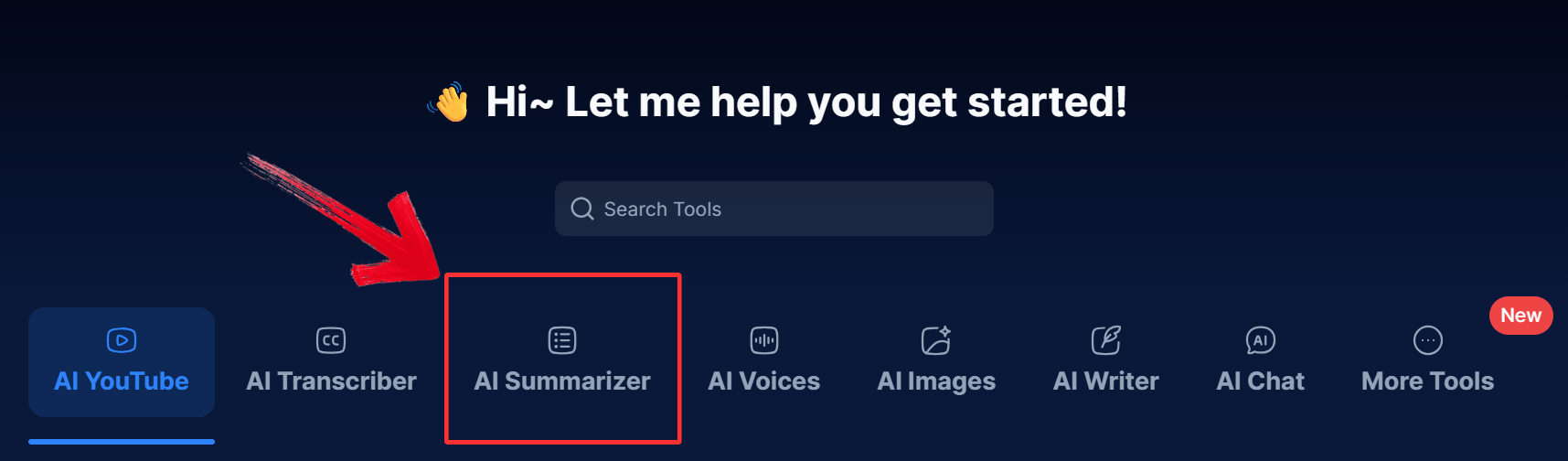
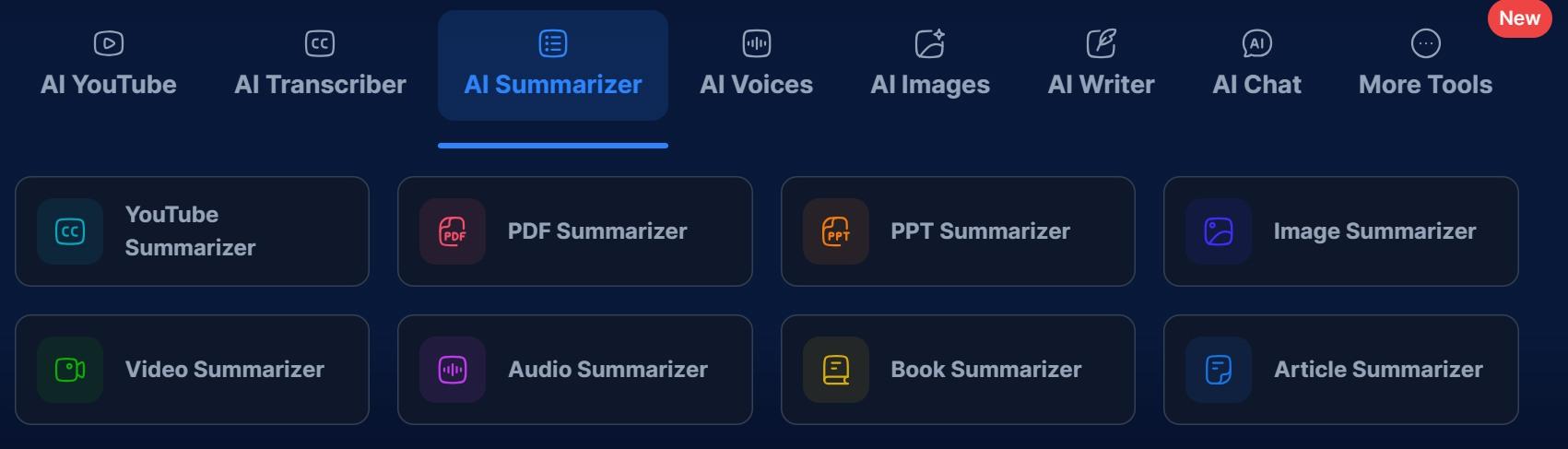
Step 3: Select your desired summarizer depending on your preferences. If you want to summarize an entire PDF, then select“PDF Summarizer”.
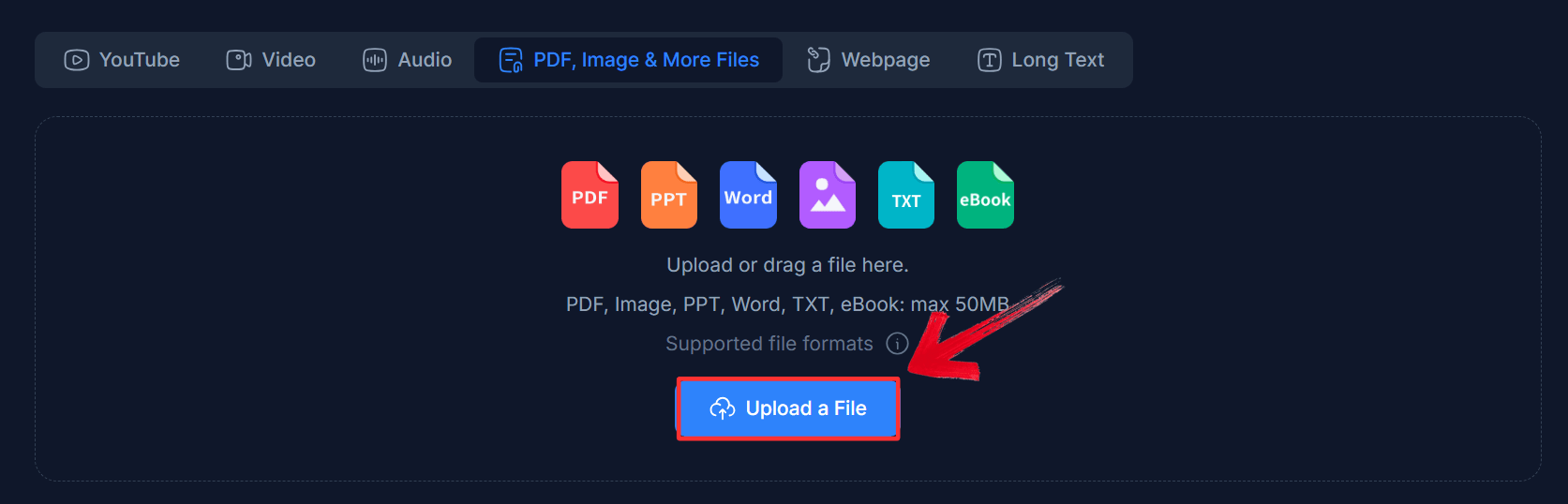
Step 4: In the new window, click on the“Upload a File” button or drag and drop your file onto the interface.
Step 5: The Summary from your uploaded file will be generated in seconds. Make sure you review it before exporting.
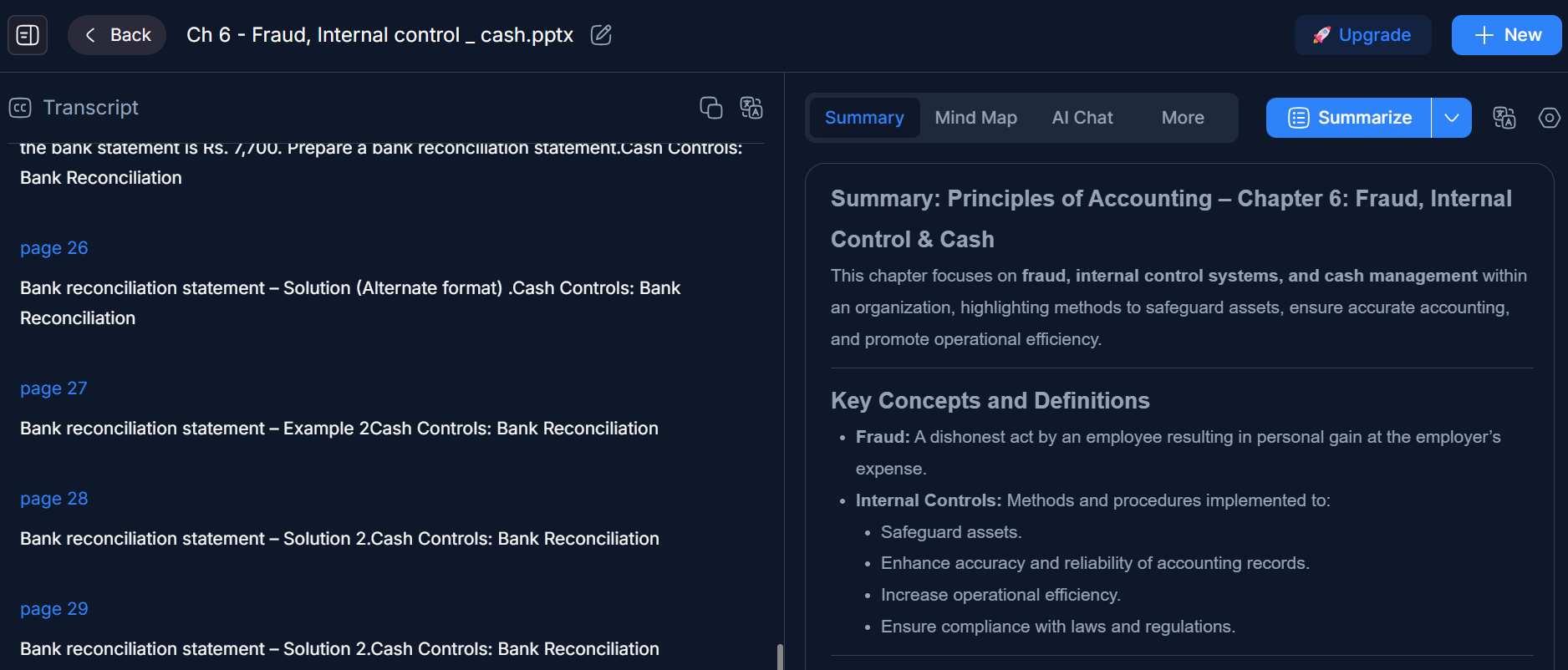
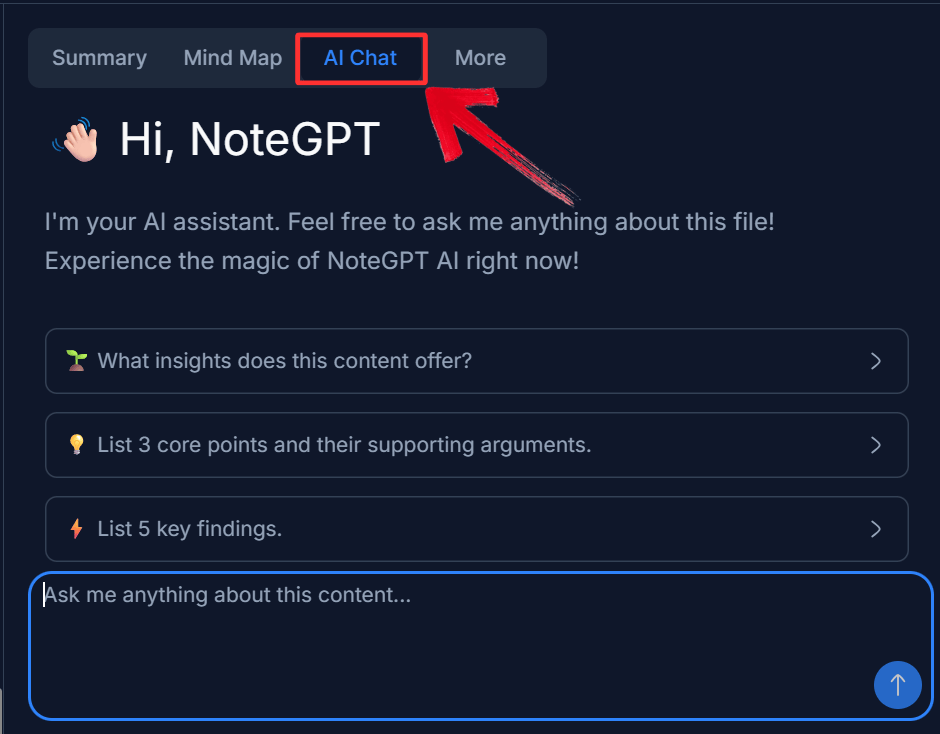
Step 6: Click on the “AI Chat”option to ask specific questions or edit the summary.
Step 7: Once you have the information you need, copy the summary to your clipboard, save it to your NoteGPT notebook for future reference, or export it to a digital note-taking app like Notion.
From NoteGPT Summaries to Actionable Outputs with WPS AI Tools
Using NoteGPT to summarize a video, article, or document is fast and helpful, but it’s only the first step. A summary alone doesn’t complete an assignment or build a presentation. To turn those notes into finished work, you still need structure, clarity, and refinement. That’s where WPS AI helps, transforming raw summaries into clear documents and presentation-ready content.
1. WPS AI Writer: Turning Summaries into Polished Documents
A NoteGPT summary gives you the core facts, but it doesn't write the report for you. By moving those raw bullet points into WPS AI Writer, you can instantly transform a rough outline into a cohesive, fully developed document.
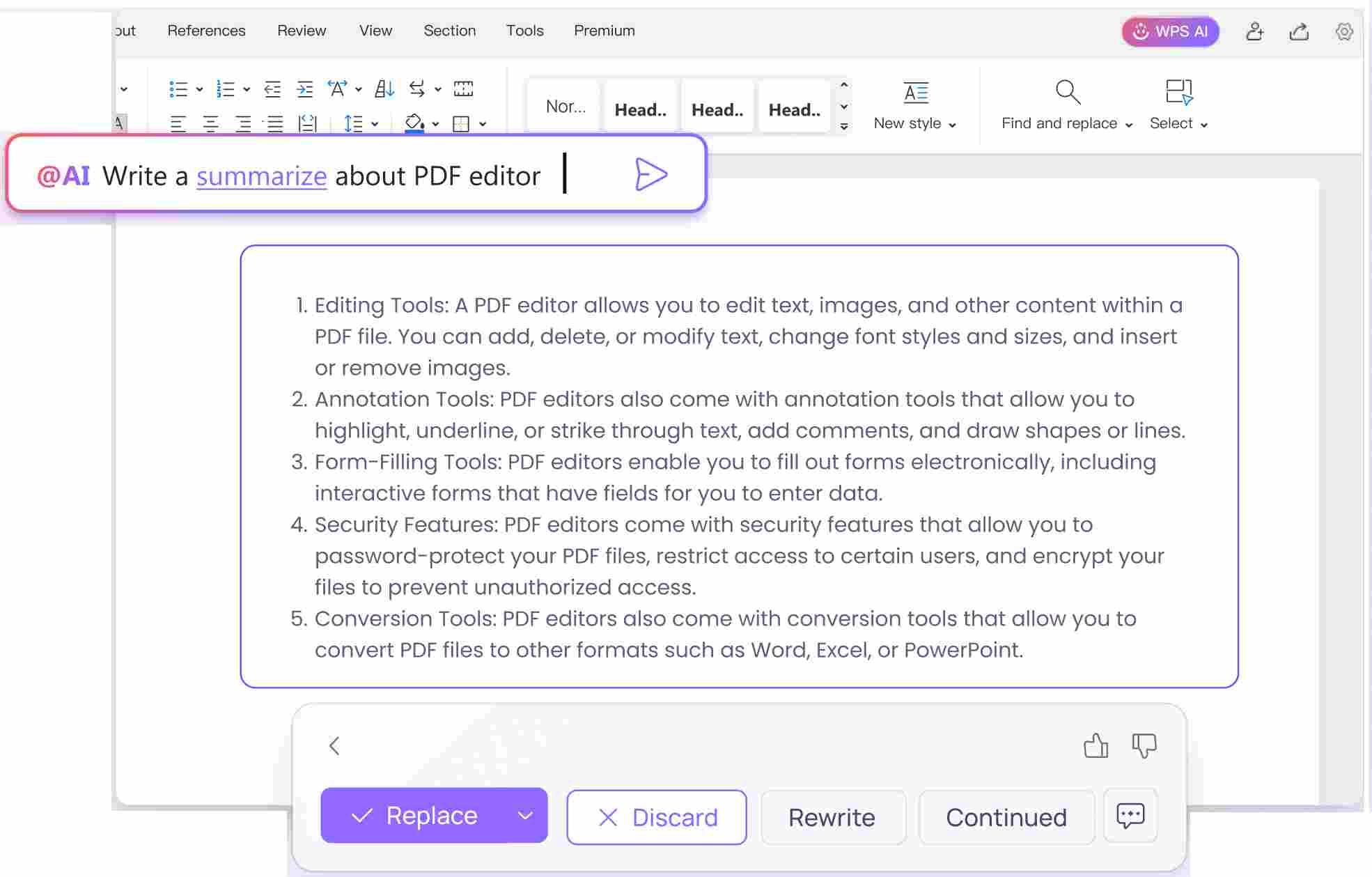
Auto Expansion: NoteGPT provides the initial outline, and WPS AI develops it into fully structured content. It transforms brief points into coherent paragraphs, making it simple to turn a video summary into a comprehensive essay or internal report.
Academic & Professional Rewriting: Whether you need an academic voice for a research paper or a professional tone for a business brief, the Rewrite feature refines your text automatically. It converts informal notes into polished, formal prose without requiring manual rewriting.
Proofreading and Language Polishing: WPS AI ensures your document is accurate and refined. Built-in proofreading detects grammar issues and improves word choice, producing a final piece that is professional, clear, and ready for submission.
2. WPS AI PDF: Deep Analysis Beyond Summaries
NoteGPT is fantastic for a quick overview, but complex projects often require deeper research. When a high-level summary isn't enough, especially with dense academic papers or 100-page reports, WPS AI PDF allows you to interrogate the document directly.
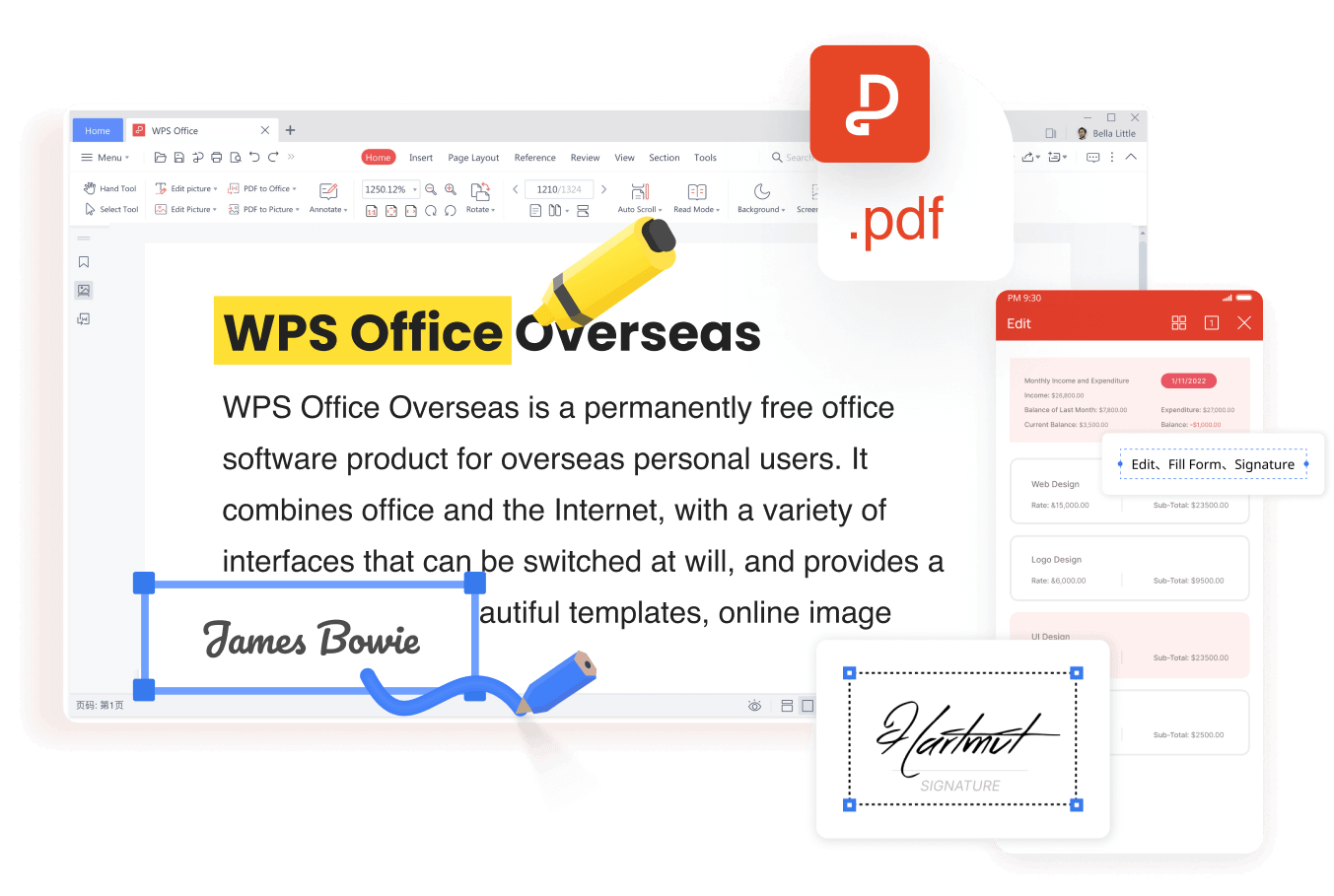
Chat with PDF: Instead of scrolling endlessly to verify a fact from a summary, simply ask the PDF with Chat with PDF. You can query specific data points, request explanations of complex diagrams, or ask for citations, allowing you to extract precise details that a general summary often misses.
Multi-PDF Synthesis: Research rarely involves just one source. By uploading multiple references, WPS AI PDF can analyze and cross-reference information across several documents simultaneously, providing a synthesized insight that goes far beyond what a single video summary can offer.
3. WPS AI Slides: One-Click Presentations from NoteGPT Outlines
This is perhaps the most powerful workflow for professionals. Instead of manually copying and pasting NoteGPT text into individual text boxes,WPS AI Slides takes your generated outline and builds a visually engaging presentation for you automatically.
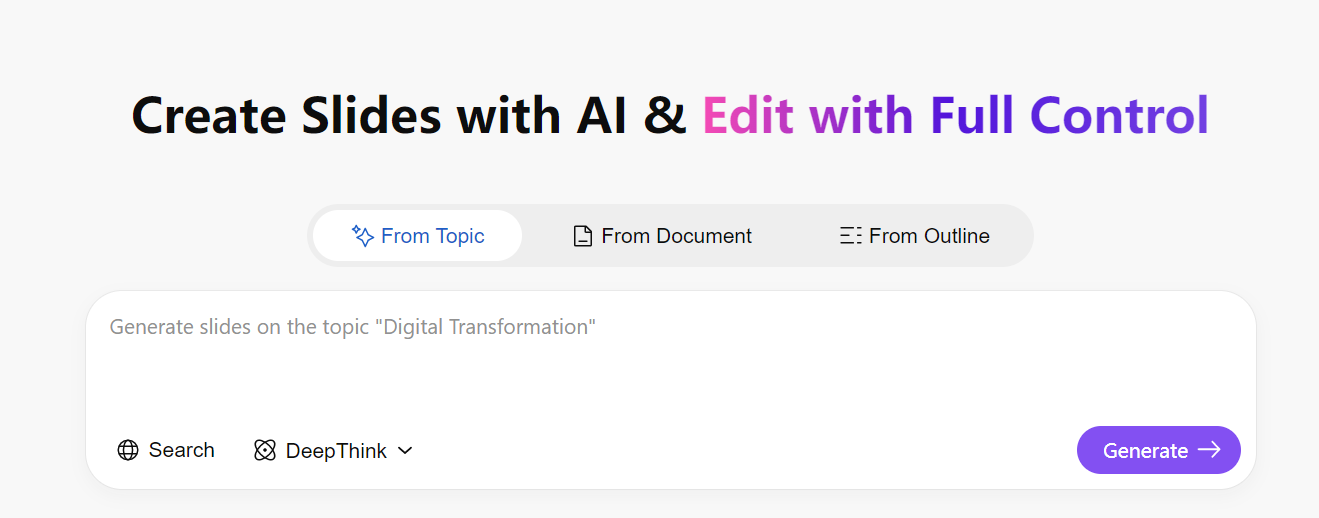
Instant Outline to Deck: Paste the structural outline from NoteGPT into WPS AI Slides, and the AI automatically generates a complete slide deck. It handles layout, typography, and visual flow, allowing you to move directly from content to a polished presentation without starting from scratch.
Time-Saving for Students and Professionals: For both students and business users, this approach streamlines the workflow. You can transform notes from a source video into a ready-to-present deck in minutes, focusing on refining your message rather than formatting slides.
FAQs
1. What types of content does NoteGPT work best with?
NoteGPT performs best when summarizing structured content such as YouTube videos, academic articles, PDFs, and online documents. It is especially useful for extracting key points from long-form educational or informational material, making it popular among students and researchers.
2. Is NoteGPT accurate enough for academic or professional use?
For most study and productivity scenarios, NoteGPT provides reliable high-level summaries. However, users should still review and refine the output, especially for academic writing or professional reports where nuance, citations, or deeper analysis are required.
3. Can NoteGPT summaries be used directly in presentations?
Not directly. NoteGPT focuses on summarization rather than visual or structural presentation design. To turn summaries into well-organized slides, users typically need an additional tool like WPS AI Slides, which can transform summarized text into a complete presentation automatically.
4. Does NoteGPT replace AI presentation tools?
No. NoteGPT and AI presentation tools serve different purposes. NoteGPT helps users understand and condense information, while WPS AI Slides helps users present that information visually. Together, they form a more complete workflow from learning to presenting.
5. How does NoteGPT compare to other AI summarization tools?
Compared to general AI chat tools, NoteGPT is more focused on learning scenarios and structured summaries with features like timestamp capturing. However, it lacks advanced output formatting and presentation features, which is why many users pair it with tools like WPS Office for downstream tasks.
Turning Summaries into Slides with AI Tools
NoteGPT is a valuable tool for anyone looking to cut through the noise of digital content, offering fast and accurate summaries of videos and articles. However, to truly maximize productivity, pairing it withWPS AI creates a powerful workflow. By using NoteGPT to capture knowledge and WPS AI Slides to present it, you can move from raw information to a polished, professional presentation in record time.

'%3e%3cpath%20d='M19.9911%204.11386V6.471H18.5894C18.0775%206.471%2017.7322%206.57814%2017.5536%206.79243C17.3751%207.00671%2017.2858%207.32814%2017.2858%207.75671V9.44421H19.9019L19.5536%2012.0871H17.2858V18.8639H14.5536V12.0871H12.2769V9.44421H14.5536V7.49779C14.5536%206.39064%2014.8632%205.53201%2015.4822%204.92189C16.1013%204.31177%2016.9257%204.00671%2017.9554%204.00671C18.8304%204.00671%2019.509%204.04243%2019.9911%204.11386Z'%20fill='%23333333'/%3e%3c/g%3e%3cdefs%3e%3cclipPath%20id='clip0_2938_8199'%3e%3crect%20width='16'%20height='16'%20fill='white'%20transform='translate(8%204.00671)'/%3e%3c/clipPath%3e%3c/defs%3e%3c/svg%3e)
'%3e%3cpath%20d='M17.5237%2010.7813L23.4811%204H22.0699L16.8949%209.88693L12.7648%204H8L14.2469%2012.9029L8%2020.0133H9.4112L14.8725%2013.7952L19.2352%2020.0133H24M9.92053%205.04213H12.0885L22.0688%2019.0224H19.9003'%20fill='%23333333'/%3e%3c/g%3e%3cdefs%3e%3cclipPath%20id='clip0_2938_8200'%3e%3crect%20width='16'%20height='16.0134'%20fill='white'%20transform='translate(8%204)'/%3e%3c/clipPath%3e%3c/defs%3e%3c/svg%3e)


