

'%3e%3cpath%20d='M8%200C12.4183%200%2016%203.58172%2016%208C16%2012.4183%2012.4183%2016%208%2016C3.58172%2016%200%2012.4183%200%208C0%203.58172%203.58172%200%208%200ZM11.6162%204.38379C11.2257%203.99337%2010.5927%203.99338%2010.2021%204.38379L8%206.58594L5.79785%204.38379C5.40732%203.99334%204.77429%203.99329%204.38379%204.38379C3.99331%204.77429%203.99335%205.40733%204.38379%205.79785L6.58594%208L4.38379%2010.2021C3.99348%2010.5927%203.99341%2011.2257%204.38379%2011.6162C4.77426%2012.0066%205.40734%2012.0065%205.79785%2011.6162L8%209.41406L10.2021%2011.6162C10.5927%2012.0066%2011.2257%2012.0067%2011.6162%2011.6162C12.0067%2011.2257%2012.0066%2010.5927%2011.6162%2010.2021L9.41406%208L11.6162%205.79785C12.0066%205.40735%2012.0066%204.77429%2011.6162%204.38379Z'%20fill='%23080E17'%20fill-opacity='0.46'/%3e%3c/g%3e%3cdefs%3e%3cclipPath%20id='clip0_3761_713'%3e%3crect%20width='16'%20height='16'%20fill='white'/%3e%3c/clipPath%3e%3c/defs%3e%3c/svg%3e)




'%3e%3cpath%20fill-rule='evenodd'%20clip-rule='evenodd'%20d='M21.4999%2010.9993C21.4999%205.20009%2016.7986%200.498901%2010.9993%200.498901C5.19994%200.498901%200.498657%205.20009%200.498657%2010.9993C0.498657%2016.2404%204.33858%2020.5844%209.35855%2021.3722V14.0346H6.69238V10.9993H9.35855V8.68594C9.35855%206.05427%2010.9262%204.60062%2013.3248%204.60062C14.4736%204.60062%2015.6753%204.80571%2015.6753%204.80571V7.38979H14.3512C13.0468%207.38979%2012.64%208.19921%2012.64%209.0296V10.9993H15.5523L15.0867%2014.0346H12.64V21.3722C17.66%2020.5844%2021.4999%2016.2404%2021.4999%2010.9993Z'%20fill='%231568EA'/%3e%3c/g%3e%3c/svg%3e)


'%3e%3cpath%20d='M2.42045%2022.1876H6.31818V12.7217L0.75%208.54553V20.5171C0.75%2021.4414%201.49892%2022.1876%202.42045%2022.1876Z'%20fill='%234285F4'/%3e%3cpath%20d='M19.682%2022.1876H23.5797C24.5041%2022.1876%2025.2502%2021.4387%2025.2502%2020.5171V8.54553L19.682%2012.7217'%20fill='%2334A853'/%3e%3cpath%20d='M19.682%205.48293V12.7216L25.2502%208.54543V6.31816C25.2502%204.25236%2022.8921%203.07469%2021.2411%204.31361'%20fill='%23FBBC04'/%3e%3cpath%20d='M6.31824%2012.7217V5.48303L13.0001%2010.4944L19.6819%205.48303V12.7217L13.0001%2017.733'%20fill='%23EA4335'/%3e%3cpath%20d='M0.75%206.31816V8.54543L6.31818%2012.7216V5.48293L4.75909%204.31361C3.10534%203.07469%200.75%204.25236%200.75%206.31816Z'%20fill='%23C5221F'/%3e%3c/g%3e%3cdefs%3e%3cclipPath%20id='clip0_2954_7305'%3e%3crect%20width='24.5'%20height='18.375'%20fill='white'%20transform='translate(0.75%203.8125)'/%3e%3c/clipPath%3e%3c/defs%3e%3c/svg%3e)


Most ready-made spelling worksheets fail for a practical reason: the word list is someone else’s. You end up with twenty words your class already knows, a font that is too decorative for a beginner, and no answer key on the day you need a quick filler.
Making your own takes about ten minutes once the pattern is chosen, and it lets you match the week’s phonics focus, the reading level of the group, and the number of copies the printer will actually produce.
Spelling Worksheets: How to Make Your Own in Minutes
Pick the practice pattern before the word list
The word list is the easy part. The learning happens in the pattern the child repeats, so choose the pattern first and let it decide how many words fit on the page.
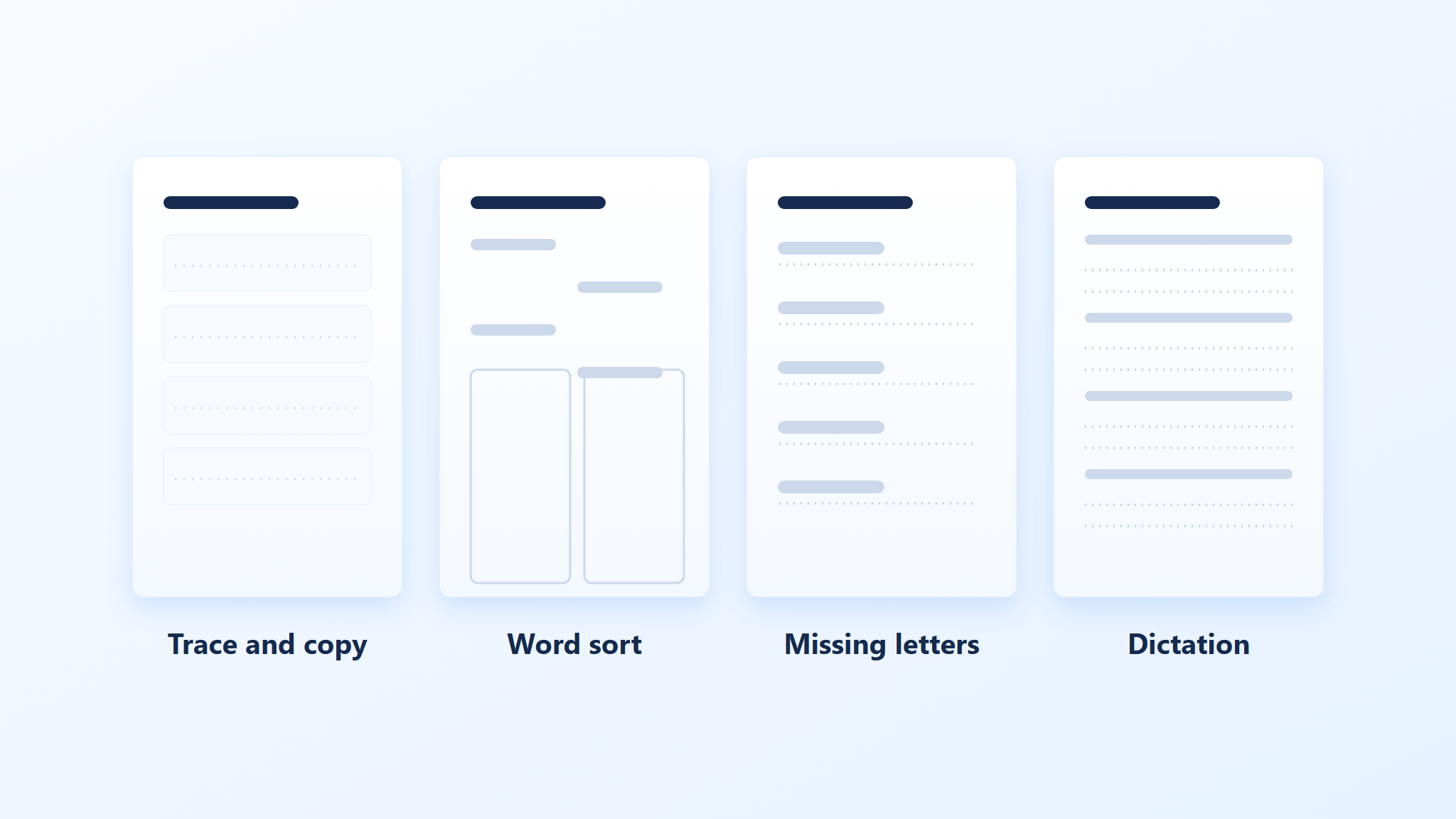
Trace, copy, cover, write. Four columns per word: a traced model, a copy, a covered attempt, and a free recall. Best for early spellers and for words with irregular letter patterns.
Word sort. A grid of mixed words at the top and two or three empty columns below, one per spelling rule (“-ight”, “-ite”, odd ones out). Sorting forces the child to compare patterns rather than memorise a list.
Missing letters. The word with two or three gaps, plus a small picture cue or a first letter hint. Good for a five minute warm-up and for mixed-ability groups.
Sentence dictation. Five short sentences built from the week’s words, with ruled lines underneath. This is the step that shows whether the spelling transfers out of the list.
Two patterns per worksheet is usually enough. A page that mixes tracing, sorting, gaps, and dictation looks thorough but rarely gets finished, and an unfinished worksheet teaches nothing.
Four spelling worksheet practice patterns


Build the worksheet in WPS Writer
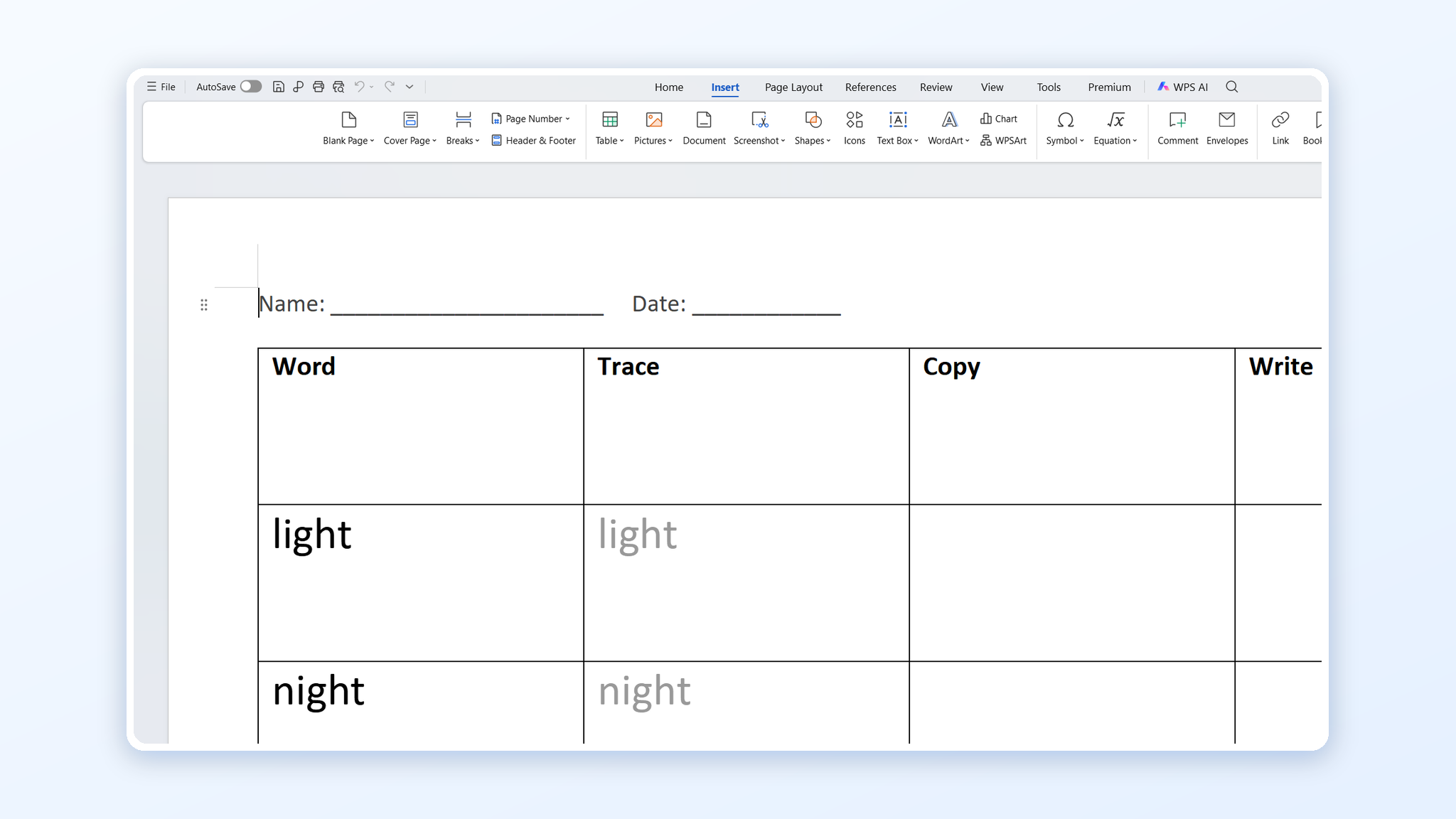
A worksheet is a table with generous spacing, so the fastest way to build one is to start from a table rather than from blank paragraphs. Keep the font plain — Arial, Verdana, or Comic Sans at 14–18pt — because decorative fonts make letter shapes harder to recognise.
Open WPS Writer, set Page Layout → Size to A4 and Margins to Narrow, so the grid has room without shrinking the type.
Insert Insert → Table with four columns for a trace-copy-cover-write sheet, or three for a word sort. Set row height generously so a young writer has space to form letters.
Type the model word in the first column, then use Home → Font size at 18pt and a dotted underline for the writing columns. Copy the row with Ctrl+C / Ctrl+V once the spacing is right.
Add a name and date line at the top with Insert → Text Box, and keep the header outside the table so it does not repeat on every row.
Check the page with Menu → Print in preview before printing a set, then export with Menu → Export to PDF so the file prints identically at school and at home.
Group the rows by pattern rather than alphabetically. A child who sees “light, night, sight” together learns the rule; the same words scattered across the page read as ten unrelated items.
Keep a challenge row at the bottom of the same sheet for the fast finishers: two harder words from the same pattern, marked with a small star. Nobody finishes in three minutes and starts talking, and you still keep one file per week to edit next year. If you would rather start from a ready-made grid, our printable spelling test paper templates use the same column order.
Spelling table layout in WPS Writer
Add an answer key and print a class set
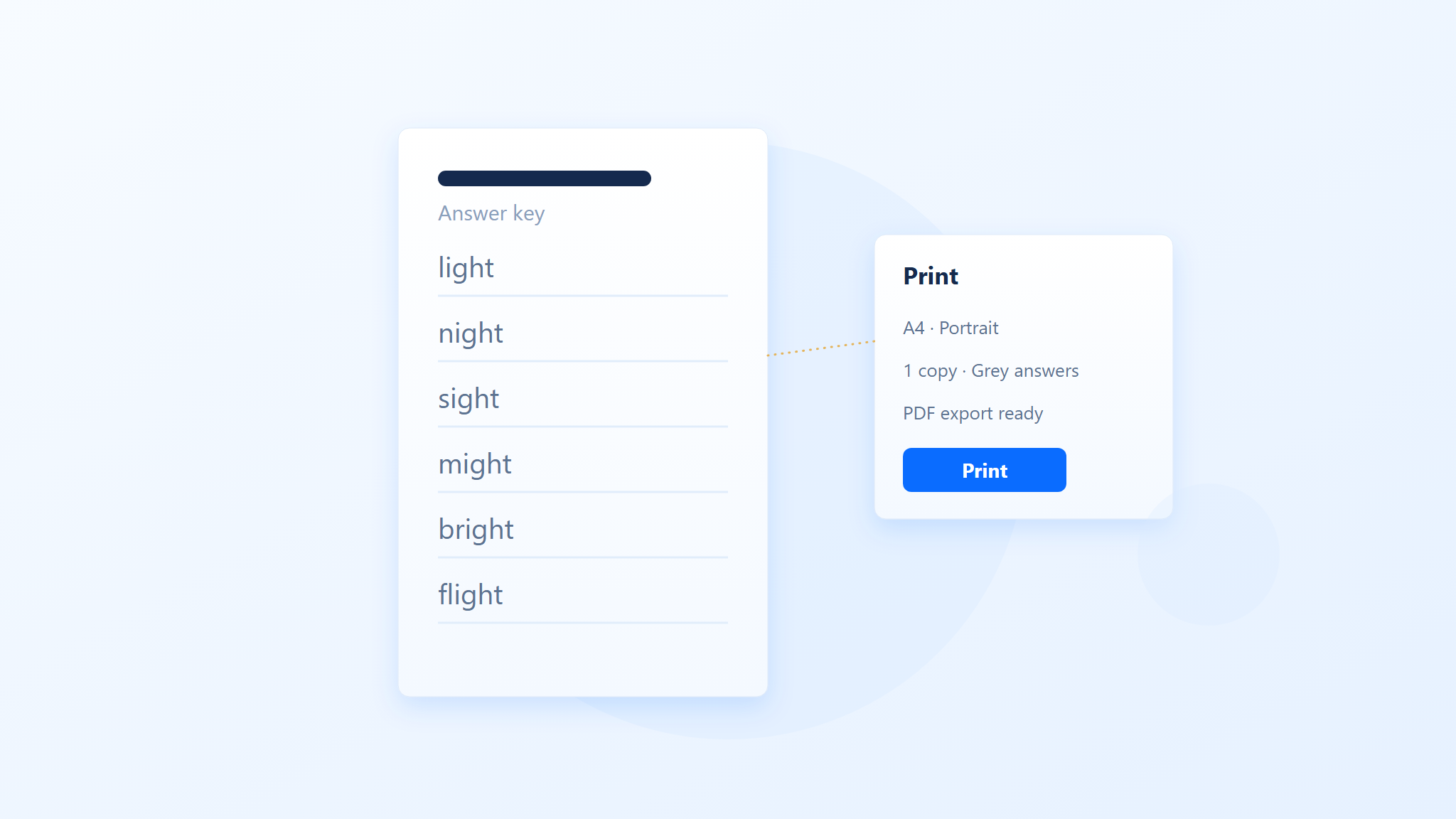
The answer key takes two minutes and saves an argument. Put it on a second page of the same file, and print it once for yourself rather than with the class set.
Duplicate the page with Insert → Page Break and fill in the answers in a lighter grey, so it is obvious at a glance which sheet is which.
Number the copies by adding the week and group in the footer, for example “Week 6 · Group B”, using Insert → Header and Footer.
Print double-sided only when the second side is intentional practice; a worksheet with a blank back wastes paper and invites doodling.
Keep one master PDF per week so next year’s version is an edit rather than a rebuild.
If the class writes on the sheet, leave a margin wide enough for a hole punch. Nothing shortens the life of a worksheet like a hole through the first letter of every word.
Answer key and print settings
The Best Free Office Alternative: WPS Office
WPS Office covers the whole job in one free app: Writer for the table layout and dotted writing lines, the built-in PDF tools for exporting a print-ready file, and a template gallery for the weeks when you want a layout to start from. Files open and save in the Microsoft formats your school already uses, so a worksheet can be shared with a colleague without conversion.
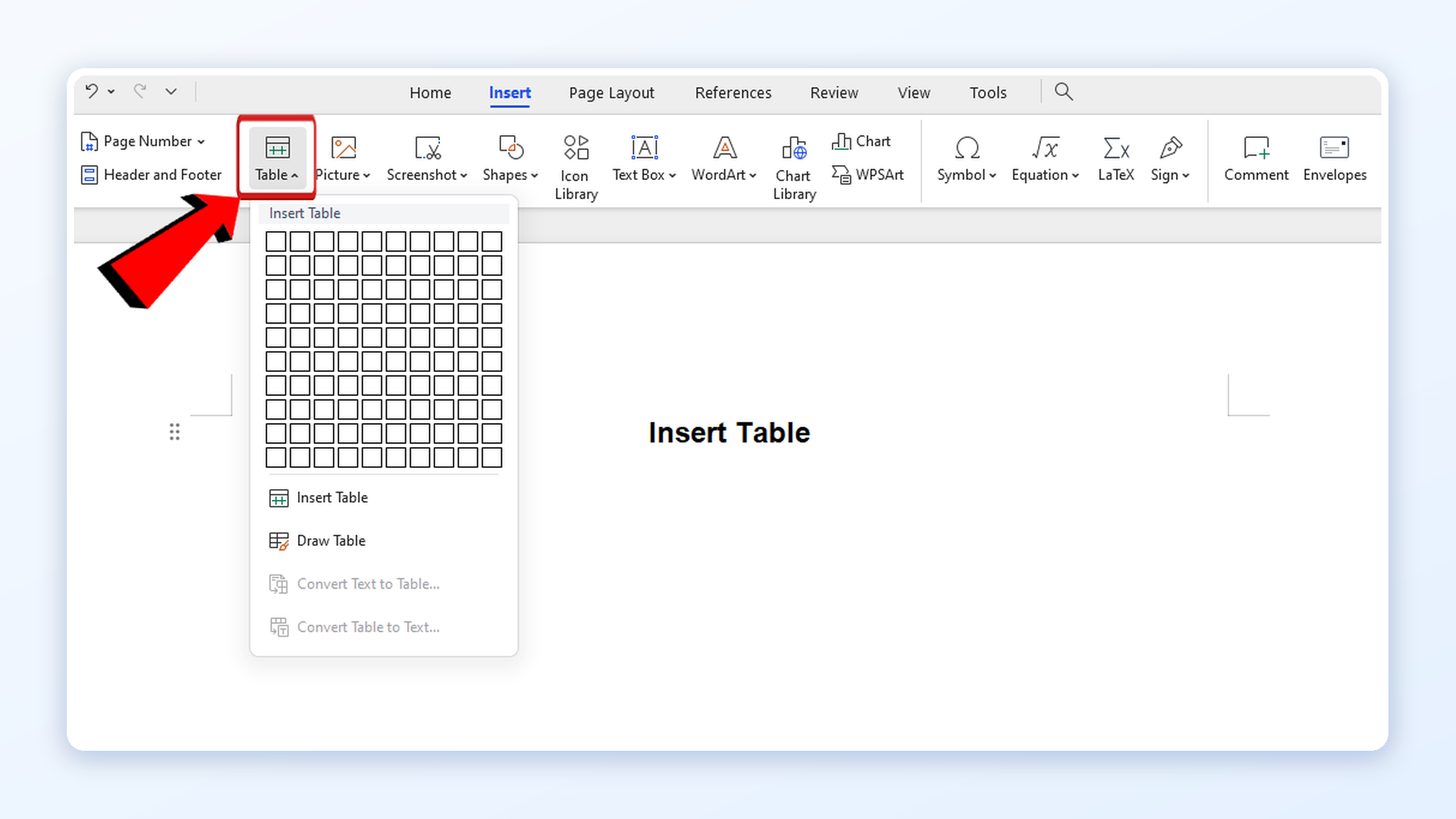
Inserting a table in WPS Writer
FAQs
What is the best font for a spelling worksheet?
A plain sans-serif such as Arial or Verdana at 14–18pt. Children need consistent letter shapes before they need decoration.
How many words should a spelling worksheet have?
Ten to twelve for a weekly list, or five to six for a warm-up sheet. Beyond that the practice time per word drops and recall suffers.
Should tracing come before copying?
Yes for beginners, because tracing fixes letter formation. Older or more confident spellers can start with cover-and-write and use tracing only for the words they miss.
How do I make a reusable spelling worksheet template?
Build the table once with the right row height and dotted underlines, then save it as a template in WPS Writer so each week starts from the same layout.
Can I print the worksheet from a phone?
Yes. Export the file to PDF first, then print from the phone or send it to a print shop; the PDF keeps the table and margins intact.


'%3e%3cpath%20d='M19.9911%204.11386V6.471H18.5894C18.0775%206.471%2017.7322%206.57814%2017.5536%206.79243C17.3751%207.00671%2017.2858%207.32814%2017.2858%207.75671V9.44421H19.9019L19.5536%2012.0871H17.2858V18.8639H14.5536V12.0871H12.2769V9.44421H14.5536V7.49779C14.5536%206.39064%2014.8632%205.53201%2015.4822%204.92189C16.1013%204.31177%2016.9257%204.00671%2017.9554%204.00671C18.8304%204.00671%2019.509%204.04243%2019.9911%204.11386Z'%20fill='%23333333'/%3e%3c/g%3e%3cdefs%3e%3cclipPath%20id='clip0_2938_8199'%3e%3crect%20width='16'%20height='16'%20fill='white'%20transform='translate(8%204.00671)'/%3e%3c/clipPath%3e%3c/defs%3e%3c/svg%3e)
'%3e%3cpath%20d='M17.5237%2010.7813L23.4811%204H22.0699L16.8949%209.88693L12.7648%204H8L14.2469%2012.9029L8%2020.0133H9.4112L14.8725%2013.7952L19.2352%2020.0133H24M9.92053%205.04213H12.0885L22.0688%2019.0224H19.9003'%20fill='%23333333'/%3e%3c/g%3e%3cdefs%3e%3cclipPath%20id='clip0_2938_8200'%3e%3crect%20width='16'%20height='16.0134'%20fill='white'%20transform='translate(8%204)'/%3e%3c/clipPath%3e%3c/defs%3e%3c/svg%3e)


