

'%3e%3cpath%20d='M8%200C12.4183%200%2016%203.58172%2016%208C16%2012.4183%2012.4183%2016%208%2016C3.58172%2016%200%2012.4183%200%208C0%203.58172%203.58172%200%208%200ZM11.6162%204.38379C11.2257%203.99337%2010.5927%203.99338%2010.2021%204.38379L8%206.58594L5.79785%204.38379C5.40732%203.99334%204.77429%203.99329%204.38379%204.38379C3.99331%204.77429%203.99335%205.40733%204.38379%205.79785L6.58594%208L4.38379%2010.2021C3.99348%2010.5927%203.99341%2011.2257%204.38379%2011.6162C4.77426%2012.0066%205.40734%2012.0065%205.79785%2011.6162L8%209.41406L10.2021%2011.6162C10.5927%2012.0066%2011.2257%2012.0067%2011.6162%2011.6162C12.0067%2011.2257%2012.0066%2010.5927%2011.6162%2010.2021L9.41406%208L11.6162%205.79785C12.0066%205.40735%2012.0066%204.77429%2011.6162%204.38379Z'%20fill='%23080E17'%20fill-opacity='0.46'/%3e%3c/g%3e%3cdefs%3e%3cclipPath%20id='clip0_3761_713'%3e%3crect%20width='16'%20height='16'%20fill='white'/%3e%3c/clipPath%3e%3c/defs%3e%3c/svg%3e)




'%3e%3cpath%20fill-rule='evenodd'%20clip-rule='evenodd'%20d='M21.4999%2010.9993C21.4999%205.20009%2016.7986%200.498901%2010.9993%200.498901C5.19994%200.498901%200.498657%205.20009%200.498657%2010.9993C0.498657%2016.2404%204.33858%2020.5844%209.35855%2021.3722V14.0346H6.69238V10.9993H9.35855V8.68594C9.35855%206.05427%2010.9262%204.60062%2013.3248%204.60062C14.4736%204.60062%2015.6753%204.80571%2015.6753%204.80571V7.38979H14.3512C13.0468%207.38979%2012.64%208.19921%2012.64%209.0296V10.9993H15.5523L15.0867%2014.0346H12.64V21.3722C17.66%2020.5844%2021.4999%2016.2404%2021.4999%2010.9993Z'%20fill='%231568EA'/%3e%3c/g%3e%3c/svg%3e)


'%3e%3cpath%20d='M2.42045%2022.1876H6.31818V12.7217L0.75%208.54553V20.5171C0.75%2021.4414%201.49892%2022.1876%202.42045%2022.1876Z'%20fill='%234285F4'/%3e%3cpath%20d='M19.682%2022.1876H23.5797C24.5041%2022.1876%2025.2502%2021.4387%2025.2502%2020.5171V8.54553L19.682%2012.7217'%20fill='%2334A853'/%3e%3cpath%20d='M19.682%205.48293V12.7216L25.2502%208.54543V6.31816C25.2502%204.25236%2022.8921%203.07469%2021.2411%204.31361'%20fill='%23FBBC04'/%3e%3cpath%20d='M6.31824%2012.7217V5.48303L13.0001%2010.4944L19.6819%205.48303V12.7217L13.0001%2017.733'%20fill='%23EA4335'/%3e%3cpath%20d='M0.75%206.31816V8.54543L6.31818%2012.7216V5.48293L4.75909%204.31361C3.10534%203.07469%200.75%204.25236%200.75%206.31816Z'%20fill='%23C5221F'/%3e%3c/g%3e%3cdefs%3e%3cclipPath%20id='clip0_2954_7305'%3e%3crect%20width='24.5'%20height='18.375'%20fill='white'%20transform='translate(0.75%203.8125)'/%3e%3c/clipPath%3e%3c/defs%3e%3c/svg%3e)


Customizing your avatar with unique clothing is one of the most exciting parts of Roblox. But jumping straight into design without the right guidance can be frustrating, you might struggle to find the official template shirt, or your design might not fit properly in-game. A proper guide changes that by giving you clarity, control, and confidence at every step of the shirt creation process. In this guide, I’ll introduce the official template shirt roblox, show you beginner-friendly tools for designing, and explain exactly how to upload your creation. By the end, you’ll be able to make shirts that look professional and fit perfectly on your avatar, turning your ideas into real, wearable Roblox items.
Understanding and Downloading the Roblox Shirt Template
Before you can design a shirt, it’s important to understand what the template shirt roblox is and why it matters. The template is essentially a map that tells Roblox how your design will wrap around your avatar. Using the wrong size or formatleads to distorted designs or failed uploads.
A template is a standardized PNG image that maps the 3D torso of a Roblox avatar. Each section; front, back, left sleeve, right sleeve, is clearly marked. Staying within these boundaries is crucial to ensure your design fits the avatar properly.
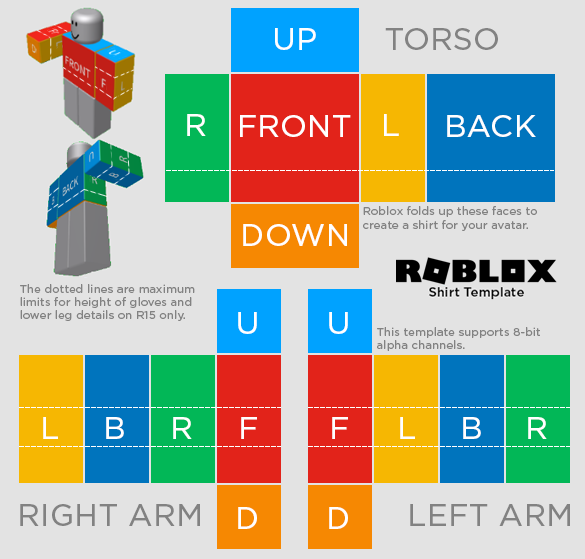
The template has clear zones: front, back, left sleeve, right sleeve, and the side areas that wrap around. Understanding these zones ensures that logos, patterns, and details appear exactly where you want on your avatar. Always download your template from the official Roblox Creator Hub or trusted educationalresources. For easy access, you can also find a free Roblox t-shirt template download to get started without any cost, ensuring correct dimensions and high resolution.
Step-by-Step Download:
Step 1: First of all, visit the Roblox CreatorDocumentation site and click “Download” in templates to download the avatar.
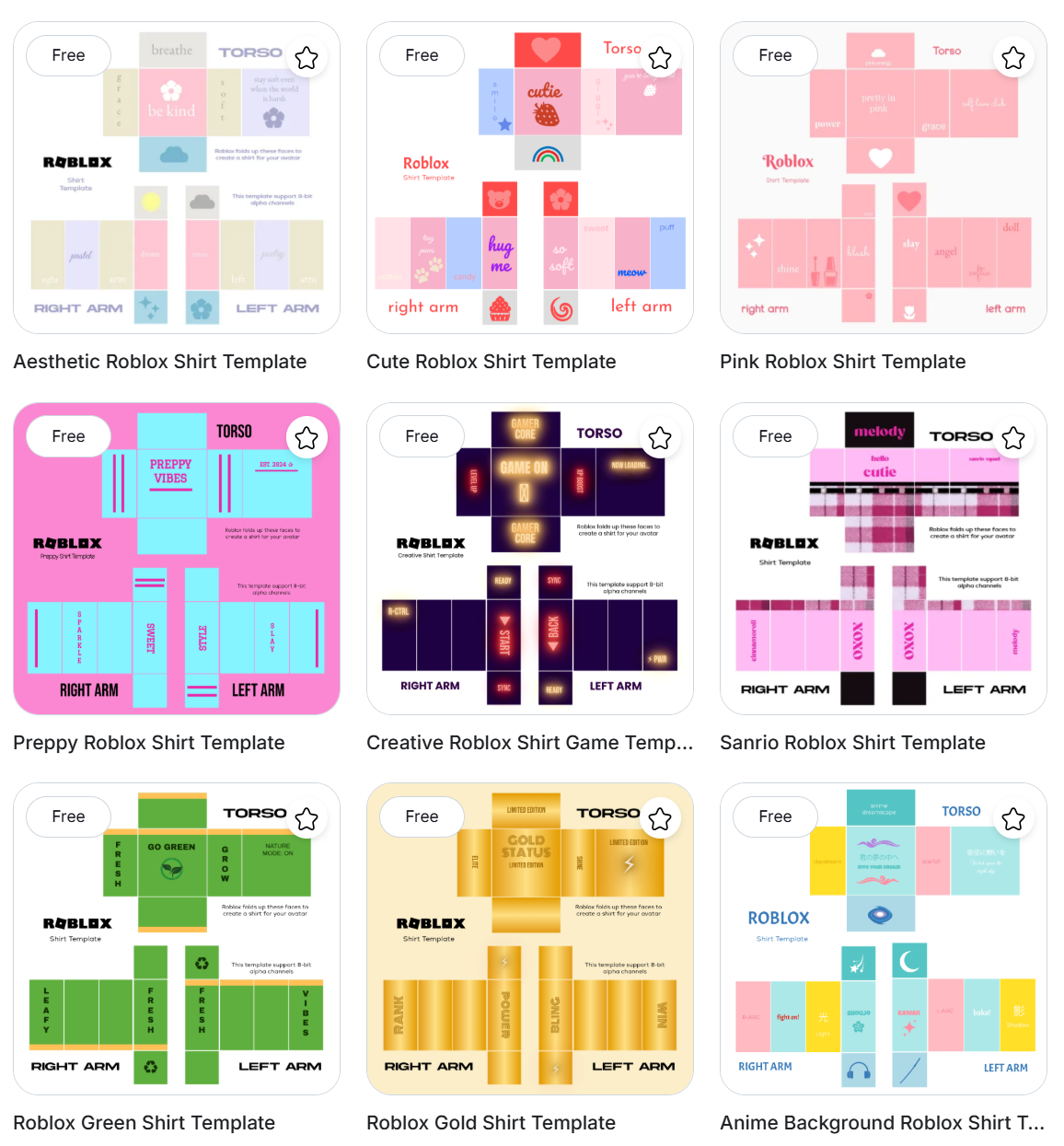
I’ve found that starting with the correct template avoids hours of frustration. Once I had the official PNG, designing became smooth and predictable.
Designing Your Shirt - Tools and Basic Process
Once your template is ready, the fun part begins: designing. Let’s explore beginner-friendly tools that simplify the process. AliveGames.io is an online platform tailored specifically for Roblox design. It’s web-based, so there’s no software installation, and the interface is designed for beginners who might feel intimidated by complex tools like Photoshop.
The platform allows you to upload your shirt template and directly draw, fill, or stamp shapes onto it. You can preview your work instantly, which helps avoid mistakes and makes the creative process seamless. If you’re wondering how to make a Roblox shirt template, this platform makes it easy to design, edit, and perfect your shirt step by step.
Features & Steps:
Step 1: First of all, open AliveGames.io and upload your downloaded Roblox shirt template PNG by clicking “Select or Upload.”
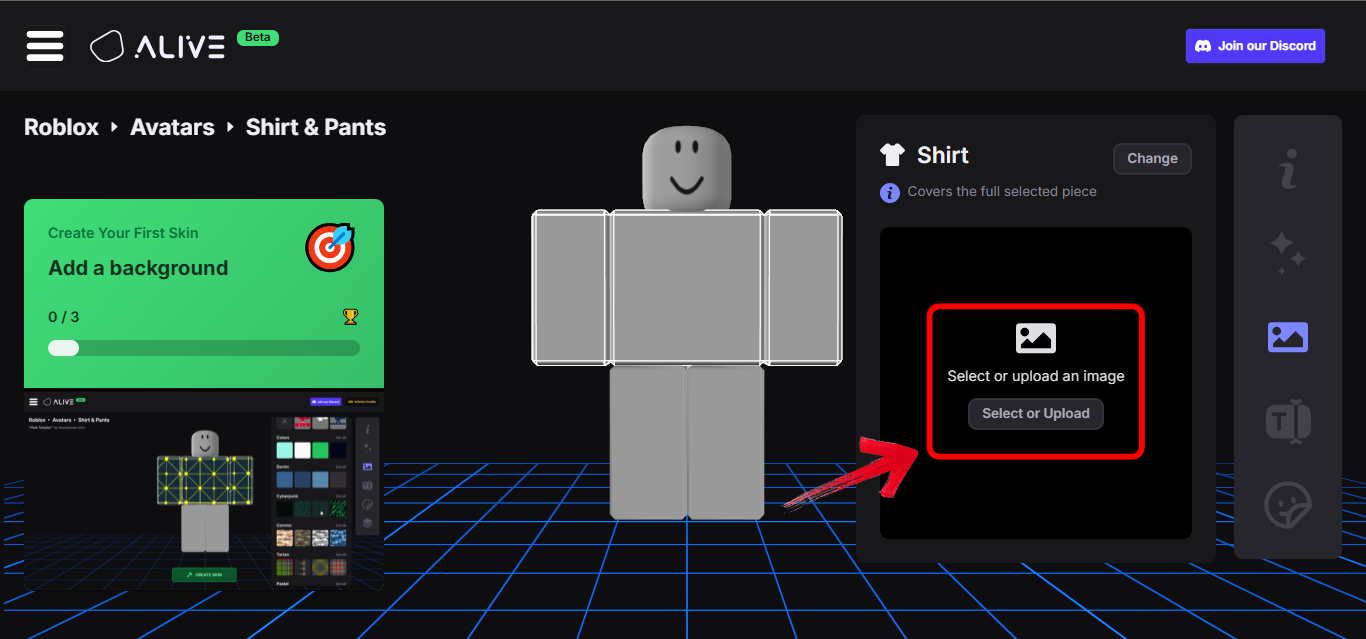
Step 2: Once uploaded, edit your avatar using the editing panel on the right side of your screen to use drawing tools, color fills, and stamps to apply your design.
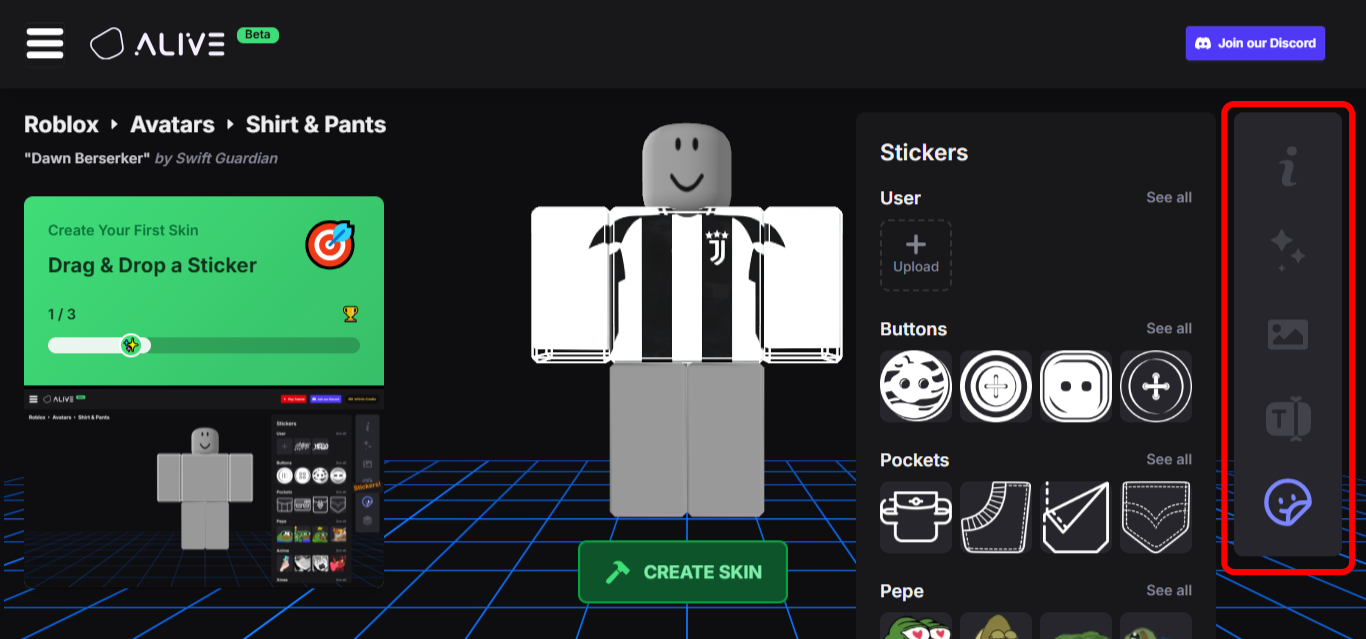
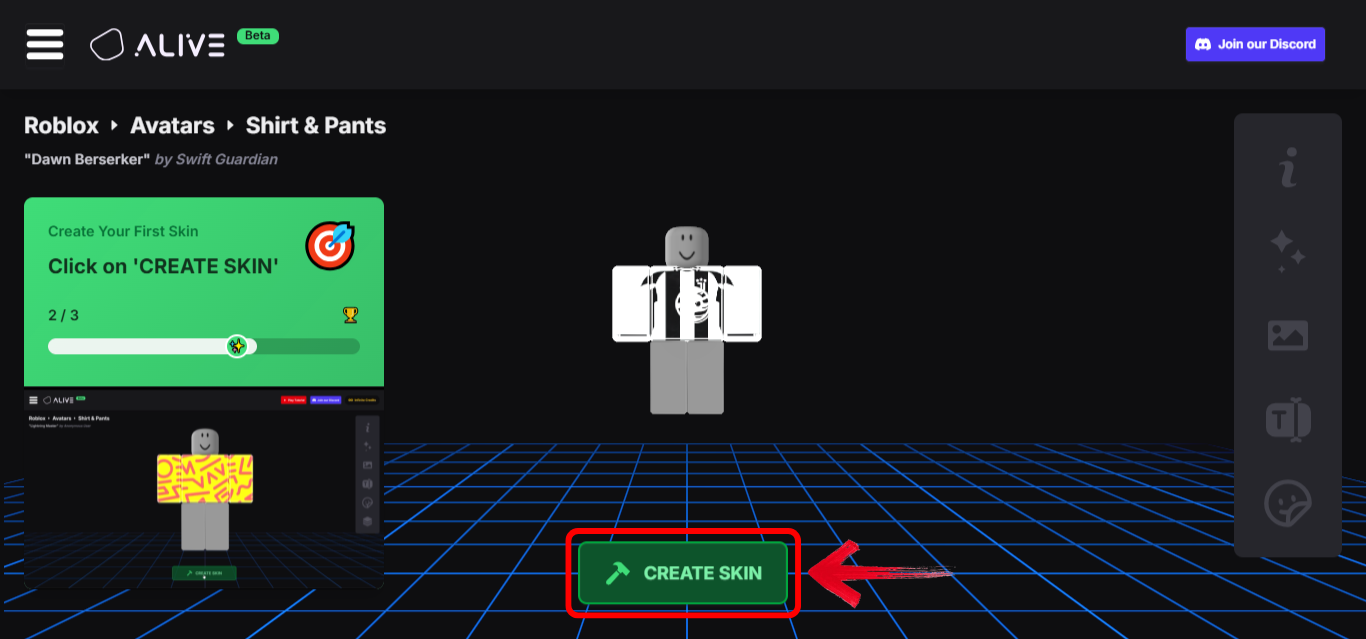
Step 3: Now save or export your final designas a PNG by clicking “Create Skin.”
Pros:
Beginner-friendly interface.
Instant preview of your design.
No software installation needed.
Cons:
Limited advanced editing features.
Requires internet access.
Fewer customization options than professional software.
I used AliveGames.io for my first shirt design. The drag-and-drop interface made it easy to experiment with colors and graphics without worrying about misaligned areas.
Using a Versatile Office Suite for Planning and Presentation (WPS Office)
Building on the initial design process with AliveGames.io, some creators may want a more versatile tool to plan and visualize their ideas in greater detail. For these cases, WPS Office is an excellent choice. This free office suite allows you to combine your shirt template, design notes, and concept art all in one place. The Presentation tool (PPT) is particularly useful for mocking up designs, providing precise alignment guides and layering options that make it easier to experiment with different elements.
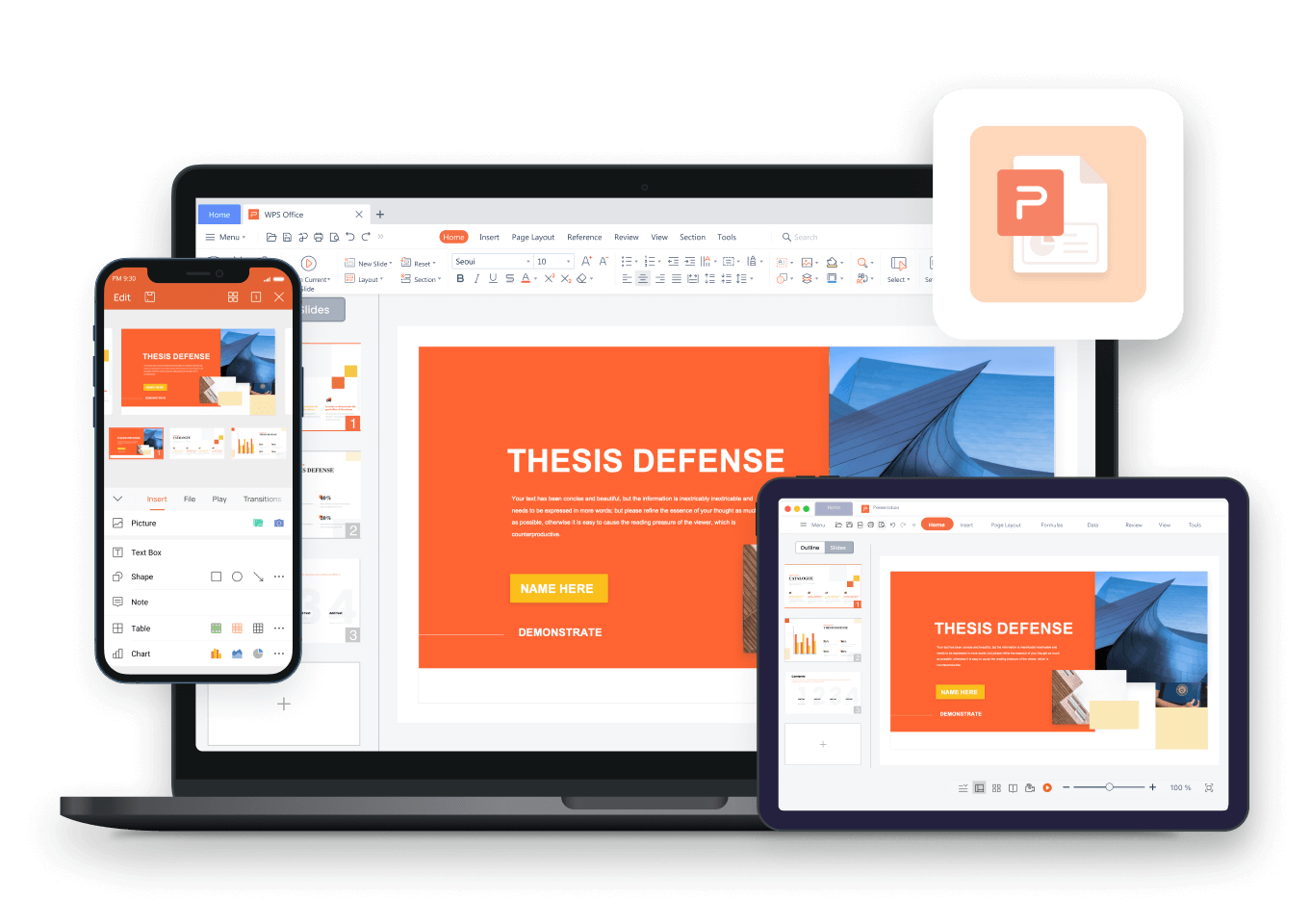
You can add logos, text, and background images to create multiple shirt variants, then export them as PNGsfor final editing. Beyond design, WPS Office keeps your workflow organized, letting you track ideas and revisions efficiently. It’s lightweight, accessible, and perfect for both beginners and more advanced creators looking to elevate their Roblox shirt projects.
Features & Steps:
Step 1: First of all, open WPS Presentation and import your shirt template PNG onto a slide.
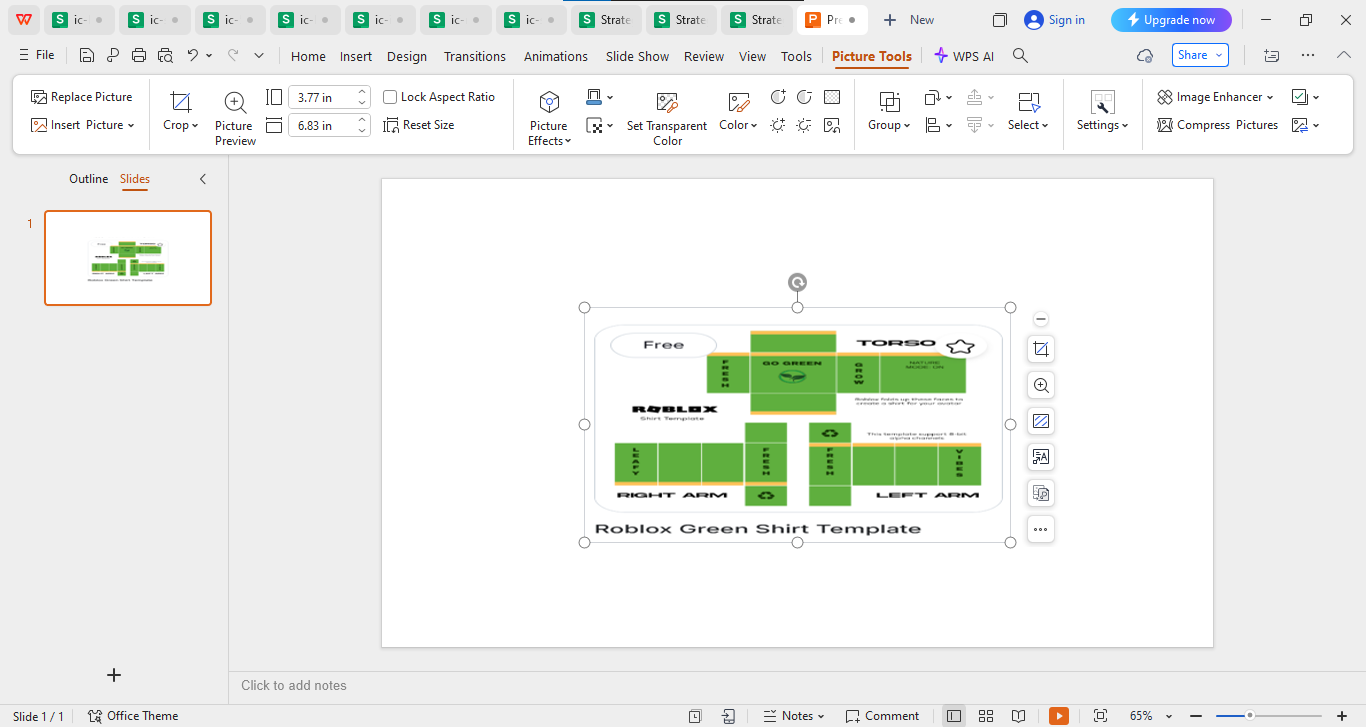
Step 2: Use shapes, text boxes, WordArt, and image effects to overlay your design.
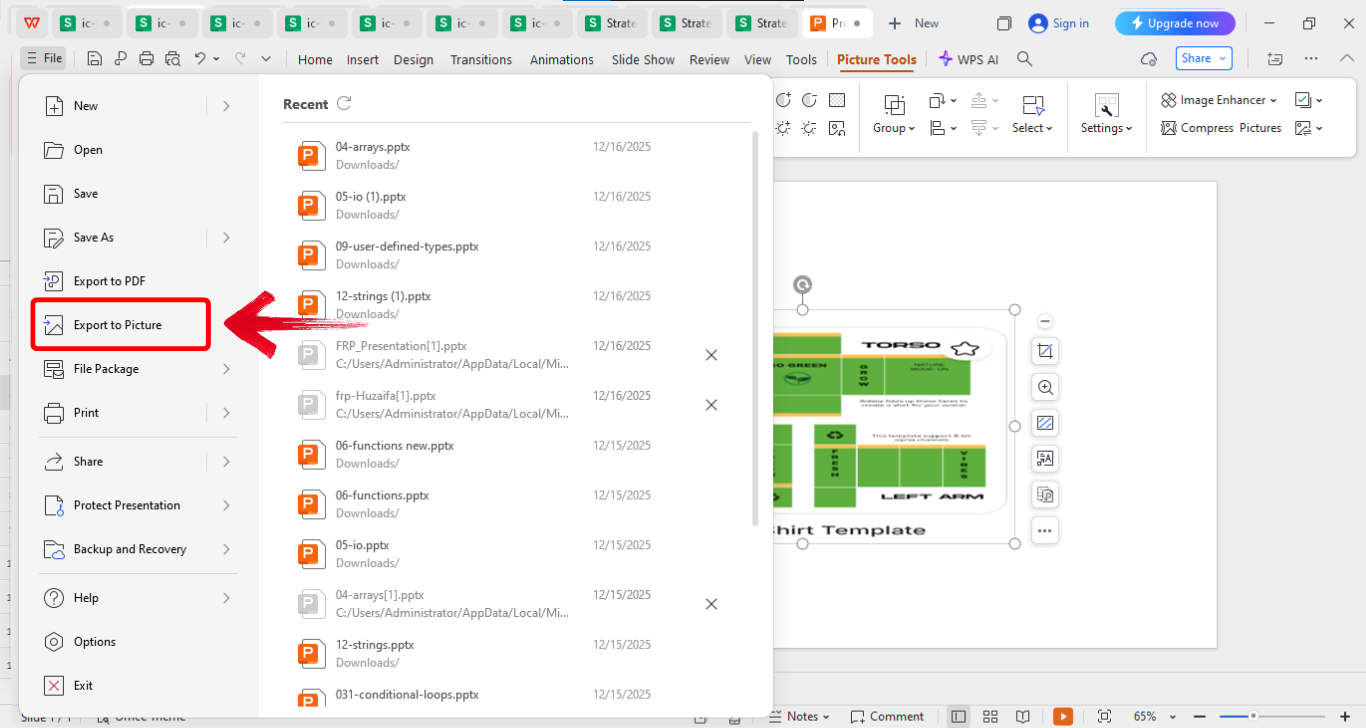
Step 3: Once you’re done editing, click“File” on the top left of your screen and then click“Export to picture” to download the edited template.
Pros:
Free and widely accessible.
Excellent for planning complex designs.
Allows combining multiple design elements in one workspace.
Cons:
Not specifically built for clothing design.
Requires manual alignment for perfect fit.
Limited pixel-level editing compared to graphic editors.
I like using WPS Presentation to plan and visualize multiple shirt variants. It keeps my workflow organized and allows me to experiment with logos and text before committing to the final PNG.
Finalizing and Uploading to Roblox
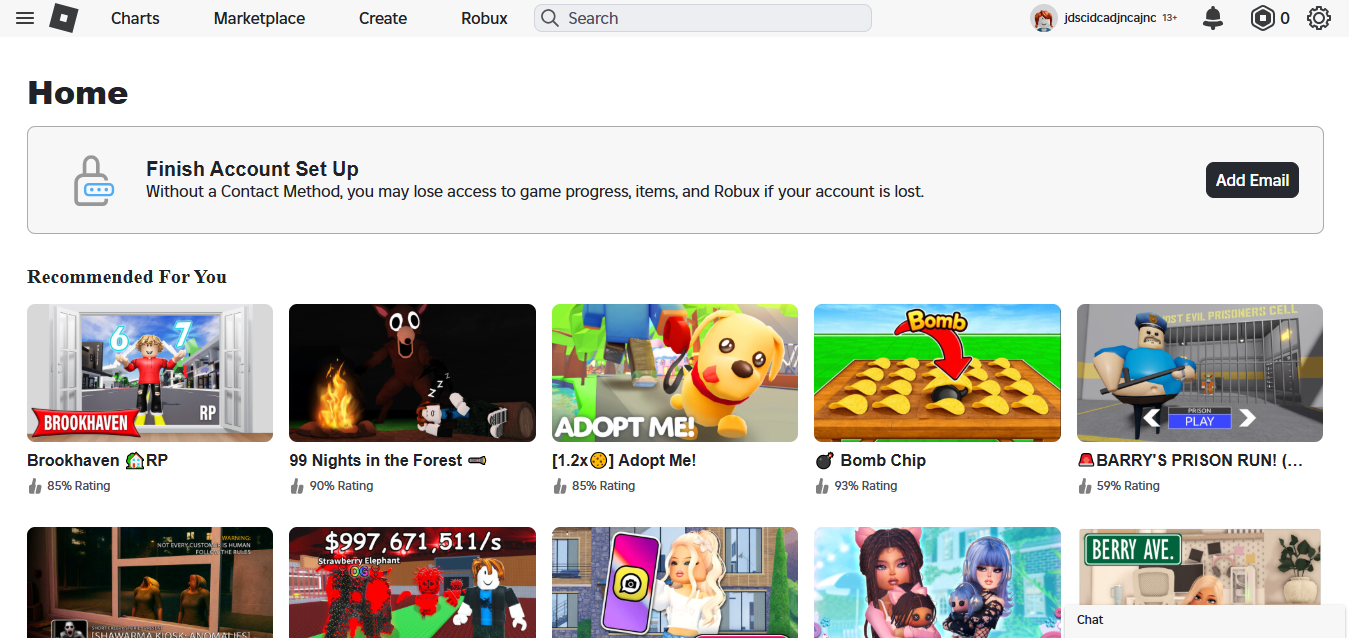
After designing, the last step is to upload your shirt to Roblox so it can be worn or sold. Ensure your design is in PNG format, meets the size requirements (585x559 pixels), and has transparent backgrounds where needed. Avoid stretching or resizingthe template itself. Just log into Roblox.com, navigate to“Create,” and follow the steps mentioned earlier. For more advanced editing, you can also use a Roblox shirt template PSD to work with layers and finer design details before uploading.
You could also face some common issues including incorrect image dimensions or uploading a file with a non-transparent background. Double-check that you are using the official template and have not altered its size.
Double-checking the template saved me from repeated upload errors. Even small misalignments can cause distortion, so verifying dimensions first is crucial.
FAQs
Q1: What are the exact image requirements for a Roblox shirt?
The shirt template must be 585x559 pixels in PNG format. Draw only within the marked zones and keep the background transparent.
Q2: Can I use Microsoft Paint or basic tools to design the shirt?
Yes, any tool that allows opening PNGs and careful drawing within template zones works. Precision is key.
Q2: Why is my shirt design blurry or stretched on my avatar?
Usually, this happens because the official template was not used or the canvas was resized incorrectly. Always stick to the 585x559px template.
Q3: How can I create a shirt with text or a complex logo?
Use a tool with layers, like WPS Presentation. Export logos or text as images, then import them into your template editor to position accurately.
Q4: Is there a way to preview my shirt before uploading?
Yes, platforms like AliveGames.io offer live previews. Alternatively, you can mock up designs in WPS Presentation to see how they wrap on the avatar.
Q5: Can I sell multiple variants of the same shirt easily?
Using WPS Office, you can create multiple slide versions of your design, export them as separate PNGs, and upload each variant as a new shirt. This helps manage a clothing line efficiently.
Final Thoughts on Creating Roblox Shirts
Creating custom Roblox clothing is exciting, but starting without the right template shirt can lead to mistakes. Using the official PNGs ensures your designs fit perfectly and avoids common errors. Tools like AliveGames.io make designing straightforward, letting you experiment and visualize creations easily. For more detailed planning, WPS Office allows you to combine template shirt roblox, logos, and text, then export polished PNGs ready for upload. Lightweight and free, it streamlines your workflow. With the right templates and tools, you can confidently design and upload shirts that look professional and fit perfectly, turning your ideas into real in-game fashion.

'%3e%3cpath%20d='M19.9911%204.11386V6.471H18.5894C18.0775%206.471%2017.7322%206.57814%2017.5536%206.79243C17.3751%207.00671%2017.2858%207.32814%2017.2858%207.75671V9.44421H19.9019L19.5536%2012.0871H17.2858V18.8639H14.5536V12.0871H12.2769V9.44421H14.5536V7.49779C14.5536%206.39064%2014.8632%205.53201%2015.4822%204.92189C16.1013%204.31177%2016.9257%204.00671%2017.9554%204.00671C18.8304%204.00671%2019.509%204.04243%2019.9911%204.11386Z'%20fill='%23333333'/%3e%3c/g%3e%3cdefs%3e%3cclipPath%20id='clip0_2938_8199'%3e%3crect%20width='16'%20height='16'%20fill='white'%20transform='translate(8%204.00671)'/%3e%3c/clipPath%3e%3c/defs%3e%3c/svg%3e)
'%3e%3cpath%20d='M17.5237%2010.7813L23.4811%204H22.0699L16.8949%209.88693L12.7648%204H8L14.2469%2012.9029L8%2020.0133H9.4112L14.8725%2013.7952L19.2352%2020.0133H24M9.92053%205.04213H12.0885L22.0688%2019.0224H19.9003'%20fill='%23333333'/%3e%3c/g%3e%3cdefs%3e%3cclipPath%20id='clip0_2938_8200'%3e%3crect%20width='16'%20height='16.0134'%20fill='white'%20transform='translate(8%204)'/%3e%3c/clipPath%3e%3c/defs%3e%3c/svg%3e)


