

'%3e%3cpath%20d='M8%200C12.4183%200%2016%203.58172%2016%208C16%2012.4183%2012.4183%2016%208%2016C3.58172%2016%200%2012.4183%200%208C0%203.58172%203.58172%200%208%200ZM11.6162%204.38379C11.2257%203.99337%2010.5927%203.99338%2010.2021%204.38379L8%206.58594L5.79785%204.38379C5.40732%203.99334%204.77429%203.99329%204.38379%204.38379C3.99331%204.77429%203.99335%205.40733%204.38379%205.79785L6.58594%208L4.38379%2010.2021C3.99348%2010.5927%203.99341%2011.2257%204.38379%2011.6162C4.77426%2012.0066%205.40734%2012.0065%205.79785%2011.6162L8%209.41406L10.2021%2011.6162C10.5927%2012.0066%2011.2257%2012.0067%2011.6162%2011.6162C12.0067%2011.2257%2012.0066%2010.5927%2011.6162%2010.2021L9.41406%208L11.6162%205.79785C12.0066%205.40735%2012.0066%204.77429%2011.6162%204.38379Z'%20fill='%23080E17'%20fill-opacity='0.46'/%3e%3c/g%3e%3cdefs%3e%3cclipPath%20id='clip0_3761_713'%3e%3crect%20width='16'%20height='16'%20fill='white'/%3e%3c/clipPath%3e%3c/defs%3e%3c/svg%3e)




'%3e%3cpath%20fill-rule='evenodd'%20clip-rule='evenodd'%20d='M21.4999%2010.9993C21.4999%205.20009%2016.7986%200.498901%2010.9993%200.498901C5.19994%200.498901%200.498657%205.20009%200.498657%2010.9993C0.498657%2016.2404%204.33858%2020.5844%209.35855%2021.3722V14.0346H6.69238V10.9993H9.35855V8.68594C9.35855%206.05427%2010.9262%204.60062%2013.3248%204.60062C14.4736%204.60062%2015.6753%204.80571%2015.6753%204.80571V7.38979H14.3512C13.0468%207.38979%2012.64%208.19921%2012.64%209.0296V10.9993H15.5523L15.0867%2014.0346H12.64V21.3722C17.66%2020.5844%2021.4999%2016.2404%2021.4999%2010.9993Z'%20fill='%231568EA'/%3e%3c/g%3e%3c/svg%3e)


'%3e%3cpath%20d='M2.42045%2022.1876H6.31818V12.7217L0.75%208.54553V20.5171C0.75%2021.4414%201.49892%2022.1876%202.42045%2022.1876Z'%20fill='%234285F4'/%3e%3cpath%20d='M19.682%2022.1876H23.5797C24.5041%2022.1876%2025.2502%2021.4387%2025.2502%2020.5171V8.54553L19.682%2012.7217'%20fill='%2334A853'/%3e%3cpath%20d='M19.682%205.48293V12.7216L25.2502%208.54543V6.31816C25.2502%204.25236%2022.8921%203.07469%2021.2411%204.31361'%20fill='%23FBBC04'/%3e%3cpath%20d='M6.31824%2012.7217V5.48303L13.0001%2010.4944L19.6819%205.48303V12.7217L13.0001%2017.733'%20fill='%23EA4335'/%3e%3cpath%20d='M0.75%206.31816V8.54543L6.31818%2012.7216V5.48293L4.75909%204.31361C3.10534%203.07469%200.75%204.25236%200.75%206.31816Z'%20fill='%23C5221F'/%3e%3c/g%3e%3cdefs%3e%3cclipPath%20id='clip0_2954_7305'%3e%3crect%20width='24.5'%20height='18.375'%20fill='white'%20transform='translate(0.75%203.8125)'/%3e%3c/clipPath%3e%3c/defs%3e%3c/svg%3e)


A strong competitive analysis template can genuinely transform how you understand your market and make strategic decisions. Many teams collect competitor data but still feel lost without a clear structure to follow. So the real focus becomes finding a smarter way to write a competitive analysis and getting free, ready-to-use templates that save time. In this guide, I’ll walk you through the writing process, share ten downloadable templates, and show you how to edit and print them using WPS Office.



How to Write a Competitive Analysis
Writing a competitive analysis becomes far easier when you follow a structured approach. Below are refined subheadings that help you break down the process in a practical and strategic way.
1. Define Your Strategic Purpose
Before diving into research, set the objective for your competitive analysis. You might aim to understand your product’s positioning, review pricing gaps, or explore customer targeting patterns. When your goal is clear, your findings become more focused and actionable.
2. Identify Competitors Across All Categories
You should list direct competitors with similar offerings, indirect ones that serve the same problem in a different way, and potential entrants who could disrupt the market soon. This broad view helps you avoid hidden threats.
3. Collect Reliable Competitor Data
Gather information like product features, pricing models, user experience insights, customer reviews, and unique selling points. At this point, real numbers matter, so use trustworthy sources like product listings, websites, and review platforms.
4. Apply Analysis Frameworks Thoughtfully
Tools like SWOT, benchmarking grids, and feature comparisons give structure to your findings. This helps you compare products side by side, highlight gaps, and visualize opportunities clearly.
5. Visualize Findings for Clarity
Your analysis becomes far more digestible through charts, heatmaps, competitive grids, or side-by-side comparison tables. Visuals help you present insights clearly during team reviews.
6. Summarize Insights and Recommend Actions
Use your findings to guide product improvements, refine pricing, propose marketing adjustments, or enhance your customer approach. Your conclusion should focus on forward movement.
In my own work, a structured analysis always reveals insights I might miss through intuition alone. Templates make the process far smoother and more organized.
Top 10 Free Competitive Analysis Templates
Below is a curated collection of ten free competitive analysis templates in Word and Excel format, perfect for anyone looking to learn how to write a competitive analysis. Each template comes with a direct download link.
Word Templates
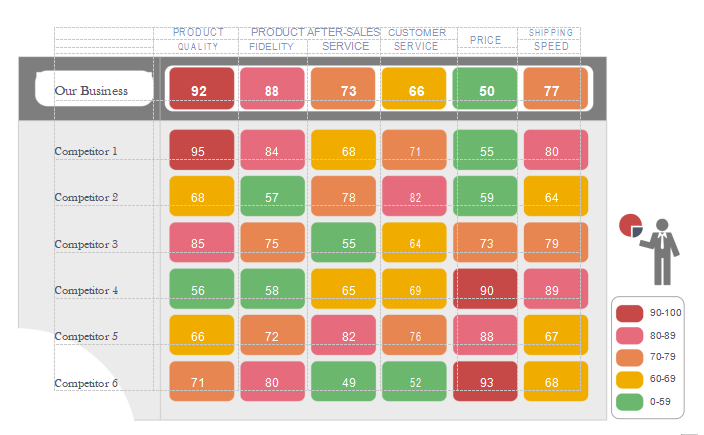
Template 1
This template, called Product Competitor Analysis, offers a clean layout to compare competitors effectively. It features structured sections for pricing, features, and customer insights. It's ideal if you want a straightforward starting point for your competitive analysis.
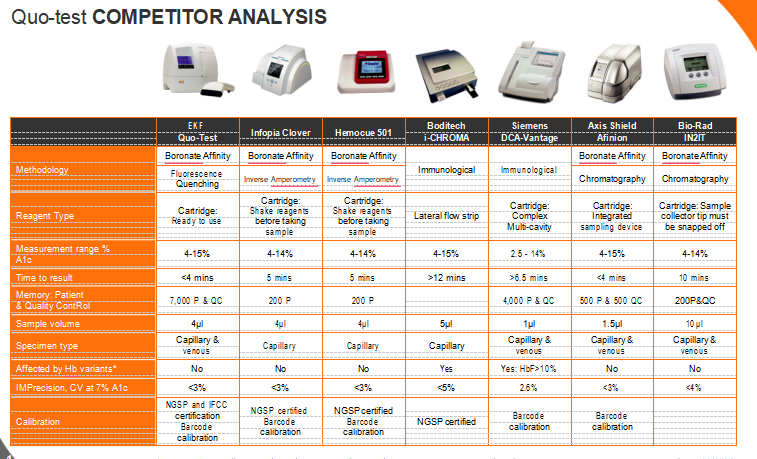
Template 2
This version, titled Quo-test COMPETITOR ANALYSIS, focuses on presenting competitive strengths and weaknesses in a visual format. You’ll find organized tables that help you identify strategic gaps quickly. It works best for teams looking for clarity in product differentiation.
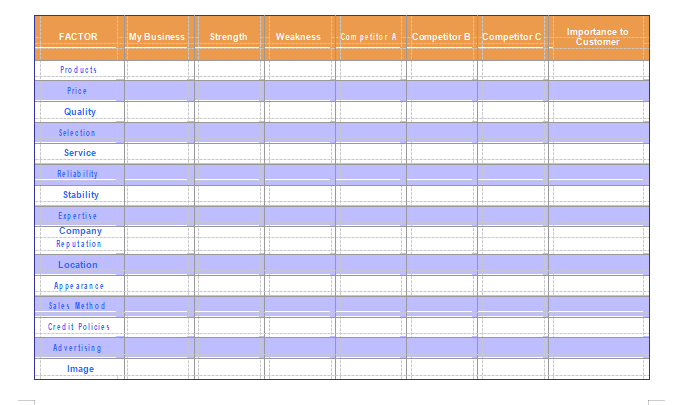
Template 3
This template, known as Competitor Analysis by Score, is perfect for feature-by-feature analysis. It includes detailed sections for categorizing competitor offerings clearly. You can use it to highlight strengths and gain insight into market trends.
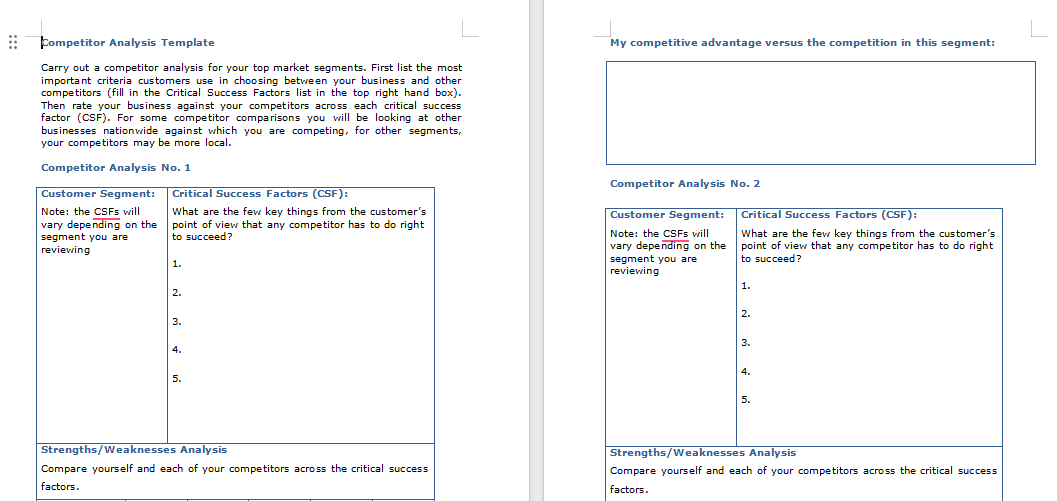
Template 4
Named Competitor Analysis Template, this one emphasizes visual summaries with simple layout designs. Its comparison blocks make it easy to observe competitor moves. You’ll find it helpful when presenting analysis to stakeholders.
Excel Templates
Template 5
This Excel-based resource, called Excel based competitor analysis, supports structured numerical comparison. It includes editable columns so you can adjust data as needed. Use it when your focus requires deeper metric evaluation.
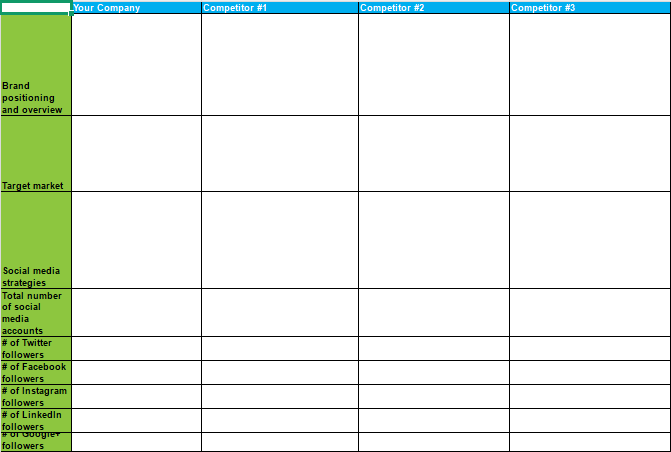
Template 6
This spreadsheet, named Excel based competitor analysis 2, is designed for side-by-side competitor rankings. You’ll find color-coded cells that help identify strategic areas. It’s great for teams who want quick insights at a glance.
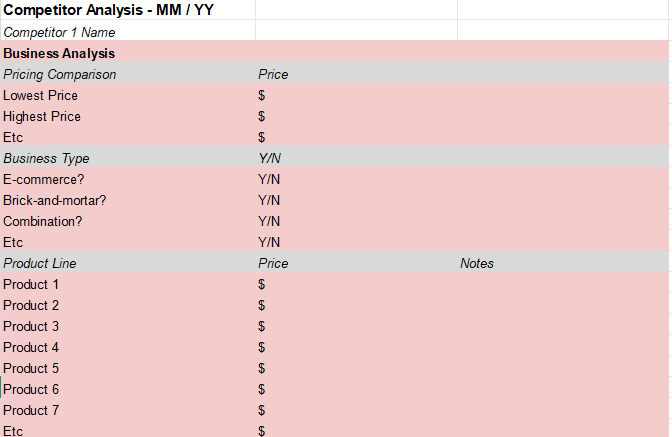
Template 7
Titled Competitor Analysis by Transmit Startups, this template is suited for detailed benchmarking analysis. You can document pricing tiers, target segments, and performance markers. It’s practical for multi-product comparison.
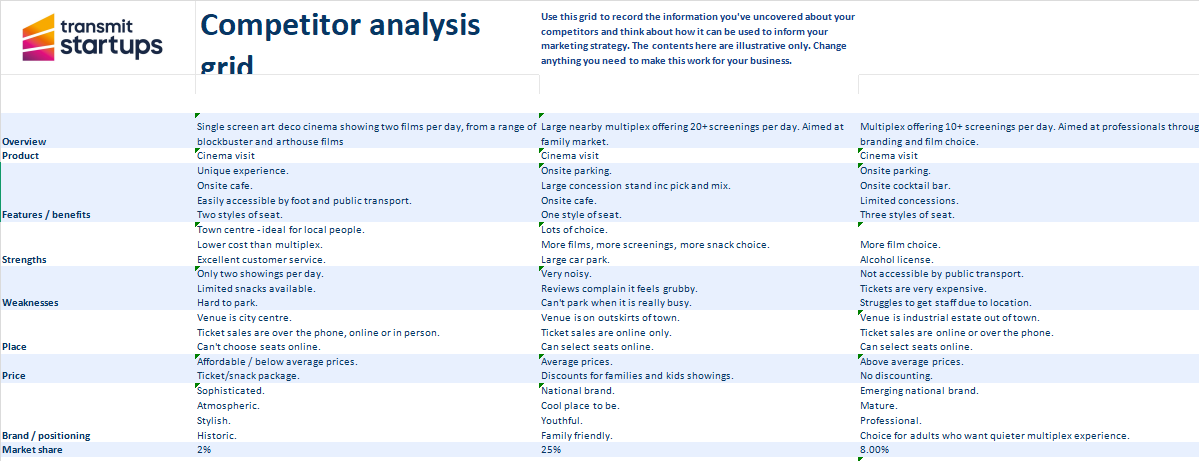
Template 8
This file, called Competitor Analysis by Demand Metric, organizes competitor strengths visually. It includes ready-to-edit columns for customer ratings and feature scores. You can use it for monthly or quarterly analysis updates.
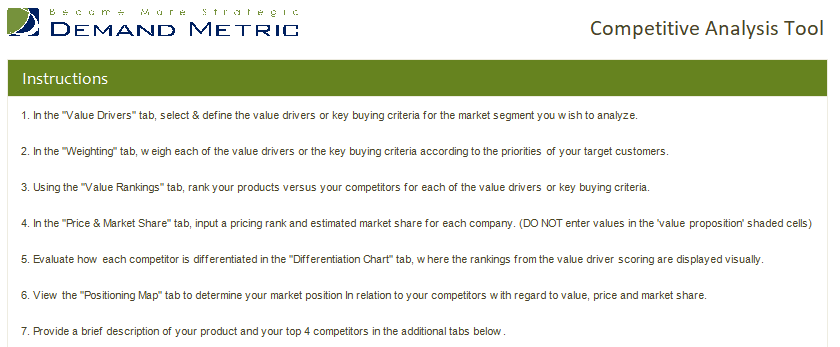
Template 9
This one, named Competitor Analysis by Chase for Business, allows you to plot competitor strategies across multiple categories. You’ll find its structure easy to adapt for presentations. It works well for strategic planning teams.
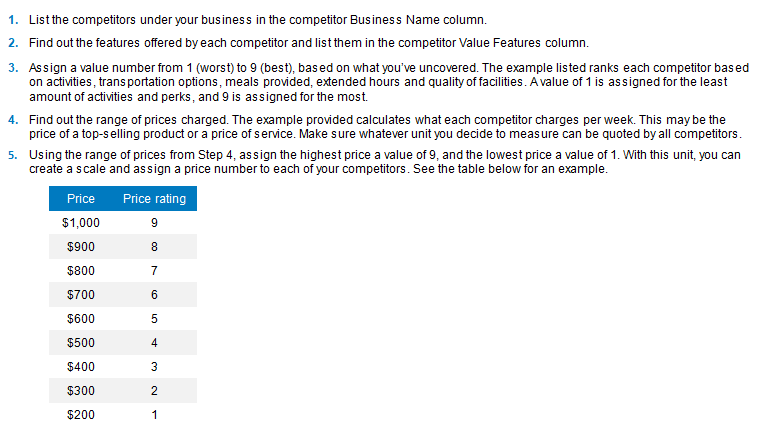
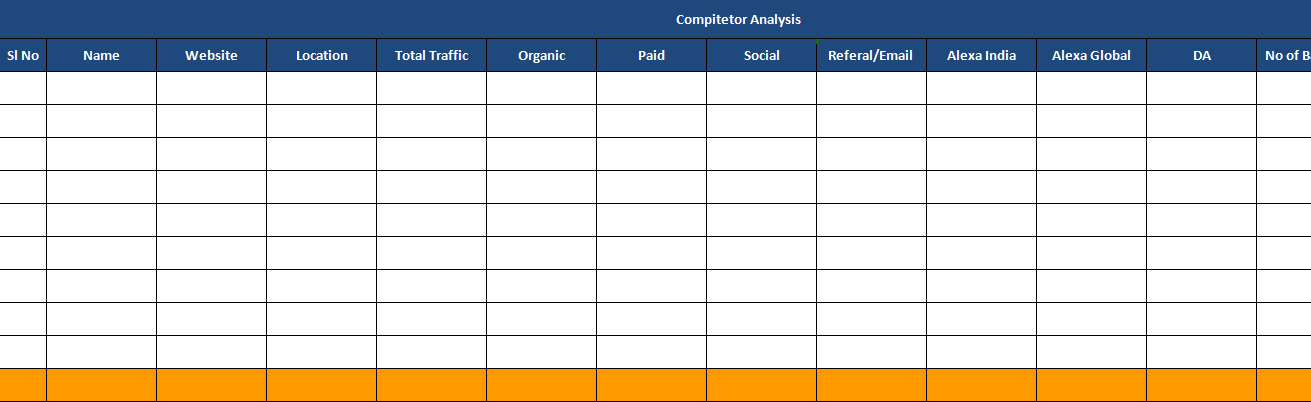
Template 10
This resource, titled Excel based Competitor Analysis 3, provides a clean evaluation model for competitive insights. It simplifies documenting market observations and pricing differences. Good for teams building long-term strategy sheets.
I’ve used several templates from TemplateArchive before, and they’re usually clean, structured, and easy to tailor for different industries.
How to Edit and Print
Here’s a short and practical guide on how to edit competitive analysis templates and convert them into polished documents. Before diving into steps, it helps to know that WPS Office provides built-in tools to design charts visually with drag-and-drop convenience.
How to Edit in Word (WPS Writer)
WPS Writer provides a smooth interface for editing Word-based competitive analysis templates.
Steps:
Here’s an easy step by step guide on how to edit such templates.
Step 1: Open your document in WPS Writer.
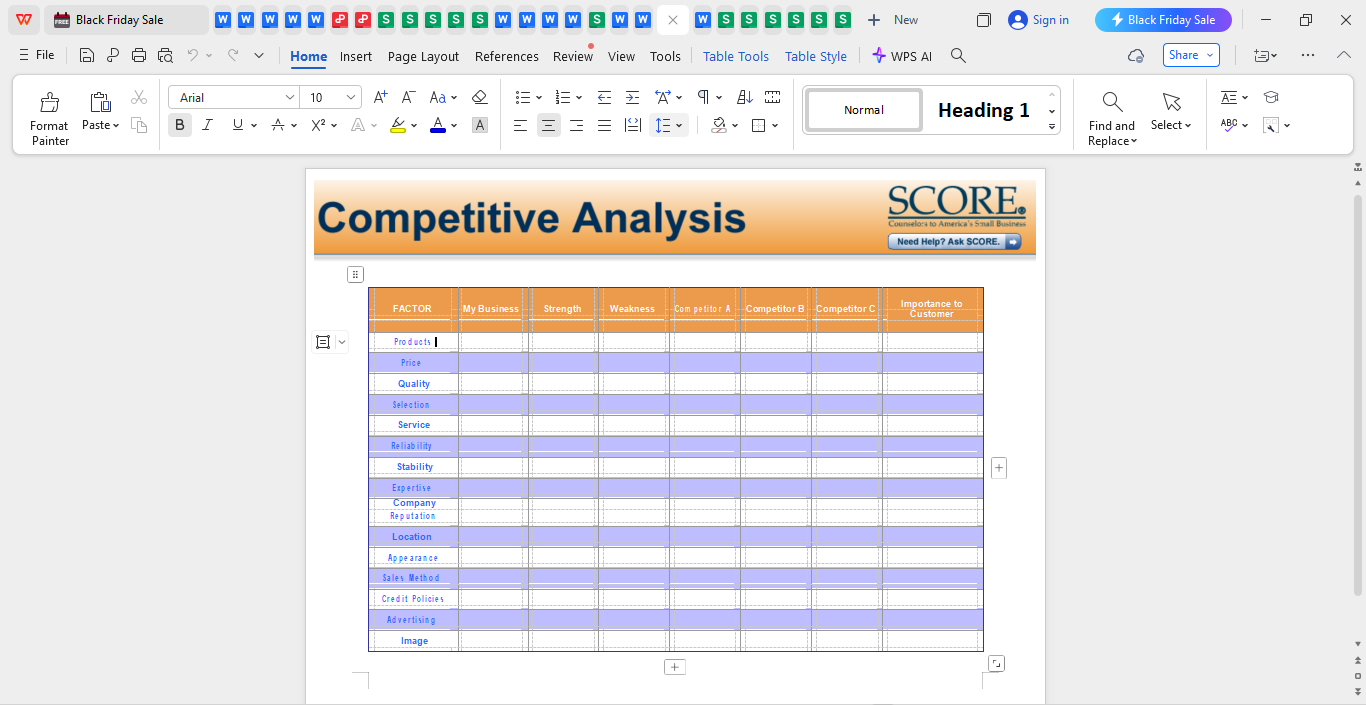
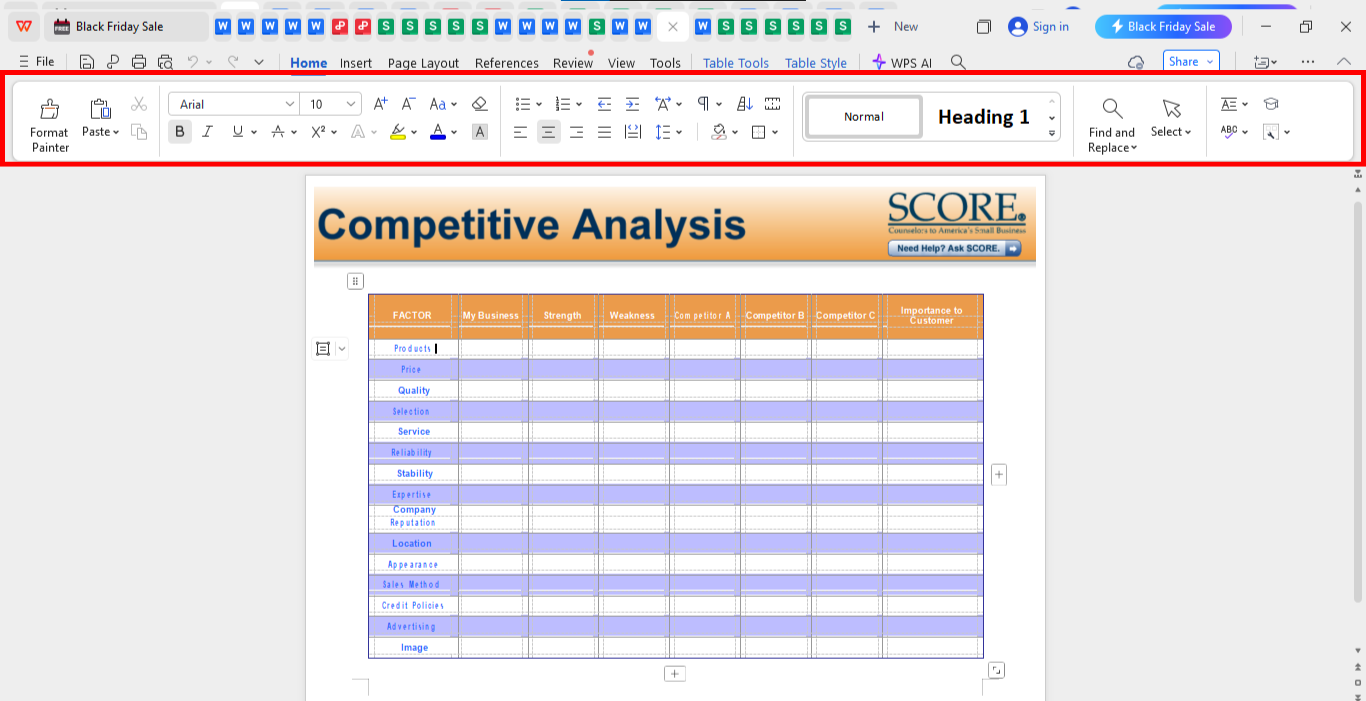
Step 2: Now from the editing panel on the top of your screen, edit the template as your preference. You can also click on the text to edit it like you want it to be.
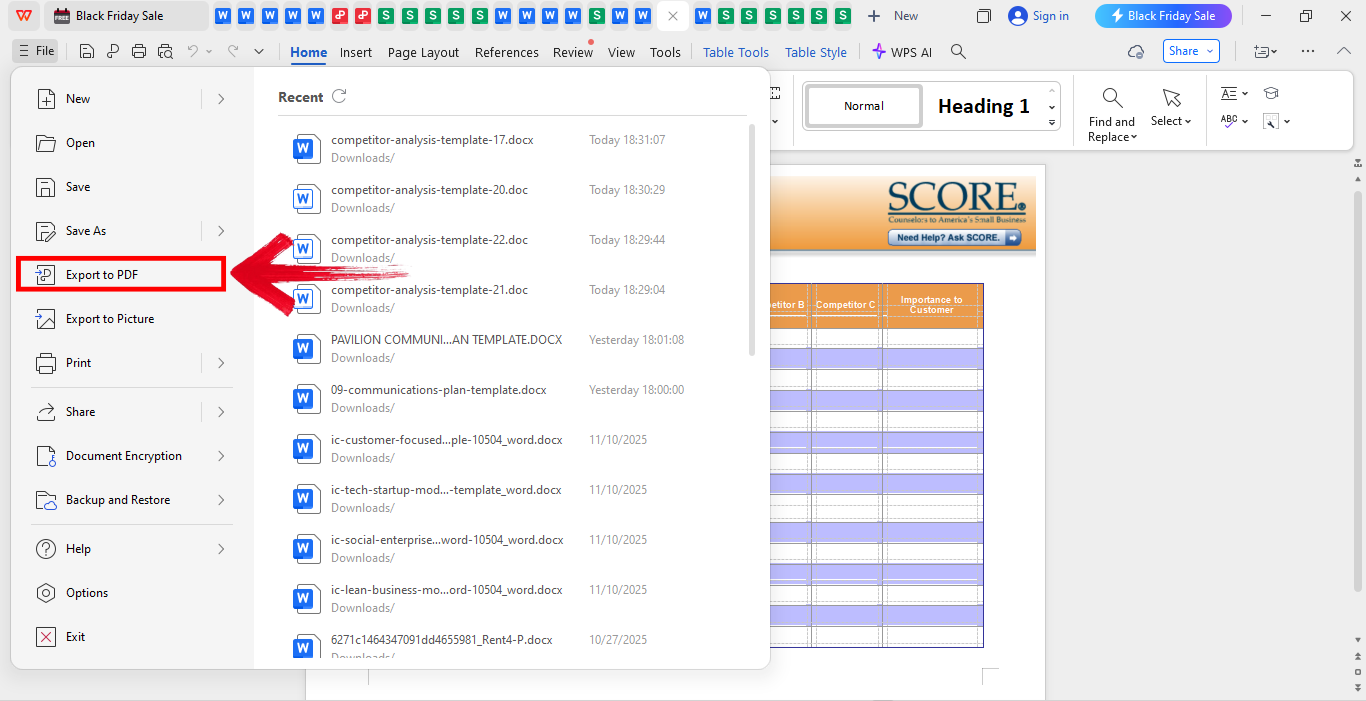
Step 3: Now in order to save your file as a PDF, go the “File” on the top left of your screen and the clock “Export to PDF.”
How to Edit in Excel (WPS Spreadsheet)
For data-heavy templates, WPS Spreadsheet gives you analytical flexibility.
Steps:
Here’s an easy step by step guide on how to edit such templates.
Step 1: Open your downloaded Excel template in WPS Spreadsheet.
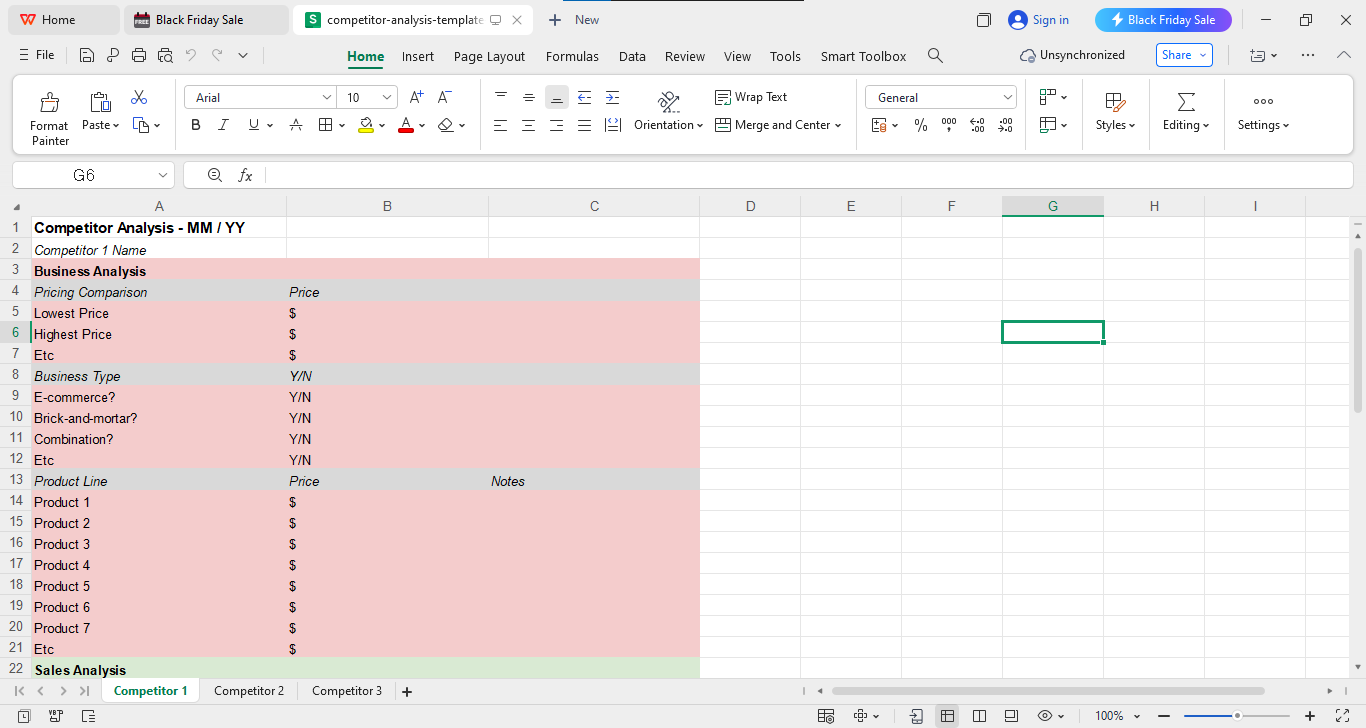
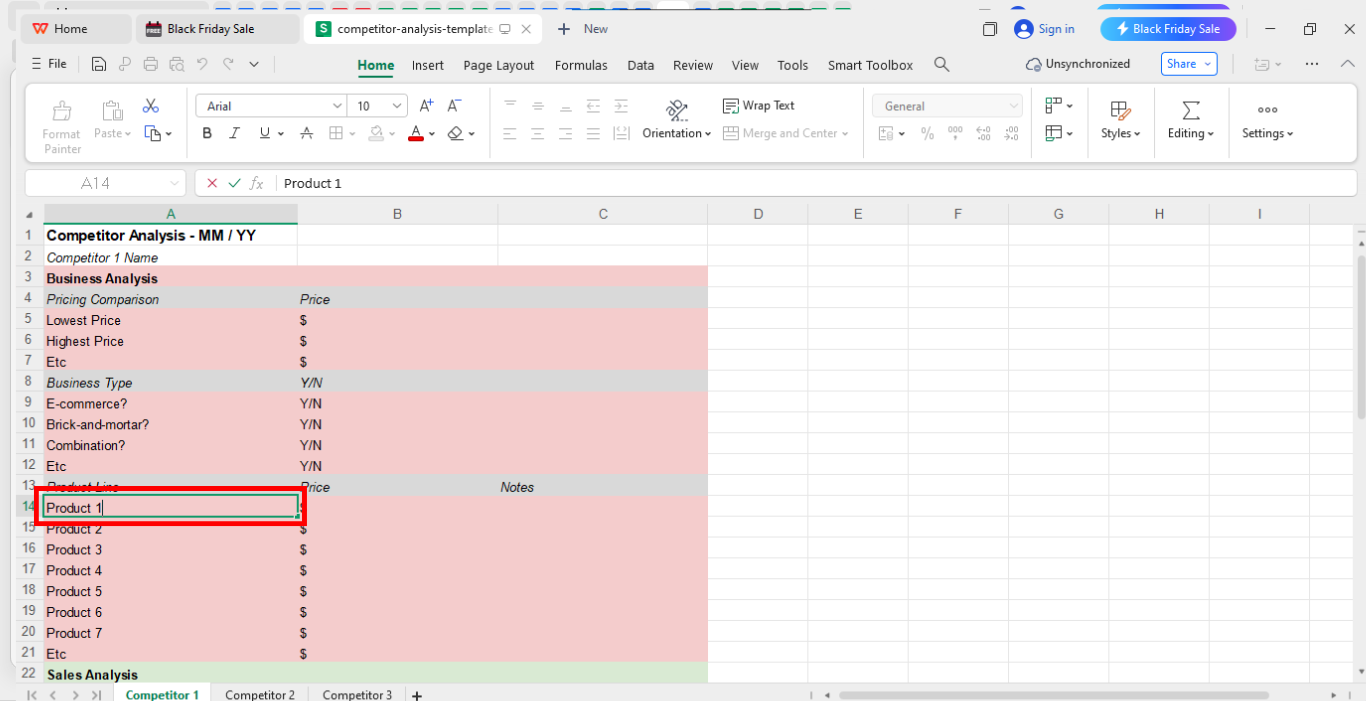
Step 2: Edit fields such as Project names or any kind of text that you’d like to be as per your preference.
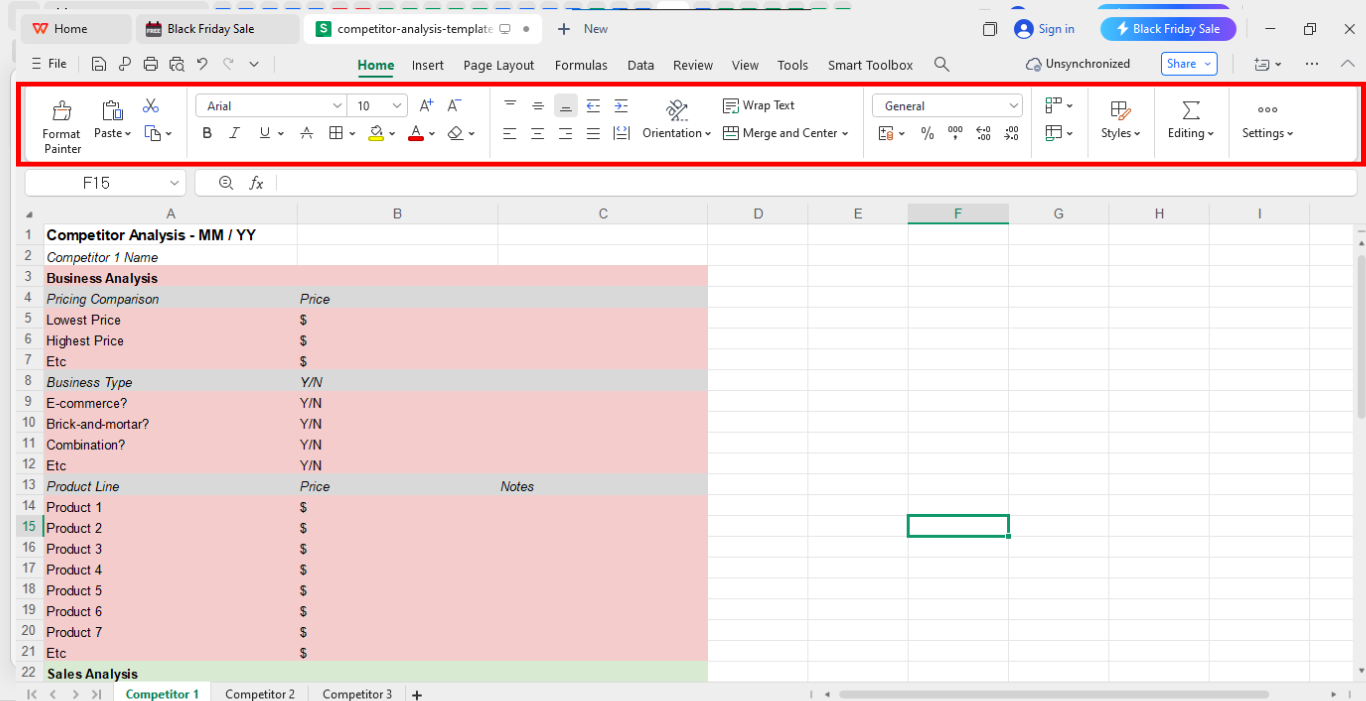
Step 3: Now from the panel above, explore the editing panel and edit the template as per your choice.
Step 4: Now in order to save your file as a PDF, go the “File” on the top left of your screen and the clock “Export to PDF.”
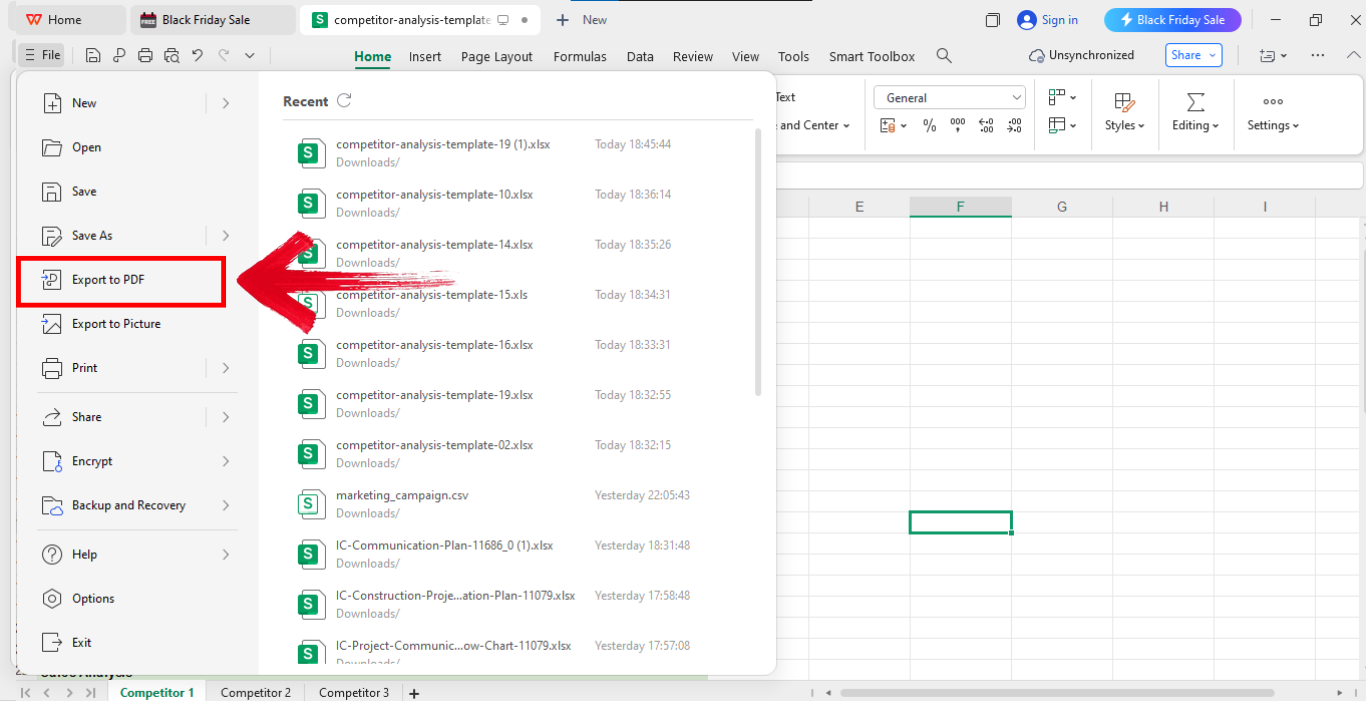
WPS makes editing effortless. The ability to switch between Writer and Spreadsheet improves my workflow, especially for reports that combine narrative and numbers.
Free Office Suite with Editable Templates & Smart AI
Before diving into the templates themselves, it’s worth pointing out the tool that makes working with all these files feel low-stress and kinda vibey. WPS Office serves as a powerful free alternative to Microsoft Office for anyone working with templates, analysis reports, or collaborative documents. I’ll walk you through key features that matter most. WPS Office is a full-suite productivity tool offering Writer, Spreadsheet, and Presentation apps.
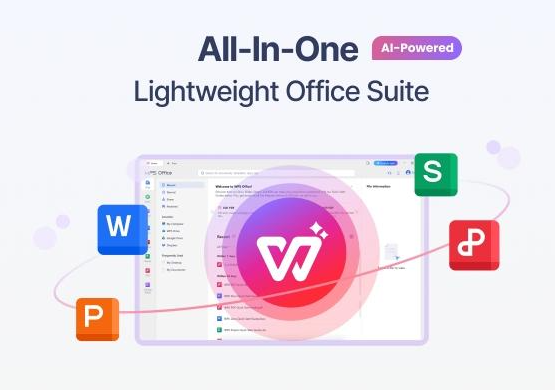
The interface is modern and responsive, making it intuitive even for users transitioning from Microsoft Office. On top of that, it loads fast, works smoothly even on mid-range laptops, and keeps everything organized in one clean workspace. You also get cloud syncing, so your competitive analysis files follow you across devices without any drama. Plus, the built-in template library saves time when you’re trying to spin up reports without starting from zero.
I use WPS when I need quick editing tools without worrying about software costs. Its AI support often speeds up my writing and formatting.
FAQs
Q1: What is a competitive analysis template used for?
It helps businesses compare competitors’ strengths, weaknesses, and market strategies.
Q2: Can I use these templates for startups?
Yes, these templates are helpful for startups assessing competitors quickly.
Q3: Which analysis framework works best?
SWOT is popular, but benchmarking grids and competitive maps also deliver strong insights.
Q4: Can I edit these templates online?
Yes, tools like WPS Office and Google Drive allow online editing.
Q5: How often should I update my competitive analysis?
You should revise it quarterly or when a major market shift occurs.
Q6: Do I need technical skills to use these templates?
No, they’re preformatted and simple to customize.
Q7: Is WPS Office fully compatible with MS Office files?
Yes, most formats open and edit smoothly.

'%3e%3cpath%20d='M19.9911%204.11386V6.471H18.5894C18.0775%206.471%2017.7322%206.57814%2017.5536%206.79243C17.3751%207.00671%2017.2858%207.32814%2017.2858%207.75671V9.44421H19.9019L19.5536%2012.0871H17.2858V18.8639H14.5536V12.0871H12.2769V9.44421H14.5536V7.49779C14.5536%206.39064%2014.8632%205.53201%2015.4822%204.92189C16.1013%204.31177%2016.9257%204.00671%2017.9554%204.00671C18.8304%204.00671%2019.509%204.04243%2019.9911%204.11386Z'%20fill='%23333333'/%3e%3c/g%3e%3cdefs%3e%3cclipPath%20id='clip0_2938_8199'%3e%3crect%20width='16'%20height='16'%20fill='white'%20transform='translate(8%204.00671)'/%3e%3c/clipPath%3e%3c/defs%3e%3c/svg%3e)
'%3e%3cpath%20d='M17.5237%2010.7813L23.4811%204H22.0699L16.8949%209.88693L12.7648%204H8L14.2469%2012.9029L8%2020.0133H9.4112L14.8725%2013.7952L19.2352%2020.0133H24M9.92053%205.04213H12.0885L22.0688%2019.0224H19.9003'%20fill='%23333333'/%3e%3c/g%3e%3cdefs%3e%3cclipPath%20id='clip0_2938_8200'%3e%3crect%20width='16'%20height='16.0134'%20fill='white'%20transform='translate(8%204)'/%3e%3c/clipPath%3e%3c/defs%3e%3c/svg%3e)


