

'%3e%3cpath%20d='M8%200C12.4183%200%2016%203.58172%2016%208C16%2012.4183%2012.4183%2016%208%2016C3.58172%2016%200%2012.4183%200%208C0%203.58172%203.58172%200%208%200ZM11.6162%204.38379C11.2257%203.99337%2010.5927%203.99338%2010.2021%204.38379L8%206.58594L5.79785%204.38379C5.40732%203.99334%204.77429%203.99329%204.38379%204.38379C3.99331%204.77429%203.99335%205.40733%204.38379%205.79785L6.58594%208L4.38379%2010.2021C3.99348%2010.5927%203.99341%2011.2257%204.38379%2011.6162C4.77426%2012.0066%205.40734%2012.0065%205.79785%2011.6162L8%209.41406L10.2021%2011.6162C10.5927%2012.0066%2011.2257%2012.0067%2011.6162%2011.6162C12.0067%2011.2257%2012.0066%2010.5927%2011.6162%2010.2021L9.41406%208L11.6162%205.79785C12.0066%205.40735%2012.0066%204.77429%2011.6162%204.38379Z'%20fill='%23080E17'%20fill-opacity='0.46'/%3e%3c/g%3e%3cdefs%3e%3cclipPath%20id='clip0_3761_713'%3e%3crect%20width='16'%20height='16'%20fill='white'/%3e%3c/clipPath%3e%3c/defs%3e%3c/svg%3e)




'%3e%3cpath%20fill-rule='evenodd'%20clip-rule='evenodd'%20d='M21.4999%2010.9993C21.4999%205.20009%2016.7986%200.498901%2010.9993%200.498901C5.19994%200.498901%200.498657%205.20009%200.498657%2010.9993C0.498657%2016.2404%204.33858%2020.5844%209.35855%2021.3722V14.0346H6.69238V10.9993H9.35855V8.68594C9.35855%206.05427%2010.9262%204.60062%2013.3248%204.60062C14.4736%204.60062%2015.6753%204.80571%2015.6753%204.80571V7.38979H14.3512C13.0468%207.38979%2012.64%208.19921%2012.64%209.0296V10.9993H15.5523L15.0867%2014.0346H12.64V21.3722C17.66%2020.5844%2021.4999%2016.2404%2021.4999%2010.9993Z'%20fill='%231568EA'/%3e%3c/g%3e%3c/svg%3e)


'%3e%3cpath%20d='M2.42045%2022.1876H6.31818V12.7217L0.75%208.54553V20.5171C0.75%2021.4414%201.49892%2022.1876%202.42045%2022.1876Z'%20fill='%234285F4'/%3e%3cpath%20d='M19.682%2022.1876H23.5797C24.5041%2022.1876%2025.2502%2021.4387%2025.2502%2020.5171V8.54553L19.682%2012.7217'%20fill='%2334A853'/%3e%3cpath%20d='M19.682%205.48293V12.7216L25.2502%208.54543V6.31816C25.2502%204.25236%2022.8921%203.07469%2021.2411%204.31361'%20fill='%23FBBC04'/%3e%3cpath%20d='M6.31824%2012.7217V5.48303L13.0001%2010.4944L19.6819%205.48303V12.7217L13.0001%2017.733'%20fill='%23EA4335'/%3e%3cpath%20d='M0.75%206.31816V8.54543L6.31818%2012.7216V5.48293L4.75909%204.31361C3.10534%203.07469%200.75%204.25236%200.75%206.31816Z'%20fill='%23C5221F'/%3e%3c/g%3e%3cdefs%3e%3cclipPath%20id='clip0_2954_7305'%3e%3crect%20width='24.5'%20height='18.375'%20fill='white'%20transform='translate(0.75%203.8125)'/%3e%3c/clipPath%3e%3c/defs%3e%3c/svg%3e)


Designing a yearbook that truly captures memories is one of the most meaningful projects for students and teachers alike. Yet without the right theme, it’s easy for your yearbook to feel disjointed or forgettable. You might have all the photos and quotes, but the presentation can fall flat if the design doesn’t bring them to life. A ready-to-use yearbook presentation theme changes that, giving you structure, style, and a professional touch in minutes. In this guide, I’ll introduce 10 top yearbook presentation themes for 2025 and show you how WPS Office can make customizing them effortless.


Top 10 Ready-to-Use Yearbook Presentation Themes
In this section, I’ve gathered ten handpicked templates that make creating your yearbook fun, modern, and hassle-free. Each template offers something unique, from school pride to personal storytelling, featuring creative yearbook presentation themes that stand out.
1. Yearbook Collage Template
The Yearbook Collage Template helps you capture multiple memories in one vibrant layout. It’s ideal for schools that want a dynamic, picture-filled spread that feels lively and inclusive. The grid layout makes it easy to highlight key moments and group photos side by side for a balanced visual flow, offering unique yearbook presentation ideas to make your design truly memorable.
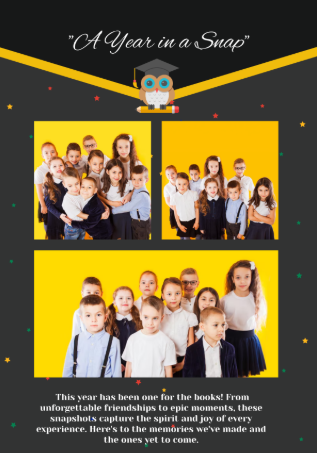
Collage-style layouts are my go-to for big class groups. They capture collective energy perfectly.
2. Printable Classroom Yearbook Template
With the Printable Classroom Yearbook Template, you can create a structured yet heartfelt classroom memory book. This design allows easy placement of student portraits, class activities, and fun captions. It keeps things visually consistent while still allowing room for creativity.
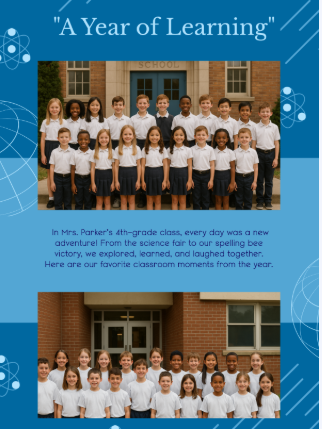
This layout helped me organize class memories beautifully without overcomplicating things.
3. Staff Appreciation Yearbook Template
The Staff Appreciation Yearbook Template is made to honor educators and staff members with grace. You can include faculty portraits, appreciation messages, and fun quotes from students. The design feels both formal and warm, making it perfect for teacher sections or dedications, and is one of the modern yearbook presentation templates that brings style and professionalism together.
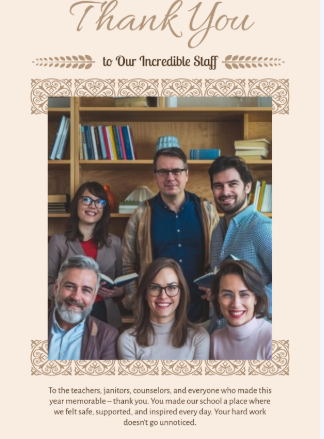
Using this layout once made our teachers tear up, it’s perfect for creating emotional impact.
4. Elementary Yearbook Template
The Elementary Yearbook Template is filled with playful colors and child-friendly layouts. It’s designed to capture the cheerful spirit of early school life through creative illustrations and fun typography. Teachers and students will love how easily it reflects a bright, youthful vibe.
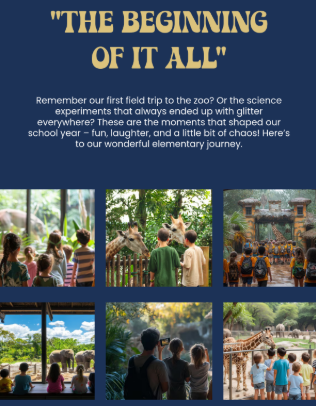
I love how this theme brings innocence and joy to life through playful colors.
5. Honor Roll Yearbook Template
The Honor Roll Yearbook Template focuses on celebrating achievements and academic milestones. It includes elegant borders, clean fonts, and sections for certificates or awards. Perfect for highlighting top-performing students or academic excellence with class.

It’s perfect when you want to showcase hard work and inspire others to achieve more.
6. Corporate Event Yearbook Template
The Corporate Event Yearbook Template brings a professional tone with sleek design elements. It’s great for documenting formal gatherings, alumni meetings, or official school events. You can add team photos, event highlights, and summaries with polished formatting.

I used a similar design for an NGO report, it added so much credibility.
7. Faculty Yearbook Template
The Faculty Yearbook Template offers a structured and formal design for highlighting teachers and staff. It provides dedicated sections for bios, experiences, and achievements. The minimalist layout helps each profile stand out while maintaining a cohesive design.

This layout helped me highlight each teacher’s individuality and legacy in style.
8. Bridal Shower Yearbook Template
The Bridal Shower Yearbook Template may sound unconventional for schools, but its elegant pastel tones and decorative layouts make it great for farewells or celebrations. You can easily adapt it for prom, graduation, or end-of-year gatherings. It adds a classy touch that makes memories shine and works perfectly as one of the interactive yearbook presentation themes.
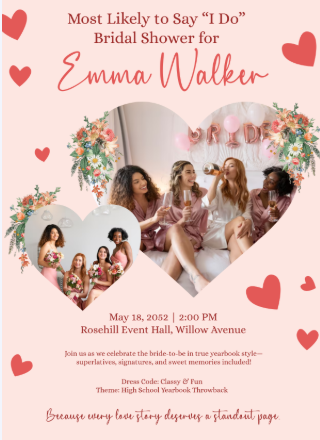
I customized it for a farewell and got tons of compliments on its elegance.
9. Prom Yearbook Template Blue Background
The Prom Yearbook Template Blue Background sets the mood with its modern, nighttime aesthetic. It’s great for prom events or senior nights, letting you combine photo spreads with captions. The blue background gives it a cinematic feel that’s both youthful and sophisticated.
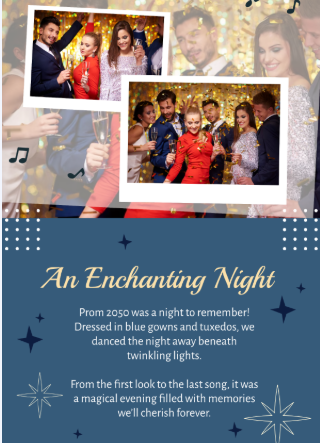
Prom themes like this make a yearbook feel cinematic, it’s pure nostalgia.
10. Blank Reunion Yearbook Template
The Blank Reunion Yearbook Template gives you full flexibility to design from scratch. It’s perfect for alumni reunions, anniversary editions, or multi-year collections. The blank structure allows you to experiment with color schemes and layouts freely.
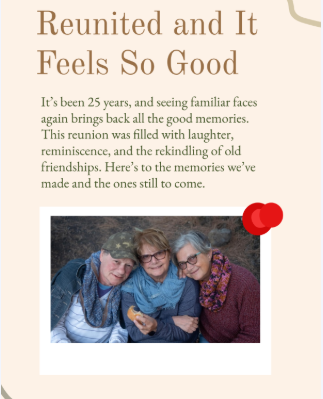
I used this one for an alumni event, super flexible and easy to adapt.
How to Edit Yearbook Presentation Themes in PDF/PNG
WPS Office is one of the most user-friendly tools I’ve used for editing and designing templates. It’s compatible with both PDF and image formats, making it ideal for personalizing any yearbook presentation theme. With WPS PDF Editor and WPS Photo Editor, you can add text, images, and even enhance visuals using AI-powered tools.
Editing the Prom Yearbook Template Blue Background in WPS PDF
Before starting, note that WPS PDF Editor lets you modify text, add graphics, and insert links easily. It’s built for non-designers, so you don’t have to worry about complex editing.
Step 1: Open WPS PDF Editor and upload your chosen template.
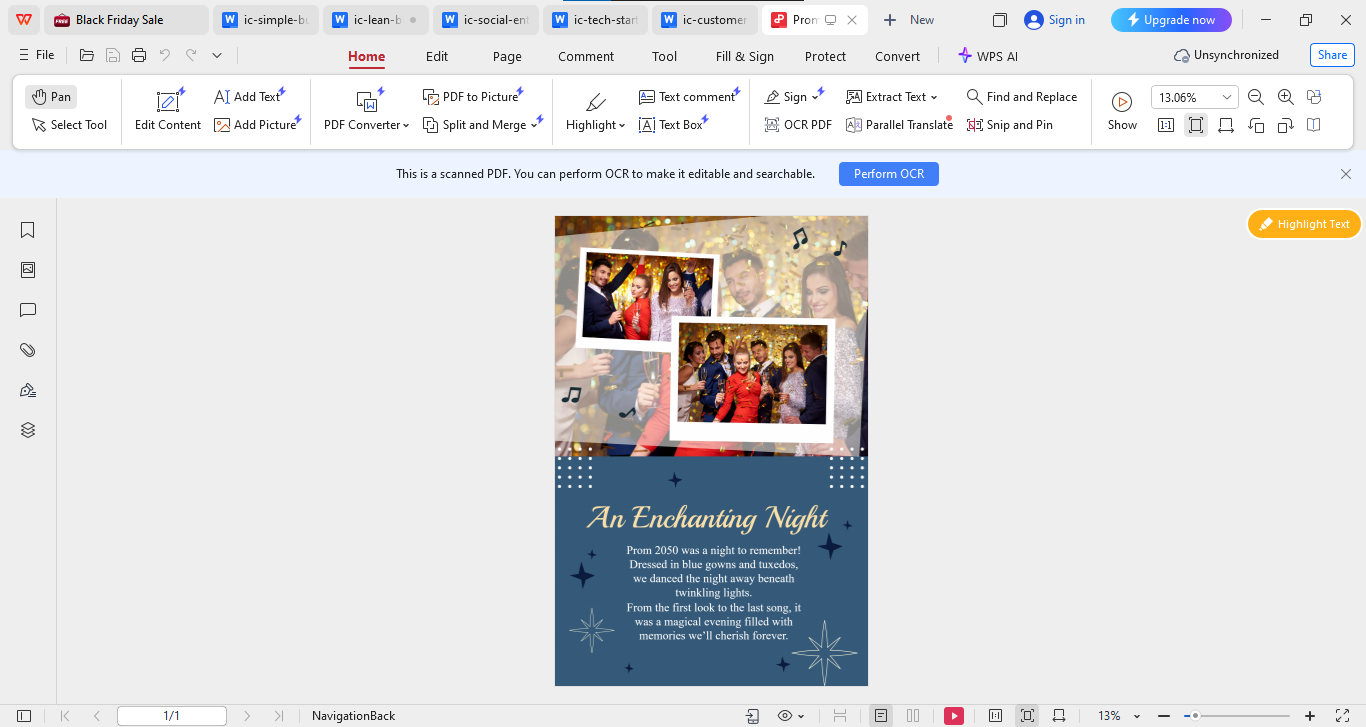
Step 2: Click on the “Edit Content” option to modify text boxes or replace images.
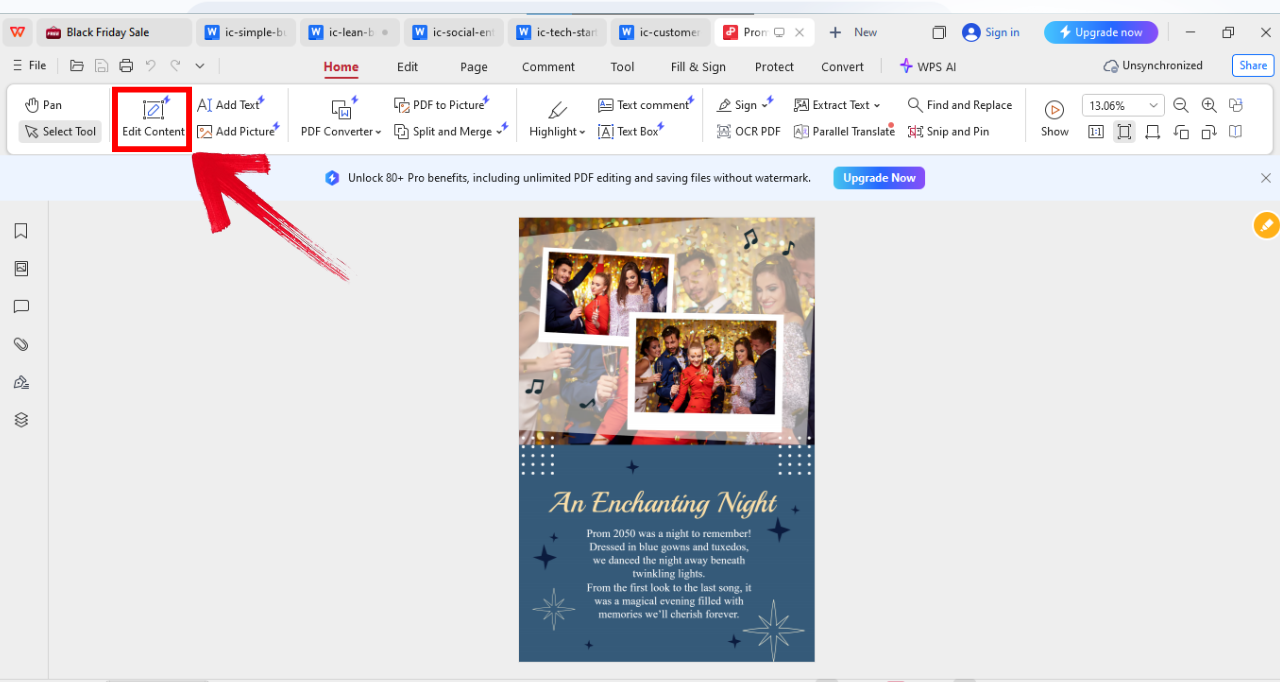
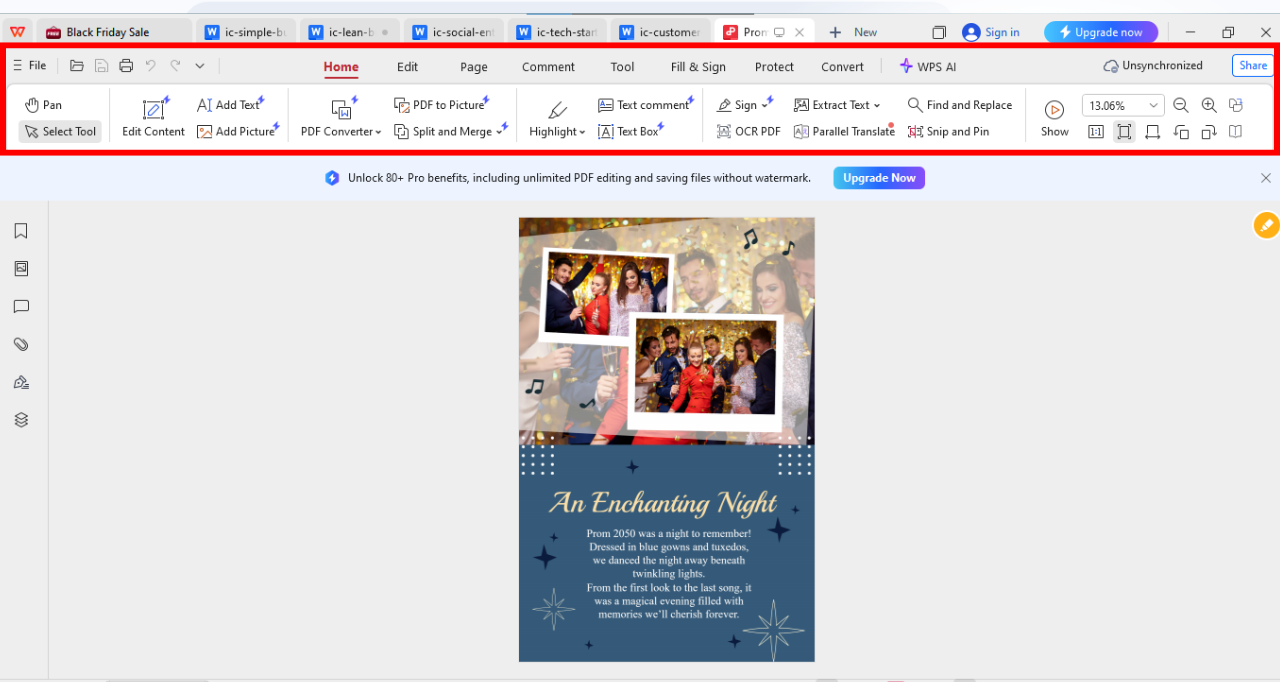
Step 3: Use the panel on the top of your screen to explore multiple editing options as per your preference and style.
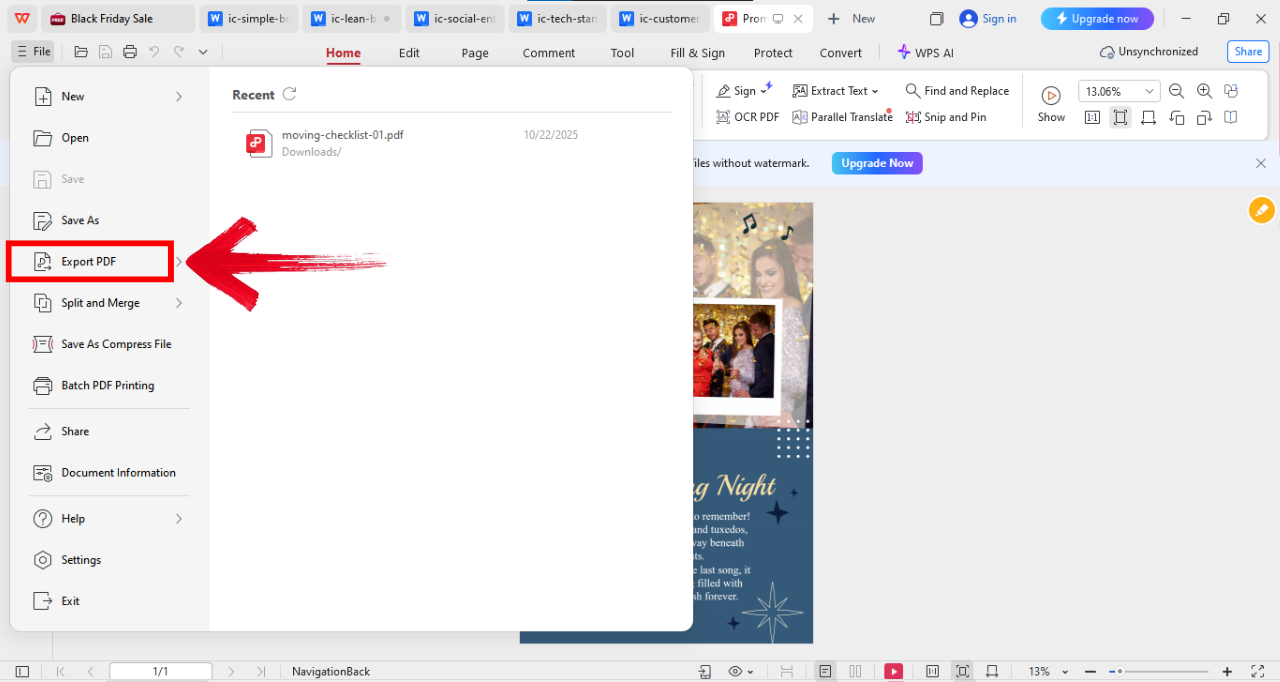
Step 4: Now click on “File” on the top left of your screen and then click “Export PDF” to save the file as PDF.
The WPS PDF Editor saved me hours. Its drag-and-drop features made design editing super intuitive.
Editing the Yearbook Collage Template in WPS Photo Editor
This one’s for when you want to go beyond text and enhance your visuals directly. The WPS Photo Editor’s AI tools help you adjust color tones, remove watermarks, and upscale quality instantly.
Step 1: Open your template in WPS Photo Editor.
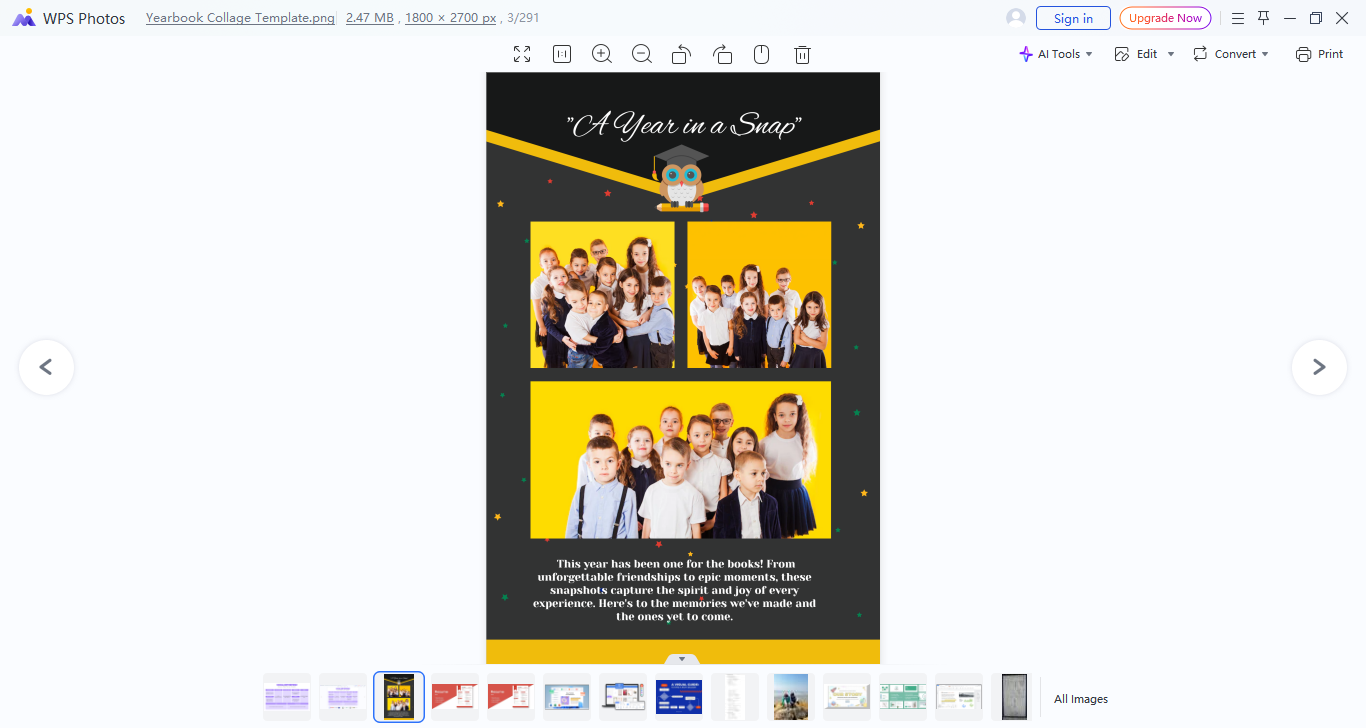
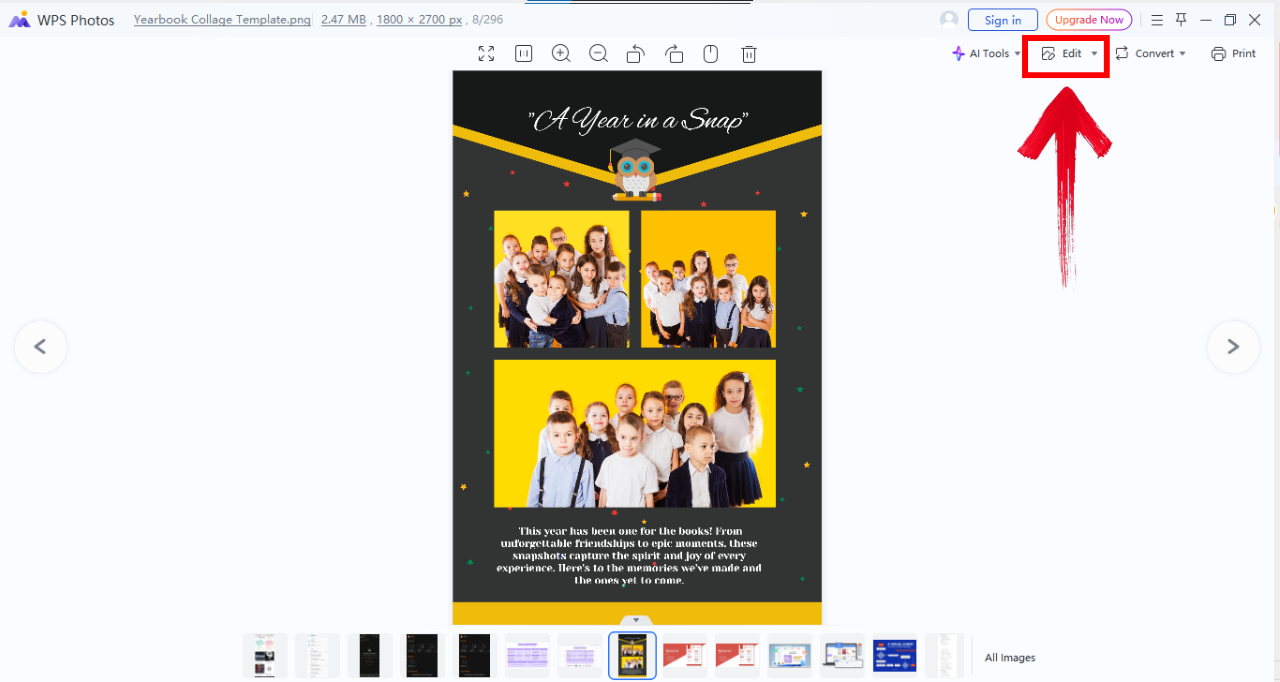
Step 2: Now click “Edit” from the top right of your screen and you’ll see an editing panel on the right side of your screen.
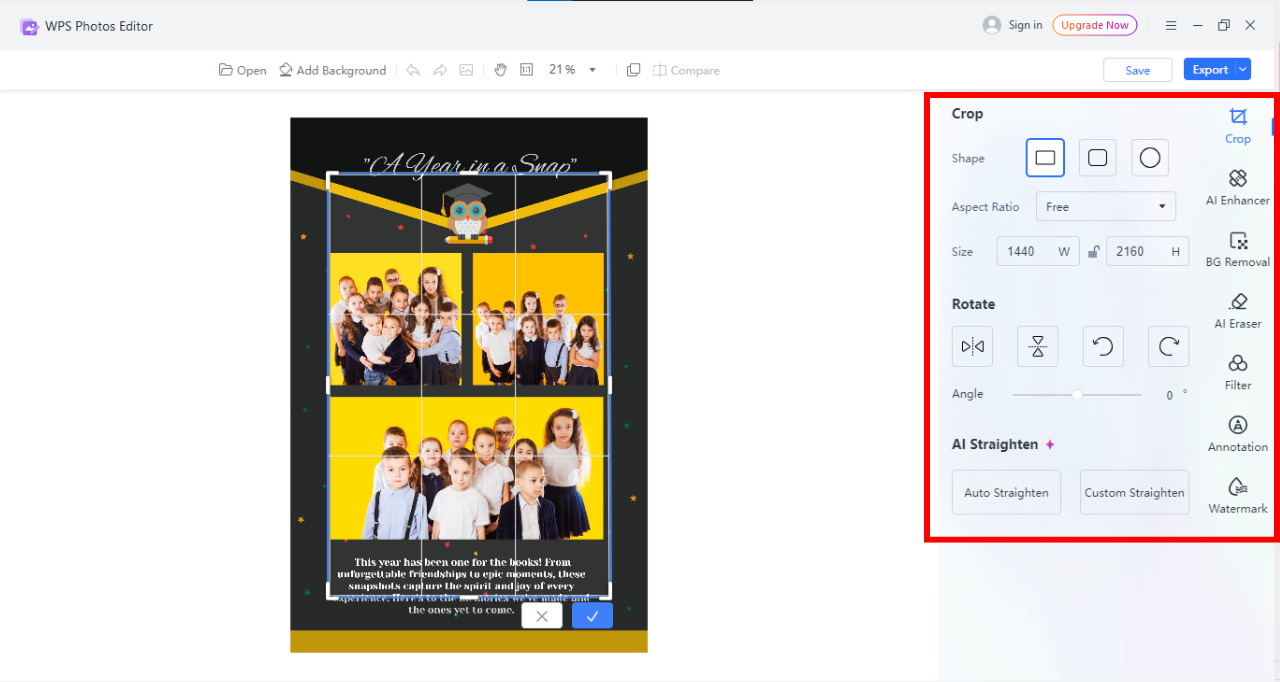
Step 3: Now use the panel on your right to implement different features to edit the image according to your preference.
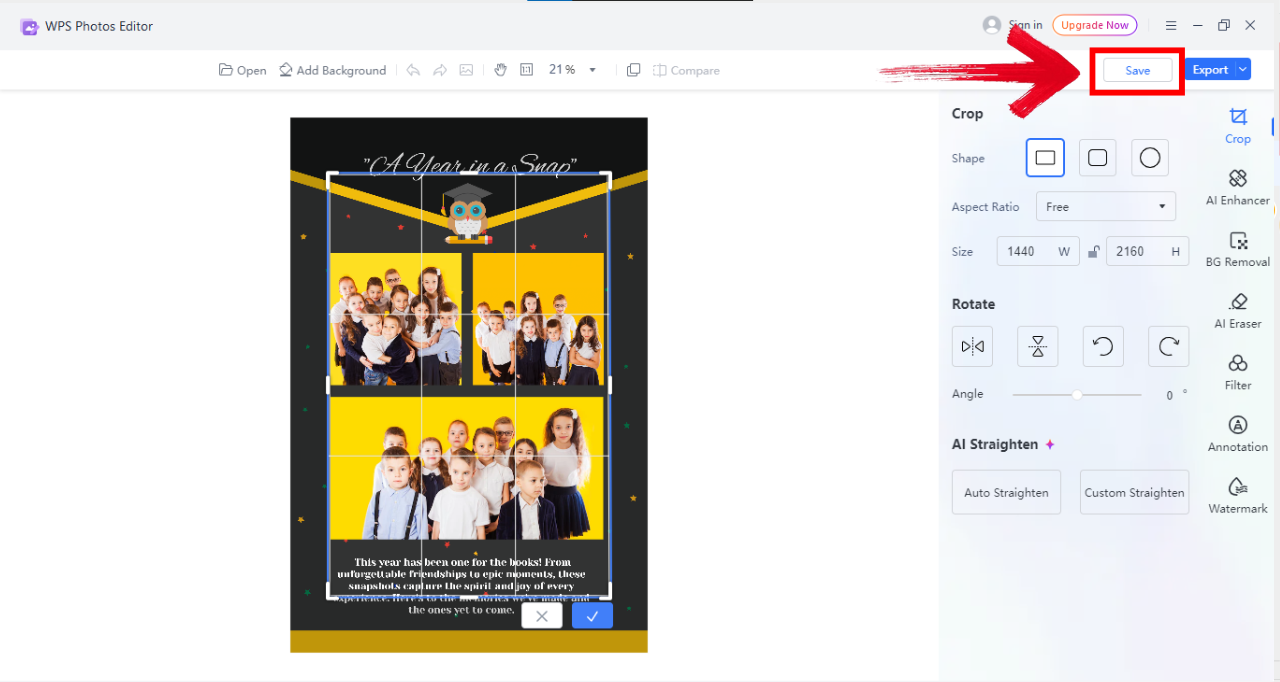
Step 4: Once you’ve explored all editing options, click on “Save” on the top right of your screen to save the image.
I was amazed at how easily I could turn dull images into polished visuals using these features.
Simplify Your Yearbook Design with WPS
After exploring these top 10 yearbook presentation themes and seeing how each one can bring your memories to life, the next step is making the design process as smooth as possible. That’s where WPS Office comes in. Instead of juggling multiple tools or struggling with complicated software, WPS Office offers an all-in-one platform to edit, enhance, and personalize your yearbook templates effortlessly.
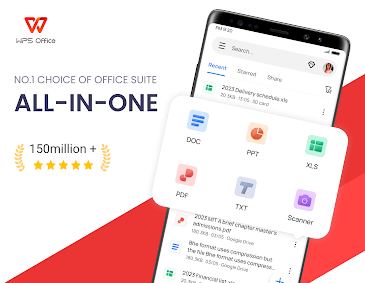
From adjusting layouts and enhancing photos to adding interactive elements, WPS Office bridges creativity with convenience, letting you focus on making your yearbook truly memorable. Its intuitive tools ensure every page looks polished and professional without any hassle.
I’ve used WPS Office for countless school projects and creative tasks. Its all-in-one nature and modern interface make it a serious competitor to Microsoft Office.
FAQs
Q1: How do I choose a theme for my yearbook presentation?
Think about your school’s culture, the vibe of your class, and the emotions you want to capture. A good theme reflects personality through visuals and tone.
Q2: Can I mix multiple yearbook presentation themes?
Absolutely. Mixing complementary ideas, like a classic layout with a modern collage, can make your design unique and layered.
Q3: What colors work best for yearbook presentation themes?
Neutral tones give a timeless look, vibrant colors bring fun, and your school colors tie everything together.
Q4: How can I make a yearbook presentation interactive?
Include QR codes, quotes, or digital polls. WPS tools let you embed these seamlessly.

'%3e%3cpath%20d='M19.9911%204.11386V6.471H18.5894C18.0775%206.471%2017.7322%206.57814%2017.5536%206.79243C17.3751%207.00671%2017.2858%207.32814%2017.2858%207.75671V9.44421H19.9019L19.5536%2012.0871H17.2858V18.8639H14.5536V12.0871H12.2769V9.44421H14.5536V7.49779C14.5536%206.39064%2014.8632%205.53201%2015.4822%204.92189C16.1013%204.31177%2016.9257%204.00671%2017.9554%204.00671C18.8304%204.00671%2019.509%204.04243%2019.9911%204.11386Z'%20fill='%23333333'/%3e%3c/g%3e%3cdefs%3e%3cclipPath%20id='clip0_2938_8199'%3e%3crect%20width='16'%20height='16'%20fill='white'%20transform='translate(8%204.00671)'/%3e%3c/clipPath%3e%3c/defs%3e%3c/svg%3e)
'%3e%3cpath%20d='M17.5237%2010.7813L23.4811%204H22.0699L16.8949%209.88693L12.7648%204H8L14.2469%2012.9029L8%2020.0133H9.4112L14.8725%2013.7952L19.2352%2020.0133H24M9.92053%205.04213H12.0885L22.0688%2019.0224H19.9003'%20fill='%23333333'/%3e%3c/g%3e%3cdefs%3e%3cclipPath%20id='clip0_2938_8200'%3e%3crect%20width='16'%20height='16.0134'%20fill='white'%20transform='translate(8%204)'/%3e%3c/clipPath%3e%3c/defs%3e%3c/svg%3e)


