

'%3e%3cpath%20d='M8%200C12.4183%200%2016%203.58172%2016%208C16%2012.4183%2012.4183%2016%208%2016C3.58172%2016%200%2012.4183%200%208C0%203.58172%203.58172%200%208%200ZM11.6162%204.38379C11.2257%203.99337%2010.5927%203.99338%2010.2021%204.38379L8%206.58594L5.79785%204.38379C5.40732%203.99334%204.77429%203.99329%204.38379%204.38379C3.99331%204.77429%203.99335%205.40733%204.38379%205.79785L6.58594%208L4.38379%2010.2021C3.99348%2010.5927%203.99341%2011.2257%204.38379%2011.6162C4.77426%2012.0066%205.40734%2012.0065%205.79785%2011.6162L8%209.41406L10.2021%2011.6162C10.5927%2012.0066%2011.2257%2012.0067%2011.6162%2011.6162C12.0067%2011.2257%2012.0066%2010.5927%2011.6162%2010.2021L9.41406%208L11.6162%205.79785C12.0066%205.40735%2012.0066%204.77429%2011.6162%204.38379Z'%20fill='%23080E17'%20fill-opacity='0.46'/%3e%3c/g%3e%3cdefs%3e%3cclipPath%20id='clip0_3761_713'%3e%3crect%20width='16'%20height='16'%20fill='white'/%3e%3c/clipPath%3e%3c/defs%3e%3c/svg%3e)




'%3e%3cpath%20fill-rule='evenodd'%20clip-rule='evenodd'%20d='M21.4999%2010.9993C21.4999%205.20009%2016.7986%200.498901%2010.9993%200.498901C5.19994%200.498901%200.498657%205.20009%200.498657%2010.9993C0.498657%2016.2404%204.33858%2020.5844%209.35855%2021.3722V14.0346H6.69238V10.9993H9.35855V8.68594C9.35855%206.05427%2010.9262%204.60062%2013.3248%204.60062C14.4736%204.60062%2015.6753%204.80571%2015.6753%204.80571V7.38979H14.3512C13.0468%207.38979%2012.64%208.19921%2012.64%209.0296V10.9993H15.5523L15.0867%2014.0346H12.64V21.3722C17.66%2020.5844%2021.4999%2016.2404%2021.4999%2010.9993Z'%20fill='%231568EA'/%3e%3c/g%3e%3c/svg%3e)


'%3e%3cpath%20d='M2.42045%2022.1876H6.31818V12.7217L0.75%208.54553V20.5171C0.75%2021.4414%201.49892%2022.1876%202.42045%2022.1876Z'%20fill='%234285F4'/%3e%3cpath%20d='M19.682%2022.1876H23.5797C24.5041%2022.1876%2025.2502%2021.4387%2025.2502%2020.5171V8.54553L19.682%2012.7217'%20fill='%2334A853'/%3e%3cpath%20d='M19.682%205.48293V12.7216L25.2502%208.54543V6.31816C25.2502%204.25236%2022.8921%203.07469%2021.2411%204.31361'%20fill='%23FBBC04'/%3e%3cpath%20d='M6.31824%2012.7217V5.48303L13.0001%2010.4944L19.6819%205.48303V12.7217L13.0001%2017.733'%20fill='%23EA4335'/%3e%3cpath%20d='M0.75%206.31816V8.54543L6.31818%2012.7216V5.48293L4.75909%204.31361C3.10534%203.07469%200.75%204.25236%200.75%206.31816Z'%20fill='%23C5221F'/%3e%3c/g%3e%3cdefs%3e%3cclipPath%20id='clip0_2954_7305'%3e%3crect%20width='24.5'%20height='18.375'%20fill='white'%20transform='translate(0.75%203.8125)'/%3e%3c/clipPath%3e%3c/defs%3e%3c/svg%3e)


A refined YouTube banner can instantly boost your channel’s identity and credibility. However, finding free, editable templates that are correctly sized and visually appealing can be quite agitating when over 70% of new creators report struggling to make their channels look professional. In this guide, I’ll introduce ten free youtube banner template downloads along with step-by-step instructions to edit them using WPS Photo, making it easy to create a ready-to-use, professional-looking banner for your channel.
10 Free YouTube Banner Templates You Can Customize Easily
A good banner is a key part of your channel’s identity. Having ready-made YouTube banner template downloads changes everything. Many creators, including myself, turn to YouTube banner design Freepik because these templates are already sized to YouTube’s 2560×1440 resolution, with the safe area in mind, so you don’t have to guess where your text or logo will appear on different devices. They also come fully editable, which means you can swap out colors, fonts, and icons without needing professional design software. Selecting a template that matches your content makes your channel feel more cohesive and instantly recognizable to viewers.
1. Gradient-Colored YouTube Banner (General Channel)
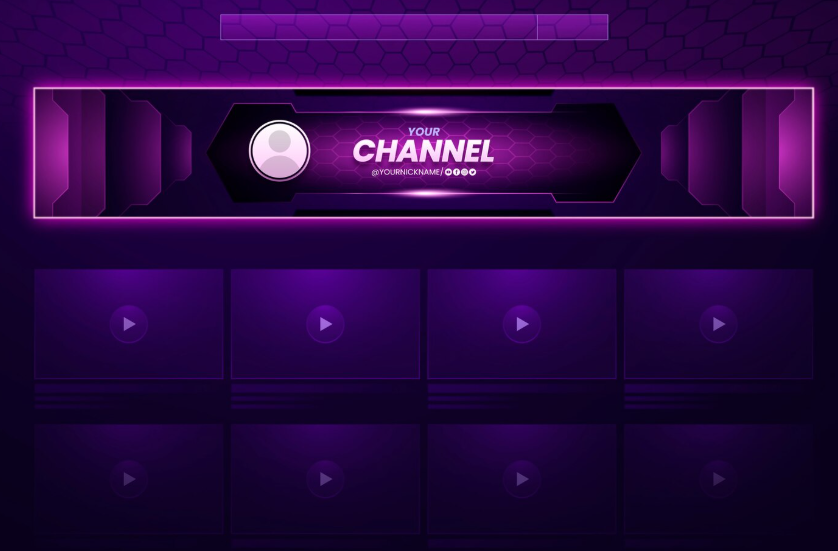
This templatepresents a striking high-tech, neon purple aesthetic that is ideally suited for gaming, streaming, or tech-focused content creators. The core of the design is the visually intense banner, framed by glowing geometric borders and overlaid with a subtle, futuristic hexagonal pattern. It provides a prominent section for your profile picture and the boldly rendered "Your Channel" title, instantly grabbing viewer attention. Below the banner, the template utilizes a clean, deep purple grid to display your video thumbnails, ensuring your entire page maintains a professional, immersive, and energetic presence.
2. Gradient Music Channel Banner
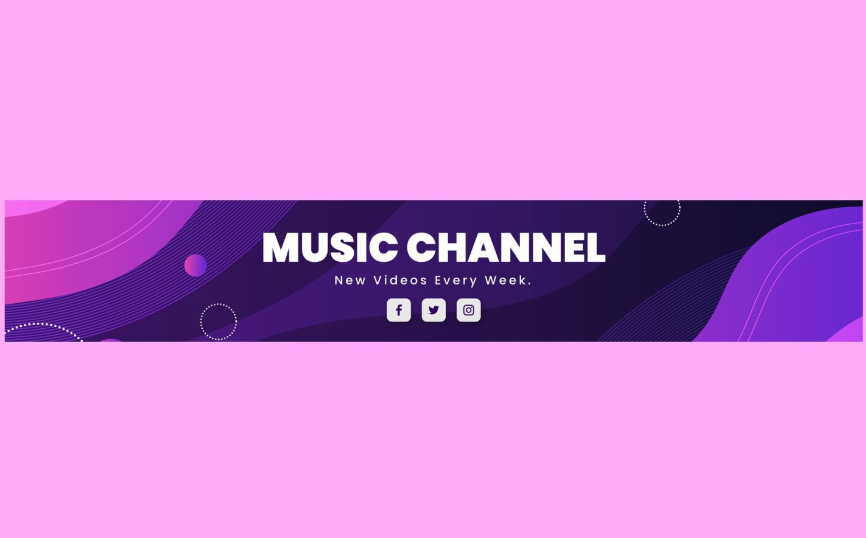
This templatefeatures a smooth, modern design characterized by a rich blend of deep purple and vibrant violet colors, making it ideal for a music, podcast, or creative arts channel. The central banner showcases dynamic, flowing wave shapes and abstract circular elements that suggest movement and rhythm. The clean, bold title "Music Channel" is centrally positioned above a customizable tagline like "New Videos Every Week". Crucially, the design prominently integrates dedicated icons for social media links, ensuring easy audience connection while maintaining a polished and energetic appearance.
3. Abstract Fluid Technology Banner
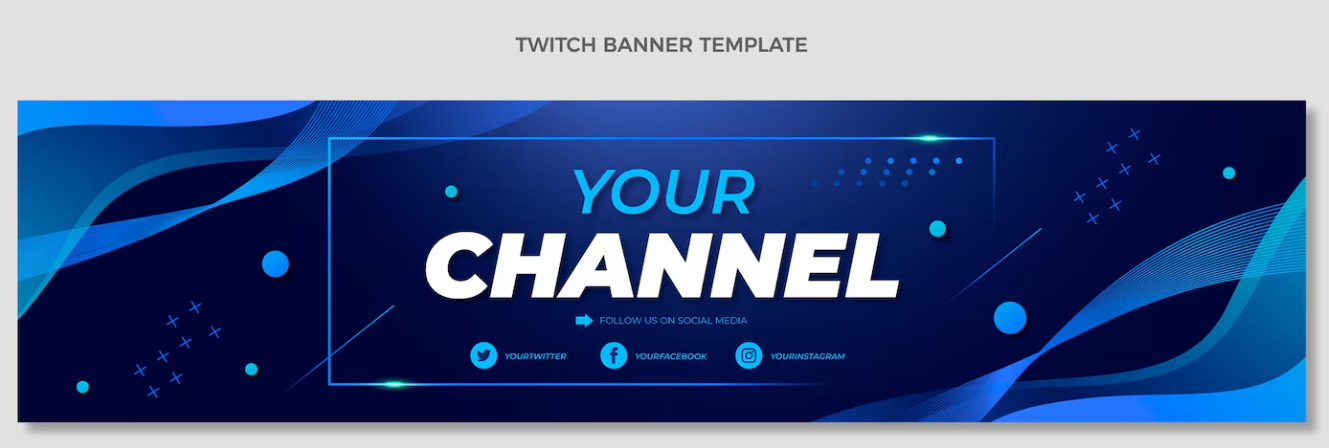
This templateis designed specifically as a Twitch Banner, utilizing a sophisticated and energetic gradient of deep navy blue fading into vibrant, electric blue. The design incorporates dynamic, flowing abstract lines that give a sense of speed and movement, perfectly suited for a live-streaming channel. The main focus is the bold, framed channel name, which stands out with bright white and light blue text against the dark background. A prominent call-to-action encourages viewers to "Follow Us On Social Media" with dedicated, easily customizable icons for Twitter, Facebook, and Instagram.
4. Creative Tech YouTube Banner
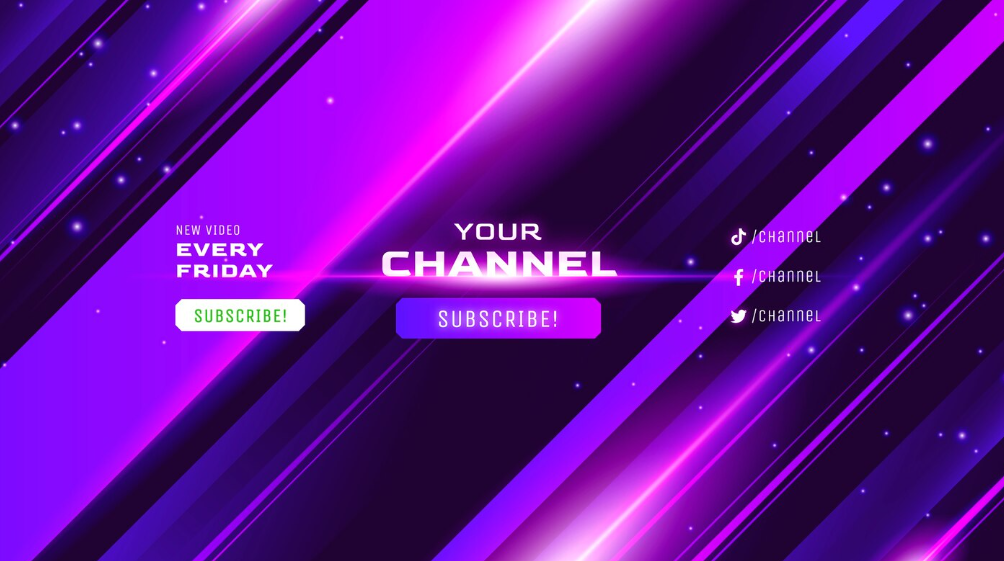
This templateis an intensely energetic banner design, dominated by a dynamic mix of deep purple and bright, streaking neon magenta lights that evoke a sense of speed and digital energy. It features a central call-to-action with prominent "Subscribe!" buttons in both white-green and purple, urging immediate engagement from visitors. The banner also clearly advertises a schedule alongside dedicated sections for integrating social media handles. This vibrant and motion-filled design is perfect for content creators in gaming, electronic music, or fast-paced entertainment.
5. Rock Channel Fire-Themed Banner
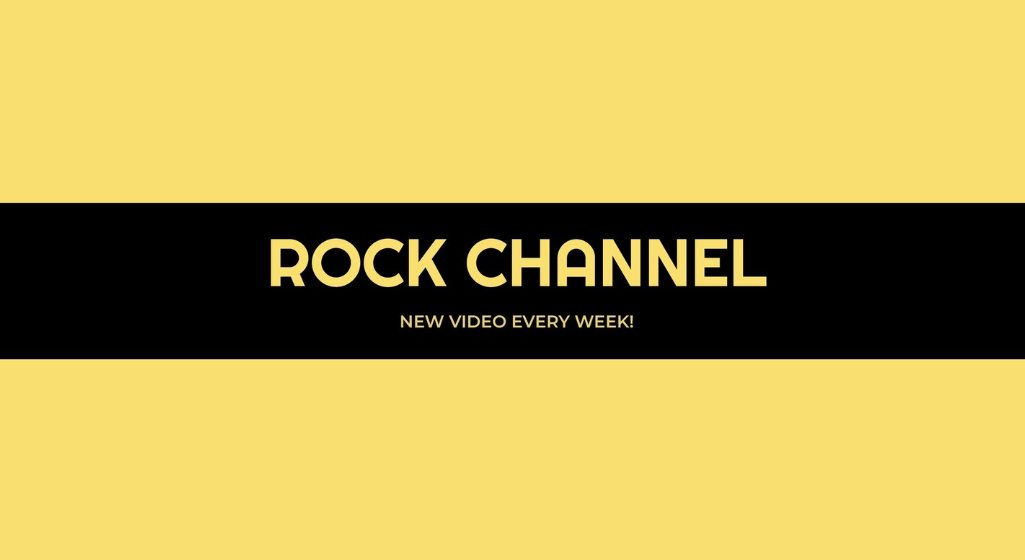
This templateis defined by its striking simplicity and high contrast, utilizing a vibrant yellow background and a prominent central black band. The design is clean, minimalist, and exceptionally effective for high-impact branding, perfectly suiting a music genre like rock or punk. The channel name is rendered in a bold, attention-grabbing font within the black strip, underneath which a clear scheduling message announces "New Video Every Week!". This template relies on a powerful, two-tone color scheme to create an instantly recognizable and professional channel identity.
6. Workout / Fitness Gradient Banner
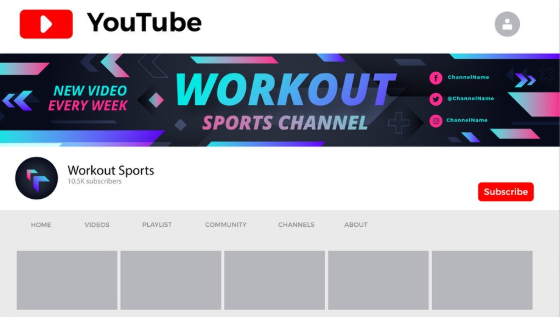
This templateis specifically tailored for a fitness or sports channel, featuring a dynamic background with dark geometric shapes and arrows suggesting motion. The design utilizes an exciting neon gradient on the main "Workout" title, ensuring it visually pops against the deep, muted background. A clear schedule notification, "New Video Every Week", is prominently displayed on the left, while space for social media handles is reserved on the right. This template expertly combines a professional, modern look with vibrant, high-energy elements to motivate viewers.
7. Minimal Flat Birthday / Personal Channel Banner
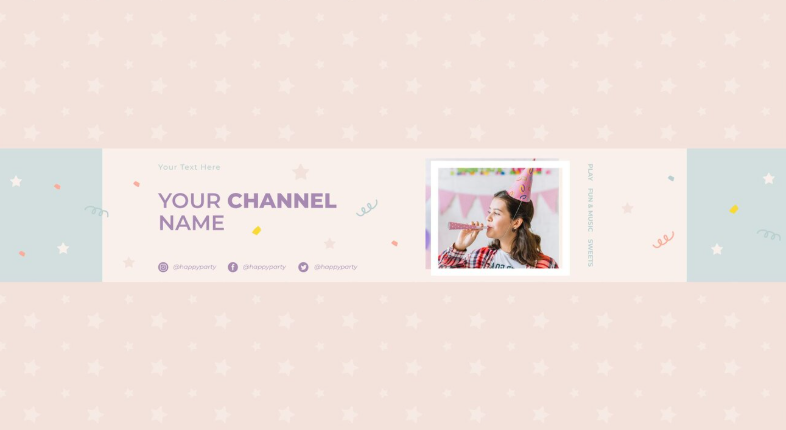
This templatefeatures a soft, pastel color palette dominated by light pink, making it perfect for channels focused on lifestyle, celebrations, crafts, or party planning. The background is subtle and charming, covered in a repetitive star pattern, while the central band is adorned with cute, scattered confetti and streamers. It includes a prominent area for a photograph or image of the host next to the channel name, giving it a friendly, personalized touch. Dedicated spaces for social media handles are included beneath the channel name, maintaining a lighthearted and approachable aesthetic.
8. Sports-Themed Creative Banner
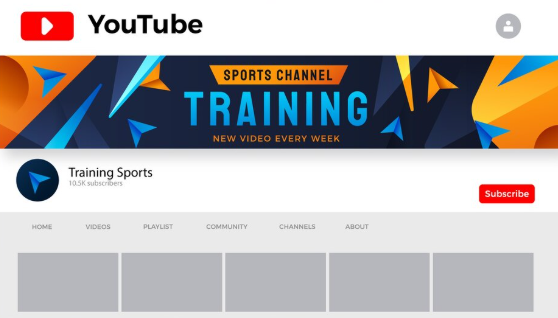
This templateis designed for a sports, fitness, or training channel, featuring a high-impact color scheme of deep navy blue, vibrant orange, and bright cyan accents. The background uses sharp, geometric and angular shapes that convey speed, dynamism, and intensity, emphasizing the concept of active training. The bold central text highlights "Training" and "Sports Channel", ensuring instant clarity on the channel's focus. The design is complemented by a clear "New VIdeo Every Week" schedule notification, providing viewers with key information in a visually engaging format.
9. Music Channel Abstract Banner
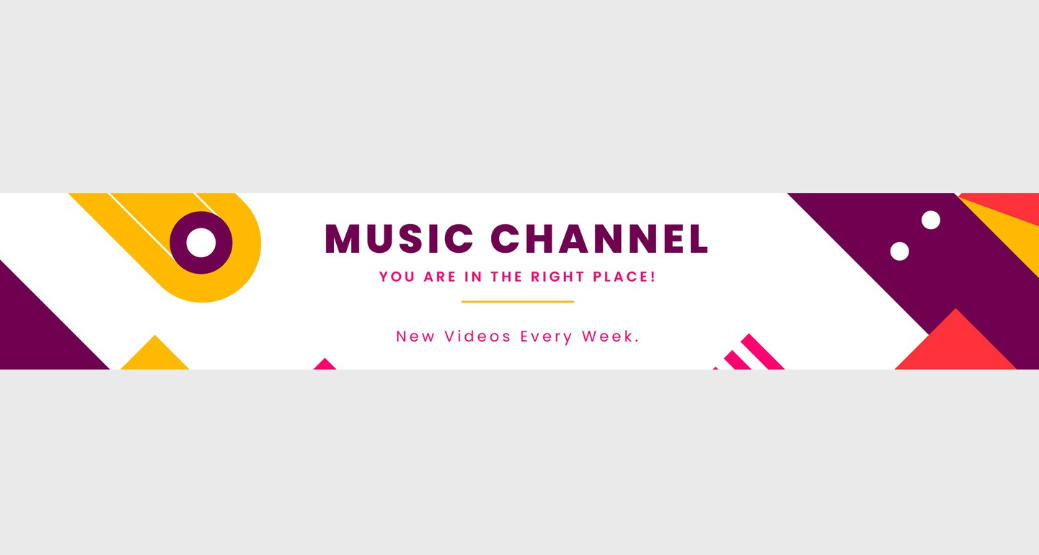
This bannerfeatures a striking, modern geometric design defined by a clean white background contrasted with bold shapes in vibrant magenta, deep purple, and bright yellow. It is perfectly suited for a Music Channel seeking a unique, artistic, and eye-catching identity. The central area clearly announces "Music Channel" and includes a welcoming tagline, "Your Are In The Right Place!", and a scheduling reminder. The use of sharp angles and solid colors gives this design a professional, abstract, and highly memorable visual appeal.
10. Xtratime Channel Banner (General Creative Banner)
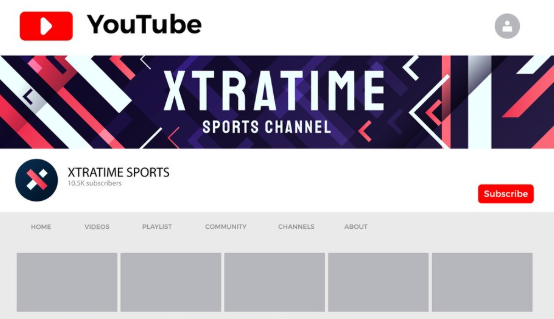
This templateis specifically branded for an "XtraTime Sports Channel", featuring a dark, energetic background with angular white and red geometric shards that suggest competition and speed. The main channel banner prominently displays the channel name in large, bold white text, capturing the viewer's attention immediately. As a channel mockup, it provides a clean example of the banner's appearance alongside the profile icon, subscriber count, and a visible 'Subscribe' button, demonstrating a ready-to-launch professional layout.
How to Use & Edit YouTube Banner Templates in WPS Photo
Once you have your YouTube channel art templates free download, the next step is to edit them to match your channel’s personality. Even minor adjustments like changing fonts, repositioning text, or modifying colors can make a big difference in how professional your banner looks. WPS Photo quickly became my go-to tool because it handles layered templates smoothly, supports PNG, JPG, and PSD files, and offers both manual and AI-assisted editing features. With it, I could replace placeholder text, insert my logo, adjust gradients, and even remove backgrounds without starting from scratch.
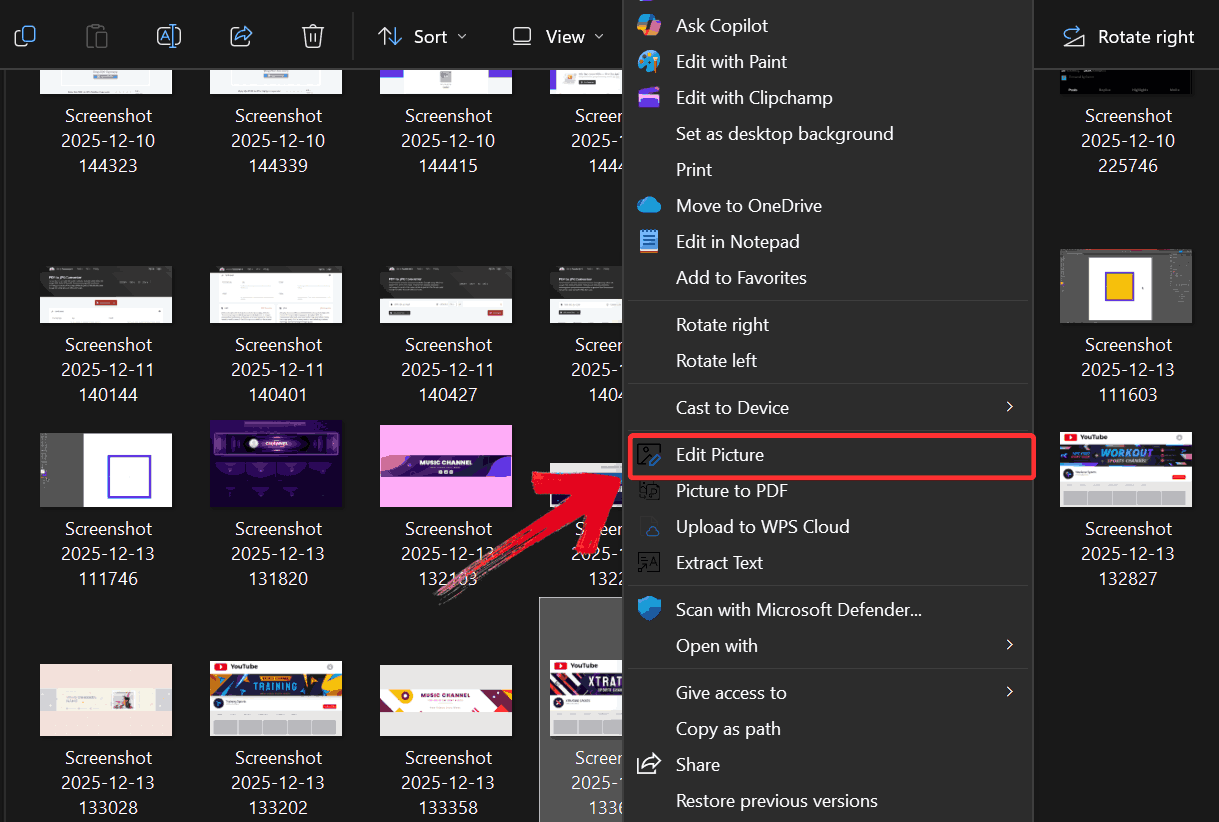
Step 1: Right-click on the YouTube banner to edit, then click on “Edit Picture” to open it in WPS Photo Editor.
Step 2: Click on “AI Enhancer” to access tools for adjusting brightness, contrast, and colors before moving on to the auto removal feature.
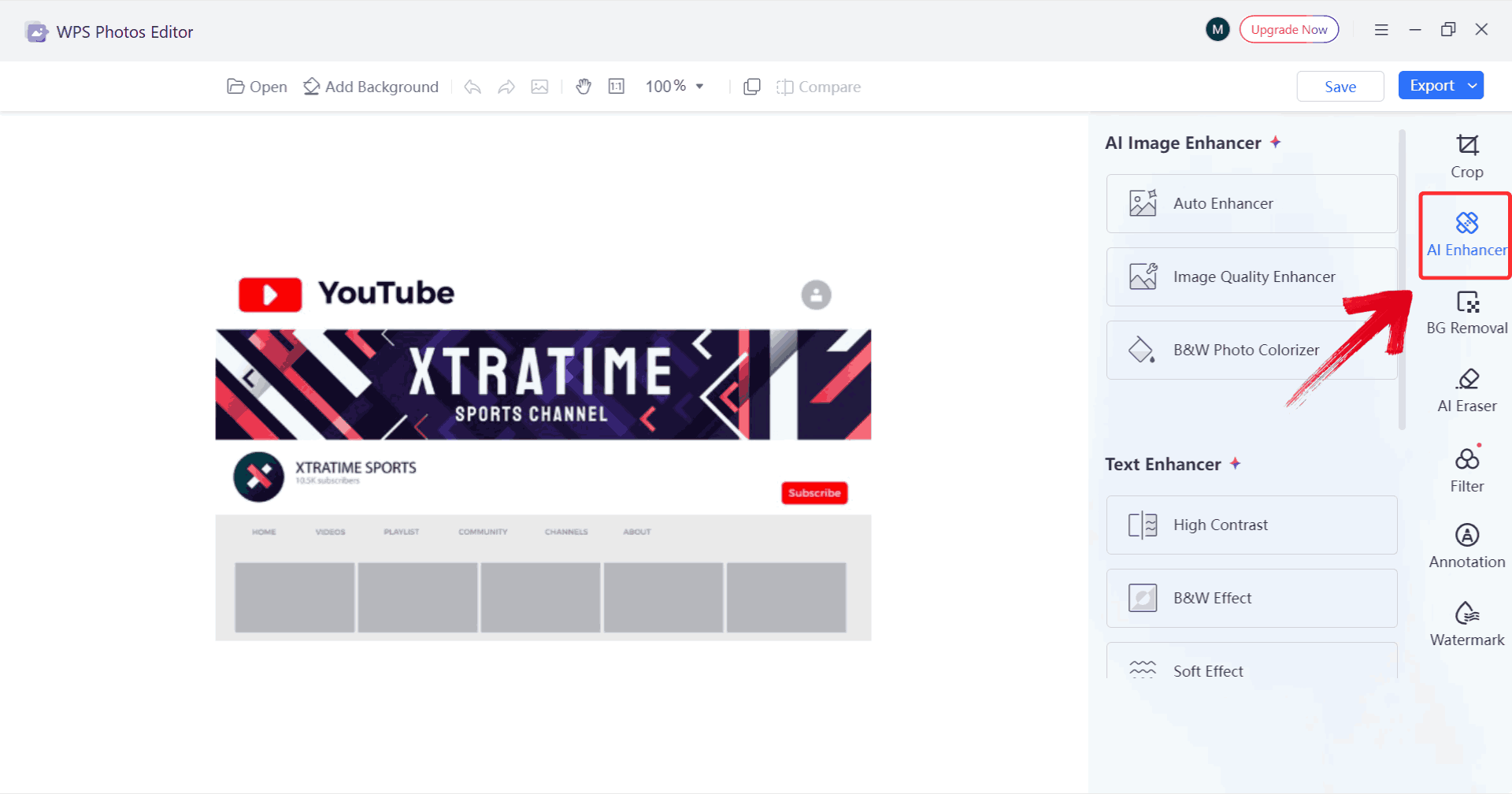
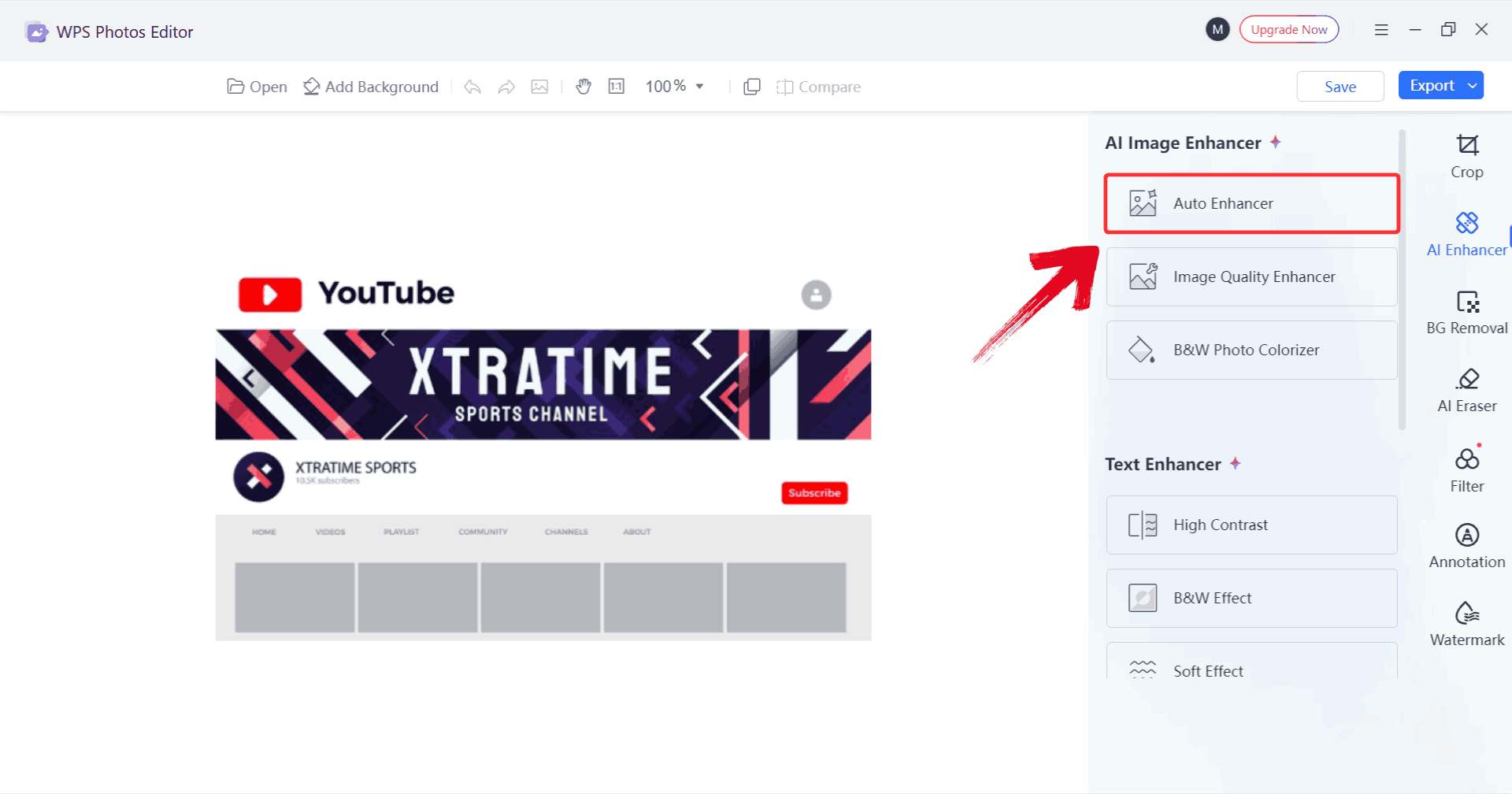
Step 3: Using the AI Enhancer, you can apply automatic improvements like “Auto Enhancer” or even use the “Text Enhancer” to refine your image further, including background removal and detail smoothing.
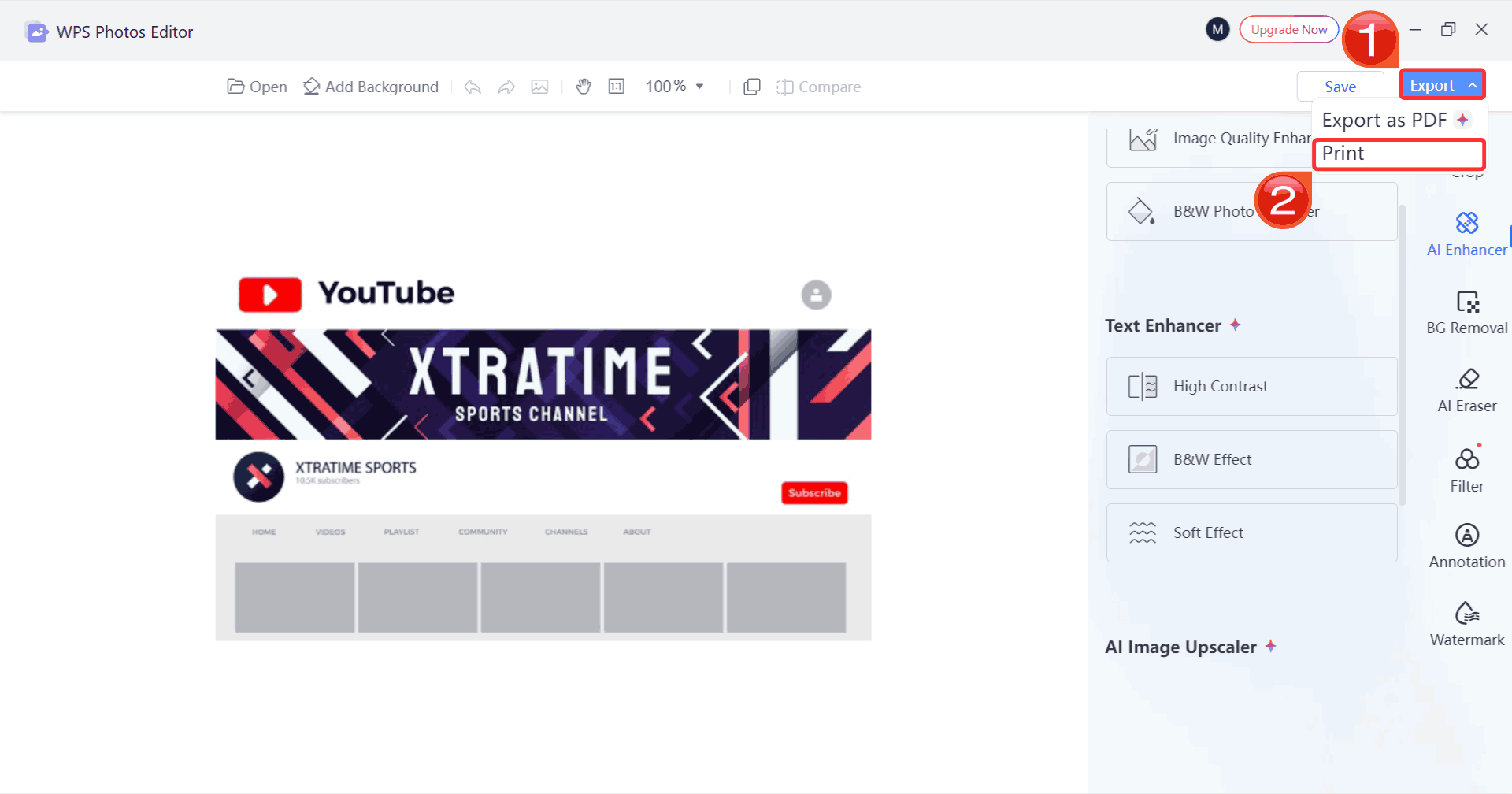
Step 4: Click on “Export” and choose the “Print” option to save your edited YouTube banner and prepare it for printing.
WPS Photo offers a range of tools to help you fine-tune your banner even further. Its AI features like Auto Enhance, Background Removal, and Portrait Retouch make adjustments fast and precise, while manual options give you full control over layer-based editing, color and gradient selection, font customization, and shape, border, or iconplacement. You can also crop and resize elements to ensure everything fits perfectly within YouTube’s safe area. Together, these tools make it easy to create a banner that truly reflects your channel’s style.
Boost Your YouTube Visuals with WPS AI Tools
For creators who are looking to elevate every aspect of their channel visuals, WPS AI goes beyond simple edits and brings AI-assisted precision to your banners, thumbnails, and profile images. Its tools for content-aware cleanup and object removal make it effortless to refine backgrounds, eliminate distractions, or reposition elements without losing quality. The high-resolution upscaling ensures that even detailed graphics remain aesthetic on all devices, and smart color correction lets you harmonize your entire channel palette quickly. With WPS, you can experiment freely with designs, enhance subtle details, and maintain a consistent, professional look across all my visuals helping your channel feel cohesive and carefully crafted.
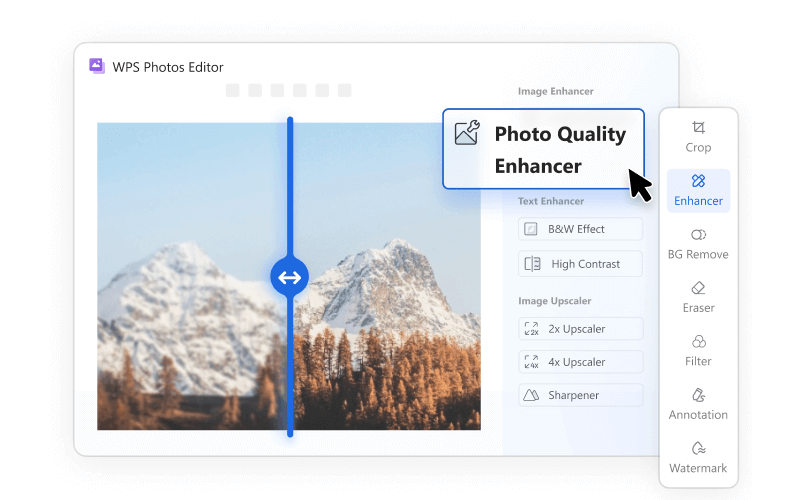
Features:
Content-Aware Cleanup: Easily remove unwanted objects or blemishes from your banner without affecting surrounding elements.
Smart Shadow & Highlight Adjustment: Balance light and shadow across your images for a more professional, dynamic look.
Batch Processing: Edit multiple images at once, saving time when updating thumbnails, banners, or social visuals.
Noise Reduction: Smooth out grainy or low-light images to ensure clean visuals.
Selective Focus & Blur: Direct viewer attention by applying focused or blurred effects to specific parts of your banner.
With these tools, refining your channel visuals becomes fast and precise. From background cleanup to color grading and perspective fixes, WPS Photo helps you maintain consistent, high-quality banners, thumbnails, and profile images. Using these features, you can create a professional, cohesive look with a fully customizable YouTube banner 2560×1440, ensuring your channel’s visuals are polished and perfectly sized for every device.
FAQs
1. Do I need design skills to use these YouTube banner templates?
Not at all. I started without any design experience. These free youtube banner template downloads are pre-formatted, and WPS Photo makes editing intuitive with AI and manual tools.
2. Are the templates compatible with YouTube’s recommended size (2560×1440)?
Yes. All the templates are sized correctly, ensuring your banner fits perfectly across devices. I always preview my work in WPS Photo before uploading to avoid misalignment.
3. Can I customize colors, gradients, and fonts in the banners?
Absolutely. WPS Photo allows you to tweak colors, apply gradients, choose fonts, and adjust icons or shapes. I usually experiment with complementary colors to match my channel’s branding.
4. Can I add my logo or profile photo to the banner?
Yes. Drag and drop your image into the template and resize it. Background removal ensures seamless integration, while auto-enhance makes your images look professional.
5. Can I use AI tools to enhance my banners?
Definitely. Features like auto-enhance, high-resolution upscaling, background removal, and color correction help your banners look polished without complicated edits.
Hit Gold with WPS
With editable YouTube banner templates, you can access visually appealing designs that are already sized for YouTube’s 2560×1440 safe area. Editing tools like WPS Photomake it easy to replace text, add logos, adjust colors, and apply gradients, all with AI-assisted enhancements. Even without design experience, you can create a professional-looking banner in minutes. The combination of ready-made templates and intuitive editing in WPS ensures your channel branding is consistent and cohesive. Advanced features like background removal, high-resolution upscaling, and smart color correction give you flexibility to refine every element.

'%3e%3cpath%20d='M19.9911%204.11386V6.471H18.5894C18.0775%206.471%2017.7322%206.57814%2017.5536%206.79243C17.3751%207.00671%2017.2858%207.32814%2017.2858%207.75671V9.44421H19.9019L19.5536%2012.0871H17.2858V18.8639H14.5536V12.0871H12.2769V9.44421H14.5536V7.49779C14.5536%206.39064%2014.8632%205.53201%2015.4822%204.92189C16.1013%204.31177%2016.9257%204.00671%2017.9554%204.00671C18.8304%204.00671%2019.509%204.04243%2019.9911%204.11386Z'%20fill='%23333333'/%3e%3c/g%3e%3cdefs%3e%3cclipPath%20id='clip0_2938_8199'%3e%3crect%20width='16'%20height='16'%20fill='white'%20transform='translate(8%204.00671)'/%3e%3c/clipPath%3e%3c/defs%3e%3c/svg%3e)
'%3e%3cpath%20d='M17.5237%2010.7813L23.4811%204H22.0699L16.8949%209.88693L12.7648%204H8L14.2469%2012.9029L8%2020.0133H9.4112L14.8725%2013.7952L19.2352%2020.0133H24M9.92053%205.04213H12.0885L22.0688%2019.0224H19.9003'%20fill='%23333333'/%3e%3c/g%3e%3cdefs%3e%3cclipPath%20id='clip0_2938_8200'%3e%3crect%20width='16'%20height='16.0134'%20fill='white'%20transform='translate(8%204)'/%3e%3c/clipPath%3e%3c/defs%3e%3c/svg%3e)


