

'%3e%3cpath%20d='M8%200C12.4183%200%2016%203.58172%2016%208C16%2012.4183%2012.4183%2016%208%2016C3.58172%2016%200%2012.4183%200%208C0%203.58172%203.58172%200%208%200ZM11.6162%204.38379C11.2257%203.99337%2010.5927%203.99338%2010.2021%204.38379L8%206.58594L5.79785%204.38379C5.40732%203.99334%204.77429%203.99329%204.38379%204.38379C3.99331%204.77429%203.99335%205.40733%204.38379%205.79785L6.58594%208L4.38379%2010.2021C3.99348%2010.5927%203.99341%2011.2257%204.38379%2011.6162C4.77426%2012.0066%205.40734%2012.0065%205.79785%2011.6162L8%209.41406L10.2021%2011.6162C10.5927%2012.0066%2011.2257%2012.0067%2011.6162%2011.6162C12.0067%2011.2257%2012.0066%2010.5927%2011.6162%2010.2021L9.41406%208L11.6162%205.79785C12.0066%205.40735%2012.0066%204.77429%2011.6162%204.38379Z'%20fill='%23080E17'%20fill-opacity='0.46'/%3e%3c/g%3e%3cdefs%3e%3cclipPath%20id='clip0_3761_713'%3e%3crect%20width='16'%20height='16'%20fill='white'/%3e%3c/clipPath%3e%3c/defs%3e%3c/svg%3e)



'%3e%3cpath%20fill-rule='evenodd'%20clip-rule='evenodd'%20d='M21.4999%2010.9993C21.4999%205.20009%2016.7986%200.498901%2010.9993%200.498901C5.19994%200.498901%200.498657%205.20009%200.498657%2010.9993C0.498657%2016.2404%204.33858%2020.5844%209.35855%2021.3722V14.0346H6.69238V10.9993H9.35855V8.68594C9.35855%206.05427%2010.9262%204.60062%2013.3248%204.60062C14.4736%204.60062%2015.6753%204.80571%2015.6753%204.80571V7.38979H14.3512C13.0468%207.38979%2012.64%208.19921%2012.64%209.0296V10.9993H15.5523L15.0867%2014.0346H12.64V21.3722C17.66%2020.5844%2021.4999%2016.2404%2021.4999%2010.9993Z'%20fill='%231568EA'/%3e%3c/g%3e%3c/svg%3e)


'%3e%3cpath%20d='M2.42045%2022.1876H6.31818V12.7217L0.75%208.54553V20.5171C0.75%2021.4414%201.49892%2022.1876%202.42045%2022.1876Z'%20fill='%234285F4'/%3e%3cpath%20d='M19.682%2022.1876H23.5797C24.5041%2022.1876%2025.2502%2021.4387%2025.2502%2020.5171V8.54553L19.682%2012.7217'%20fill='%2334A853'/%3e%3cpath%20d='M19.682%205.48293V12.7216L25.2502%208.54543V6.31816C25.2502%204.25236%2022.8921%203.07469%2021.2411%204.31361'%20fill='%23FBBC04'/%3e%3cpath%20d='M6.31824%2012.7217V5.48303L13.0001%2010.4944L19.6819%205.48303V12.7217L13.0001%2017.733'%20fill='%23EA4335'/%3e%3cpath%20d='M0.75%206.31816V8.54543L6.31818%2012.7216V5.48293L4.75909%204.31361C3.10534%203.07469%200.75%204.25236%200.75%206.31816Z'%20fill='%23C5221F'/%3e%3c/g%3e%3cdefs%3e%3cclipPath%20id='clip0_2954_7305'%3e%3crect%20width='24.5'%20height='18.375'%20fill='white'%20transform='translate(0.75%203.8125)'/%3e%3c/clipPath%3e%3c/defs%3e%3c/svg%3e)


Most students do not need more apps - they need the five that match the five things studying actually involves: capturing notes, starting despite your phone, remembering what you read, handing work in on time, and getting the essay or the PDF out the door. Pick one app per job, install it this week, and stop looking for a better list. Here is the free pick for each one.
Best Study Apps for Students: Free Tools by Study Task
Note-Taking and Organization Apps for Students
Notes are where most study stacks fall apart: three apps, half your notes in each, none of them searchable when an exam comes round. Choose one home for notes and one rule for what goes in it.
Notion is the all-rounder - pages, databases and a course dashboard in one workspace, with a free education plan for students who sign up with a school address.
OneNote is the unglamorous, reliable option: free, syncs everywhere, and handles typing, handwriting and pasted screenshots in the same page.
Obsidian stores plain text files on your own machine and links them together, which suits subjects where the connections between topics matter more than the formatting.
Google Keep is the quick-capture layer for reading references, quotes and reminders that would otherwise disappear into your camera roll.
Note taking and organizing study material


Focus Apps for Students Who Keep Losing the Evening
A study app cannot help while the phone is winning. The fix is one timer plus one block, not a productivity system.
Forest grows a virtual tree while you keep the phone alone; leave the app and the tree dies. It is free on Android and a paid download on iPhone, and it works because you feel the loss.
Cold Turkey blocks sites and apps on a desktop for a set period, which is the practical answer for laptop study sessions.
A plain timer is still the cheapest option: 25 minutes on, 5 off, four rounds, then a real break. Keep it in the same app as your task list so you start a session instead of planning one.
Focus timer that blocks notifications
Memorization Apps for Students: Spaced Repetition
Re-reading feels productive and mostly is not. The method with the strongest evidence is spaced repetition: recall the answer, then see the card again just before you would forget it.
Anki is the reference tool - free on desktop and Android, paid on iPhone - and its scheduling algorithm handles the intervals for you. Best for high-stakes exams where repetition pays.
Quizlet has a bigger free library: search a topic and there is often already a set waiting, which saves the hours you would spend authoring cards.
Khan Academy fills the gaps a flashcard cannot: free video explanations and practice problems for maths, sciences and more when the lecture did not land.
Spaced repetition flashcards for revision
Assignment and Deadline Apps for Students
Deadlines slip because they live in five places: a syllabus PDF, an email, a group chat, your head and a calendar you never open. Consolidate them once.
Google Calendar is the deadline layer most students already have and barely use. Put study sessions in as events and the spacing of your revision schedules itself.
Todoist handles the task layer - due dates, priorities, repeating items and a calm view of what is next, with a workable free tier.
MyStudyLife or a paper planner suits timetable-heavy weeks, where what you need is a weekly grid rather than a backlog.
Weekly planner tracking assignment progress
Document and PDF Apps for Students
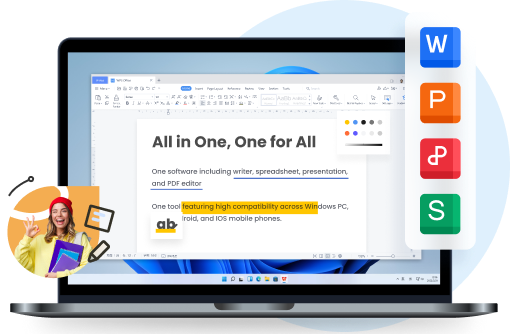
Every course ends in a file: the essay, the lab report, the reading you have to annotate, the slides you present. This is where a free office suite replaces three half-finished tools, and where WPS on your phone keeps the reading and the editing in one place.
WPS Office writes the essay, builds the slides and opens the PDF you were sent - with highlighting, comments and form filling on the same file.
Zotero stays free and keeps citations in order, which matters the moment a reference list runs past thirty sources.
Otter-style transcription is worth a look for lecture-heavy weeks, provided you check names and numbers against the recording afterwards.
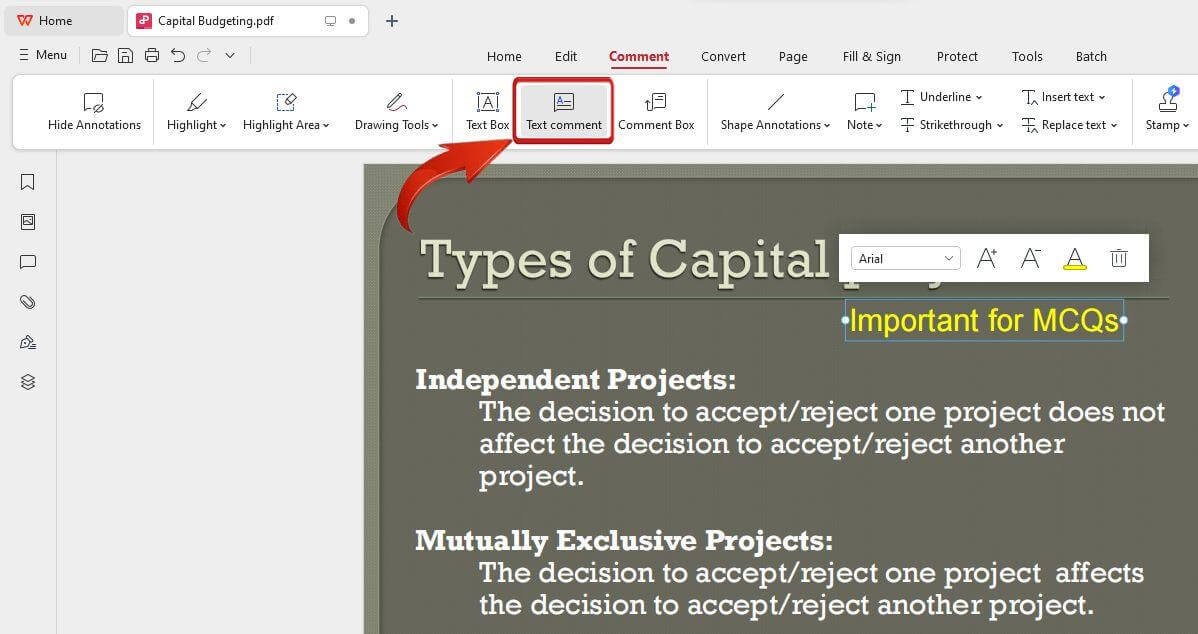
Adding a text comment to a PDF in WPS
The Best Free All-in-One: WPS Office
If you only install one thing from this list, make it the app that covers the documents your grades actually come from. WPS Office is free, light enough for an old laptop, and covers the three formats every course uses - Writer for essays, Presentation for slides and the PDF tools for anything a lecturer sends you. You can open a PDF reading list, highlight it, add comments, convert it for editing, and hand in the finished essay from the same window.
Free: writing, spreadsheets, slides, PDF annotation and conversion on desktop and mobile.
One install: no juggling three apps for one assignment, and files stay compatible with Word, Excel and PowerPoint.
Works on the devices you own: Windows, Mac, Android and iOS, so a draft started on a phone finishes on a laptop.
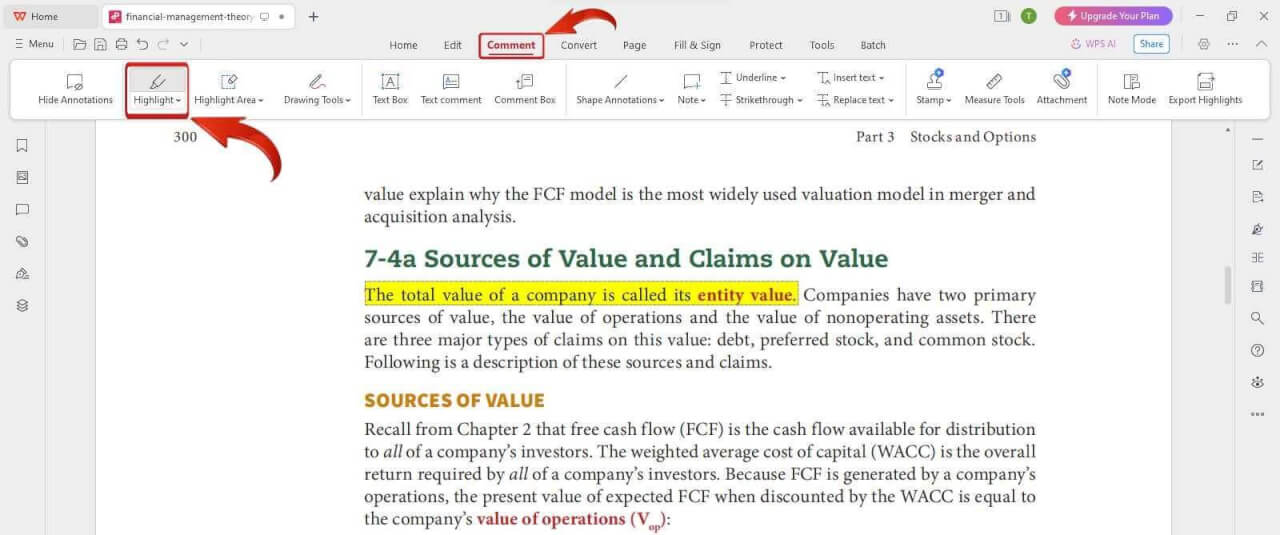
Highlighting a PDF reading list in WPS
FAQs
1. What are the best free study apps for students?
For notes, Notion or OneNote; for focus, Forest or a plain Pomodoro timer; for memory, Anki or Quizlet; for deadlines, Google Calendar with Todoist; and for documents, WPS Office. All have a usable free tier.
2. Is Anki worth learning for exams?
If your exam rewards recall - definitions, vocabulary, anatomy, formulas - yes. The first week of card making feels slow, but reviewing cards you already own is far cheaper than re-reading a textbook, and the scheduling does the spacing for you.
3. Do study apps actually improve grades?
Apps that change what you do - forcing recall, blocking distractions, spacing review - have the strongest evidence. Apps that only change where your notes live mostly save time and stress, which is still worth having.
4. Can one app do notes, tasks and documents?
Notion covers notes and planning well but is not built for submitting a formatted essay or editing a PDF, so most students keep a document suite alongside it. WPS Office is the usual pairing.
5. How many study apps should a student use?
Five is plenty, one per job: notes, focus, memory, deadlines, documents. Cutting back is often more effective than adding another tool.


'%3e%3cpath%20d='M19.9911%204.11386V6.471H18.5894C18.0775%206.471%2017.7322%206.57814%2017.5536%206.79243C17.3751%207.00671%2017.2858%207.32814%2017.2858%207.75671V9.44421H19.9019L19.5536%2012.0871H17.2858V18.8639H14.5536V12.0871H12.2769V9.44421H14.5536V7.49779C14.5536%206.39064%2014.8632%205.53201%2015.4822%204.92189C16.1013%204.31177%2016.9257%204.00671%2017.9554%204.00671C18.8304%204.00671%2019.509%204.04243%2019.9911%204.11386Z'%20fill='%23333333'/%3e%3c/g%3e%3cdefs%3e%3cclipPath%20id='clip0_2938_8199'%3e%3crect%20width='16'%20height='16'%20fill='white'%20transform='translate(8%204.00671)'/%3e%3c/clipPath%3e%3c/defs%3e%3c/svg%3e)
'%3e%3cpath%20d='M17.5237%2010.7813L23.4811%204H22.0699L16.8949%209.88693L12.7648%204H8L14.2469%2012.9029L8%2020.0133H9.4112L14.8725%2013.7952L19.2352%2020.0133H24M9.92053%205.04213H12.0885L22.0688%2019.0224H19.9003'%20fill='%23333333'/%3e%3c/g%3e%3cdefs%3e%3cclipPath%20id='clip0_2938_8200'%3e%3crect%20width='16'%20height='16.0134'%20fill='white'%20transform='translate(8%204)'/%3e%3c/clipPath%3e%3c/defs%3e%3c/svg%3e)


