

'%3e%3cpath%20d='M8%200C12.4183%200%2016%203.58172%2016%208C16%2012.4183%2012.4183%2016%208%2016C3.58172%2016%200%2012.4183%200%208C0%203.58172%203.58172%200%208%200ZM11.6162%204.38379C11.2257%203.99337%2010.5927%203.99338%2010.2021%204.38379L8%206.58594L5.79785%204.38379C5.40732%203.99334%204.77429%203.99329%204.38379%204.38379C3.99331%204.77429%203.99335%205.40733%204.38379%205.79785L6.58594%208L4.38379%2010.2021C3.99348%2010.5927%203.99341%2011.2257%204.38379%2011.6162C4.77426%2012.0066%205.40734%2012.0065%205.79785%2011.6162L8%209.41406L10.2021%2011.6162C10.5927%2012.0066%2011.2257%2012.0067%2011.6162%2011.6162C12.0067%2011.2257%2012.0066%2010.5927%2011.6162%2010.2021L9.41406%208L11.6162%205.79785C12.0066%205.40735%2012.0066%204.77429%2011.6162%204.38379Z'%20fill='%23080E17'%20fill-opacity='0.46'/%3e%3c/g%3e%3cdefs%3e%3cclipPath%20id='clip0_3761_713'%3e%3crect%20width='16'%20height='16'%20fill='white'/%3e%3c/clipPath%3e%3c/defs%3e%3c/svg%3e)



'%3e%3cpath%20fill-rule='evenodd'%20clip-rule='evenodd'%20d='M21.4999%2010.9993C21.4999%205.20009%2016.7986%200.498901%2010.9993%200.498901C5.19994%200.498901%200.498657%205.20009%200.498657%2010.9993C0.498657%2016.2404%204.33858%2020.5844%209.35855%2021.3722V14.0346H6.69238V10.9993H9.35855V8.68594C9.35855%206.05427%2010.9262%204.60062%2013.3248%204.60062C14.4736%204.60062%2015.6753%204.80571%2015.6753%204.80571V7.38979H14.3512C13.0468%207.38979%2012.64%208.19921%2012.64%209.0296V10.9993H15.5523L15.0867%2014.0346H12.64V21.3722C17.66%2020.5844%2021.4999%2016.2404%2021.4999%2010.9993Z'%20fill='%231568EA'/%3e%3c/g%3e%3c/svg%3e)


'%3e%3cpath%20d='M2.42045%2022.1876H6.31818V12.7217L0.75%208.54553V20.5171C0.75%2021.4414%201.49892%2022.1876%202.42045%2022.1876Z'%20fill='%234285F4'/%3e%3cpath%20d='M19.682%2022.1876H23.5797C24.5041%2022.1876%2025.2502%2021.4387%2025.2502%2020.5171V8.54553L19.682%2012.7217'%20fill='%2334A853'/%3e%3cpath%20d='M19.682%205.48293V12.7216L25.2502%208.54543V6.31816C25.2502%204.25236%2022.8921%203.07469%2021.2411%204.31361'%20fill='%23FBBC04'/%3e%3cpath%20d='M6.31824%2012.7217V5.48303L13.0001%2010.4944L19.6819%205.48303V12.7217L13.0001%2017.733'%20fill='%23EA4335'/%3e%3cpath%20d='M0.75%206.31816V8.54543L6.31818%2012.7216V5.48293L4.75909%204.31361C3.10534%203.07469%200.75%204.25236%200.75%206.31816Z'%20fill='%23C5221F'/%3e%3c/g%3e%3cdefs%3e%3cclipPath%20id='clip0_2954_7305'%3e%3crect%20width='24.5'%20height='18.375'%20fill='white'%20transform='translate(0.75%203.8125)'/%3e%3c/clipPath%3e%3c/defs%3e%3c/svg%3e)


The landscape of AI-assisted writing just shifted. On April 11, 2026, Anthropic officially released a beta version of its Claude assistant as an add-in for Microsoft Word. This strategic integration is aimed primarily at professionals who work intensively with documents on a daily basis, and it serves as the final piece of the puzzle following Anthropic's successful launches in Excel and PowerPoint back in February 2026.
What is Claude for Word?
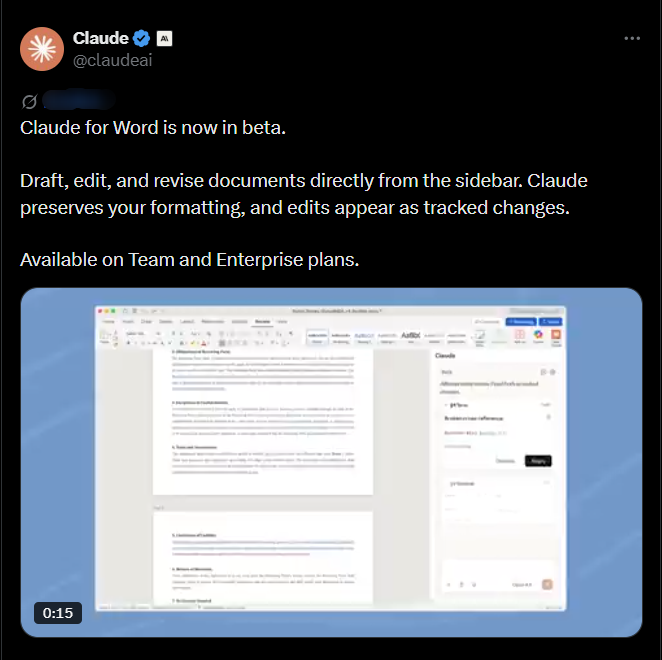
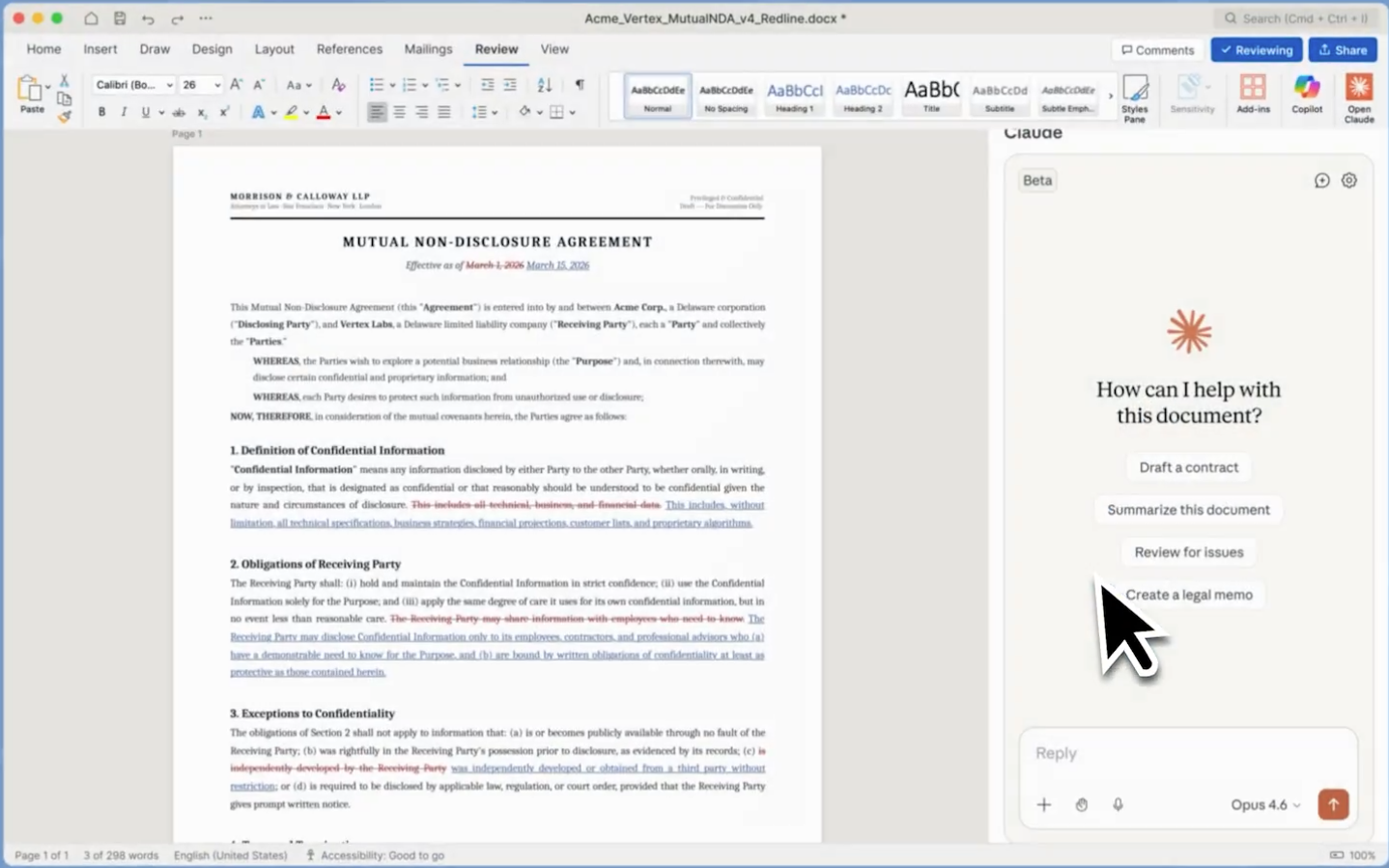
According to the official announcement, Claude for Word is a dedicated sidebar integration that allows users to draft, edit, and revise documents in real-time. Unlike basic AI extensions, Claude for Word is built with "document awareness," meaning it understands the context of your entire file.
Key Features of the Beta Release:
Native Sidebar Access: Chat with Claude without ever leaving your document window.
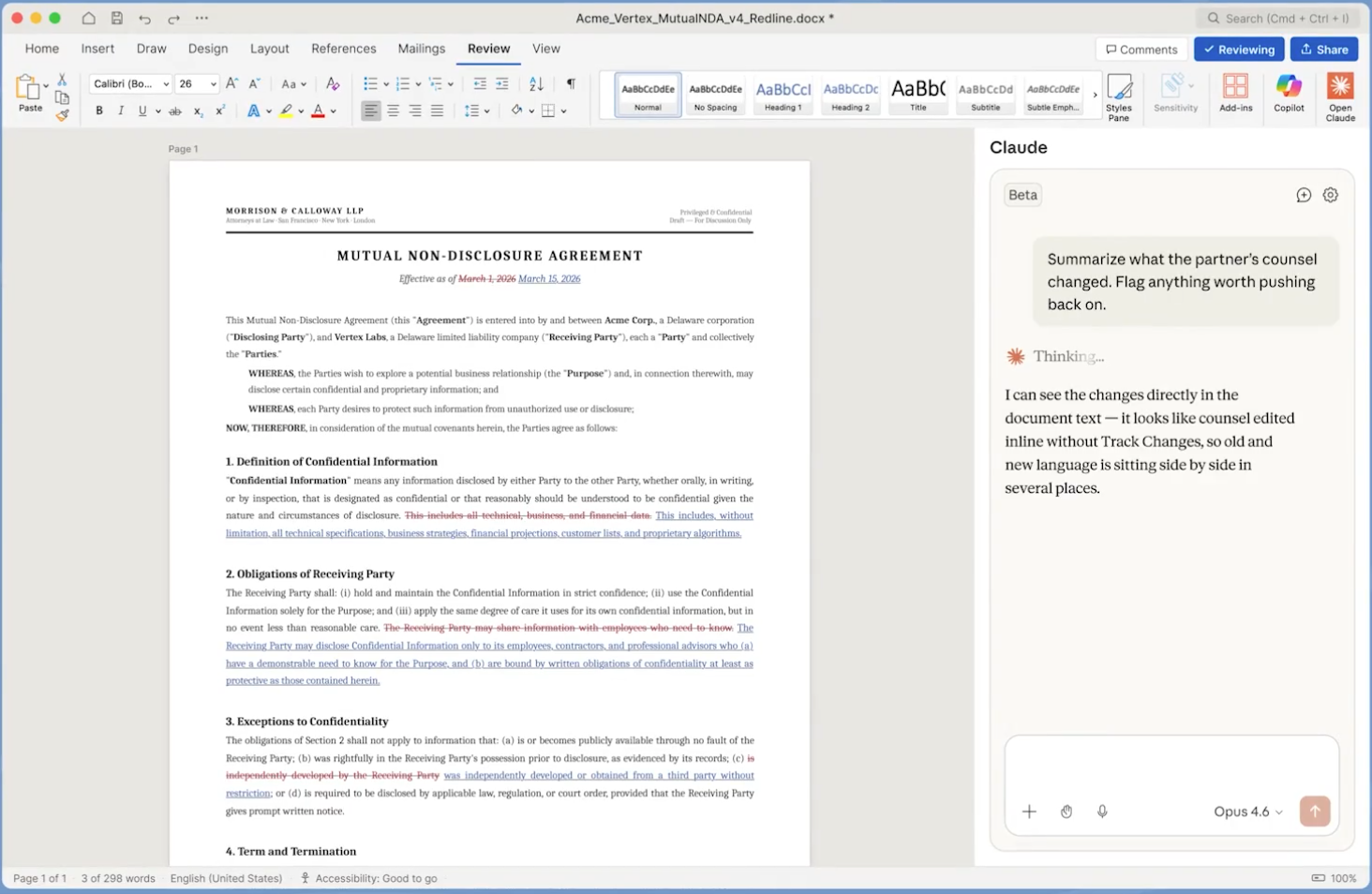
native sidebar Tracked Changes Support: One of the most praised features—Claude’s edits appear as native Word Tracked Changes, allowing you to accept or reject AI suggestions with a single click.
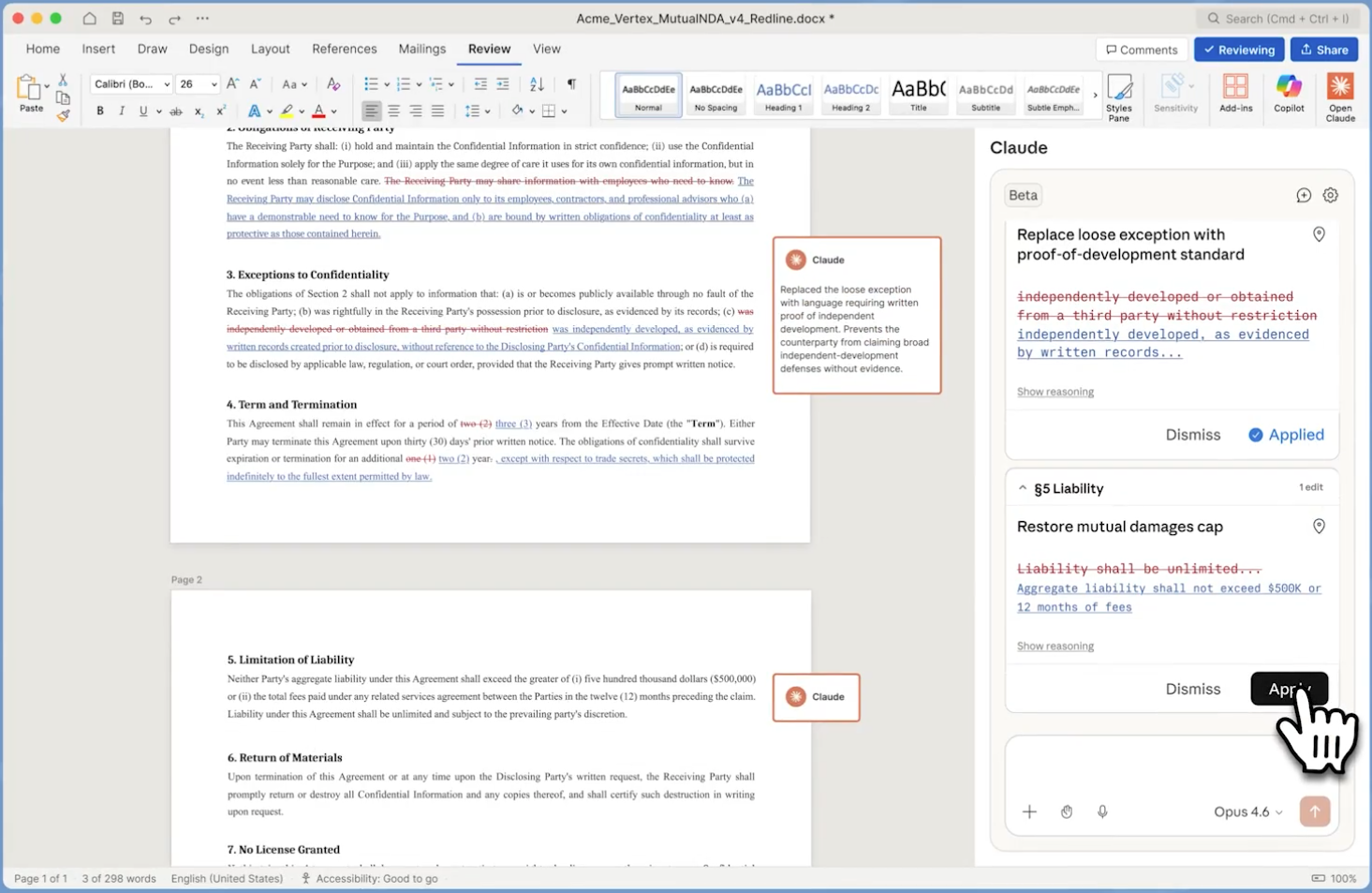
Accept or Reject changes Formatting Preservation: Claude is designed to respect your document’s "skeleton," ensuring that bold text, headers, and specific alignments remain intact after an AI edit.
How to Get Started with Claude in Word
Since the tool is currently in Beta, access is rolling out specifically to professional tiers. Here is how to set it up:
Check Your Plan: Ensure you are on a Claude Team or Enterprise plan.
Install the Add-in: In Microsoft Word, navigate to the Insert tab > Get Add-ins. Search for "Claude by Anthropic."
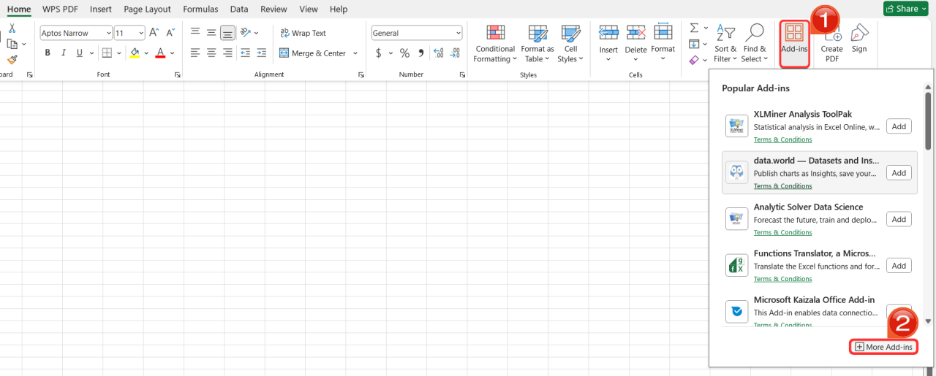
Open the Sidebar: Once installed, click the Claude icon in your Home ribbon.
Login & Sync: Sign in with your Anthropic credentials, and the sidebar will initialize, ready to read your current document.
Best Use Cases: Claude for Word vs. Microsoft Copilot (Who is it actually for?)
While both Claude and Microsoft Copilot now share space inside the Microsoft Word ribbon, they serve completely different audiences and have different structural limitations. Choosing the right one depends on your subscription access and whether you need an "ecosystem assistant" or a "prose specialist."
1. The Audience Limits: Who Can Actually Use It?
Microsoft Copilot is built for the general business user. If you have a standard Microsoft 365 commercial or Pro subscription, you can access it.
Claude for Word (Beta) is currently highly restricted. As of the April 11 launch, it is locked behind the Claude Team ($25/user/month) and Enterprise plans. It is specifically targeted at high-end, document-heavy professionals (lawyers, researchers, and senior editors) rather than general consumers.
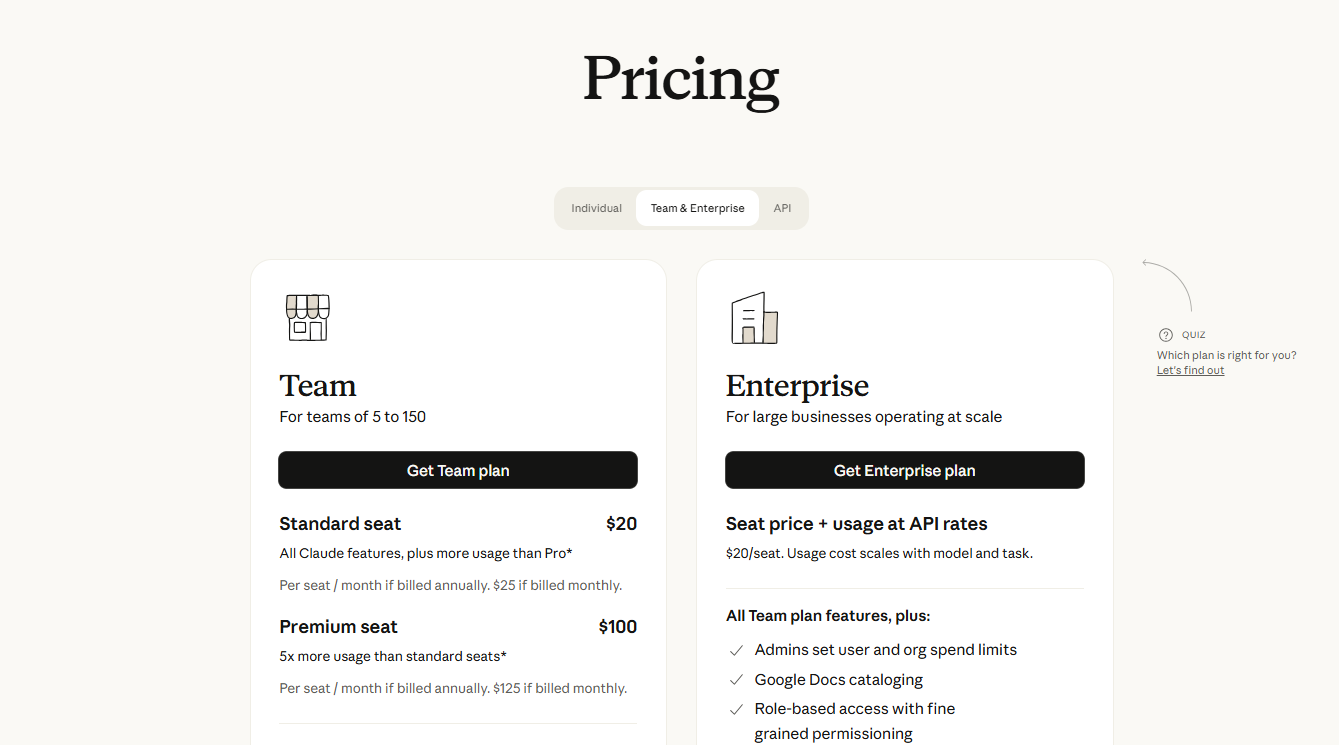
Claude for Word pricing
2. Where Claude Dominates: Deep Logic and Specialized Prose
If you meet the subscription requirements, Claude acts as a "Senior Editor," vastly outperforming standard AI in specific high-stakes scenarios:
Legal & Compliance Redlining: While Copilot is great at generating quick bullet points, Claude is superior at logical reasoning. You can feed it a 50-page contract and ask it to find conflicting clauses. It will suggest specific "redline" changes to mitigate liability risks, using Word's Tracked Changes so you can audit its logic.
Human-Like, Nuanced Editing: Copilot often produces standard, functional "AI-sounding" text. Claude is widely praised for its literary flair. It can take a dry, technical research paper and rewrite it into a persuasive, client-facing narrative without losing the core facts or sounding robotic.
Structural Overhauls: Claude’s massive context window allows it to remember the intricate details of long documents. You can ask it to restructure an entire proposal to make it sound more aggressive or formal, and it will maintain that specific tone from page 1 to page 100.
3. Where Microsoft Copilot Wins: Ecosystem Connectivity
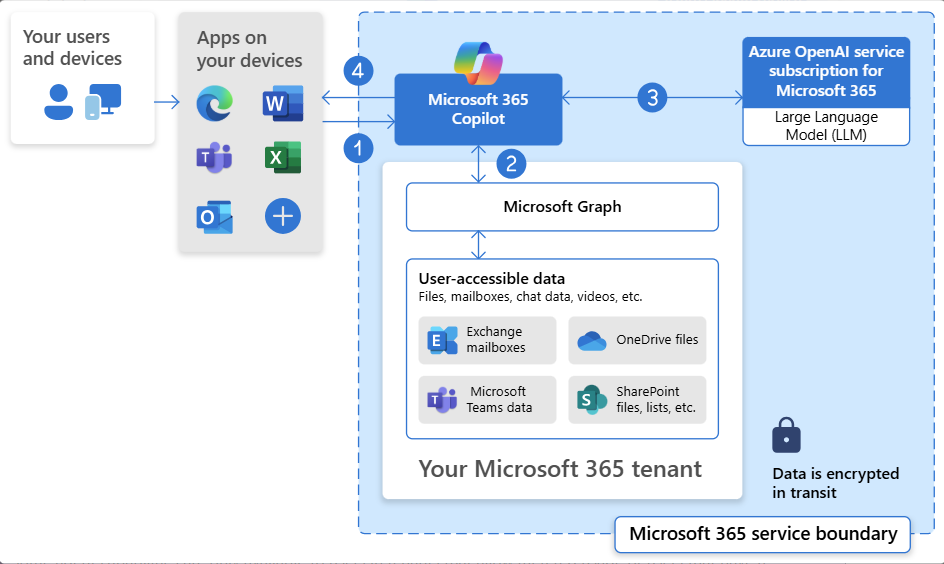
The "Generalist" Advantage: Claude's biggest limitation is that it only "sees" the document in front of it. Copilot, however, is connected to your entire Microsoft ecosystem. If your task is, "Draft a proposal based on the emails I received from John yesterday and my Teams meeting notes," Microsoft Copilot is the tool you need.


Pricing and Availability (2026)
Following the February release for Excel and PowerPoint, the Word integration completes the suite for business users.
| Tier | Availability | Cost |
| Claude Team | Beta Access Open | $25 / user / month |
| Claude Enterprise | Beta Access Open | Custom Pricing |
| Claude Pro/Free | Waitlist | N/A |
The All-in-One Alternative: WPS AI Copilot
While the Claude for Word integration is a landmark moment for Anthropic fans, it still requires a high-tier subscription and a multi-step installation. If you are looking for an all-in-one AI office experience that is even more deeply integrated and versatile, WPS AI Copilot is the ultimate contender.
Why WPS AI Copilot Shines:
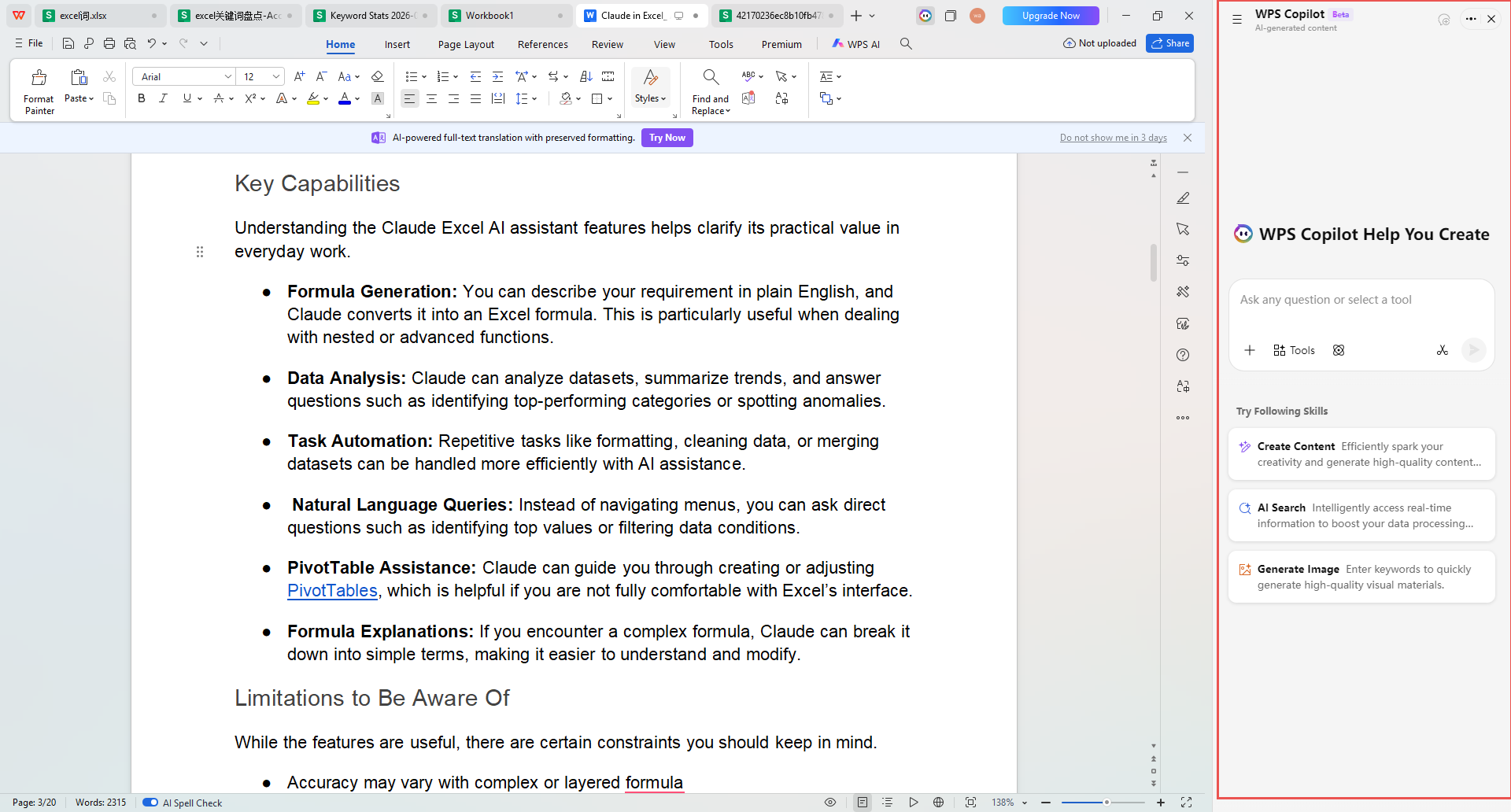
Universal AI Presence: In WPS Office, the AI isn't just a sidebar add-on; it is a core component that works across Docs, Slides, Sheets, and a world-class PDF editor.
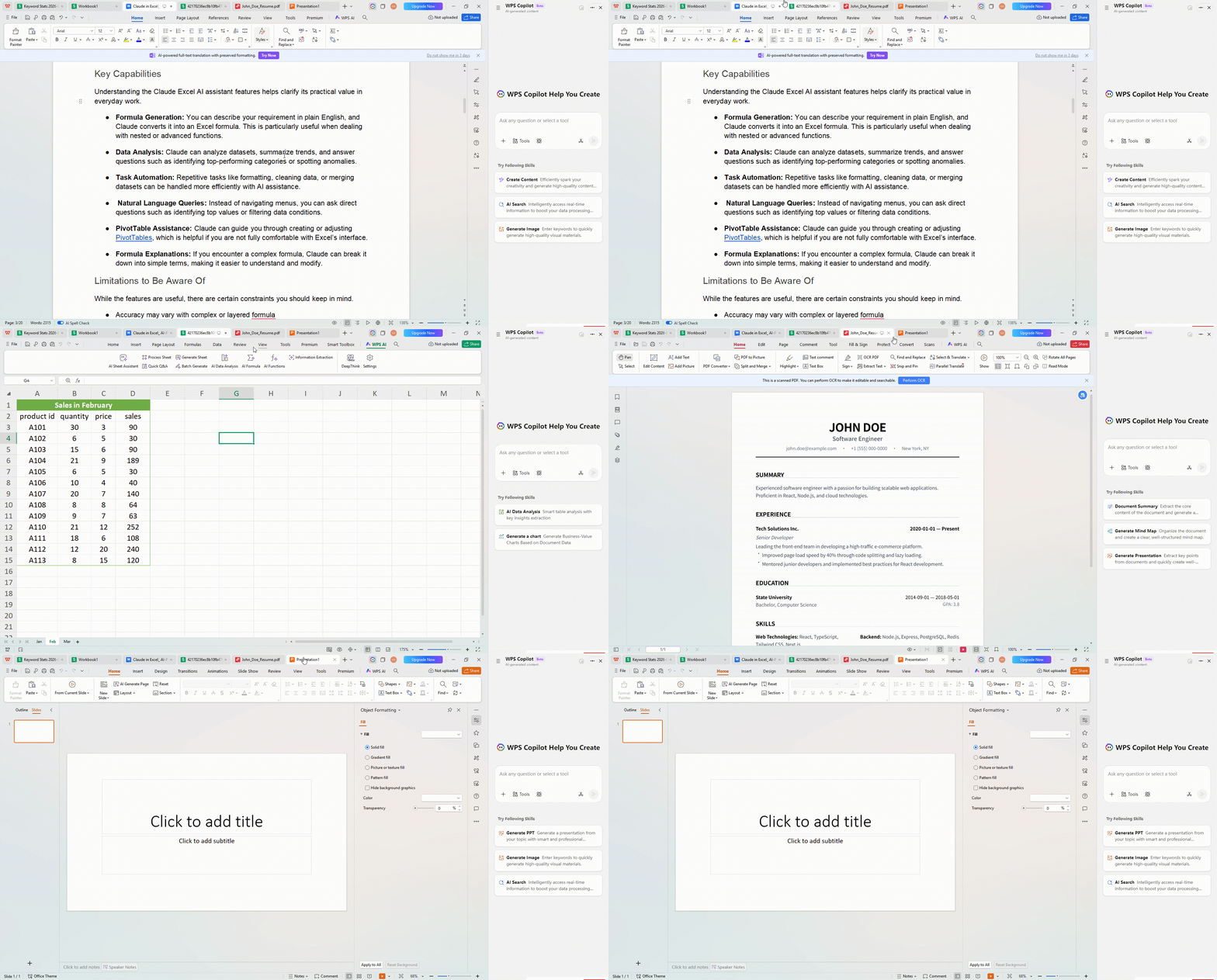
Advanced PDF Intelligence: While Word plugins often struggle with fixed formats, WPS AI can summarize, extract data from, and even rewrite scanned PDFs with ease.
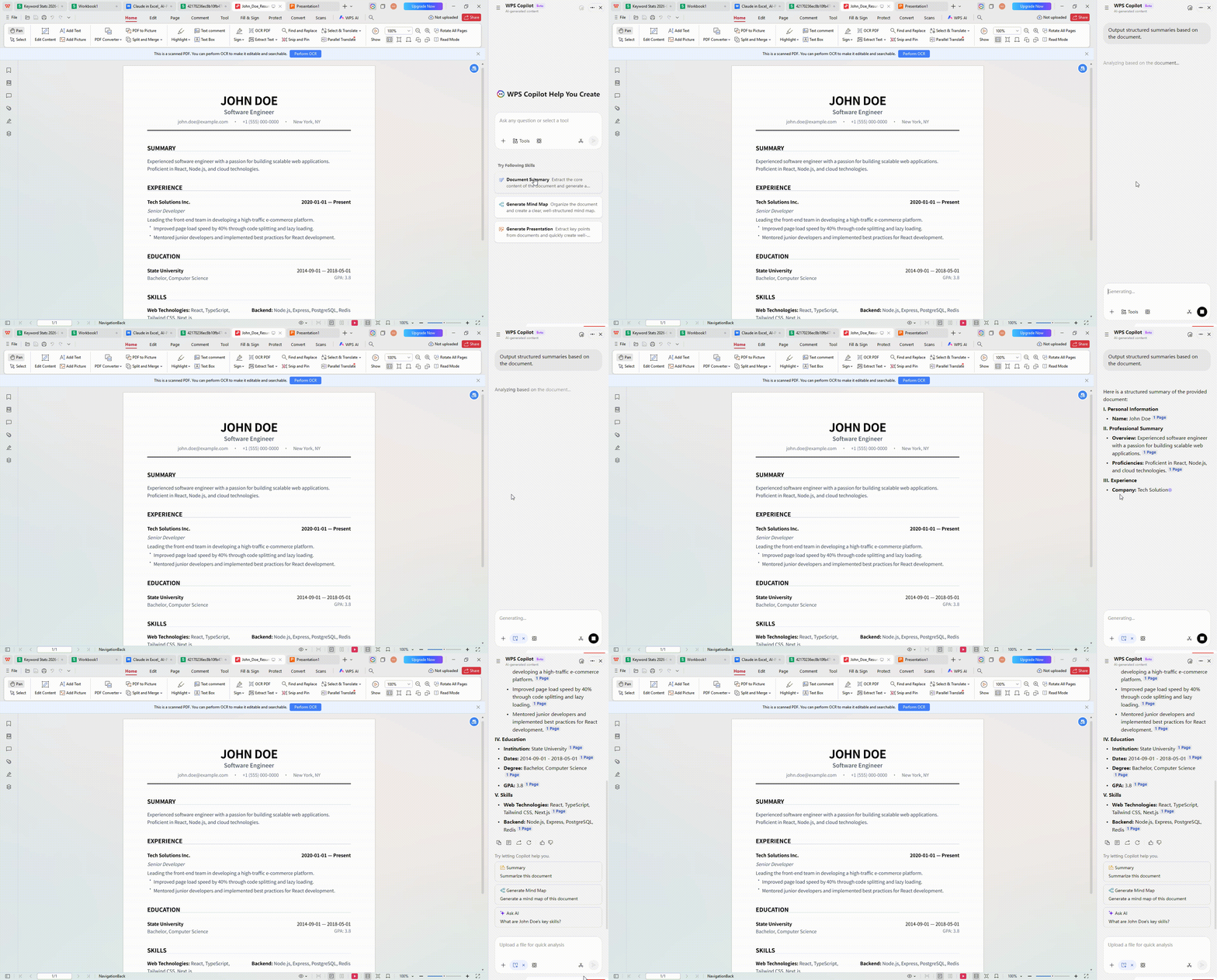
Seamless Creative Flow: Need to turn your document into a presentation? WPS AI can generate an entire PPT deck based on your Word content in seconds—something the current Claude plugin cannot do.
Optimized for Global Workflows: WPS AI offers localized support and a more accessible pricing structure, making it the smarter choice for teams that need comprehensive AI tools without the premium "enterprise-only" gatekeeping.
FAQ:
1. When was Claude for Word officially released?
Anthropic announced the beta version of Claude for Word on April 11, 2026. This follows the previous integration of
2. Can I use Claude in Word for free?
Currently, the Claude for Word beta is restricted to users on Claude Team and Enterprise plans. Free and Pro individual users are currently on a waitlist for the official add-in.
3. Does Claude for Word support Tracked Changes?
Yes. One of its standout features is the ability to suggest edits that appear directly as native Word Tracked Changes. This allows you to review, accept, or reject AI suggestions just like you would with a human collaborator.
4. Which offers better value: Claude for Word or WPS AI Copilot?
While both are powerful, WPS AI Copilot generally offers higher value for the average professional. The Claude for Word beta requires a premium business subscription ($25/user/month) and is currently limited to specific document tasks. In contrast, WPS AI provides a natively integrated experience across Docs, PDFs, and Slides at a more accessible price point. If you need an all-in-one productivity hub rather than just a specialized writing assistant, WPS AI is the more cost-effective "gold standard."
Conclusion:
The landscape of 2026 makes one thing clear: productivity is no longer about working harder, but working smarter with the right integration.
If you are a die-hard Anthropic enthusiast who relies on deep reasoning and literary precision, the Claude for Word Beta is a revolutionary addition to your arsenal. When paired with the data-crunching capabilities of
However, if your goal is a faster, more unified, and cost-effective AI productivity suite that handles Docs, PPTs, and PDFs under one roof, WPS AI Copilot remains the gold standard for the modern professional. While Claude offers surgical precision in specific apps, WPS AI provides a seamless, "all-in-one" intelligence that simply makes work flow better.

'%3e%3cpath%20d='M19.9911%204.11386V6.471H18.5894C18.0775%206.471%2017.7322%206.57814%2017.5536%206.79243C17.3751%207.00671%2017.2858%207.32814%2017.2858%207.75671V9.44421H19.9019L19.5536%2012.0871H17.2858V18.8639H14.5536V12.0871H12.2769V9.44421H14.5536V7.49779C14.5536%206.39064%2014.8632%205.53201%2015.4822%204.92189C16.1013%204.31177%2016.9257%204.00671%2017.9554%204.00671C18.8304%204.00671%2019.509%204.04243%2019.9911%204.11386Z'%20fill='%23333333'/%3e%3c/g%3e%3cdefs%3e%3cclipPath%20id='clip0_2938_8199'%3e%3crect%20width='16'%20height='16'%20fill='white'%20transform='translate(8%204.00671)'/%3e%3c/clipPath%3e%3c/defs%3e%3c/svg%3e)
'%3e%3cpath%20d='M17.5237%2010.7813L23.4811%204H22.0699L16.8949%209.88693L12.7648%204H8L14.2469%2012.9029L8%2020.0133H9.4112L14.8725%2013.7952L19.2352%2020.0133H24M9.92053%205.04213H12.0885L22.0688%2019.0224H19.9003'%20fill='%23333333'/%3e%3c/g%3e%3cdefs%3e%3cclipPath%20id='clip0_2938_8200'%3e%3crect%20width='16'%20height='16.0134'%20fill='white'%20transform='translate(8%204)'/%3e%3c/clipPath%3e%3c/defs%3e%3c/svg%3e)


