Inventory sheets are one of the most practical tools you can use to
keep operations organized. They give you a clear record of what’s in
stock, what’s been sold or moved, and what needs restocking. The
challenge is that creating a well-structured sheet from scratch takes
time and often results in messy spreadsheets that are hard to maintain.
That’s why ready-made, editable templates have become so valuable. In
this guide, I’ll share 10 free templates you can start using immediately
and take you through simple steps to customize and print them in WPS
Excel.
Inventory Sheets
What Should Be
Included in an Inventory Sheet
Having spent years in bookkeeping, inventory sheets became my primary
tool. Initially, I assumed that listing item names and quantities was
enough. But as soon as things got busy, that arrangement fell apart with
supplier details becoming hazy, stockseemingly vanishing, and audits turning into long nights of
backtracking. What really makes an inventory sheet useful is the extra
layer of detail. The right information not only keeps records clean but
also helps you spot trends, prevent shortages, and maintain transparency
across your operations.
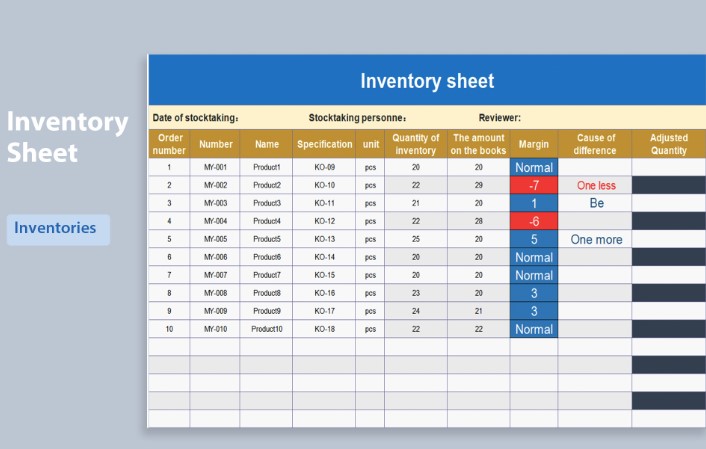
Inventory Sheet
Here’s what you’ll usually want to include:
Item Name/Description: The basic identifier of
your product or asset.
SKU or Product Code: A unique code for tracking
items without confusion.
Quantity in Stock: The number of units available
at a given time.
Unit Price or Value: Important for cost control
and audits.
Date of Entry/Exit: When items were added to or
removed from stock.
Supplier or Source: Helps in tracking vendors
and purchase history.
One can think of it like building blocks: if you skip one, the whole
sheet becomes less reliable.
10 Free Inventory
Sheet Templates [Download Now]
One of the things that’s as obvious as it is overlooked is the
foundation itself: having a well-structured template. It’s easy to
underestimate how much time and accuracy a ready-made sheet can save. A
solid template does half the heavy lifting by keeping everything in
order from the start, so you can focus on managing inventory instead of
fixing errorslater. With that base in place, let’s get into the good stuff: the
templates. Each one is designed for a slightly different use case, so
you can pick whichever one makes the most sense for you.
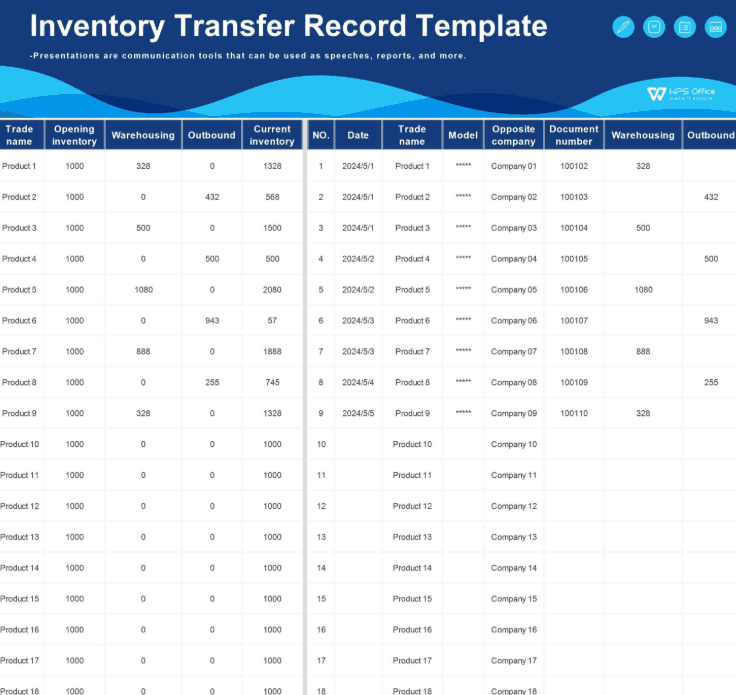
1. Inventory Transfer
Record Template 1
This Inventory
Transfer Record Template is a highly practical and professional
document designed for efficient business operations. It features a
clean, organized layout with a clear header for company details and a
detailed table for item descriptions, quantities, and conditions. The
form is completed with dedicated sections for both the recipient's and
authorizing person's signatures, ensuring clear accountability and a
reliable record for all inventory transfers.
Inventory Transfer Template
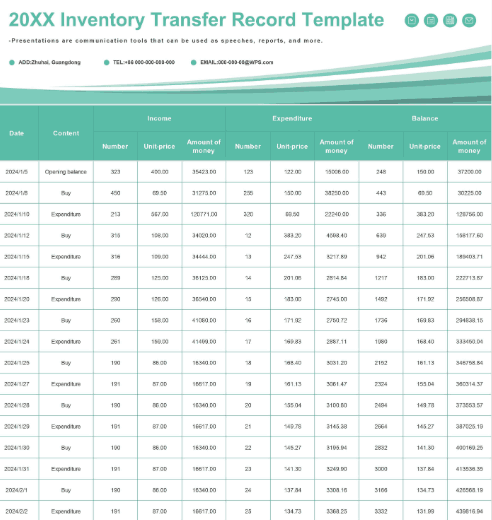
2. Inventory Transfer Record
Template
This Inventory
Transfer Record Template features a clean and modern design with
a calming teal color scheme. The document is structured with a clear
header for company information and a detailed, tabular format that
includes columns for "Date," "Content," "Income," and "Expenditure". The
organized grid layout is ideal for businesses that need to meticulously
track their assets and financial flow. This template serves as an
excellent resource for maintaining a precise record of all inventory
transactions.
Inventory Record Template
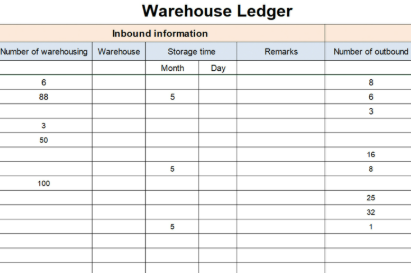
3. Simple Warehouse Ledger
This Simple
Warehouse Ledger template provides a clear and functional
framework for tracking inventory. It features a straightforward table
format with distinct sections for "Inbound information", which includes
details on warehousing and storage time. The design is practical, using
a grid layout to ensure easy data entry and organization. This template
is an essential tool for any business needing to maintain a simple, yet
effective, record of goods moving in and out of a warehouse.
Simple Warehouse Ledger
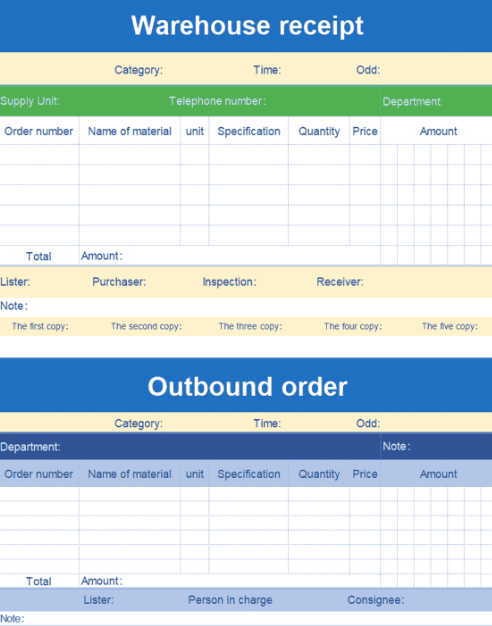
4. Fresh Outgoing &
Incoming Documents
This Fresh
Outgoing & Incoming Documents template provides a highly
functional, two-in-one design for streamlined warehouse management. The
document is clearly divided into distinct "Warehouse receipt" and
"Outbound order" sections, each with a different color scheme to improve
visual organization. Both sections feature a detailed grid for tracking
crucial information such as order number, material, quantity, and price.
This template is an essential tool for maintaining accurate and
organized records of all goods moving in and out of a facility.
Fresh Outgoing & Incoming Documents
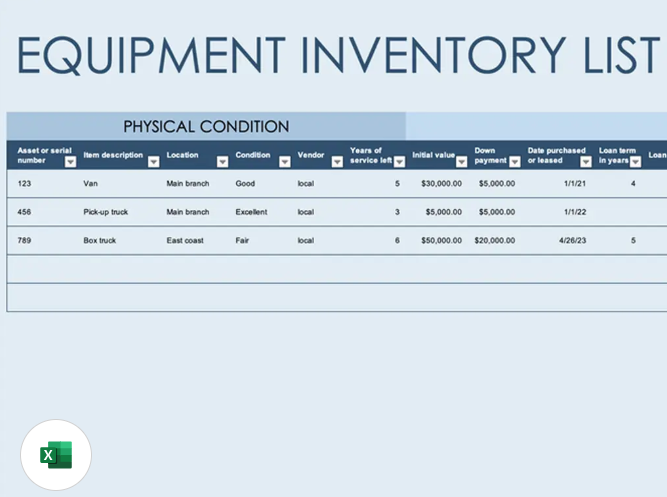
5. Equipment Inventory List
This Equipment
Inventory List template provides a straightforward and highly
organized solution for tracking company assets. The document features a
professional and clean design, with a simple grid layout and clear,
blue-colored headers that make it easy to use. It includes dedicated
columns for essential details such as the date of acquisition, item
description, serial number, and physical location. This template is a
perfect tool for any business looking to maintain an accurate and
well-structured record of its equipment.
Equipment Inventory List
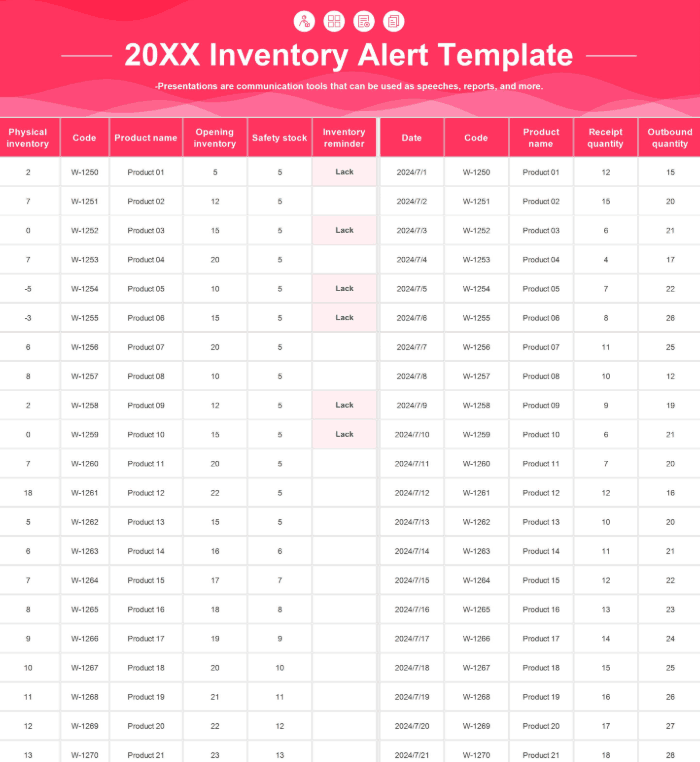
6. Inventory Alert Template
This Inventory
Alert Template offers a comprehensive and organized solution for
tracking stock levels with precision. Its detailed spreadsheet includes
key columns to monitor opening inventory, safety stock, and recent
transaction quantities. A crucial feature is the "Inventory reminder"
column, which uses a "Lack" alert to instantly highlight items that need
to be reordered. This functional design makes it an excellent resource
for businesses aiming to proactively manage their inventory and prevent
shortages.
Inventory Alert Template List
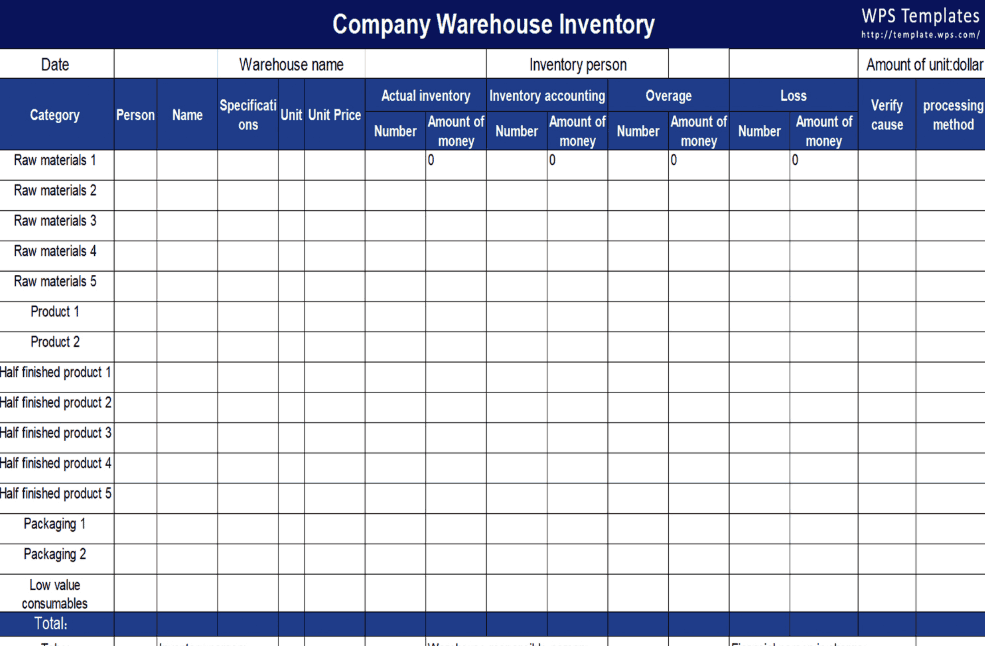
7. Warehouse Physical
Inventory List
This Warehouse
Physical Inventory Listtemplate provides a highly
detailed and comprehensive solution for auditing company stock. The
professional spreadsheet features a structured layout with pre-defined
rows for different inventory categories, including raw materials and
finished goods. Its key strength lies in its ability to compare "Actual
inventory" against "Inventory accounting" to track overage and loss.
This template is an invaluable tool for businesses that require
meticulous record-keeping and discrepancy analysis.
Warehouse Physical Inventory List
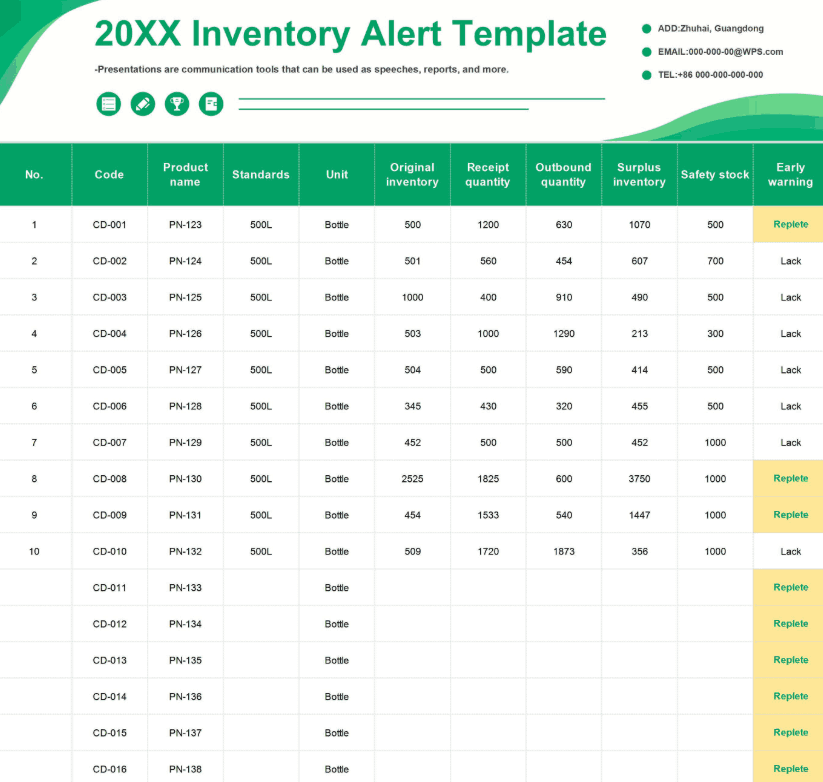
8. Inventory Alert Template 1
This Inventory
Alert Template offers a professional and highly organized
solution for proactive stock management. The spreadsheet features a
detailed table for tracking essential data, including "Receipt quantity"
and "Outbound quantity". Its key feature is the "Early warning" column,
which uses a color-coded system to visually alert users to stock status,
with "Replete" indicating a surplus and "Lack" indicating a shortage.
This functional template is an invaluable tool for businesses to
maintain precise control over their inventory and prevent issues before
they occur.
Inventory Alert Template 1
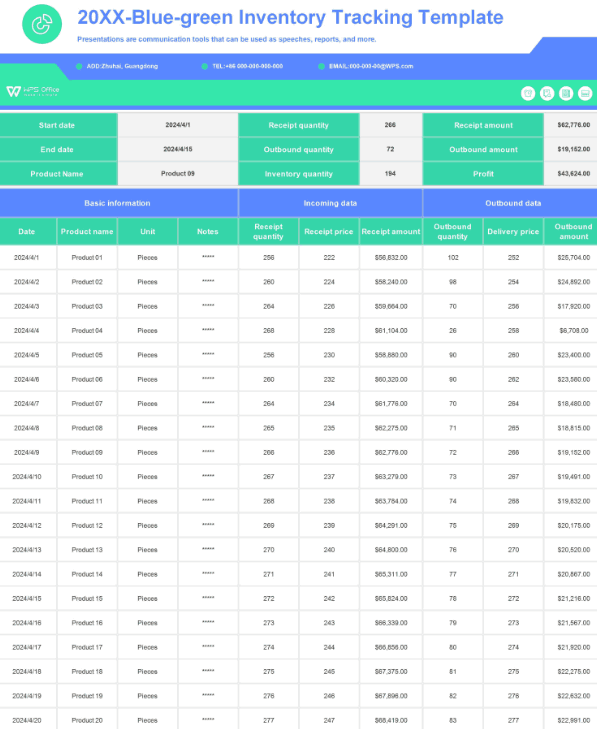
9. Inventory Tracking Template
This Inventory
Tracking Template features a professional and visually appealing
design with a clean blue and green color scheme. The document is a
comprehensive spreadsheet that meticulously tracks both the physical
movement and financial aspects of inventory. It is logically divided
into sections for "Basic Information," "Incoming data," and "Outbound
data," allowing for a clear overview of product flow. The template is an
excellent tool for businesses aiming to track not only stock levels but
also the associated profitability of their inventory.
Inventory Tracking Template
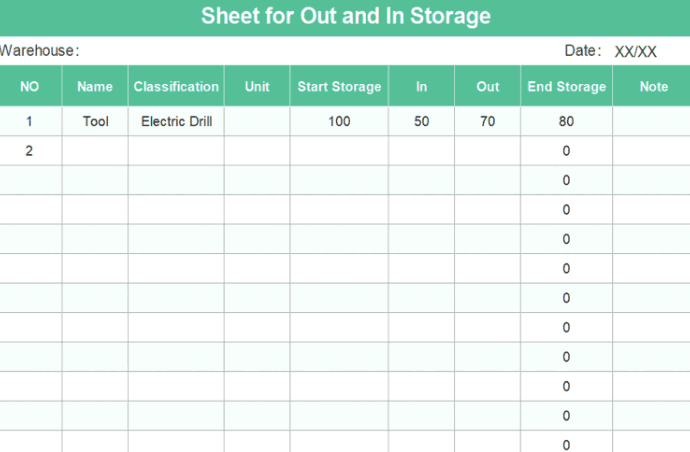
10. Sheet for Out and In
Storage
This Sheet
for Out and In Storage template provides a simple, yet
effective, solution for tracking inventory in a warehouse. The document
features a clean, green-themed design and a straightforward table format
with columns for "Start Storage", "In", and "Out" quantities. The
template is designed to easily calculate the "End Storage" quantity,
ensuring a quick and accurate overview of stock levels. This is a
practical and functional tool for any business needing to maintain basic
records of their goods.
Sheet for Out and In Storage
These free inventory sheet templates are all editable and printable,
which means you can adapt them to your business right away.
How to Edit and Print
Inventory Sheets
After I’ve picked the right template in WPS Spreadsheet, I make sure
it matches the way I track inventory without breaking the formatting.
I’ve learned the trick is to edit through text
boxes instead of typing over them, keep rows aligned so totals
don’t get messy, and double-check formulas before entering real data.
And once everything looks right on screen, I always think ahead to
printing, because a sheet that looks neat in WPS can turn into chaos on
paper if I don’t set margins or page breaks properly. Here’s how to get
it right.
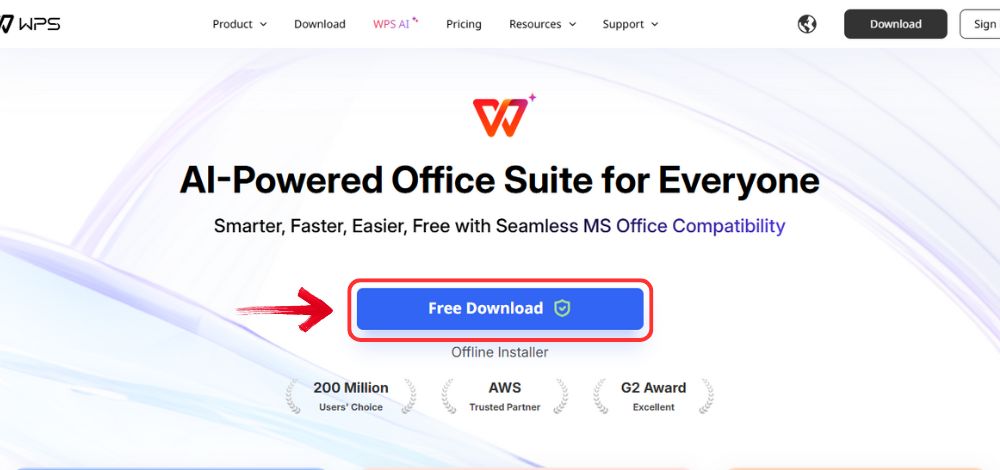
Step 1: First, open your browser to visit WPS Office click the "Free
Download" button to start the download.
Download WPS Office
Step 2: The download will finish in a few seconds.
Once done, run the installation file like you would for any other app or
software.
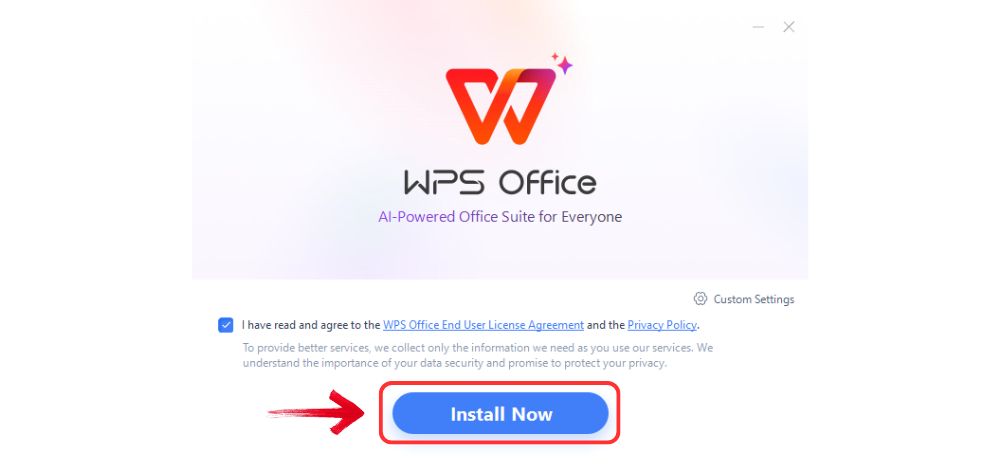
Step 3: WPS Office will show you a few simple terms
and conditions. Accept them, then click the "Install
Now" button to begin the installation.
Install WPS Office
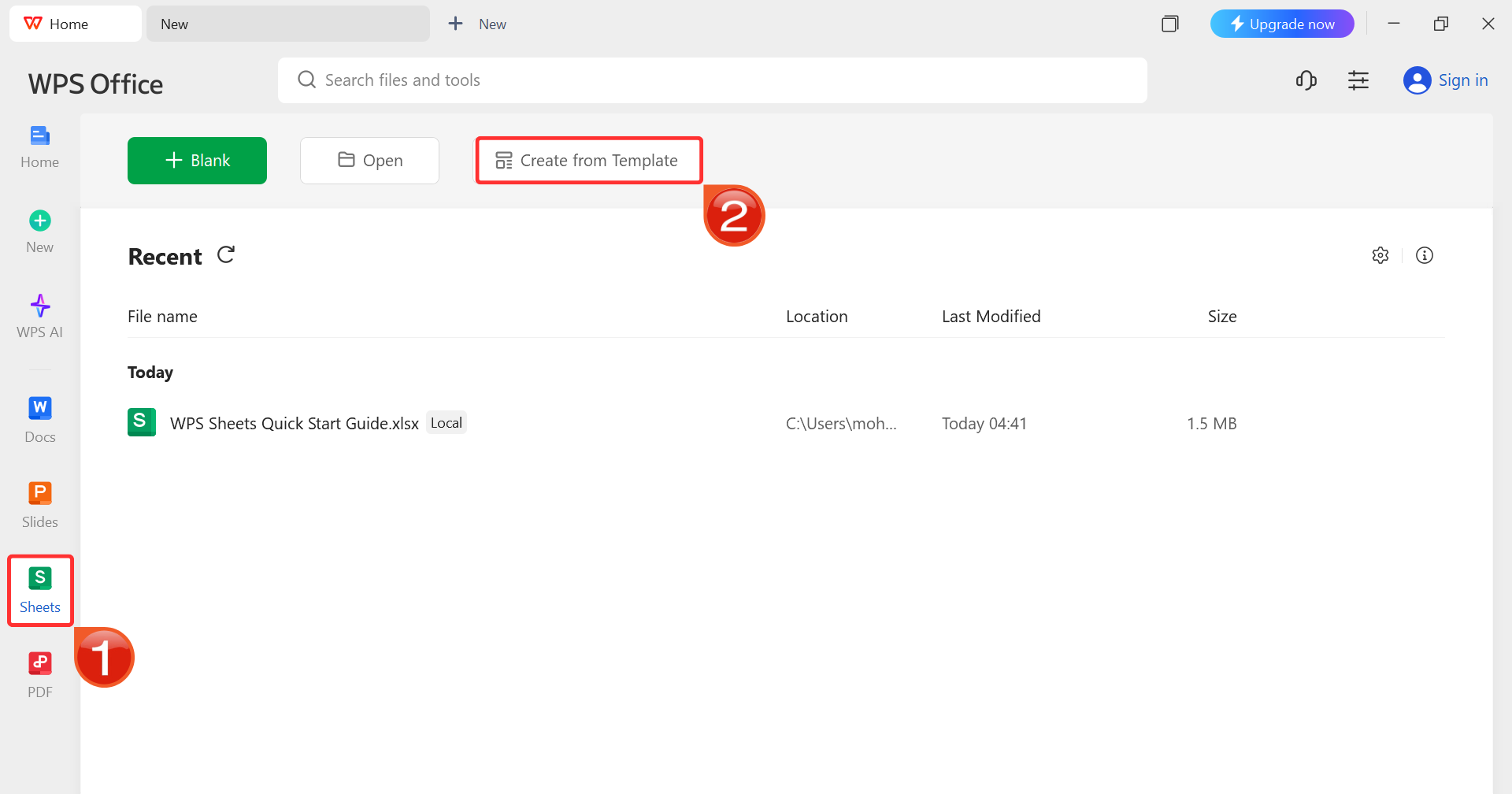
Step 4: After you’ve launched WPS Office, click“Sheets” from the left sidebar and hit “Create
from Template” to launch WPS Spreadsheet using your desired
template.
WPS Spreadsheet Dashboard
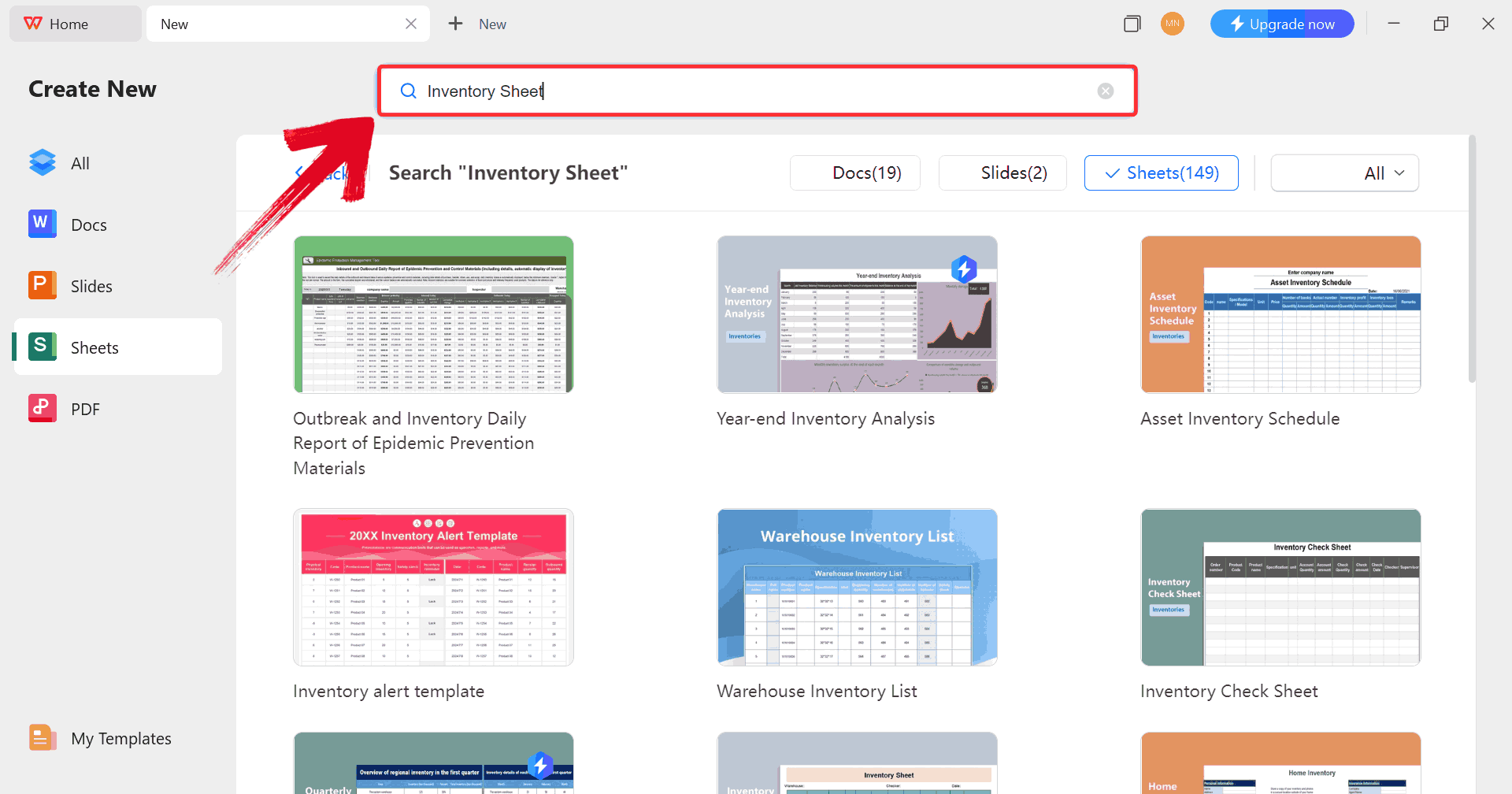
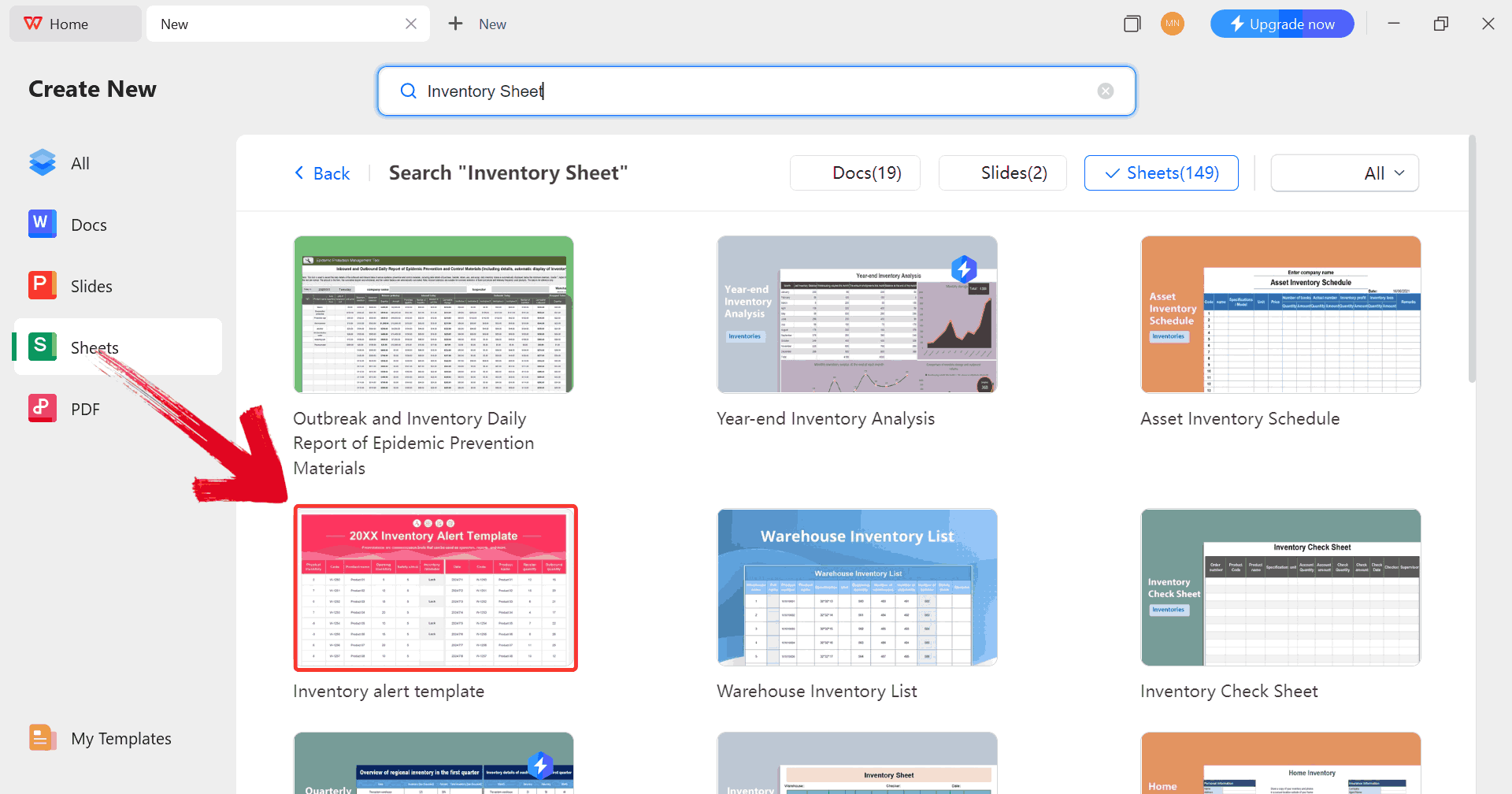
Step 5: In the template gallery’s search bar, type“inventory sheet” to see all available inventory sheet
templates ready for use.
Search Template
Step 6: Just click on any template that fits your
needs to open it and start customizing your template right away.
Choose Template
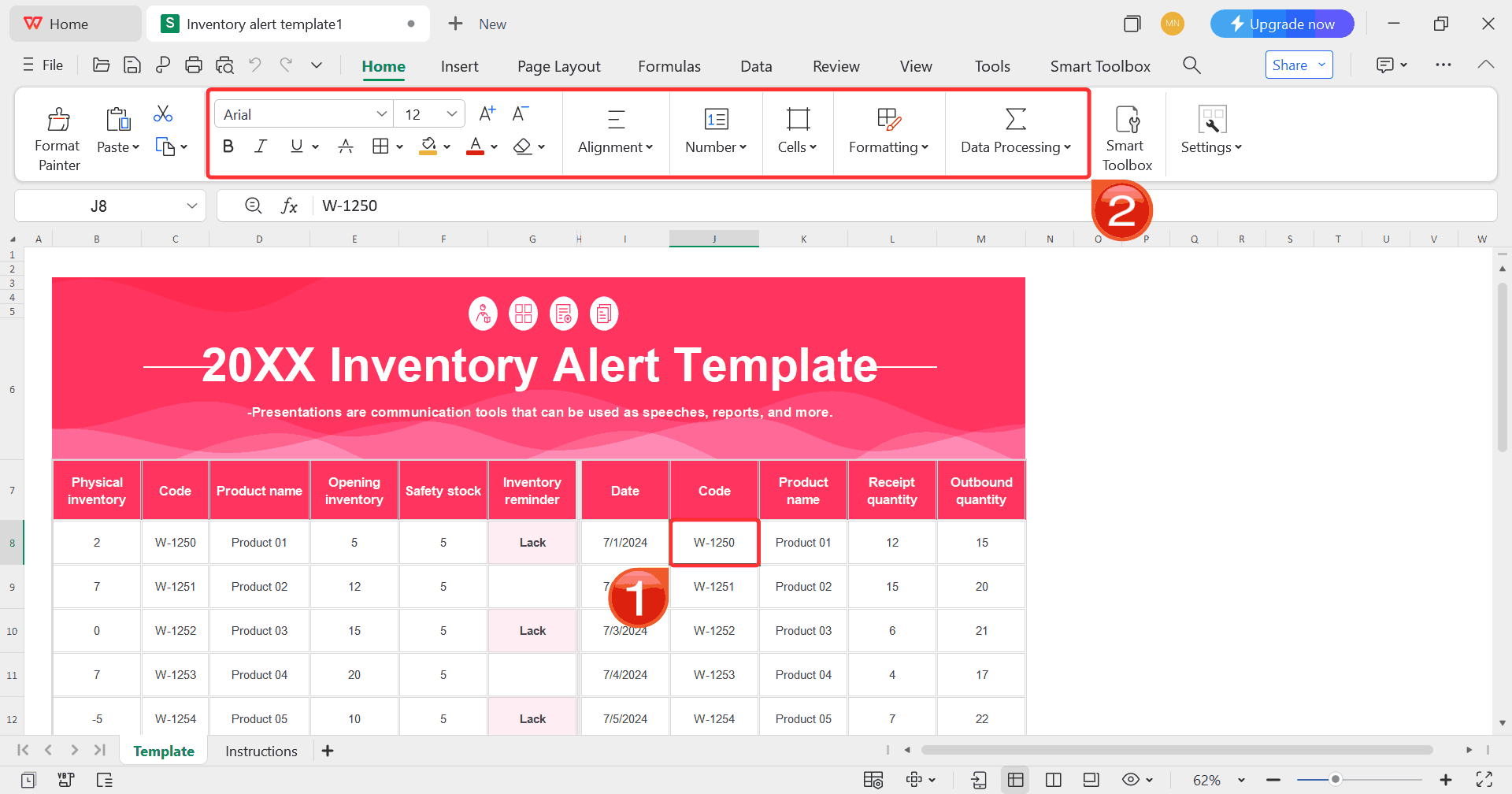
Step 7: Select any cell in your spreadsheet, and
then use the menu at the top to make whatever changes you need like
adjusting formatting, editing text, or changing formulas.
Customize Template
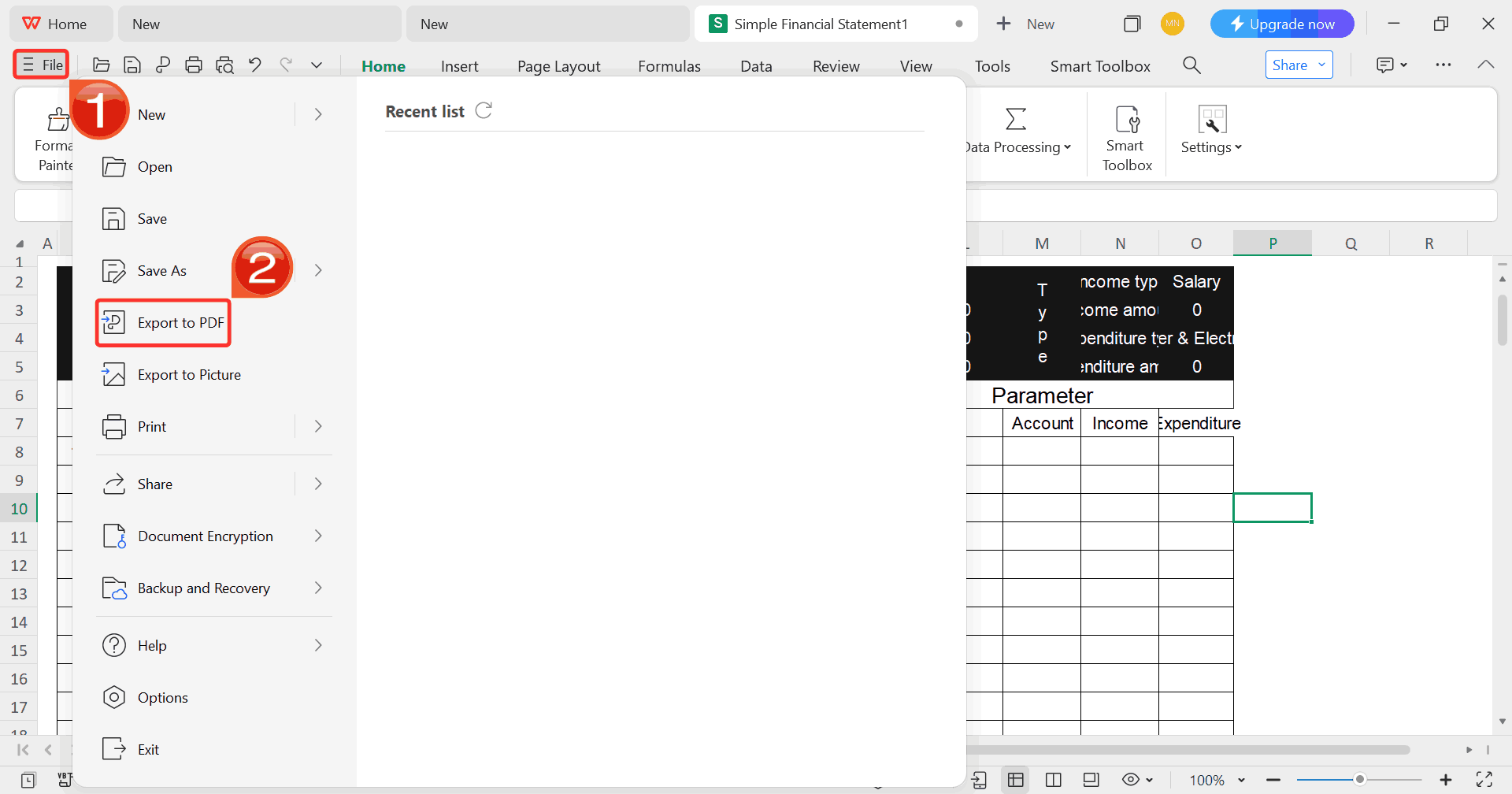
Step 8: Once you’re done customizing your template,
click on “File”, then select “Export to
PDF” to save your inventory sheet in a polished, shareable
format.
Export Template
Free Office Suite
with Abundant Templates
Keeping inventory organized can be a nuisance without the right
tools. WPS Office offers a
free, lightweight suite that includes a spreadsheet program perfect for
managing stock. It comes with a wide range of ready-to-use templates,
from inventory tracking to stock alerts, so you don’t have to start from
scratch. Editing these templates is simple, and you can adjust layouts,
headers, and categories to fit your specific warehouse or store setup.
For anyone dealing with multiple products or locations, having access to
these templates makes staying on top of inventory much simpler. WPS
Office also supports printing and PDF export, making it easy to share or
review your records offline.
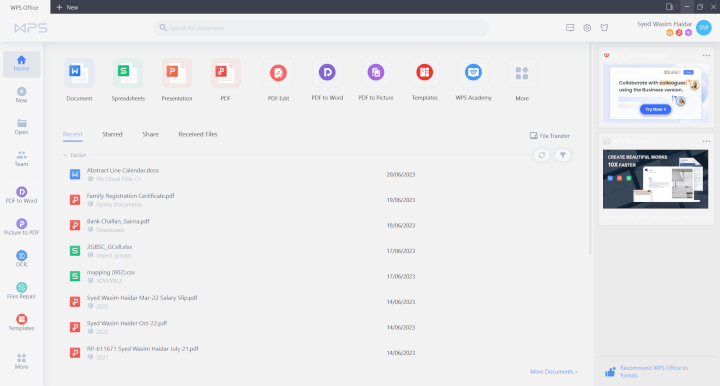
WPS Office Dashboard
Features:
Free and lightweight: WPS Office doesn’t require
a heavy installation or any expensive subscription fees, making it easy
to start using immediately.
Hundreds of templates: The suite offers a wide
variety of templates, not just for inventory management, but also for
invoices, resumes,
event planning, and more.
Direct editing: You can open any template and
start editing right away without having to navigate complicated setups
or formatting issues.
PDF export & print: Saving your work as a
PDF or printing it directly is simple and can be done in just a few
clicks.
Web and desktop versions: Access WPS Office from
any device at any time, whether you’re working online or on a desktop
computer.
WPS Office feels especially practical if you don’t need advanced
design tools like Adobe. It keeps things fast, simple, and
user-friendly.
FAQs
1. What’s the
standard format for an inventory sheet?
Columns usually include: Item, SKU, Quantity, Entry/Exit Date, and
Notes.
2. Can I track
inventory in Excel without formulas?
Yes. Many templates are designed for manual entry without complex
formulas.
3. What’s
the best file format to save inventory sheets?
Use Excel (.xlsx) for editing and PDF for printing or sharing.
4. Can I use WPS
templates for commercial use?
Most templates are free for personal and small business use, but
check license details.
5. Can
I customize inventory sheets for multiple locations?
Yes. Add a “Location” column for warehouses or branches to avoid
confusion.
Efficiency Simplified by
WPS Office
When people hear the term inventory sheets, they often think of them
as just another set of forms. In reality, they’re powerful tools that
keep your business running steadily by providing structure, accuracy,
and efficiency. With free inventory sheet templates, including printable
inventory tracking sheets, you don’t have to waste time designing from
scratch. You can focus on your main objective: managing stock
effectively.
Using WPS Office makes the
process even easier. From logging warehouse transfers to setting up
stock alerts and conducting physical audits, the platform gives you
simple editing and printing options in a lightweight, user-friendly
package. At the end of the day, the right template plus the right tool
means one less headache and more time to optimize parts of your business
that truly matter.
7+ years in productivity tech. I test and review the latest tools to simplify your workflow. Follow for honest app comparisons, practical guides, and curated tech picks to boost efficiency.


'%3e%3cpath%20d='M8%200C12.4183%200%2016%203.58172%2016%208C16%2012.4183%2012.4183%2016%208%2016C3.58172%2016%200%2012.4183%200%208C0%203.58172%203.58172%200%208%200ZM11.6162%204.38379C11.2257%203.99337%2010.5927%203.99338%2010.2021%204.38379L8%206.58594L5.79785%204.38379C5.40732%203.99334%204.77429%203.99329%204.38379%204.38379C3.99331%204.77429%203.99335%205.40733%204.38379%205.79785L6.58594%208L4.38379%2010.2021C3.99348%2010.5927%203.99341%2011.2257%204.38379%2011.6162C4.77426%2012.0066%205.40734%2012.0065%205.79785%2011.6162L8%209.41406L10.2021%2011.6162C10.5927%2012.0066%2011.2257%2012.0067%2011.6162%2011.6162C12.0067%2011.2257%2012.0066%2010.5927%2011.6162%2010.2021L9.41406%208L11.6162%205.79785C12.0066%205.40735%2012.0066%204.77429%2011.6162%204.38379Z'%20fill='%23080E17'%20fill-opacity='0.46'/%3e%3c/g%3e%3cdefs%3e%3cclipPath%20id='clip0_3761_713'%3e%3crect%20width='16'%20height='16'%20fill='white'/%3e%3c/clipPath%3e%3c/defs%3e%3c/svg%3e)




'%3e%3cpath%20fill-rule='evenodd'%20clip-rule='evenodd'%20d='M21.4999%2010.9993C21.4999%205.20009%2016.7986%200.498901%2010.9993%200.498901C5.19994%200.498901%200.498657%205.20009%200.498657%2010.9993C0.498657%2016.2404%204.33858%2020.5844%209.35855%2021.3722V14.0346H6.69238V10.9993H9.35855V8.68594C9.35855%206.05427%2010.9262%204.60062%2013.3248%204.60062C14.4736%204.60062%2015.6753%204.80571%2015.6753%204.80571V7.38979H14.3512C13.0468%207.38979%2012.64%208.19921%2012.64%209.0296V10.9993H15.5523L15.0867%2014.0346H12.64V21.3722C17.66%2020.5844%2021.4999%2016.2404%2021.4999%2010.9993Z'%20fill='%231568EA'/%3e%3c/g%3e%3c/svg%3e)


'%3e%3cpath%20d='M2.42045%2022.1876H6.31818V12.7217L0.75%208.54553V20.5171C0.75%2021.4414%201.49892%2022.1876%202.42045%2022.1876Z'%20fill='%234285F4'/%3e%3cpath%20d='M19.682%2022.1876H23.5797C24.5041%2022.1876%2025.2502%2021.4387%2025.2502%2020.5171V8.54553L19.682%2012.7217'%20fill='%2334A853'/%3e%3cpath%20d='M19.682%205.48293V12.7216L25.2502%208.54543V6.31816C25.2502%204.25236%2022.8921%203.07469%2021.2411%204.31361'%20fill='%23FBBC04'/%3e%3cpath%20d='M6.31824%2012.7217V5.48303L13.0001%2010.4944L19.6819%205.48303V12.7217L13.0001%2017.733'%20fill='%23EA4335'/%3e%3cpath%20d='M0.75%206.31816V8.54543L6.31818%2012.7216V5.48293L4.75909%204.31361C3.10534%203.07469%200.75%204.25236%200.75%206.31816Z'%20fill='%23C5221F'/%3e%3c/g%3e%3cdefs%3e%3cclipPath%20id='clip0_2954_7305'%3e%3crect%20width='24.5'%20height='18.375'%20fill='white'%20transform='translate(0.75%203.8125)'/%3e%3c/clipPath%3e%3c/defs%3e%3c/svg%3e)



'%3e%3cpath%20d='M19.9911%204.11386V6.471H18.5894C18.0775%206.471%2017.7322%206.57814%2017.5536%206.79243C17.3751%207.00671%2017.2858%207.32814%2017.2858%207.75671V9.44421H19.9019L19.5536%2012.0871H17.2858V18.8639H14.5536V12.0871H12.2769V9.44421H14.5536V7.49779C14.5536%206.39064%2014.8632%205.53201%2015.4822%204.92189C16.1013%204.31177%2016.9257%204.00671%2017.9554%204.00671C18.8304%204.00671%2019.509%204.04243%2019.9911%204.11386Z'%20fill='%23333333'/%3e%3c/g%3e%3cdefs%3e%3cclipPath%20id='clip0_2938_8199'%3e%3crect%20width='16'%20height='16'%20fill='white'%20transform='translate(8%204.00671)'/%3e%3c/clipPath%3e%3c/defs%3e%3c/svg%3e)
'%3e%3cpath%20d='M17.5237%2010.7813L23.4811%204H22.0699L16.8949%209.88693L12.7648%204H8L14.2469%2012.9029L8%2020.0133H9.4112L14.8725%2013.7952L19.2352%2020.0133H24M9.92053%205.04213H12.0885L22.0688%2019.0224H19.9003'%20fill='%23333333'/%3e%3c/g%3e%3cdefs%3e%3cclipPath%20id='clip0_2938_8200'%3e%3crect%20width='16'%20height='16.0134'%20fill='white'%20transform='translate(8%204)'/%3e%3c/clipPath%3e%3c/defs%3e%3c/svg%3e)


