

'%3e%3cpath%20d='M8%200C12.4183%200%2016%203.58172%2016%208C16%2012.4183%2012.4183%2016%208%2016C3.58172%2016%200%2012.4183%200%208C0%203.58172%203.58172%200%208%200ZM11.6162%204.38379C11.2257%203.99337%2010.5927%203.99338%2010.2021%204.38379L8%206.58594L5.79785%204.38379C5.40732%203.99334%204.77429%203.99329%204.38379%204.38379C3.99331%204.77429%203.99335%205.40733%204.38379%205.79785L6.58594%208L4.38379%2010.2021C3.99348%2010.5927%203.99341%2011.2257%204.38379%2011.6162C4.77426%2012.0066%205.40734%2012.0065%205.79785%2011.6162L8%209.41406L10.2021%2011.6162C10.5927%2012.0066%2011.2257%2012.0067%2011.6162%2011.6162C12.0067%2011.2257%2012.0066%2010.5927%2011.6162%2010.2021L9.41406%208L11.6162%205.79785C12.0066%205.40735%2012.0066%204.77429%2011.6162%204.38379Z'%20fill='%23080E17'%20fill-opacity='0.46'/%3e%3c/g%3e%3cdefs%3e%3cclipPath%20id='clip0_3761_713'%3e%3crect%20width='16'%20height='16'%20fill='white'/%3e%3c/clipPath%3e%3c/defs%3e%3c/svg%3e)




'%3e%3cpath%20fill-rule='evenodd'%20clip-rule='evenodd'%20d='M21.4999%2010.9993C21.4999%205.20009%2016.7986%200.498901%2010.9993%200.498901C5.19994%200.498901%200.498657%205.20009%200.498657%2010.9993C0.498657%2016.2404%204.33858%2020.5844%209.35855%2021.3722V14.0346H6.69238V10.9993H9.35855V8.68594C9.35855%206.05427%2010.9262%204.60062%2013.3248%204.60062C14.4736%204.60062%2015.6753%204.80571%2015.6753%204.80571V7.38979H14.3512C13.0468%207.38979%2012.64%208.19921%2012.64%209.0296V10.9993H15.5523L15.0867%2014.0346H12.64V21.3722C17.66%2020.5844%2021.4999%2016.2404%2021.4999%2010.9993Z'%20fill='%231568EA'/%3e%3c/g%3e%3c/svg%3e)


'%3e%3cpath%20d='M2.42045%2022.1876H6.31818V12.7217L0.75%208.54553V20.5171C0.75%2021.4414%201.49892%2022.1876%202.42045%2022.1876Z'%20fill='%234285F4'/%3e%3cpath%20d='M19.682%2022.1876H23.5797C24.5041%2022.1876%2025.2502%2021.4387%2025.2502%2020.5171V8.54553L19.682%2012.7217'%20fill='%2334A853'/%3e%3cpath%20d='M19.682%205.48293V12.7216L25.2502%208.54543V6.31816C25.2502%204.25236%2022.8921%203.07469%2021.2411%204.31361'%20fill='%23FBBC04'/%3e%3cpath%20d='M6.31824%2012.7217V5.48303L13.0001%2010.4944L19.6819%205.48303V12.7217L13.0001%2017.733'%20fill='%23EA4335'/%3e%3cpath%20d='M0.75%206.31816V8.54543L6.31818%2012.7216V5.48293L4.75909%204.31361C3.10534%203.07469%200.75%204.25236%200.75%206.31816Z'%20fill='%23C5221F'/%3e%3c/g%3e%3cdefs%3e%3cclipPath%20id='clip0_2954_7305'%3e%3crect%20width='24.5'%20height='18.375'%20fill='white'%20transform='translate(0.75%203.8125)'/%3e%3c/clipPath%3e%3c/defs%3e%3c/svg%3e)


Tracking your health often starts with one simple number: your BMI, or Body Mass Index. Instead of doing the math by hand or hunting for an online calculator, you can build your own BMI calculator in a spreadsheet in just a few minutes. In this guide, you will learn the standard BMI formula, how to write it in Excel for both metric and imperial units, and how to extend it into a reusable calculator that labels every result automatically.
How to Calculate BMI in Excel: Formula, Steps & Template
What Is BMI and the Standard BMI Formula
BMI stands for Body Mass Index. It is a quick, inexpensive screening measure that estimates whether your weight is in a healthy range for your height. Health organizations, gyms, schools, and clinics use it to flag underweight, overweight, or obese categories — but it is a screening tool, not a diagnosis, because it does not distinguish muscle from fat.
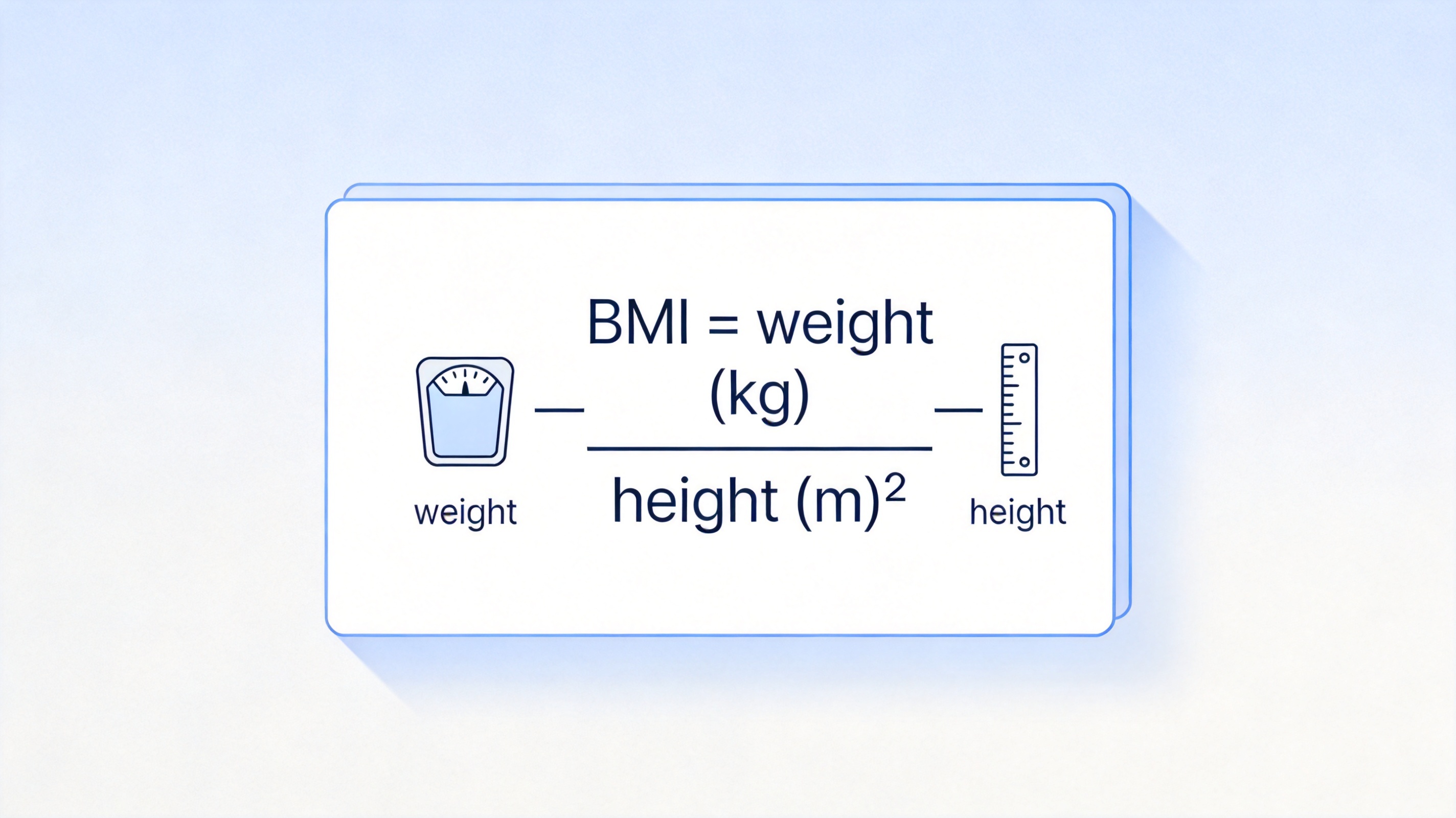
The standard metric formula is:
BMI = weight (kg) / height (m)²
For example, a person weighing 62 kg at 1.68 m has a BMI of 62 / 1.68² ≈ 21.97. If you prefer imperial units, the same result comes from BMI = 703 × weight (lbs) / height (in)², where 703 is the conversion factor between the two systems.
Standard BMI formula weight height
Adult BMI results are usually interpreted with these widely used cutoffs: below 18.5 is underweight, 18.5 to 24.9 is normal, 25 to 29.9 is overweight, and 30 or above is obese. Keep in mind that athletes, older adults, and children need different interpretations.


How to Calculate BMI in Excel with the Metric Formula
If your weight is in kilograms and your height is in meters, the BMI formula in Excel is a one-liner. Here is how to set it up from scratch:
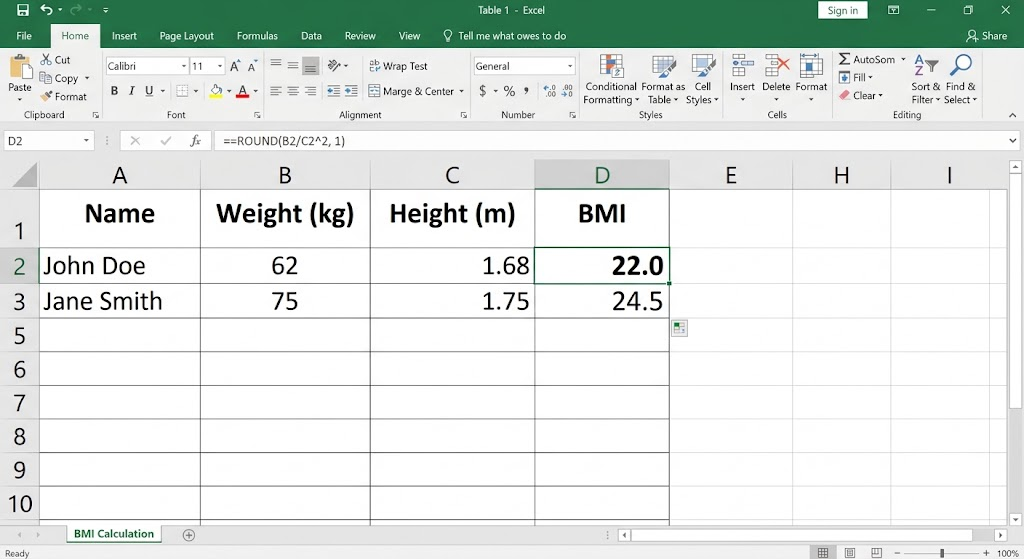
Enter your headers. In cells A1 to D1, type Name, Weight (kg), Height (m), and BMI.
Add your data. In row 2, type the person's name, weight in kilograms (for example, 62), and height in meters (for example, 1.68).
Write the BMI formula. In cell D2, enter =B2/C2^2 and press Enter. The caret (^) squares the height, so the formula divides weight by height squared.
Fill down. Drag the fill handle or double-click it to copy the formula for everyone in your list. If you work with long tables, you can also apply a formula to an entire column without dragging.
Round the result. For a cleaner display, wrap it as =ROUND(B2/C2^2,1), which keeps one decimal place.
One common mistake is forgetting parentheses when you convert centimeters inline. If your height is in centimeters, use =B2/((C2/100)^2) instead — dividing by 100 first, then squaring. Without the inner parentheses, the math order goes wrong and the result will be far too small.
Metric BMI formula in spreadsheet
How to Use the BMI Formula with Imperial Units
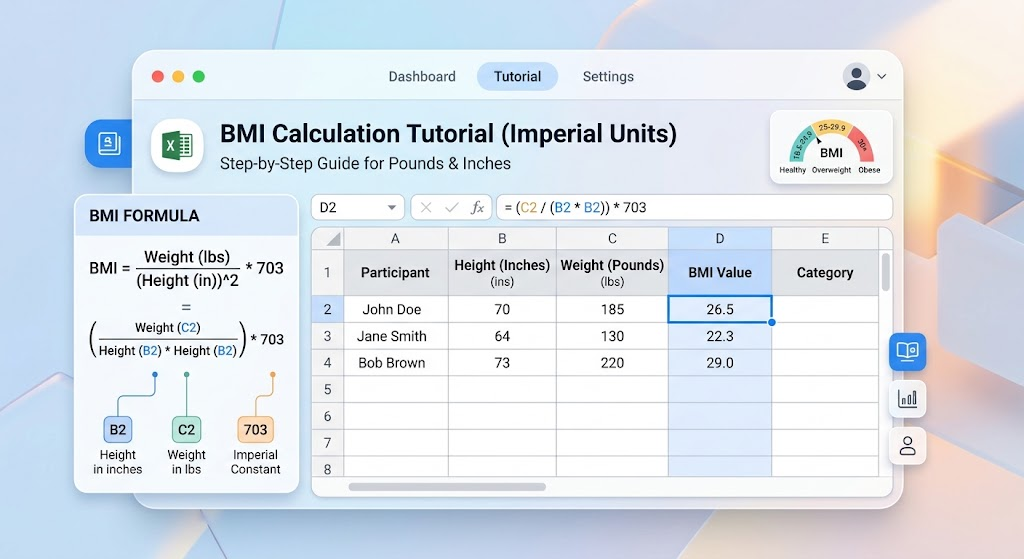
In the United States, height is usually recorded in feet and inches and weight in pounds. You have two clean options: convert everything to metric with the CONVERT function, or use the 703 factor directly.
Option 1: the 703 factor (fastest)
Set up your columns. Put Name, Weight (lbs), Height (in), and BMI in cells A1 to D1.
Enter the data. For example, Maria weighs 140 lbs and is 65 inches tall.
Write the formula. In D2, enter =ROUND(703*B2/(C2^2),1). The result is 23.3, a normal BMI.
Copy down the column for the rest of your list.
Option 2: convert with CONVERT (keeps metric math)
Convert weight to kilograms. In an empty column, use =CONVERT(B2,"lbm","kg").
Convert height to meters. Use =CONVERT(C2,"in","m"). If height is split across feet and inches, first combine them as =C2+D2/12 total inches, then convert.
Apply the metric formula. Divide the kilogram value by the meter value squared, exactly as in the previous section.
The 703 shortcut is quicker for one-off tables, while CONVERT is better when your sheet mixes units or feeds other metric calculations.
Imperial BMI formula in spreadsheet
How to Build a BMI Formula Calculator with Categories
A raw BMI number is useful, but a label is easier to read. With a nested IF formula, your spreadsheet can turn every BMI value into Underweight, Normal, Overweight, or Obese automatically.
Add a Category column next to your BMI column (column E).
Enter the nested IF formula. In E2, type: =IF(D2<18.5,"underweight",if(d2<25,"normal",if(d2<30,"overweight","obese")))<>
Copy down so every row gets labeled.
Optional: highlight the categories. Select the BMI column, then use Home > Conditional Formatting > Highlight Cells Rules to color normal values green and out-of-range values red.
Save it as a template. Once the layout works, save a blank copy so you can reuse the same BMI calculator for new groups — a class roster, a gym program, or a family health tracker. For ready-made layouts, you can start from these free BMI index chart templates and add the formulas above.
This small calculator is one of the most practical spreadsheet builds: no macros, no add-ins, and it works identically in Excel, WPS Spreadsheet, and Google Sheets because it uses only core arithmetic and IF logic.
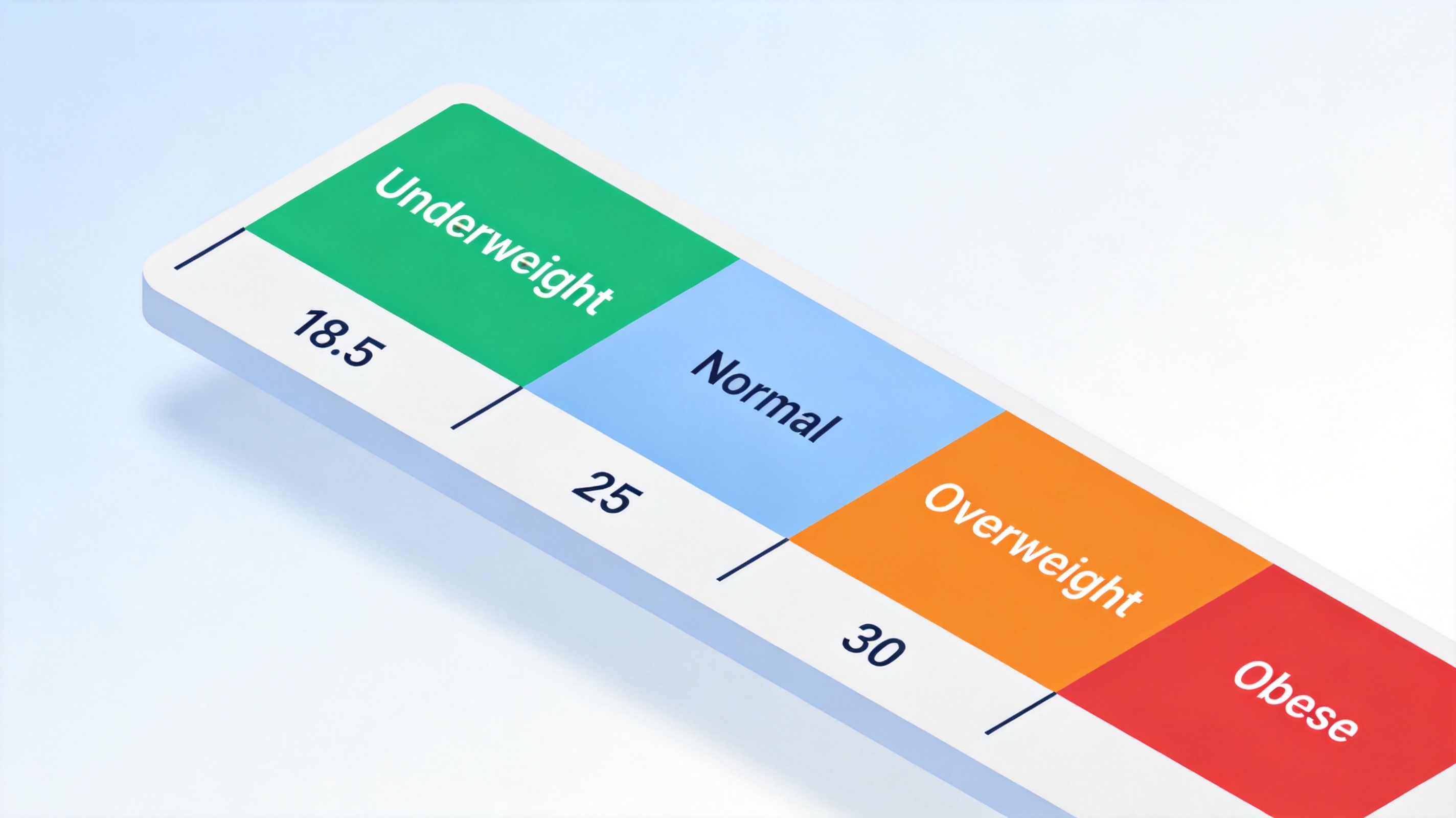
BMI weight categories scale chart
The Best Free Alternative: WPS Office for BMI Calculators
You do not need a paid Microsoft 365 subscription to build any of the above. WPS Office is a free, lightweight office suite whose Spreadsheet app runs every formula in this guide — BMI, ROUND, IF, and CONVERT — with full compatibility with .xlsx and .xls files.
WPS Spreadsheet adds a few conveniences for a BMI tracker: thousands of free health and fitness templates, built-in conditional formatting for the category colors, and cloud sync so your calculator follows you across devices. The interface mirrors familiar spreadsheet layouts, so the steps in this article translate one-to-one.

WPS Office Spreadsheet health workbook
FAQs
What is the BMI formula in Excel for kg and meters?
With weight in B2 and height in meters in C2, use =B2/C2^2. The caret operator squares the height, giving weight divided by height squared.
How do I calculate BMI with pounds and inches?
Use the imperial version =703*weight/(height^2). With weight in B2 and height in inches in C2, enter =ROUND(703*B2/(C2^2),1) to get a result rounded to one decimal.
What if my height is in centimeters?
Convert inside the formula: =B2/((C2/100)^2). The inner parentheses divide centimeters by 100 first, converting them to meters before squaring.
How do I label BMI results as underweight or obese?
Add a category column with =IF(D2<18.5,"underweight",if(d2<25,"normal",if(d2<30,"overweight","obese"))) and="" fill="" it="" down.="" pair="" with="" conditional="" formatting="" for="" color="" coding.="">
Is BMI accurate for everyone?
No. BMI is a screening tool based only on height and weight. It can misclassify muscular athletes and does not apply to children the same way, so treat it as a starting point, not a diagnosis.


'%3e%3cpath%20d='M19.9911%204.11386V6.471H18.5894C18.0775%206.471%2017.7322%206.57814%2017.5536%206.79243C17.3751%207.00671%2017.2858%207.32814%2017.2858%207.75671V9.44421H19.9019L19.5536%2012.0871H17.2858V18.8639H14.5536V12.0871H12.2769V9.44421H14.5536V7.49779C14.5536%206.39064%2014.8632%205.53201%2015.4822%204.92189C16.1013%204.31177%2016.9257%204.00671%2017.9554%204.00671C18.8304%204.00671%2019.509%204.04243%2019.9911%204.11386Z'%20fill='%23333333'/%3e%3c/g%3e%3cdefs%3e%3cclipPath%20id='clip0_2938_8199'%3e%3crect%20width='16'%20height='16'%20fill='white'%20transform='translate(8%204.00671)'/%3e%3c/clipPath%3e%3c/defs%3e%3c/svg%3e)
'%3e%3cpath%20d='M17.5237%2010.7813L23.4811%204H22.0699L16.8949%209.88693L12.7648%204H8L14.2469%2012.9029L8%2020.0133H9.4112L14.8725%2013.7952L19.2352%2020.0133H24M9.92053%205.04213H12.0885L22.0688%2019.0224H19.9003'%20fill='%23333333'/%3e%3c/g%3e%3cdefs%3e%3cclipPath%20id='clip0_2938_8200'%3e%3crect%20width='16'%20height='16.0134'%20fill='white'%20transform='translate(8%204)'/%3e%3c/clipPath%3e%3c/defs%3e%3c/svg%3e)


