

'%3e%3cpath%20d='M8%200C12.4183%200%2016%203.58172%2016%208C16%2012.4183%2012.4183%2016%208%2016C3.58172%2016%200%2012.4183%200%208C0%203.58172%203.58172%200%208%200ZM11.6162%204.38379C11.2257%203.99337%2010.5927%203.99338%2010.2021%204.38379L8%206.58594L5.79785%204.38379C5.40732%203.99334%204.77429%203.99329%204.38379%204.38379C3.99331%204.77429%203.99335%205.40733%204.38379%205.79785L6.58594%208L4.38379%2010.2021C3.99348%2010.5927%203.99341%2011.2257%204.38379%2011.6162C4.77426%2012.0066%205.40734%2012.0065%205.79785%2011.6162L8%209.41406L10.2021%2011.6162C10.5927%2012.0066%2011.2257%2012.0067%2011.6162%2011.6162C12.0067%2011.2257%2012.0066%2010.5927%2011.6162%2010.2021L9.41406%208L11.6162%205.79785C12.0066%205.40735%2012.0066%204.77429%2011.6162%204.38379Z'%20fill='%23080E17'%20fill-opacity='0.46'/%3e%3c/g%3e%3cdefs%3e%3cclipPath%20id='clip0_3761_713'%3e%3crect%20width='16'%20height='16'%20fill='white'/%3e%3c/clipPath%3e%3c/defs%3e%3c/svg%3e)



'%3e%3cpath%20fill-rule='evenodd'%20clip-rule='evenodd'%20d='M21.4999%2010.9993C21.4999%205.20009%2016.7986%200.498901%2010.9993%200.498901C5.19994%200.498901%200.498657%205.20009%200.498657%2010.9993C0.498657%2016.2404%204.33858%2020.5844%209.35855%2021.3722V14.0346H6.69238V10.9993H9.35855V8.68594C9.35855%206.05427%2010.9262%204.60062%2013.3248%204.60062C14.4736%204.60062%2015.6753%204.80571%2015.6753%204.80571V7.38979H14.3512C13.0468%207.38979%2012.64%208.19921%2012.64%209.0296V10.9993H15.5523L15.0867%2014.0346H12.64V21.3722C17.66%2020.5844%2021.4999%2016.2404%2021.4999%2010.9993Z'%20fill='%231568EA'/%3e%3c/g%3e%3c/svg%3e)


'%3e%3cpath%20d='M2.42045%2022.1876H6.31818V12.7217L0.75%208.54553V20.5171C0.75%2021.4414%201.49892%2022.1876%202.42045%2022.1876Z'%20fill='%234285F4'/%3e%3cpath%20d='M19.682%2022.1876H23.5797C24.5041%2022.1876%2025.2502%2021.4387%2025.2502%2020.5171V8.54553L19.682%2012.7217'%20fill='%2334A853'/%3e%3cpath%20d='M19.682%205.48293V12.7216L25.2502%208.54543V6.31816C25.2502%204.25236%2022.8921%203.07469%2021.2411%204.31361'%20fill='%23FBBC04'/%3e%3cpath%20d='M6.31824%2012.7217V5.48303L13.0001%2010.4944L19.6819%205.48303V12.7217L13.0001%2017.733'%20fill='%23EA4335'/%3e%3cpath%20d='M0.75%206.31816V8.54543L6.31818%2012.7216V5.48293L4.75909%204.31361C3.10534%203.07469%200.75%204.25236%200.75%206.31816Z'%20fill='%23C5221F'/%3e%3c/g%3e%3cdefs%3e%3cclipPath%20id='clip0_2954_7305'%3e%3crect%20width='24.5'%20height='18.375'%20fill='white'%20transform='translate(0.75%203.8125)'/%3e%3c/clipPath%3e%3c/defs%3e%3c/svg%3e)


Do you have an MHTML file you want to share, archive, or read offline? Converting MHTML to PDF is the easiest way to make your web content portable, searchable, and printable.
In this guide, we’ll show you how to convert MHTML to PDF in the fastest and easiest way using online converters, browsers, or the free WPS PDF Tool complete with screenshots, tips, and FAQs.
Whether you’re a student, professional, or business user, this guide will save you time and frustration.
Creating an MHTML file
An MHTML file can be created by different web browsers available.
Using google chrome
Step1:Open google chrome, tap on the 3 dots at the top right corner, and select ‘More Tools’
Step2: click on ‘save page as.’ and choose ‘Webpage, Single file’

You can do the same process on Mac and using another browser as well including Microsoft Edge.
Opening an MHTML file
An MHTML file is opened by virtually any web browser including the most common ones which are Chrome, Microsoft Edge, and internet explorer. Other applications that open MHTML files include WPS Office Writer and MS Word among others. The different web browsers may display the file differently so you should not be surprised. This is essential because there is no standardized format to display such a file.
Why you need to convert MHTML to PDF
PDFs are common and many people can access them. Converting any other file format is usually something that people will do now and then. Learning MHTML to PDF conversion is therefore beneficial in this sense.
Additionally, since the main aim of having MHTML, is for archiving purposes, PDF documents are better when it comes to archiving a document. This is because the PDF takes up very little space compared to a file in MHTML or other formats.
Also, with a PDF document, you can easily annotate and highlight important things in the document. This is not possible with an MHTML document.
A PDF document also safeguards the graphic integrity of your file and is more secure compared to MHTML
How to convert MHTML to PDF
There are different methods on how to convert MHTML to PDF. these are grouped into 3 categories:
Online converters
Conversion programs and
Web browsers
Using a conversion program
A conversion program is a function incorporated in a word processor and helps you convert any document to PDF as long as it can be opened by the word processor. This method is tedious because you have to convert your MHTML document to HTML which can be opened by Word then use the PDF printer Program in word to get your PDF.
Using online converters
There are many PDF converters online that you can use to convert MHTML to pdf. they include the WPS PDF tools and PDF Converter. These tools require that you upload your file, then wait for the conversion to be complete, and then download your file.
Advantages of using online converters
Using online converters like WPS PDF tools is faster and does not require any specifications in terms of the operating system. It is also very easy because you don’t need to master any steps. Good converters are also secure and usually delete your document after one hour. Others including the WPS PDF online converter are free to use requiring no user registration or subscription.
Using a web browser
Using a web browser such as Microsoft Edge is also another way to convert MHTML documents to PDF. below are the steps to follow:
Step1:open your MHTML file in Microsoft Edge
Step2: click on the 3 dots in the top right corner and select ‘Print ‘
Step3: in the print menu, select Microsoft print to PDF in the printer section
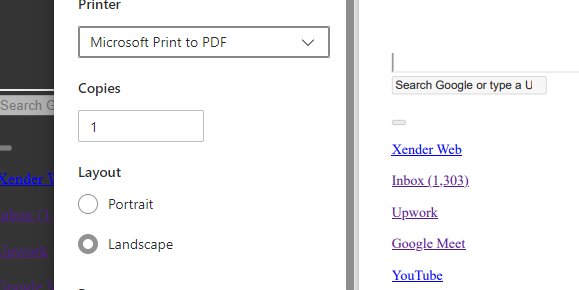
Step4: tap on ‘Print’ at the bottom of the page and select the storage location and name of your PDF document
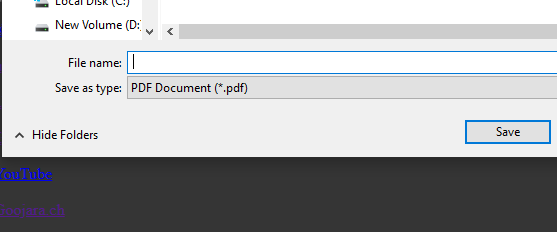
Step5: Finally, click on save to finish the process.
This is the standard procedure and can be done in other web browsers as well. The conversion takes a few minutes compared to the online conversion.
Method Comparison Table
| Method | Pros | Cons |
|---|---|---|
| Online Tools | Quick, no installation required | Not ideal for sensitive files |
| Browser | No software installation, fast | Limited formatting options |
| Desktop Program | Full control, high-quality output | Software installation |
FAQ
Q1: Can I open MHTML files without a browser?
A: Yes, programs like WPS Office can open MHTML files directly.
Q2: Are PDFs better than MHTML for archiving?
A: Absolutely. PDFs are universally supported, easier to share, and more professional-looking.
Q3: Do online converters preserve formatting?
A: Generally yes, but complex pages may lose some layout. Desktop tools are more reliable.
Converting MHTML to PDF is important as is learning how to convert MHTML to PDF. to use the WPS PDF conversion and also Download WPS Office for different platforms you can visit this site https://pdf.wps.com.

'%3e%3cpath%20d='M19.9911%204.11386V6.471H18.5894C18.0775%206.471%2017.7322%206.57814%2017.5536%206.79243C17.3751%207.00671%2017.2858%207.32814%2017.2858%207.75671V9.44421H19.9019L19.5536%2012.0871H17.2858V18.8639H14.5536V12.0871H12.2769V9.44421H14.5536V7.49779C14.5536%206.39064%2014.8632%205.53201%2015.4822%204.92189C16.1013%204.31177%2016.9257%204.00671%2017.9554%204.00671C18.8304%204.00671%2019.509%204.04243%2019.9911%204.11386Z'%20fill='%23333333'/%3e%3c/g%3e%3cdefs%3e%3cclipPath%20id='clip0_2938_8199'%3e%3crect%20width='16'%20height='16'%20fill='white'%20transform='translate(8%204.00671)'/%3e%3c/clipPath%3e%3c/defs%3e%3c/svg%3e)
'%3e%3cpath%20d='M17.5237%2010.7813L23.4811%204H22.0699L16.8949%209.88693L12.7648%204H8L14.2469%2012.9029L8%2020.0133H9.4112L14.8725%2013.7952L19.2352%2020.0133H24M9.92053%205.04213H12.0885L22.0688%2019.0224H19.9003'%20fill='%23333333'/%3e%3c/g%3e%3cdefs%3e%3cclipPath%20id='clip0_2938_8200'%3e%3crect%20width='16'%20height='16.0134'%20fill='white'%20transform='translate(8%204)'/%3e%3c/clipPath%3e%3c/defs%3e%3c/svg%3e)


