

'%3e%3cpath%20d='M8%200C12.4183%200%2016%203.58172%2016%208C16%2012.4183%2012.4183%2016%208%2016C3.58172%2016%200%2012.4183%200%208C0%203.58172%203.58172%200%208%200ZM11.6162%204.38379C11.2257%203.99337%2010.5927%203.99338%2010.2021%204.38379L8%206.58594L5.79785%204.38379C5.40732%203.99334%204.77429%203.99329%204.38379%204.38379C3.99331%204.77429%203.99335%205.40733%204.38379%205.79785L6.58594%208L4.38379%2010.2021C3.99348%2010.5927%203.99341%2011.2257%204.38379%2011.6162C4.77426%2012.0066%205.40734%2012.0065%205.79785%2011.6162L8%209.41406L10.2021%2011.6162C10.5927%2012.0066%2011.2257%2012.0067%2011.6162%2011.6162C12.0067%2011.2257%2012.0066%2010.5927%2011.6162%2010.2021L9.41406%208L11.6162%205.79785C12.0066%205.40735%2012.0066%204.77429%2011.6162%204.38379Z'%20fill='%23080E17'%20fill-opacity='0.46'/%3e%3c/g%3e%3cdefs%3e%3cclipPath%20id='clip0_3761_713'%3e%3crect%20width='16'%20height='16'%20fill='white'/%3e%3c/clipPath%3e%3c/defs%3e%3c/svg%3e)




'%3e%3cpath%20fill-rule='evenodd'%20clip-rule='evenodd'%20d='M21.4999%2010.9993C21.4999%205.20009%2016.7986%200.498901%2010.9993%200.498901C5.19994%200.498901%200.498657%205.20009%200.498657%2010.9993C0.498657%2016.2404%204.33858%2020.5844%209.35855%2021.3722V14.0346H6.69238V10.9993H9.35855V8.68594C9.35855%206.05427%2010.9262%204.60062%2013.3248%204.60062C14.4736%204.60062%2015.6753%204.80571%2015.6753%204.80571V7.38979H14.3512C13.0468%207.38979%2012.64%208.19921%2012.64%209.0296V10.9993H15.5523L15.0867%2014.0346H12.64V21.3722C17.66%2020.5844%2021.4999%2016.2404%2021.4999%2010.9993Z'%20fill='%231568EA'/%3e%3c/g%3e%3c/svg%3e)


'%3e%3cpath%20d='M2.42045%2022.1876H6.31818V12.7217L0.75%208.54553V20.5171C0.75%2021.4414%201.49892%2022.1876%202.42045%2022.1876Z'%20fill='%234285F4'/%3e%3cpath%20d='M19.682%2022.1876H23.5797C24.5041%2022.1876%2025.2502%2021.4387%2025.2502%2020.5171V8.54553L19.682%2012.7217'%20fill='%2334A853'/%3e%3cpath%20d='M19.682%205.48293V12.7216L25.2502%208.54543V6.31816C25.2502%204.25236%2022.8921%203.07469%2021.2411%204.31361'%20fill='%23FBBC04'/%3e%3cpath%20d='M6.31824%2012.7217V5.48303L13.0001%2010.4944L19.6819%205.48303V12.7217L13.0001%2017.733'%20fill='%23EA4335'/%3e%3cpath%20d='M0.75%206.31816V8.54543L6.31818%2012.7216V5.48293L4.75909%204.31361C3.10534%203.07469%200.75%204.25236%200.75%206.31816Z'%20fill='%23C5221F'/%3e%3c/g%3e%3cdefs%3e%3cclipPath%20id='clip0_2954_7305'%3e%3crect%20width='24.5'%20height='18.375'%20fill='white'%20transform='translate(0.75%203.8125)'/%3e%3c/clipPath%3e%3c/defs%3e%3c/svg%3e)


Still holding on to microsoft office for mac 2011 because it came with an old iMac or MacBook? You are not alone: the suite still launches on older systems, and millions of Word, Excel, and PowerPoint documents were created with it. The catch is that Microsoft ended support for it years ago, and modern macOS versions have made it harder to keep running.
This guide walks through how to download and install Office for Mac 2011 if you still need it, how to fix the most common activation and license errors, why it stops working on macOS Catalina and newer, and a free, modern alternative—WPS Office for Mac—that keeps your .docx, .xlsx, and .pptx files fully editable without any workarounds.
How to Download, Fix, and Keep Using Microsoft Office for Mac 2011
What Is Microsoft Office for Mac 2011 and Is It Still Usable
Microsoft Office for Mac 2011 is the office suite Microsoft released in October 2010 for macOS. It included Word 2011, Excel 2011, PowerPoint 2011, and Outlook 2011, and it was the first Mac version to bring the Windows-style ribbon interface to the Mac. It also came in several editions, from Home & Student to Home & Business and Professional.
According to Microsoft's support lifecycle page, support for Office 2011 for Mac ended on October 10, 2017. The apps themselves keep working and your documents will not disappear, but end of support means:
No security updates — newly discovered vulnerabilities in Word, Excel, or PowerPoint 2011 will never be patched, so opening files from unknown sources carries real risk.
No bug fixes or feature updates — crashes and compatibility quirks will stay exactly as they are.
No technical support — Microsoft no longer offers phone or chat support, and most of the online help content has been retired.
Reduced online service access — some cloud-connected features that relied on Microsoft's older services no longer function.
So the honest answer is: yes, it still runs on older Macs, but it is not safe as your only office suite on a Mac that goes online. That is why many users either keep it for legacy files or pair it with a maintained alternative like WPS Office for Mac.
How to Download and Install Microsoft Office for Mac 2011
If your Mac runs macOS 10.5.8 through 10.14 Mojave, you can still install Office for Mac 2011 from an original installation disc, a backup DMG file, or Microsoft's download center, which still hosts the final 14.7.7 update for licensed users. Here is the clean way to do it:
Check your macOS version — click the Apple menu > About This Mac. Office 2011 needs Mac OS X 10.5.8 or later and will only install on versions before Catalina.
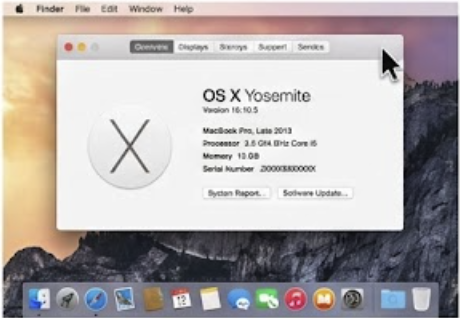
Check macOS version Get the installer — use your original DVD or a previously saved installer image. If you lost it, Microsoft's Download Center provides update packages such as the 14.4.9 DMG for existing installations.
Mount the DMG and run the installer — double-click the .dmg file, open Office Installer, and follow the on-screen steps until Continue > Install finishes.
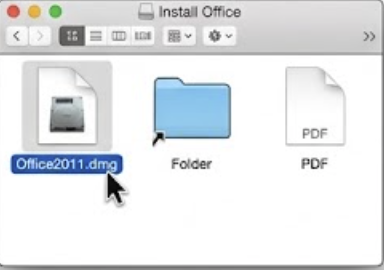
open Office Installer Enter your product key — when the Setup Assistant asks for the 25-character key, type the key from your Certificate of Authenticity or confirmation email.
Run Software Update — open Help > Check for Updates inside any Office app and install the final 14.7.7 update to get the last round of fixes from 2017.
Activate and verify — launch Word and confirm the app opens without a trial or activation notice.

Verify product activated
Note that Microsoft AutoUpdate for Office 2011 can fail on modern TLS settings; if the updater hangs, download the final update DMG directly from the Download Center instead. If you only need to read and edit documents rather than reinstall the suite itself, skipping this whole process and using WPS Office is usually faster—more on that below.
How to Fix Microsoft Office for Mac 2011 Activation and License Errors
The most common complaint with an aging Office 2011 install is the "License not found" or repeated activation prompt after migrating to a new Mac or restoring from backup. The license data lives in specific folders, and migration tools often skip it. Try these fixes in order:
Quit all Office apps — close Word, Excel, PowerPoint, and Outlook completely before touching license files.
Re-enter your product key — open Word > Word > Preferences > Product Information (or run the Office Setup Assistant again) and type your 25-character key.
Delete stale license files — in Finder, press Shift + Command + G and go to
~/Library/Preferences, then remove files likecom.microsoft.office.licensing.plistso the suite rebuilds them.Run the Office Setup Assistant again — relaunch it from the Applications > Microsoft Office 2011 folder and let it re-register the license.
Repair keychain entries — open Keychain Access, search for "Office", and delete expired Microsoft certificate entries, then activate again.
If activation still fails because Microsoft's activation servers have changed since 2017, volume-license (MAK/KMS) users should contact their organization's IT admin, and retail users should keep proof of purchase. And if you no longer have a valid key at all, reactivating is essentially a dead end—switching to a free suite such as WPS Writer avoids the problem entirely.
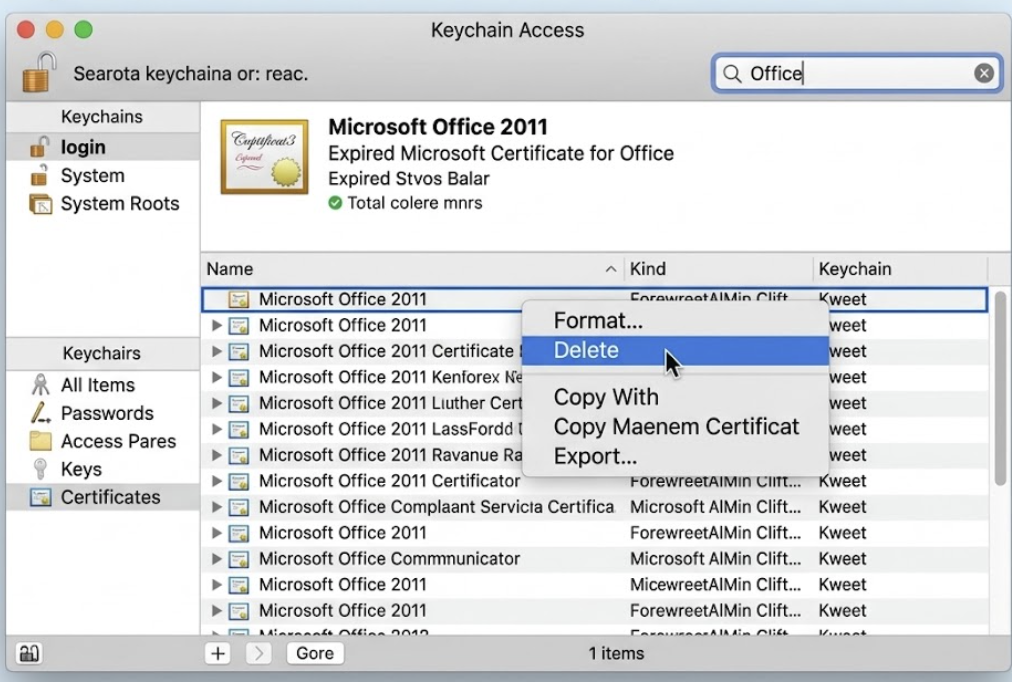
Search for Office and delete expired certificates in keychain


Why Microsoft Office for Mac 2011 Fails on macOS Catalina and Newer
Starting with macOS 10.15 Catalina, Apple removed support for 32-bit applications. Every Office 2011 app—Word, Excel, PowerPoint, and Outlook—is 32-bit, so on Catalina or any later macOS they either refuse to launch or crash immediately. Big Sur, Monterey, Ventura, Sonoma, and Sequoia keep that 64-bit-only rule, so upgrading your Mac effectively retires Office 2011.
You have three realistic options at this point:
Stay on an old macOS — if the Mac itself supports nothing newer than Mojave, Office 2011 keeps working, but you lose all newer security fixes from Apple.
Buy a modern Office version — Microsoft 365 or Office Home 2024 are 64-bit and fully supported, but both are paid.
Move to a free, 64-bit suite — this is where WPS Office for Mac comes in, and for most home users it is the smoothest path because your existing files open directly.
For a step-by-step migration of an older Mac, the same 32-vs-64-bit logic applies to other legacy apps too, so audit your Applications folder before any system upgrade.

Office 2011 32-bit blocked on macOS Catalina
The Best Free Alternative: WPS Office for Mac
If the sections above feel like too much work for an unsupported 2010 suite, there is a simpler answer: WPS Office for Mac. It is a free, modern, 64-bit office suite from Kingsoft that runs natively on the latest macOS versions and both Intel and Apple silicon Macs. Here is what you actually get, point by point:
Full compatibility with your existing files — WPS opens and saves .docx, .doc, .xlsx, .xls, .pptx, and .ppt directly, so documents you created in Office 2011 keep their layout, formulas, and styles without a conversion step.
All four apps in one suite — Writer for documents, Spreadsheet for Excel-style work, Presentation for slides, plus a built-in PDF toolkit that lets you read, annotate, convert, and merge PDFs—something Office 2011 never included.
A familiar ribbon interface — the tabbed ribbon layout closely matches what you are used to from Office 2011, so switching takes minutes rather than days of relearning.
Free core editing with no subscription — creating and editing documents, spreadsheets, and presentations is free; optional WPS Premium adds AI writing, extra templates, and PDF advanced tools if you ever want them.
Actively maintained and secure — unlike Office 2011, WPS Office receives regular updates, security patches, and support for current macOS releases, so you are not running unpatched software.
Cross-platform and cloud-ready — the same suite runs on Windows, macOS, Linux, iOS, and Android, and WPS Cloud syncs your files so you can start a document on your Mac and finish it on your phone.
Lighter on older hardware — it is designed to run smoothly even on Macs that feel slow with modern Microsoft 365 builds, which matters if you are keeping an older machine alive.
Modern extras — tabbed multi-document editing, built-in templates, OCR in the PDF tools, and presentation-to-video export give you capabilities Office 2011 never had.
Getting started takes about two minutes: download WPS Office for Mac from the official site, drag it into Applications, open your old .docx or .xlsx files straight from Finder, and keep working. If you want a deeper dive into Office setup on macOS in general, see our guides on Microsoft Office for Mac full version with product key and how to download Microsoft Office for Mac.
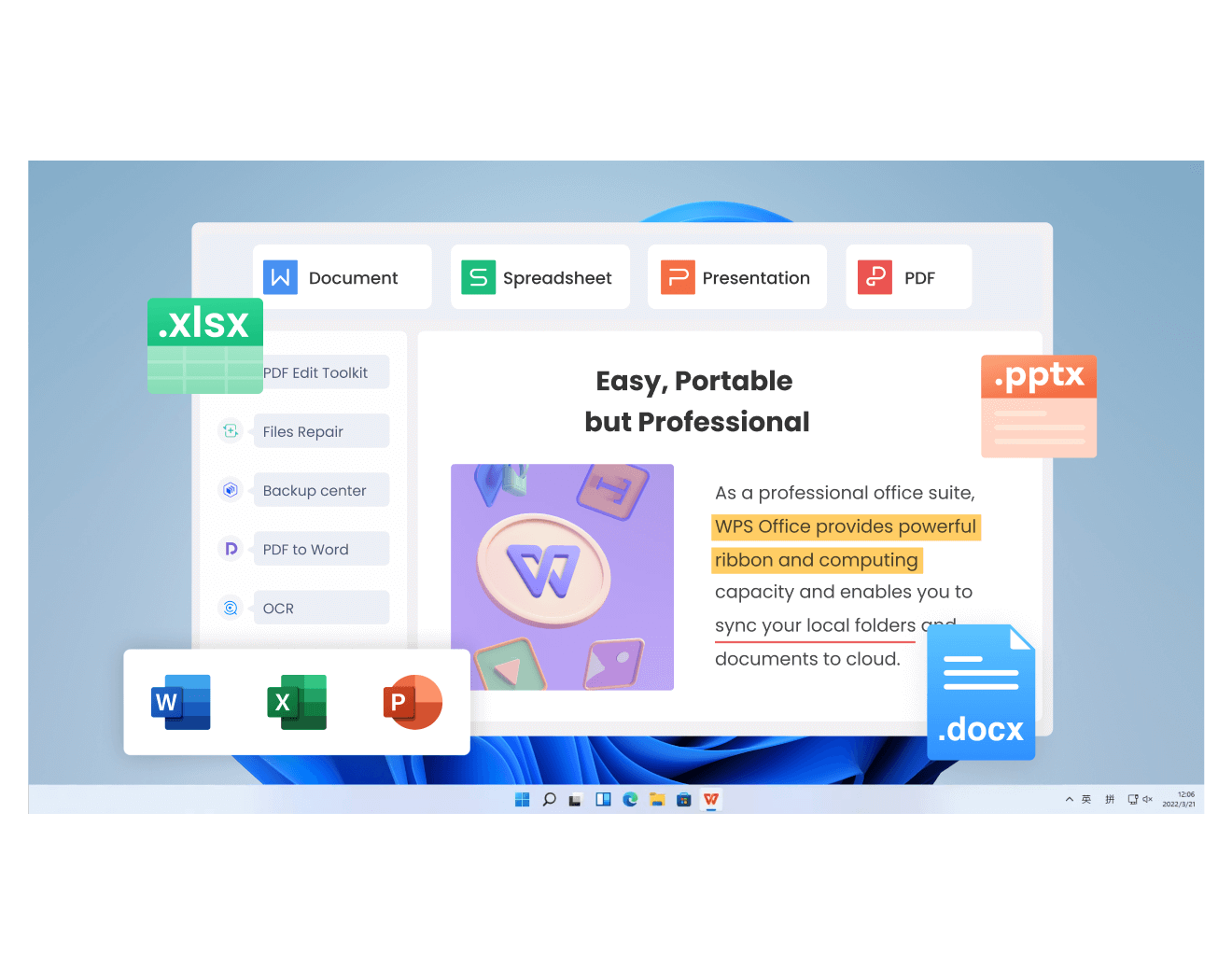
WPS Office for Mac suite overview
FAQs
Can I still download Microsoft Office for Mac 2011 legally?
Only if you already own a license. Microsoft no longer sells Office 2011, but licensed users can still fetch its final 14.7.7 update from the official Download Center. Downloading installers paired with keys you did not buy is not legal.
Does Microsoft Office for Mac 2011 still work on macOS Catalina?
No. Office 2011 apps are 32-bit, and Catalina dropped 32-bit support entirely, so Word, Excel, PowerPoint, and Outlook 2011 will not launch on Catalina or any newer macOS.
Is it safe to keep using Office for Mac 2011?
It runs, but it stopped receiving security updates in October 2017, so unpatched vulnerabilities remain open. Use it offline with trusted files only, or switch to a maintained suite for daily work.
How do I fix the "License not found" error in Office 2011 for Mac?
Quit all Office apps, re-enter your product key in the Setup Assistant or Preferences, and if needed delete the stale com.microsoft.office.licensing.plist file in ~/Library/Preferences before activating again.
What is the best free replacement for Microsoft Office for Mac 2011?
WPS Office for Mac is a strong choice: it is free, 64-bit, runs on current macOS, and opens .docx, .xlsx, and .pptx files with a familiar ribbon interface—no migration or conversion needed.

'%3e%3cpath%20d='M19.9911%204.11386V6.471H18.5894C18.0775%206.471%2017.7322%206.57814%2017.5536%206.79243C17.3751%207.00671%2017.2858%207.32814%2017.2858%207.75671V9.44421H19.9019L19.5536%2012.0871H17.2858V18.8639H14.5536V12.0871H12.2769V9.44421H14.5536V7.49779C14.5536%206.39064%2014.8632%205.53201%2015.4822%204.92189C16.1013%204.31177%2016.9257%204.00671%2017.9554%204.00671C18.8304%204.00671%2019.509%204.04243%2019.9911%204.11386Z'%20fill='%23333333'/%3e%3c/g%3e%3cdefs%3e%3cclipPath%20id='clip0_2938_8199'%3e%3crect%20width='16'%20height='16'%20fill='white'%20transform='translate(8%204.00671)'/%3e%3c/clipPath%3e%3c/defs%3e%3c/svg%3e)
'%3e%3cpath%20d='M17.5237%2010.7813L23.4811%204H22.0699L16.8949%209.88693L12.7648%204H8L14.2469%2012.9029L8%2020.0133H9.4112L14.8725%2013.7952L19.2352%2020.0133H24M9.92053%205.04213H12.0885L22.0688%2019.0224H19.9003'%20fill='%23333333'/%3e%3c/g%3e%3cdefs%3e%3cclipPath%20id='clip0_2938_8200'%3e%3crect%20width='16'%20height='16.0134'%20fill='white'%20transform='translate(8%204)'/%3e%3c/clipPath%3e%3c/defs%3e%3c/svg%3e)


