

'%3e%3cpath%20d='M8%200C12.4183%200%2016%203.58172%2016%208C16%2012.4183%2012.4183%2016%208%2016C3.58172%2016%200%2012.4183%200%208C0%203.58172%203.58172%200%208%200ZM11.6162%204.38379C11.2257%203.99337%2010.5927%203.99338%2010.2021%204.38379L8%206.58594L5.79785%204.38379C5.40732%203.99334%204.77429%203.99329%204.38379%204.38379C3.99331%204.77429%203.99335%205.40733%204.38379%205.79785L6.58594%208L4.38379%2010.2021C3.99348%2010.5927%203.99341%2011.2257%204.38379%2011.6162C4.77426%2012.0066%205.40734%2012.0065%205.79785%2011.6162L8%209.41406L10.2021%2011.6162C10.5927%2012.0066%2011.2257%2012.0067%2011.6162%2011.6162C12.0067%2011.2257%2012.0066%2010.5927%2011.6162%2010.2021L9.41406%208L11.6162%205.79785C12.0066%205.40735%2012.0066%204.77429%2011.6162%204.38379Z'%20fill='%23080E17'%20fill-opacity='0.46'/%3e%3c/g%3e%3cdefs%3e%3cclipPath%20id='clip0_3761_713'%3e%3crect%20width='16'%20height='16'%20fill='white'/%3e%3c/clipPath%3e%3c/defs%3e%3c/svg%3e)




'%3e%3cpath%20fill-rule='evenodd'%20clip-rule='evenodd'%20d='M21.4999%2010.9993C21.4999%205.20009%2016.7986%200.498901%2010.9993%200.498901C5.19994%200.498901%200.498657%205.20009%200.498657%2010.9993C0.498657%2016.2404%204.33858%2020.5844%209.35855%2021.3722V14.0346H6.69238V10.9993H9.35855V8.68594C9.35855%206.05427%2010.9262%204.60062%2013.3248%204.60062C14.4736%204.60062%2015.6753%204.80571%2015.6753%204.80571V7.38979H14.3512C13.0468%207.38979%2012.64%208.19921%2012.64%209.0296V10.9993H15.5523L15.0867%2014.0346H12.64V21.3722C17.66%2020.5844%2021.4999%2016.2404%2021.4999%2010.9993Z'%20fill='%231568EA'/%3e%3c/g%3e%3c/svg%3e)


'%3e%3cpath%20d='M2.42045%2022.1876H6.31818V12.7217L0.75%208.54553V20.5171C0.75%2021.4414%201.49892%2022.1876%202.42045%2022.1876Z'%20fill='%234285F4'/%3e%3cpath%20d='M19.682%2022.1876H23.5797C24.5041%2022.1876%2025.2502%2021.4387%2025.2502%2020.5171V8.54553L19.682%2012.7217'%20fill='%2334A853'/%3e%3cpath%20d='M19.682%205.48293V12.7216L25.2502%208.54543V6.31816C25.2502%204.25236%2022.8921%203.07469%2021.2411%204.31361'%20fill='%23FBBC04'/%3e%3cpath%20d='M6.31824%2012.7217V5.48303L13.0001%2010.4944L19.6819%205.48303V12.7217L13.0001%2017.733'%20fill='%23EA4335'/%3e%3cpath%20d='M0.75%206.31816V8.54543L6.31818%2012.7216V5.48293L4.75909%204.31361C3.10534%203.07469%200.75%204.25236%200.75%206.31816Z'%20fill='%23C5221F'/%3e%3c/g%3e%3cdefs%3e%3cclipPath%20id='clip0_2954_7305'%3e%3crect%20width='24.5'%20height='18.375'%20fill='white'%20transform='translate(0.75%203.8125)'/%3e%3c/clipPath%3e%3c/defs%3e%3c/svg%3e)


An xlsb file is an Excel Binary Workbook. It holds the same kind of sheets, formulas, and charts you would put in an XLSX file, but it stores those parts as compact binary records instead of XML text. That difference is why a large workbook sometimes opens and saves faster in this format, and why some apps refuse to open it at all.
This guide explains what sits inside the file, when the format is worth using, how to open it in WPS Spreadsheet, and how to convert it to XLSX before you send it to someone else.
What an xlsb file actually stores
Microsoft introduced the Excel Binary Workbook with Excel 2007, alongside XLSX. Both formats sit in a ZIP package. XLSX fills that package with XML parts. An xlsb file uses the same package idea, then swaps those XML parts for binary records (BIFF12).
That is why the two formats can hold the same grid size—1,048,576 rows by 16,384 columns—and the same formulas once the workbook is in memory. The format mainly changes how the app reads the file from disk and writes it back.
One practical catch: an xlsb file can also carry VBA macros. XLSX cannot. Treat a surprise .xlsb attachment the same way you would treat XLSM. Enable macros only when you trust the sender.


When an xlsb file is worth using
Reach for this format when the workbook is large, slow to open, or slow to save, and almost everyone who touches it uses Excel or another desktop spreadsheet that still lists Excel Binary Workbook. Internal models, long transaction dumps, and workbooks with many sheets often benefit.
Stay on XLSX for everyday files. XLSX is the default for a reason: Google Sheets, Apple Numbers, many Python libraries, and most upload portals expect it. Binary parts are also harder to inspect or repair if the file is damaged, so XLSX is the safer interchange copy.
File size is not a promise. Microsoft has said both formats compress with ZIP, so they can end up about the same size. Some workbooks shrink; a few get larger. Judge the result after you save both copies, not from a rule of thumb.
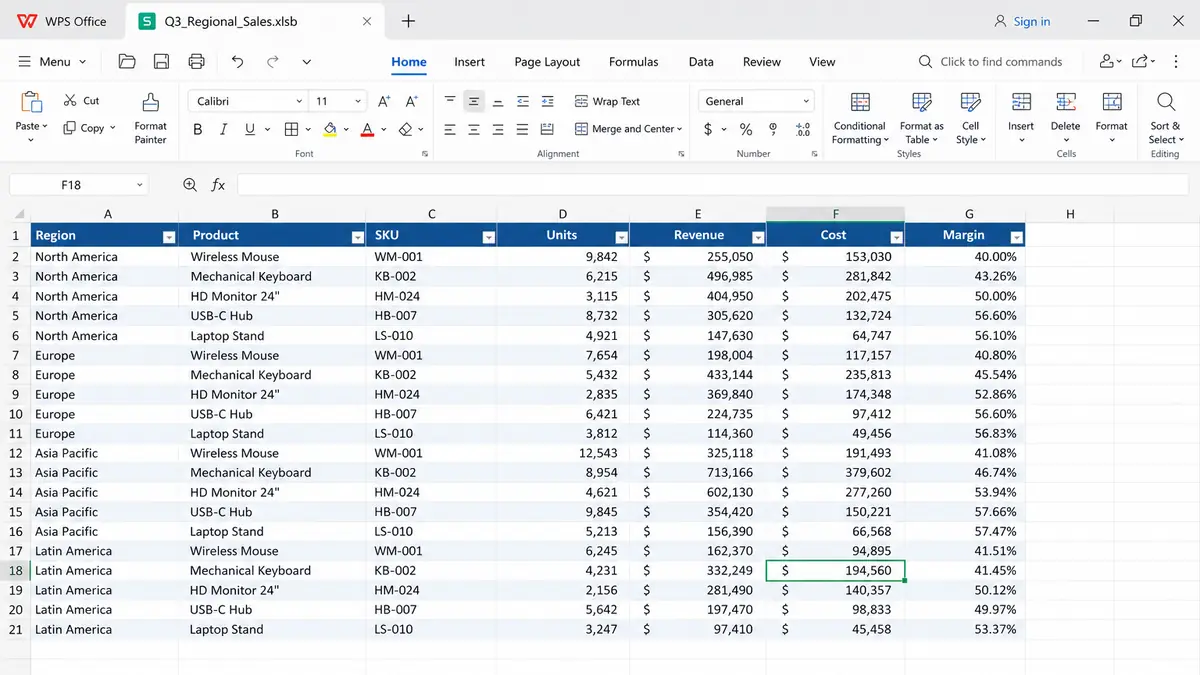
WPS spreadsheet with xlsb file
How to open an xlsb file in WPS Spreadsheet
WPS Spreadsheet can open an xlsb file on desktop in the same way it opens XLSX. You do not need a separate viewer for a normal data workbook.
Install WPS Spreadsheet if it is not already on the computer.
Double-click the .xlsb file, or in WPS choose File > Open.
Set the file type filter to Excel Binary Workbook (*.xlsb) if the file does not appear in the list.
Select the workbook and click Open.
If a security prompt mentions macros, leave them disabled unless you know the file is safe.
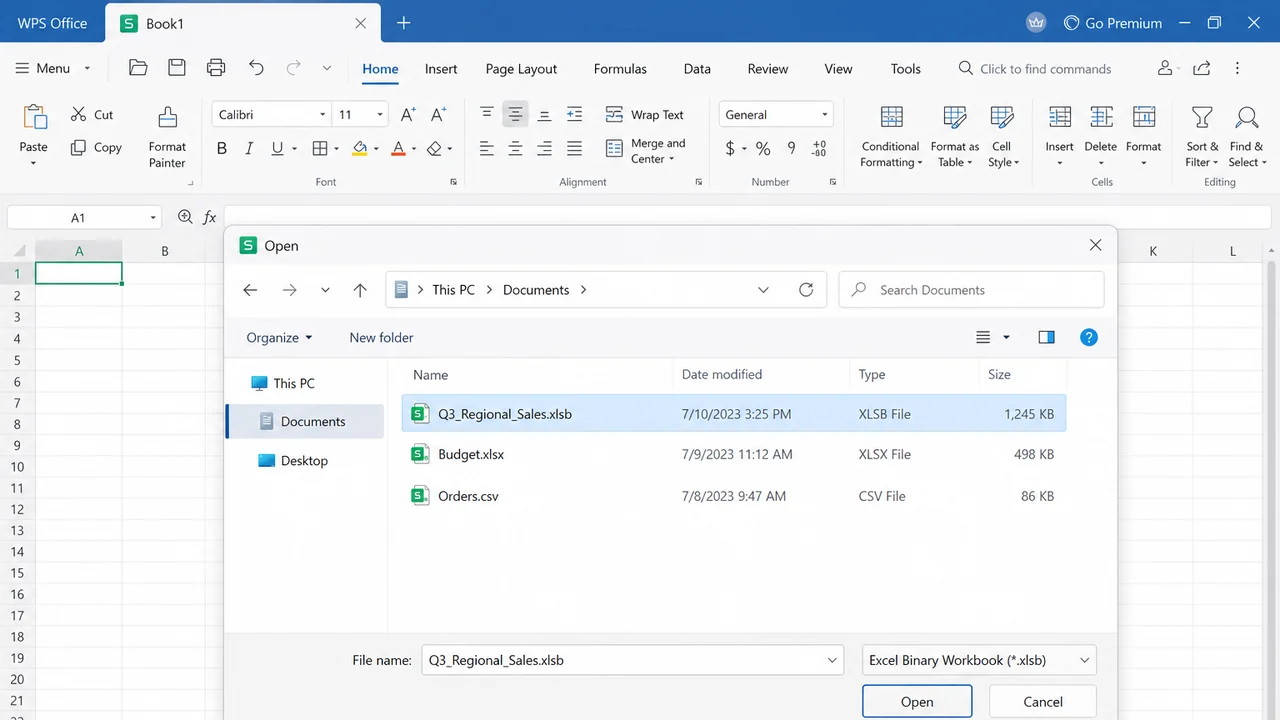
Open xlsb file in WPS
If Windows or macOS asks which app should open the file, pick WPS Office or WPS Spreadsheet. Complex Power Query models, some Excel-only add-ins, and protected workbooks may still open with missing features. In that case, ask the sender for an XLSX copy or open the file in Excel first.
How to save a workbook as an xlsb file
Saving as binary is useful when a large XLSX workbook feels sluggish on your own machine. Current WPS Spreadsheet desktop builds often list Excel Binary Workbook (*.xlsb) in Save As. The exact list can vary by version, so check the dropdown rather than assuming it is there.
Open the workbook in WPS Spreadsheet.
Choose File > Save As.
Pick a folder and keep a clear file name.
Open Save as type and select Excel Binary Workbook (*.xlsb).
Click Save. Keep the original XLSX until you confirm the new file opens cleanly.
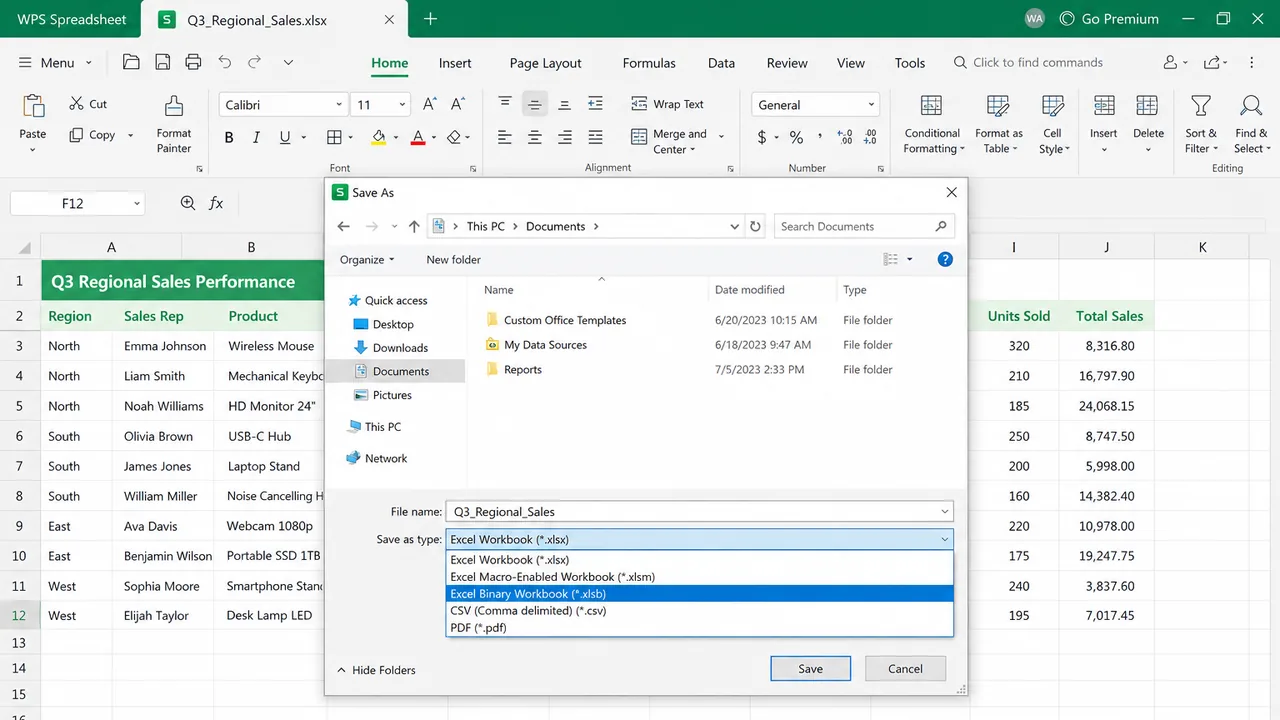
Save workbook as xlsb file
If your build does not list *.xlsb, you can still work in WPS and keep XLSX as the saved format. Excel can create the binary copy later if you need that extra open/save speed.
Convert an xlsb file to XLSX for sharing
Converting is the right move before you email the workbook, upload it to a portal, or hand it to someone on Google Sheets. XLSX is the format most tools already know.
Open the xlsb file in WPS Spreadsheet.
Choose File > Save As.
Select Excel Workbook (*.xlsx) in Save as type.
If the workbook uses macros, choose Excel Macro-Enabled Workbook (*.xlsm) instead. A plain XLSX save drops the VBA project.
Click Save, then open the new file and check a few formulas, charts, and frozen panes.
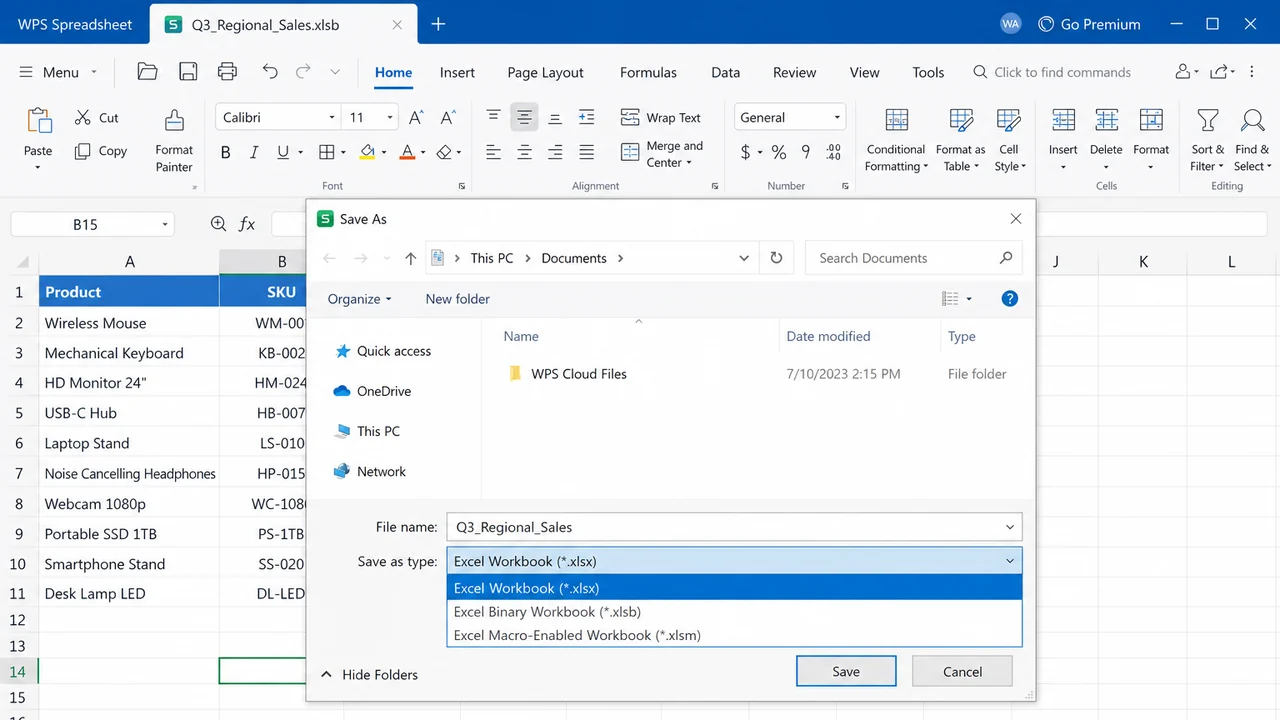
Convert xlsb file to XLSX
Need a still older Excel 97–2003 copy instead? See how to convert XLSX to XLS. If you are going the other way, from legacy .xls into a modern workbook, convert XLS to XLSX first.
Avoid random online converters for workbooks that contain payroll, customer lists, or anything confidential. A local Save As keeps the data on your computer.
XLSB file vs XLSX and XLSM: which format to pick
Use this as a working rule, not a ranking.
XLSX: default. Best when you share files, commit them to git, or feed them into other software. It does not store VBA.
XLSM: same XML package as XLSX, plus macros. Use it when you need VBA and still want a more portable XML package.
XLSB: binary package, optional macros, often faster open/save on large sheets. Use it inside a team that already agreed on Excel or WPS desktop.
Once the file is loaded, calculation speed is about the same. The format does not make SUM or VLOOKUP faster. It mainly changes load and save time.
FAQs
Can Google Sheets open an xlsb file?
Often no, or only with missing features. Upload an XLSX copy instead. Apple Numbers has the same problem. Convert first if the other person is not on Excel or WPS.
Does an xlsb file support macros?
Yes. Macros are allowed in this format, which is why the official MIME type is marked as macro-enabled. That does not mean every .xlsb contains VBA. It means you should not assume it is as inert as XLSX.
Why is my xlsb file larger than the XLSX version?
It happens. Binary storage helps some layouts and hurts others. Pivot caches, lots of tiny strings, or heavy formatting can flip the result. Compare both saves on your actual workbook.
Will converting remove my formulas?
Save As to XLSX keeps formulas, formatting, and most charts. What you can lose is VBA (if you save as XLSX instead of XLSM) and a few Excel-only features that the destination app never supported.


'%3e%3cpath%20d='M19.9911%204.11386V6.471H18.5894C18.0775%206.471%2017.7322%206.57814%2017.5536%206.79243C17.3751%207.00671%2017.2858%207.32814%2017.2858%207.75671V9.44421H19.9019L19.5536%2012.0871H17.2858V18.8639H14.5536V12.0871H12.2769V9.44421H14.5536V7.49779C14.5536%206.39064%2014.8632%205.53201%2015.4822%204.92189C16.1013%204.31177%2016.9257%204.00671%2017.9554%204.00671C18.8304%204.00671%2019.509%204.04243%2019.9911%204.11386Z'%20fill='%23333333'/%3e%3c/g%3e%3cdefs%3e%3cclipPath%20id='clip0_2938_8199'%3e%3crect%20width='16'%20height='16'%20fill='white'%20transform='translate(8%204.00671)'/%3e%3c/clipPath%3e%3c/defs%3e%3c/svg%3e)
'%3e%3cpath%20d='M17.5237%2010.7813L23.4811%204H22.0699L16.8949%209.88693L12.7648%204H8L14.2469%2012.9029L8%2020.0133H9.4112L14.8725%2013.7952L19.2352%2020.0133H24M9.92053%205.04213H12.0885L22.0688%2019.0224H19.9003'%20fill='%23333333'/%3e%3c/g%3e%3cdefs%3e%3cclipPath%20id='clip0_2938_8200'%3e%3crect%20width='16'%20height='16.0134'%20fill='white'%20transform='translate(8%204)'/%3e%3c/clipPath%3e%3c/defs%3e%3c/svg%3e)


