

'%3e%3cpath%20d='M8%200C12.4183%200%2016%203.58172%2016%208C16%2012.4183%2012.4183%2016%208%2016C3.58172%2016%200%2012.4183%200%208C0%203.58172%203.58172%200%208%200ZM11.6162%204.38379C11.2257%203.99337%2010.5927%203.99338%2010.2021%204.38379L8%206.58594L5.79785%204.38379C5.40732%203.99334%204.77429%203.99329%204.38379%204.38379C3.99331%204.77429%203.99335%205.40733%204.38379%205.79785L6.58594%208L4.38379%2010.2021C3.99348%2010.5927%203.99341%2011.2257%204.38379%2011.6162C4.77426%2012.0066%205.40734%2012.0065%205.79785%2011.6162L8%209.41406L10.2021%2011.6162C10.5927%2012.0066%2011.2257%2012.0067%2011.6162%2011.6162C12.0067%2011.2257%2012.0066%2010.5927%2011.6162%2010.2021L9.41406%208L11.6162%205.79785C12.0066%205.40735%2012.0066%204.77429%2011.6162%204.38379Z'%20fill='%23080E17'%20fill-opacity='0.46'/%3e%3c/g%3e%3cdefs%3e%3cclipPath%20id='clip0_3761_713'%3e%3crect%20width='16'%20height='16'%20fill='white'/%3e%3c/clipPath%3e%3c/defs%3e%3c/svg%3e)




'%3e%3cpath%20fill-rule='evenodd'%20clip-rule='evenodd'%20d='M21.4999%2010.9993C21.4999%205.20009%2016.7986%200.498901%2010.9993%200.498901C5.19994%200.498901%200.498657%205.20009%200.498657%2010.9993C0.498657%2016.2404%204.33858%2020.5844%209.35855%2021.3722V14.0346H6.69238V10.9993H9.35855V8.68594C9.35855%206.05427%2010.9262%204.60062%2013.3248%204.60062C14.4736%204.60062%2015.6753%204.80571%2015.6753%204.80571V7.38979H14.3512C13.0468%207.38979%2012.64%208.19921%2012.64%209.0296V10.9993H15.5523L15.0867%2014.0346H12.64V21.3722C17.66%2020.5844%2021.4999%2016.2404%2021.4999%2010.9993Z'%20fill='%231568EA'/%3e%3c/g%3e%3c/svg%3e)


'%3e%3cpath%20d='M2.42045%2022.1876H6.31818V12.7217L0.75%208.54553V20.5171C0.75%2021.4414%201.49892%2022.1876%202.42045%2022.1876Z'%20fill='%234285F4'/%3e%3cpath%20d='M19.682%2022.1876H23.5797C24.5041%2022.1876%2025.2502%2021.4387%2025.2502%2020.5171V8.54553L19.682%2012.7217'%20fill='%2334A853'/%3e%3cpath%20d='M19.682%205.48293V12.7216L25.2502%208.54543V6.31816C25.2502%204.25236%2022.8921%203.07469%2021.2411%204.31361'%20fill='%23FBBC04'/%3e%3cpath%20d='M6.31824%2012.7217V5.48303L13.0001%2010.4944L19.6819%205.48303V12.7217L13.0001%2017.733'%20fill='%23EA4335'/%3e%3cpath%20d='M0.75%206.31816V8.54543L6.31818%2012.7216V5.48293L4.75909%204.31361C3.10534%203.07469%200.75%204.25236%200.75%206.31816Z'%20fill='%23C5221F'/%3e%3c/g%3e%3cdefs%3e%3cclipPath%20id='clip0_2954_7305'%3e%3crect%20width='24.5'%20height='18.375'%20fill='white'%20transform='translate(0.75%203.8125)'/%3e%3c/clipPath%3e%3c/defs%3e%3c/svg%3e)


An ett file is a spreadsheet template from WPS Spreadsheet—the same format Kingsoft Spreadsheets used. It stores a starter layout: column headers, number formats, formulas, sometimes a chart. You fill in a new period without rebuilding the sheet. It is the WPS counterpart to Excel’s XLT or XLTX template, not a finished report.
This guide covers what the format is for, how to open an ett file, how to save one of your own, and how to convert it to Excel before you send it out.
What an ett file is used for
The point of a template is reuse. You keep the structure. You replace the numbers.
Teams use this format for monthly budgets, invoice shells, attendance grids, and any sheet that should look the same every cycle. WPS Spreadsheet also ships with ready-made templates and lets you pull more from inside the app. Those packaged files are ett files too.
It sits next to an .et workbook. Both hold rows, columns, formulas, and charts. The difference is intent: .et is a working file; an ett file is the master you copy from. If you treat the template as a regular workbook and keep typing over it, you will eventually overwrite the blank version you meant to keep.
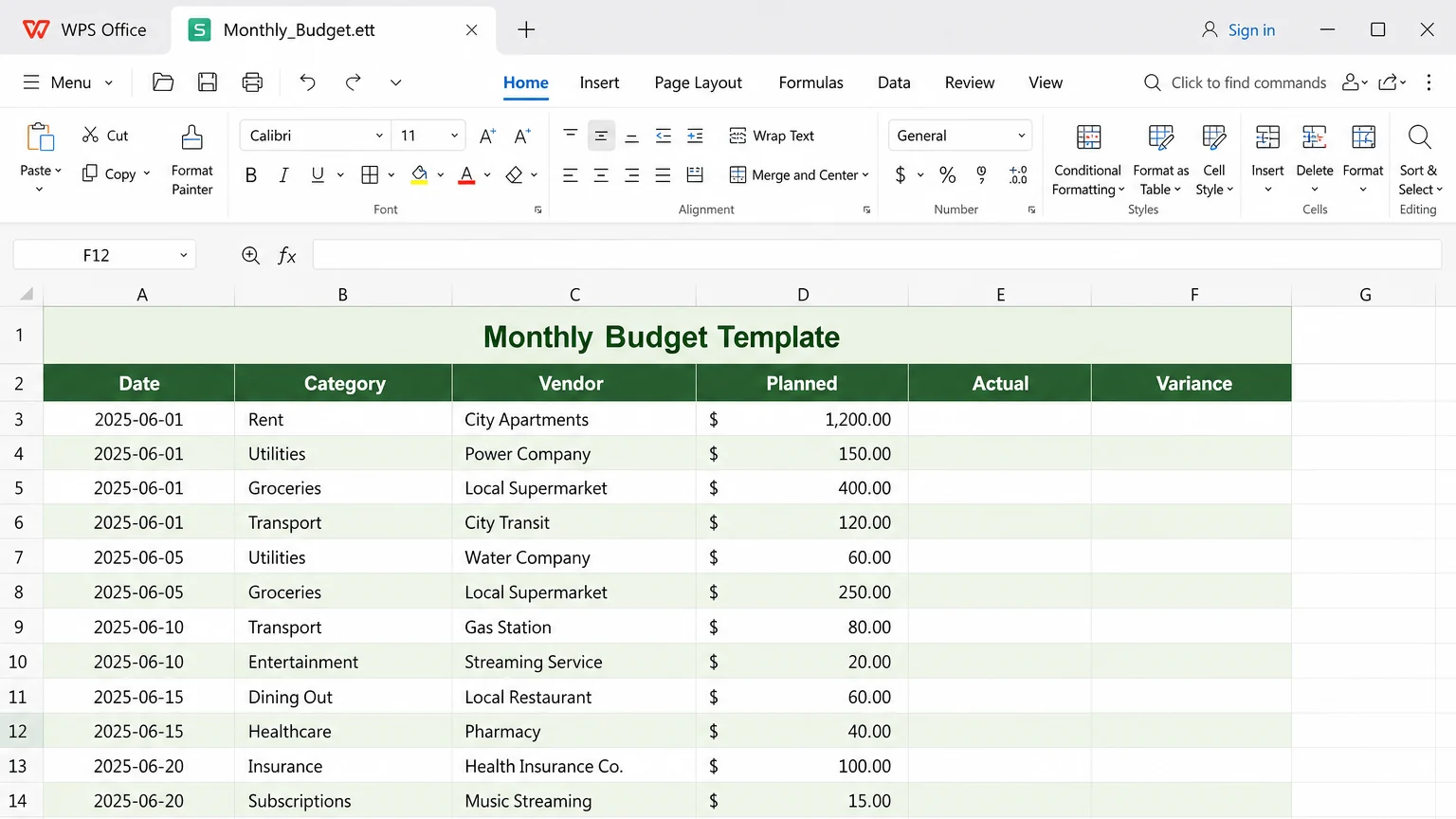
How to open an ett file in WPS Spreadsheet
Microsoft Excel is not a reliable opener for this extension. If a coworker sent budget.ett and Excel throws a format error, that is expected. Open it in WPS Spreadsheet instead.
Install WPS Spreadsheet if it is not already on the computer.
Double-click the .ett file, or in WPS choose File > Open.
If the file does not appear, set the type filter to WPS Spreadsheets Template (*.ett) or All Files.
Select the file and click Open.
Check the layout before you type over it. Some builds start a new unsaved workbook from the template; others open the template itself.
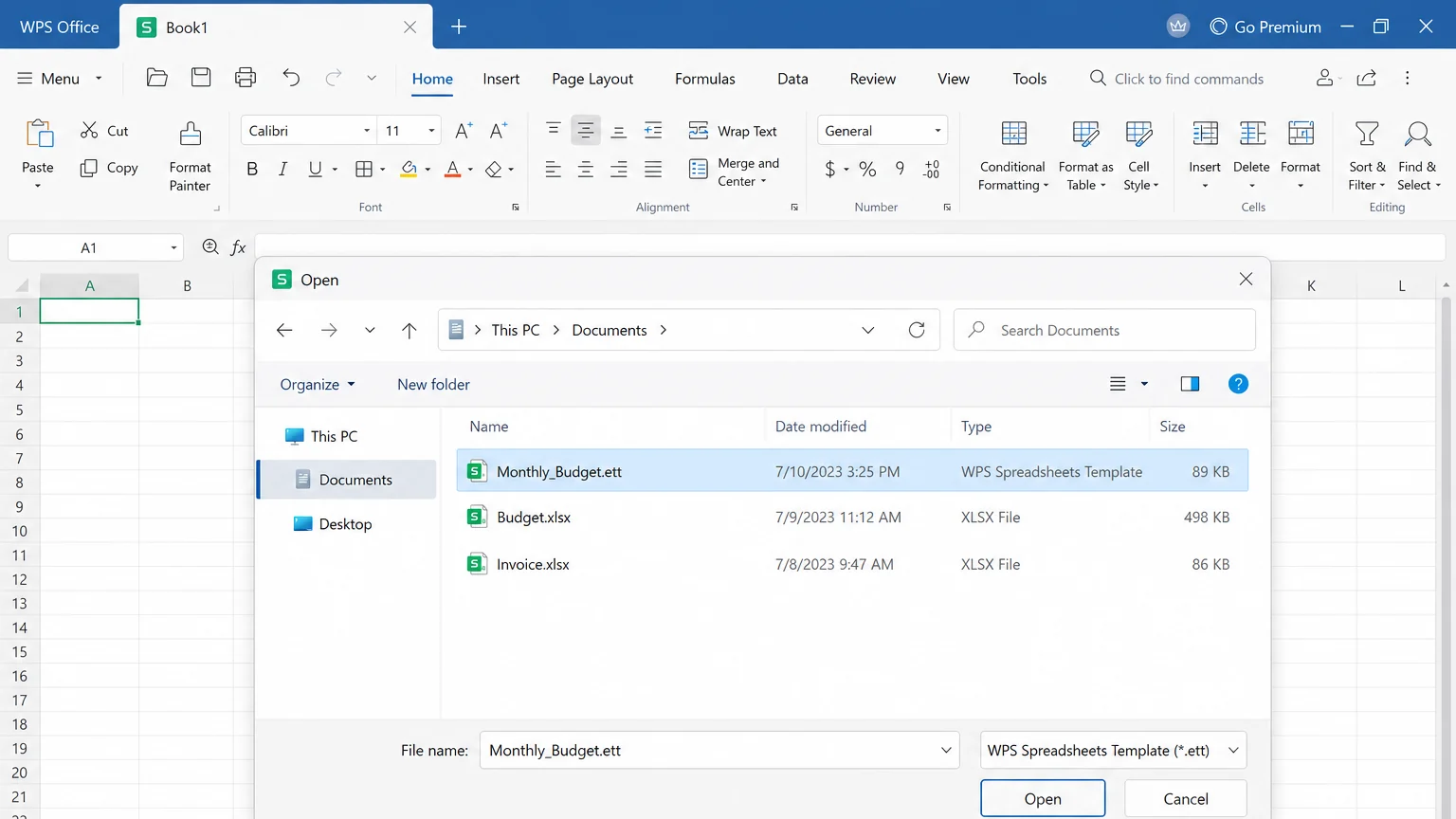
Open ett file in WPS
If Windows or macOS asks which app should open the file, pick WPS Office or WPS Spreadsheet. Then use File > Save As to a normal workbook so the original template stays intact.
Labels on the Open dialog change a little by version. Look for Spreadsheet Template or *.ett rather than hunting for one exact phrase.


How to create and save an ett file
Build the sheet once, then freeze the layout as a template.
Open a blank workbook in WPS Spreadsheet.
Add headers, number formats, formulas, frozen panes, and any charts that should appear every time. Leave sample values only where they help. Clear the rest.
Choose File > Save As.
Pick a folder you can find later—Documents or a shared templates folder.
Open Save as type and select WPS Spreadsheets Template (*.ett). Older Chinese-language builds listed this as WPS Spreadsheet template file (.ett).
Click Save.
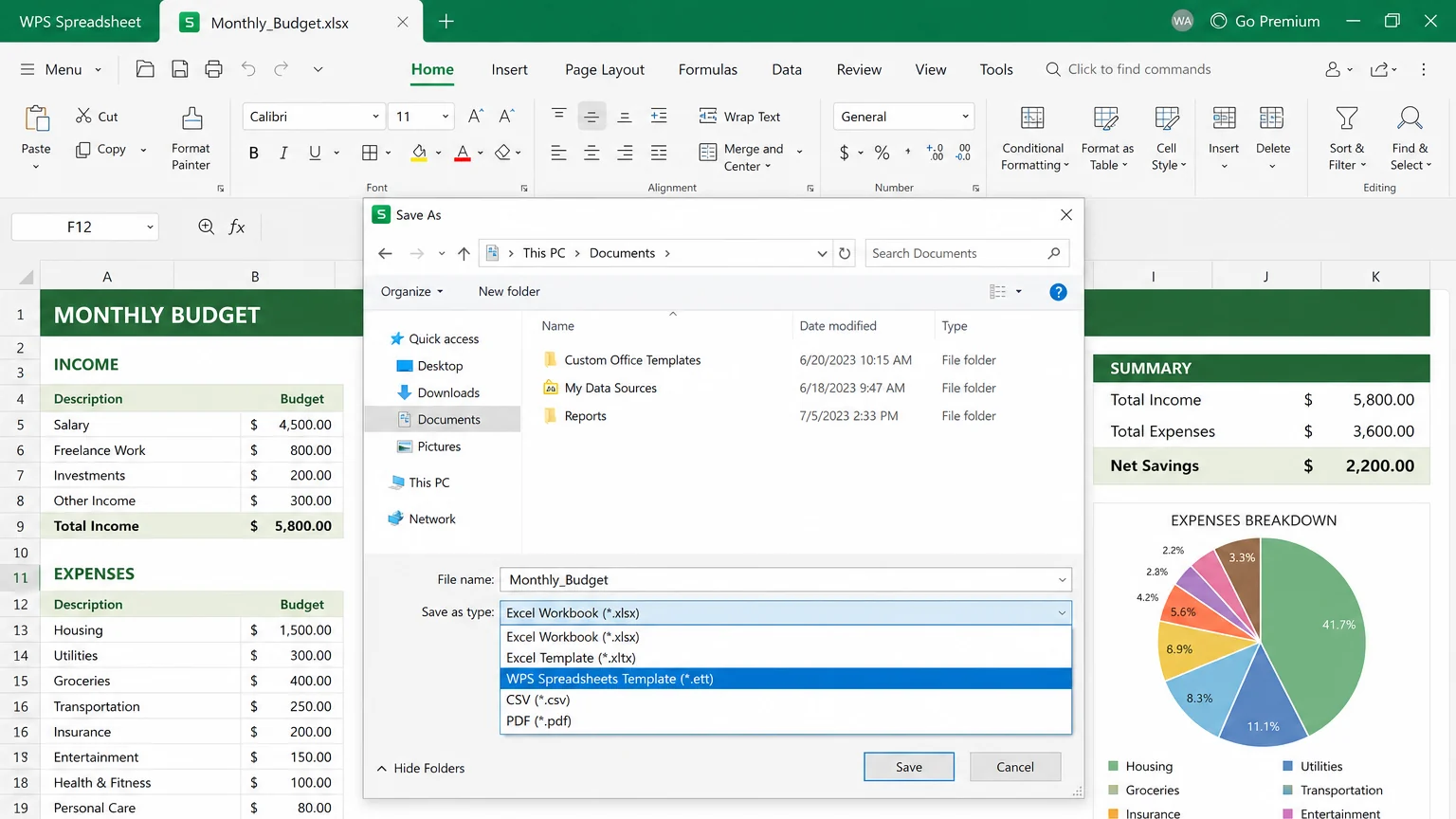
Save workbook as ett file
To use it later, File > Open the ett file, or look under New for templates stored on this computer. Exact menu names vary. After you fill in a new period, save that copy as .et or .xlsx. Do not keep saving over the template unless you meant to change the master.
Convert an ett file to Excel for sharing
Excel users, Google Sheets, and most upload portals expect XLSX. Convert before you email the file. Do not rename .ett to .xlsx; that only changes the label and usually produces a “file format is not valid” error.
Open the ett file in WPS Spreadsheet.
Choose File > Save As.
Select Excel Workbook (*.xlsx). If you need an Excel template instead, pick Excel Template (*.xltx) when the list includes it.
Click Save, then open the new file and spot-check formulas, charts, and sheet tabs.
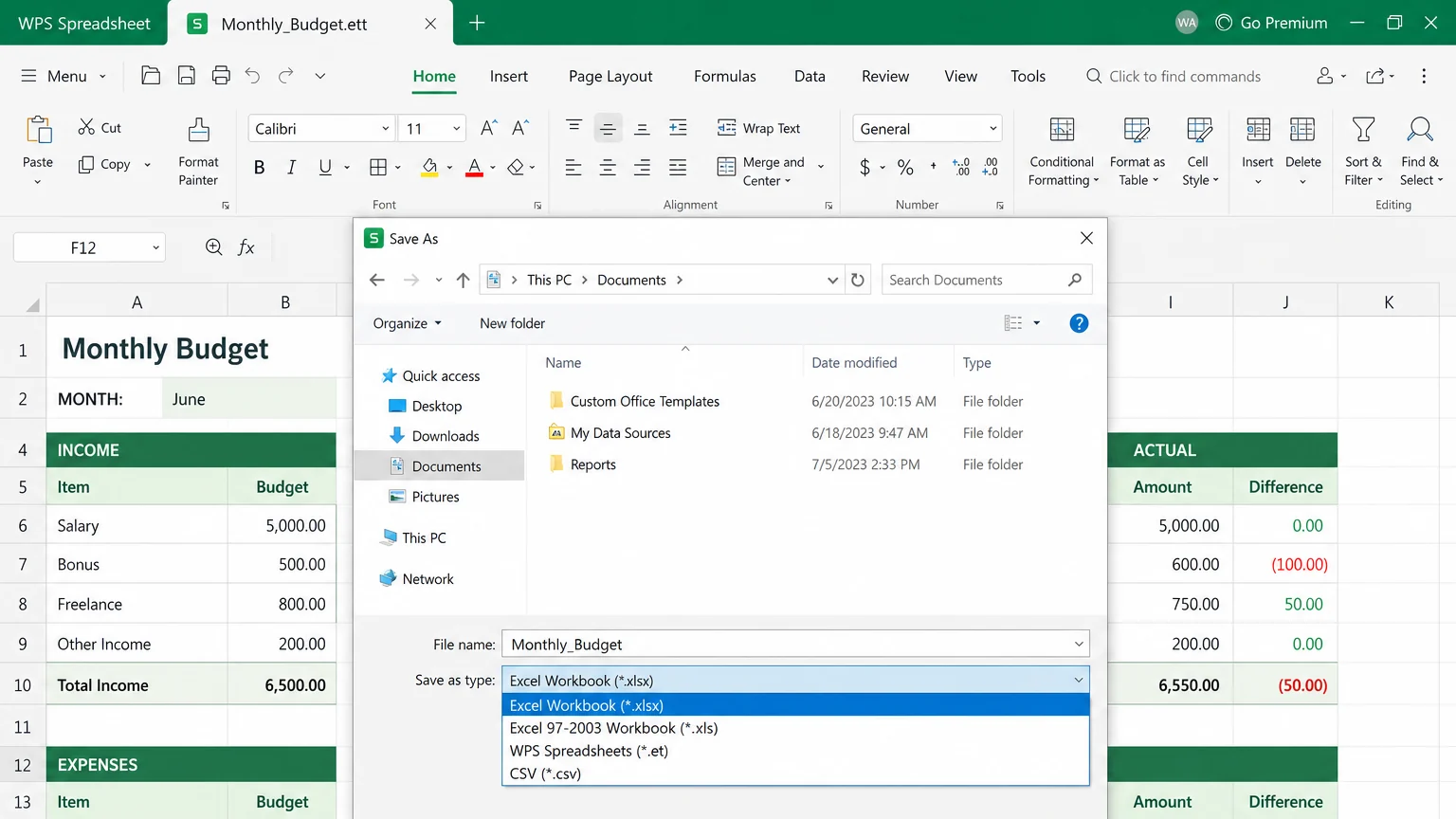
Convert ett file to Excel
For a working WPS workbook rather than Excel, choose WPS Spreadsheets (*.et). If you are sending files into a mixed Excel/WPS team, the format comparison in XLS vs XLSX vs ET is the longer read. For a finished .et workbook rather than a template, see how to convert WPS to Excel.
Skip random online converters for payroll, student records, or customer lists. A local Save As keeps the sheet on your machine.
ETT file vs ET, XLTX, and XLSX
Pick the extension by what happens next, not by which one sounds native.
ETT: WPS template. Use it when you will create the same sheet many times inside WPS.
ET: WPS working workbook. Fine on your PC. Excel does not open .et natively.
XLTX: Excel’s modern template. Better when the next person lives in Excel. WPS can also open an older XLT file.
XLSX: everyday shareable workbook. Best default for email, Drive, and almost any other spreadsheet app.
WPS Spreadsheet can open and save across this set in one desktop app. Excel cannot start from .ett or .et. If the recipient is Excel-only, send XLSX—or XLTX if they asked for a template.
Common questions about an ett file
Can Microsoft Excel open an ett file?
Usually no. Excel has no built-in reader for this WPS template format. Open it in WPS Spreadsheet and Save As Excel Workbook (.xlsx), or ask the sender for an XLSX copy.
Is an ett file the same as an ET file?
No. Both belong to WPS Spreadsheet. .et is a workbook you edit and keep. An ett file is the reusable starter. Opening the template should give you a new sheet to fill—though you should still Save As before you type, in case your build opens the master itself.
Can Google Sheets open an ett file?
Do not count on it. Convert to XLSX in WPS first, then upload that copy.
Will converting remove my formulas?
Save As to XLSX keeps formulas, formatting, and most charts. What can drop are WPS-only features and any macros that were never Excel VBA. Check the converted file before you archive the original.


'%3e%3cpath%20d='M19.9911%204.11386V6.471H18.5894C18.0775%206.471%2017.7322%206.57814%2017.5536%206.79243C17.3751%207.00671%2017.2858%207.32814%2017.2858%207.75671V9.44421H19.9019L19.5536%2012.0871H17.2858V18.8639H14.5536V12.0871H12.2769V9.44421H14.5536V7.49779C14.5536%206.39064%2014.8632%205.53201%2015.4822%204.92189C16.1013%204.31177%2016.9257%204.00671%2017.9554%204.00671C18.8304%204.00671%2019.509%204.04243%2019.9911%204.11386Z'%20fill='%23333333'/%3e%3c/g%3e%3cdefs%3e%3cclipPath%20id='clip0_2938_8199'%3e%3crect%20width='16'%20height='16'%20fill='white'%20transform='translate(8%204.00671)'/%3e%3c/clipPath%3e%3c/defs%3e%3c/svg%3e)
'%3e%3cpath%20d='M17.5237%2010.7813L23.4811%204H22.0699L16.8949%209.88693L12.7648%204H8L14.2469%2012.9029L8%2020.0133H9.4112L14.8725%2013.7952L19.2352%2020.0133H24M9.92053%205.04213H12.0885L22.0688%2019.0224H19.9003'%20fill='%23333333'/%3e%3c/g%3e%3cdefs%3e%3cclipPath%20id='clip0_2938_8200'%3e%3crect%20width='16'%20height='16.0134'%20fill='white'%20transform='translate(8%204)'/%3e%3c/clipPath%3e%3c/defs%3e%3c/svg%3e)


