

'%3e%3cpath%20d='M8%200C12.4183%200%2016%203.58172%2016%208C16%2012.4183%2012.4183%2016%208%2016C3.58172%2016%200%2012.4183%200%208C0%203.58172%203.58172%200%208%200ZM11.6162%204.38379C11.2257%203.99337%2010.5927%203.99338%2010.2021%204.38379L8%206.58594L5.79785%204.38379C5.40732%203.99334%204.77429%203.99329%204.38379%204.38379C3.99331%204.77429%203.99335%205.40733%204.38379%205.79785L6.58594%208L4.38379%2010.2021C3.99348%2010.5927%203.99341%2011.2257%204.38379%2011.6162C4.77426%2012.0066%205.40734%2012.0065%205.79785%2011.6162L8%209.41406L10.2021%2011.6162C10.5927%2012.0066%2011.2257%2012.0067%2011.6162%2011.6162C12.0067%2011.2257%2012.0066%2010.5927%2011.6162%2010.2021L9.41406%208L11.6162%205.79785C12.0066%205.40735%2012.0066%204.77429%2011.6162%204.38379Z'%20fill='%23080E17'%20fill-opacity='0.46'/%3e%3c/g%3e%3cdefs%3e%3cclipPath%20id='clip0_3761_713'%3e%3crect%20width='16'%20height='16'%20fill='white'/%3e%3c/clipPath%3e%3c/defs%3e%3c/svg%3e)




'%3e%3cpath%20fill-rule='evenodd'%20clip-rule='evenodd'%20d='M21.4999%2010.9993C21.4999%205.20009%2016.7986%200.498901%2010.9993%200.498901C5.19994%200.498901%200.498657%205.20009%200.498657%2010.9993C0.498657%2016.2404%204.33858%2020.5844%209.35855%2021.3722V14.0346H6.69238V10.9993H9.35855V8.68594C9.35855%206.05427%2010.9262%204.60062%2013.3248%204.60062C14.4736%204.60062%2015.6753%204.80571%2015.6753%204.80571V7.38979H14.3512C13.0468%207.38979%2012.64%208.19921%2012.64%209.0296V10.9993H15.5523L15.0867%2014.0346H12.64V21.3722C17.66%2020.5844%2021.4999%2016.2404%2021.4999%2010.9993Z'%20fill='%231568EA'/%3e%3c/g%3e%3c/svg%3e)


'%3e%3cpath%20d='M2.42045%2022.1876H6.31818V12.7217L0.75%208.54553V20.5171C0.75%2021.4414%201.49892%2022.1876%202.42045%2022.1876Z'%20fill='%234285F4'/%3e%3cpath%20d='M19.682%2022.1876H23.5797C24.5041%2022.1876%2025.2502%2021.4387%2025.2502%2020.5171V8.54553L19.682%2012.7217'%20fill='%2334A853'/%3e%3cpath%20d='M19.682%205.48293V12.7216L25.2502%208.54543V6.31816C25.2502%204.25236%2022.8921%203.07469%2021.2411%204.31361'%20fill='%23FBBC04'/%3e%3cpath%20d='M6.31824%2012.7217V5.48303L13.0001%2010.4944L19.6819%205.48303V12.7217L13.0001%2017.733'%20fill='%23EA4335'/%3e%3cpath%20d='M0.75%206.31816V8.54543L6.31818%2012.7216V5.48293L4.75909%204.31361C3.10534%203.07469%200.75%204.25236%200.75%206.31816Z'%20fill='%23C5221F'/%3e%3c/g%3e%3cdefs%3e%3cclipPath%20id='clip0_2954_7305'%3e%3crect%20width='24.5'%20height='18.375'%20fill='white'%20transform='translate(0.75%203.8125)'/%3e%3c/clipPath%3e%3c/defs%3e%3c/svg%3e)


Quick answer: Searches for xls et xlsx usually mean “what’s the difference, and which should I use?” Add a third format people hit in mixed teams: .et from WPS Spreadsheets. .xls is Excel 97–2003 (legacy binary). .xlsx is the modern Excel default (Open XML). .et is WPS-native—Microsoft Excel cannot open .et and has no built-in converter. For Excel-only recipients, open the file in WPS Spreadsheets and Save As .xlsx offline so you never upload payroll sheets to a random converter site.This guide introduces all three formats first, then compares limits and compatibility, then covers the Excel pain points mixed teams actually hit—plus how to convert and share without breaking privacy or formatting.
What are XLS, XLSX, and ET?
Before picking a save format, name the three extensions clearly:
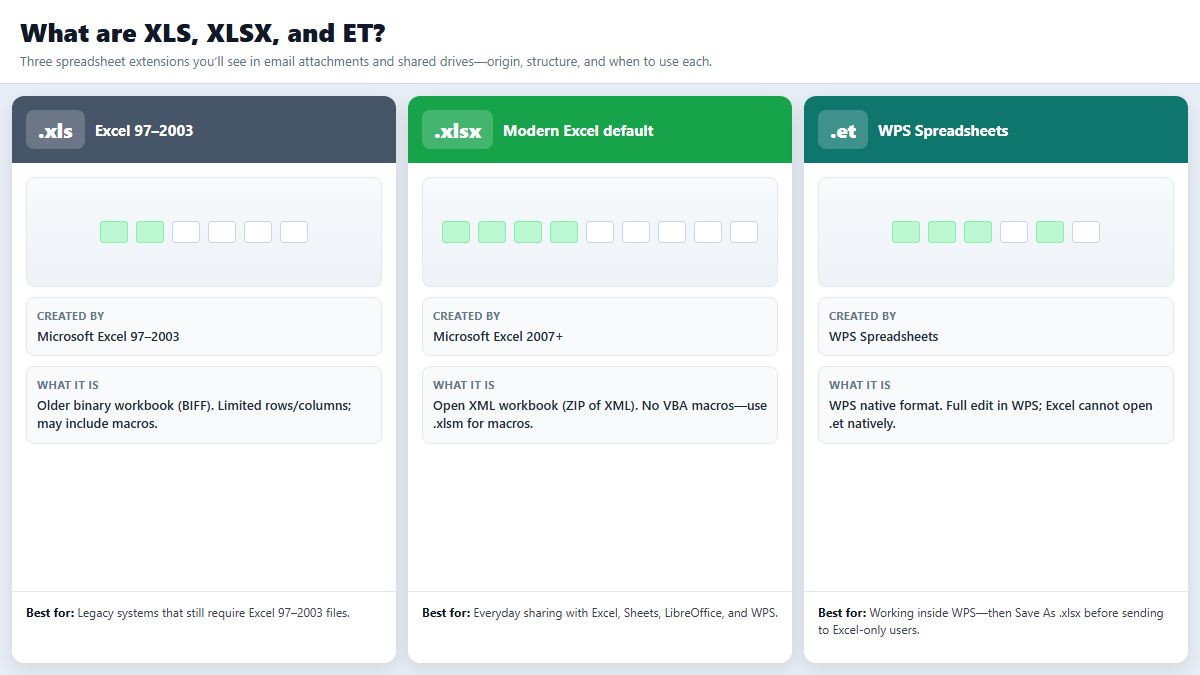
.xls (Excel 97–2003 Workbook) — Older Microsoft binary spreadsheet format. Still exported by some ERP portals, government forms, and legacy macros. Roughly capped around 65,536 rows and 256 columns. Opens in modern Excel in Compatibility Mode.
.xlsx (Excel Workbook) — Default format since Excel 2007. Built on Office Open XML (a ZIP of XML parts). Usually smaller on disk, supports about 1,048,576 rows and 16,384 columns, and cannot store VBA macros (use .xlsm for macros). Best default for sharing with Excel, Google Sheets, LibreOffice, and WPS.
.et (WPS Spreadsheets) — Native workbook format for WPS Office Spreadsheets. Full editing inside WPS. Excel does not read .et natively—recipients on Excel-only PCs see an unsupported format error unless you convert first.
Related names you’ll see beside these: .xlsm (macro-enabled Open XML), .xlsb (Excel binary for huge workbooks). For “xls et xlsx,” the decision is almost always legacy vs modern Excel—plus whether a teammate accidentally sent .et.
What is the difference between XLS, XLSX, and ET?
Use this comparison when you choose how to save or convert:
Structure: .xls = binary BIFF; .xlsx = compressed Open XML; .et = WPS Spreadsheets native format.
Capacity: .xlsx (and modern WPS sheets) dwarf .xls row/column limits—big data dumps often must leave .xls behind.
Excel compatibility: Excel opens .xls and .xlsx. Excel does not open .et.
WPS Spreadsheets compatibility: WPS can open and save .et, .xls, and .xlsx in one app.
Security for sharing: Plain .xlsx cannot carry VBA, so it’s safer for cold email attachments than macro-capable .xls/.xlsm. Still: never enable macros from unknown senders.
File size & recovery: .xlsx is usually smaller and recovers more cleanly than old .xls after corruption.
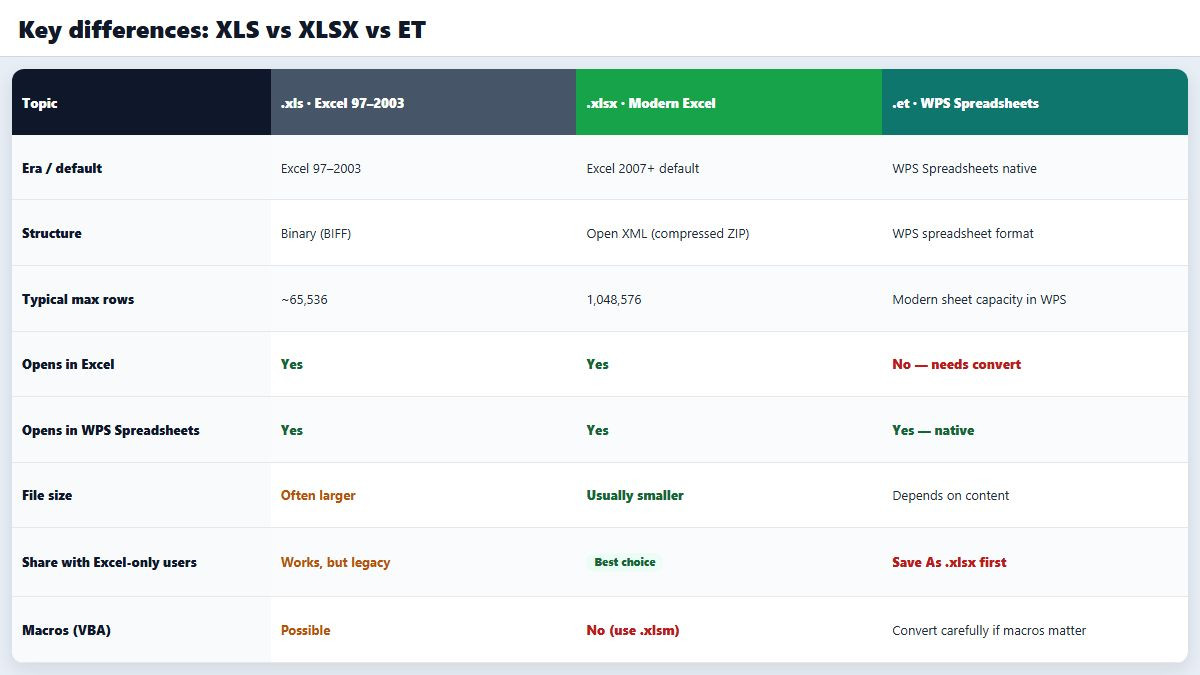
Which should you use? Day-to-day sharing → .xlsx. Forced by an old portal → .xls only as the final export (keep a working .xlsx copy). Working inside WPS → .et is fine locally, but Save As .xlsx before sending to Excel-only users. Need macros → .xlsm, not .xlsx.
Why Excel struggles with ET files and heavy XLS workbooks
Microsoft Excel is excellent at .xls/.xlsx—but mixed WPS–Excel environments expose clear gaps:
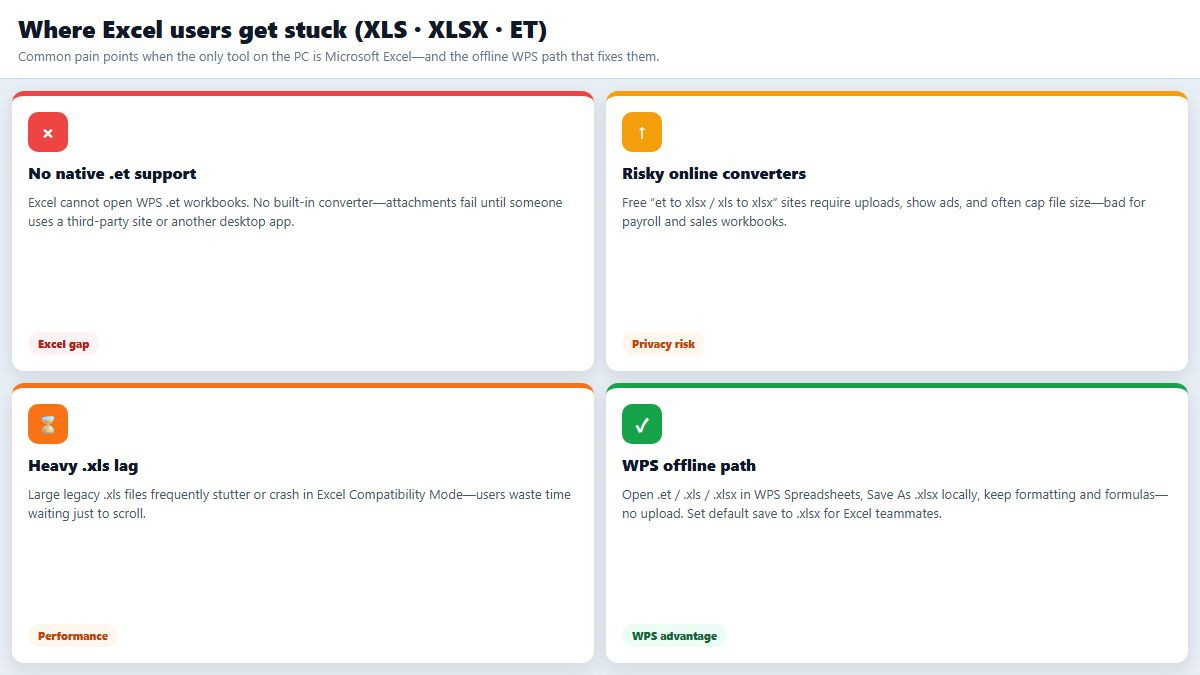
No native .et support. Excel has no built-in .et reader or converter. Double-clicking
report.etfails with a format/type error. Users then hunt third-party tools.Online converters are a privacy trap. “et to xlsx” / “xls to xlsx” websites often require uploads, show ads, and enforce size caps. Finance, HR, and student data should not land on unknown servers.
Large legacy .xls files lag or crash. Opening oversized Excel 97–2003 workbooks in Compatibility Mode frequently means slow scrolls, freezes, or crashes—especially with dense formatting and charts.
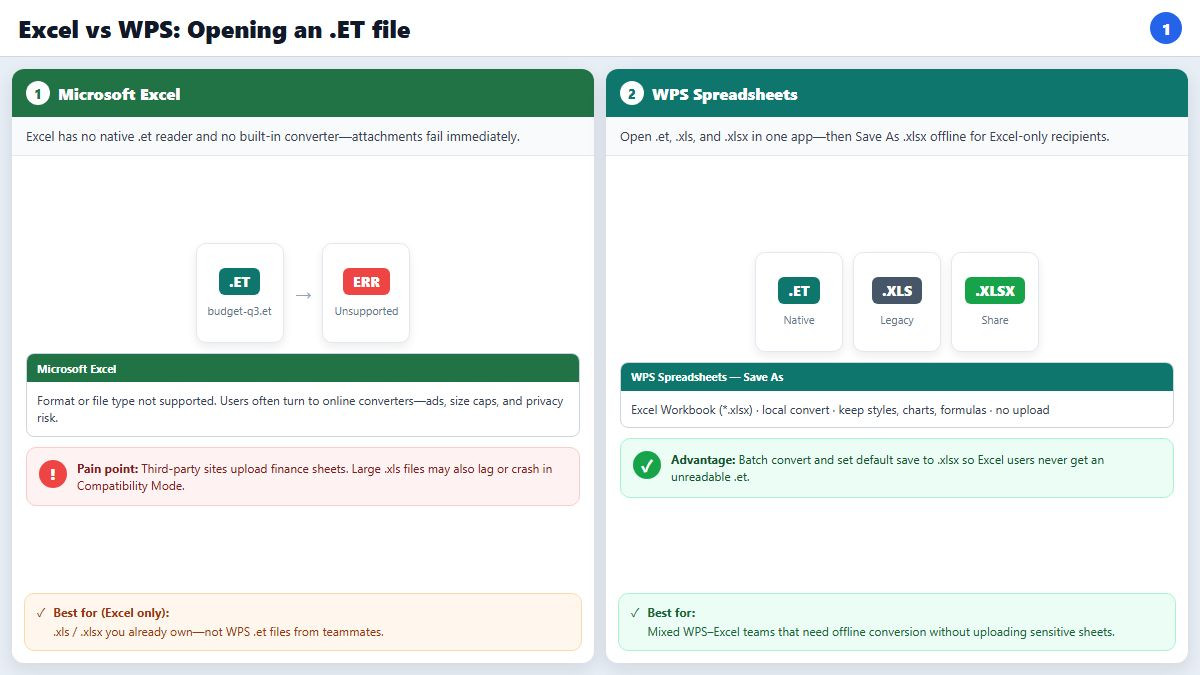
Those pain points are exactly where teams look for an offline spreadsheet that speaks all three formats.
How do I convert XLS or ET to XLSX without uploading?
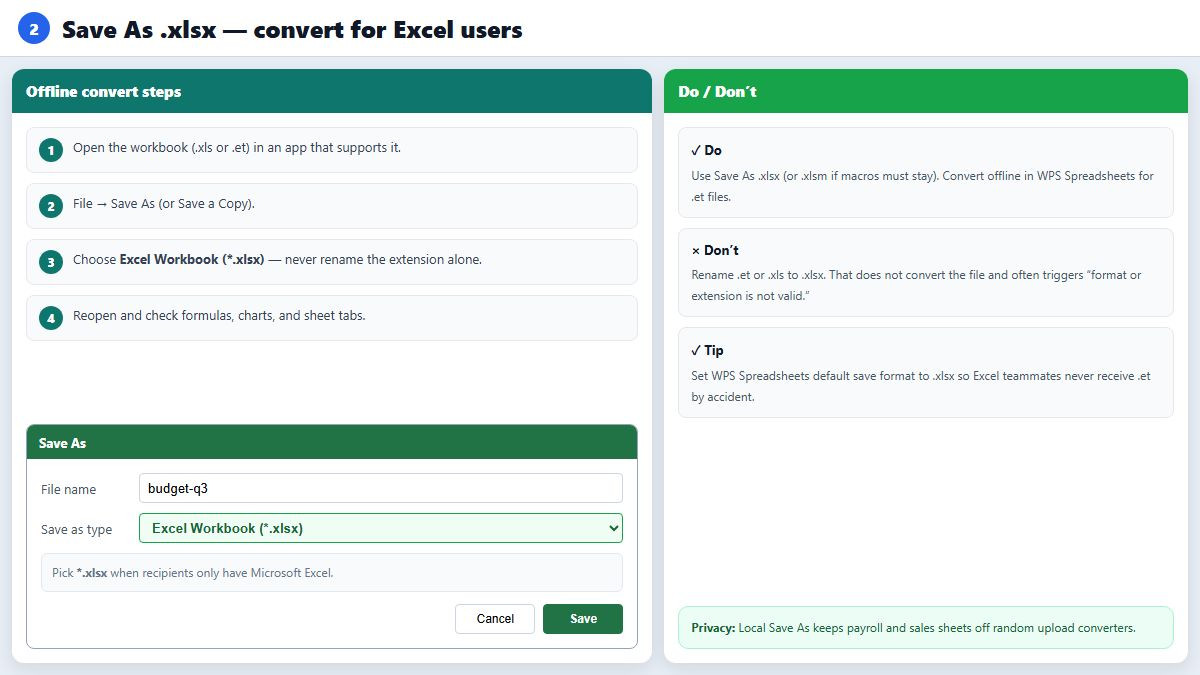
Do not rename .xls or .et to .xlsx—Excel will often say the format or extension is not valid. Convert with a real Save As:
Open the workbook in an app that understands the source format.
Go to File → Save As (or Save a Copy).
Choose Excel Workbook (*.xlsx).
Save to a new name, then reopen and spot-check formulas, charts, and sheet tabs.
In Microsoft Excel itself: open .xls → File → Save As → Excel Workbook (*.xlsx), or use File → Info → Convert to leave Compatibility Mode. If the .xls has macros, save as .xlsm instead so VBA is not stripped.
Excel still cannot start from a .et file. For .et → .xlsx you need WPS Spreadsheets (or another tool that reads .et) and a local Save As—prefer that over an upload converter.
Another option: convert XLS, XLSX, and ET in WPS Spreadsheets
If your inbox mixes WPS and Excel attachments, open them in WPS Office Spreadsheets instead of bouncing between Excel and shady websites:
Native read/write for all three: open and edit .et, .xls, and .xlsx in one desktop app.
Offline one-click Save As: convert locally—no upload, no ad-filled free converter, no mystery file-size quota.
Keep layout where it matters: conversion aims to preserve table styles, charts, and formulas better than “paste into a web grid.”
Batch conversion: turn a folder of legacy .xls (or .et) files into shareable .xlsx when you migrate a team drive.
Default save format: set Spreadsheets to save as .xlsx by default (and avoid auto-saving .et when you collaborate with Excel-only users) so recipients never get an unreadable extension.
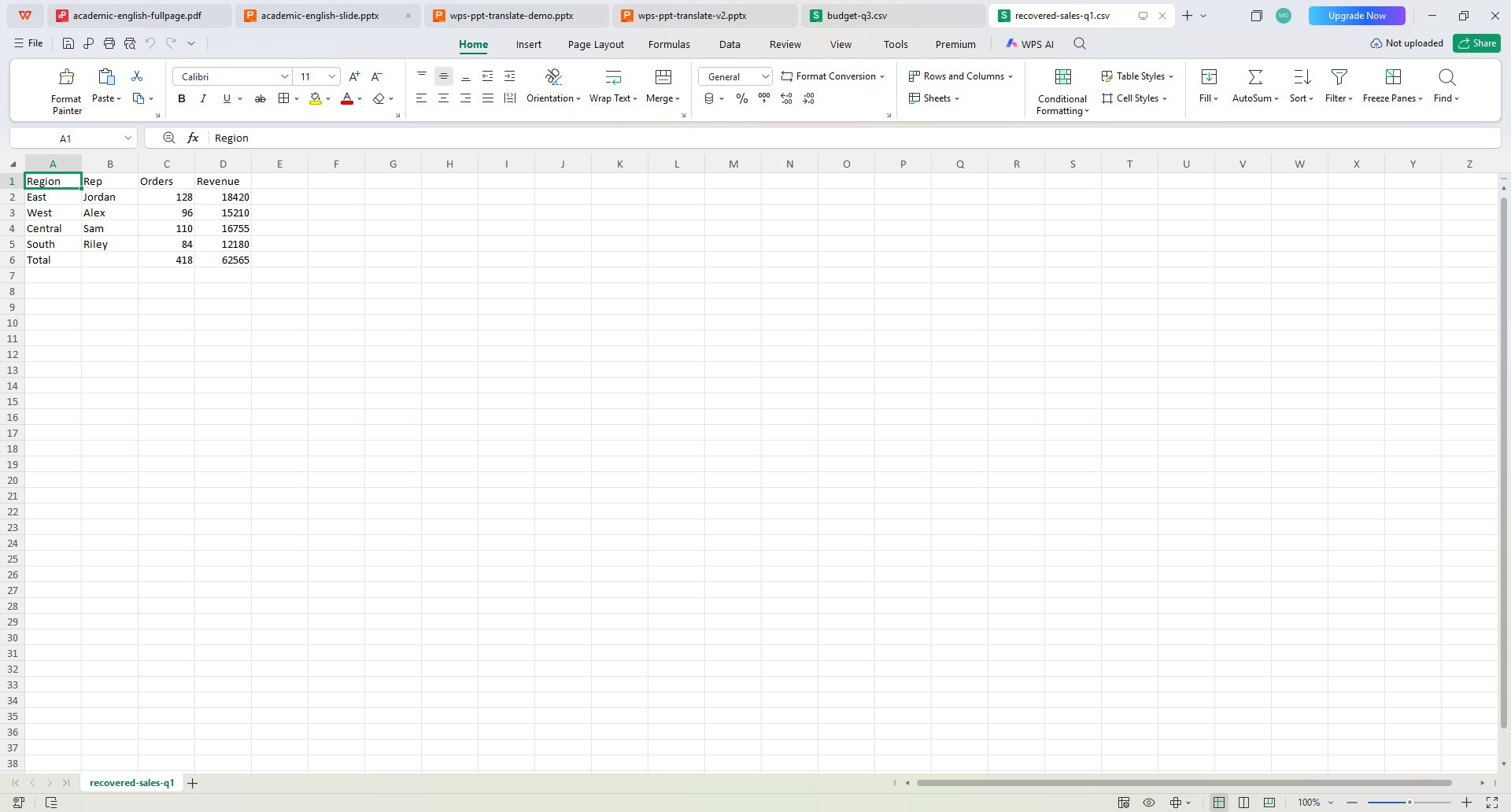
That does not replace learning the format differences above—but it removes Excel’s .et blind spot and the urge to upload sensitive sheets just to change an extension.
FAQ
What is the difference between XLS and XLSX?
.xls is the Excel 97–2003 binary format with smaller grid limits. .xlsx is the modern Open XML default: usually smaller files, far more rows/columns, and no VBA macros (use .xlsm for macros).
What is an ET file?
.et is the native spreadsheet format of WPS Spreadsheets. It opens fully in WPS. Microsoft Excel cannot open .et natively—Save As .xlsx before sending to Excel-only users.
Can Microsoft Excel open an ET file?
No. Excel has no built-in .et converter. Open the file in WPS Spreadsheets and Save As Excel Workbook (.xlsx), or ask the sender for an .xlsx copy.
How do I convert XLS to XLSX?
Open the .xls file → File → Save As → Excel Workbook (*.xlsx). Or use File → Info → Convert in modern Excel. Do not only rename the extension.
How do I convert ET to XLSX without uploading?
Open the .et workbook in WPS Spreadsheets on your PC → File → Save As → Excel Workbook (*.xlsx). Keep finance and HR files offline.
Why is my large XLS file so slow in Excel?
Legacy .xls workbooks run in Compatibility Mode with older limits and heavier binary structures. Convert important files to .xlsx (or open/convert in WPS Spreadsheets) and remove unused sheets/formatting.
Should I default to XLSX when sharing?
Yes for almost all Excel and cross-app sharing. Keep .xls only when a system requires it. If you use WPS, set the default save format to .xlsx so teammates never receive .et by accident.
What about macros when converting?
Saving as .xlsx drops VBA. If the workbook has macros, save as .xlsm and retest the macros after conversion.
Summary
XLS is legacy Excel, XLSX is the modern shareable default, and ET is WPS Spreadsheets’ native format that Excel cannot open. Convert with a real Save As—never by renaming. When Excel blocks .et files, stalls on huge .xls workbooks, or pushes you toward upload converters, use WPS Spreadsheets to read all three formats offline, preserve styles/charts/formulas, batch convert, and default new files to .xlsx so Excel users can open what you send.



'%3e%3cpath%20d='M19.9911%204.11386V6.471H18.5894C18.0775%206.471%2017.7322%206.57814%2017.5536%206.79243C17.3751%207.00671%2017.2858%207.32814%2017.2858%207.75671V9.44421H19.9019L19.5536%2012.0871H17.2858V18.8639H14.5536V12.0871H12.2769V9.44421H14.5536V7.49779C14.5536%206.39064%2014.8632%205.53201%2015.4822%204.92189C16.1013%204.31177%2016.9257%204.00671%2017.9554%204.00671C18.8304%204.00671%2019.509%204.04243%2019.9911%204.11386Z'%20fill='%23333333'/%3e%3c/g%3e%3cdefs%3e%3cclipPath%20id='clip0_2938_8199'%3e%3crect%20width='16'%20height='16'%20fill='white'%20transform='translate(8%204.00671)'/%3e%3c/clipPath%3e%3c/defs%3e%3c/svg%3e)
'%3e%3cpath%20d='M17.5237%2010.7813L23.4811%204H22.0699L16.8949%209.88693L12.7648%204H8L14.2469%2012.9029L8%2020.0133H9.4112L14.8725%2013.7952L19.2352%2020.0133H24M9.92053%205.04213H12.0885L22.0688%2019.0224H19.9003'%20fill='%23333333'/%3e%3c/g%3e%3cdefs%3e%3cclipPath%20id='clip0_2938_8200'%3e%3crect%20width='16'%20height='16.0134'%20fill='white'%20transform='translate(8%204)'/%3e%3c/clipPath%3e%3c/defs%3e%3c/svg%3e)


