

'%3e%3cpath%20d='M8%200C12.4183%200%2016%203.58172%2016%208C16%2012.4183%2012.4183%2016%208%2016C3.58172%2016%200%2012.4183%200%208C0%203.58172%203.58172%200%208%200ZM11.6162%204.38379C11.2257%203.99337%2010.5927%203.99338%2010.2021%204.38379L8%206.58594L5.79785%204.38379C5.40732%203.99334%204.77429%203.99329%204.38379%204.38379C3.99331%204.77429%203.99335%205.40733%204.38379%205.79785L6.58594%208L4.38379%2010.2021C3.99348%2010.5927%203.99341%2011.2257%204.38379%2011.6162C4.77426%2012.0066%205.40734%2012.0065%205.79785%2011.6162L8%209.41406L10.2021%2011.6162C10.5927%2012.0066%2011.2257%2012.0067%2011.6162%2011.6162C12.0067%2011.2257%2012.0066%2010.5927%2011.6162%2010.2021L9.41406%208L11.6162%205.79785C12.0066%205.40735%2012.0066%204.77429%2011.6162%204.38379Z'%20fill='%23080E17'%20fill-opacity='0.46'/%3e%3c/g%3e%3cdefs%3e%3cclipPath%20id='clip0_3761_713'%3e%3crect%20width='16'%20height='16'%20fill='white'/%3e%3c/clipPath%3e%3c/defs%3e%3c/svg%3e)




'%3e%3cpath%20fill-rule='evenodd'%20clip-rule='evenodd'%20d='M21.4999%2010.9993C21.4999%205.20009%2016.7986%200.498901%2010.9993%200.498901C5.19994%200.498901%200.498657%205.20009%200.498657%2010.9993C0.498657%2016.2404%204.33858%2020.5844%209.35855%2021.3722V14.0346H6.69238V10.9993H9.35855V8.68594C9.35855%206.05427%2010.9262%204.60062%2013.3248%204.60062C14.4736%204.60062%2015.6753%204.80571%2015.6753%204.80571V7.38979H14.3512C13.0468%207.38979%2012.64%208.19921%2012.64%209.0296V10.9993H15.5523L15.0867%2014.0346H12.64V21.3722C17.66%2020.5844%2021.4999%2016.2404%2021.4999%2010.9993Z'%20fill='%231568EA'/%3e%3c/g%3e%3c/svg%3e)


'%3e%3cpath%20d='M2.42045%2022.1876H6.31818V12.7217L0.75%208.54553V20.5171C0.75%2021.4414%201.49892%2022.1876%202.42045%2022.1876Z'%20fill='%234285F4'/%3e%3cpath%20d='M19.682%2022.1876H23.5797C24.5041%2022.1876%2025.2502%2021.4387%2025.2502%2020.5171V8.54553L19.682%2012.7217'%20fill='%2334A853'/%3e%3cpath%20d='M19.682%205.48293V12.7216L25.2502%208.54543V6.31816C25.2502%204.25236%2022.8921%203.07469%2021.2411%204.31361'%20fill='%23FBBC04'/%3e%3cpath%20d='M6.31824%2012.7217V5.48303L13.0001%2010.4944L19.6819%205.48303V12.7217L13.0001%2017.733'%20fill='%23EA4335'/%3e%3cpath%20d='M0.75%206.31816V8.54543L6.31818%2012.7216V5.48293L4.75909%204.31361C3.10534%203.07469%200.75%204.25236%200.75%206.31816Z'%20fill='%23C5221F'/%3e%3c/g%3e%3cdefs%3e%3cclipPath%20id='clip0_2954_7305'%3e%3crect%20width='24.5'%20height='18.375'%20fill='white'%20transform='translate(0.75%203.8125)'/%3e%3c/clipPath%3e%3c/defs%3e%3c/svg%3e)


Course grades, survey scores, and inventory valuations rarely treat every number equally. A weighted mean calculator multiplies each value by its weight, adds those products, and divides by the sum of weights so one outlier cannot pretend it matters as much as the rest.
Spreadsheet users search weighted mean calculator when a simple AVERAGE lies about the class GPA or the blended unit cost. WPS Spreadsheet uses the same formulas as Excel: a SUMPRODUCT line for the numerator and a SUM on the weight column for the denominator.
The walkthrough below builds a small table you can reuse each term. Labels sit in column A, values in B, and weights in C. Totals are formulas, not typed numbers, so a changed quiz score updates the weighted mean automatically.
If you already exported grades from an LMS, paste values first and add a weight column rather than retyping averages by hand. Auditors and parents ask how the final number was built; a visible weight column answers that question faster than a single mystery cell.
Weighted Mean Calculator in Excel: Formula and SUMPRODUCT
When You Need a Weighted Mean Calculator
Reach for weighted averages when the syllabus or the contract says some inputs count more:
Grades: Exams 50%, homework 30%, participation 20%—not three equal thirds.
Portfolio returns: Each holding has a different dollar weight in the account.
Quality checks: Recent batches may carry double weight versus older samples.
Customer scores: Enterprise accounts weighted higher than trial users in a health index.
A plain mean treats a 100 on a five-point quiz the same as a 100 on the final. Weighted math fixes that without manual proportion guesswork.
Keep weights on the same scale—often percentages that sum to 100—or use any positive numbers as long as you divide by their sum. Mixing negative weights with this layout usually signals a modeling mistake rather than a spreadsheet bug.
Faculty sometimes publish two means on the syllabus: unweighted for participation dashboards and weighted for the transcript line. Label both clearly in the sheet tab so a teaching assistant does not email the wrong figure during grade disputes.
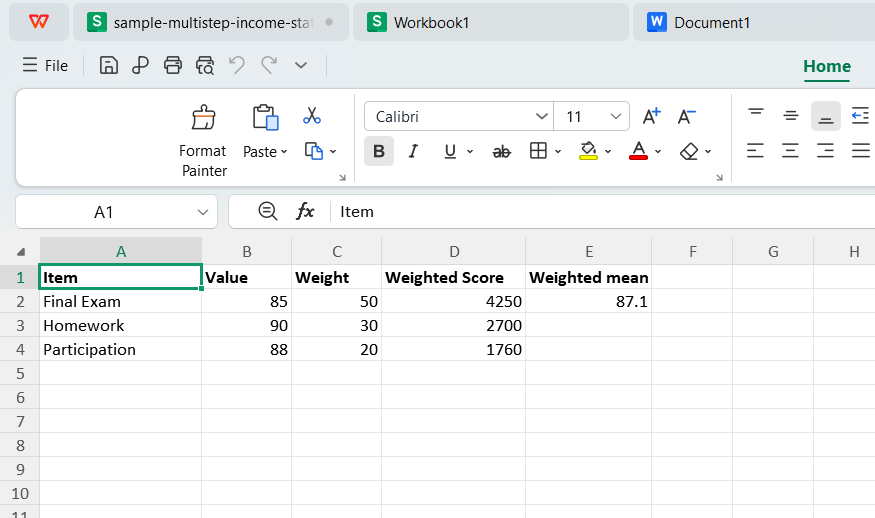
Weighted mean table with values and weights in WPS Spreadsheet
Weighted Mean Formula in Excel and WPS
The textbook definition fits one row of math:
Weighted mean = Σ (value × weight) ÷ Σ (weights)
In a sheet with values in B2:B6 and weights in C2:C6, the weighted mean in cell E2 can be:
=SUMPRODUCT(B2:B6,C2:C6)/SUM(C2:C6)
SUMPRODUCT multiplies each pair and adds the products—exactly the Σ step. SUM on the weight column is the denominator. Format E2 as a number with the decimal places your rubric expects.
If weights are stored as percentages (0.2, 0.3, 0.5), the same formula works. If they are whole numbers (20, 30, 50), it still works because numerator and denominator scale together.
Guard against blank cells: an empty weight row can drop the denominator or leave a phantom zero in SUMPRODUCT. Filter blanks before you publish the grade book.
Alternative layout: some textbooks teach =SUM(B2:B6*C2:C6)/SUM(C2:C6) as an array-style entry. Modern Excel and WPS prefer SUMPRODUCT because it behaves predictably when ranges include text you forgot to clean.
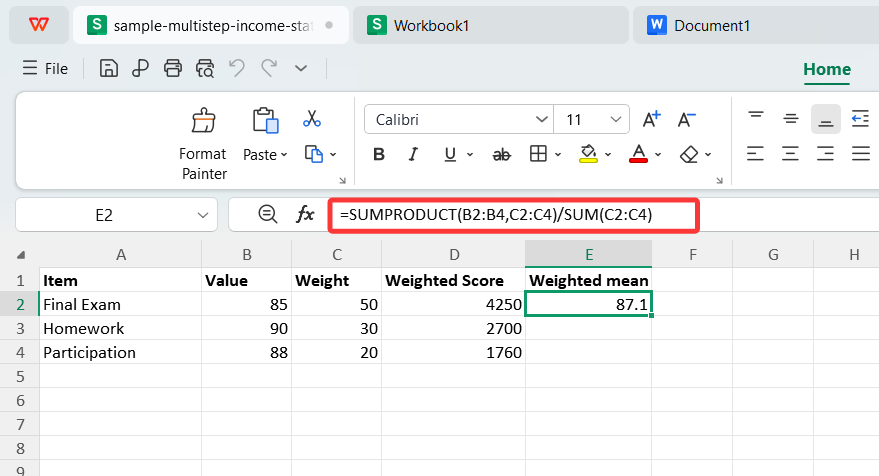
SUMPRODUCT weighted mean formula in WPS Spreadsheet
Build a Weighted Mean Calculator with SUMPRODUCT
Open WPS Spreadsheet and type headers: Value, Weight, and Weighted score in row 1.
Enter each raw score in column B and its weight in column C. Add a helper column D with
=B2*C2if you want to audit each product line by line.In a total row, sum column D with
=SUM(D2:D6)and sum weights with=SUM(C2:C6).Place the weighted mean beside them:
=SUMPRODUCT(B2:B6,C2:C6)/SUM(C2:C6)or=D_total/C_totalif you already summed products.Name the range if you reuse it monthly: Formulas → Name Manager makes the next term a copy-paste job.
Drop the demo team file sample-weighted-grades.xlsx into the same layout when you train new TAs. They should see the mean move when a single exam cell changes.
Charts are optional. A weighted mean is one cell; a bar chart of values alone can mislead stakeholders who forget the weights.
When weights change mid-semester—dropping a quiz category, for example—update the weight column and add a comment cell with the effective date. Historical PDFs you already sent will not match unless you regenerate them on purpose.
Weighted Mean Mistakes to Catch Before You Submit
Weights that do not sum to 100%: That is fine mathematically if you divide by
SUM(weights). It is wrong only when you also multiply the mean by 100 again by habit.Using AVERAGE on pre-multiplied scores: If column D already holds value×weight, take
SUM(D)only when weights sum to 1. Otherwise divide bySUM(C).Text scores: Numbers stored as text break
SUMPRODUCT. Convert with Data → Text to Columns or value multiplication by 1.Rounding too early: Round the final weighted mean, not each product line, unless the rubric explicitly says to.
Document the weight table in the workbook tab name or a cover note. Reviewers ask where the 40% exam weight came from long after the formula still calculates.
When you export to PDF for parents or auditors, freeze the values first or save a copy so a late cell edit does not change a signed PDF attachment.
Cross-check one student by hand on scratch paper once per term. If manual math and SUMPRODUCT disagree, the error is almost always a weight entered as 5 instead of 0.05.
The Best Free Office Alternative: WPS Office
A weighted mean calculator belongs in the sheet next to your source data—not on a paste board.
| WPS Spreadsheet | Web weighted mean calculator | |
|---|---|---|
| Privacy | Grades and costs stay on your machine. | You paste sensitive rows into a browser form. |
| Reusable template | Save .xlsx and update each term. | You retype lists unless the site offers accounts. |
| SUMPRODUCT | Same syntax as Excel for audits. | Hidden logic; hard to show formulas in a report. |
| Charts and PDF | Export tables from the same suite. | Separate tools for visualization. |
| Offline | Works without uploading student data. | Requires connection and trust in the host. |
SUM, SUMPRODUCT, and AVERAGE in one free desktop install.
Open Excel .xlsx from finance or registrar exports without conversion.
Writer and PDF tools sit beside Spreadsheet when you mail the report.
Open WPS Office, build the weight table once, and let the formula row answer every recalculation request.
FAQs
What is the difference between weighted mean and average?
Average adds values and divides by count. Weighted mean multiplies each value by its weight first, then divides by the sum of weights.
Can SUMPRODUCT replace the whole weighted mean calculator?
Yes. =SUMPRODUCT(values,weights)/SUM(weights) is the standard one-cell solution in Excel and WPS.
What if weights are percentages?
Store them as 0.25 for 25% or as 25 with other weights on the same scale—just keep the denominator consistent with the numerator.
Does WPS Spreadsheet match Excel for weighted mean?
Core math functions behave the same for typical grade and cost models. Always spot-check imported macros separately.
Can I weight by count instead of percent?
Yes. Use enrollment counts or unit volumes as weights. SUMPRODUCT still applies; SUM(weights) is the total count or volume.


Summary: Weighted Mean Calculator
Put values and weights in columns, use SUMPRODUCT divided by SUM of weights, and avoid averaging already-weighted products unless weights sum to one.
Save the workbook as your weighted mean calculator template, round only at the end, and keep WPS Spreadsheet as the private place to run the math.

'%3e%3cpath%20d='M19.9911%204.11386V6.471H18.5894C18.0775%206.471%2017.7322%206.57814%2017.5536%206.79243C17.3751%207.00671%2017.2858%207.32814%2017.2858%207.75671V9.44421H19.9019L19.5536%2012.0871H17.2858V18.8639H14.5536V12.0871H12.2769V9.44421H14.5536V7.49779C14.5536%206.39064%2014.8632%205.53201%2015.4822%204.92189C16.1013%204.31177%2016.9257%204.00671%2017.9554%204.00671C18.8304%204.00671%2019.509%204.04243%2019.9911%204.11386Z'%20fill='%23333333'/%3e%3c/g%3e%3cdefs%3e%3cclipPath%20id='clip0_2938_8199'%3e%3crect%20width='16'%20height='16'%20fill='white'%20transform='translate(8%204.00671)'/%3e%3c/clipPath%3e%3c/defs%3e%3c/svg%3e)
'%3e%3cpath%20d='M17.5237%2010.7813L23.4811%204H22.0699L16.8949%209.88693L12.7648%204H8L14.2469%2012.9029L8%2020.0133H9.4112L14.8725%2013.7952L19.2352%2020.0133H24M9.92053%205.04213H12.0885L22.0688%2019.0224H19.9003'%20fill='%23333333'/%3e%3c/g%3e%3cdefs%3e%3cclipPath%20id='clip0_2938_8200'%3e%3crect%20width='16'%20height='16.0134'%20fill='white'%20transform='translate(8%204)'/%3e%3c/clipPath%3e%3c/defs%3e%3c/svg%3e)


