

'%3e%3cpath%20d='M8%200C12.4183%200%2016%203.58172%2016%208C16%2012.4183%2012.4183%2016%208%2016C3.58172%2016%200%2012.4183%200%208C0%203.58172%203.58172%200%208%200ZM11.6162%204.38379C11.2257%203.99337%2010.5927%203.99338%2010.2021%204.38379L8%206.58594L5.79785%204.38379C5.40732%203.99334%204.77429%203.99329%204.38379%204.38379C3.99331%204.77429%203.99335%205.40733%204.38379%205.79785L6.58594%208L4.38379%2010.2021C3.99348%2010.5927%203.99341%2011.2257%204.38379%2011.6162C4.77426%2012.0066%205.40734%2012.0065%205.79785%2011.6162L8%209.41406L10.2021%2011.6162C10.5927%2012.0066%2011.2257%2012.0067%2011.6162%2011.6162C12.0067%2011.2257%2012.0066%2010.5927%2011.6162%2010.2021L9.41406%208L11.6162%205.79785C12.0066%205.40735%2012.0066%204.77429%2011.6162%204.38379Z'%20fill='%23080E17'%20fill-opacity='0.46'/%3e%3c/g%3e%3cdefs%3e%3cclipPath%20id='clip0_3761_713'%3e%3crect%20width='16'%20height='16'%20fill='white'/%3e%3c/clipPath%3e%3c/defs%3e%3c/svg%3e)



'%3e%3cpath%20fill-rule='evenodd'%20clip-rule='evenodd'%20d='M21.4999%2010.9993C21.4999%205.20009%2016.7986%200.498901%2010.9993%200.498901C5.19994%200.498901%200.498657%205.20009%200.498657%2010.9993C0.498657%2016.2404%204.33858%2020.5844%209.35855%2021.3722V14.0346H6.69238V10.9993H9.35855V8.68594C9.35855%206.05427%2010.9262%204.60062%2013.3248%204.60062C14.4736%204.60062%2015.6753%204.80571%2015.6753%204.80571V7.38979H14.3512C13.0468%207.38979%2012.64%208.19921%2012.64%209.0296V10.9993H15.5523L15.0867%2014.0346H12.64V21.3722C17.66%2020.5844%2021.4999%2016.2404%2021.4999%2010.9993Z'%20fill='%231568EA'/%3e%3c/g%3e%3c/svg%3e)


'%3e%3cpath%20d='M2.42045%2022.1876H6.31818V12.7217L0.75%208.54553V20.5171C0.75%2021.4414%201.49892%2022.1876%202.42045%2022.1876Z'%20fill='%234285F4'/%3e%3cpath%20d='M19.682%2022.1876H23.5797C24.5041%2022.1876%2025.2502%2021.4387%2025.2502%2020.5171V8.54553L19.682%2012.7217'%20fill='%2334A853'/%3e%3cpath%20d='M19.682%205.48293V12.7216L25.2502%208.54543V6.31816C25.2502%204.25236%2022.8921%203.07469%2021.2411%204.31361'%20fill='%23FBBC04'/%3e%3cpath%20d='M6.31824%2012.7217V5.48303L13.0001%2010.4944L19.6819%205.48303V12.7217L13.0001%2017.733'%20fill='%23EA4335'/%3e%3cpath%20d='M0.75%206.31816V8.54543L6.31818%2012.7216V5.48293L4.75909%204.31361C3.10534%203.07469%200.75%204.25236%200.75%206.31816Z'%20fill='%23C5221F'/%3e%3c/g%3e%3cdefs%3e%3cclipPath%20id='clip0_2954_7305'%3e%3crect%20width='24.5'%20height='18.375'%20fill='white'%20transform='translate(0.75%203.8125)'/%3e%3c/clipPath%3e%3c/defs%3e%3c/svg%3e)


Creating presentations from scratch is an incredibly tedious task, especially for students and professionals who need quick presentations but lack the design skills required. However, most AI slide tools do not deliver reliable results, leaving users wondering if tools like Magic Slides are worth using. So, is Magic Slides a reliable AI presentation tool for practical use? In this Magic Slides AI review, I’ll be evaluating what it actually is and how you can use it effectively to boost your productivity.



What Is Magic Slides and How Does It Work?
Magic Slides is an AI-powered presentation helper that simplifies your workflow and eliminates the need to manually design and format your content into a professional layout. Using GPT-based models, it summarizes the key points of your content while also creating the entire content structure in a polished layout. I found it to be exceptionally powerful in making complete presentations from just a single prompt, helping me save a ton of time and eliminating the hassle out of the process.

Pros and Cons of Magic Slides
If you’re considering adding Magic Slides to your workflow but aren’t sure if it’s actually worth using or not, don’t worry. I’ve been in the situation myself, and I know how confusing it may seem, but once you weigh out the pros and cons, the choice becomes very apparent. In this section, I’ll be highlighting the key pros and cons of the Magic Slides presentation generator.
Magic Slides Pricing Explained
Magic Slides is a great tool to add to your workflow to simplify your presentations and save a lot of time. But if you aren’t sure what the pricing models are and what features are provided for free, I’ll help you understand better. In this section, I’ll be explaining the detailed Magic Slides pricing and helping you decide if it’s worth the cost or not for your own requirements.
How to Use Magic Slides Step by Step
Once you’ve decided on using Magic Slides for your presentations, using it is incredibly straightforward. It provides quick and fully customizable presentations in just a few minutes, making sure you don’t run into any hassle along the way. I’ve personally saved a lot of time using its built-in content generation, providing high-quality slides without any hassle. In this section, I’ll walk you through each step of the process, making sure you don’t get lost along the way.
Step 1: Visit Magic Slides and type in the prompt of your presentation, then press the Choose Template and Settings button.

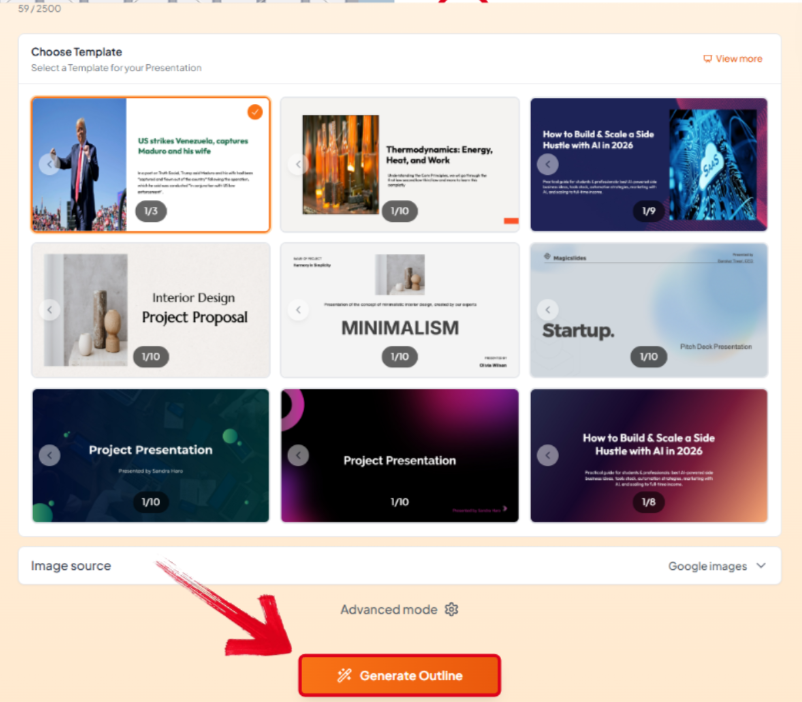
Step 2: Select the template you’d like to use, then press Generate Outline to continue.
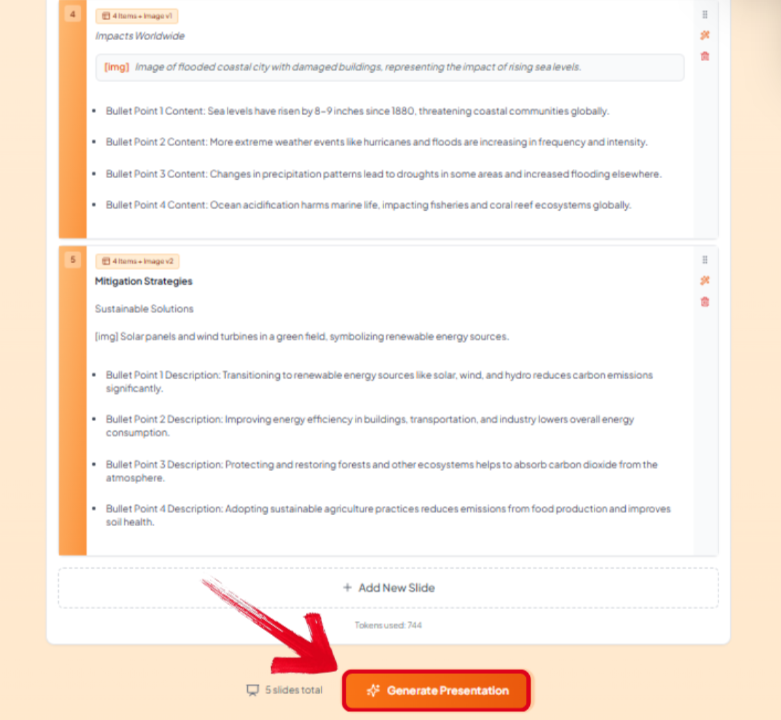
Step 3: Review the generated outline to finalize it, then press Generate Presentation.
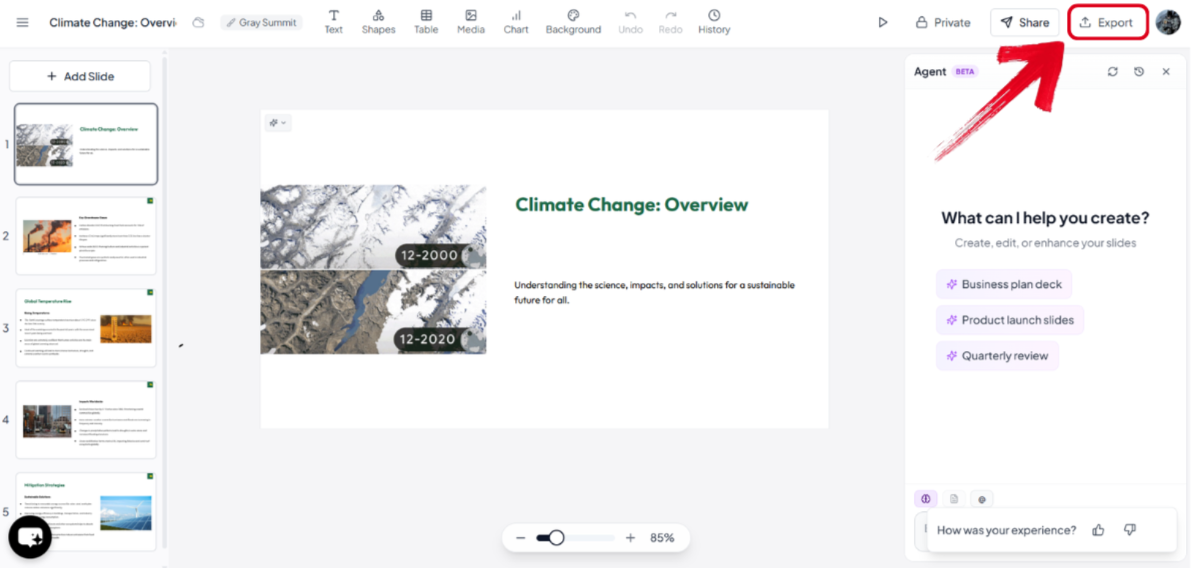
Step 4: Once your presentation is complete, make any changes you want and then press the Export button to save it to your device.
Why WPS AI Slides Is a Strong Alternative to Magic Slides
After trying out Magic Slides for yourself, some users may realize that it lacks the flexibility and platform support required by most professionals, which can be greatly inconvenient. This is why I use smart alternatives like WPS AI Slides for all my presentation needs. It’s an all-in-one solution for streamlining my workflow and elevating my presentation, providing me with an easy-to-use and reliable platform for generating high-quality slides.

How to Create a Polished Presentation with WPS AI Slides
If WPS AI Slides feels like the right choice for your creative workflow, using it is incredibly simple. I’ll be walking you through how to use WPS AI Slides to help you be more efficient with your slide design.
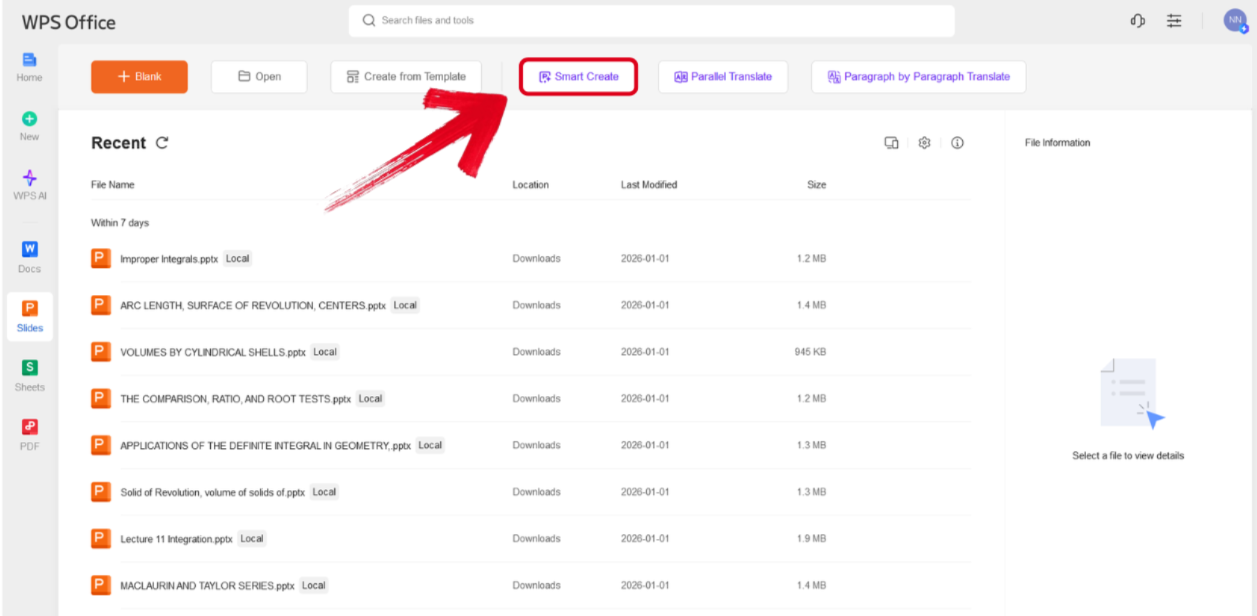
Step 1: Open WPS Presentation and select the Smart Create button to get started.
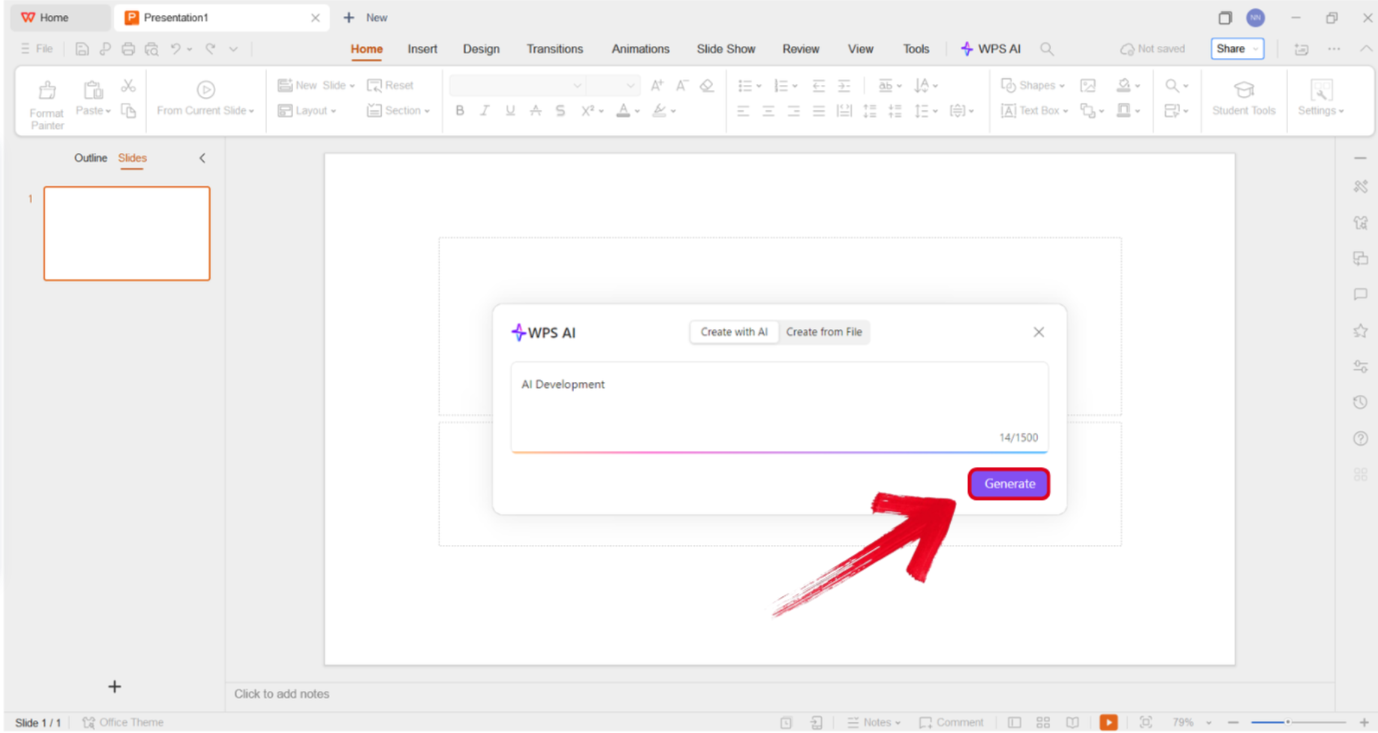
Step 2: Type out the prompt of the presentation you want to design and press Generate.
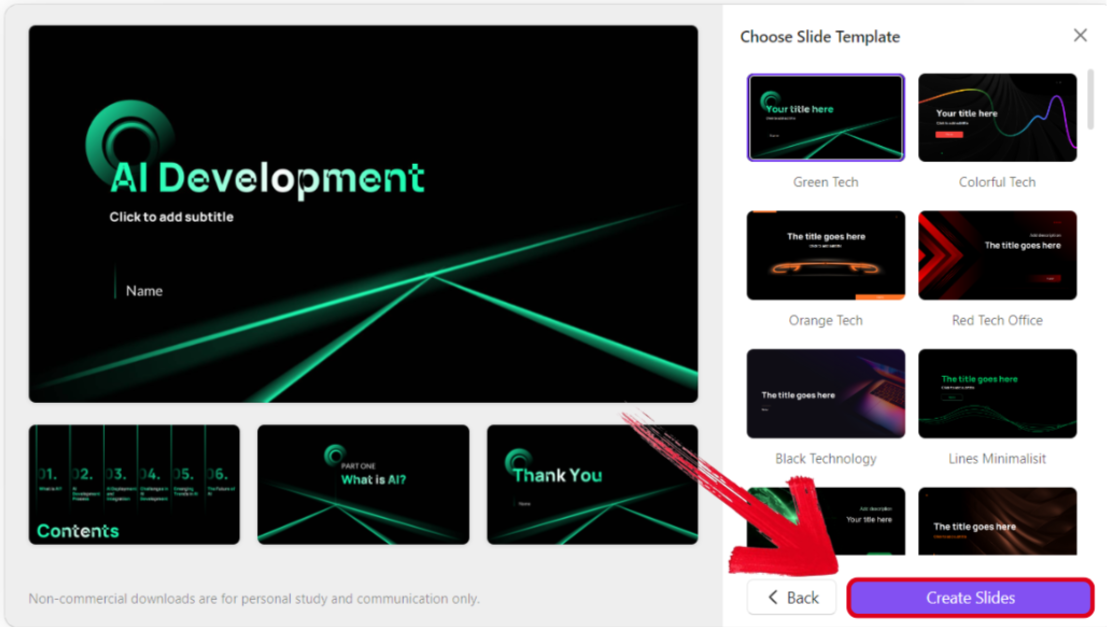
Step 3: Select the template you want to use for your outline and press Create Slides.
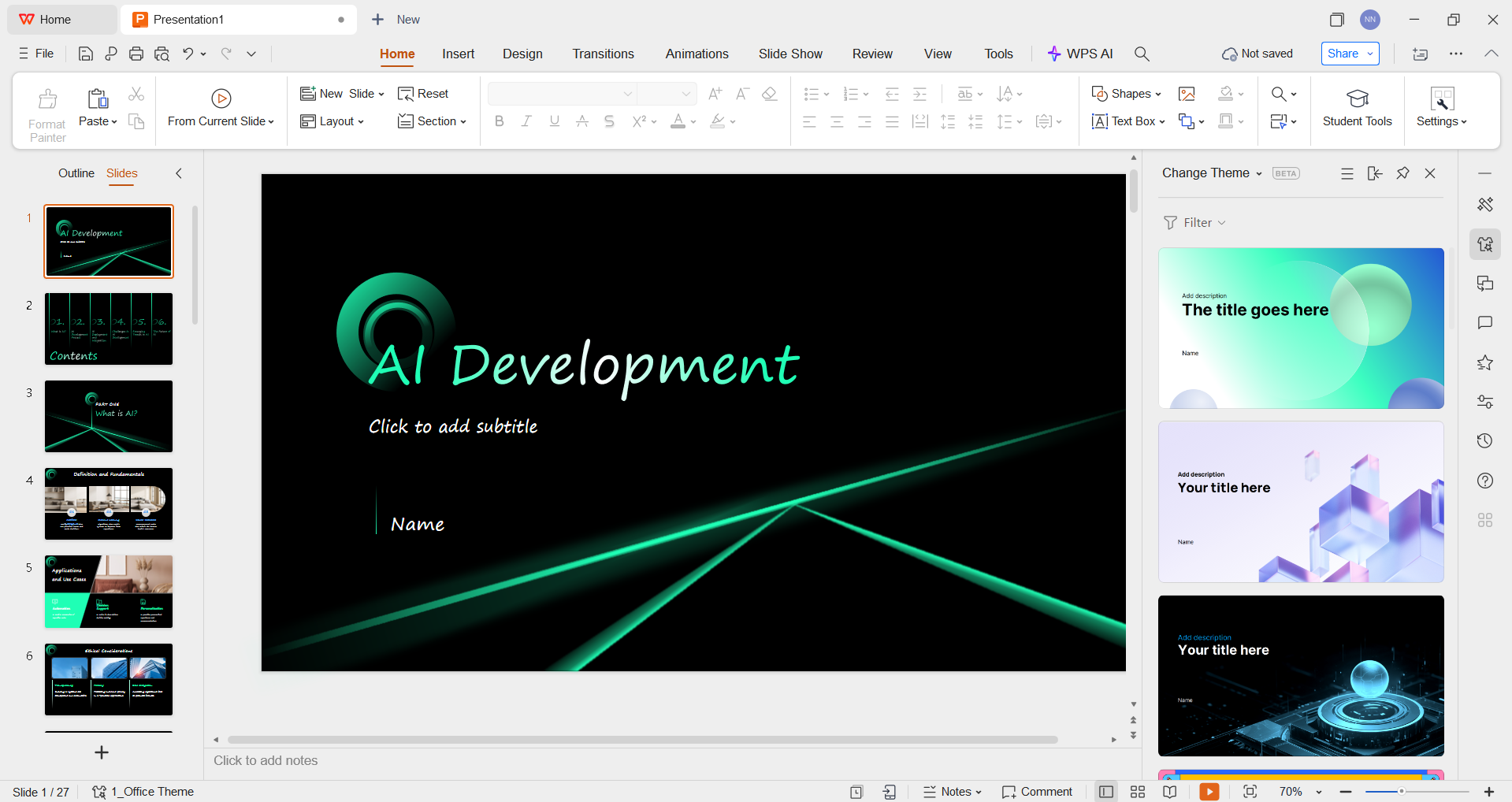
Step 4: Review the final structure of your presentation and change anything you want to, even the theme and visual elements.
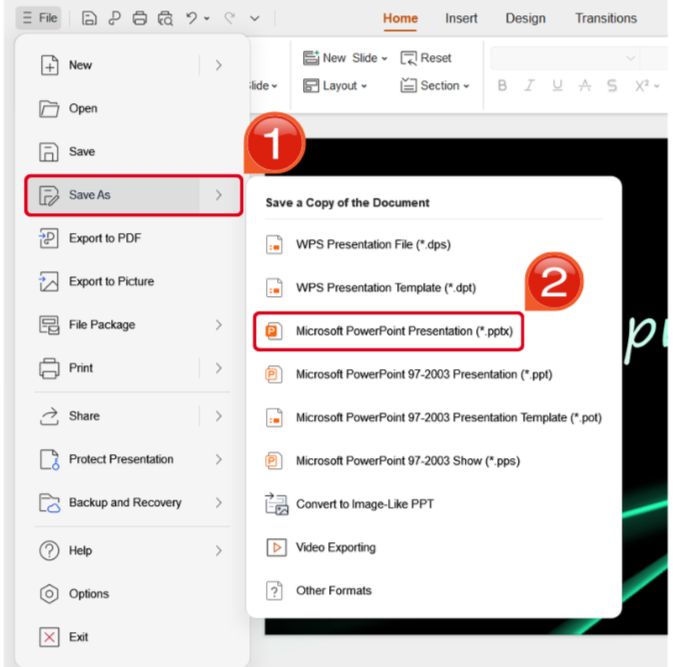
Step 5: Once you’ve finalized your design, navigate to the File Tab and locate the Save As options. Select the format you want to save your presentation as.
WPS AI Slides VS Magic Slides
If you’re confused between Magic Slides vs alternatives like WPS AI Slides for your workflow, I know how frustrating it may seem. One thing I found that helped me a lot was comparing my options side by side and evaluating each one according to my own workflow needs and requirements. In this section, I’ll simplify the process for you by breaking both of them down side by side and helping you decide on the most suitable option for yourself.
| Criteria | WPS AI Slides | Magic Slides |
|---|---|---|
| Platform | Desktop/Web; integrates with PowerPoint & Google Slides | Web-based; Google Slides add-on |
| AI Quality | Strong, structured content | Good, may need refinement |
| Customization | High: text, layout, templates, beautify | Medium: relies on post-edit tweaks |
| Pricing | Freemium: paid upgrades for full features | Freemium: paid credits for frequent use |
| Ease of Use | User-friendly AI editor | Simple prompt workflow |
| Export | PPTX (PowerPoint/Google Slides) | PPTX, PDF; may need adjustments |
| Best For | Professionals, teams, educators | Students, casual users, quick drafts |
FAQs
Q1. What makes Magic Slides different from traditional slide creation tools?
Magic Slides automates slide generation using AI from text prompts, unlike traditional tools, where users manually create each slide. It integrates with Google Slides, which is convenient, but it may limit customization compared to more flexible platforms like WPS AI Slides.
Q2. Can I fully customize slides generated by Magic Slides?
Magic Slides allows some customization, such as editing text and adjusting layouts, but users often find it less flexible than desktop or cross-platform tools. WPS AI Slides, in contrast, offers full slide editing, professional templates, and design adjustments after AI generation.
Q3. Is Magic Slides suitable for all types of users?
Magic Slides is ideal for students and professionals who need fast slide generation, but it may not satisfy users who require complex formatting, offline editing, or cross-platform use. WPS AI Slides addresses these needs with broader compatibility and more advanced features.
Q4. What are the limitations of Magic Slides’ pricing plans?
Magic Slides offers a free trial plan with limited slides and functionality. Paid tiers expand features but may be costly for frequent users. WPS AI Slides provides a free, fully functional version with AI slide generation, making it more accessible for long-term use.
Q5. How does Magic Slides compare to other AI presentation generators?
While Magic Slides is convenient for Google Slides users, other AI tools may offer better customization, AI content quality, or export options. WPS AI Slides stands out as a practical alternative due to one-click AI slide generation, multi-format export, and cross-platform support.
Q6. Can WPS AI Slides completely replace Magic Slides for my presentations?
Yes, for users seeking more control, flexibility, and professional results, WPS AI Slides can serve as a comprehensive solution. It allows AI-powered generation, full editing, and seamless integration across Windows, Mac, Android, and iOS, covering all common presentation scenarios.

'%3e%3cpath%20d='M19.9911%204.11386V6.471H18.5894C18.0775%206.471%2017.7322%206.57814%2017.5536%206.79243C17.3751%207.00671%2017.2858%207.32814%2017.2858%207.75671V9.44421H19.9019L19.5536%2012.0871H17.2858V18.8639H14.5536V12.0871H12.2769V9.44421H14.5536V7.49779C14.5536%206.39064%2014.8632%205.53201%2015.4822%204.92189C16.1013%204.31177%2016.9257%204.00671%2017.9554%204.00671C18.8304%204.00671%2019.509%204.04243%2019.9911%204.11386Z'%20fill='%23333333'/%3e%3c/g%3e%3cdefs%3e%3cclipPath%20id='clip0_2938_8199'%3e%3crect%20width='16'%20height='16'%20fill='white'%20transform='translate(8%204.00671)'/%3e%3c/clipPath%3e%3c/defs%3e%3c/svg%3e)
'%3e%3cpath%20d='M17.5237%2010.7813L23.4811%204H22.0699L16.8949%209.88693L12.7648%204H8L14.2469%2012.9029L8%2020.0133H9.4112L14.8725%2013.7952L19.2352%2020.0133H24M9.92053%205.04213H12.0885L22.0688%2019.0224H19.9003'%20fill='%23333333'/%3e%3c/g%3e%3cdefs%3e%3cclipPath%20id='clip0_2938_8200'%3e%3crect%20width='16'%20height='16.0134'%20fill='white'%20transform='translate(8%204)'/%3e%3c/clipPath%3e%3c/defs%3e%3c/svg%3e)


