

'%3e%3cpath%20d='M8%200C12.4183%200%2016%203.58172%2016%208C16%2012.4183%2012.4183%2016%208%2016C3.58172%2016%200%2012.4183%200%208C0%203.58172%203.58172%200%208%200ZM11.6162%204.38379C11.2257%203.99337%2010.5927%203.99338%2010.2021%204.38379L8%206.58594L5.79785%204.38379C5.40732%203.99334%204.77429%203.99329%204.38379%204.38379C3.99331%204.77429%203.99335%205.40733%204.38379%205.79785L6.58594%208L4.38379%2010.2021C3.99348%2010.5927%203.99341%2011.2257%204.38379%2011.6162C4.77426%2012.0066%205.40734%2012.0065%205.79785%2011.6162L8%209.41406L10.2021%2011.6162C10.5927%2012.0066%2011.2257%2012.0067%2011.6162%2011.6162C12.0067%2011.2257%2012.0066%2010.5927%2011.6162%2010.2021L9.41406%208L11.6162%205.79785C12.0066%205.40735%2012.0066%204.77429%2011.6162%204.38379Z'%20fill='%23080E17'%20fill-opacity='0.46'/%3e%3c/g%3e%3cdefs%3e%3cclipPath%20id='clip0_3761_713'%3e%3crect%20width='16'%20height='16'%20fill='white'/%3e%3c/clipPath%3e%3c/defs%3e%3c/svg%3e)


'%3e%3cpath%20fill-rule='evenodd'%20clip-rule='evenodd'%20d='M21.4999%2010.9993C21.4999%205.20009%2016.7986%200.498901%2010.9993%200.498901C5.19994%200.498901%200.498657%205.20009%200.498657%2010.9993C0.498657%2016.2404%204.33858%2020.5844%209.35855%2021.3722V14.0346H6.69238V10.9993H9.35855V8.68594C9.35855%206.05427%2010.9262%204.60062%2013.3248%204.60062C14.4736%204.60062%2015.6753%204.80571%2015.6753%204.80571V7.38979H14.3512C13.0468%207.38979%2012.64%208.19921%2012.64%209.0296V10.9993H15.5523L15.0867%2014.0346H12.64V21.3722C17.66%2020.5844%2021.4999%2016.2404%2021.4999%2010.9993Z'%20fill='%231568EA'/%3e%3c/g%3e%3c/svg%3e)


'%3e%3cpath%20d='M2.42045%2022.1876H6.31818V12.7217L0.75%208.54553V20.5171C0.75%2021.4414%201.49892%2022.1876%202.42045%2022.1876Z'%20fill='%234285F4'/%3e%3cpath%20d='M19.682%2022.1876H23.5797C24.5041%2022.1876%2025.2502%2021.4387%2025.2502%2020.5171V8.54553L19.682%2012.7217'%20fill='%2334A853'/%3e%3cpath%20d='M19.682%205.48293V12.7216L25.2502%208.54543V6.31816C25.2502%204.25236%2022.8921%203.07469%2021.2411%204.31361'%20fill='%23FBBC04'/%3e%3cpath%20d='M6.31824%2012.7217V5.48303L13.0001%2010.4944L19.6819%205.48303V12.7217L13.0001%2017.733'%20fill='%23EA4335'/%3e%3cpath%20d='M0.75%206.31816V8.54543L6.31818%2012.7216V5.48293L4.75909%204.31361C3.10534%203.07469%200.75%204.25236%200.75%206.31816Z'%20fill='%23C5221F'/%3e%3c/g%3e%3cdefs%3e%3cclipPath%20id='clip0_2954_7305'%3e%3crect%20width='24.5'%20height='18.375'%20fill='white'%20transform='translate(0.75%203.8125)'/%3e%3c/clipPath%3e%3c/defs%3e%3c/svg%3e)


AI presentation tools have completely revolutionized how people make presentations, with tools like SlidesGPT eliminating the need to design each slide manually. But many users are confused about its actual performance and whether it really is the right tool for their workflow. So, is SlidesGPT worth using for serious presentation work? In this guide, I’ll be giving you an honest review of SlidesGPT AI and introducing WPS AI Slides as a comprehensive alternative.
What is SlidesGPT? An In-Depth Look
SlidesGPT is a fully web-based AI application designed to generate complete PowerPoint presentations from a single prompt. It’s aimed at automating the entire slide creation process fully within yourwebbrowser, greatly simplifying the process and helping you save a lot of time and effort. While it is a great option for creating a visual draft quickly, it lacks the depth required for polished and professional presentations.
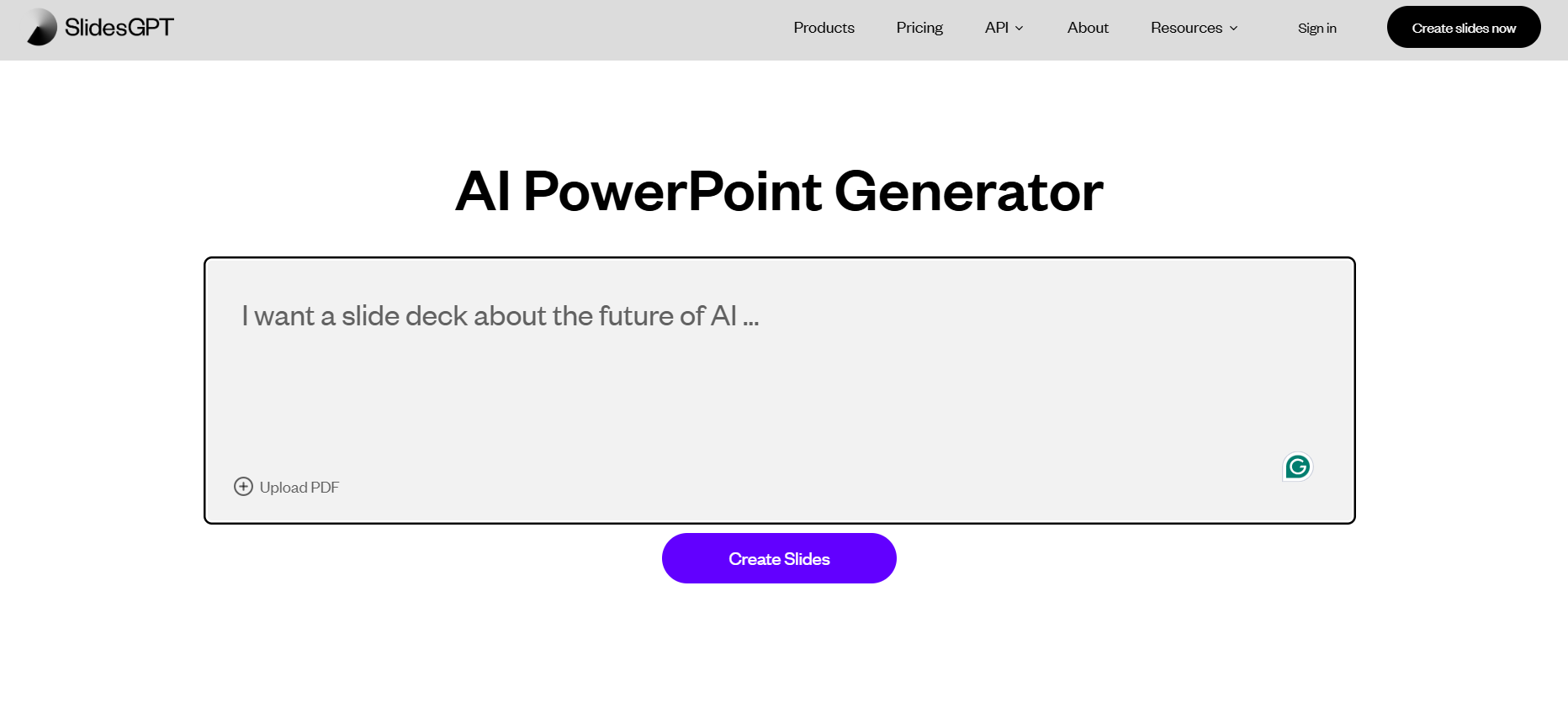
Key Features
Prompt-to-Presentation: Input a topic (e.g., "Quarterly Sales Report") and generate a full presentation.
AI-Generated Content: Creates titles, bullet points, and slide text.
Automated Basic Design: Applies a simple theme and layout to all slides.
Quick Export: Allows downloading the presentation as a .pptx file.
Web-Based Convenience: No software installation required.
Pros
Quick processing speeds
Simple and easy-to-use interface
Offers a free tier for basic functionality
Cons
Limited content control
Generic design outputs
Often requires additional rework in another editor
No integrated tools
If SlidesGPT seems like the right choice for your presentation needs, using it is incredibly straightforward. I’ll be highlighting each step of the way down below to help you simplify the process and eliminate any confusion.
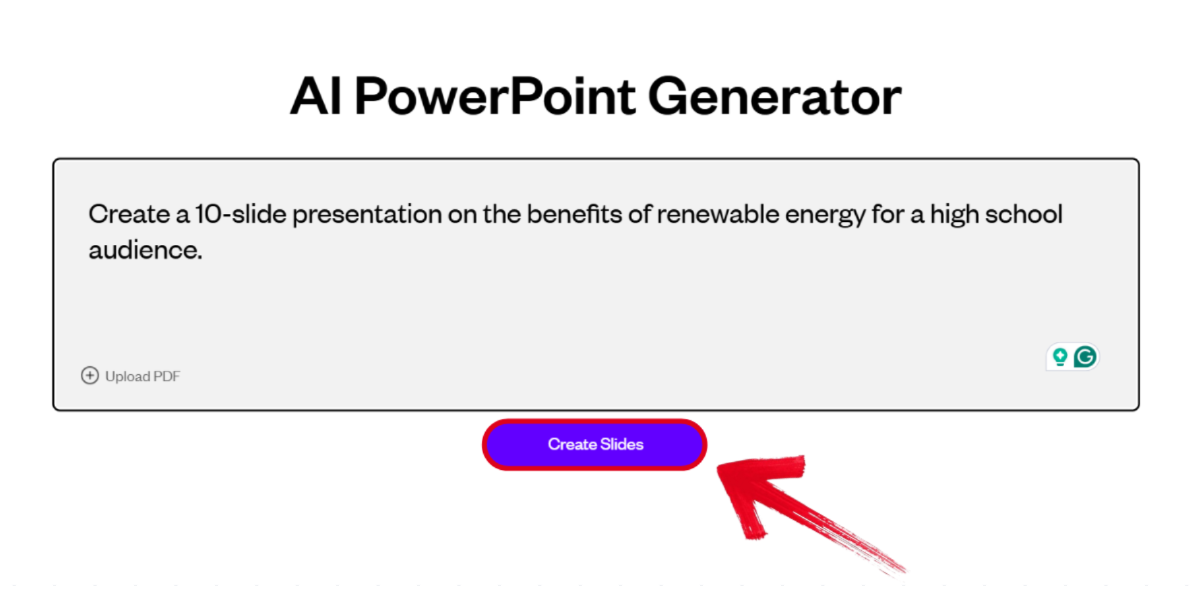
Step 1: Visit SlidesGPT on your web browser and type out a prompt describing the presentation you want to generate, then press Create Slides.
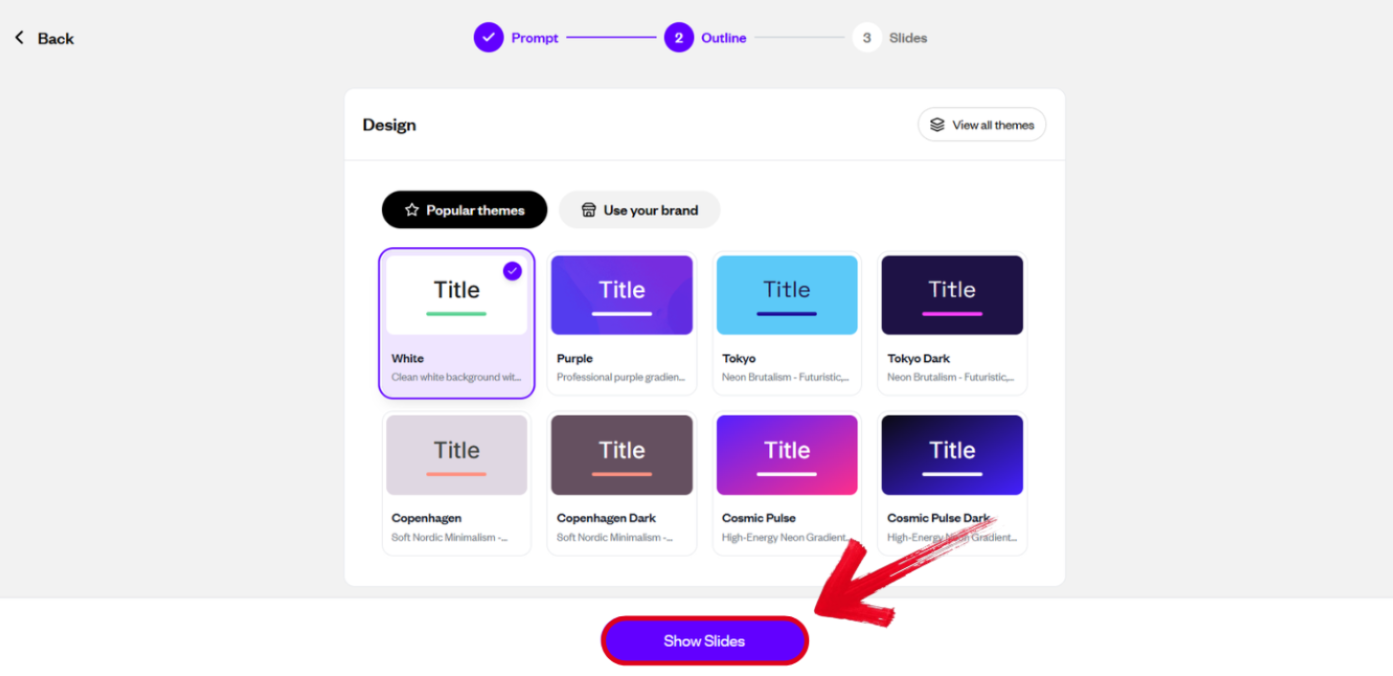
Step 2: Select the theme you want to use for your presentation, then select Show Slides.
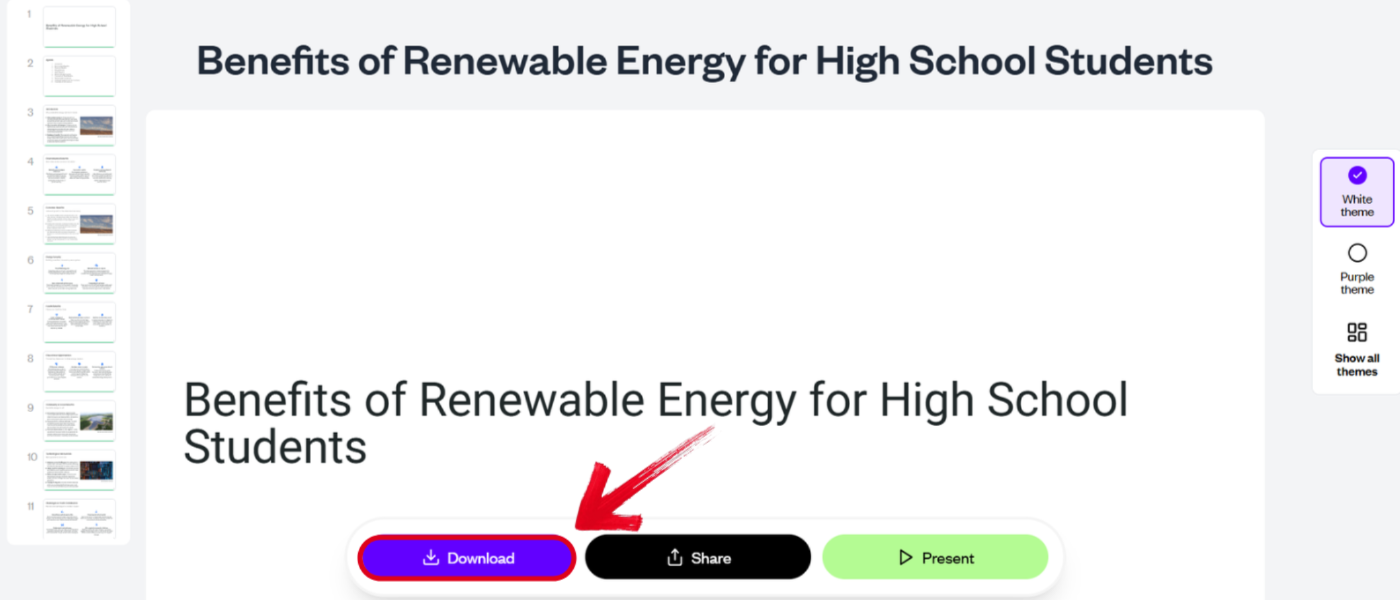
Step 3: Once the complete presentation has been generated, simply press Download to export it to your device.
A Powerful Alternative: WPS AI Slides - Beyond Simple Generation
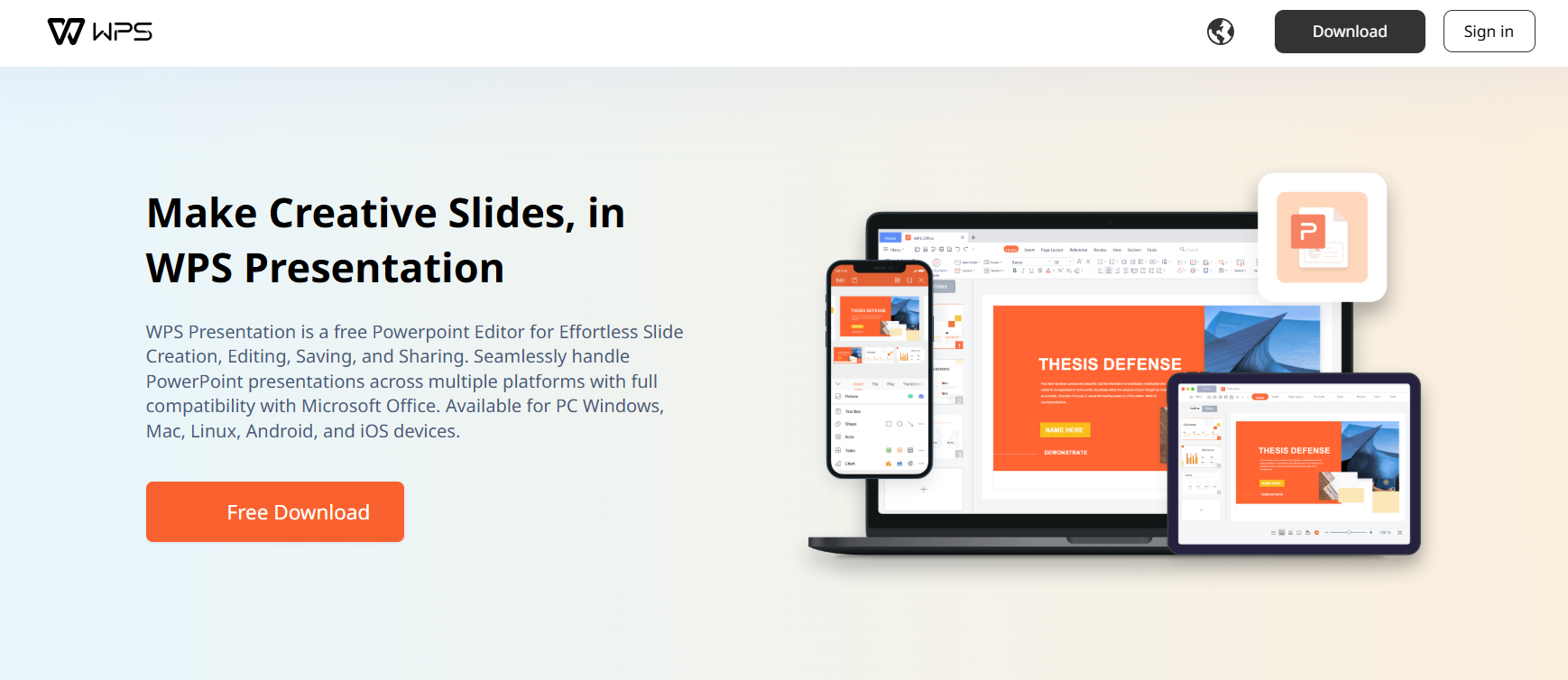
While SlidesGPT is great for crafting an initial draft for your presentation, it lacks the depth and advanced features required for professional presentations. This is why I rely on powerful SlidesGPT alternatives like WPS AI Slides as an all-in-one, feature-rich presentation suite for all my presentation needs. It acts as an intelligent assistant throughout the entire design process, giving me full control over my designs and delivering polished results every single time. It’s the perfect tool for users looking for quality and control in their presentations.
Key Advantages Over Standalone Generators
Interactive AI Workflow: Generate content and then refine it however you want with follow-up prompts.
Professional Design Tools: Provides access to a vast template library, advanced formatting, image editing, and AI Beautify.
Seamless Google Slides Compatibility: Create and edit in WPS, then save directly to Google Slides format (.pptx) with perfect formatting preservation.
Integrated Office Suite: Provides easy imports of content from documents and spreadsheets.
Real Collaboration: Built-in cloud sharing and real-time co-editing features for teams.
How to Create a Polished Presentation with WPS AI Slides
If WPS AI Slides feels like the right choice for your creative workflow, using it is incredibly simple. I’ll be walking you through how to use WPS AI Slides to help you be more efficient with your slide design.
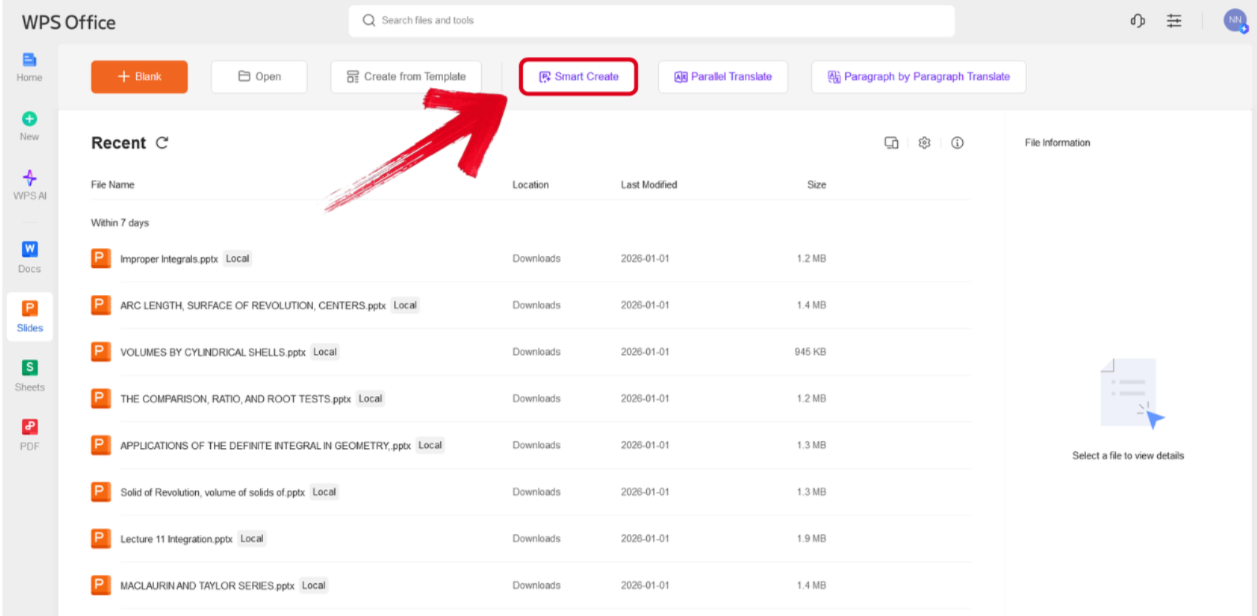
Step 1: Open WPS Presentation and select theSmart Create button to get started.
Step 2: Type out the prompt of the presentation you want to design and press Generate.
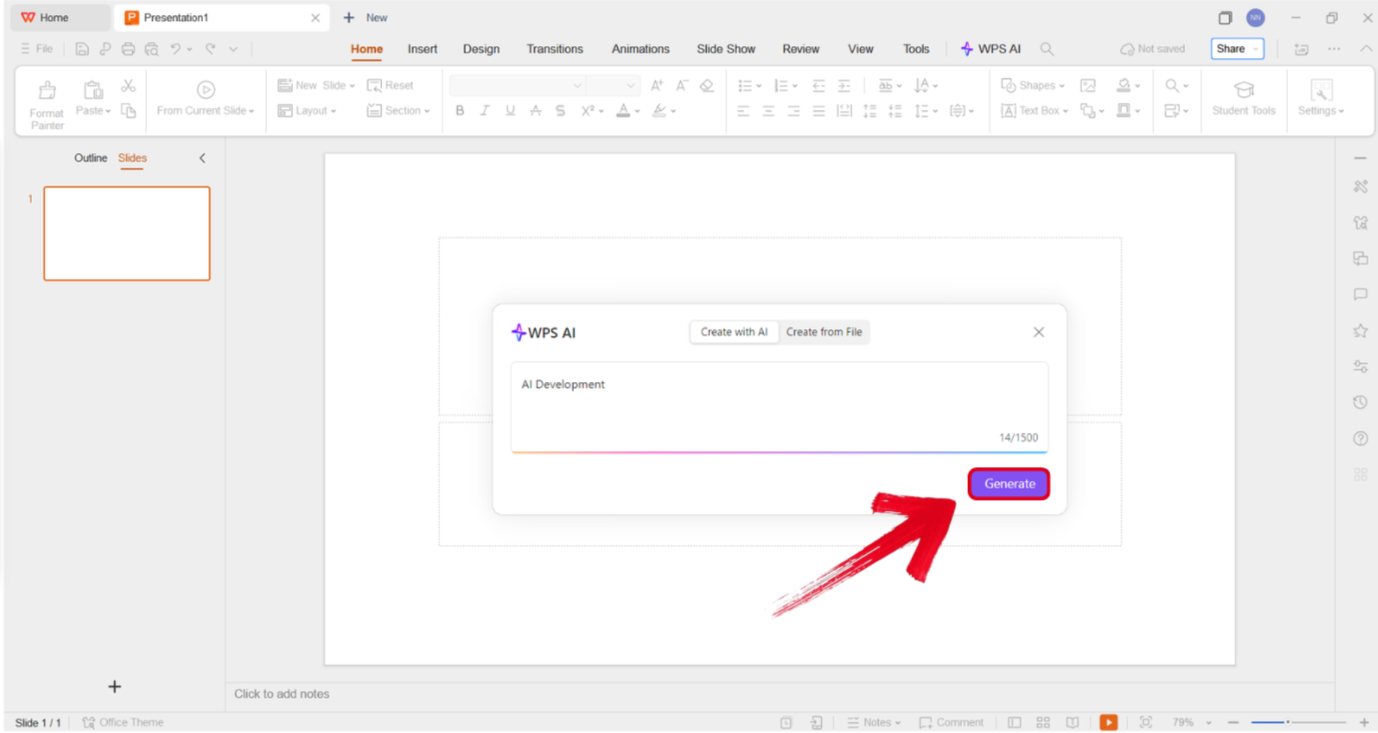
Tip: Make sure your presentation prompt is detailed, including the title, subtitles, and any other details you want to include.
Step 3: Select the template you want to use for your outline and press Create Slides.
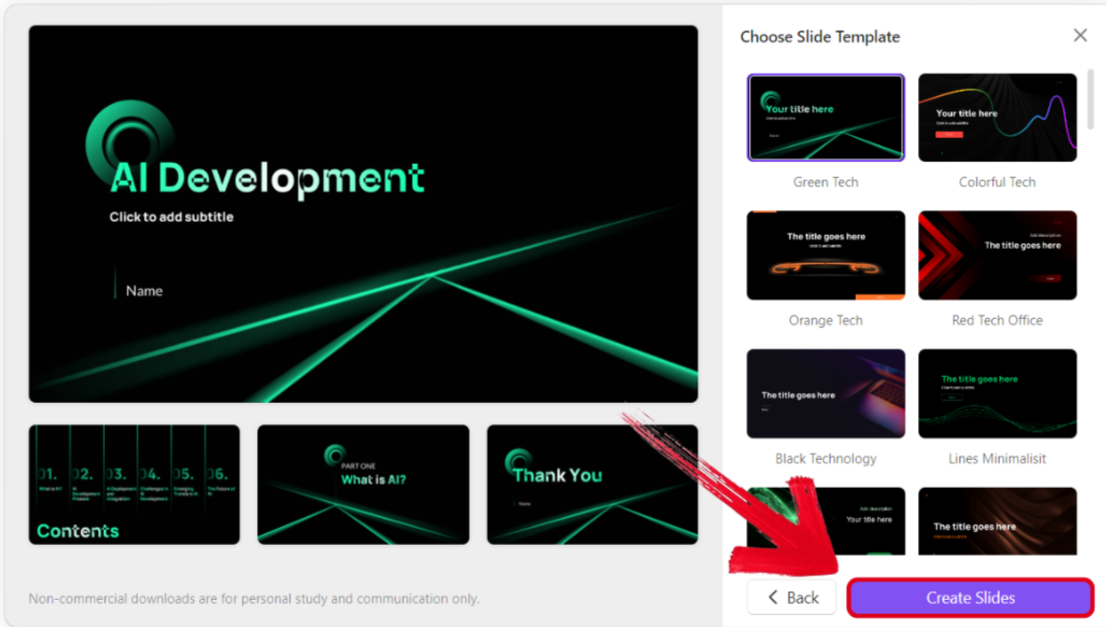
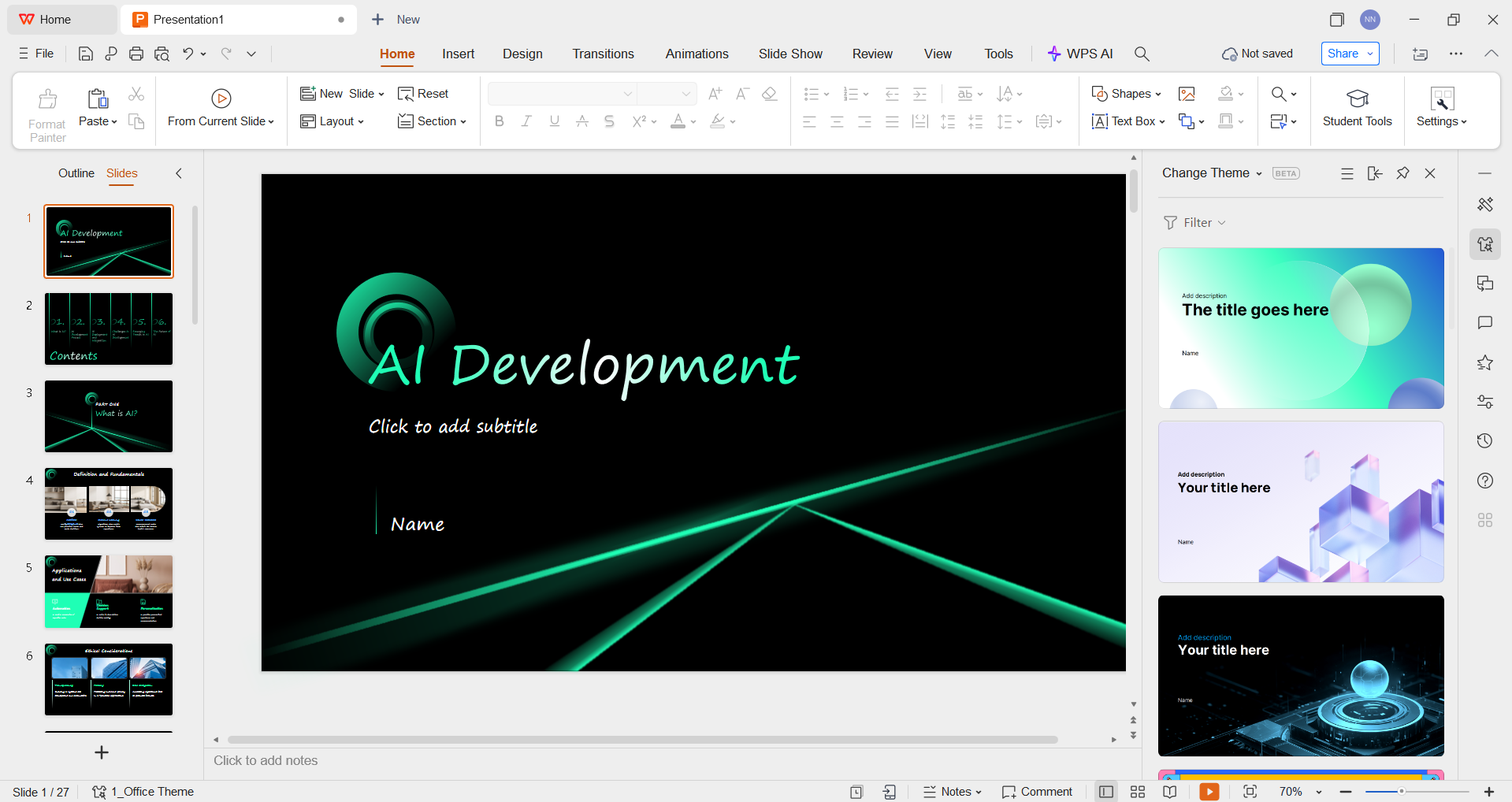
Step 4: Review the final structure of your presentation and change anything you want to, even the theme and visual elements.
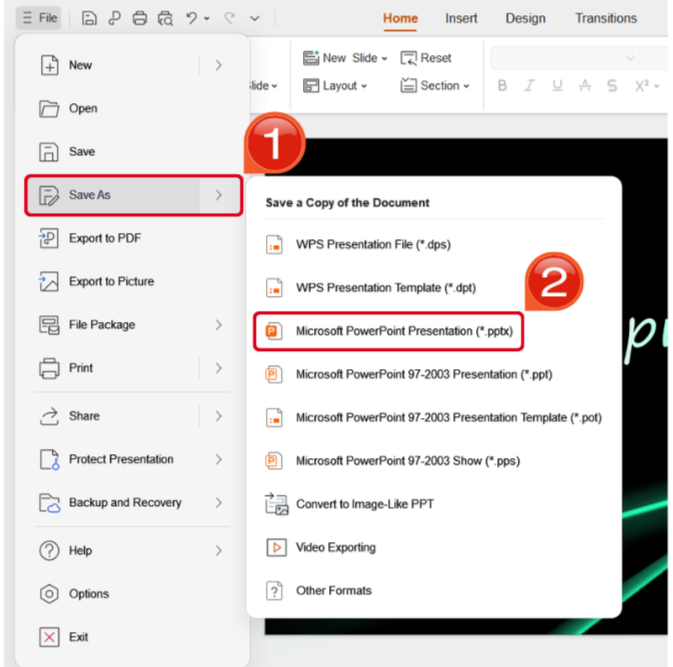
Step 5: Once you’ve finalized your design, navigate to the File Tab and locate the Save Asoptions. Select the format you want to save your presentation as.
Comparison & Decision Guide
While both of these tools are a great help in simplifying the presentation designprocess and helping you save time, both have their own unique use cases catered towards different workflows. If you’re trying to choose the right option for your own workflow, you have to evaluate each one according to your own requirements. In this section, I’ll be comparing both of these tools side by side to help you make the decision between tools like SlidesGPT vs PowerPoint effectively.
| Aspect | SlidesGPT | WPS AI Slides |
|---|---|---|
| Core Philosophy | Fully automated one-shot presentation generation | AI-assisted iterative co-creation inside a professional editor |
| Best For | Creating a basic first draft from a single idea in minimal time | Producing polished and customized presentations for work, school, or clients |
| Content and Design Control | Low control with limited customization after generation | High control with editable AI content and advanced design tools |
| Output and Integration | Exports PPTX for manual editing in other software. Standalone tool | Native PPTX export for Google Slides and PowerPoint with cloud collaboration |
Why Choose WPS AI Slides Over Pure Generators Like SlidesGPT?
1. From Draft to Deliverable in One Tool
Slides GPT creates a prototype for your presentation that often needs heavy revision elsewhere.
WPS AI Slides enables the entire creation process in one environment.
2. Maintain Brand and Quality Standards
WPS AI Slides offers brand kits, custom color palettes, and font management, which are essential for professional work.
SlidesGPT lacks any detailed customization features.
3. Cost-Effective for Serious Users
WPS AI Slides is part of the comprehensive WPS Office subscription, offering word processing, spreadsheets, and AI-powered presentations for an all-in-one solution.
SlidesGPT is filled with restrictions in the free version.
4. Future-Proof Workflow
WPS AI Slides provides direct compatibility with Google Slides, and PowerPoint ensures your presentations are usable everywhere.
FAQs
Q1. What is SlidesGPT, and is it really free?
SlidesGPT is a web-based AI tool that generates PowerPoint presentations from text prompts. It offers limited free generations for testing, while continued use requires a paid plan or credits.
Q2. Can I edit SlidesGPT presentations in Google Slides?
Yes, indirectly. SlidesGPT exports a PTX file, which you can upload to Google Drive and open in Google Slides. Some design elements may need manual adjustment.
Q3. Does SlidesGPT offer design customization tools?
No. SlidesGPT focuses on one-shot presentation generation. Any design edits must be done later in PowerPoint or Google Slides.
Q4. Is SlidesGPT good for professional presentations?
SlidesGPT is best for quick first drafts. For polished and client-ready presentations, tools like WPS AI Slides offer more control and design features.
Evaluating SlidesGPT for Practical Usage
SlidesGPT is a reliable and effective tool for quick slide design, providing initial drafts that you can further edit for your presentations. While it’s great for basic prototypes, it lacks the depth and advanced features required for professional presentations. In this guide, I’ve provided a detailed breakdown of SlidesGPT and evaluated its usage in real-world scenarios. If you’re looking for a complete, all-in-one tool to elevate your presentations, WPS AI Slides is the perfect solution. It’s completely free and provides high-quality and polished results every single time.

'%3e%3cpath%20d='M19.9911%204.11386V6.471H18.5894C18.0775%206.471%2017.7322%206.57814%2017.5536%206.79243C17.3751%207.00671%2017.2858%207.32814%2017.2858%207.75671V9.44421H19.9019L19.5536%2012.0871H17.2858V18.8639H14.5536V12.0871H12.2769V9.44421H14.5536V7.49779C14.5536%206.39064%2014.8632%205.53201%2015.4822%204.92189C16.1013%204.31177%2016.9257%204.00671%2017.9554%204.00671C18.8304%204.00671%2019.509%204.04243%2019.9911%204.11386Z'%20fill='%23333333'/%3e%3c/g%3e%3cdefs%3e%3cclipPath%20id='clip0_2938_8199'%3e%3crect%20width='16'%20height='16'%20fill='white'%20transform='translate(8%204.00671)'/%3e%3c/clipPath%3e%3c/defs%3e%3c/svg%3e)
'%3e%3cpath%20d='M17.5237%2010.7813L23.4811%204H22.0699L16.8949%209.88693L12.7648%204H8L14.2469%2012.9029L8%2020.0133H9.4112L14.8725%2013.7952L19.2352%2020.0133H24M9.92053%205.04213H12.0885L22.0688%2019.0224H19.9003'%20fill='%23333333'/%3e%3c/g%3e%3cdefs%3e%3cclipPath%20id='clip0_2938_8200'%3e%3crect%20width='16'%20height='16.0134'%20fill='white'%20transform='translate(8%204)'/%3e%3c/clipPath%3e%3c/defs%3e%3c/svg%3e)


