In healthcare, every second matters and clear communication often
determines how smoothly operations run. Hospital templates help ease
tasks like presentations, patient forms, and administrative documents so
teams can stay focused on care rather than formatting but many people
end up wasting time on generic layouts that don’t match their needs or
branding. In this guide, I’ll share 10 ready-to-use templates and show
you how to edit, print, and share them.
Use Word, Excel, and PPT for FREE
Hospital Templates
Top 10 Hospital
Templates [Free Download]
People don’t realize that selecting the right template matters just
as much as knowing how to edit it. I’ve pulled together a set of
hospital templates that are genuinely practical. Each one has a clear
layout, is easy to adjust in WPS Presentation or PowerPoint, and
includes design elements that work for real medical use cases, not just
theoretical examples. Below are ten templates you can download right
away and adapt to your department, project,
or presentation without having to rebuild anything from scratch.
1.
Beige Illustrative Innovations in Medicine Presentation (PPT/PDF)
This template is a presentation slide with a friendly, illustrated style, designed for
a medical or healthcare topic titled Innovations in Medicine. The slide
uses a clean, light color palette and features two standing female
doctors discussing a clipboard and a clipboard on a wall, suggesting a
professional, collaborative environment. The title is attributed to
Borcelle Hospital, making it suitable for institutional or educational
medical presentations.
Beige Hospital Template
2. Blue
White and Gray Modern Medical Presentation (PPT/PDF)
This template is a professional title slide designed for a business or technical
presentation on healthcare. It features a large, modern title Medical
Presentation and a secondary sub-title Smart Hospitals: How Technology
Is Enhancing Patient Care. The design uses geometric purple or gray
accent shapes on the right side and a muted background photograph of a
clean hospital room with a gurney, giving it a high-tech, corporate
feel.
White and Grey Hospital Template
3.
Green Orange Blue Creative Healthcare Facility Presentation
(PPT/PDF)
This template is a presentation title slide featuring a welcoming, hand-drawn
illustration style with a soft, limited color palette. The slide is
titled Healthcare Facility Presentation and attributes the creation to
Olivia Wilson. The graphic prominently features a female doctor with a
stethoscope and a male nurse or professional holding a clipboard, making
it suitable for internal or educational presentations in a clinic or
hospital setting.
Green and Orange Hospital Template
4. Blue
Illustrated Medical Center Presentation (PPT/PDF)
This template is a presentation slide featuring a two-tone blue and beige color block
design for a clean, professional look. It prominently displays a mission
statement, Your health, our mission, with the supporting phrase
“Addressing every need”. The right side of the slide contains an
illustration showing a doctor in a lab coat shaking hands with a patient
via mobile screen overlays, symbolizing digital health services or a
successful consultation.
Blue Hospital Template
5.
Blue White Modern Hospital Care Medical Presentation (PPT/PDF)
This template is a presentation title slide combining a modern graphic design with a
photo inlay, focusing on Hospital Care and Health Support. The design
uses a cool, light blue color scheme with subtle DNA helix and line
graphics. A prominent illustration of a two-story hospital building is
juxtaposed with a circular photograph of an actual hospital interior,
creating a blend of concept and reality. It includes contact details and
is attributed to Borcelle Hospital and presenter Avery Davis.
Blue White Hospital Template
6. Teal
and White Modern Healthcare Presentation (PPT/PDF)
This template is a professional presentation title slide focused on Health Care and
Innovations in Modern Hospital Care. The design features a light,
semi-transparent background of a doctor in a hospital setting and uses a
clean, contemporary layout with an active navigation bar. The theme uses
a bright turquoise gradient cross and shield icons, emphasizing
advancements in technology, telemedicine, and sustainable hospital
environments.
Teal and White Hospital Template
7.
Colorful Simple Minimalist Illustrative Doctors Medical Presentation
(PPT/PDF)
This template is a presentation title slide for consultation services under the banner
of Borcelle Doctors, promoting quality care for all. The design uses a
clean white background with a dark blue footer and features a soft
illustration of a doctor administering a shot to a male patient. The
bold, curved title text and simple, professional illustration make it
suitable for a healthcare practice or public health presentation.
Colorful and Simple Hospital Template
8.
Blue and White Cartoon Style Healthcare Presentation (PPT/PDF)
This template is a presentation title slide for a healthcare brand, Ultimedic,
featuring a light blue background and decorative navy blue cross and
abstract star motifs. The main feature is a cheerful, illustrated group
of four medical professionals: a nurse, two doctors, and another medical
staff member. The overall design is friendly and professional, making it
suitable for presentations about healthcare services or team
introductions.
Cartoon Style Hospital Template
9.
Blue and White Modern Medical Healthy Presentation (PPT/PDF)
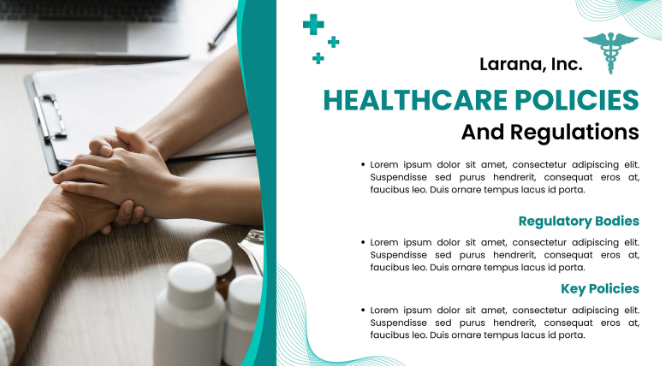
This template is a professional presentation slide focused on healthcare policies and
regulations under the branding of Larana, Inc.. The design utilizes a
distinctive split screen: the left side features a high-quality
photograph of a doctor and patient interacting over a desk with
medication, while the right side contains the text and graphics. The
color scheme is teal and white, with simple bullet points introducing
subtopics like regulatory bodies and key policies.
Modern Hospital Template
10.
Teal White and Black Modern Hospital Promotion Medical Presentation
(PPT/PDF)
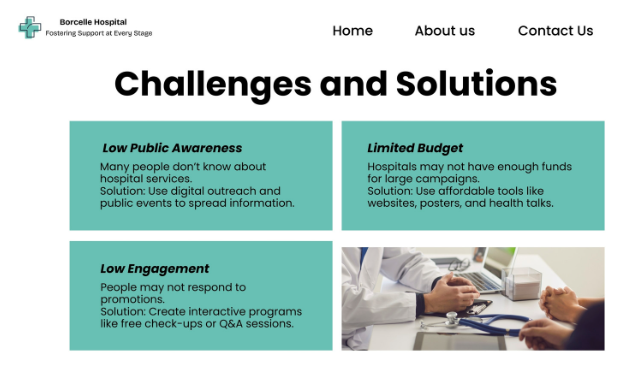
This template is a presentation content slide focused on identifying and addressing
business challenges, titled Challenges and Solutions. It uses two-by-two
teal-colored content blocks to detail issues like Low Public Awareness
and Limited Budget, providing a corresponding Solution for each. The
bottom right quadrant includes a relevant photo of medical
professionals, reinforcing the presentation's healthcare theme under the
Borcelle Hospital branding.
Teal White and Black Hospital Template
These free hospital templates are some of my personal favorites
because they’re visually clear, easy to edit, and suitable for real
healthcare scenarios.
How to Edit
and Print Hospital Templates in PPT/PDF
When you start filling in a hospital template, it’s easy for slides
or form fields to shift out of place, if you paste in data from other
sources. Using WPS Presentation for PPTs or WPS PDF for forms keeps
everything aligned and preserves the design elements, like charts,
headers, and medical icons. This approach also makes it simple to adjust
tables, insert images, or update patient and procedural information
without breaking the template.
How
to Edit a Hospital Template in PowerPoint (WPS Presentation)
WPS Presentation lets you update patient charts,
departmental overviews, and procedure slides directly within the
template while keeping all tables, icons, and formatting intact. Here’s
how to create a hospital PPT.
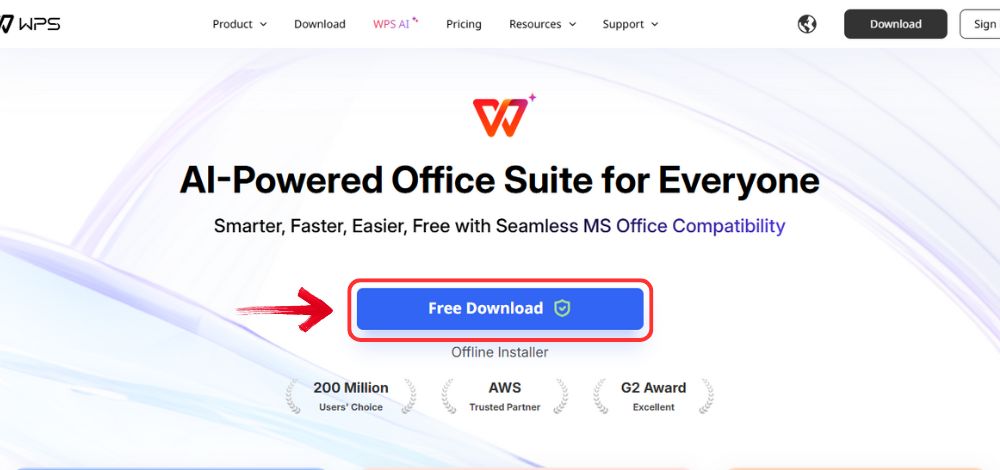
Step 1: First, open your browser to visit WPS Office and click the "Free Download" button to start the download.
Download WPS Office
Step 2: The download will finish in a few seconds.
Once done, run the installation file like you would for any other app or
software.
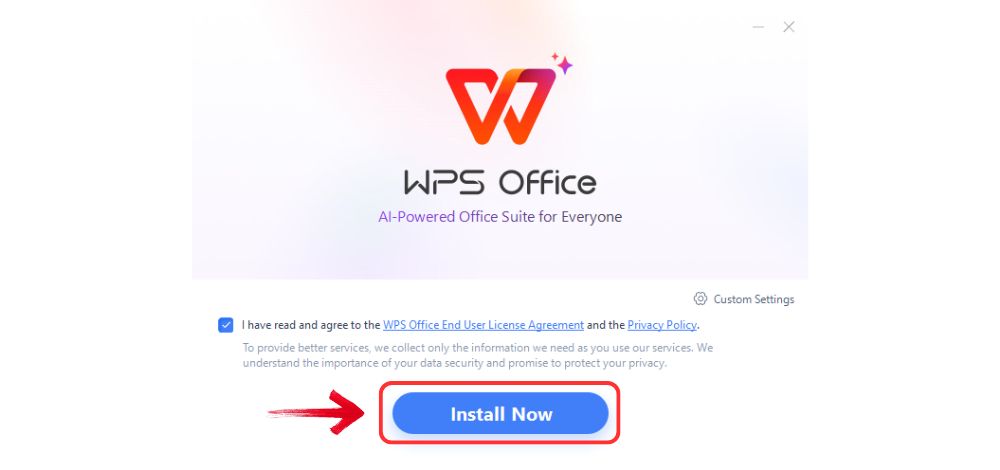
Step 3: WPS Office will show you a few simple terms
and conditions. Accept them, then click the "Install" button to begin the installation.
Install WPS Office
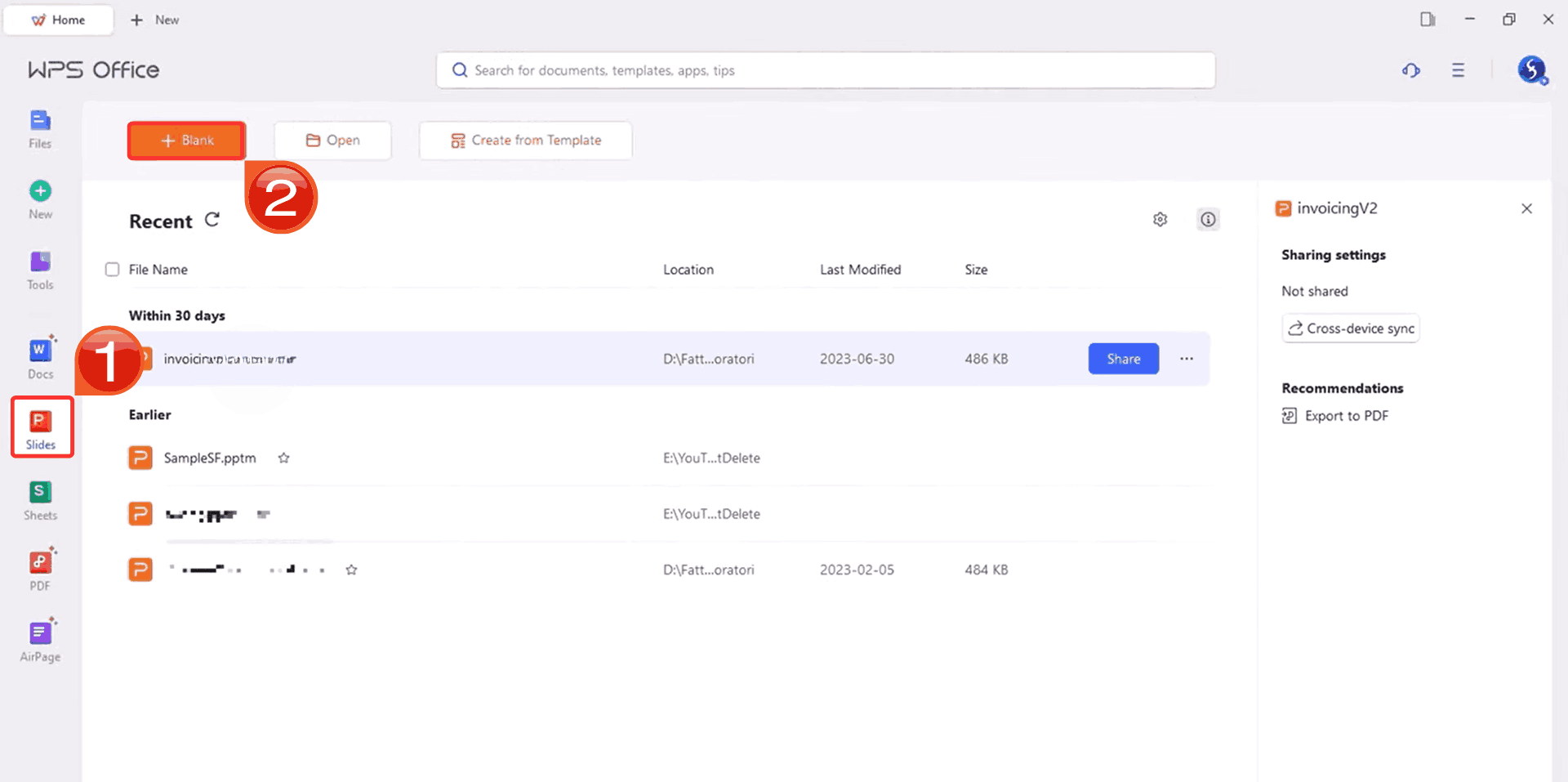
Step 4: After installation, on WPS Office, click on “Slides” from the left panel, then select “Open” to open a presentation in WPS Office.
Create blank presentation
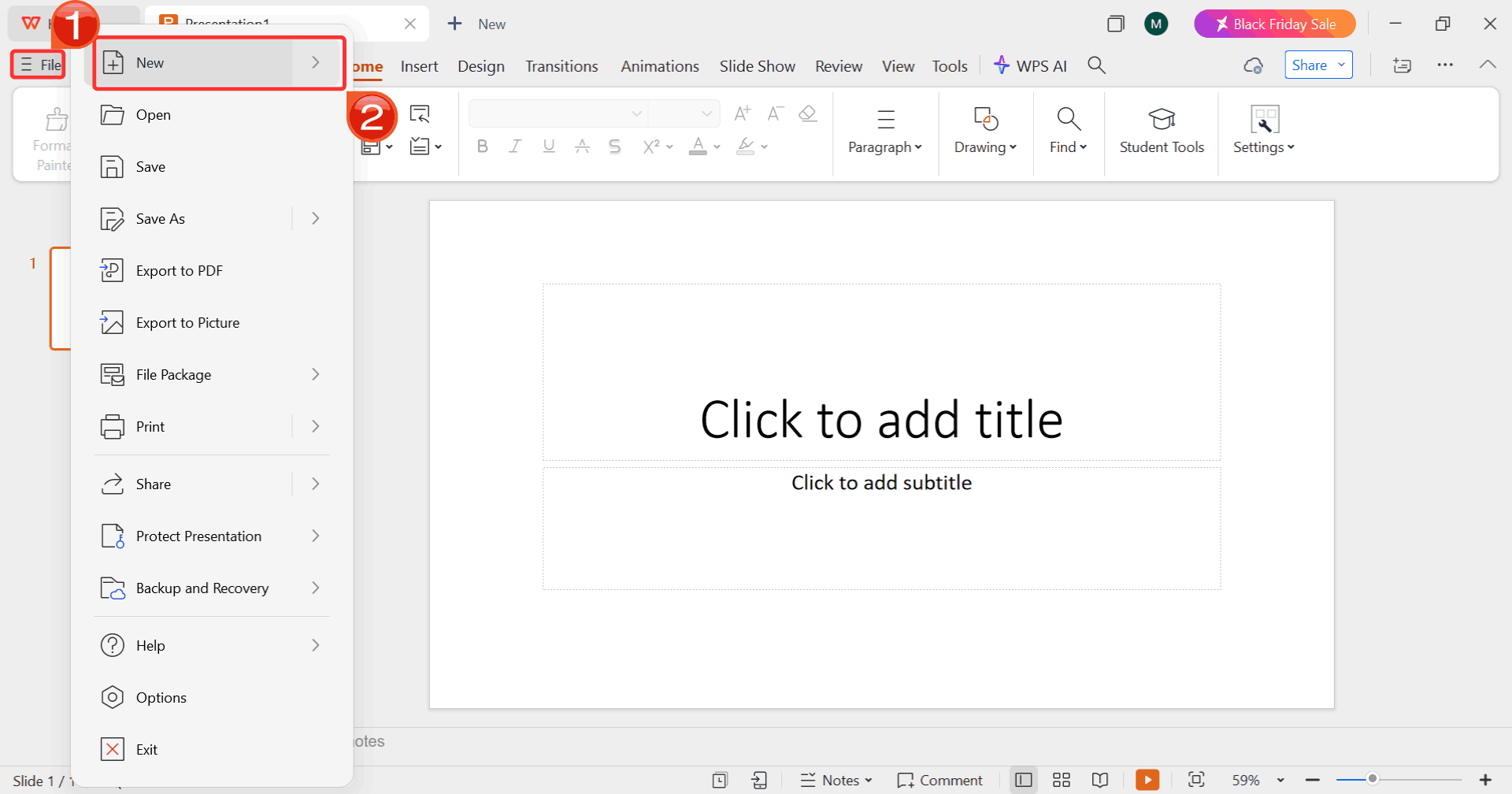
Step 5: Click on “File”, then click
on “New” to browse options for opening a blank
presentation or choosing from available templates.
Select New
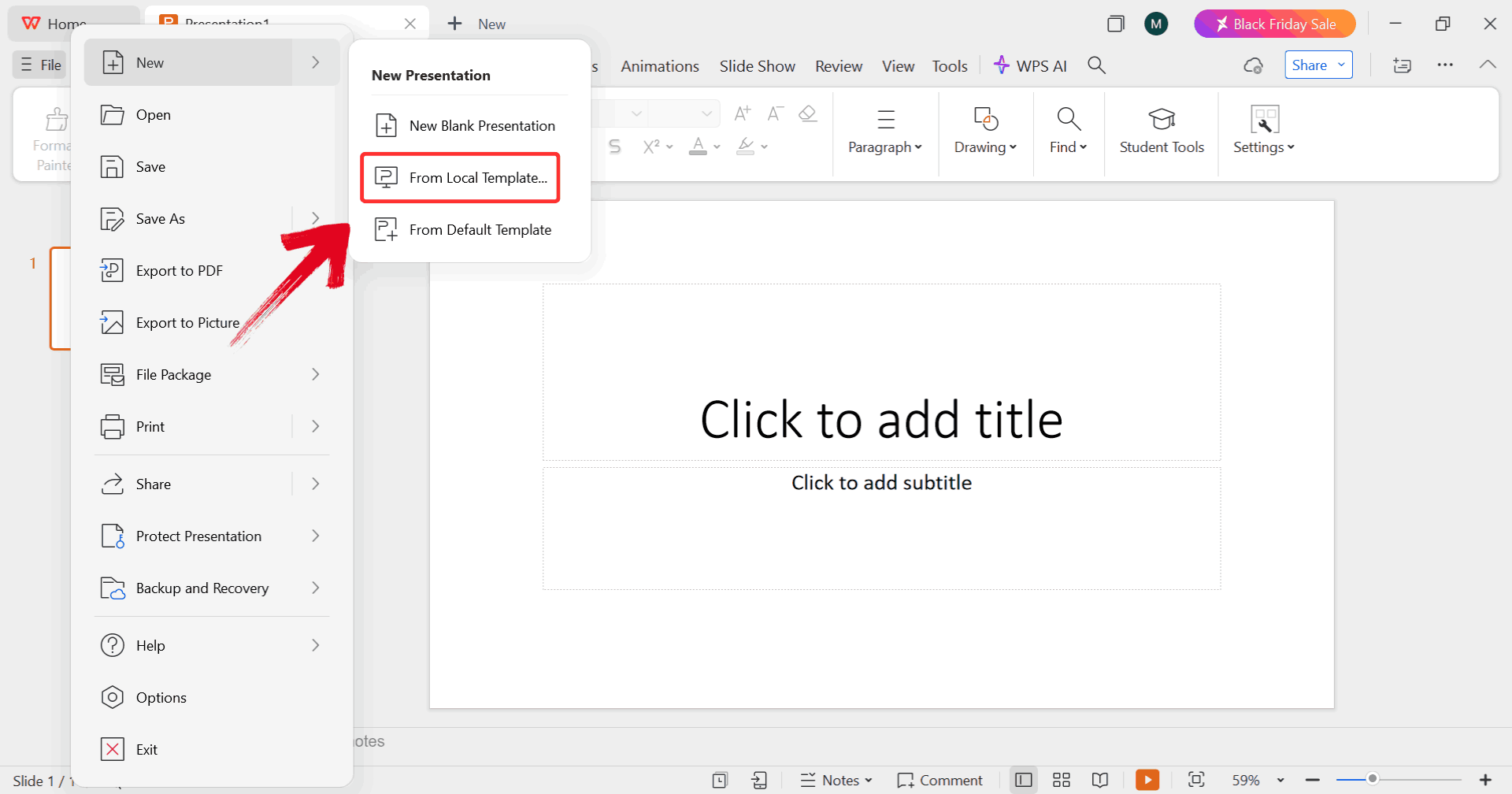
Step 6: Click on “From Local
Template” to upload your desired template, either from your
device or directly from the WPS template library.
Upload Template
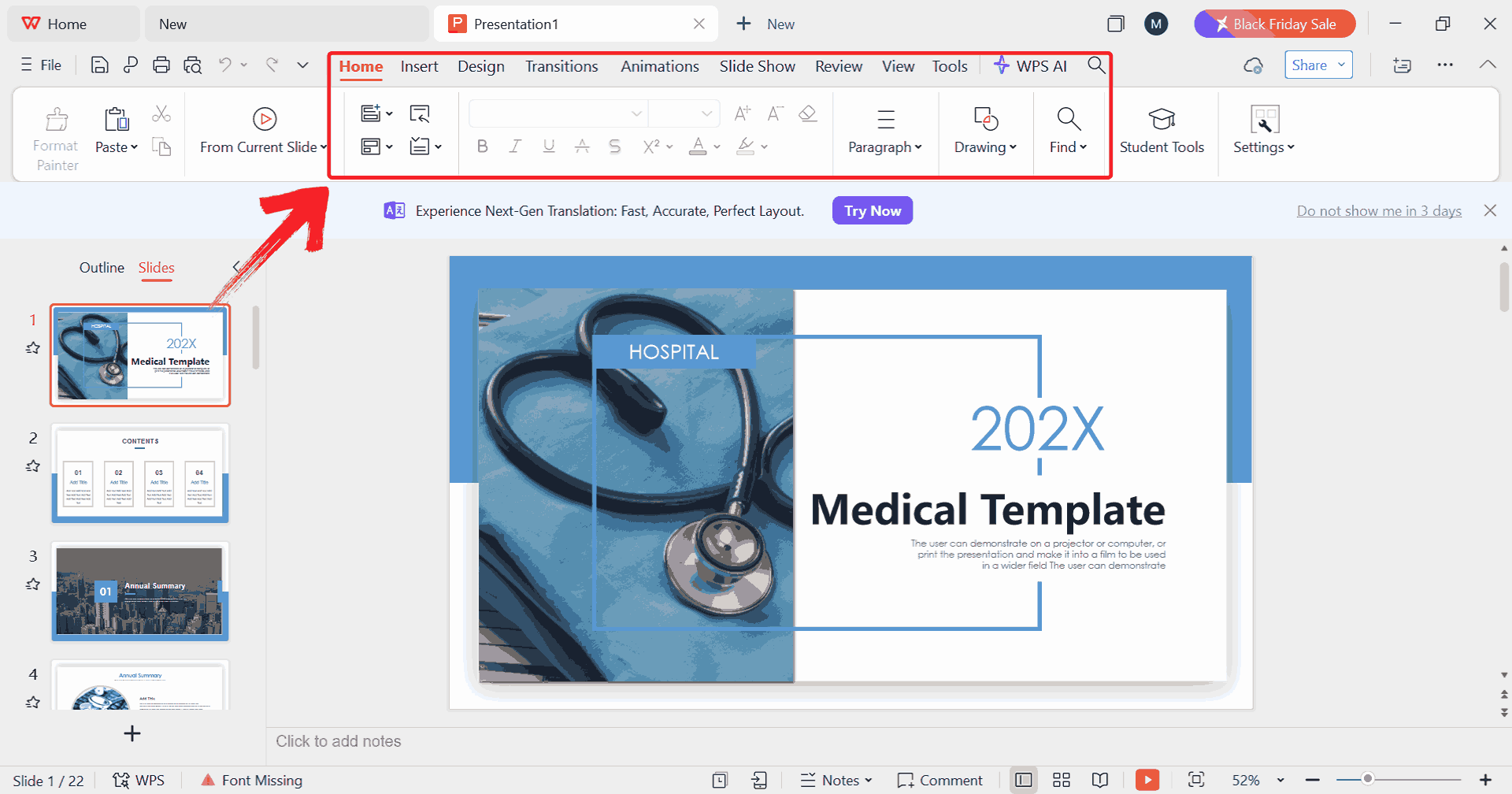
Step 7: Once your template is uploaded, use the top
ribbon in WPS Presentation to click on text boxes, replace images,
adjust colors, and modify other design elements.
Edit Template
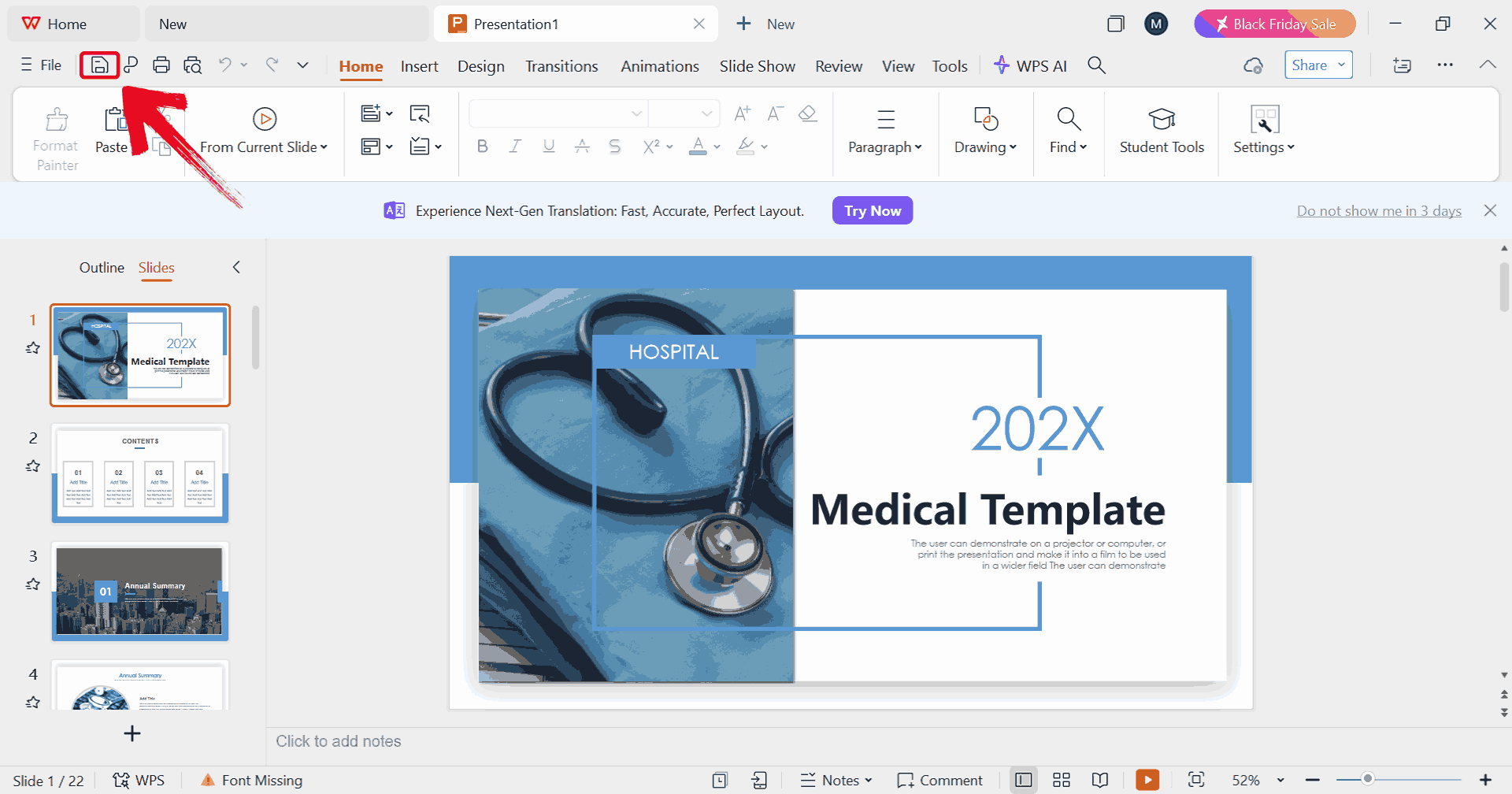
Step 8: Click on the save icon to save your final
presentation to your device.
Save Template
How to Edit a
Hospital Template in PDF (WPS PDF)
Working with hospital forms and reports in PDF can be tricky if the
layout shifts or fields aren’t editable. WPS PDF lets you modify text,
add checkboxes,
and update tables directly within the template, keeping everything
aligned and professional. Here’s how to make your hospital PDF templates
ready for use.
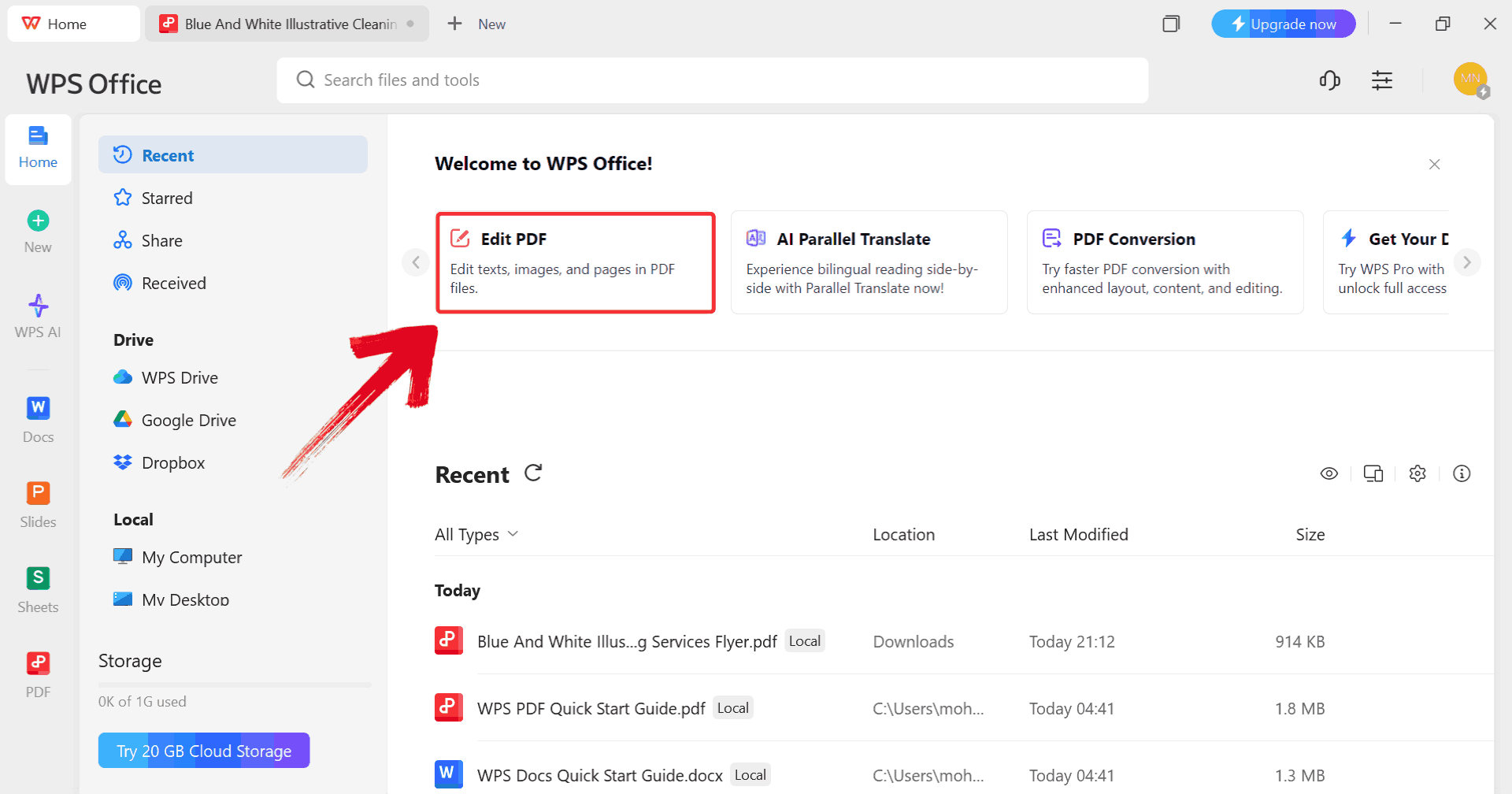
Step 1: Start by clicking on “Edit
PDF” on the WPS Office dashboard to import your template.
Click Edit PDF
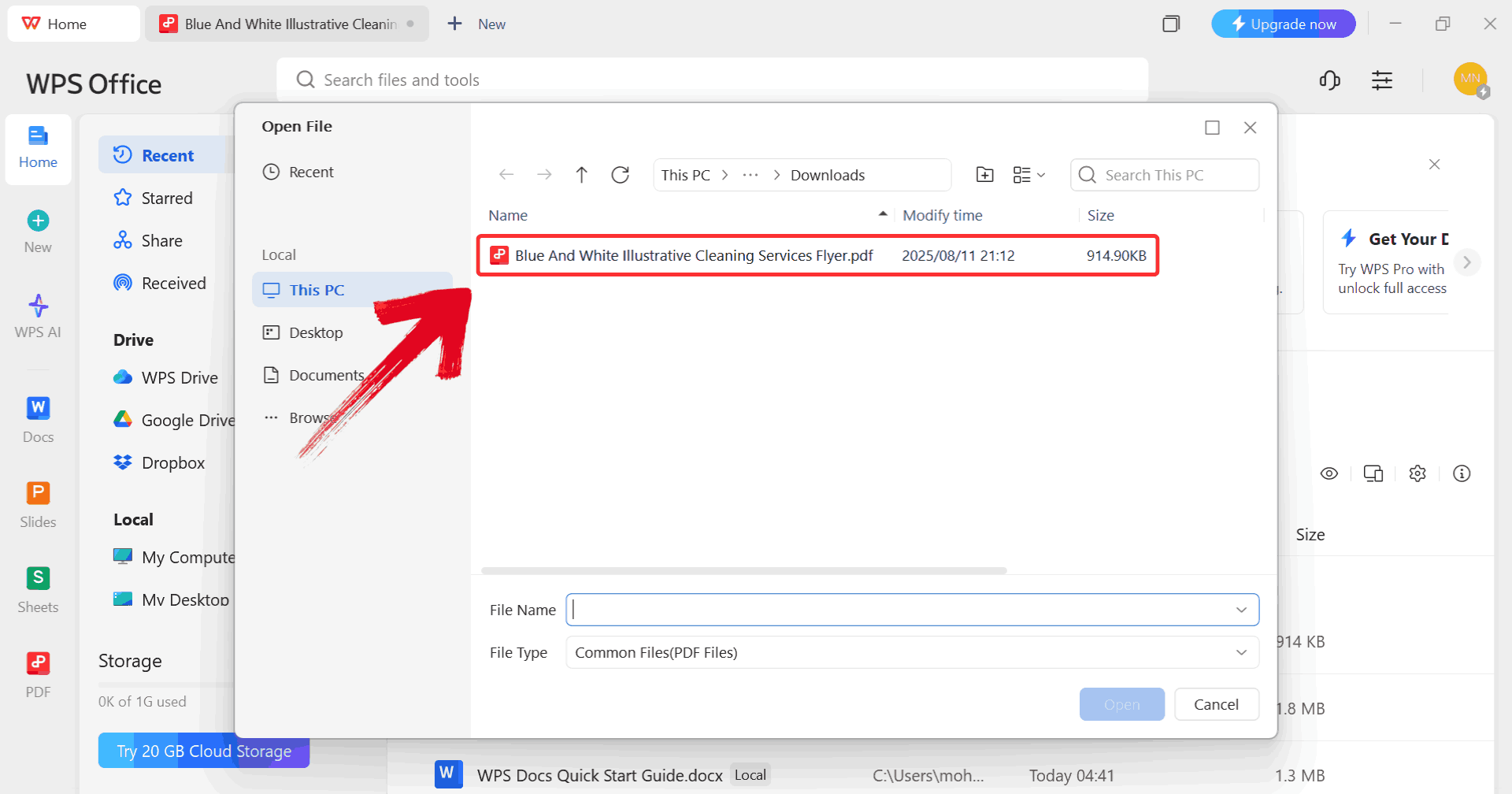
Step 2: When prompted, browse through your computer
and select the PDF file you want to edit.
Select PDF
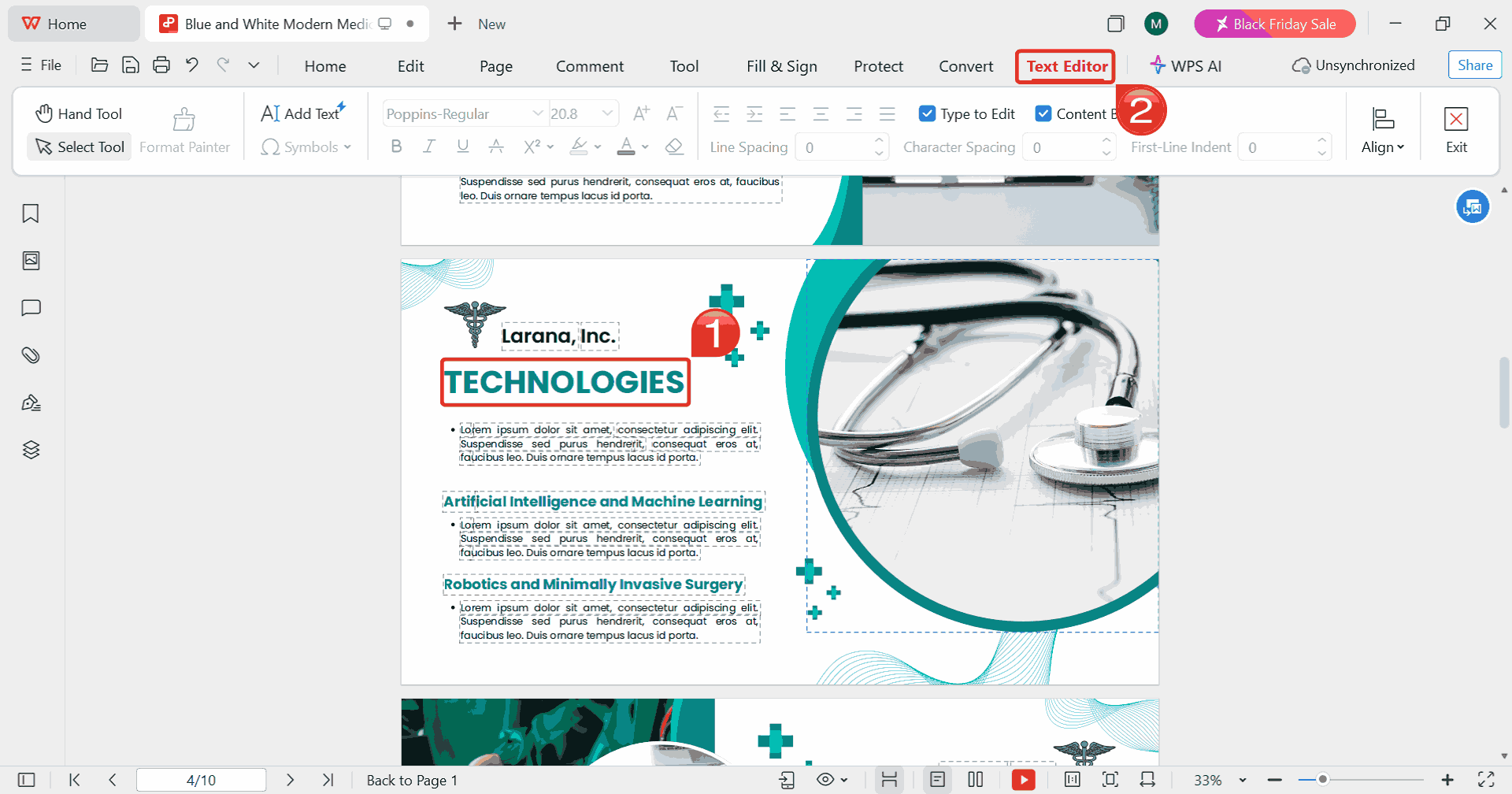
Step 3: Click on the text you want to edit, then
select “Text Editor” from the toolbar at the top. This
lets you modify the content, adjust fonts and sizes, and add new text
boxes or annotations as needed.
Edit PDF
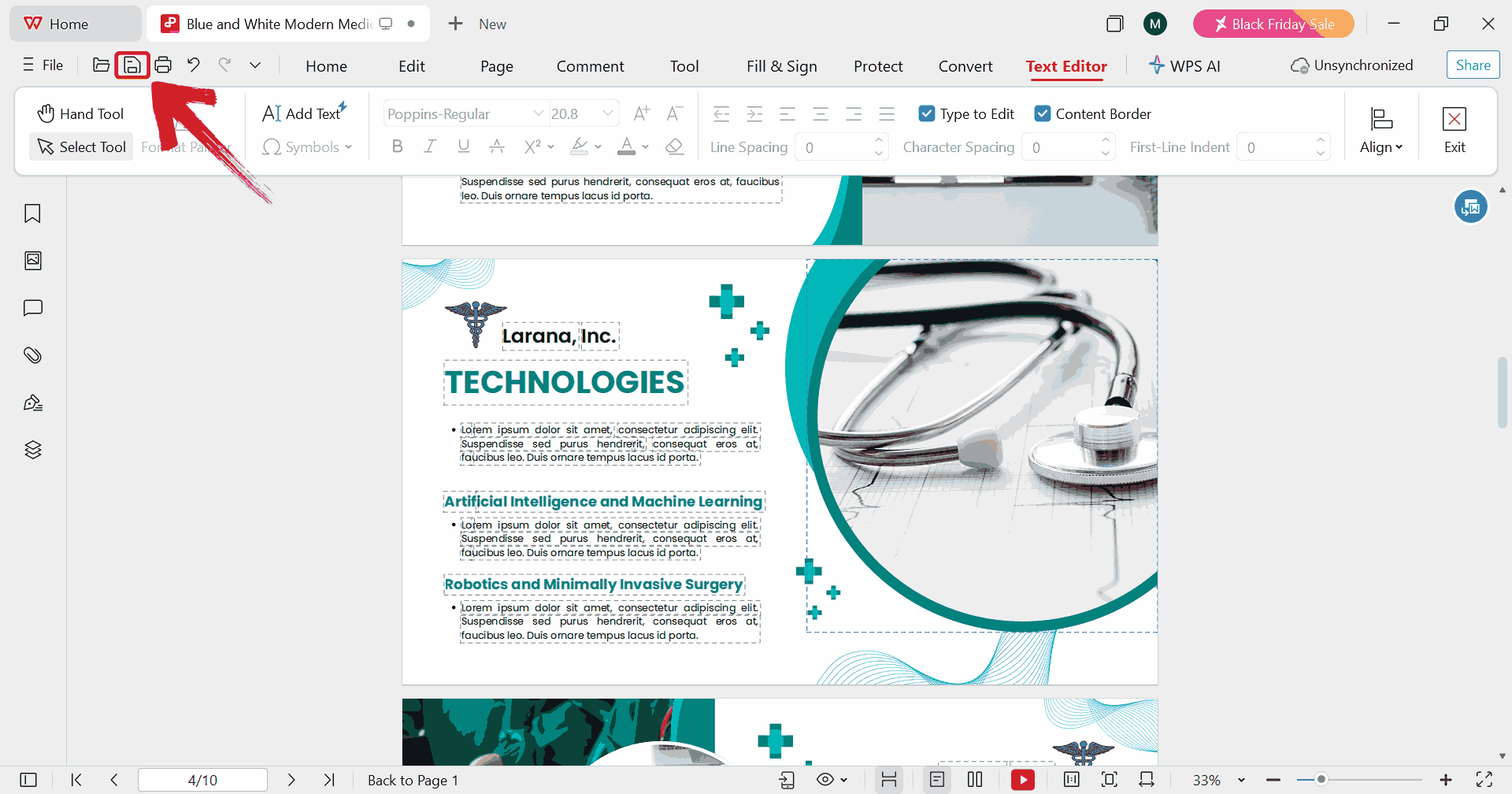
Step 4: Once you’ve made the changes, click on the
save icon to save the edits to your original PDF file.
Print PDF
Free Office
Suite with Editable Templates & Smart AI
If you're looking for an efficient way to work with hospital
templates, WPS Office is one
of the strongest tools available today. It provides a seamless
environment for working with presentations, documents, spreadsheets, and
PDFs, all in one place. Its built-in template library covers patient
forms, medical reports, and departmental presentations, so you can start
with a solid foundation instead of building from scratch. With cloud
support, file compatibility, and responsive performance even on modest
devices, WPS Office helps you focus on accurate content and clear
organization rather than wrestling with software constraints.
WPS Office Features
Features
Rich Template Store: Access a wide variety of healthcare-specific designs ready to use for presentations, reports, and forms.
Direct Editing: Modify templates instantly in Word, Excel, or PowerPoint formats without losing formatting.
AI Assistance: Built-in AI tools assist with writing, calculations, slide creation, and layout suggestions.
Free Across Devices: Completely free to download and use on desktops, laptops, and mobile devices.
PDF Toolkit: Convert, annotate, sign, and compress PDFs efficiently within the suite.
For users working with hospital examples, forms, or presentations,
WPS Office provides an enhanced experience without overwhelming you with
unnecessary features.
100% secure
FAQs
1.
Can I use a template for different hospital departments or
specialties?
Yes, as you can find hospital templates for patient forms,
administrative tasks, clinical notes, and health education. They’re
flexible enough to suit any specialty.
2. Are these
templates secure for patient information?
It depends on the software you use. WPS Office is secure, but you
should avoid entering sensitive patient details if you're using online
design tools not meant for medical data.
3. Can I edit these
templates on my phone?
Yes, WPS Office has a mobile app that lets you edit PPTs, PDFs, and
hospital documents on the go.
4. Can I print hospital
templates directly?
Absolutely. Once you finalize a template in WPS Presentation or WPS
PDF, you can print it using the built-in print settings.
5. Can I customize
charts and medical diagrams?
Yes, WPS Presentation allows full customization of charts, icons, and
medical illustrations.
Better Templates for Better Care with WPS
Finding and formatting medical documents used to take far more time than it should when every detail needs to be accurate and professional. Today, hospital templates make that process faster by giving you ready-made layouts you can customize in minutes. With free options available for presentations, forms, and reports, you no longer have to build everything from scratch or settle for generic designs. Tools like WPS Office make editing even smoother with built-in AI, PDF features, and cloud sharing that fit real healthcare systems. Free templates are great for quick needs, while WPS offers the consistency and flexibility required for everyday hospital use.
7+ years in productivity tech. I test and review the latest tools to simplify your workflow. Follow for honest app comparisons, practical guides, and curated tech picks to boost efficiency.


'%3e%3cpath%20d='M8%200C12.4183%200%2016%203.58172%2016%208C16%2012.4183%2012.4183%2016%208%2016C3.58172%2016%200%2012.4183%200%208C0%203.58172%203.58172%200%208%200ZM11.6162%204.38379C11.2257%203.99337%2010.5927%203.99338%2010.2021%204.38379L8%206.58594L5.79785%204.38379C5.40732%203.99334%204.77429%203.99329%204.38379%204.38379C3.99331%204.77429%203.99335%205.40733%204.38379%205.79785L6.58594%208L4.38379%2010.2021C3.99348%2010.5927%203.99341%2011.2257%204.38379%2011.6162C4.77426%2012.0066%205.40734%2012.0065%205.79785%2011.6162L8%209.41406L10.2021%2011.6162C10.5927%2012.0066%2011.2257%2012.0067%2011.6162%2011.6162C12.0067%2011.2257%2012.0066%2010.5927%2011.6162%2010.2021L9.41406%208L11.6162%205.79785C12.0066%205.40735%2012.0066%204.77429%2011.6162%204.38379Z'%20fill='%23080E17'%20fill-opacity='0.46'/%3e%3c/g%3e%3cdefs%3e%3cclipPath%20id='clip0_3761_713'%3e%3crect%20width='16'%20height='16'%20fill='white'/%3e%3c/clipPath%3e%3c/defs%3e%3c/svg%3e)




'%3e%3cpath%20fill-rule='evenodd'%20clip-rule='evenodd'%20d='M21.4999%2010.9993C21.4999%205.20009%2016.7986%200.498901%2010.9993%200.498901C5.19994%200.498901%200.498657%205.20009%200.498657%2010.9993C0.498657%2016.2404%204.33858%2020.5844%209.35855%2021.3722V14.0346H6.69238V10.9993H9.35855V8.68594C9.35855%206.05427%2010.9262%204.60062%2013.3248%204.60062C14.4736%204.60062%2015.6753%204.80571%2015.6753%204.80571V7.38979H14.3512C13.0468%207.38979%2012.64%208.19921%2012.64%209.0296V10.9993H15.5523L15.0867%2014.0346H12.64V21.3722C17.66%2020.5844%2021.4999%2016.2404%2021.4999%2010.9993Z'%20fill='%231568EA'/%3e%3c/g%3e%3c/svg%3e)


'%3e%3cpath%20d='M2.42045%2022.1876H6.31818V12.7217L0.75%208.54553V20.5171C0.75%2021.4414%201.49892%2022.1876%202.42045%2022.1876Z'%20fill='%234285F4'/%3e%3cpath%20d='M19.682%2022.1876H23.5797C24.5041%2022.1876%2025.2502%2021.4387%2025.2502%2020.5171V8.54553L19.682%2012.7217'%20fill='%2334A853'/%3e%3cpath%20d='M19.682%205.48293V12.7216L25.2502%208.54543V6.31816C25.2502%204.25236%2022.8921%203.07469%2021.2411%204.31361'%20fill='%23FBBC04'/%3e%3cpath%20d='M6.31824%2012.7217V5.48303L13.0001%2010.4944L19.6819%205.48303V12.7217L13.0001%2017.733'%20fill='%23EA4335'/%3e%3cpath%20d='M0.75%206.31816V8.54543L6.31818%2012.7216V5.48293L4.75909%204.31361C3.10534%203.07469%200.75%204.25236%200.75%206.31816Z'%20fill='%23C5221F'/%3e%3c/g%3e%3cdefs%3e%3cclipPath%20id='clip0_2954_7305'%3e%3crect%20width='24.5'%20height='18.375'%20fill='white'%20transform='translate(0.75%203.8125)'/%3e%3c/clipPath%3e%3c/defs%3e%3c/svg%3e)











'%3e%3cpath%20d='M19.9911%204.11386V6.471H18.5894C18.0775%206.471%2017.7322%206.57814%2017.5536%206.79243C17.3751%207.00671%2017.2858%207.32814%2017.2858%207.75671V9.44421H19.9019L19.5536%2012.0871H17.2858V18.8639H14.5536V12.0871H12.2769V9.44421H14.5536V7.49779C14.5536%206.39064%2014.8632%205.53201%2015.4822%204.92189C16.1013%204.31177%2016.9257%204.00671%2017.9554%204.00671C18.8304%204.00671%2019.509%204.04243%2019.9911%204.11386Z'%20fill='%23333333'/%3e%3c/g%3e%3cdefs%3e%3cclipPath%20id='clip0_2938_8199'%3e%3crect%20width='16'%20height='16'%20fill='white'%20transform='translate(8%204.00671)'/%3e%3c/clipPath%3e%3c/defs%3e%3c/svg%3e)
'%3e%3cpath%20d='M17.5237%2010.7813L23.4811%204H22.0699L16.8949%209.88693L12.7648%204H8L14.2469%2012.9029L8%2020.0133H9.4112L14.8725%2013.7952L19.2352%2020.0133H24M9.92053%205.04213H12.0885L22.0688%2019.0224H19.9003'%20fill='%23333333'/%3e%3c/g%3e%3cdefs%3e%3cclipPath%20id='clip0_2938_8200'%3e%3crect%20width='16'%20height='16.0134'%20fill='white'%20transform='translate(8%204)'/%3e%3c/clipPath%3e%3c/defs%3e%3c/svg%3e)


