A house inauguration is an extremely important event when you’ve just
become a homeowner. But many hosts struggle to find a free housewarming
invitation card that is balanced and doesn't come off as either too
informal or too complex. This guide provides a curated selection of 10
professional templates and a step-by-step tutorial on customizing them
effortlessly.
Use Word, Excel, and PPT for FREE
House Inauguration Invitation
What Is a House
Inauguration Invitation?
A house inauguration invitation is a formal or informal request sent
to family and friends to join in celebrating a new residence. Beyond
just providing logistics, it serves as the first impression of your new
home and helps establish the theme of the event, whether it is a traditional event or a casual Open House
party.
Here’s what every good house inauguration invitation should
include:
Host Names: Clearly state who is inviting the
guests to the new home.
Event Date and Time: Provide the specific day
and a clear start time.
The Venue: Include the full new address and a
landmark for easier navigation.
RSVP Details: Give a deadline and contact method
for guests to confirm attendance.
The New Home Message: A short, warm new home
inauguration invitation message to welcome guests.
I find that timing is just as critical as the design itself.
Invitations should ideally be sent 2 to 3 weeks in advance to ensure
your guests can clear their schedules.
10
Best House Inauguration Invitation Templates [Free to Download]
Using a house inauguration invitation template allows you to focus on
the guest list rather than design technicalities. These templates are
designed for easy customization, allowing you to edit text and colors
straight away. Here are 10 of the best editable house inauguration card
online.
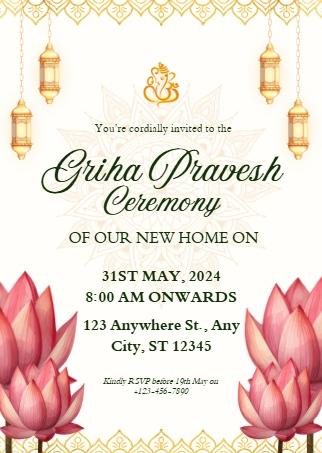
1. Yellow and Green
Griha Pravesh Invitation
This Yellow
and Green Griha Pravesh Invitation is a beautifully balanced
document designed for those hosting a traditional Indian house
inauguration. The layout is defined by its elegant pink lotus
illustrations at the bottom corners and hanging lanterns at the top,
featuring specific fields for Ceremony Date, Venue Address, and RSVP
Instructions. I find that the use of deep green script against a clean
white background creates a sophisticated contrast that feels both
celebratory and professional.
Yellow and Green Griha Pravesh Invitation
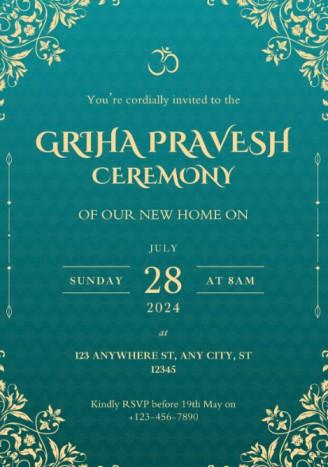
2. Teal and Golden
Griha Pravesh Invitation
This Teal
and Golden Griha Pravesh Invitation is an elegant, high-contrast
document designed for evening ceremonies or sophisticated gatherings.
The layout is defined by a deep teal textured background accented with
intricate golden floral corner patterns and a central Om symbol. Built
for a luxury feel, this structure is perfect for homeowners who want
their housewarming ceremony invitation format to look premium and
formal, featuring clear slots for the Date, Time, and Venue.
Teal and Golden Griha Pravesh Invitation
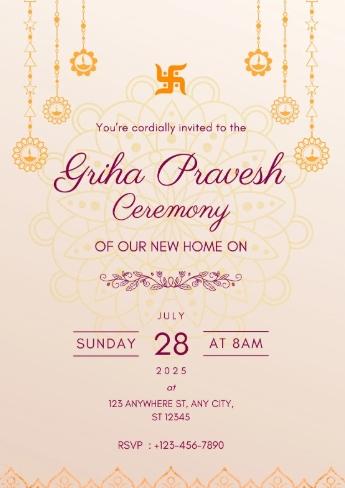
3. Orange and Purple
Griha Pravesh Invitation
This Orange
and Purple Griha Pravesh Invitation is a warm, visually balanced
document designed for festive afternoon celebrations. The layout is
defined by a large, intricate golden mandala backdrop on a
cream-to-peach gradient, accented by hanging traditional lanterns and a
central Swastika symbol. I find the combination of bold maroon
typography for the main title and clean, centered alignment for the
Event Date, Time, and RSVP details ensures that the message remains
readable despite the detailed artistic elements.
Orange and Purple Griha Pravesh Invitation
4. Green and Orange
Housewarming Invitation
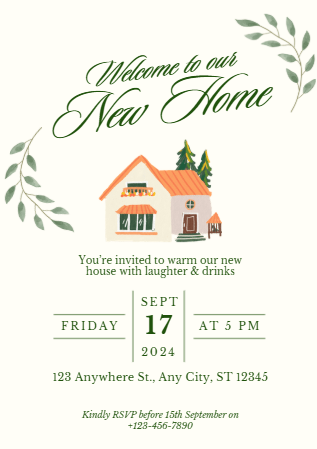
This Green
and Orange Housewarming Invitation is a charming, casual
document designed for welcoming friends to a cozy new residence. The
layout is defined by a warm, hand-painted watercolor illustration of a
house with orange roofing and surrounding greenery, framed by delicate
leafy branches. Built for a friendly and relaxed tone, this structure is
perfect for informal gatherings, featuring clearly organized sections
for the Event Date, Time, Location, and RSVP info.
Green and Orange Housewarming Invitation
5. Pink and Yellow
Griha Pravesh Invitation
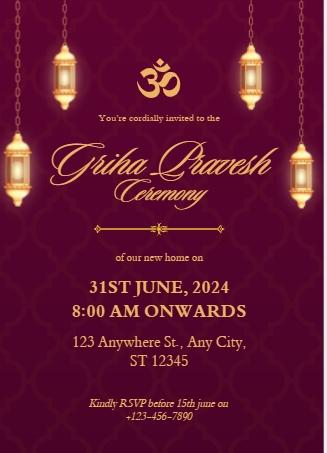
This Pink
and Yellow Griha Pravesh Invitation is a sophisticated,
traditional document designed for formal evening housewarming
ceremonies. The layout is defined by a deep plum background with a
subtle geometric pattern, accented by hanging golden lanterns and a
central Om symbol. I find the use of elegant gold cursive for the Griha
Pravesh heading adds a prestigious touch, while the clear, gold-font
fields for the Ceremony Date, Venue, and RSVP ensure the vital details
are easily scannable against the dark backdrop
Pink and Yellow Griha Pravesh Invitation
6. Traditional Marigold
Griha Pravesh
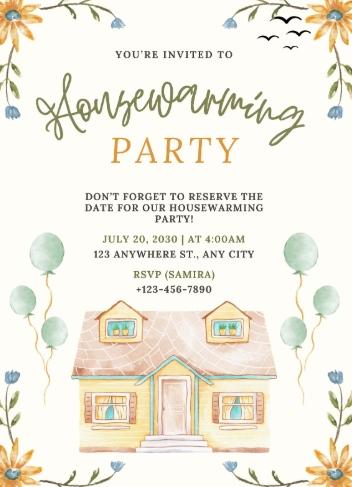
This Traditional
Marigold Griha Pravesh Invitation is a bright, cheerful document
designed for festive daytime celebrations. The layout is defined by
charming watercolor sunflower and bluebell illustrations in the corners,
alongside green balloons and a quaint house illustration at the bottom.
I find that the playful Housewarming Party script combined with clear
fields for the Party Date, Venue Address, and RSVP (Name & Phone)
makes this structure perfect for creating a lively and inviting
atmosphere for your guests
Traditional Marigold Griha Pravesh
7. Gold and Cream
Floral Traditional Invitation
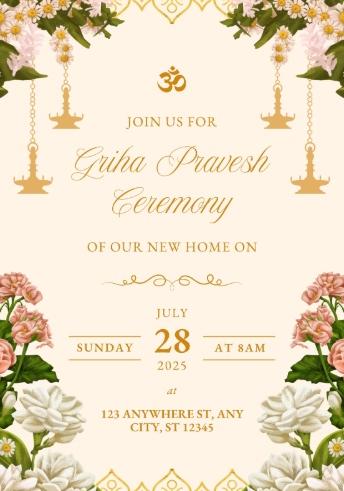
This Gold
and Cream Griha Pravesh Invitation is a highly professional,
balanced document designed for formal housewarming ceremonies that blend
tradition with modern aesthetics. The layout is defined by lush white
and pink floral garlands in the top corners and large white floral
arrangements at the bottom, accented by hanging golden oil lamps and a
central Om symbol. I find that the clean, centered golden typography for
the Ceremony Date, Start Time, and Venue Address provides a prestigious
and organized look that clearly communicates all essential details to
your guests.
Gold and Cream Floral Traditional Invitation
8. White and
Black Minimalist Housewarming Invitation
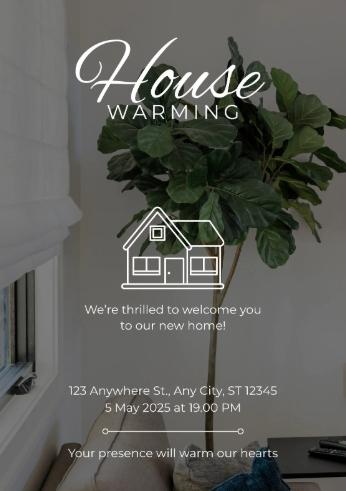
This White
and Black Minimalistic Housewarming Invitation is a
contemporary, photo-realistic document designed for homeowners who
prefer a clean and stylish modern aesthetic. The layout is defined by a
high-quality background image of a leafy indoor plant near a bright
window, featuring a minimalist white house icon and crisp sans-serif
typography. I find the simple structure, which includes dedicated lines
for the Address and Event Date and Time, along with the heartwarming
closing sentiment Your presence will warm our hearts, makes it an
excellent choice for a professional yet inviting digital or printed
card.
White and Black Minimalist Housewarming Invitation
9. Green and
Black Watercolor Housewarming Invitation
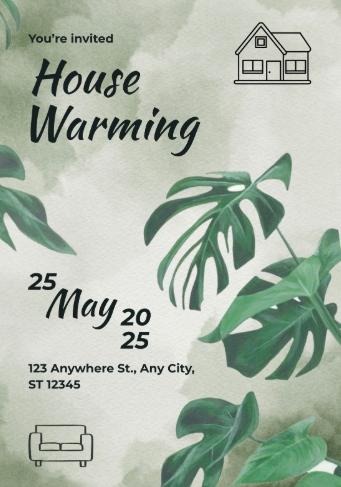
This Green
and Black Housewarming Invitation is a refreshing,
nature-inspired document designed for creative homeowners or plant
enthusiasts. The layout is defined by a textured, sage-green watercolor
background featuring large, realistic Monstera leaf illustrations and a
minimalist house icon in the top corner. Built for an organic and modern
feel, this structure provides a vertical timeline for the Event Date and
clear, bold typography for the Address, which I find particularly
effective for a trendy, casual housewarming celebration.
Green and Black Watercolor Housewarming Invitation
10. Blue Lines Open House
Invitation
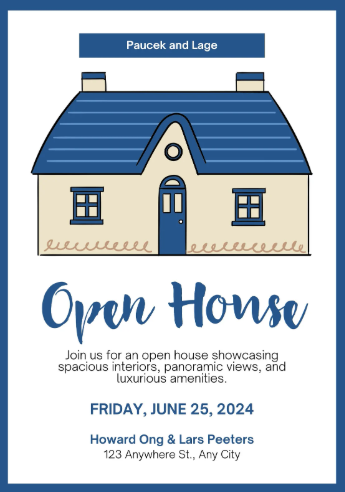
This Blue
Lines Open House Invitation is a clean, structured document
designed for showcasing a new property or hosting a formal house tour.
The layout is defined by a crisp blue frame and a simple, hand-drawn
house illustration, featuring specific fields for Host Names, Event
Date, and Address Details. I find the combination of bold serif Open
House typography and a professional blue-and-white color scheme makes
this version perfect for real estate professionals or homeowners wanting
a polished, high-end look for their free housewarming invitation
card.
Blue Lines Open House Invitation
While these ten templates provide a fantastic starting point for any
celebration, I have found that individual tastes are as unique as the
homes themselves. If you are looking for even more options, I highly
recommend visiting the WPS
template website. There are numerous WPS templates available,
ensuring there is always one that perfectly suits your specific
aesthetic and event needs. The best part is that these templates can be
downloaded and used directly in the software, streamlining your entire
creation process.
For Traditional Ceremonies, I personally recommend the Floral Garland
or Regal Plum designs. They maintain a high level of prestige while
keeping cultural symbols central to the theme. For Modern Homeowners,
the Artistic Monstera or Modern Lifestyle layouts are unbeatable.
How
to Edit a House Inauguration Invitation in Word & Excel
Downloading a template is only the first step. Customizing your
invite with personal details is what truly makes it special. WPS Office
is the perfect tool for this because it handles both the design (Writer) and the guest list (Spreadsheets) in one place. A single
integrated suite eliminates the frustration of switching between
different apps, allowing you to maintain a consistent style across all
your event documents.
How to Edit Itinerary in
Word:
Creating a custom invite in WPS Writer is
incredibly straightforward. I recommend using the built-in template
library for the best results.
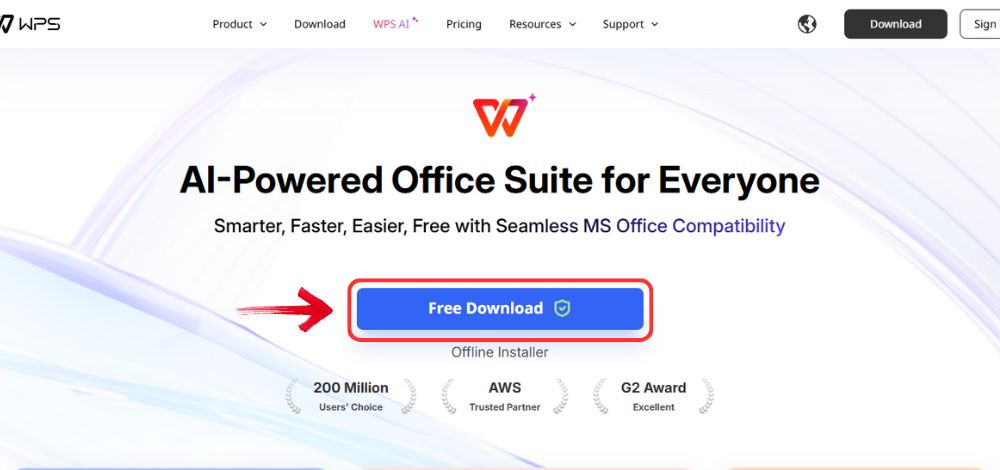
Step 1: Open your browser to visit WPS Office and click the "Free Download" button to start the download.
Download WPS Office
Step 2: The download will finish in a few seconds.
Once done, run the installation file like you would for any other app or
software.
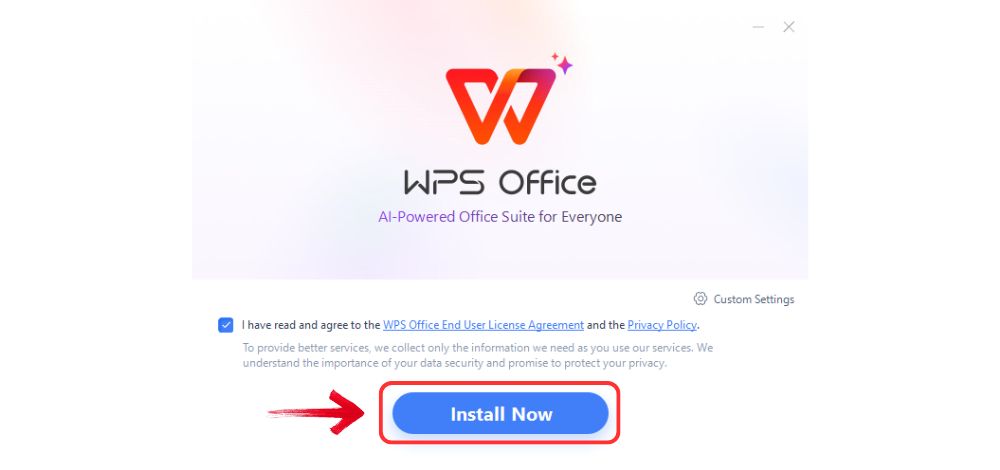
Step 3: WPS Office will show you a few simple terms
and conditions. Accept them, then click the "Install
Now" button to begin the installation.
Install WPS Office
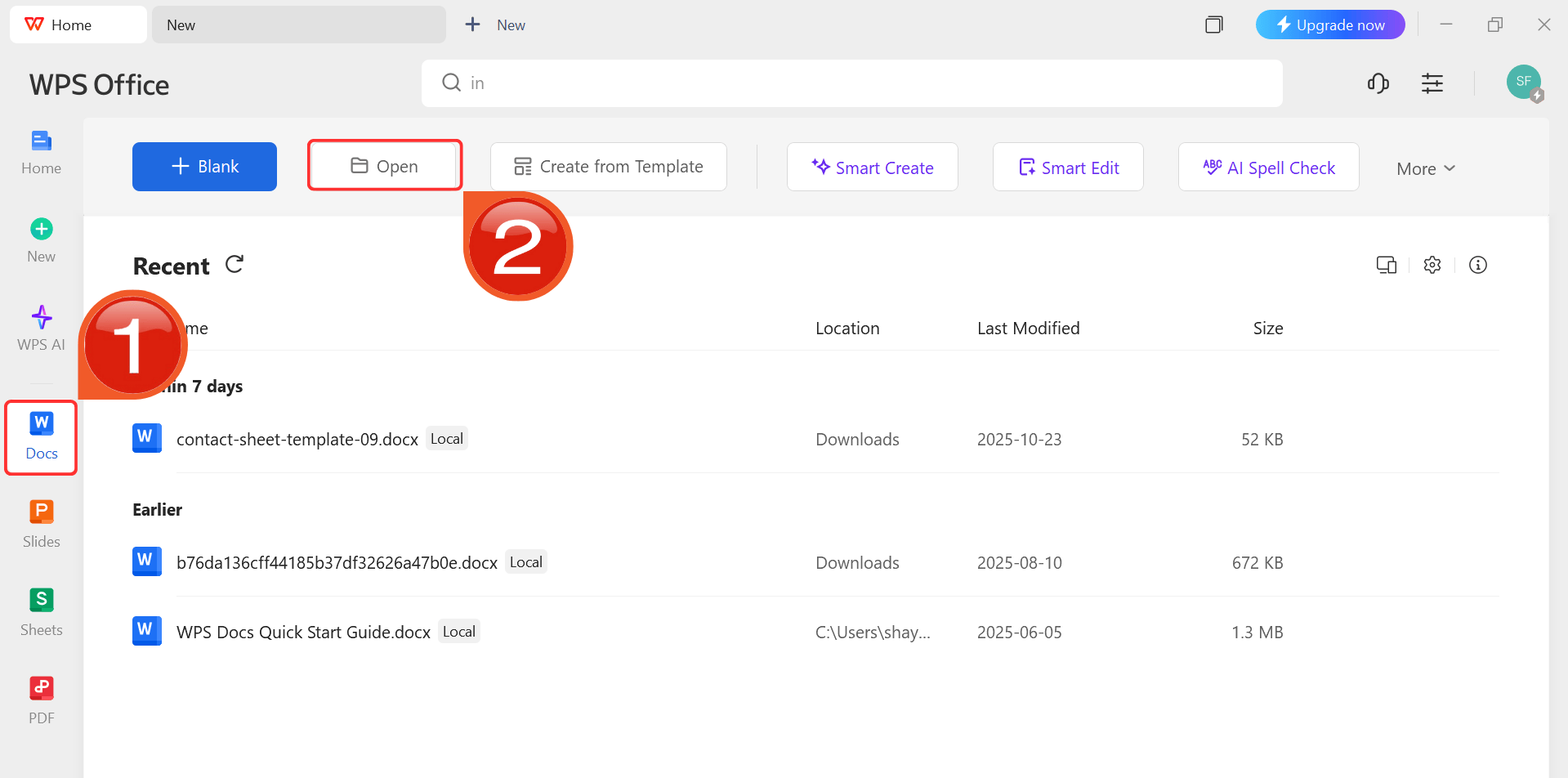
Step 4: After installation, in WPS Office, click “Docs” from the left sidebar and hit “Open” and open your template.
WPS Docs Dashboard
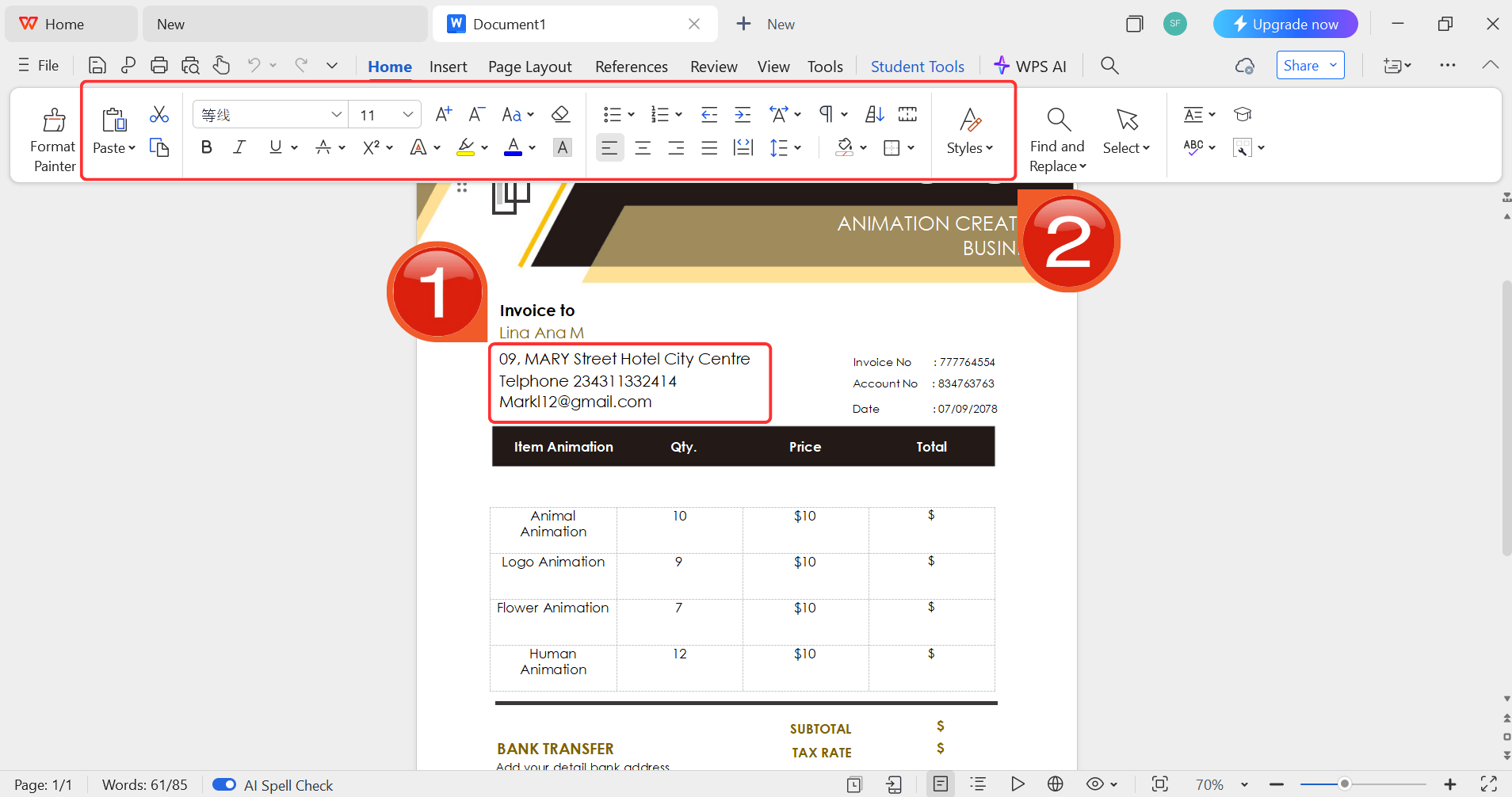
Step 5: Click on the text you want to modify and
enter your New Home Message, Date, and Venue details.
Customize your template
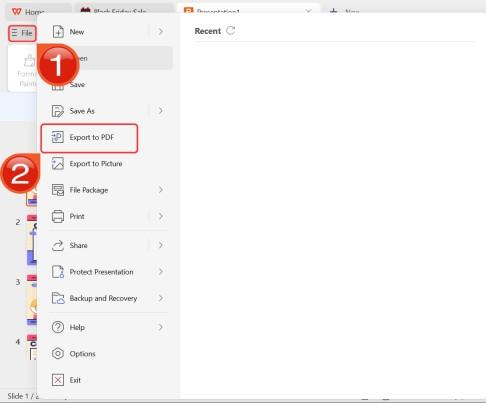
Step 6: To save the document, head to "File" and choose "Export to PDF" for
a high-quality, printable housewarming invitation PDF.
Export as PDF
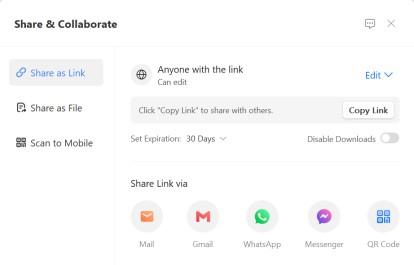
Step 7: You can also share the link to your document
with others to enable collaborative work in case they want to make their
own changes as well.
Share link
How to Edit Itinerary in
Excel:
If you are planning a multi-part ceremony, using WPS
Spreadsheet is better for managing the schedule.
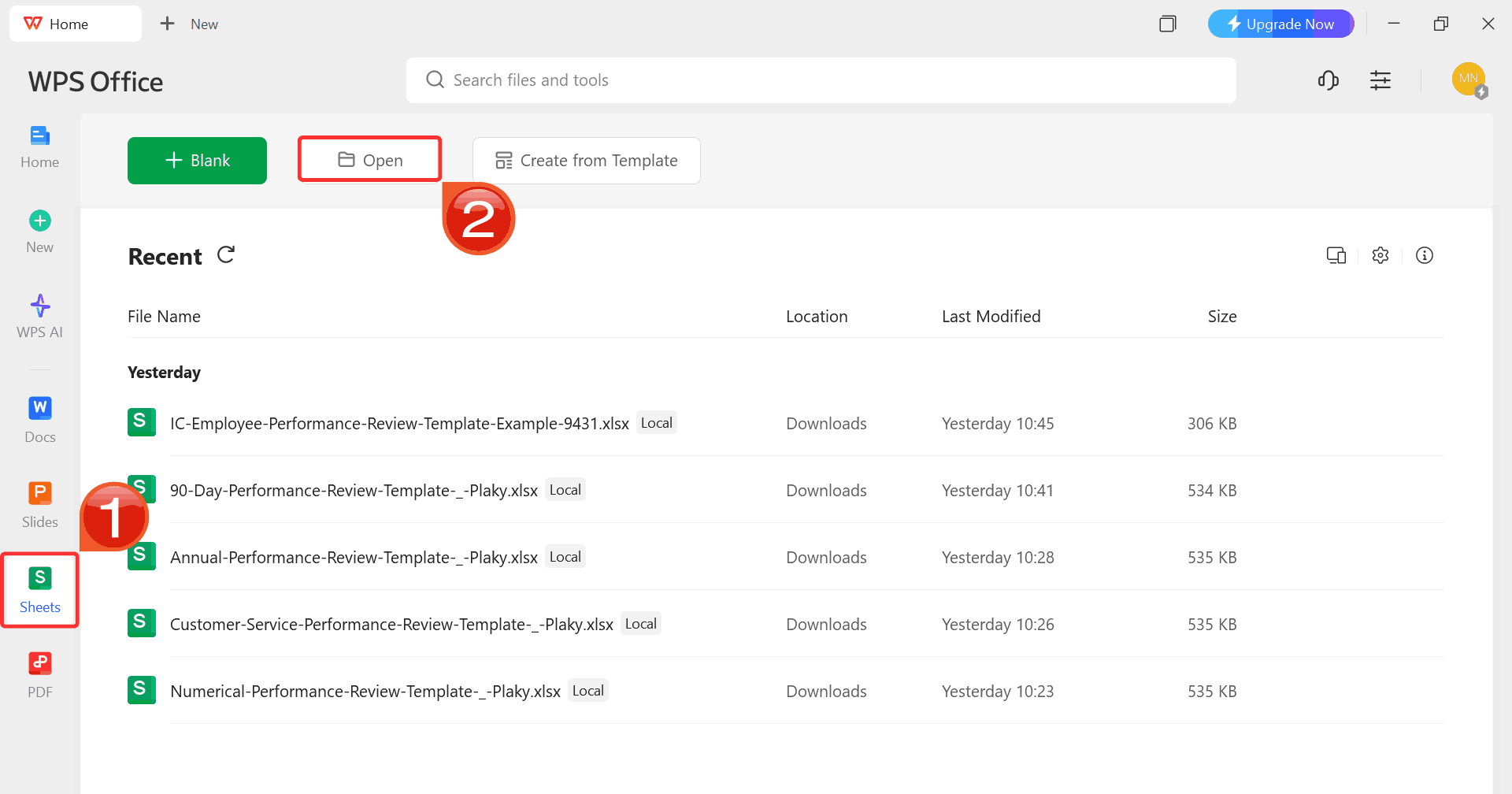
Step 1: On WPS Office, click "Sheets" from the left sidebar and hit "Open" to select your itinerary template.
WPS Excel Dashboard
Step 2: Click on the cells to enter your details,
using the Ribbon above for formatting.
Step 3: Use the Shareable Editing feature to send a
link to your family members so they can add their own tasks in
real-time.
Share link
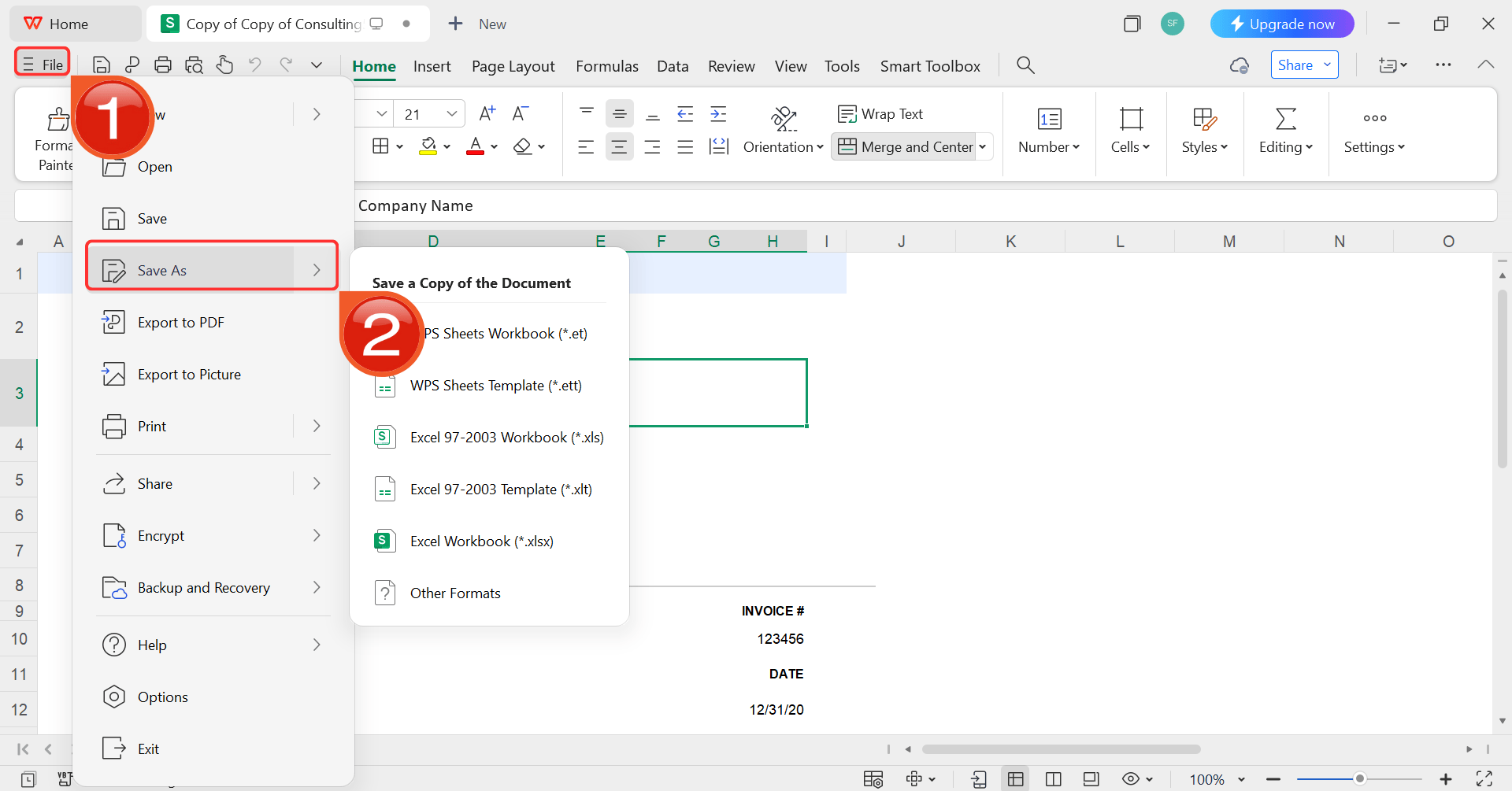
Step 4: After you’re done modifying the template,
head to “File” and choose “Save as” to
save the invoice in your desired format.
Save as
Free Office
Suite with Rich Editable Templates
Many hosters start by downloading a template from various online
platforms. Traditional office software can be surprisingly annoying when
it comes to customization. Jumping between different, unconnected
applications to edit a Word-based invite and then an Excel-based guest
list often leads to formatting errors or lost data. These traditional
tools can feel rigid and outdated, making what should be a creative
process feel like a chore.
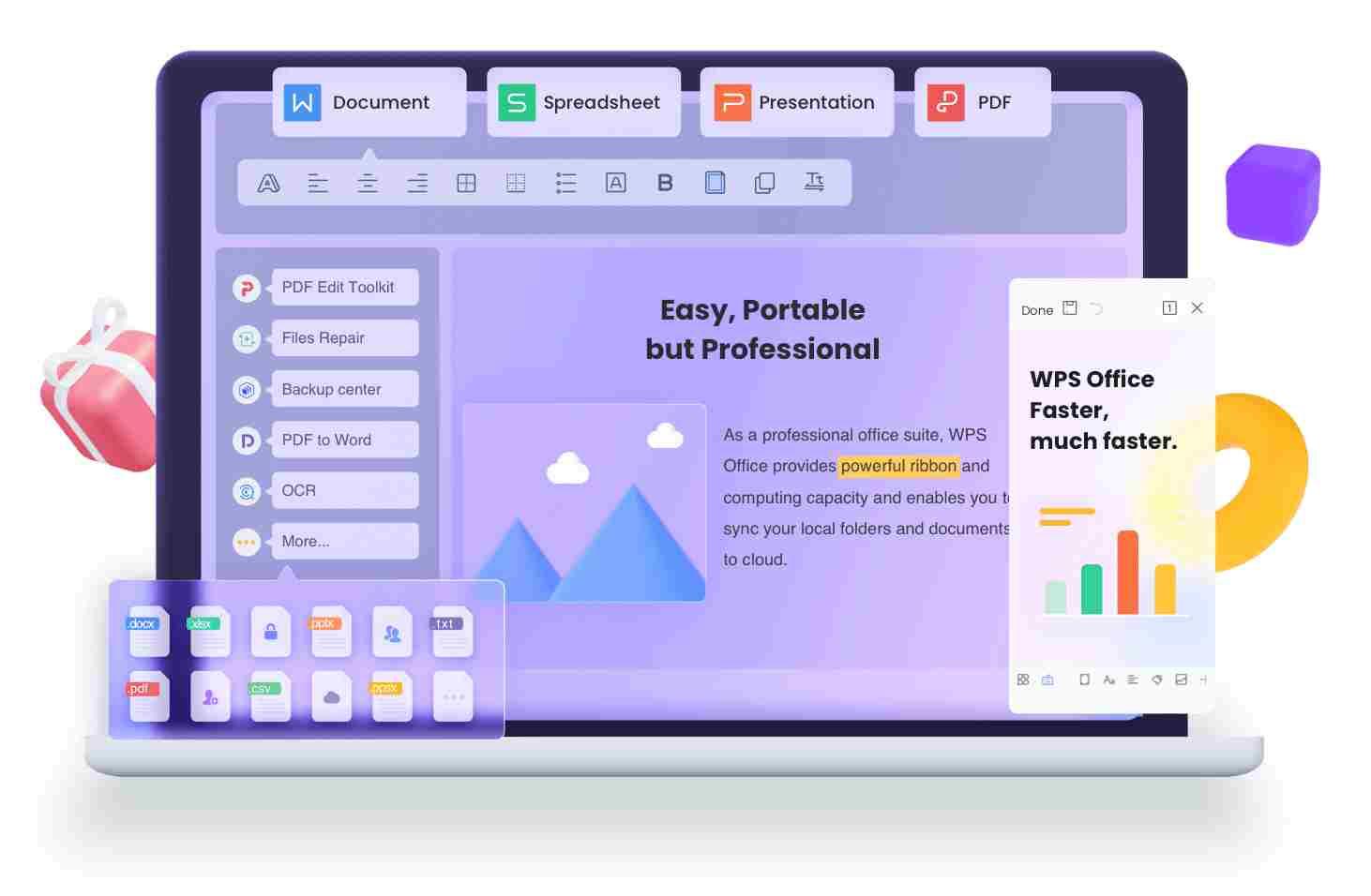
WPS Office
WPS Office solves these
problems by providing a modern, integrated environment where your
invitation design and event planning live side-by-side. This suite acts
as a single, all-in-one solution that handles documents, spreadsheets,
and presentations under one roof, eliminating the need to ever switch
software. Best of all, it is entirely free to use and respects your
workspace by remaining ad-free and avoiding intrusive tracking. Having
every tool you need in one secure place is the only way to manage a
complex event like a house inauguration with true confidence.
Key Features:
AI-Powered Writing: Use the built-in AI to help you rephrase your new home inauguration invitation message to sound more welcoming.
Powerful PDF Toolkit: Edit, merge, or convert your invitation PDF directly within the suite.
Rich Template Store: Access thousands of free, pre-designed templates for any event directly from the dashboard.
Online & Offline Sync: Work on your invitation at home or on the go via the mobile app.
Secure & Stable: Your personal home details are kept safe with localized document management.
Shareable Editing: Share a single link to collaborate with others in real-time.
100% secure
FAQs
Q1: What is the best format for a house inauguration
invitation?
A good house inauguration invitation should clearly include the event
date, time, location, host names, and RSVP details. Using WPS Writer or
Spreadsheet, you can customize any template to include these elements
neatly and professionally in a PDF format, which is best for both
printing and digital sharing.
Q2: Can I edit a free housewarming invitation template
without professional design skills?
Yes. Most free templates from platforms like Canva or WPS Office are
fully editable. With WPS Writer or WPS Spreadsheet, you can change text,
colors, and images easily, even without prior design experience.
Q3: Is it possible to make an online shareable house
inauguration invitation?
Absolutely. After editing your template in WPS Office, you can
generate an online link to share your invitation digitally with friends
and family. This feature also allows collaborative editing if you have
multiple hosts.
Q4: Can I print the invitation directly after editing in WPS
Office?
Yes. WPS allows you to save your invitation as a PDF or high-quality
image file. I usually recommend a quick preview to ensure everything
aligns correctly before printing on cardstock.
Celebrating Your New Beginning with Confidence
Planning a housewarming is an exciting time, and your house inauguration invitation should reflect that joy. As we've seen, starting with a professional template is the key to creating a beautiful invite without the stress. You should focus on clear event details and a warm personal message. A great template handles the design for you, and a suite like WPS Office then fits naturally into this workflow, giving you a single, powerful tool to edit, share, and print your invitation with confidence.
Expert in office suites and technology with a strong background in writing. I specialize in reviewing public health topics, delivering insightful, accurate content for diverse audiences in tech.


'%3e%3cpath%20d='M8%200C12.4183%200%2016%203.58172%2016%208C16%2012.4183%2012.4183%2016%208%2016C3.58172%2016%200%2012.4183%200%208C0%203.58172%203.58172%200%208%200ZM11.6162%204.38379C11.2257%203.99337%2010.5927%203.99338%2010.2021%204.38379L8%206.58594L5.79785%204.38379C5.40732%203.99334%204.77429%203.99329%204.38379%204.38379C3.99331%204.77429%203.99335%205.40733%204.38379%205.79785L6.58594%208L4.38379%2010.2021C3.99348%2010.5927%203.99341%2011.2257%204.38379%2011.6162C4.77426%2012.0066%205.40734%2012.0065%205.79785%2011.6162L8%209.41406L10.2021%2011.6162C10.5927%2012.0066%2011.2257%2012.0067%2011.6162%2011.6162C12.0067%2011.2257%2012.0066%2010.5927%2011.6162%2010.2021L9.41406%208L11.6162%205.79785C12.0066%205.40735%2012.0066%204.77429%2011.6162%204.38379Z'%20fill='%23080E17'%20fill-opacity='0.46'/%3e%3c/g%3e%3cdefs%3e%3cclipPath%20id='clip0_3761_713'%3e%3crect%20width='16'%20height='16'%20fill='white'/%3e%3c/clipPath%3e%3c/defs%3e%3c/svg%3e)




'%3e%3cpath%20fill-rule='evenodd'%20clip-rule='evenodd'%20d='M21.4999%2010.9993C21.4999%205.20009%2016.7986%200.498901%2010.9993%200.498901C5.19994%200.498901%200.498657%205.20009%200.498657%2010.9993C0.498657%2016.2404%204.33858%2020.5844%209.35855%2021.3722V14.0346H6.69238V10.9993H9.35855V8.68594C9.35855%206.05427%2010.9262%204.60062%2013.3248%204.60062C14.4736%204.60062%2015.6753%204.80571%2015.6753%204.80571V7.38979H14.3512C13.0468%207.38979%2012.64%208.19921%2012.64%209.0296V10.9993H15.5523L15.0867%2014.0346H12.64V21.3722C17.66%2020.5844%2021.4999%2016.2404%2021.4999%2010.9993Z'%20fill='%231568EA'/%3e%3c/g%3e%3c/svg%3e)


'%3e%3cpath%20d='M2.42045%2022.1876H6.31818V12.7217L0.75%208.54553V20.5171C0.75%2021.4414%201.49892%2022.1876%202.42045%2022.1876Z'%20fill='%234285F4'/%3e%3cpath%20d='M19.682%2022.1876H23.5797C24.5041%2022.1876%2025.2502%2021.4387%2025.2502%2020.5171V8.54553L19.682%2012.7217'%20fill='%2334A853'/%3e%3cpath%20d='M19.682%205.48293V12.7216L25.2502%208.54543V6.31816C25.2502%204.25236%2022.8921%203.07469%2021.2411%204.31361'%20fill='%23FBBC04'/%3e%3cpath%20d='M6.31824%2012.7217V5.48303L13.0001%2010.4944L19.6819%205.48303V12.7217L13.0001%2017.733'%20fill='%23EA4335'/%3e%3cpath%20d='M0.75%206.31816V8.54543L6.31818%2012.7216V5.48293L4.75909%204.31361C3.10534%203.07469%200.75%204.25236%200.75%206.31816Z'%20fill='%23C5221F'/%3e%3c/g%3e%3cdefs%3e%3cclipPath%20id='clip0_2954_7305'%3e%3crect%20width='24.5'%20height='18.375'%20fill='white'%20transform='translate(0.75%203.8125)'/%3e%3c/clipPath%3e%3c/defs%3e%3c/svg%3e)




'%3e%3cpath%20d='M19.9911%204.11386V6.471H18.5894C18.0775%206.471%2017.7322%206.57814%2017.5536%206.79243C17.3751%207.00671%2017.2858%207.32814%2017.2858%207.75671V9.44421H19.9019L19.5536%2012.0871H17.2858V18.8639H14.5536V12.0871H12.2769V9.44421H14.5536V7.49779C14.5536%206.39064%2014.8632%205.53201%2015.4822%204.92189C16.1013%204.31177%2016.9257%204.00671%2017.9554%204.00671C18.8304%204.00671%2019.509%204.04243%2019.9911%204.11386Z'%20fill='%23333333'/%3e%3c/g%3e%3cdefs%3e%3cclipPath%20id='clip0_2938_8199'%3e%3crect%20width='16'%20height='16'%20fill='white'%20transform='translate(8%204.00671)'/%3e%3c/clipPath%3e%3c/defs%3e%3c/svg%3e)
'%3e%3cpath%20d='M17.5237%2010.7813L23.4811%204H22.0699L16.8949%209.88693L12.7648%204H8L14.2469%2012.9029L8%2020.0133H9.4112L14.8725%2013.7952L19.2352%2020.0133H24M9.92053%205.04213H12.0885L22.0688%2019.0224H19.9003'%20fill='%23333333'/%3e%3c/g%3e%3cdefs%3e%3cclipPath%20id='clip0_2938_8200'%3e%3crect%20width='16'%20height='16.0134'%20fill='white'%20transform='translate(8%204)'/%3e%3c/clipPath%3e%3c/defs%3e%3c/svg%3e)


