Policy work moves fast, and you rarely have the luxury of time to
explain complex issues in long reports. That’s why people use policy
briefs because it gives you a chance to present a focused argument,
backed by data, in a way decision-makers will actually read. But most
people struggle with this as compressing months of research into a few
pages and choosing what matters most often feels confusing. In this
guide, I’ll share 10 free policy brief templates you can download
instantly and edit them easily using WPS Office.
Use Word, Excel, and PPT for FREE
Policy Brief Template
How to Create a Policy Brief
A policy brief is a short, focused document designed to
present a specific issue, explain why it matters, and recommend a clear
course of action. Its purpose is not to impress readers with academic
complexity but to guide them toward a practical decision. That’s why
policymakers, stakeholders, and advocacy groups rely on well-crafted
briefs, they quickly clarify the problem and offer actionable
solutions.
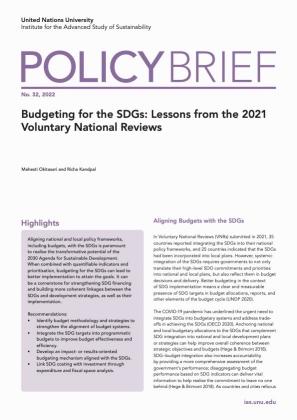
United Nations Policy Brief
Before we discuss the free policy brief examples, it helps to
understand what goes into a strong brief. Based on best practices from
the UNC Writing Center, IDRC, and FiscalNote, here are the
essentials:
Title & Summary: A strong title clarifies
the issue immediately, and a one-paragraph summary prepares readers for
the key points.
Problem Statement: Explain what the issue is,
why it matters, and who is affected. Use data sparingly, only the most
compelling facts should go here.
Background & Context: Provide concise
evidence from credible sources. Keep this section tight but
informative.
Policy Options: Present alternative solutions
objectively. This helps you build credibility before recommending
one.
Recommendations: State what you want the reader
to do. These should be specific, actionable, and realistic.
Implications & Impact: Explain the expected
outcomes and why your recommendation is the best path forward.
References: Cite credible sources to support your claims.
Keeping these principles in mind will make your road to learning how
to create a policy brief much easier and compelling.
Top 10 Policy Brief
Templates [Free Download]
Rather than sketching a layout from scratch, which often leads to
wasted time and structural uncertainty, I’ve collected ten high-quality,
free policy brief templates that already follow best practices. These
templates are designed with clarity and decision-making in mind: they
include sections for executive summaries, context and evidence, policy alternatives, and
concrete recommendations. Choosing one of these will give you a
ready-made framework so you can focus on your content rather than on
spacing, margins, or formatting.
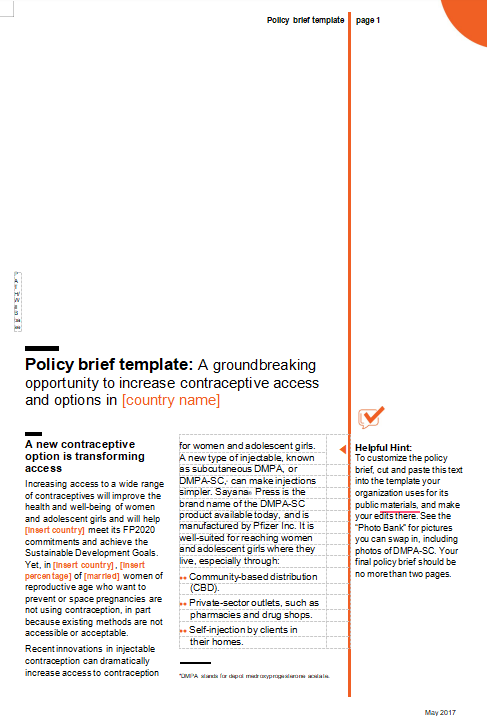
Policy Brief Template 01
This template provides
a clear structure for a high-level policy brief, designed to concisely
communicate policy proposals or findings. It uses a distinct orange
vertical sidebar and includes a large title space and sections for
high-impact text, such as the section titled A new contraceptive option
is transforming access. A Helpful Hint section is included to guide
customization, advising the user to keep the brief concise and no more
than two pages.
Policy Brief Template 01
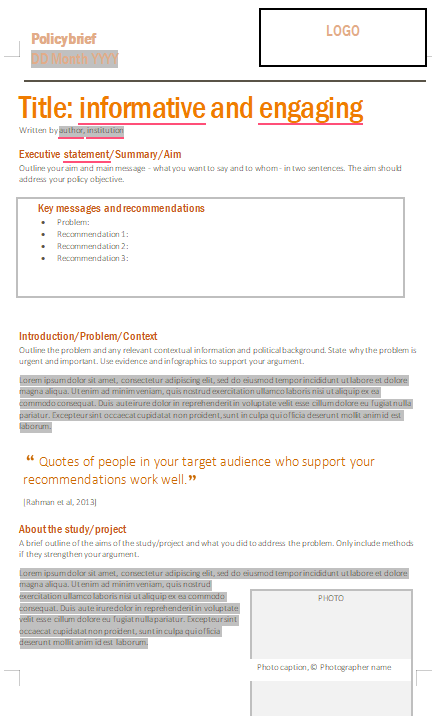
Policy Brief Template 02
This template provides
a detailed, formal structure for a policy brief, emphasizing clarity and
action. It features a large title placeholder and immediately presents
an Executive Statement followed by key messages and recommendations. The
layout is designed for readability, including sections for
Introduction/Problem, supporting quotes, and a final section for about
the project, with a placeholder for a photo and caption.
Policy Brief Template 02
Policy Brief Template 03
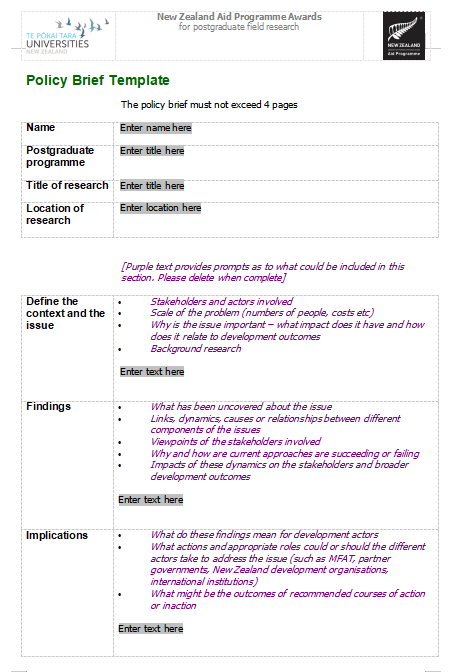
This template is
specifically designed for policy briefs related to the New Zealand Aid
Programme Awards for postgraduate field research. It features a strictly
defined structure, starting with identifying the name, postgraduate
programme, title of research, and location. The core of the brief is
broken into three main sections: define the context and the issue,
Findings, and Implications, each with detailed bulleted prompts for
required content. A restriction is clearly stated that the brief must
not exceed 4 pages.
Policy Brief Template 03
Policy Brief Template 04
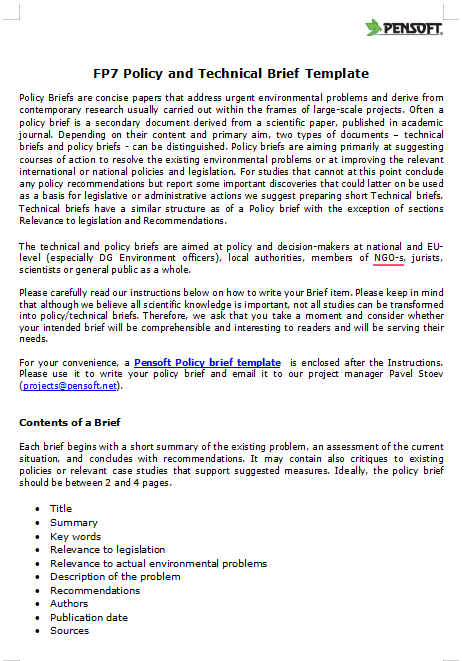
This template is
primarily an instructional guide for the FP7 Policy and Technical Brief,
providing context on the differences between the two document types. It
defines a policy brief as aiming at suggesting courses of action, while
a technical brief focuses on research discoveries without policy
recommendations. The document provides a checklist for the contents of a
Brief, including required sections like title, summary, key words,
recommendations, and sources.
Policy Brief Template 04
Policy Brief Template 05
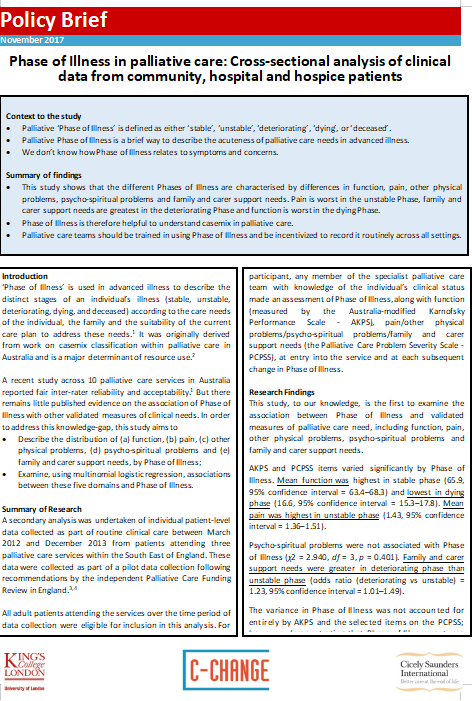
This template provides
a detailed, academic structure for a policy brief, exemplified by its
focus on the "Phase of Illness in palliative care" research. It clearly
separates content into sections for context to the study, summary of
findings, Introduction, and highly technical research findings. The
two-column format for the main body allows for detailed presentation of
methodologies and statistical findings, such as 95% confidence
intervals, making it suitable for rigorous academic communication.
Policy Brief Template 05
Policy Brief Template 06
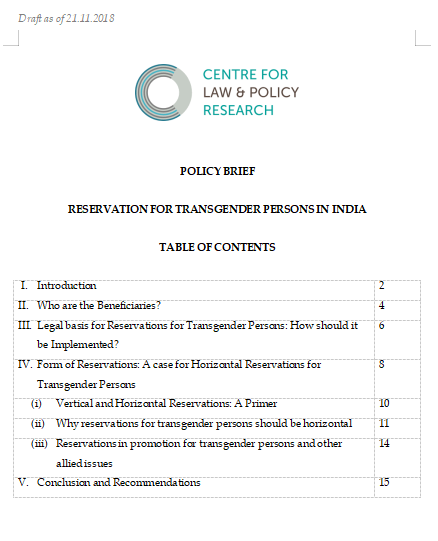
This template is
designed as the cover page and table of contents for a formal policy
brief from the Centre for Law & Policy Research. It clearly
establishes the document's subject as “Reservation For Transgender
Persons In India”. The table of contents breaks down the brief into key
legal and policy sections, including the legal basis for reservations,
form of reservations, and conclusion and recommendations. The layout is
highly structured, providing page numbers for sub-sections like vertical
and horizontal reservations.
Policy Brief Template 06
Policy Brief Template 07
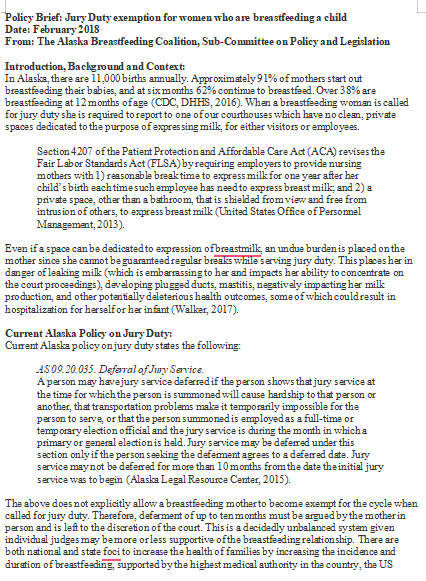
This template provides
the detailed text and structure for a policy brief arguing for Jury Duty
exemption for women who are breastfeeding a child. It begins with an
Introduction, Background and Context, citing statistics on breastfeeding
rates in Alaska and linking the need for lactation spaces to the federal
Patient Protection and Affordable Care Act (ACA). The brief includes a
section detailing the Current Alaska Policy on Jury Duty, highlighting
the discretion currently given to judges and arguing the existing laws
do not explicitly grant the exemption.
Policy Brief Template 07
Policy Brief Template 08
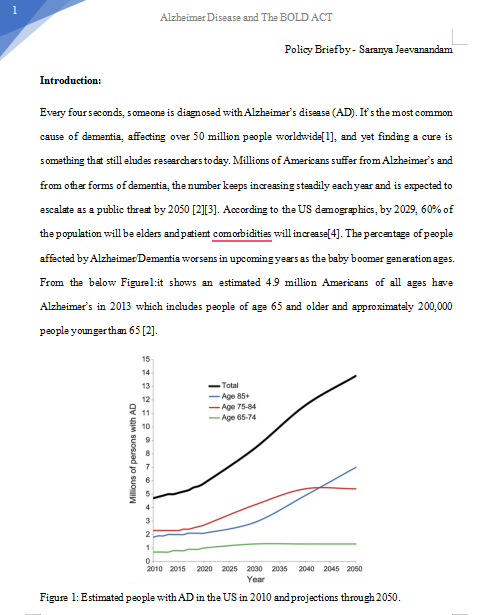
This template provides
the initial text and structure for a policy brief focusing on
Alzheimer's disease and its relation to the Bold Act. The Introduction
section highlights the global and U.S. prevalence of AD, noting that it
affects over 50 million people worldwide and is expected to escalate as
a public threat. The brief includes a data visualization, Figure 1:
Estimated people with AD in the US in 2010 and projections through 2050,
which graphs the projected increase in AD cases across different age
groups.
Policy Brief Template 08
Policy Brief Template 09
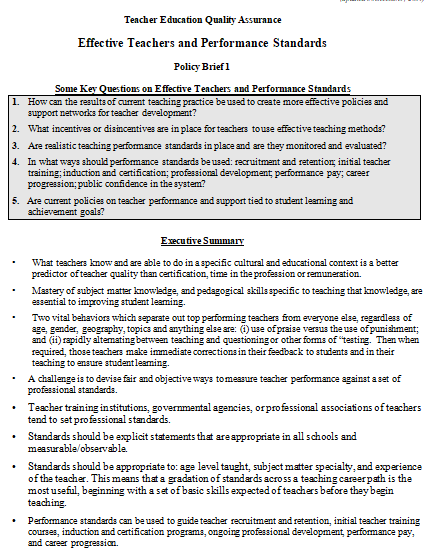
This template provides
the structured content for a policy brief titled “Effective Teachers”
and “Performance Standards”, focusing on teacher education quality
assurance. It begins with some key questions regarding teacher
development, performance standards, and current supporting policies. The
subsequent executive summary section uses a detailed bulleted format to
outline the core arguments, covering topics from teacher qualification,
pedagogical skills, student learning, and the importance of
measurable/observable standards.
Policy Brief Template 09
Policy Brief Template 10
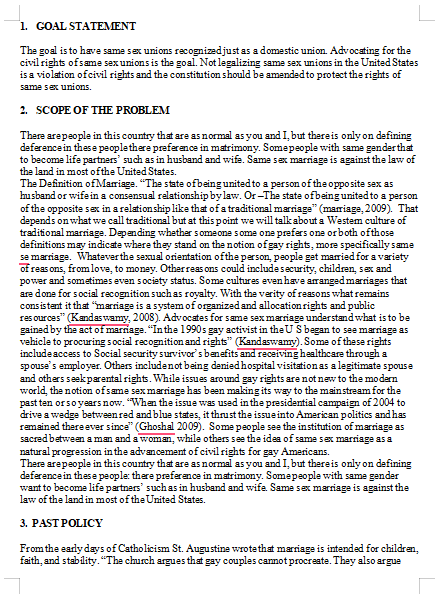
This template provides
the structured content for a policy brief focusing on legalizing
same-sex unions and civil rights. It clearly defines the goal statement
as advocating for same-sex unions and arguing that not legalizing them
violates civil rights. The detailed scope of the problem section cites
multiple definitions of marriage and discusses the legal history of
same-sex marriage in the U.S., referencing works by Kandaswamy and
Ghoshal. A final section, past policy, begins the historical context of
the issue.
Policy Brief Template 10
How
to Edit and Print a Policy Brief Template in Word (WPS Writer)
Most formatting issues happen when users paste text directly from
their notes or another document, which can break spacing, headers, and
alignment. That’s why I prefer editing policy briefs in WPS Writer, it
keeps the original formatting intact and gives you precise control over
sections like executive summaries, data tables, citations,
and recommendation boxes. Here’s how to edit and print a policy brief
template in Word.
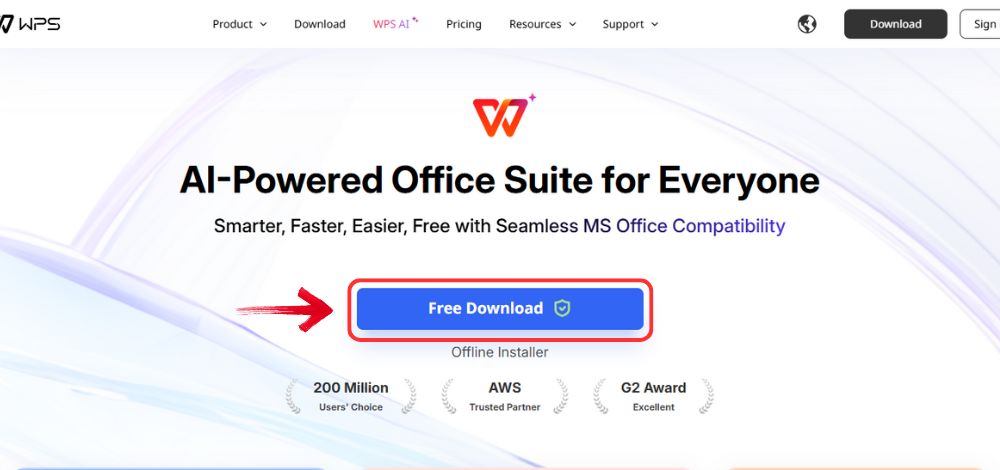
Step 1: First, open your browser to visit WPS Office and click the "Free Download" button to start the download.
Download WPS Office
Step 2: The download will finish in a few seconds.
Once done, run the installation file like you would for any other app or
software.
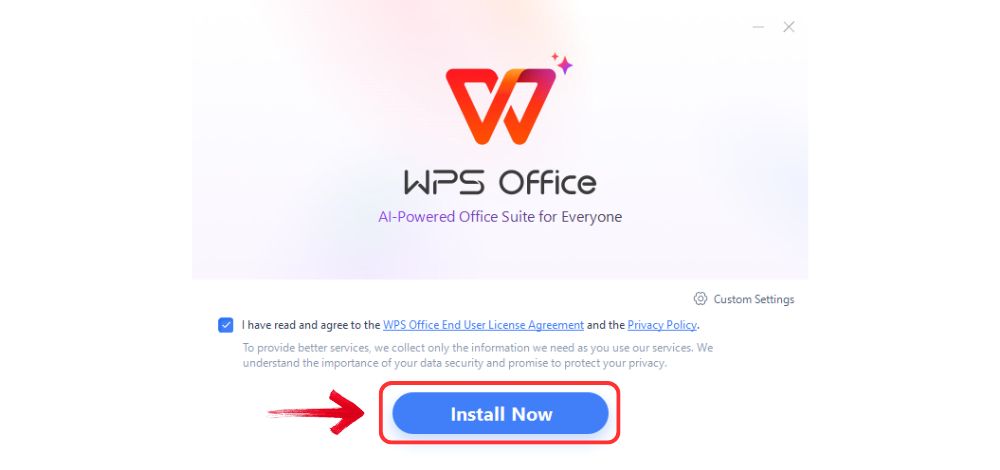
Step 3: WPS Office will show you a few simple terms
and conditions. Accept them, then click the "Install" button to begin the installation.
Install WPS Office
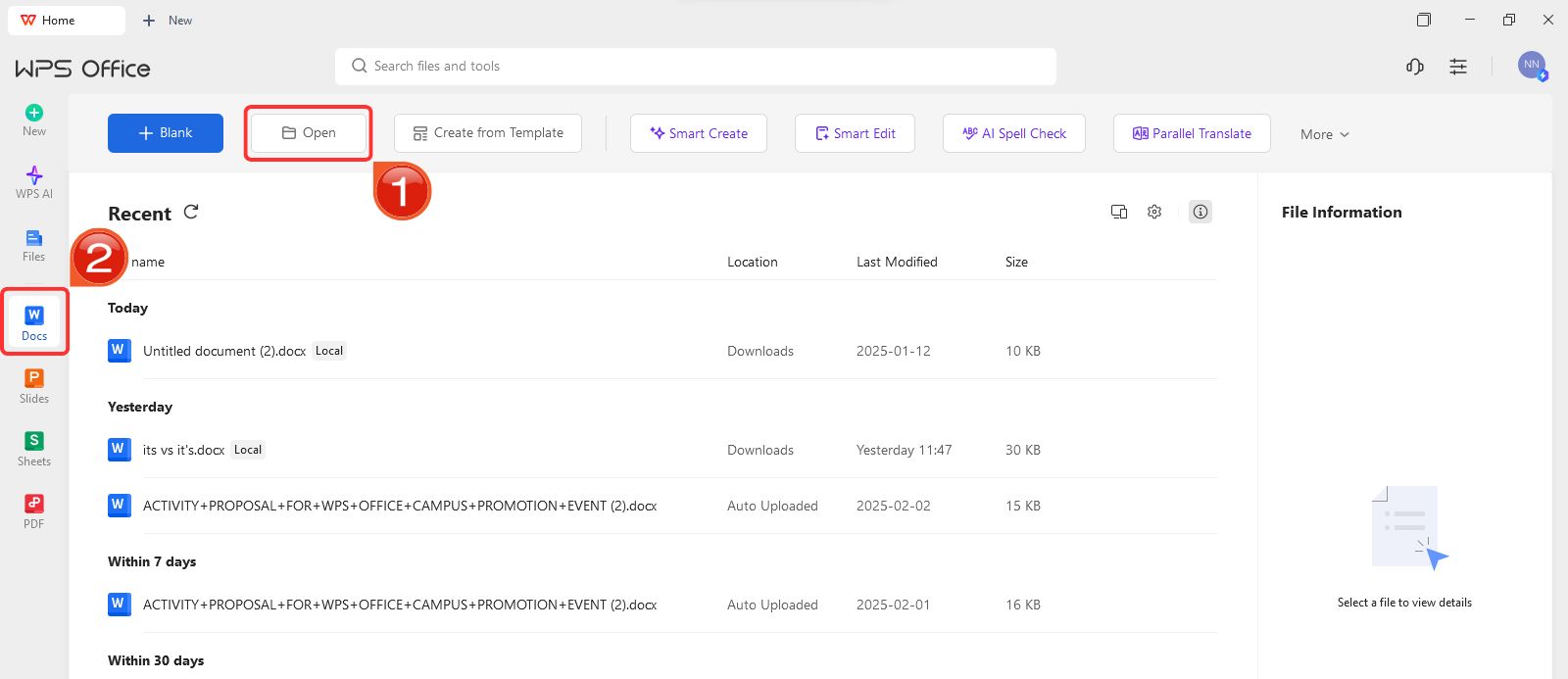
Step 4: After installation, on WPS Office, click on “Docs” from the left panel, then select “Open” to open a document in WPS Office.
Create new blank document
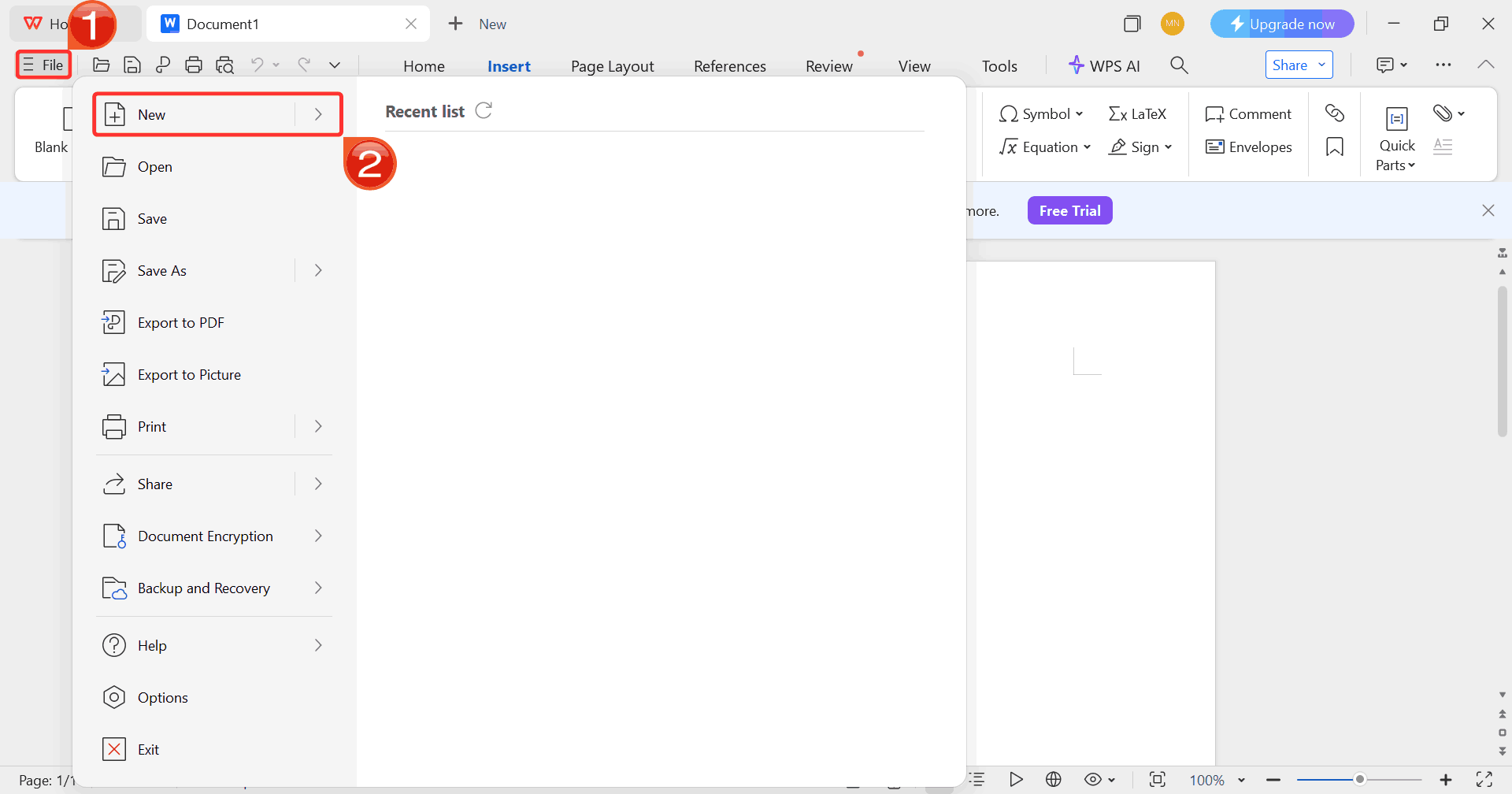
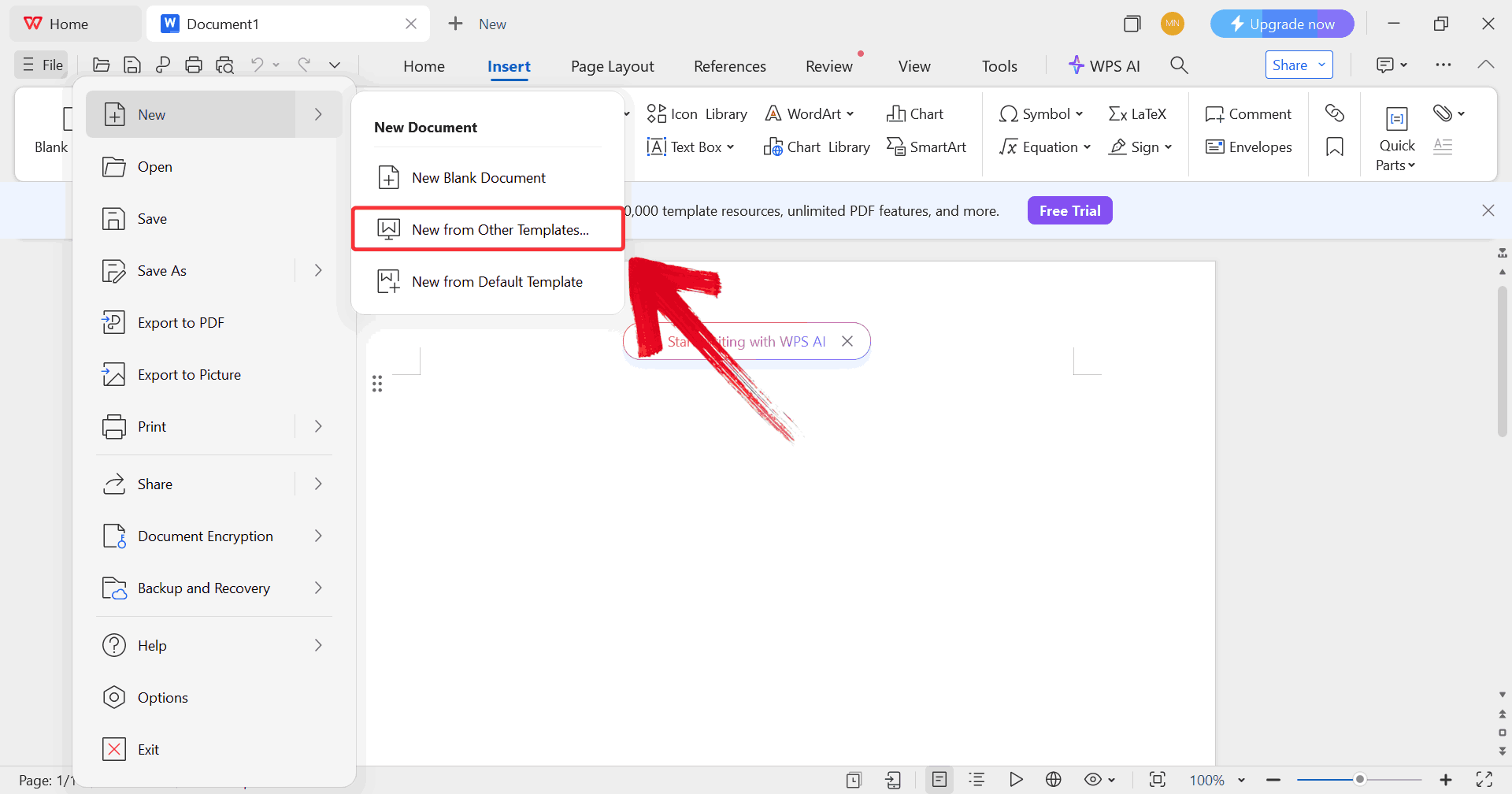
Step 5: Click on “File”, then click
on “New” to browse options for opening a blank document
or choosing from available templates.
Select New
Step 6: Click on “New from other
templates” to upload your desired template, either from your
device or directly from the WPS template library.
Upload Template
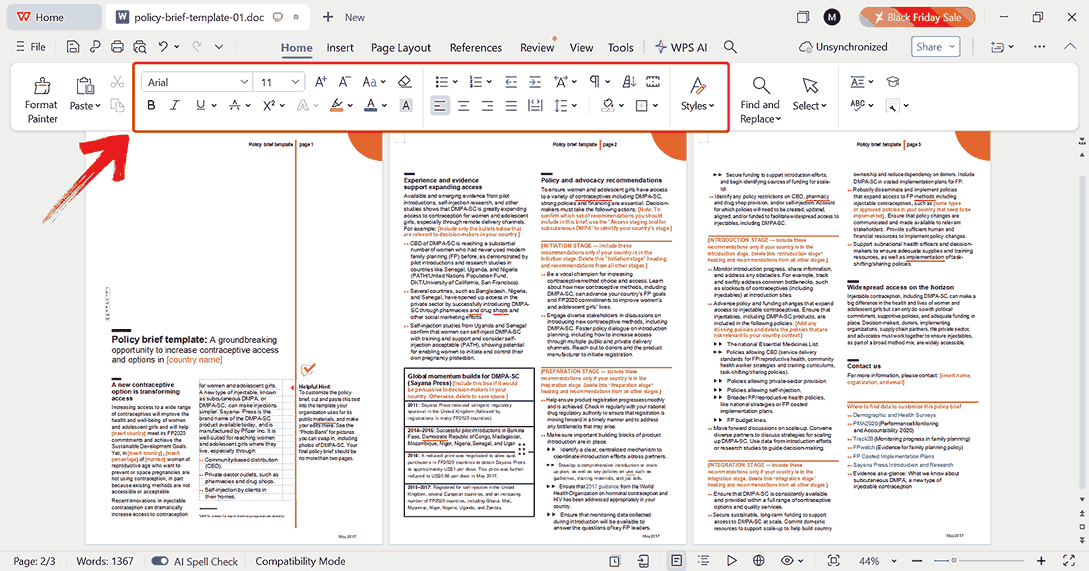
Step 7: After uploading the template, use the
toolbar at the top to edit text, swap images, change colors, and
customize other elements to match your vision.
Edit Template
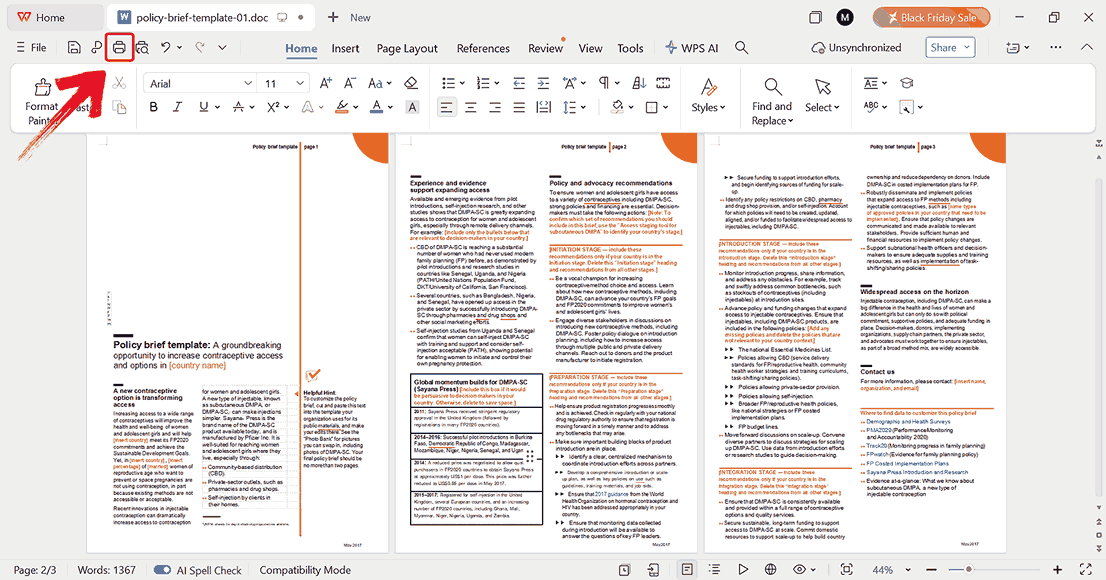
Step 8: Click on the printer icon to start printing
your template, but make sure your printer is connected before you
begin.
Print Template
Free
Office Suite with Editable Templates & Smart AI (WPS Office)
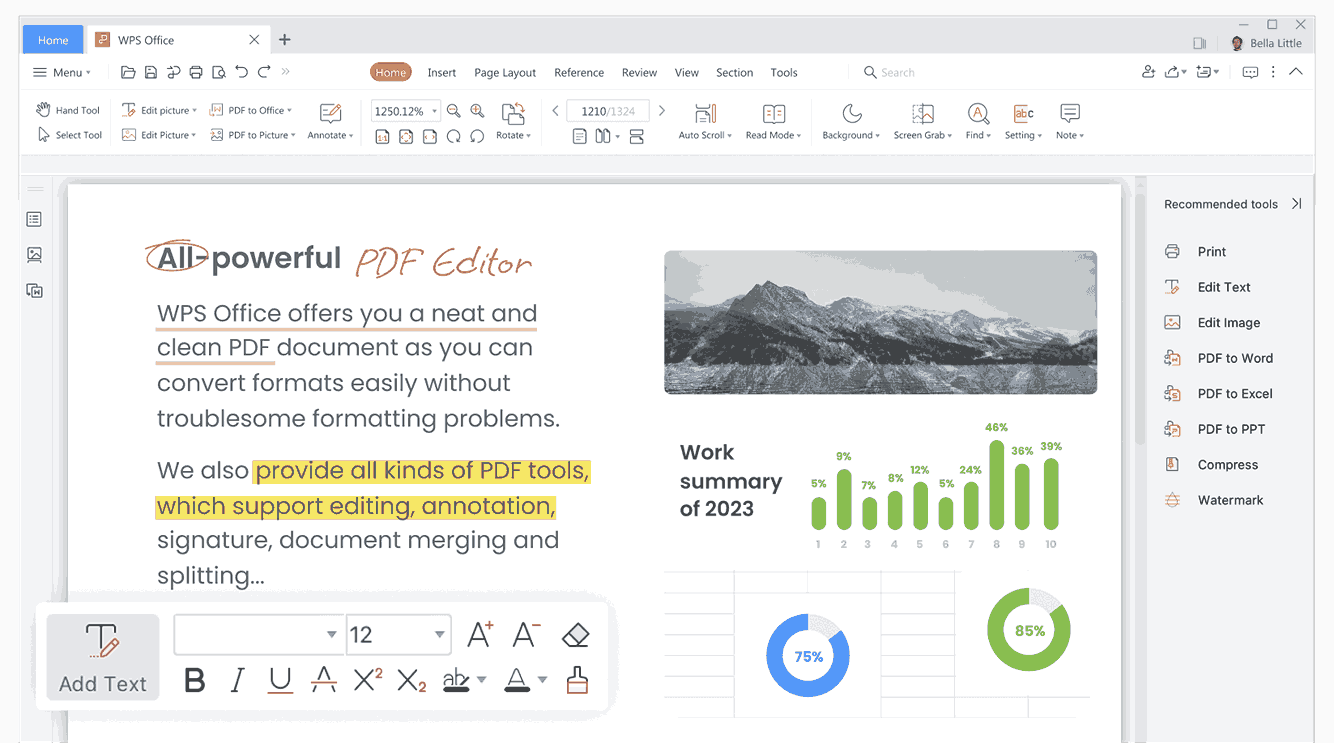
With a policy brief template ready, it’s important to use a platform
that allows you to edit, format, and share your document smoothly. WPS Office is built with that in
mind: its Writer app handles template editing seamlessly, while
Spreadsheets and Presentation make it easy to add data tables, charts,
or visual summaries directly into your brief. The suite’s rich template
library also gives you quick access to professionally designed layouts,
so you can adapt a brief to any topic without worrying about formatting
issues. Using WPS Office ensures that your focus stays on refining your
recommendations and evidence, not on fixing technical hiccups.
WPS Office User Interface
Key Advantages:
Completely free and lightweight, so it runs smoothly even on devices with limited resources, letting you focus on writing your policy brief.
Offers a wide range of customizable policy brief templates to help you start your document quickly and professionally.
Allows you to export your policy brief as a PDF or print it directly, keeping your formatting and layout intact.
Available on both desktop and online platforms, giving you the flexibility to work on your brief anytime, anywhere.
WPS Office simplifies creating policy briefs by providing all the
necessary templates and editing tools in one place. You can get started
quickly and concentrate on crafting your recommendations and evidence,
rather than struggling with formatting or software limitations.
100% secure
FAQs
1.
What’s the main difference between a policy brief and a research
paper?
A research paper presents detailed methods, analysis, and results for
academic purposes. A policy brief condenses that research into a short,
persuasive, action-oriented document for policymakers.
2. What’s the ideal
length for a policy brief?
Most policy briefs are 2–4 pages. This length is long enough to
present strong evidence but short enough to keep a busy reader’s
attention.
3. Do policymakers
really read policy briefs?
Yes. Policy briefs are often preferred because they offer clear,
concise summaries that guide decisions without overwhelming detail.
4.
Can students use policy brief templates for school assignments?
Absolutely. These templates are frequently used in public policy,
political science, and international relations courses.
5. Should a policy
brief use technical language?
Not necessarily. Clear, direct language is more persuasive and more
likely to be understood by non-specialists.
Policy Review with WPS
Creating a strong policy brief becomes much easier when you start with a ready policy brief template rather than struggling with formatting from scratch. Templates help you organize your problem statement, evidence, and recommendations in a way readers can understand quickly. With AI-powered tools and modern editors, you no longer need to struggle with structure or layout, WPS Office gives you precise formatting, free templates, and simple PDF exporting in just a few seconds.
The free templates offer ready-made frameworks you can adapt to any topic and if you need even more variety, the WPS template store has hundreds of options you can download instantly. Editing, printing, and sharing your brief is easy, making the entire process smoother from drafting to final review. Ultimately, good tools like WPS don’t intend to replace good thinking, they just help you communicate it faster and more effectively.
7+ years in productivity tech. I test and review the latest tools to simplify your workflow. Follow for honest app comparisons, practical guides, and curated tech picks to boost efficiency.


'%3e%3cpath%20d='M8%200C12.4183%200%2016%203.58172%2016%208C16%2012.4183%2012.4183%2016%208%2016C3.58172%2016%200%2012.4183%200%208C0%203.58172%203.58172%200%208%200ZM11.6162%204.38379C11.2257%203.99337%2010.5927%203.99338%2010.2021%204.38379L8%206.58594L5.79785%204.38379C5.40732%203.99334%204.77429%203.99329%204.38379%204.38379C3.99331%204.77429%203.99335%205.40733%204.38379%205.79785L6.58594%208L4.38379%2010.2021C3.99348%2010.5927%203.99341%2011.2257%204.38379%2011.6162C4.77426%2012.0066%205.40734%2012.0065%205.79785%2011.6162L8%209.41406L10.2021%2011.6162C10.5927%2012.0066%2011.2257%2012.0067%2011.6162%2011.6162C12.0067%2011.2257%2012.0066%2010.5927%2011.6162%2010.2021L9.41406%208L11.6162%205.79785C12.0066%205.40735%2012.0066%204.77429%2011.6162%204.38379Z'%20fill='%23080E17'%20fill-opacity='0.46'/%3e%3c/g%3e%3cdefs%3e%3cclipPath%20id='clip0_3761_713'%3e%3crect%20width='16'%20height='16'%20fill='white'/%3e%3c/clipPath%3e%3c/defs%3e%3c/svg%3e)




'%3e%3cpath%20fill-rule='evenodd'%20clip-rule='evenodd'%20d='M21.4999%2010.9993C21.4999%205.20009%2016.7986%200.498901%2010.9993%200.498901C5.19994%200.498901%200.498657%205.20009%200.498657%2010.9993C0.498657%2016.2404%204.33858%2020.5844%209.35855%2021.3722V14.0346H6.69238V10.9993H9.35855V8.68594C9.35855%206.05427%2010.9262%204.60062%2013.3248%204.60062C14.4736%204.60062%2015.6753%204.80571%2015.6753%204.80571V7.38979H14.3512C13.0468%207.38979%2012.64%208.19921%2012.64%209.0296V10.9993H15.5523L15.0867%2014.0346H12.64V21.3722C17.66%2020.5844%2021.4999%2016.2404%2021.4999%2010.9993Z'%20fill='%231568EA'/%3e%3c/g%3e%3c/svg%3e)


'%3e%3cpath%20d='M2.42045%2022.1876H6.31818V12.7217L0.75%208.54553V20.5171C0.75%2021.4414%201.49892%2022.1876%202.42045%2022.1876Z'%20fill='%234285F4'/%3e%3cpath%20d='M19.682%2022.1876H23.5797C24.5041%2022.1876%2025.2502%2021.4387%2025.2502%2020.5171V8.54553L19.682%2012.7217'%20fill='%2334A853'/%3e%3cpath%20d='M19.682%205.48293V12.7216L25.2502%208.54543V6.31816C25.2502%204.25236%2022.8921%203.07469%2021.2411%204.31361'%20fill='%23FBBC04'/%3e%3cpath%20d='M6.31824%2012.7217V5.48303L13.0001%2010.4944L19.6819%205.48303V12.7217L13.0001%2017.733'%20fill='%23EA4335'/%3e%3cpath%20d='M0.75%206.31816V8.54543L6.31818%2012.7216V5.48293L4.75909%204.31361C3.10534%203.07469%200.75%204.25236%200.75%206.31816Z'%20fill='%23C5221F'/%3e%3c/g%3e%3cdefs%3e%3cclipPath%20id='clip0_2954_7305'%3e%3crect%20width='24.5'%20height='18.375'%20fill='white'%20transform='translate(0.75%203.8125)'/%3e%3c/clipPath%3e%3c/defs%3e%3c/svg%3e)



'%3e%3cpath%20d='M19.9911%204.11386V6.471H18.5894C18.0775%206.471%2017.7322%206.57814%2017.5536%206.79243C17.3751%207.00671%2017.2858%207.32814%2017.2858%207.75671V9.44421H19.9019L19.5536%2012.0871H17.2858V18.8639H14.5536V12.0871H12.2769V9.44421H14.5536V7.49779C14.5536%206.39064%2014.8632%205.53201%2015.4822%204.92189C16.1013%204.31177%2016.9257%204.00671%2017.9554%204.00671C18.8304%204.00671%2019.509%204.04243%2019.9911%204.11386Z'%20fill='%23333333'/%3e%3c/g%3e%3cdefs%3e%3cclipPath%20id='clip0_2938_8199'%3e%3crect%20width='16'%20height='16'%20fill='white'%20transform='translate(8%204.00671)'/%3e%3c/clipPath%3e%3c/defs%3e%3c/svg%3e)
'%3e%3cpath%20d='M17.5237%2010.7813L23.4811%204H22.0699L16.8949%209.88693L12.7648%204H8L14.2469%2012.9029L8%2020.0133H9.4112L14.8725%2013.7952L19.2352%2020.0133H24M9.92053%205.04213H12.0885L22.0688%2019.0224H19.9003'%20fill='%23333333'/%3e%3c/g%3e%3cdefs%3e%3cclipPath%20id='clip0_2938_8200'%3e%3crect%20width='16'%20height='16.0134'%20fill='white'%20transform='translate(8%204)'/%3e%3c/clipPath%3e%3c/defs%3e%3c/svg%3e)


