

'%3e%3cpath%20d='M8%200C12.4183%200%2016%203.58172%2016%208C16%2012.4183%2012.4183%2016%208%2016C3.58172%2016%200%2012.4183%200%208C0%203.58172%203.58172%200%208%200ZM11.6162%204.38379C11.2257%203.99337%2010.5927%203.99338%2010.2021%204.38379L8%206.58594L5.79785%204.38379C5.40732%203.99334%204.77429%203.99329%204.38379%204.38379C3.99331%204.77429%203.99335%205.40733%204.38379%205.79785L6.58594%208L4.38379%2010.2021C3.99348%2010.5927%203.99341%2011.2257%204.38379%2011.6162C4.77426%2012.0066%205.40734%2012.0065%205.79785%2011.6162L8%209.41406L10.2021%2011.6162C10.5927%2012.0066%2011.2257%2012.0067%2011.6162%2011.6162C12.0067%2011.2257%2012.0066%2010.5927%2011.6162%2010.2021L9.41406%208L11.6162%205.79785C12.0066%205.40735%2012.0066%204.77429%2011.6162%204.38379Z'%20fill='%23080E17'%20fill-opacity='0.46'/%3e%3c/g%3e%3cdefs%3e%3cclipPath%20id='clip0_3761_713'%3e%3crect%20width='16'%20height='16'%20fill='white'/%3e%3c/clipPath%3e%3c/defs%3e%3c/svg%3e)




'%3e%3cpath%20fill-rule='evenodd'%20clip-rule='evenodd'%20d='M21.4999%2010.9993C21.4999%205.20009%2016.7986%200.498901%2010.9993%200.498901C5.19994%200.498901%200.498657%205.20009%200.498657%2010.9993C0.498657%2016.2404%204.33858%2020.5844%209.35855%2021.3722V14.0346H6.69238V10.9993H9.35855V8.68594C9.35855%206.05427%2010.9262%204.60062%2013.3248%204.60062C14.4736%204.60062%2015.6753%204.80571%2015.6753%204.80571V7.38979H14.3512C13.0468%207.38979%2012.64%208.19921%2012.64%209.0296V10.9993H15.5523L15.0867%2014.0346H12.64V21.3722C17.66%2020.5844%2021.4999%2016.2404%2021.4999%2010.9993Z'%20fill='%231568EA'/%3e%3c/g%3e%3c/svg%3e)


'%3e%3cpath%20d='M2.42045%2022.1876H6.31818V12.7217L0.75%208.54553V20.5171C0.75%2021.4414%201.49892%2022.1876%202.42045%2022.1876Z'%20fill='%234285F4'/%3e%3cpath%20d='M19.682%2022.1876H23.5797C24.5041%2022.1876%2025.2502%2021.4387%2025.2502%2020.5171V8.54553L19.682%2012.7217'%20fill='%2334A853'/%3e%3cpath%20d='M19.682%205.48293V12.7216L25.2502%208.54543V6.31816C25.2502%204.25236%2022.8921%203.07469%2021.2411%204.31361'%20fill='%23FBBC04'/%3e%3cpath%20d='M6.31824%2012.7217V5.48303L13.0001%2010.4944L19.6819%205.48303V12.7217L13.0001%2017.733'%20fill='%23EA4335'/%3e%3cpath%20d='M0.75%206.31816V8.54543L6.31818%2012.7216V5.48293L4.75909%204.31361C3.10534%203.07469%200.75%204.25236%200.75%206.31816Z'%20fill='%23C5221F'/%3e%3c/g%3e%3cdefs%3e%3cclipPath%20id='clip0_2954_7305'%3e%3crect%20width='24.5'%20height='18.375'%20fill='white'%20transform='translate(0.75%203.8125)'/%3e%3c/clipPath%3e%3c/defs%3e%3c/svg%3e)


An XLSM to JSON job is usually about the grid, not the VBA. You open a macro-enabled Excel workbook, turn each data row into a JSON object, and hand that payload to an API, a web app, or a database. Most converters never run the macros. They read stored cell values and headers.
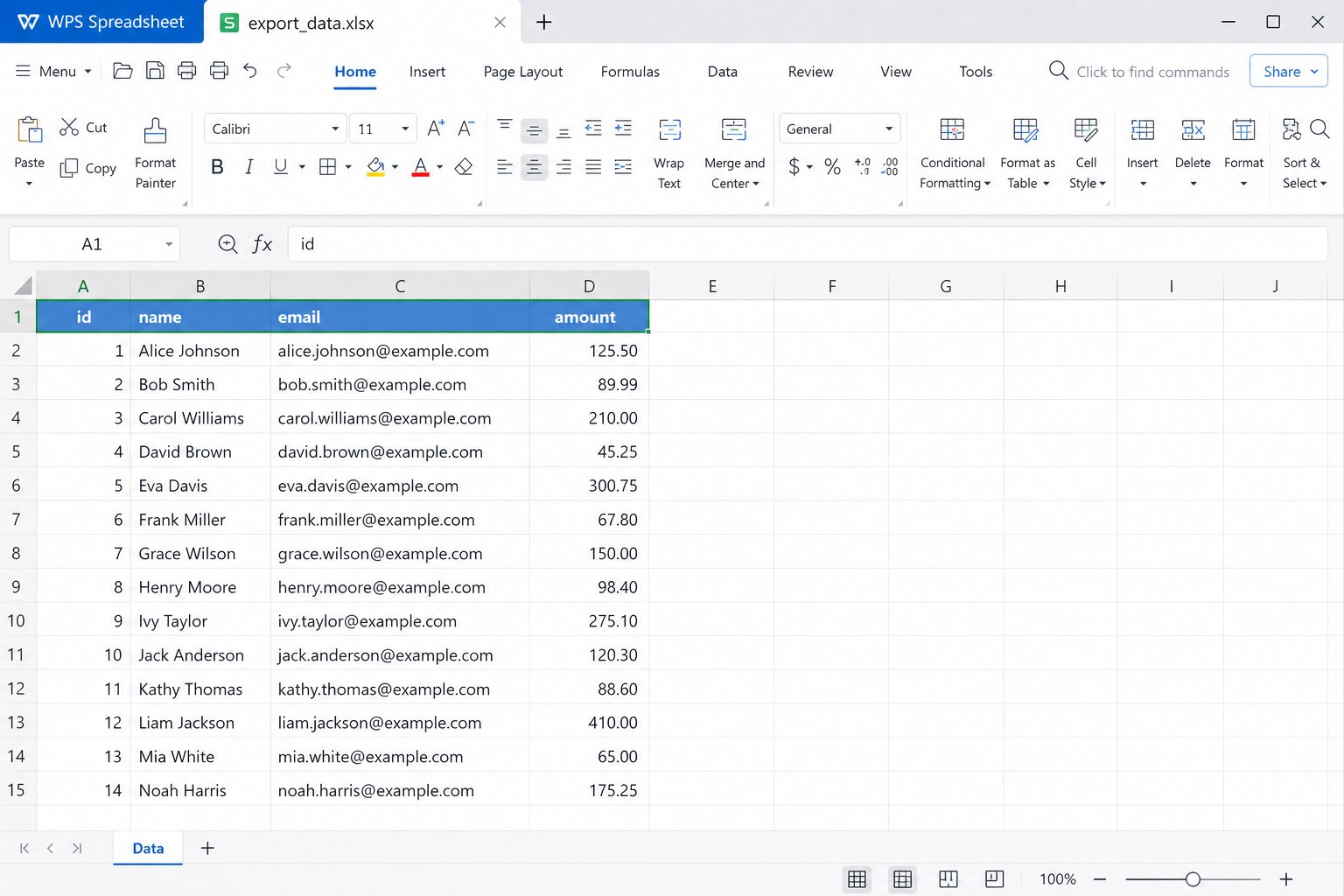
This guide walks through a practical XLSM to JSON path with WPS Spreadsheets: open the .xlsm file locally, clean the table, save a CSV bridge, then produce JSON. It also covers online tools, scripts, and the safety limits you should expect. If you only need to view the workbook first, see how to open file XLSM.

What an XLSM to JSON conversion actually exports
XLSM is an Open XML workbook that can store VBA. JSON is a text format built from objects, arrays, strings, numbers, and booleans. When people search XLSM to JSON, they almost always want the sheet as an array of objects—one object per row, keys taken from the header row.
That shape fits most APIs:
Row 1 becomes keys such as
Product,SKU, andPriceEach following row becomes one object
Empty cells usually become
nullor get omitted, depending on the toolFormulas export as calculated values when the file was last saved with those results cached
What does not travel in a normal XLSM to JSON export: button code, UserForms, ActiveX controls, and most VBA modules. If your report only rebuilds after a macro runs, finish that step in Excel or WPS first, then convert the resulting values.
Prepare the workbook before XLSM to JSON export
Bad structure is the main reason XLSM to JSON looks wrong. Merged titles, blank spacer rows, and two header lines produce messy keys. Spend two minutes on the sheet before you convert.
Use this checklist:
Put field names in a single header row
Keep one record per row under those headers
Remove totals rows if they should not become JSON objects
Use unique, simple header names without line breaks
Keep ZIP codes and SKUs as text so leading zeros survive
If the workbook has several sheets, decide which sheet is the source of truth. Converters often default to the first sheet only. For multi-sheet models, run XLSM to JSON once per sheet or use a script that names each sheet in the output object.


How to do XLSM to JSON with WPS Spreadsheets
WPS Office lists .xlsm among Excel-compatible spreadsheet formats, so you can open the file on your PC, review the data with macros left off, and save a clean table. WPS does not need to be a native JSON editor for this workflow. The reliable desktop pattern is: open XLSM → clean → Save As CSV → convert CSV to JSON. That still counts as a full XLSM to JSON pipeline for APIs and imports.
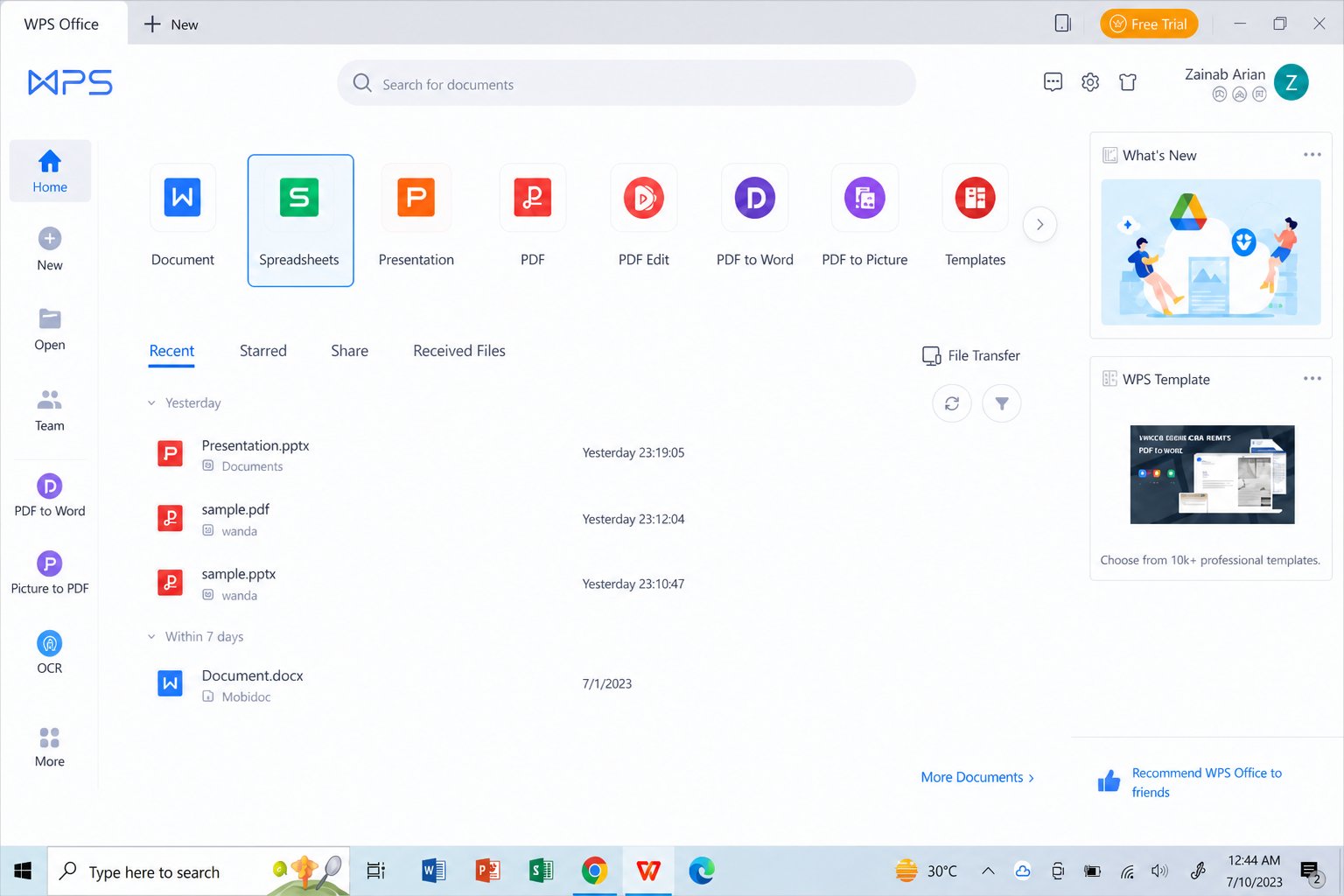
Step 1: Open Spreadsheets from the WPS home screen
Launch WPS Office and choose Spreadsheets. You want the spreadsheet workspace, not Writer or Presentation.
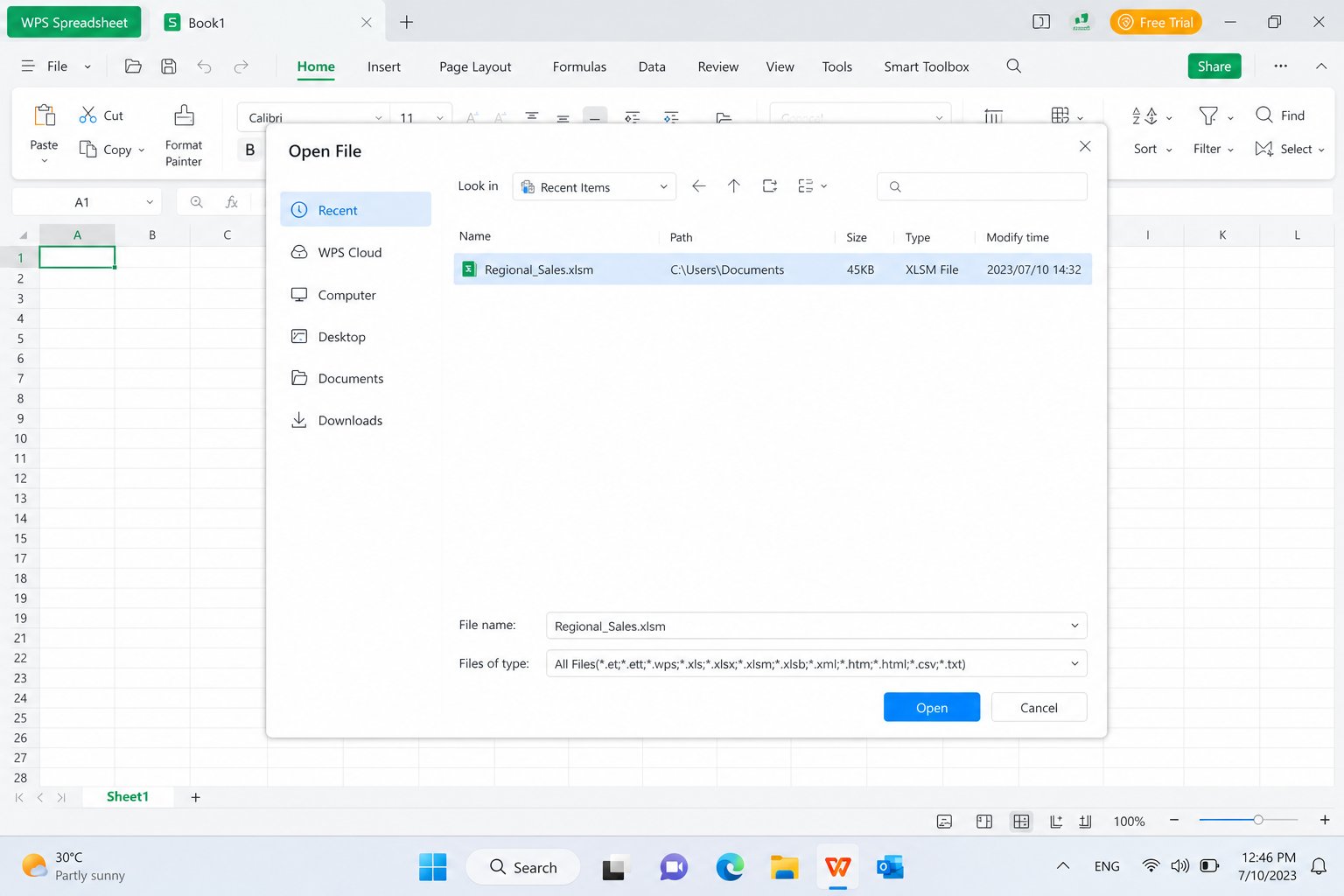
Step 2: Open the .xlsm workbook
Click Menu > Open, browse to the macro-enabled file, and open it. Enable macros only if you trust the sender and you need the automation to refresh values. For a data-only XLSM to JSON job, leave macros disabled and work from the stored numbers.
Step 3: Clean headers and trim the used range
Confirm row 1 holds the keys you want in JSON. Delete decorative title rows above the table, or move the real table to a new sheet named Data. Check that dates and decimals look correct before you leave the grid.
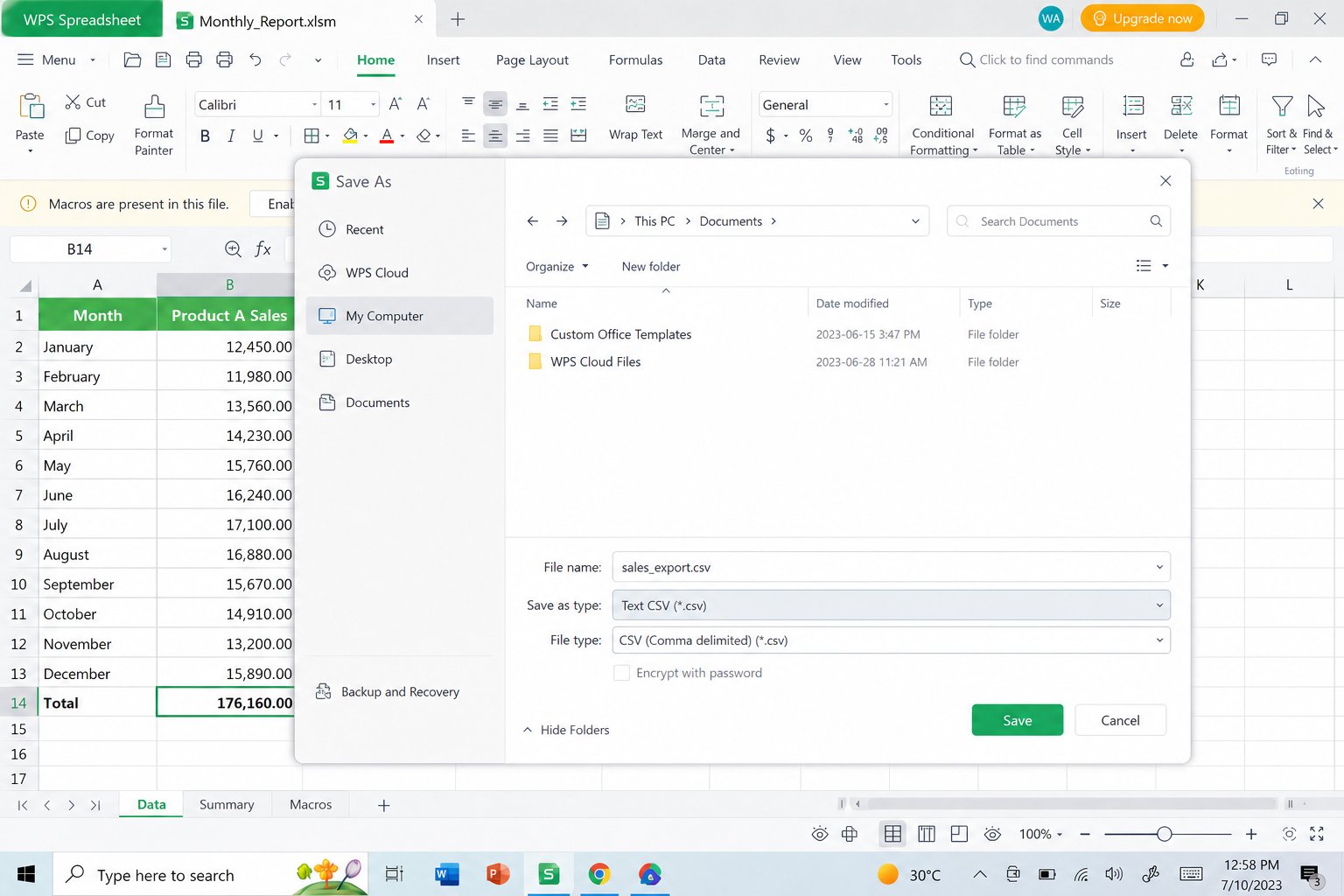
Step 4: Save As CSV as a bridge file
Choose Menu > Save As (or Save As from the file menu), set the type to CSV or Text CSV, and save a copy. CSV keeps the table flat and removes Excel chrome. Many free converters and scripts accept CSV as input, which makes the last mile of XLSM to JSON simpler and safer than uploading a macro file.
Step 5: Convert the clean table to JSON
Upload the CSV to a trusted local converter, or run a short script (Python with pandas, Node with SheetJS, and similar libraries all support this). Prefer tools that output an array of objects and keep text fields as strings. When you are done, you should see JSON that mirrors the WPS table row by row.
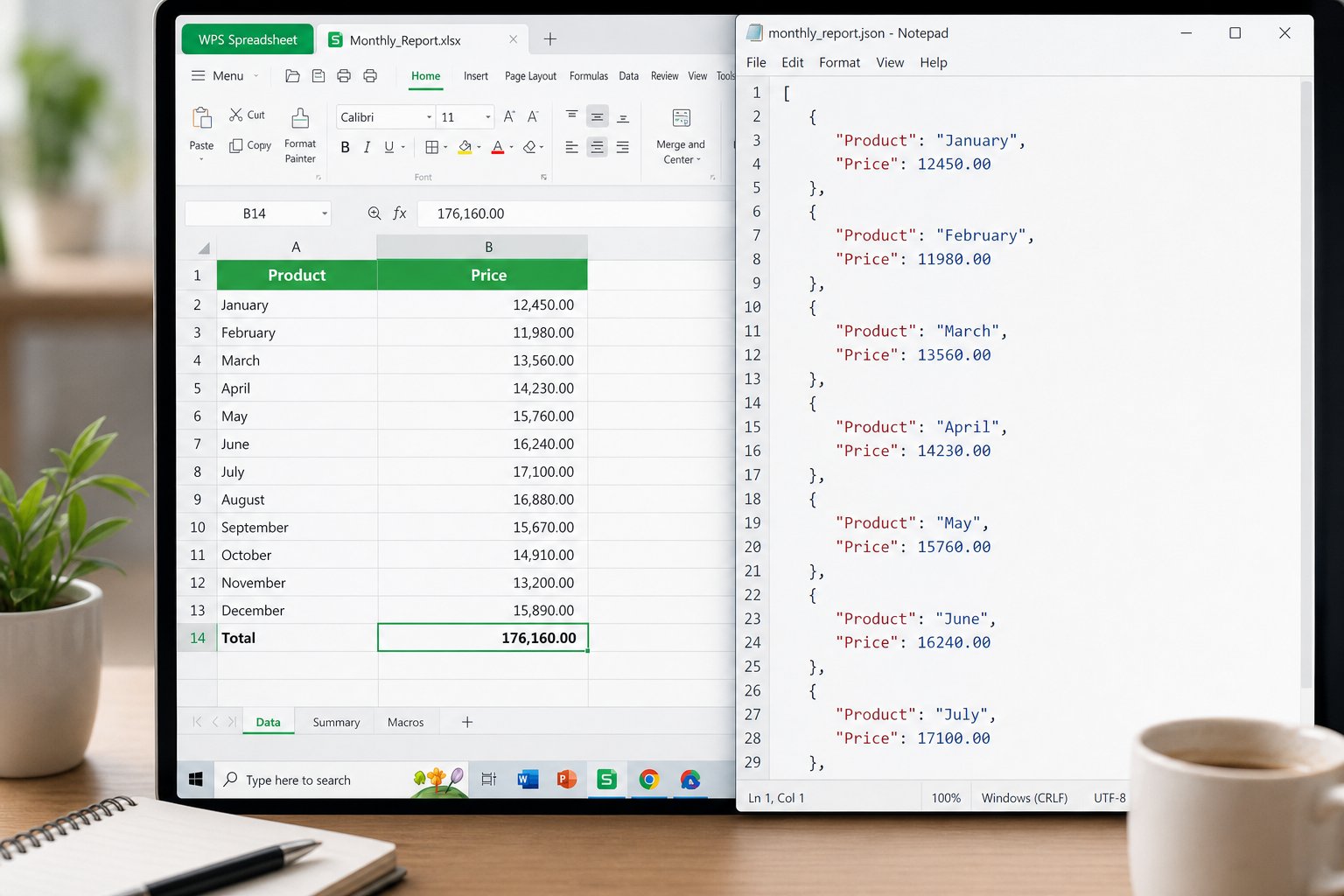
If you later need the reverse direction, WPS also covers how to convert JSON to Excel.
Online tools and scripts for XLSM to JSON
When the file is already clean, an online XLSM to JSON converter can finish the job in one upload. Good tools parse the workbook statically, never execute VBA, and let you choose array-of-objects output. Avoid unknown sites for payroll, customer, or health data—use a local script instead.
For developers, libraries such as SheetJS, openpyxl plus a JSON dump, or commercial Excel APIs can load .xlsm and emit JSON. Typical options you will see:
Array of objects from the active sheet
Nested object keyed by sheet name
Pretty-printed vs minified JSON
Toggles to keep formula text instead of cached values
Scripts scale better than click tools when you need nightly XLSM to JSON jobs. Keep the WPS cleanup step for messy human-built workbooks; automate only after the headers are stable.
Safety limits every XLSM to JSON workflow should respect
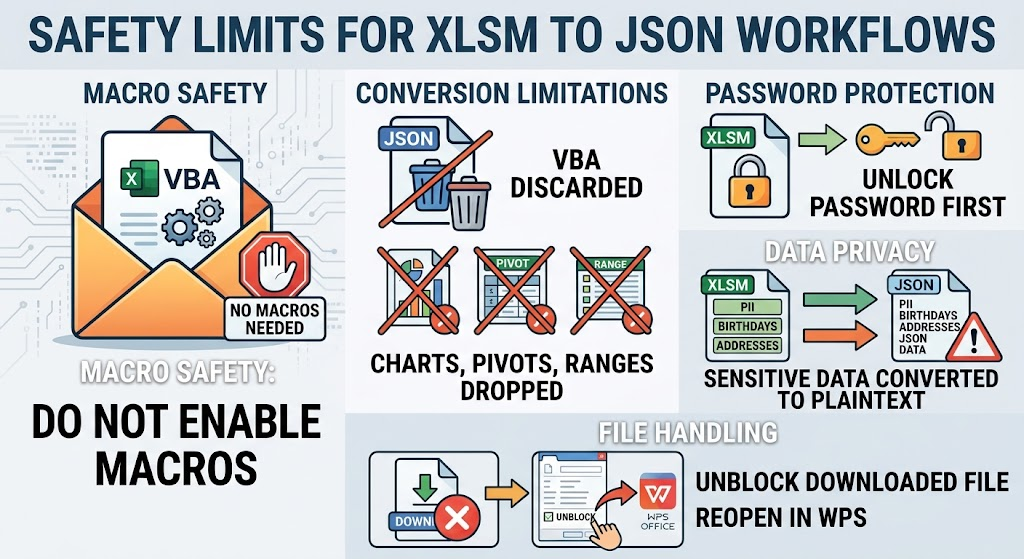
Treat macro workbooks like mail attachments with code. A converter that advertises XLSM to JSON should not need to run macros. If a site asks you to enable macros in the browser, stop.
Also remember:
JSON will not preserve VBA for later re-import
Charts, pivot caches, and named ranges may be dropped
Password-protected workbooks must be unlocked before conversion
Personal data in the sheet becomes plaintext JSON—store it carefully
If Windows blocks the file after download, unblock only trusted files in Properties, then reopen in WPS. You can still complete XLSM to JSON with macros disabled.
FAQ
Does XLSM to JSON include the macros?
Usually no. Standard converters export cell data. Macro names may appear only in optional metadata. Plan to keep the original .xlsm if you still need the VBA.
Can I run XLSM to JSON without Microsoft Excel?
Yes. Open the file in WPS Spreadsheets, clean the table, export CSV, then convert. Online parsers and scripts that understand Open XML can also read .xlsm directly.
Why does my XLSM to JSON output look nested or empty?
Wrong sheet, blank header cells, or merged title rows are common causes. Put a single header row on the data sheet and retry. If formulas show as blank, open the workbook, recalculate, save, and convert again.
Is CSV required for XLSM to JSON?
No, but it is a practical bridge when you want to strip macros before an upload. Direct XLSM parsers skip that step. Use CSV when privacy or macro risk matters more than one-click convenience.


'%3e%3cpath%20d='M19.9911%204.11386V6.471H18.5894C18.0775%206.471%2017.7322%206.57814%2017.5536%206.79243C17.3751%207.00671%2017.2858%207.32814%2017.2858%207.75671V9.44421H19.9019L19.5536%2012.0871H17.2858V18.8639H14.5536V12.0871H12.2769V9.44421H14.5536V7.49779C14.5536%206.39064%2014.8632%205.53201%2015.4822%204.92189C16.1013%204.31177%2016.9257%204.00671%2017.9554%204.00671C18.8304%204.00671%2019.509%204.04243%2019.9911%204.11386Z'%20fill='%23333333'/%3e%3c/g%3e%3cdefs%3e%3cclipPath%20id='clip0_2938_8199'%3e%3crect%20width='16'%20height='16'%20fill='white'%20transform='translate(8%204.00671)'/%3e%3c/clipPath%3e%3c/defs%3e%3c/svg%3e)
'%3e%3cpath%20d='M17.5237%2010.7813L23.4811%204H22.0699L16.8949%209.88693L12.7648%204H8L14.2469%2012.9029L8%2020.0133H9.4112L14.8725%2013.7952L19.2352%2020.0133H24M9.92053%205.04213H12.0885L22.0688%2019.0224H19.9003'%20fill='%23333333'/%3e%3c/g%3e%3cdefs%3e%3cclipPath%20id='clip0_2938_8200'%3e%3crect%20width='16'%20height='16.0134'%20fill='white'%20transform='translate(8%204)'/%3e%3c/clipPath%3e%3c/defs%3e%3c/svg%3e)


