A column of 4,000 links is useless until the domain sits in its own cell, and retyping them by hand is not an option. Put this in the next column and fill it down: =TEXTBEFORE(TEXTAFTER(A2,"//"),"/"). It strips the protocol, keeps the host, and stops at the first slash.
Get Domain From URL in WPS Spreadsheet: Three Formulas
100% secure
Get Domain From URL With One Formula
The formula reads the URL in two moves: TEXTAFTER jumps past https:// or http://, and TEXTBEFORE stops at the first /. Whatever sits between those two points is the host name, including any subdomain.
Put the links in column A, starting at A2, with a header in A1. Keep the full URLs — the formula needs the protocol to find its starting point.
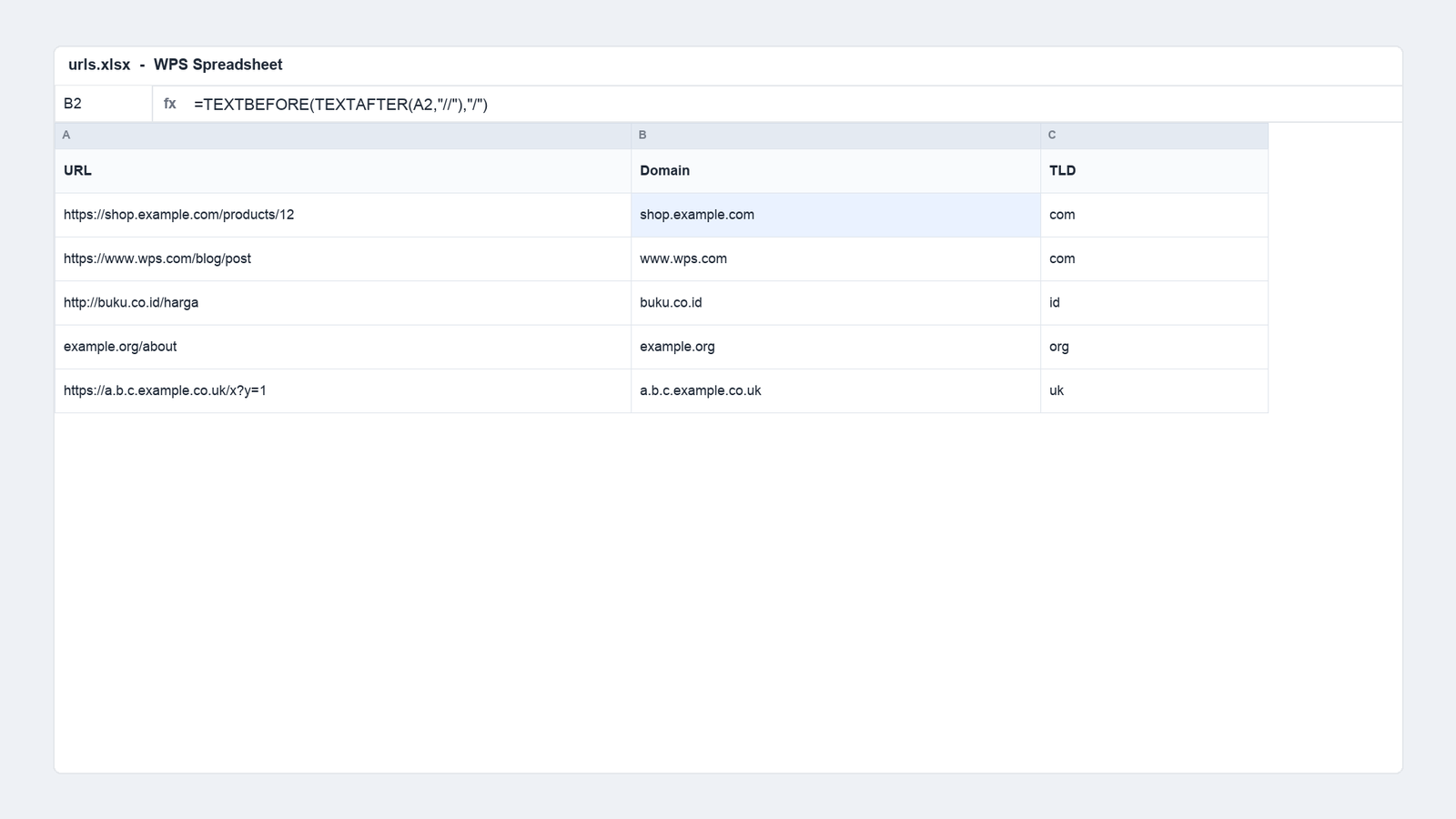
Click B2 and type the formula: =TEXTBEFORE(TEXTAFTER(A2,"//"),"/")
Press Enter and check the first result by eye. If B2 shows shop.example.com for https://shop.example.com/products/12, the pattern is right.
Double-click the fill handle in the corner of B2. WPS Spreadsheet copies the formula down to the last row of data, and the references adjust on their own.
Scan for errors before you build anything on top. A #VALUE! cell usually means one row holds a link without //, and that row needs the fallback in the next section.
Extract domain from URL formula
If a few rows are plain domains without a protocol, prefix them inside the formula instead of editing the data: =TEXTBEFORE(TEXTAFTER("//"&A2,"//"),"/") returns example.org for both example.org/about and https://example.org/about.
Use Word, Excel, and PPT for FREE
Get Domain From URL in Older WPS Builds
TEXTAFTER and TEXTBEFORE are relatively new functions. On an older WPS build, or in a file that has to open in an older Excel, they return #NAME? and the whole column breaks. The classic version works everywhere and costs one nested formula:
Why the nested SUBSTITUTE: it removes the protocol first, so LEFT starts counting at the domain instead of at https.
Why the &"/" at the end: a URL with no trailing slash would otherwise return an error. Appending a slash guarantees FIND always has something to find.
What it cannot do: it keeps www. and any port number, because those are part of the host. Clean them in the next column rather than inside this formula.
Copy the result as values before sharing. Select the column, copy, then paste as values so a colleague on a different build sees text rather than a formula error.
100% secure
Get Domain From URL as a Root Domain
Reporting usually needs the registrable domain, not the host: shop.example.com, www.example.com and blog.example.com should all roll up to example.com. Three small formulas do that.
Last two labels: =TEXTAFTER(B2,".",-2) turns shop.example.com into example.com. The negative instance number counts dots from the right.
Two-part suffixes: the same formula returns co.uk for example.co.uk, which is wrong. Wrap it: =IF(ISNUMBER(SEARCH(".co.",B2)),TEXTAFTER(B2,".",-3),TEXTAFTER(B2,".",-2)) and add the suffixes you actually meet, such as .com.my or .co.id.
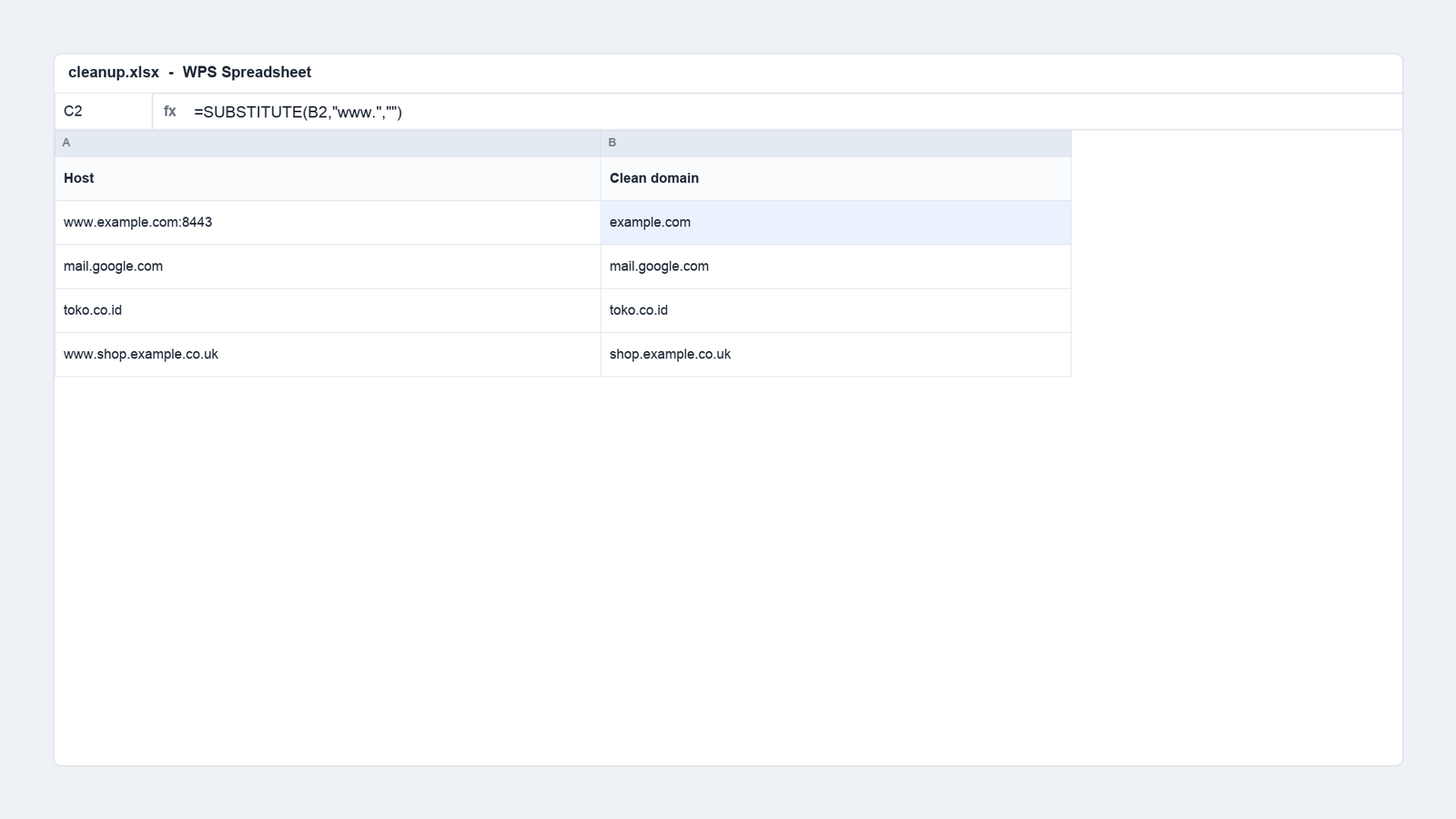
Strip www: =SUBSTITUTE(B2,"www.","") removes the prefix wherever it appears, so www.example.com and example.com finally match.
Drop a port: =IFERROR(TEXTBEFORE(B2,":"),B2) handles hosts copied out of a staging environment, where www.example.com:8443 would otherwise sit in its own row forever.
Clean host and domain columns
Keep the host column and the clean domain column separate. The host is what you debug with when a link looks wrong; the clean domain is what you group by. Overwriting the host loses the evidence.
Use Word, Excel, and PPT for FREE
Get Domain From URL Counts for a Report
Once the domain is in its own column, the analysis is one step away. Counting beats eyeballing, and it takes a single formula or a pivot table.
List the domains you care about in a blank area, or generate the unique list with =UNIQUE(C2:C5000) on builds that support dynamic arrays.
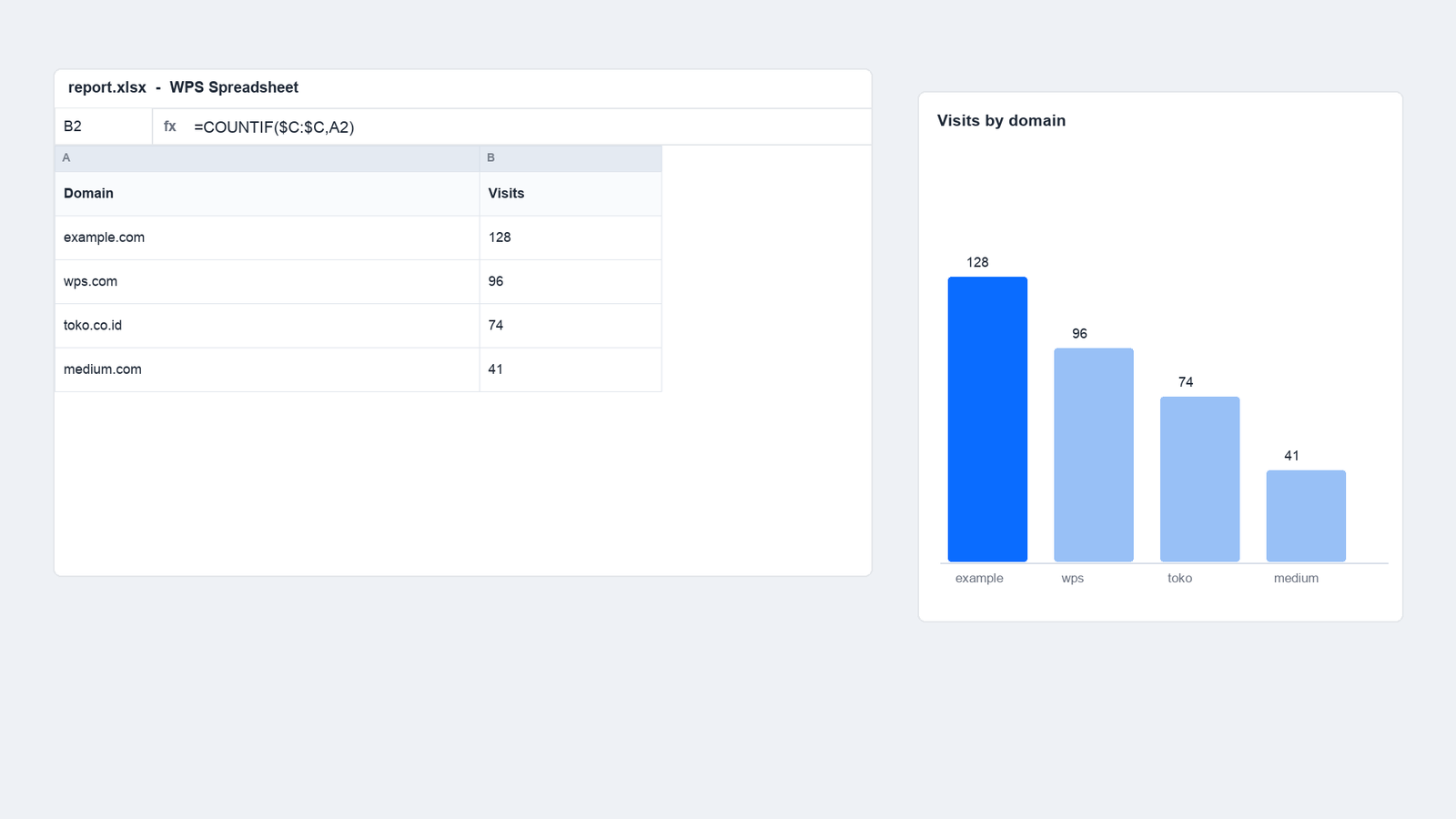
Count each one: =COUNTIF($C:$C,A2) beside the list returns every occurrence, including the ones you forgot were in the file.
Or build a pivot table. Select the domain column, choose Insert, Pivot Table, then drag the domain into Rows and the same field into Values. WPS writes the counts without a formula.
Chart the top ten only. A bar chart of 400 domains tells nobody anything; sort descending, keep ten, and the report reads in one second.
Visits counted by domain in WPS Spreadsheet
One practical check before you trust the numbers: search the clean domain column for the empty-looking results. A blank cell means the original URL had no host at all, and those rows will quietly shrink your totals.
100% secure
Two habits keep this column trustworthy over time. First, keep the formula in a column with a clear header such as host, not in a scratch column you will delete next week. Second, when new URLs arrive, paste them at the bottom of column A and re-fill the formula range; a mixed range where the last 200 rows have no formula is the most common reason a report undercounts.
The Best Free Spreadsheet Alternative: WPS Office
Cleaning a URL column is a five-minute job in a spreadsheet you already have, and a fifteen-minute job when the file opens with broken formulas in a different suite. WPS Spreadsheet runs the same text functions with the same syntax.
TEXTAFTER, TEXTBEFORE, UNIQUE and COUNTIF work the same way they do in Excel, so a formula written here travels.
One-click pivot tables for the counting step, with the chart on the same sheet.
Clean .xlsx compatibility, so a file that arrives from a client opens with its formulas and formatting intact.
AI formula help inside the sheet when the nesting gets deep, and no upload step before you can see the result.
Free for personal use on desktop, web and mobile, with WPS Spreadsheet included in the same suite as Writer and PDF.
WPS Spreadsheet main interface
Use Word, Excel, and PPT for FREE
FAQs
What is the simplest formula to get the domain from a URL?
=TEXTBEFORE(TEXTAFTER(A2,"//"),"/") returns the host name from a full URL. It strips the protocol and stops at the first slash after the domain.
Why does TEXTAFTER return #NAME? in my file?
The function does not exist in that build or file format. Use the LEFT, SUBSTITUTE and FIND combination instead, or save the file as .xlsx in a current WPS version.
How do I get example.com instead of shop.example.com?
=TEXTAFTER(B2,".",-2) returns the last two labels. For suffixes such as .co.uk, add the ISNUMBER(SEARCH(".co.",B2)) test so those rows keep three labels.
Can I remove www with the same formula?
Use =SUBSTITUTE(B2,"www.","") in a separate column. Keeping the original host makes it possible to check which rows had the prefix.
How do I count how many links come from each domain?
Use =COUNTIF($C:$C,A2) next to a list of domains, or a pivot table with the domain field in Rows and Values. Both give the same count.
Free Office Download
Use Word, Excel, and PPT for FREE, No Ads.
Edit PDF files with the powerful PDF toolkit.
Microsoft-like interface. Easy to learn. 100% Compatibility.
Boost your productivity with WPS's abundant free Word, Excel, PPT, and CV templates.
100% secure
Algirdas Jasaitis
Summary
Get the domain from a URL with =TEXTBEFORE(TEXTAFTER(A2,"//"),"/"), and keep the classic LEFT and FIND version for older builds that do not know the newer functions.
Add two columns after the host: one for the clean domain with www removed, one for the root domain, and handle two-part suffixes such as .co.uk explicitly.
Counting is the point of the whole exercise: count with COUNTIF or a pivot table, then chart the top ten only. WPS Spreadsheet does all of it on the free tier.
15 years of office industry experience, tech lover and copywriter. Follow me for product reviews, comparisons, and recommendations for new apps and software.


'%3e%3cpath%20d='M8%200C12.4183%200%2016%203.58172%2016%208C16%2012.4183%2012.4183%2016%208%2016C3.58172%2016%200%2012.4183%200%208C0%203.58172%203.58172%200%208%200ZM11.6162%204.38379C11.2257%203.99337%2010.5927%203.99338%2010.2021%204.38379L8%206.58594L5.79785%204.38379C5.40732%203.99334%204.77429%203.99329%204.38379%204.38379C3.99331%204.77429%203.99335%205.40733%204.38379%205.79785L6.58594%208L4.38379%2010.2021C3.99348%2010.5927%203.99341%2011.2257%204.38379%2011.6162C4.77426%2012.0066%205.40734%2012.0065%205.79785%2011.6162L8%209.41406L10.2021%2011.6162C10.5927%2012.0066%2011.2257%2012.0067%2011.6162%2011.6162C12.0067%2011.2257%2012.0066%2010.5927%2011.6162%2010.2021L9.41406%208L11.6162%205.79785C12.0066%205.40735%2012.0066%204.77429%2011.6162%204.38379Z'%20fill='%23080E17'%20fill-opacity='0.46'/%3e%3c/g%3e%3cdefs%3e%3cclipPath%20id='clip0_3761_713'%3e%3crect%20width='16'%20height='16'%20fill='white'/%3e%3c/clipPath%3e%3c/defs%3e%3c/svg%3e)




'%3e%3cpath%20fill-rule='evenodd'%20clip-rule='evenodd'%20d='M21.4999%2010.9993C21.4999%205.20009%2016.7986%200.498901%2010.9993%200.498901C5.19994%200.498901%200.498657%205.20009%200.498657%2010.9993C0.498657%2016.2404%204.33858%2020.5844%209.35855%2021.3722V14.0346H6.69238V10.9993H9.35855V8.68594C9.35855%206.05427%2010.9262%204.60062%2013.3248%204.60062C14.4736%204.60062%2015.6753%204.80571%2015.6753%204.80571V7.38979H14.3512C13.0468%207.38979%2012.64%208.19921%2012.64%209.0296V10.9993H15.5523L15.0867%2014.0346H12.64V21.3722C17.66%2020.5844%2021.4999%2016.2404%2021.4999%2010.9993Z'%20fill='%231568EA'/%3e%3c/g%3e%3c/svg%3e)


'%3e%3cpath%20d='M2.42045%2022.1876H6.31818V12.7217L0.75%208.54553V20.5171C0.75%2021.4414%201.49892%2022.1876%202.42045%2022.1876Z'%20fill='%234285F4'/%3e%3cpath%20d='M19.682%2022.1876H23.5797C24.5041%2022.1876%2025.2502%2021.4387%2025.2502%2020.5171V8.54553L19.682%2012.7217'%20fill='%2334A853'/%3e%3cpath%20d='M19.682%205.48293V12.7216L25.2502%208.54543V6.31816C25.2502%204.25236%2022.8921%203.07469%2021.2411%204.31361'%20fill='%23FBBC04'/%3e%3cpath%20d='M6.31824%2012.7217V5.48303L13.0001%2010.4944L19.6819%205.48303V12.7217L13.0001%2017.733'%20fill='%23EA4335'/%3e%3cpath%20d='M0.75%206.31816V8.54543L6.31818%2012.7216V5.48293L4.75909%204.31361C3.10534%203.07469%200.75%204.25236%200.75%206.31816Z'%20fill='%23C5221F'/%3e%3c/g%3e%3cdefs%3e%3cclipPath%20id='clip0_2954_7305'%3e%3crect%20width='24.5'%20height='18.375'%20fill='white'%20transform='translate(0.75%203.8125)'/%3e%3c/clipPath%3e%3c/defs%3e%3c/svg%3e)







'%3e%3cpath%20d='M19.9911%204.11386V6.471H18.5894C18.0775%206.471%2017.7322%206.57814%2017.5536%206.79243C17.3751%207.00671%2017.2858%207.32814%2017.2858%207.75671V9.44421H19.9019L19.5536%2012.0871H17.2858V18.8639H14.5536V12.0871H12.2769V9.44421H14.5536V7.49779C14.5536%206.39064%2014.8632%205.53201%2015.4822%204.92189C16.1013%204.31177%2016.9257%204.00671%2017.9554%204.00671C18.8304%204.00671%2019.509%204.04243%2019.9911%204.11386Z'%20fill='%23333333'/%3e%3c/g%3e%3cdefs%3e%3cclipPath%20id='clip0_2938_8199'%3e%3crect%20width='16'%20height='16'%20fill='white'%20transform='translate(8%204.00671)'/%3e%3c/clipPath%3e%3c/defs%3e%3c/svg%3e)
'%3e%3cpath%20d='M17.5237%2010.7813L23.4811%204H22.0699L16.8949%209.88693L12.7648%204H8L14.2469%2012.9029L8%2020.0133H9.4112L14.8725%2013.7952L19.2352%2020.0133H24M9.92053%205.04213H12.0885L22.0688%2019.0224H19.9003'%20fill='%23333333'/%3e%3c/g%3e%3cdefs%3e%3cclipPath%20id='clip0_2938_8200'%3e%3crect%20width='16'%20height='16.0134'%20fill='white'%20transform='translate(8%204)'/%3e%3c/clipPath%3e%3c/defs%3e%3c/svg%3e)


