

'%3e%3cpath%20d='M8%200C12.4183%200%2016%203.58172%2016%208C16%2012.4183%2012.4183%2016%208%2016C3.58172%2016%200%2012.4183%200%208C0%203.58172%203.58172%200%208%200ZM11.6162%204.38379C11.2257%203.99337%2010.5927%203.99338%2010.2021%204.38379L8%206.58594L5.79785%204.38379C5.40732%203.99334%204.77429%203.99329%204.38379%204.38379C3.99331%204.77429%203.99335%205.40733%204.38379%205.79785L6.58594%208L4.38379%2010.2021C3.99348%2010.5927%203.99341%2011.2257%204.38379%2011.6162C4.77426%2012.0066%205.40734%2012.0065%205.79785%2011.6162L8%209.41406L10.2021%2011.6162C10.5927%2012.0066%2011.2257%2012.0067%2011.6162%2011.6162C12.0067%2011.2257%2012.0066%2010.5927%2011.6162%2010.2021L9.41406%208L11.6162%205.79785C12.0066%205.40735%2012.0066%204.77429%2011.6162%204.38379Z'%20fill='%23080E17'%20fill-opacity='0.46'/%3e%3c/g%3e%3cdefs%3e%3cclipPath%20id='clip0_3761_713'%3e%3crect%20width='16'%20height='16'%20fill='white'/%3e%3c/clipPath%3e%3c/defs%3e%3c/svg%3e)



'%3e%3cpath%20fill-rule='evenodd'%20clip-rule='evenodd'%20d='M21.4999%2010.9993C21.4999%205.20009%2016.7986%200.498901%2010.9993%200.498901C5.19994%200.498901%200.498657%205.20009%200.498657%2010.9993C0.498657%2016.2404%204.33858%2020.5844%209.35855%2021.3722V14.0346H6.69238V10.9993H9.35855V8.68594C9.35855%206.05427%2010.9262%204.60062%2013.3248%204.60062C14.4736%204.60062%2015.6753%204.80571%2015.6753%204.80571V7.38979H14.3512C13.0468%207.38979%2012.64%208.19921%2012.64%209.0296V10.9993H15.5523L15.0867%2014.0346H12.64V21.3722C17.66%2020.5844%2021.4999%2016.2404%2021.4999%2010.9993Z'%20fill='%231568EA'/%3e%3c/g%3e%3c/svg%3e)


'%3e%3cpath%20d='M2.42045%2022.1876H6.31818V12.7217L0.75%208.54553V20.5171C0.75%2021.4414%201.49892%2022.1876%202.42045%2022.1876Z'%20fill='%234285F4'/%3e%3cpath%20d='M19.682%2022.1876H23.5797C24.5041%2022.1876%2025.2502%2021.4387%2025.2502%2020.5171V8.54553L19.682%2012.7217'%20fill='%2334A853'/%3e%3cpath%20d='M19.682%205.48293V12.7216L25.2502%208.54543V6.31816C25.2502%204.25236%2022.8921%203.07469%2021.2411%204.31361'%20fill='%23FBBC04'/%3e%3cpath%20d='M6.31824%2012.7217V5.48303L13.0001%2010.4944L19.6819%205.48303V12.7217L13.0001%2017.733'%20fill='%23EA4335'/%3e%3cpath%20d='M0.75%206.31816V8.54543L6.31818%2012.7216V5.48293L4.75909%204.31361C3.10534%203.07469%200.75%204.25236%200.75%206.31816Z'%20fill='%23C5221F'/%3e%3c/g%3e%3cdefs%3e%3cclipPath%20id='clip0_2954_7305'%3e%3crect%20width='24.5'%20height='18.375'%20fill='white'%20transform='translate(0.75%203.8125)'/%3e%3c/clipPath%3e%3c/defs%3e%3c/svg%3e)


Need to share a presentation that opens the same way on every device? When you convert PPT to PDF with iLovePDF, each slide becomes a fixed page that keeps your fonts, charts, and images in place. A PDF copy is easier to email, print, and archive, and recipients cannot accidentally edit your slides.
This guide walks you through the free online conversion step by step, explains the file size limits of the free plan, and shows a desktop alternative if you prefer not to upload your slides at all.
How to Convert PPT to PDF with iLovePDF
How to Convert PPT to PDF with iLovePDF Online
The whole conversion happens in your browser, and you do not need to create an account. Follow these steps to convert PPT to PDF with iLovePDF in under a minute.
Open the tool — Go to iLovePDF PowerPoint to PDF in your browser.
Add your PPT files — Click Select PPT files or drag and drop your .ppt or .pptx presentations into the upload area. You can also import files from Google Drive or Dropbox.
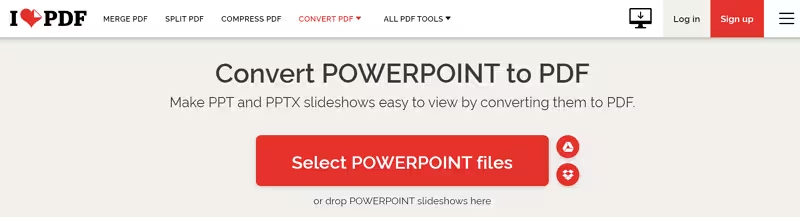
Convert PPT files with iLovePDF online
Start the conversion — Press the red Convert to PDF button. iLovePDF turns each slide into a fixed PDF page.
Download the result — Click Download PDF to save the file to your device, or upload it straight to Google Drive or Dropbox.
You can queue several presentations in one session, but the free plan limits how large each file can be, which we cover below.


iLovePDF PPT to PDF Options and Free Limits
The online converter is built for quick, occasional jobs, and the free plan comes with a few practical boundaries worth knowing before you upload.
File size: the free plan handles presentations up to around 15 MB per file, while a Pro subscription raises the ceiling to 4 GB.
Multiple files: you can queue more than one presentation at a time, with the number of files capped on the free plan.
Privacy: uploaded files are processed over an encrypted connection and automatically deleted from iLovePDF servers after about two hours.
No installation: everything runs in the browser, so it works on Windows, macOS, and even a tablet.
Because the tool works from the browser, it is a good fit for one-off conversions. If you convert decks every week, or your files regularly exceed the free size cap, a desktop exporter removes those limits entirely.
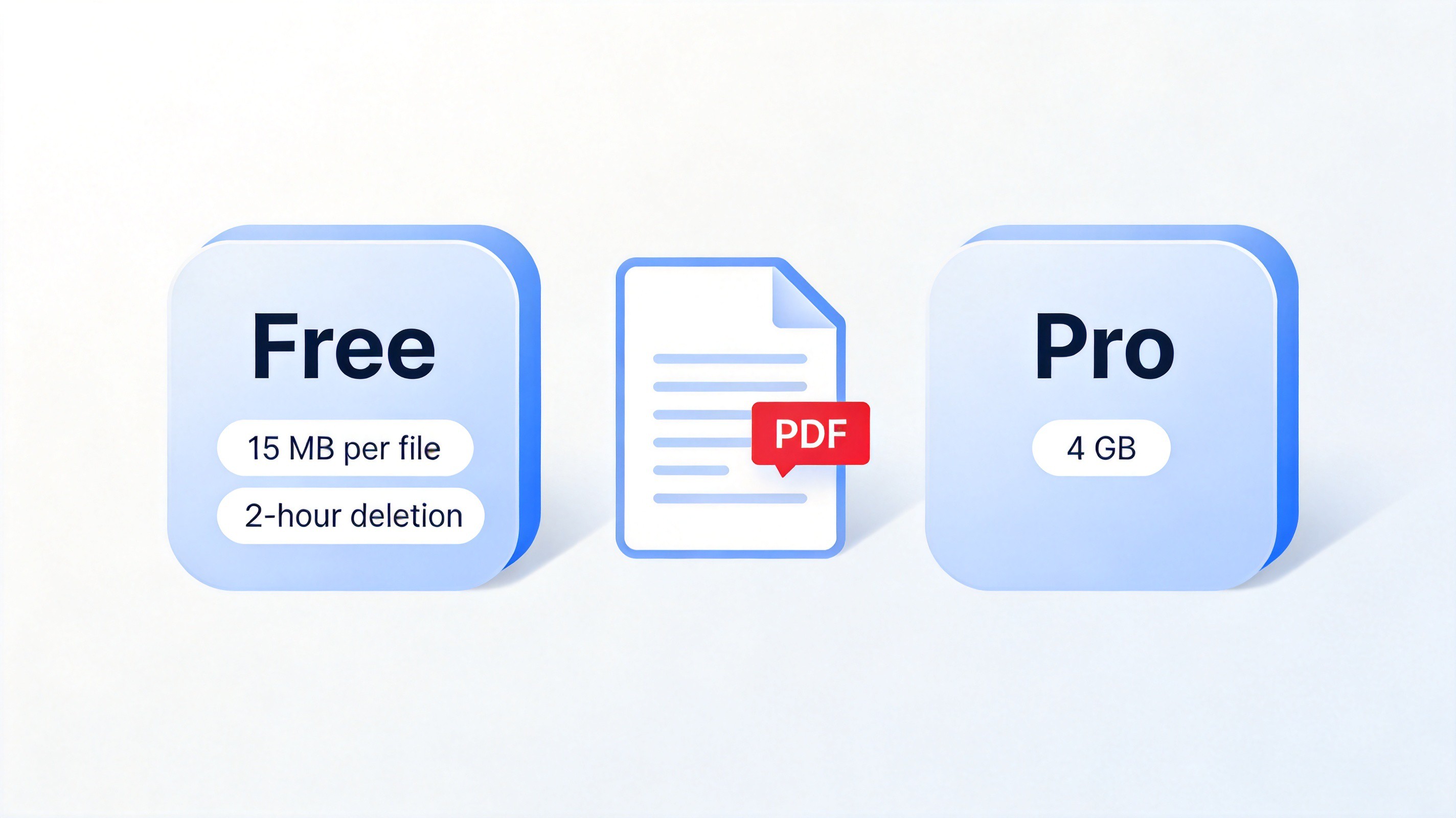
iLovePDF free plan file size limits
The Best Free Alternative: WPS Office for PPT to PDF
If you would rather not upload your slides to a website, WPS Presentation includes a built-in PDF exporter that runs entirely on your desktop. There is no file size cap tied to an upload queue, no waiting for a browser progress bar, and your decks never leave your device. For a deeper look at the built-in export path, see our guide on how to convert PPT to PDF for free.
How to Convert PPT to PDF with WPS Office
Open the file — Launch WPS Presentation and open your .ppt or .pptx deck.
Choose Export to PDF — Click the File tab and select Export to PDF from the menu.
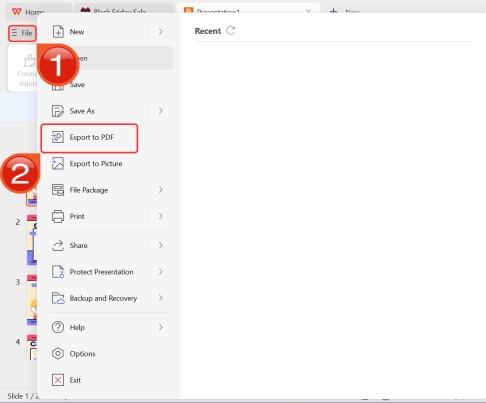
Export presentation as PDF in WPS
Set the range and export — Pick All Slides or a custom page range, choose a save location, and click Export.
WPS Office bundles this exporter with Writer, Spreadsheet, and a full PDF toolkit in one free download, so the same app covers your documents, sheets, and presentations.
FAQs
Is iLovePDF PPT to PDF free to use?
Yes. The online PowerPoint to PDF tool is free with no registration required. You only need a Pro subscription if your files exceed the free size and quantity limits.
What is the maximum file size on the free plan?
The free plan handles presentations up to around 15 MB per file. If your deck contains heavy images or embedded media, compress it first or use a desktop exporter such as WPS Presentation.
Does converting PPT to PDF keep animations and speaker notes?
No. PDF is a static format, so animations and transitions are flattened and speaker notes are not included. Each slide becomes one finished page, which is ideal for sharing and printing.
Are my files safe on iLovePDF?
Files are transferred over an encrypted connection and automatically deleted from iLovePDF servers after about two hours. If confidentiality is critical, an offline converter keeps files on your device entirely.
What if my presentation is larger than 15 MB?
Compress the images in your deck before uploading, upgrade to iLovePDF Pro for larger files, or export directly from desktop software with no upload size cap.

Summary
Converting PPT to PDF with iLovePDF takes four steps: open the PowerPoint to PDF tool, upload your .ppt or .pptx files, press Convert to PDF, and download the result. The free plan covers files up to around 15 MB with no registration, and uploads are deleted after about two hours. If you convert decks often, want no upload size cap, or prefer to keep slides on your device, WPS Presentation exports PDFs offline with the built-in File > Export to PDF path in a few clicks.

'%3e%3cpath%20d='M19.9911%204.11386V6.471H18.5894C18.0775%206.471%2017.7322%206.57814%2017.5536%206.79243C17.3751%207.00671%2017.2858%207.32814%2017.2858%207.75671V9.44421H19.9019L19.5536%2012.0871H17.2858V18.8639H14.5536V12.0871H12.2769V9.44421H14.5536V7.49779C14.5536%206.39064%2014.8632%205.53201%2015.4822%204.92189C16.1013%204.31177%2016.9257%204.00671%2017.9554%204.00671C18.8304%204.00671%2019.509%204.04243%2019.9911%204.11386Z'%20fill='%23333333'/%3e%3c/g%3e%3cdefs%3e%3cclipPath%20id='clip0_2938_8199'%3e%3crect%20width='16'%20height='16'%20fill='white'%20transform='translate(8%204.00671)'/%3e%3c/clipPath%3e%3c/defs%3e%3c/svg%3e)
'%3e%3cpath%20d='M17.5237%2010.7813L23.4811%204H22.0699L16.8949%209.88693L12.7648%204H8L14.2469%2012.9029L8%2020.0133H9.4112L14.8725%2013.7952L19.2352%2020.0133H24M9.92053%205.04213H12.0885L22.0688%2019.0224H19.9003'%20fill='%23333333'/%3e%3c/g%3e%3cdefs%3e%3cclipPath%20id='clip0_2938_8200'%3e%3crect%20width='16'%20height='16.0134'%20fill='white'%20transform='translate(8%204)'/%3e%3c/clipPath%3e%3c/defs%3e%3c/svg%3e)


