

'%3e%3cpath%20d='M8%200C12.4183%200%2016%203.58172%2016%208C16%2012.4183%2012.4183%2016%208%2016C3.58172%2016%200%2012.4183%200%208C0%203.58172%203.58172%200%208%200ZM11.6162%204.38379C11.2257%203.99337%2010.5927%203.99338%2010.2021%204.38379L8%206.58594L5.79785%204.38379C5.40732%203.99334%204.77429%203.99329%204.38379%204.38379C3.99331%204.77429%203.99335%205.40733%204.38379%205.79785L6.58594%208L4.38379%2010.2021C3.99348%2010.5927%203.99341%2011.2257%204.38379%2011.6162C4.77426%2012.0066%205.40734%2012.0065%205.79785%2011.6162L8%209.41406L10.2021%2011.6162C10.5927%2012.0066%2011.2257%2012.0067%2011.6162%2011.6162C12.0067%2011.2257%2012.0066%2010.5927%2011.6162%2010.2021L9.41406%208L11.6162%205.79785C12.0066%205.40735%2012.0066%204.77429%2011.6162%204.38379Z'%20fill='%23080E17'%20fill-opacity='0.46'/%3e%3c/g%3e%3cdefs%3e%3cclipPath%20id='clip0_3761_713'%3e%3crect%20width='16'%20height='16'%20fill='white'/%3e%3c/clipPath%3e%3c/defs%3e%3c/svg%3e)



'%3e%3cpath%20fill-rule='evenodd'%20clip-rule='evenodd'%20d='M21.4999%2010.9993C21.4999%205.20009%2016.7986%200.498901%2010.9993%200.498901C5.19994%200.498901%200.498657%205.20009%200.498657%2010.9993C0.498657%2016.2404%204.33858%2020.5844%209.35855%2021.3722V14.0346H6.69238V10.9993H9.35855V8.68594C9.35855%206.05427%2010.9262%204.60062%2013.3248%204.60062C14.4736%204.60062%2015.6753%204.80571%2015.6753%204.80571V7.38979H14.3512C13.0468%207.38979%2012.64%208.19921%2012.64%209.0296V10.9993H15.5523L15.0867%2014.0346H12.64V21.3722C17.66%2020.5844%2021.4999%2016.2404%2021.4999%2010.9993Z'%20fill='%231568EA'/%3e%3c/g%3e%3c/svg%3e)


'%3e%3cpath%20d='M2.42045%2022.1876H6.31818V12.7217L0.75%208.54553V20.5171C0.75%2021.4414%201.49892%2022.1876%202.42045%2022.1876Z'%20fill='%234285F4'/%3e%3cpath%20d='M19.682%2022.1876H23.5797C24.5041%2022.1876%2025.2502%2021.4387%2025.2502%2020.5171V8.54553L19.682%2012.7217'%20fill='%2334A853'/%3e%3cpath%20d='M19.682%205.48293V12.7216L25.2502%208.54543V6.31816C25.2502%204.25236%2022.8921%203.07469%2021.2411%204.31361'%20fill='%23FBBC04'/%3e%3cpath%20d='M6.31824%2012.7217V5.48303L13.0001%2010.4944L19.6819%205.48303V12.7217L13.0001%2017.733'%20fill='%23EA4335'/%3e%3cpath%20d='M0.75%206.31816V8.54543L6.31818%2012.7216V5.48293L4.75909%204.31361C3.10534%203.07469%200.75%204.25236%200.75%206.31816Z'%20fill='%23C5221F'/%3e%3c/g%3e%3cdefs%3e%3cclipPath%20id='clip0_2954_7305'%3e%3crect%20width='24.5'%20height='18.375'%20fill='white'%20transform='translate(0.75%203.8125)'/%3e%3c/clipPath%3e%3c/defs%3e%3c/svg%3e)


AI image tools have become some of the most exciting resources for creators today. They let you generate new visuals, refine existing photos, and experiment with design in ways that were once impossible without advanced software. The challenge, however, is that not every tool manages to balance creativity with reliability. That’s where Google’s new AI image generator inside the Gemini app shines. It promises fast image creation, precise editing, and consistent results across multiple edits. In this Nano Banana review, I’ll take you through what Nano Banana can do, highlight its pros and cons, and introduce you to WPS Photos as a simpler alternative.


Overview of Nano Banana
So, what is Nano Banana exactly? At its core, Nano Banana is Google’s AI image generator that lives inside the Gemini app. Unlike older editing tools, it not only tweaks photos but it can create entirely new ones based on your prompts, edit existing visuals with precision, and even keep characters consistent across multiple images. That last point, consistency, is a game-changer. Many AI tools struggle to keep the same face, body, or style intact across multiple generations. Nano Banana AI, however, is designed to solve that.
Features:
Pricing:
Pros:
Cons:
It’s easy to see why the hype exists: Nano Banana combines the reach of Google with the creativity of a Google AI image generator, making it one of the most talked-about tools for creators in 2025.
How to Use Nano Banana – A Step-by-Step Guide
It took me a little time to get comfortable with Nano Banana, mainly because its options aren’t immediately obvious. Since it’s built into the Gemini app, you don’t have to install anything extra, but you do need to know where to look and what each option does. Once I figured out the basics, the process felt much more straightforward and the results were easier to manage. Here’s exactly how you can start using it:
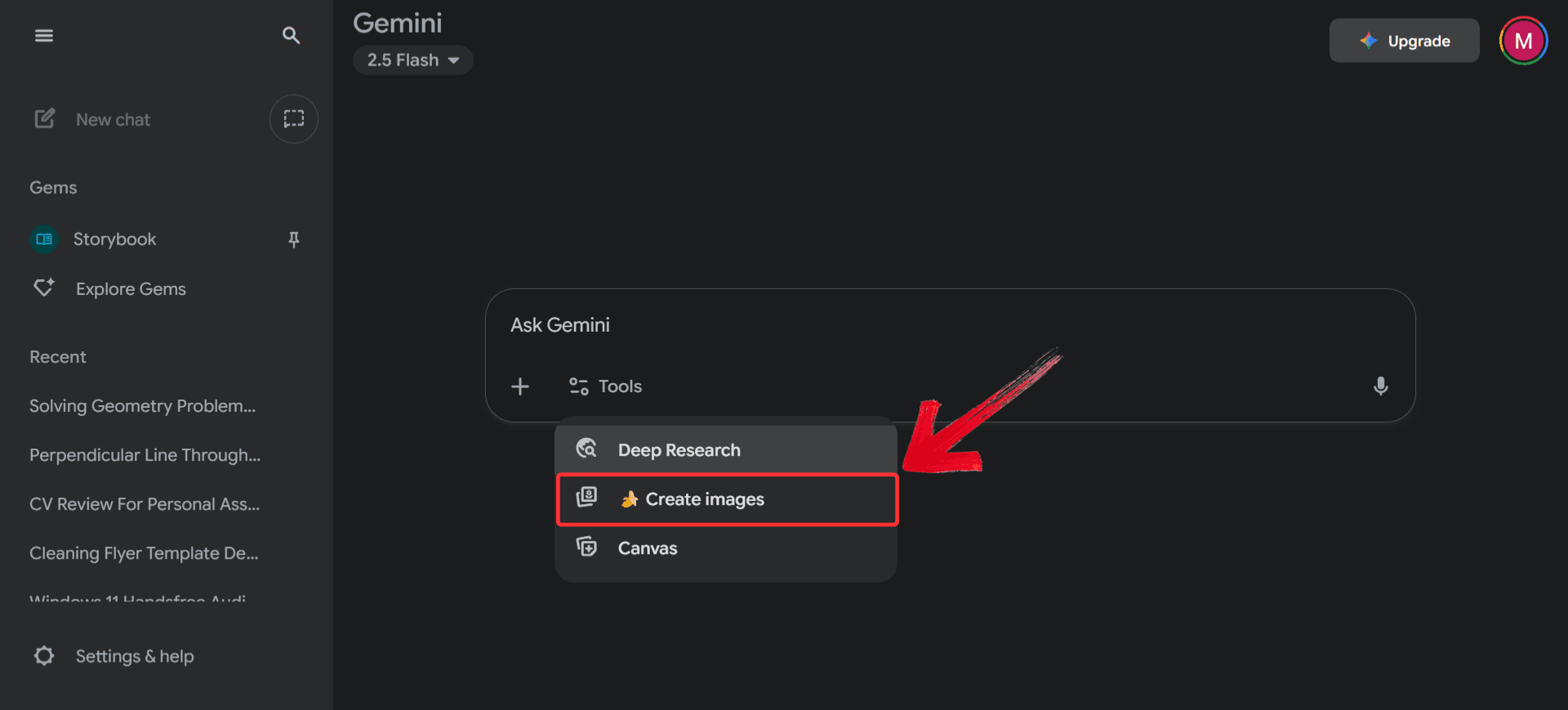
Step 1: Go to Gemini’s official website and click on the “Tools” option from the top menu.
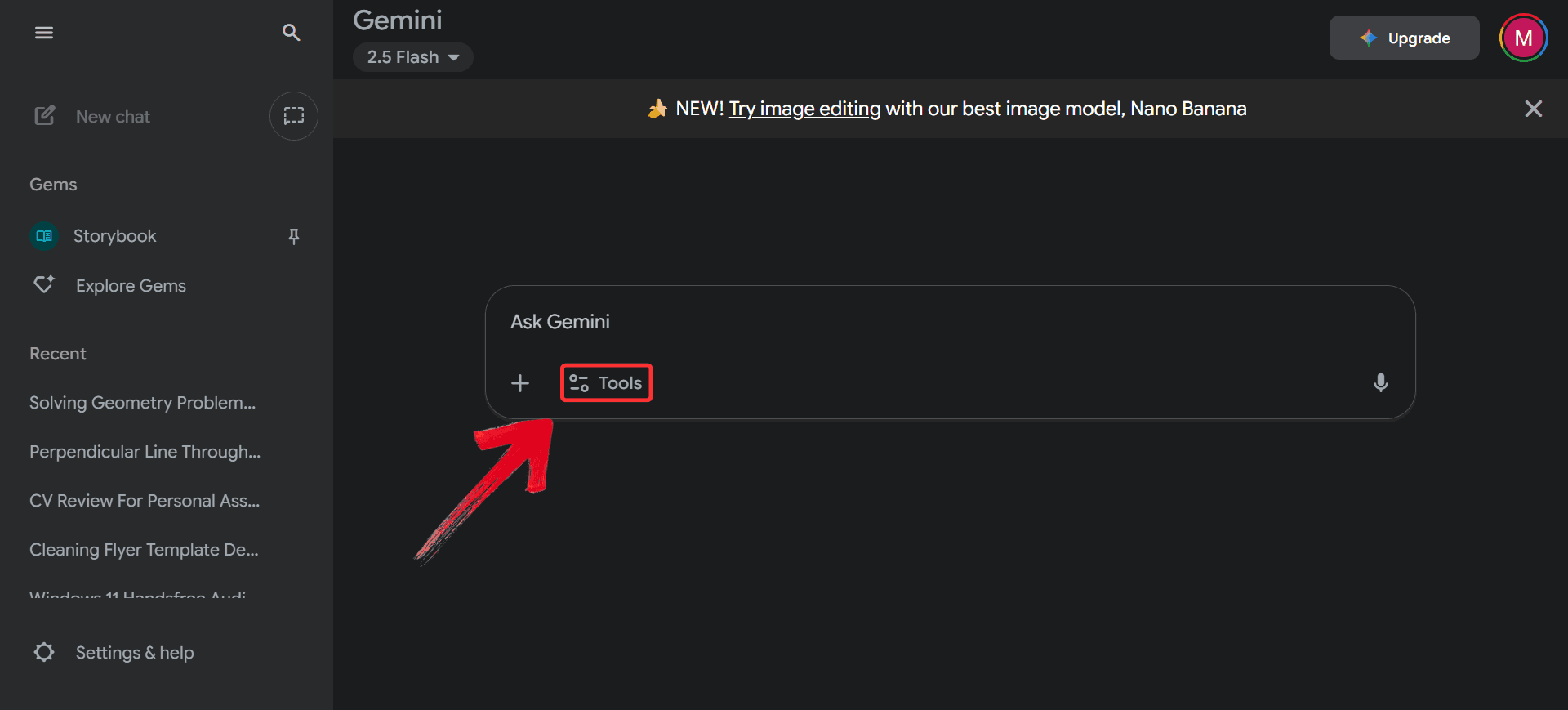
Step 2: From the dropdown, select “Create Images” to switch into Nano Banana.
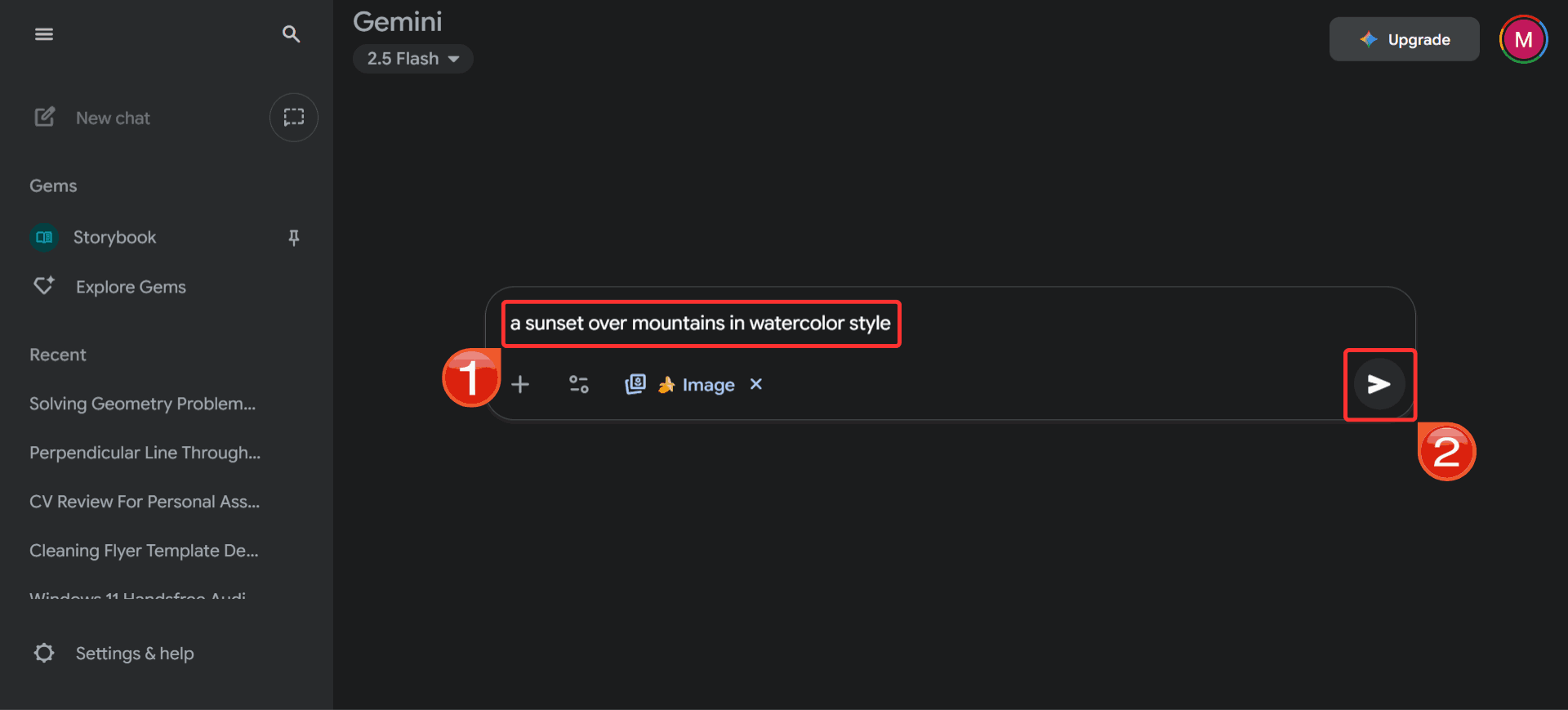
Step 3: In the text box, type the prompt for the image you want to generate and hit “Send”.
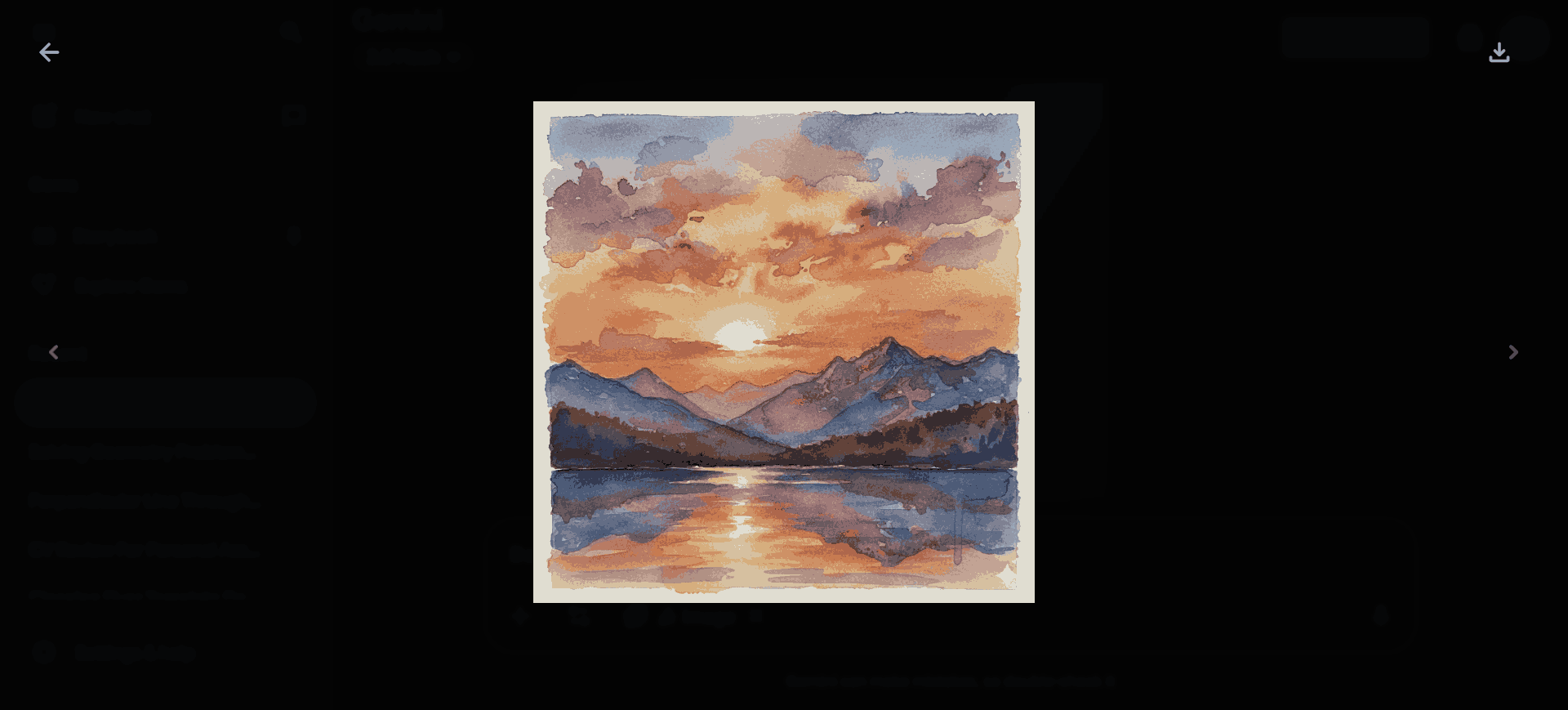
Step 4: Nano Banana will generate the photo based on your prompt; you can review it, make refinements, or start over with a new idea.
Another AI Photo Solution – WPS Photos
While Nano Banana shines at generating entirely new visuals, there are times when I just want to refine a photo I already have instead of starting from scratch. A friend suggested I try WPS Photos for simpler edits. I wasn’t sure at first, but after giving it a try, I realized he was right: it’s almost perfect. The first time I used it, I brightened up a dull travel shot and quickly removed a random signboard in the background, all in under a minute. Instead of typing prompts, I could just adjust lighting, apply filters, or clean up little distractions in a few taps. It felt effortless compared to full-scale generation, and it’s become my default photo editor.
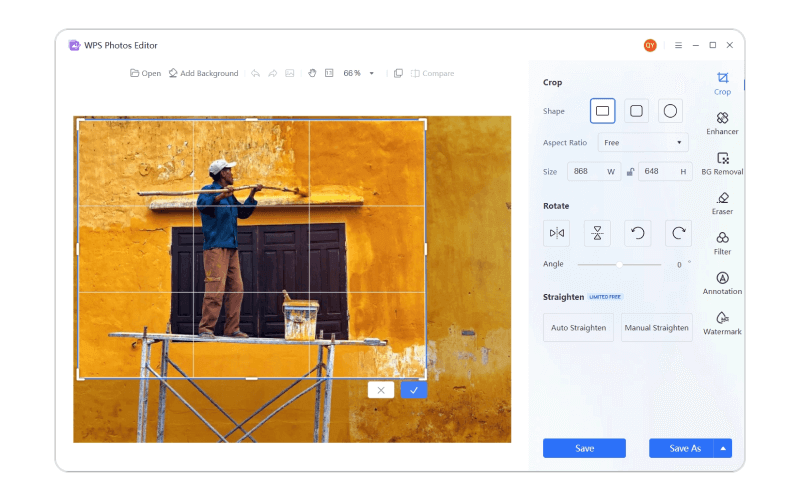
Features:
Reading through the features is one thing, but actually trying WPS Photos showed me how simple it really is. It takes little effort to get started since there are no complicated menus or settings, just straightforward tools that make quick edits feel natural. And since this Nano Banana Review also explores alternatives, it makes sense to show you exactly how you can use WPS Photos for your own images
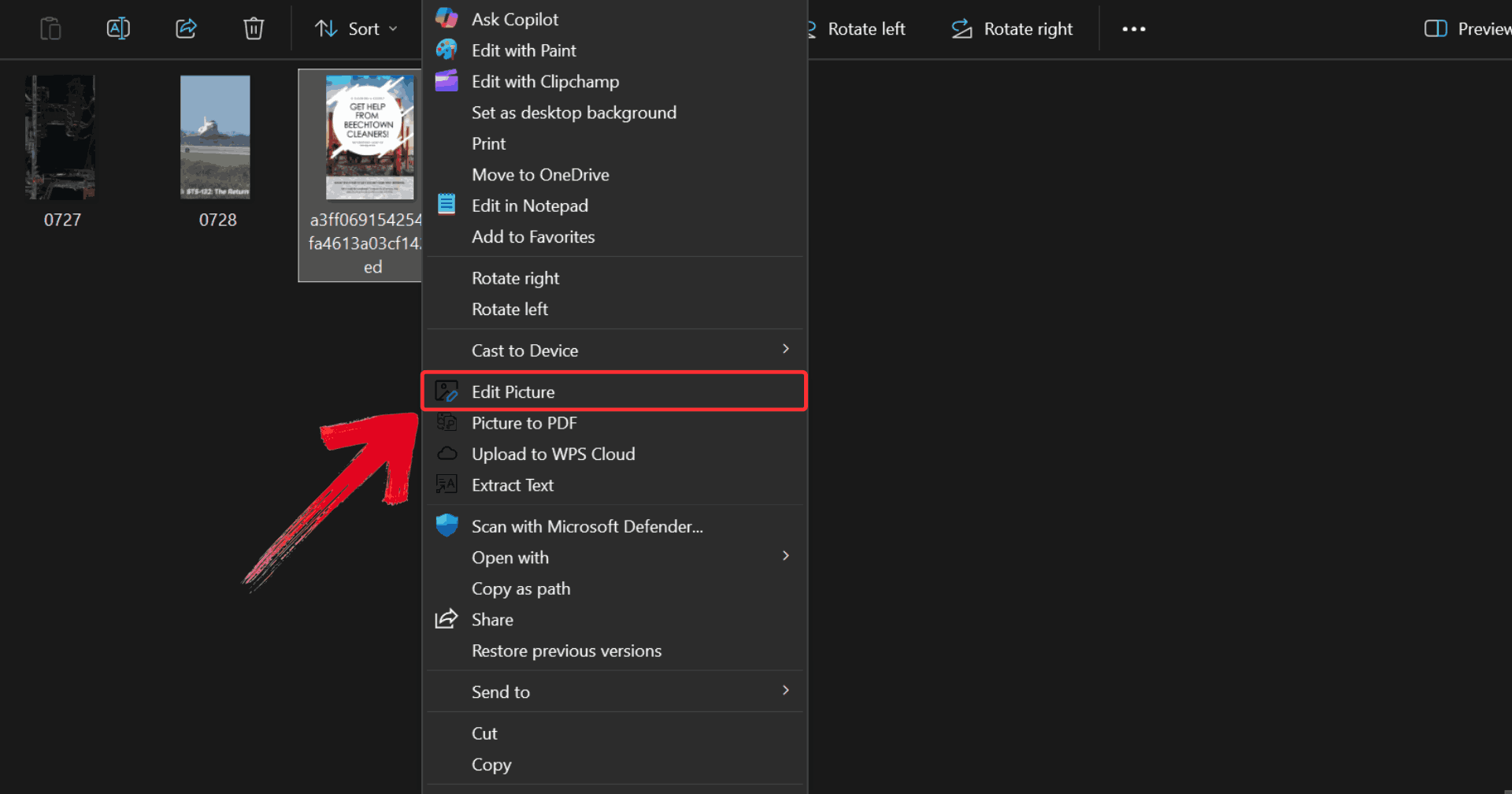
Step 1: Right-click on the photo you want to edit, then click on “Edit Photo” to open it in WPS Photo Editor.
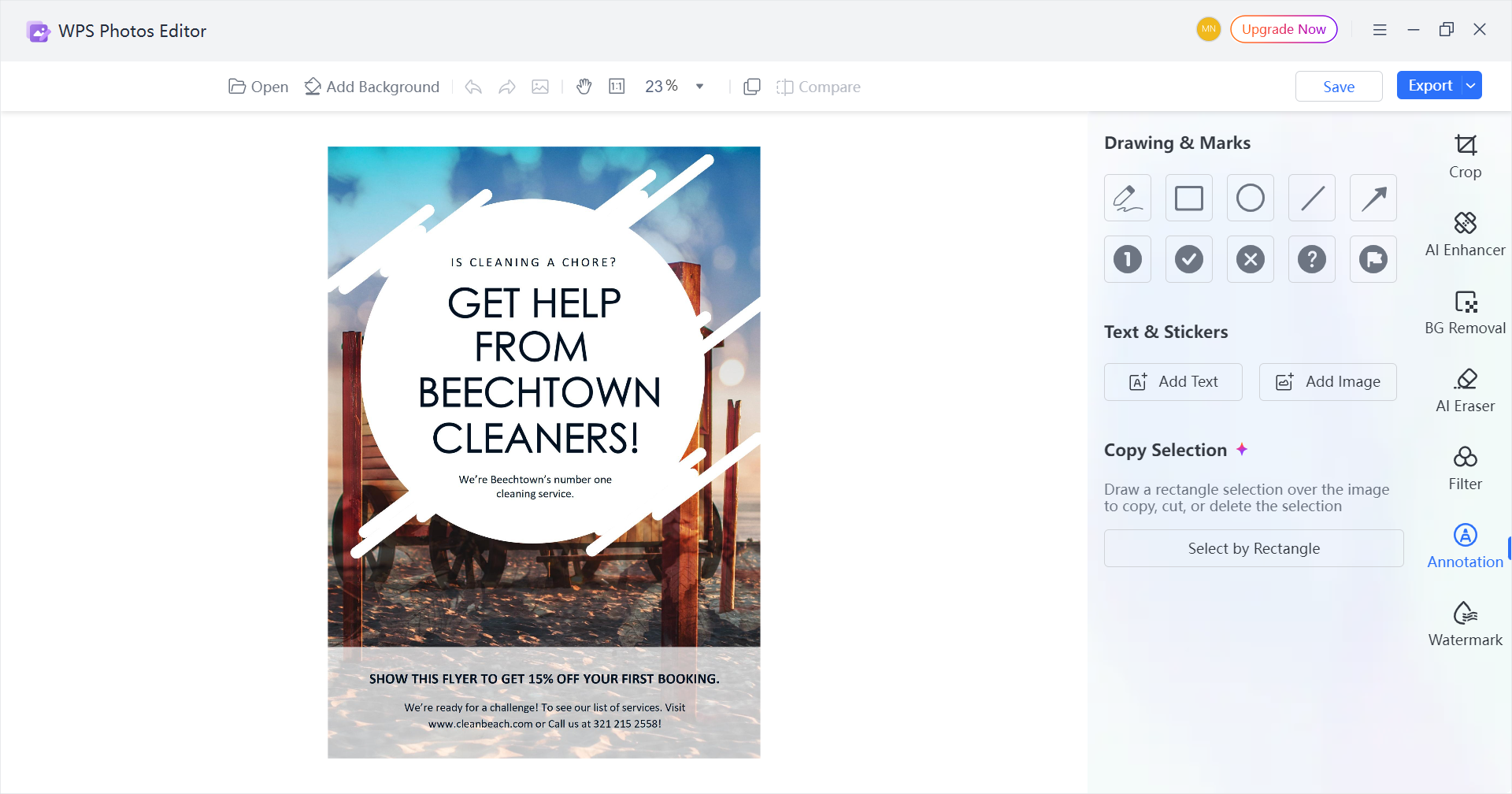
Step 2: Make whatever changes you like to the photo, such as using the Image Enhancer and adjusting colors for a polished look.
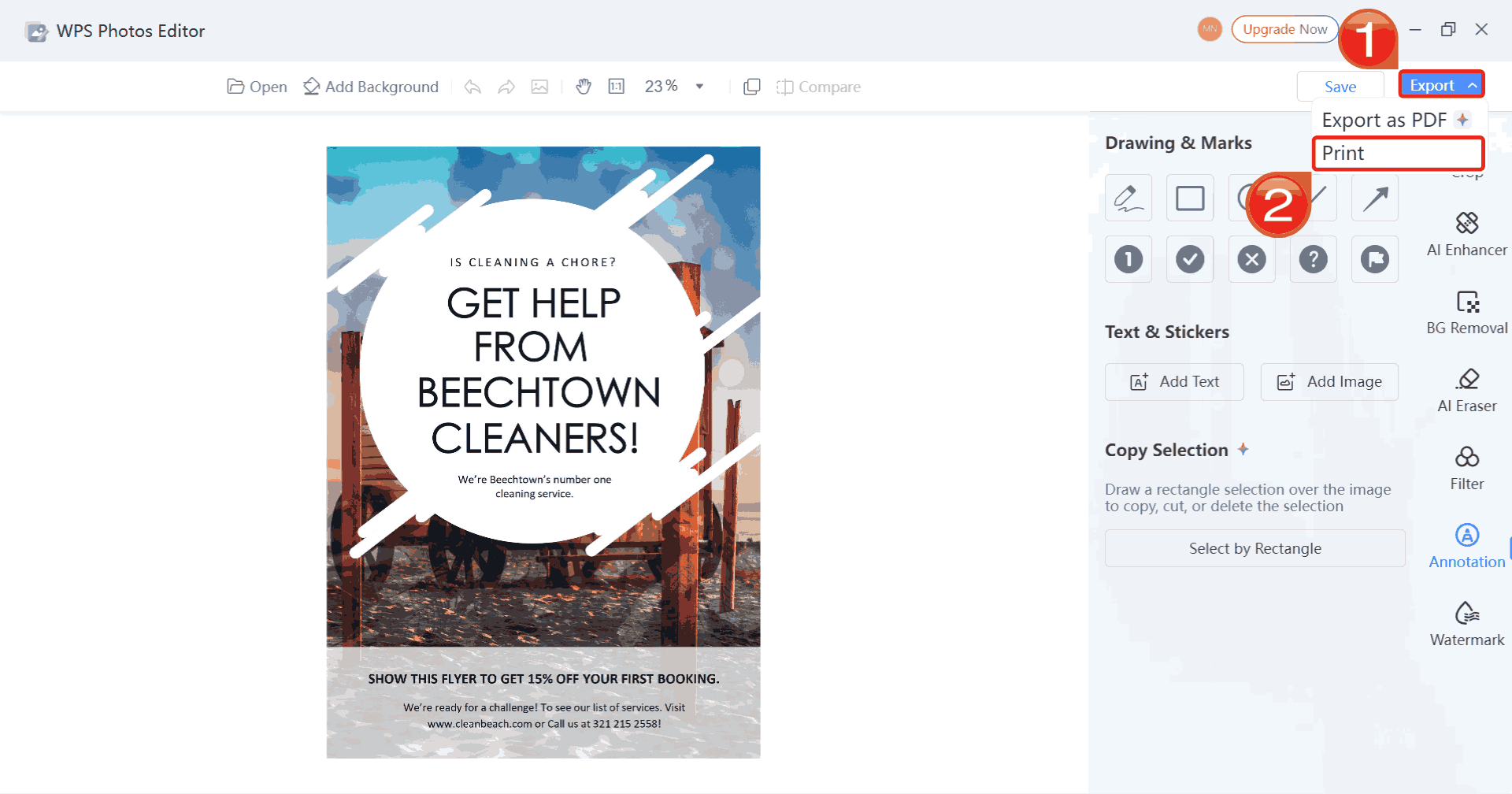
Step 3: Click on “Export”, then select “Print” to save your changes and print your edited photo.
FAQs
1. Is Nano Banana free to use?
Yes, Nano Banana offers free daily image generations, but advanced features like high resolution and watermark-free downloads require a Gemini subscription.
2. Can Nano Banana be used for professional design?
It’s great for concept creation and experimentation, but limitations like watermarks and occasional glitches may not make it ideal for final, client-ready publishing.
3. How does WPS Photos differ from Nano Banana?
Nano Banana is primarily an AI image generator, while WPS Photos is focused on enhancing real photos with filters, retouching, and background tools.
4. Which tool is better for casual users?
WPS Photos is the simpler, more user-friendly option for everyday edits. Nano Banana is better suited for users experimenting with AI-generated art or creative storytelling.

'%3e%3cpath%20d='M19.9911%204.11386V6.471H18.5894C18.0775%206.471%2017.7322%206.57814%2017.5536%206.79243C17.3751%207.00671%2017.2858%207.32814%2017.2858%207.75671V9.44421H19.9019L19.5536%2012.0871H17.2858V18.8639H14.5536V12.0871H12.2769V9.44421H14.5536V7.49779C14.5536%206.39064%2014.8632%205.53201%2015.4822%204.92189C16.1013%204.31177%2016.9257%204.00671%2017.9554%204.00671C18.8304%204.00671%2019.509%204.04243%2019.9911%204.11386Z'%20fill='%23333333'/%3e%3c/g%3e%3cdefs%3e%3cclipPath%20id='clip0_2938_8199'%3e%3crect%20width='16'%20height='16'%20fill='white'%20transform='translate(8%204.00671)'/%3e%3c/clipPath%3e%3c/defs%3e%3c/svg%3e)
'%3e%3cpath%20d='M17.5237%2010.7813L23.4811%204H22.0699L16.8949%209.88693L12.7648%204H8L14.2469%2012.9029L8%2020.0133H9.4112L14.8725%2013.7952L19.2352%2020.0133H24M9.92053%205.04213H12.0885L22.0688%2019.0224H19.9003'%20fill='%23333333'/%3e%3c/g%3e%3cdefs%3e%3cclipPath%20id='clip0_2938_8200'%3e%3crect%20width='16'%20height='16.0134'%20fill='white'%20transform='translate(8%204)'/%3e%3c/clipPath%3e%3c/defs%3e%3c/svg%3e)


