

'%3e%3cpath%20d='M8%200C12.4183%200%2016%203.58172%2016%208C16%2012.4183%2012.4183%2016%208%2016C3.58172%2016%200%2012.4183%200%208C0%203.58172%203.58172%200%208%200ZM11.6162%204.38379C11.2257%203.99337%2010.5927%203.99338%2010.2021%204.38379L8%206.58594L5.79785%204.38379C5.40732%203.99334%204.77429%203.99329%204.38379%204.38379C3.99331%204.77429%203.99335%205.40733%204.38379%205.79785L6.58594%208L4.38379%2010.2021C3.99348%2010.5927%203.99341%2011.2257%204.38379%2011.6162C4.77426%2012.0066%205.40734%2012.0065%205.79785%2011.6162L8%209.41406L10.2021%2011.6162C10.5927%2012.0066%2011.2257%2012.0067%2011.6162%2011.6162C12.0067%2011.2257%2012.0066%2010.5927%2011.6162%2010.2021L9.41406%208L11.6162%205.79785C12.0066%205.40735%2012.0066%204.77429%2011.6162%204.38379Z'%20fill='%23080E17'%20fill-opacity='0.46'/%3e%3c/g%3e%3cdefs%3e%3cclipPath%20id='clip0_3761_713'%3e%3crect%20width='16'%20height='16'%20fill='white'/%3e%3c/clipPath%3e%3c/defs%3e%3c/svg%3e)




'%3e%3cpath%20fill-rule='evenodd'%20clip-rule='evenodd'%20d='M21.4999%2010.9993C21.4999%205.20009%2016.7986%200.498901%2010.9993%200.498901C5.19994%200.498901%200.498657%205.20009%200.498657%2010.9993C0.498657%2016.2404%204.33858%2020.5844%209.35855%2021.3722V14.0346H6.69238V10.9993H9.35855V8.68594C9.35855%206.05427%2010.9262%204.60062%2013.3248%204.60062C14.4736%204.60062%2015.6753%204.80571%2015.6753%204.80571V7.38979H14.3512C13.0468%207.38979%2012.64%208.19921%2012.64%209.0296V10.9993H15.5523L15.0867%2014.0346H12.64V21.3722C17.66%2020.5844%2021.4999%2016.2404%2021.4999%2010.9993Z'%20fill='%231568EA'/%3e%3c/g%3e%3c/svg%3e)


'%3e%3cpath%20d='M2.42045%2022.1876H6.31818V12.7217L0.75%208.54553V20.5171C0.75%2021.4414%201.49892%2022.1876%202.42045%2022.1876Z'%20fill='%234285F4'/%3e%3cpath%20d='M19.682%2022.1876H23.5797C24.5041%2022.1876%2025.2502%2021.4387%2025.2502%2020.5171V8.54553L19.682%2012.7217'%20fill='%2334A853'/%3e%3cpath%20d='M19.682%205.48293V12.7216L25.2502%208.54543V6.31816C25.2502%204.25236%2022.8921%203.07469%2021.2411%204.31361'%20fill='%23FBBC04'/%3e%3cpath%20d='M6.31824%2012.7217V5.48303L13.0001%2010.4944L19.6819%205.48303V12.7217L13.0001%2017.733'%20fill='%23EA4335'/%3e%3cpath%20d='M0.75%206.31816V8.54543L6.31818%2012.7216V5.48293L4.75909%204.31361C3.10534%203.07469%200.75%204.25236%200.75%206.31816Z'%20fill='%23C5221F'/%3e%3c/g%3e%3cdefs%3e%3cclipPath%20id='clip0_2954_7305'%3e%3crect%20width='24.5'%20height='18.375'%20fill='white'%20transform='translate(0.75%203.8125)'/%3e%3c/clipPath%3e%3c/defs%3e%3c/svg%3e)


For professionals who want to make their project management more efficient, a burndown chart is an essential tool to streamline the process. However, many teams don’t really know how they work and how to create a reliable one, which makes it inconvenient for everyone. So, are there any free burndown chart templates you can use? In this guide, I’ll be showing some of the best burndown examples and teaching you how to edit them easily.


How to Create a Burndown Chart
If you don’t know what a burndown chart is, or simply need a refresher, I’ll be walking you through everything myself. A burndown chart is basically a visual representation of how much work you have left, along with the estimated time it will take to fully complete it. It can be an extremely useful tool to help you keep track of your team’s pace, making sure you finish all your projects on time.
Top 10 Burndown Chart Templates
If you’re trying to figure out how to create a burndown chart and implement it to your workflow, then it can be a bit confusing as a beginner. Using free burndown chart templates helps me streamline this process and save a lot of time, letting me be more efficient with my work. In this section, I’ll be highlighting 10 of the best burndown chart examples I’ve found for my own work so you can choose the right option for your own projects.
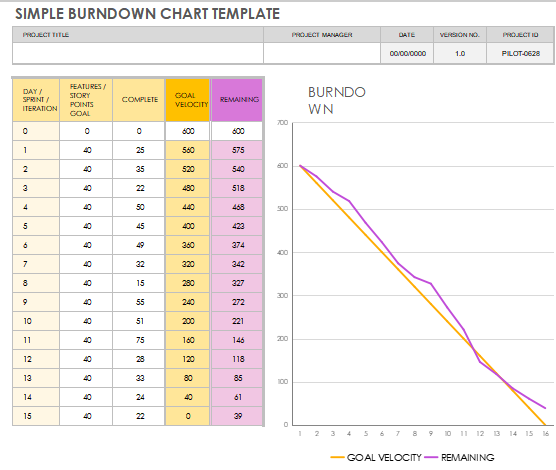
1. Simple Burndown Chart Template
If you are looking for something simple and minimalistic that isn’t too much of a hassle to use, then the Simple Burndown Chart Template would be the right choice for you. It features a simple visual graph for your workflow, along with your goals and other details in an organized table to the left. You can edit it further to customize it and make it your own.
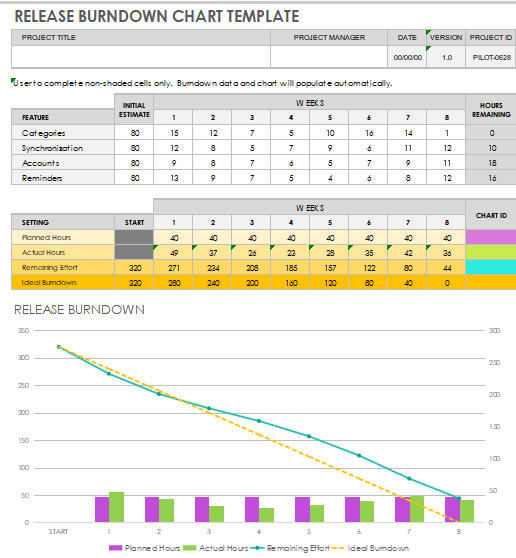
2. Release Burndown Chart Template
For those of you who want a burndown chart tracking their release with all the details included, then going for the Release Burndown Chart Template would be a better option. It features all the weeks listed in columns, along with work being divided in each one slot, helping you track everything precisely.
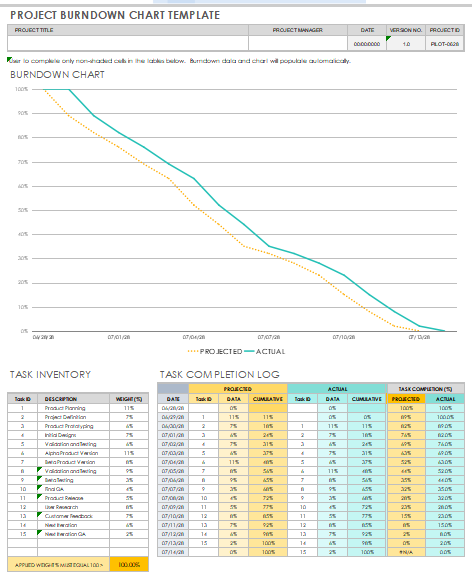
3. Project Burndown Chart Template
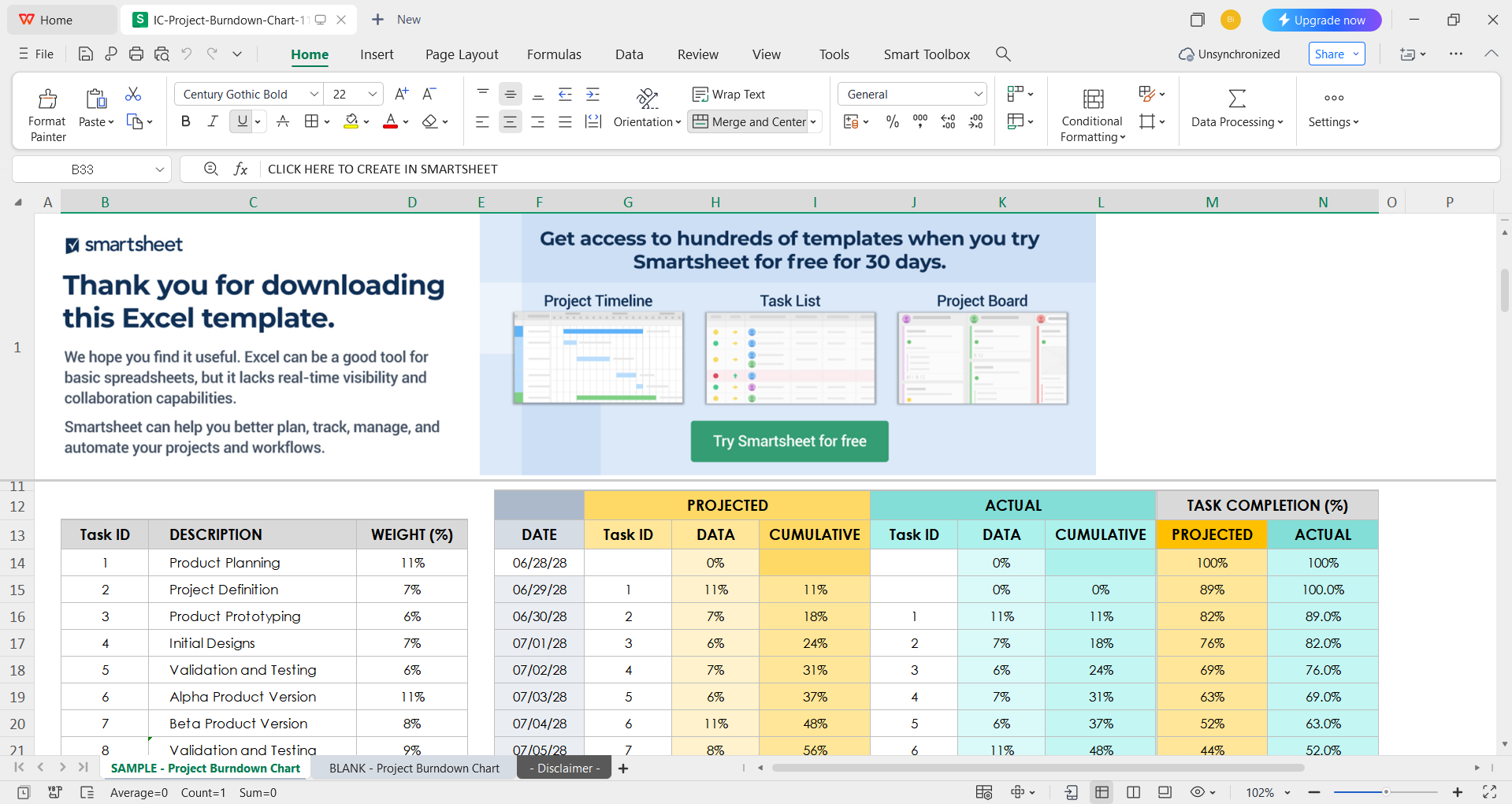
The Project Burndown Chart Template is perfect for students and professionals who want to organize and keep track of every task in their work, without missing any essential details in the process. It features 3 separate tables for projected, actual, and completion progress, helping you stay on top of your entire team.
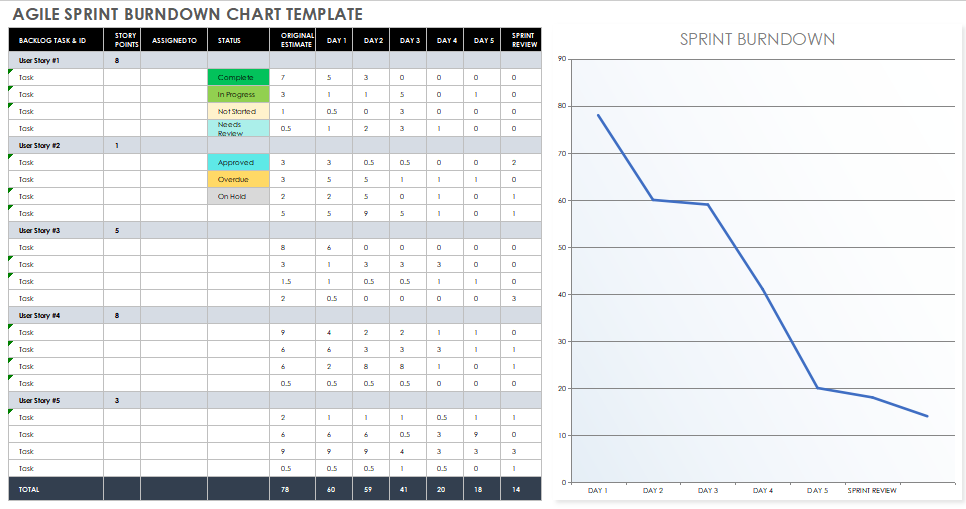
4. Agile Sprint Burndown Chart Template
If you are looking for a burndown chart example that not only keeps track of every single story but also helps you analyze each individual task reliably, then the Agile Sprint Burndown Chart Template would serve you well. It features a detailed breakdown of your tasks and story points, along with giving a graphical representation of the progress to further help you.
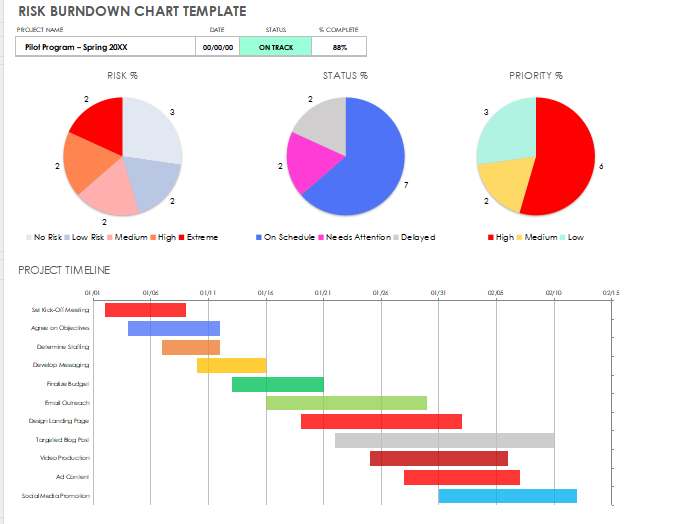
5. Risk Burndown Chart Template
For working professionals who want something more straightforward to organize their daily project tasks and evaluate the risk, the Risk Burndown Chart Template might be a suitable option. It features a bunch of colourful graphs that reliably help you know where you and your team stand on the project tasks, ensuring punctuality and consistency within the team.
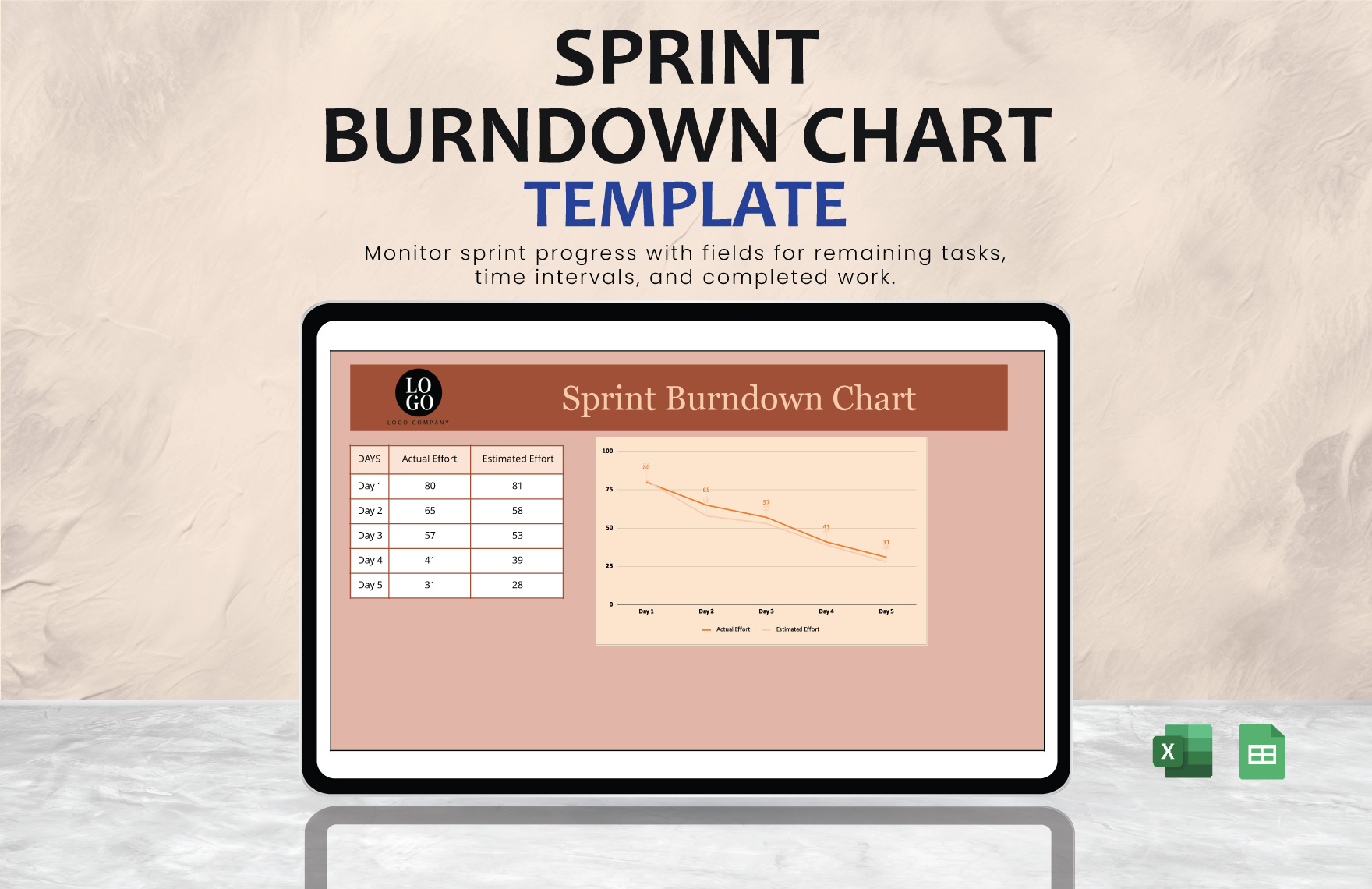
6. Sprint Burndown Chart Template
If you want a burndown chart that doesn’t seem too complicated or advanced, then I would personally recommend the Sprint Burndown Chart Template for your project tracking needs. It features colorful visuals for tracking work, along with a straightforward table listing out all the data in a polished and organized manner.
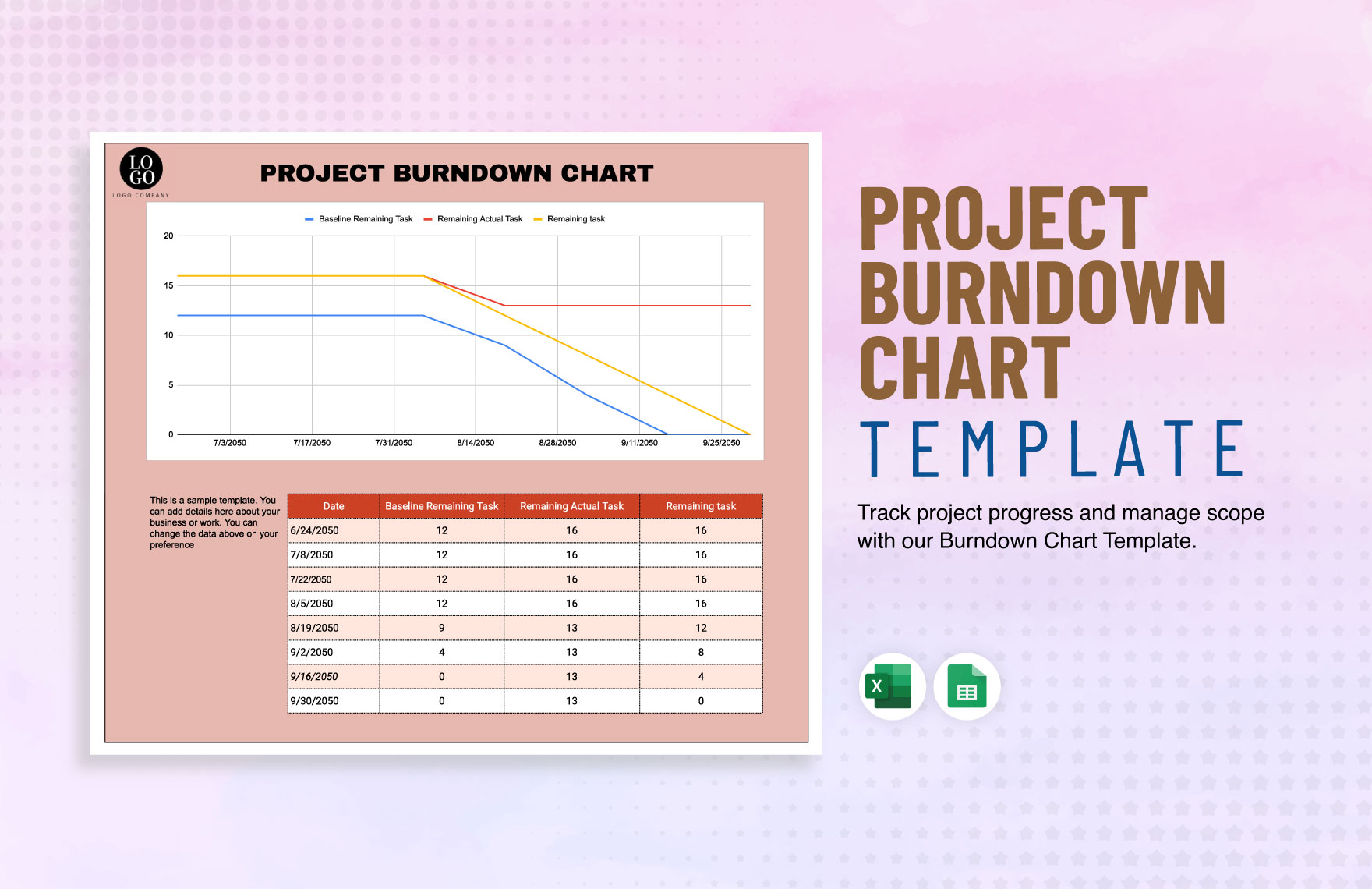
7. Project Burndown Chart
For those of you looking for something a little different and exciting, the Project Burndown Chart seems like the perfect option to me. It features a different approach to forming a burndown chart by adding color to it and making it less complicated, ideal for simple and straightforward tracking of your projects without getting overwhelmed with too much clutter.
8. Task Completion Summary Burndown Chart
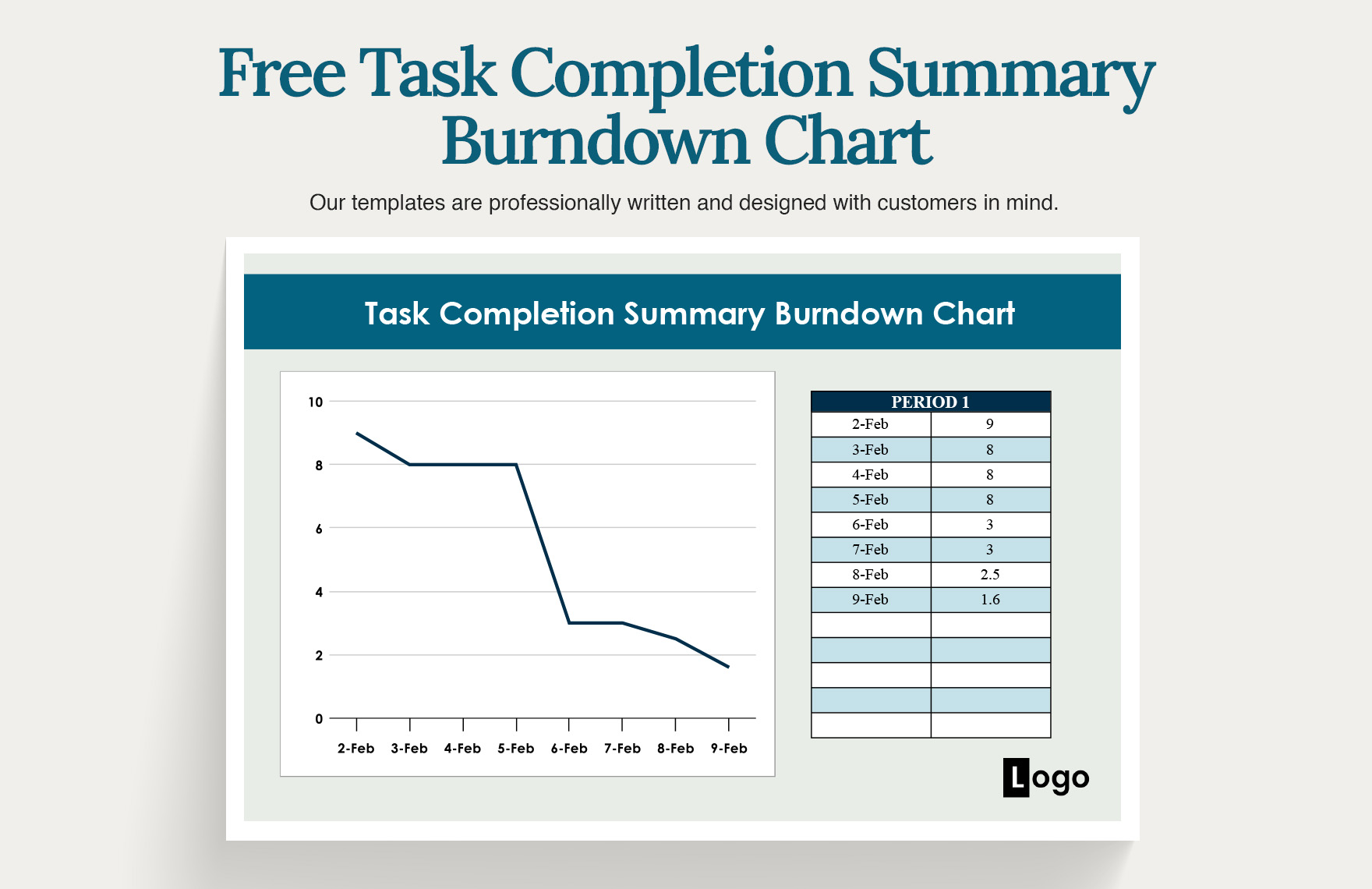
If you want a simple chart for tracking one task, without the hassle of extra and unnecessary details, then the Task Completion Summary Burndown Chart template is made for you. It features a white and blue chart template with a graph and a table with all the key details listed, making sure you can keep track of everything easily.
9. Risk Burndown Chart
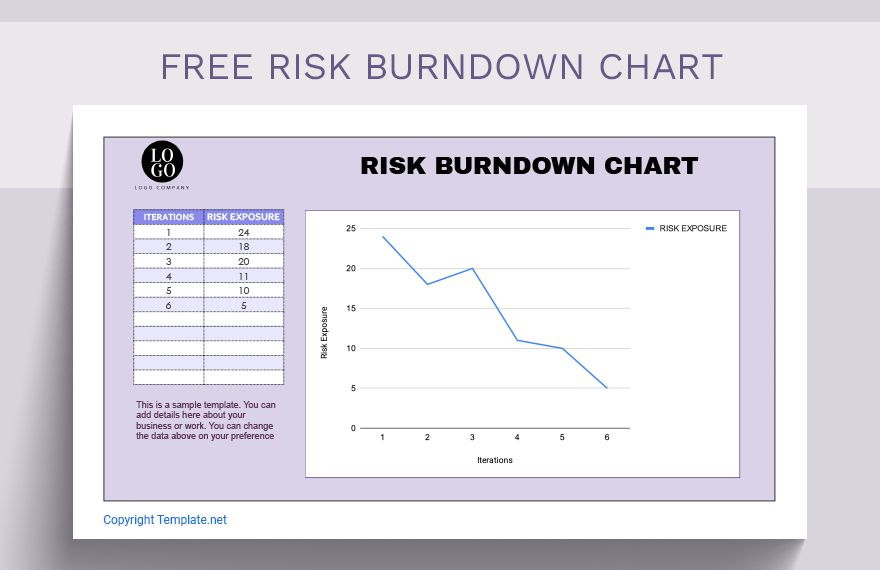
If your project is really serious and has tight deadlines, then you can keep track of the risk using the Risk Burndown Chart. It features a minimalistic table, along with a graphical representation of the iterations and risk exposure to help you keep track of every little one and not mess up.
10. Release Burndown Chart Template
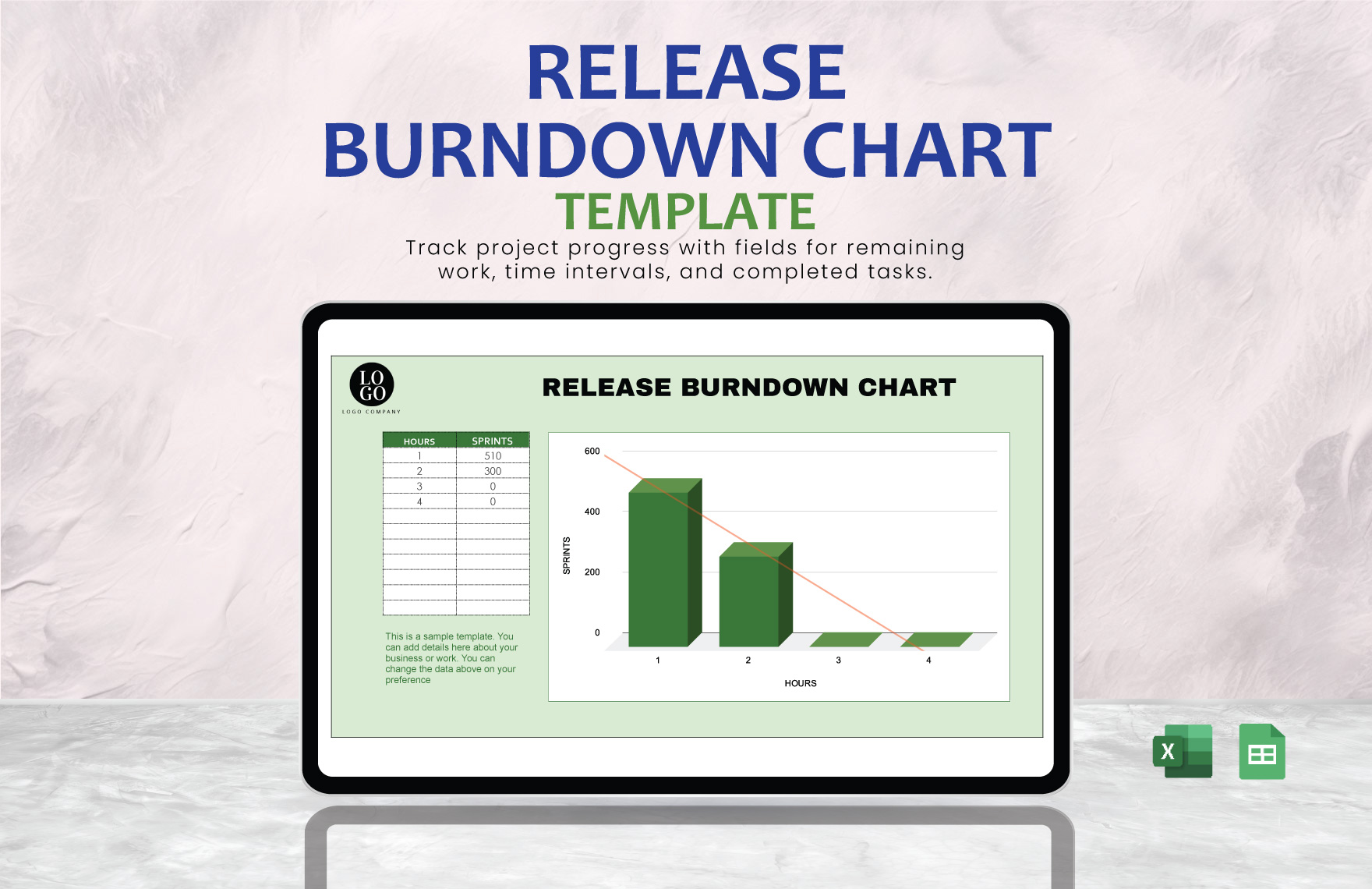
If you’re a businessman or a professional who needs to keep track of your release using a variety of different graphs, then you should give the Release Burndown Chart Template a try. It has everything you need for a basic burndown chart, without any irrelevant details or clutter to distract you.
All of these templates have helped me really elevate my project management in my workspace. But if none of these seem to suit your needs, you can check out more like these WPS Template and find many more that would fit your requirements.
How to Edit and Print Burndown Chart Template in Excel
Once you’ve decided which template you want to use for your own burndown charts, the next step is customizing it to match your own work. I personally use WPS Office for this process, as it completely removes the hassle out of the process and saves me a lot of time. In this section, I’ll be highlighting each step of the editing process and teach you how to customize your chart template in Excel.
Step 1: Open your downloaded burndown chart template in WPS Office to get started.
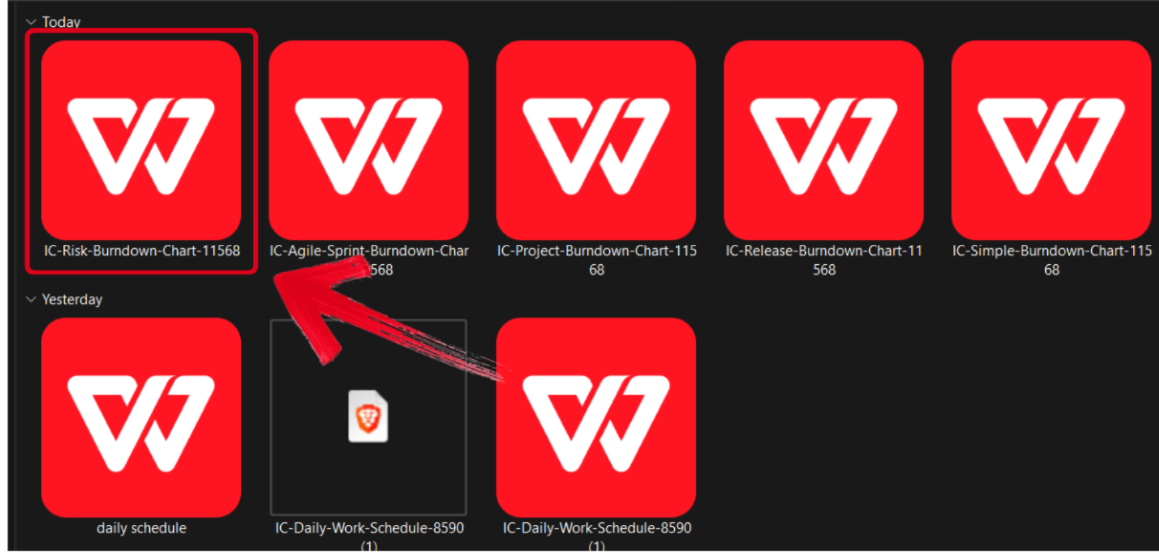
Step 2: Edit the burndown chart template and add your own tasks and deadlines for your project.
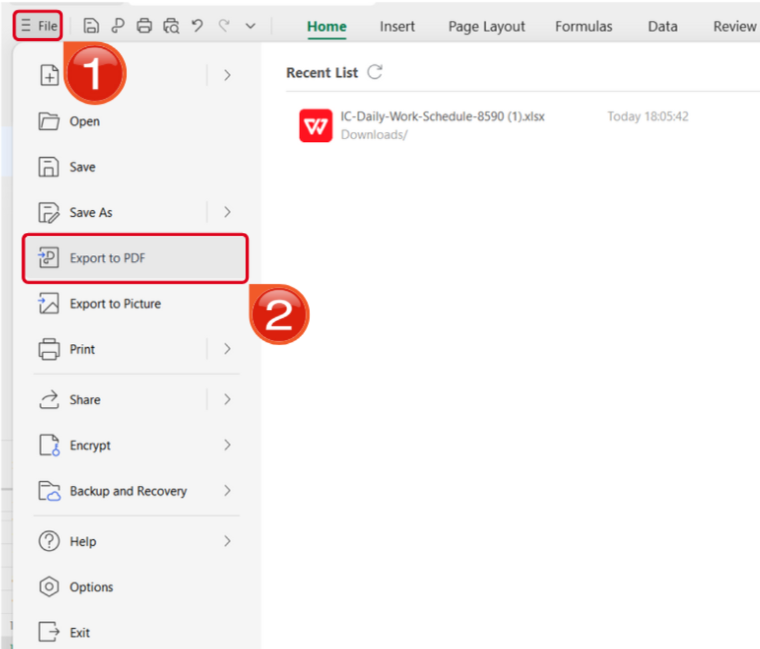
Step 3: Open the Files menu and select Export to PDF to convert your template to a PDF document.
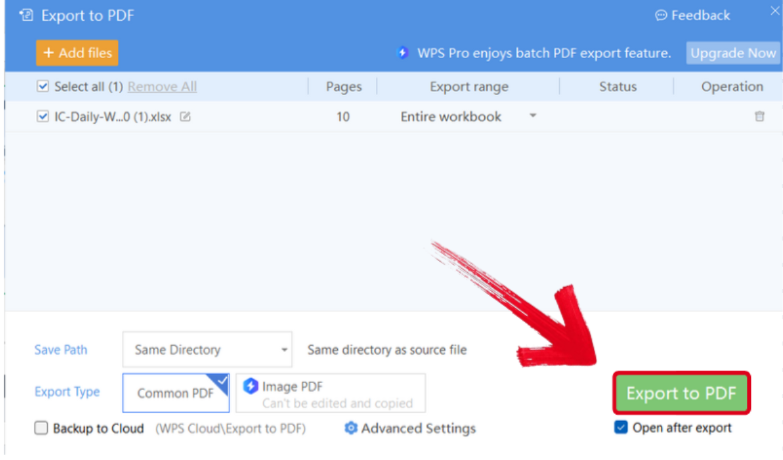
Step 4: Your Excel file will now start conversion into a PDF file. Press Export to PDF to save it to your device.
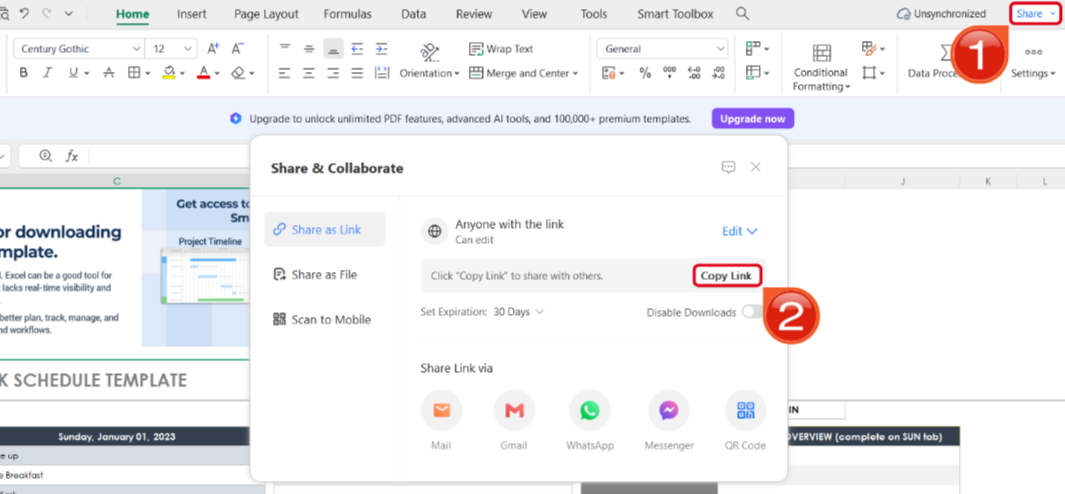
Step 5: Once you’re done saving it as a PDF, press Share to generate an online link for your file. Then press Copy Link to copy it to your clipboard and share it with others.
Free Office Suite with Editable Templates & Smart AI
When I’m overwhelmed with projects and deadlines, the last thing I can afford is to waste any time dealing with slow and unreliable software to make my burndown charts. This is where WPS Office really helps me streamline my workflow and make template formatting much simpler. It equips me with all the features and templates I need to create a polished and well-structured burndown chart, without any hassle.
WPS Office has quickly become my go-to companion in my workflow, helping me do everything more efficiently and boosting my productivity. It’s completely free and equips me with all the tools I need to make burndown charts and track my projects easily.
FAQs
Q1. How do you read a burndown chart?
A burndown chart shows the amount of work left to do versus the time available. The vertical axis represents the remaining work (often in story points, tasks, or hours), and the horizontal axis represents time. The ideal trend line shows steady progress toward completion, while the actual line shows the team’s real progress. If the actual line stays above the ideal line, the team is behind schedule; if it falls below, they are ahead.
Q2. What’s the difference between a burndown chart and a burnup chart?
A burndown chart tracks work remaining, while a burnup chart tracks work completed. Both are useful for visualizing progress, but the burndown chart highlights the gap to completion, which makes it especially motivating for teams to stay on track.
Q3. Are story points essential for a burndown chart?
Not necessarily. Story points are the most common unit used, but you can also track hours, tasks, or backlog items. The important part is to pick one measurement unit and use it consistently throughout the chart.
Q4. What are the main benefits of using a burndown chart?
Burndown charts provide:
A clear visual of progress toward project goals
Early identification of potential delays
A motivational tool to keep the team focused
Data to improve future sprint planning and estimations
Q5. What are common mistakes to avoid with burndown charts?
Some pitfalls include:
Using inconsistent units of measurement
Not updating the chart regularly
Ignoring scope changes, which can distort progress
Over-relying on the chart without considering team dynamics and external factors

'%3e%3cpath%20d='M19.9911%204.11386V6.471H18.5894C18.0775%206.471%2017.7322%206.57814%2017.5536%206.79243C17.3751%207.00671%2017.2858%207.32814%2017.2858%207.75671V9.44421H19.9019L19.5536%2012.0871H17.2858V18.8639H14.5536V12.0871H12.2769V9.44421H14.5536V7.49779C14.5536%206.39064%2014.8632%205.53201%2015.4822%204.92189C16.1013%204.31177%2016.9257%204.00671%2017.9554%204.00671C18.8304%204.00671%2019.509%204.04243%2019.9911%204.11386Z'%20fill='%23333333'/%3e%3c/g%3e%3cdefs%3e%3cclipPath%20id='clip0_2938_8199'%3e%3crect%20width='16'%20height='16'%20fill='white'%20transform='translate(8%204.00671)'/%3e%3c/clipPath%3e%3c/defs%3e%3c/svg%3e)
'%3e%3cpath%20d='M17.5237%2010.7813L23.4811%204H22.0699L16.8949%209.88693L12.7648%204H8L14.2469%2012.9029L8%2020.0133H9.4112L14.8725%2013.7952L19.2352%2020.0133H24M9.92053%205.04213H12.0885L22.0688%2019.0224H19.9003'%20fill='%23333333'/%3e%3c/g%3e%3cdefs%3e%3cclipPath%20id='clip0_2938_8200'%3e%3crect%20width='16'%20height='16.0134'%20fill='white'%20transform='translate(8%204)'/%3e%3c/clipPath%3e%3c/defs%3e%3c/svg%3e)


