

'%3e%3cpath%20d='M8%200C12.4183%200%2016%203.58172%2016%208C16%2012.4183%2012.4183%2016%208%2016C3.58172%2016%200%2012.4183%200%208C0%203.58172%203.58172%200%208%200ZM11.6162%204.38379C11.2257%203.99337%2010.5927%203.99338%2010.2021%204.38379L8%206.58594L5.79785%204.38379C5.40732%203.99334%204.77429%203.99329%204.38379%204.38379C3.99331%204.77429%203.99335%205.40733%204.38379%205.79785L6.58594%208L4.38379%2010.2021C3.99348%2010.5927%203.99341%2011.2257%204.38379%2011.6162C4.77426%2012.0066%205.40734%2012.0065%205.79785%2011.6162L8%209.41406L10.2021%2011.6162C10.5927%2012.0066%2011.2257%2012.0067%2011.6162%2011.6162C12.0067%2011.2257%2012.0066%2010.5927%2011.6162%2010.2021L9.41406%208L11.6162%205.79785C12.0066%205.40735%2012.0066%204.77429%2011.6162%204.38379Z'%20fill='%23080E17'%20fill-opacity='0.46'/%3e%3c/g%3e%3cdefs%3e%3cclipPath%20id='clip0_3761_713'%3e%3crect%20width='16'%20height='16'%20fill='white'/%3e%3c/clipPath%3e%3c/defs%3e%3c/svg%3e)




'%3e%3cpath%20fill-rule='evenodd'%20clip-rule='evenodd'%20d='M21.4999%2010.9993C21.4999%205.20009%2016.7986%200.498901%2010.9993%200.498901C5.19994%200.498901%200.498657%205.20009%200.498657%2010.9993C0.498657%2016.2404%204.33858%2020.5844%209.35855%2021.3722V14.0346H6.69238V10.9993H9.35855V8.68594C9.35855%206.05427%2010.9262%204.60062%2013.3248%204.60062C14.4736%204.60062%2015.6753%204.80571%2015.6753%204.80571V7.38979H14.3512C13.0468%207.38979%2012.64%208.19921%2012.64%209.0296V10.9993H15.5523L15.0867%2014.0346H12.64V21.3722C17.66%2020.5844%2021.4999%2016.2404%2021.4999%2010.9993Z'%20fill='%231568EA'/%3e%3c/g%3e%3c/svg%3e)


'%3e%3cpath%20d='M2.42045%2022.1876H6.31818V12.7217L0.75%208.54553V20.5171C0.75%2021.4414%201.49892%2022.1876%202.42045%2022.1876Z'%20fill='%234285F4'/%3e%3cpath%20d='M19.682%2022.1876H23.5797C24.5041%2022.1876%2025.2502%2021.4387%2025.2502%2020.5171V8.54553L19.682%2012.7217'%20fill='%2334A853'/%3e%3cpath%20d='M19.682%205.48293V12.7216L25.2502%208.54543V6.31816C25.2502%204.25236%2022.8921%203.07469%2021.2411%204.31361'%20fill='%23FBBC04'/%3e%3cpath%20d='M6.31824%2012.7217V5.48303L13.0001%2010.4944L19.6819%205.48303V12.7217L13.0001%2017.733'%20fill='%23EA4335'/%3e%3cpath%20d='M0.75%206.31816V8.54543L6.31818%2012.7216V5.48293L4.75909%204.31361C3.10534%203.07469%200.75%204.25236%200.75%206.31816Z'%20fill='%23C5221F'/%3e%3c/g%3e%3cdefs%3e%3cclipPath%20id='clip0_2954_7305'%3e%3crect%20width='24.5'%20height='18.375'%20fill='white'%20transform='translate(0.75%203.8125)'/%3e%3c/clipPath%3e%3c/defs%3e%3c/svg%3e)


If someone emailed you an inventory export or a GIS attribute table ending in .dbf, the first question is usually the same: what is a DBF file, and can you open it without FoxPro? In short, a DBF file is a classic dBase-style database table—rows and columns stored in one file—still used by ERP systems, legacy apps, and shapefile workflows.
This guide answers what is DBF file format in plain language, shows how the structure works, and walks through opening and converting the table in WPS Spreadsheet so you can review data locally and share XLSX or CSV when partners need a modern workbook.
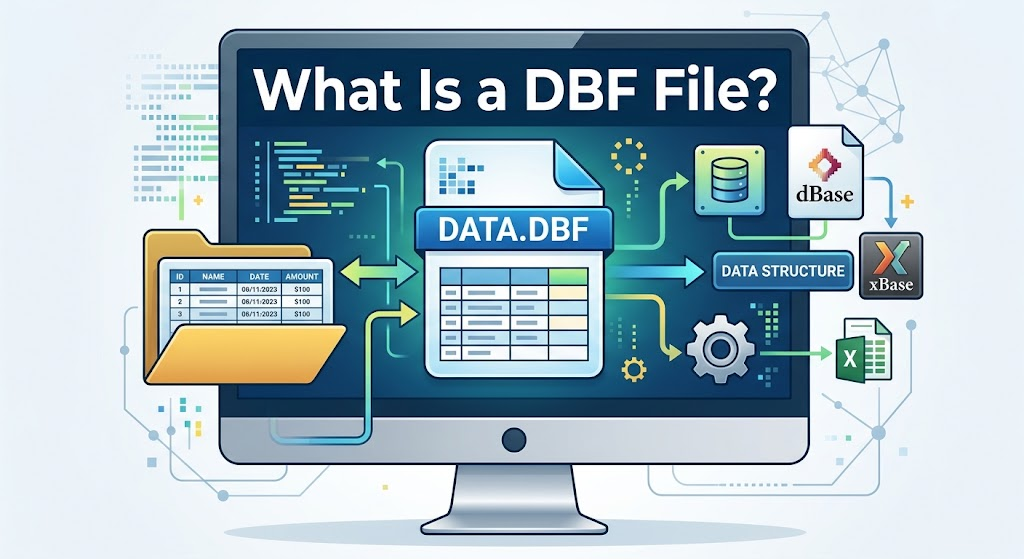
What is DBF file format in plain English
A DBF file (dBase database file) stores one table: field names, field types, and fixed-length records. The format started with dBASE in the early 1980s and became a de facto interchange standard. FoxPro, Clipper, and many GIS tools adopted the same idea—so when you ask what is DBF file, you are really asking about a portable table format that predates modern Excel workbooks.
Unlike XLSX, a DBF file is not a multi-sheet workbook. It is closer to a single database table you can open in a grid. Memo (long text) values may live in a companion .dbt or .fpt file; if that companion is missing, long notes can appear blank even when the .dbf itself opens.
Modern Microsoft Excel support for DBF varies by version and platform. Some desktop builds still open simple tables; Excel for the web often rejects the type; Mac Excel historically lacked reliable DBF open support. That is why many teams open the table in WPS Spreadsheet first—see the free DBF file viewer workflow—then Save As XLSX when they need a shareable workbook.
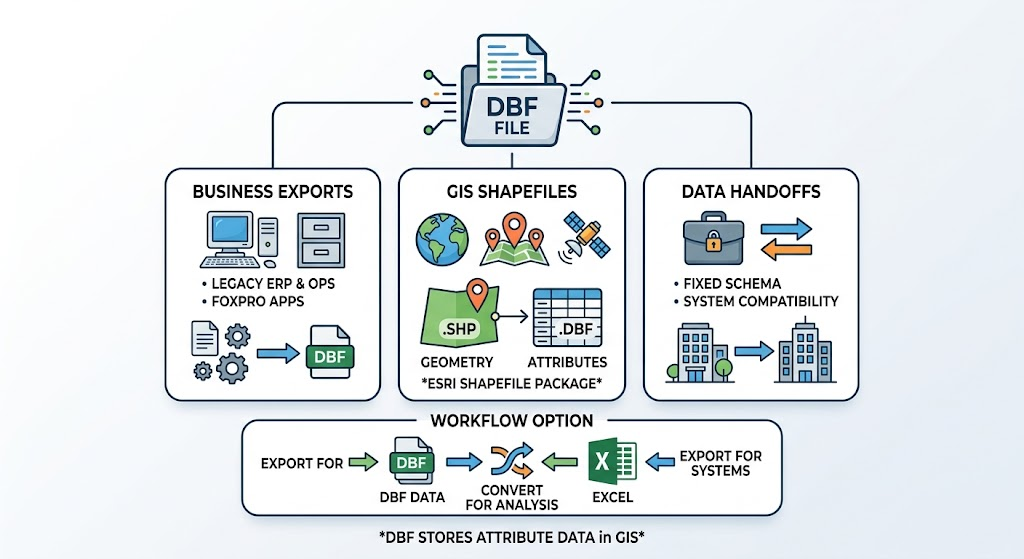
What is DBF file used for in business and GIS
Knowing what is DBF file used for helps you decide whether to keep the original export or convert it:
ERP and ops exports — customer lists, stock snapshots, and batch reports from older systems still ship as .dbf.
FoxPro / Visual FoxPro apps — legacy line-of-business tools continue to write dBase-style tables.
GIS shapefiles — Esri shapefile packages store attribute columns in a .dbf alongside .shp and .shx. The geometry is not inside the DBF; the DBF holds the attribute table.
Data handoffs — some portals still accept or produce DBF when they need a fixed schema without Excel formulas.
If your goal is analysis or sharing with teammates who only know Excel, convert after you review the grid. WPS can turn the table into a workbook with the DBF to Excel path (File → Save As → Excel Workbook). When a downstream system still requires DBF, you can also go the other way with XLSX to DBF.


What is DBF file structure: header, fields, and records
Under the hood, answering what is DBF file structure means three blocks:
Header — version flag, last update date, record count, header length, and record length.
Field descriptors — each column’s name (up to 11 characters in classic dBase), type (Character, Numeric, Date, Logical, Memo, and vendor extensions), length, and decimals.
Records — fixed-width rows. Each record starts with a deletion flag (space = active, asterisk = deleted). Fields are packed without separators.
Common field types you will see in practice:
C — character / text
N — numeric (stored as text digits in classic layouts)
D — date (often YYYYMMDD)
L — logical (true/false)
M — memo pointer into .dbt / .fpt
Practical limits to remember: classic field names are short; some FoxPro types (datetime, currency, integer) may not round-trip perfectly in every spreadsheet; encoding (OEM code pages vs UTF-8) can garble non-English text if the wrong code page is assumed. Treat the first open as a visual check for headers, row counts, and odd characters—not as a guarantee that every proprietary type survived.
How to open a DBF file once you know what is DBF file basics
After you understand what is DBF file basics, opening one in WPS Spreadsheet is straightforward and stays on your device—no upload to an online viewer.
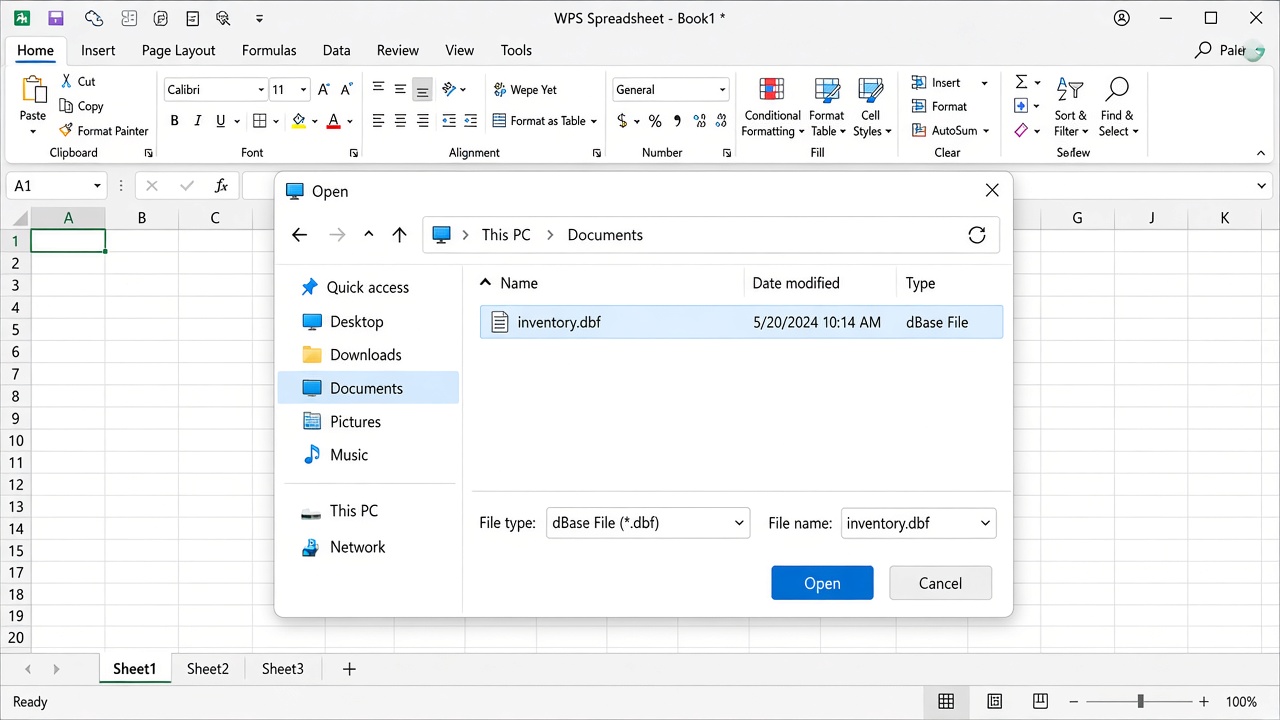
Open DBF file in WPS
Install and launch WPS Office, then open WPS Spreadsheet.
Choose File → Open (or Open → Computer → Browse).
Set the file type filter to dBase File (*.dbf) or All Files, select your .dbf, and click Open.
Confirm column headers and a sensible row count. If memo columns look empty, check whether a matching .dbt or .fpt file sits next to the .dbf.
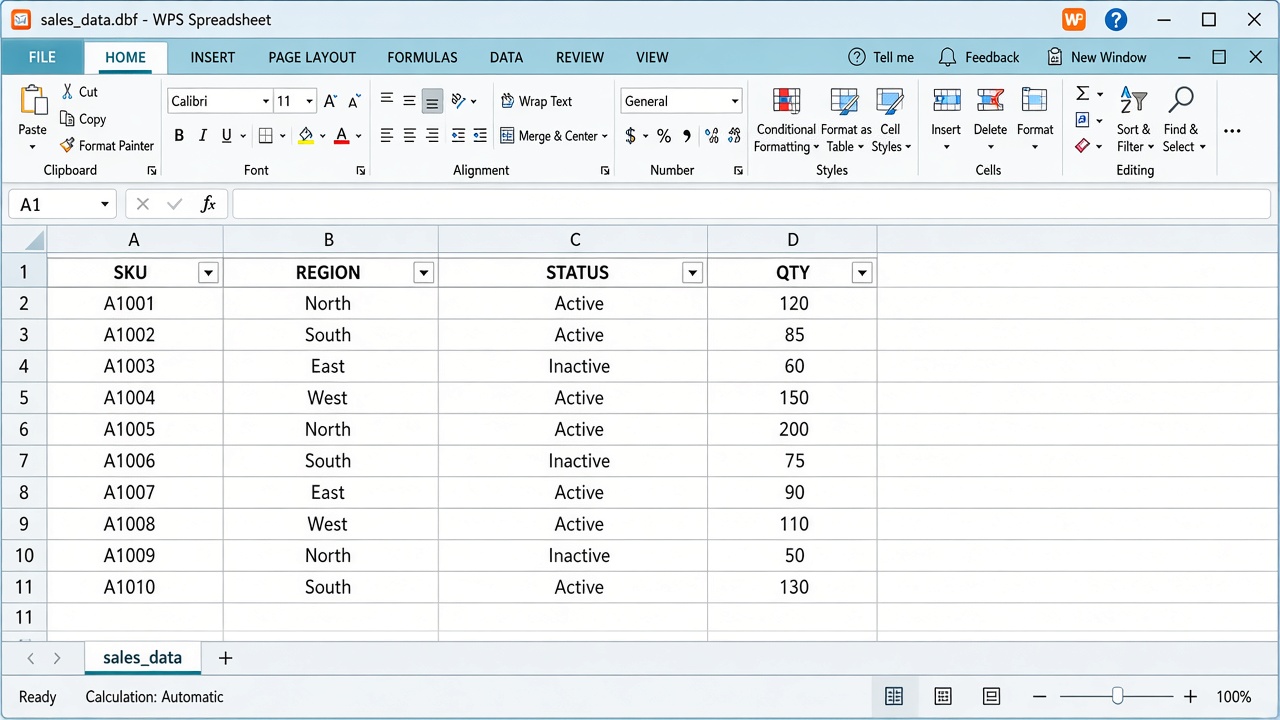
Filter DBF rows in WPS
Once the grid loads, use familiar spreadsheet tools: Sort & Filter, Find, and light cell edits. Keep the original .dbf as the system export; treat your Spreadsheet session as the place to inspect and tidy before you hand data off.
How to convert and share after asking what is DBF file vs Excel
Teammates and portals rarely ask what is DBF file vs Excel—they simply expect an .xlsx. After the table looks right in WPS:
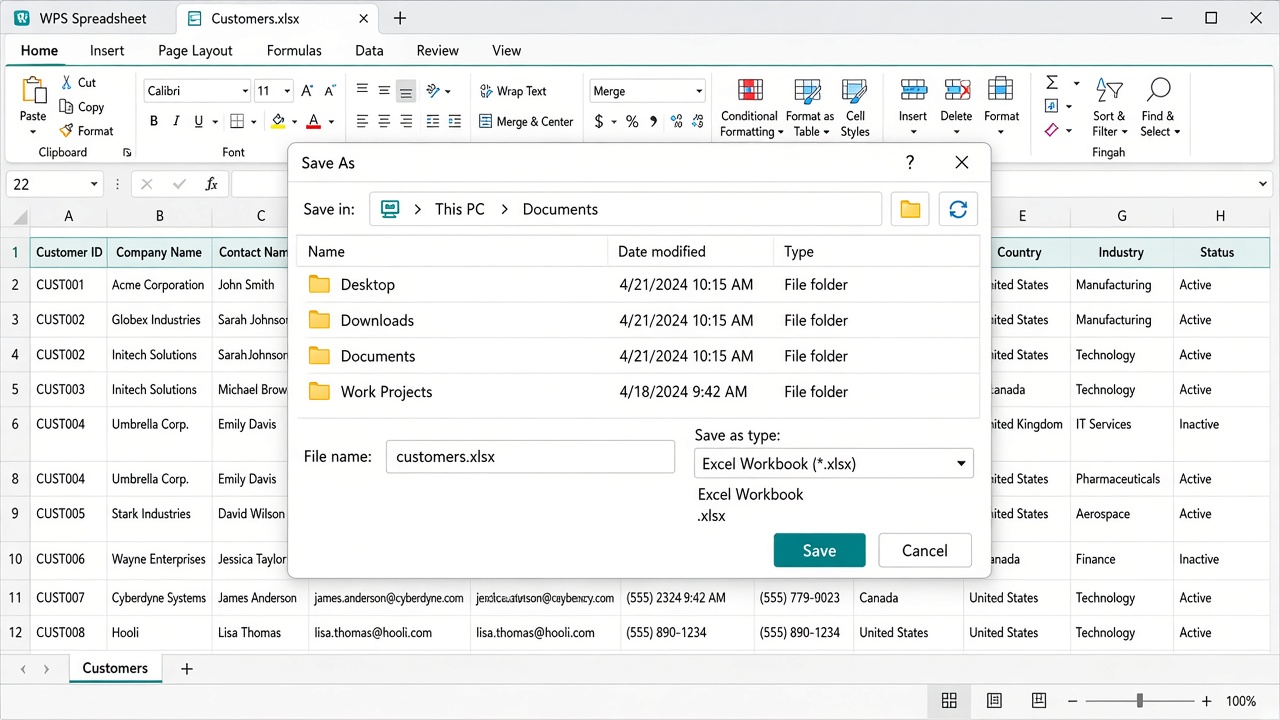
Save DBF as Excel workbook
Go to File → Save As.
Choose Excel Workbook (*.xlsx) for modern Excel, Google Sheets, and most dashboards—or Excel 97-2003 Workbook (*.xls) only when a partner still requires the older format (XLS still caps at 65,536 rows and 256 columns).
Pick CSV when a flat import file is enough.
Keep the original .dbf as backup for the source system.
Need a static handout instead of an editable sheet? Open the table, then export to PDF with the DBF to PDF flow. Going back into a legacy importer? Start from a workbook or CSV and use XLSX to DBF or CSV to DBF as needed.
Checklist before you send the file
Header names match the source export.
Row count is in the expected range (deleted records may still occupy space until packed).
Dates and numbers look correct—not shifted or truncated.
Non-English text is readable; if not, reopen with the correct encoding when your tool allows it.
Confidential tables were converted locally—avoid uploading customer or payroll DBF files to random online converters.
FAQ
What is a DBF file?
A DBF file is a dBase-style database table: one file holding field definitions and fixed-length records. It is still used by ERP exports, FoxPro apps, and GIS shapefile attribute tables.
Is a DBF file the same as Excel?
No. Excel workbooks (XLSX/XLS) support multiple sheets, formulas, and formatting. A DBF file is closer to a single database table. You can open a DBF in WPS Spreadsheet and Save As XLSX when you need Excel features.
Can I open a DBF file without FoxPro?
Yes. WPS Spreadsheet can open .dbf locally. You do not need FoxPro, dBase, or a Microsoft Excel license for a quick view and edit.
Why does Excel reject my DBF file?
Support depends on Excel version and platform. Some newer builds struggle with legacy encodings or refuse certain DBF variants; Excel on the web often blocks the type. Opening in WPS, then saving as XLSX, is a reliable workaround.
What about shapefile .dbf files?
The .dbf in a shapefile stores attributes only. Opening it in Spreadsheet shows the attribute table; it does not load map geometry from .shp.
Is converting DBF online safe?
Online tools require uploads. For customer lists, inventory, or finance exports, prefer a local open in WPS Spreadsheet so the file never leaves your device.


'%3e%3cpath%20d='M19.9911%204.11386V6.471H18.5894C18.0775%206.471%2017.7322%206.57814%2017.5536%206.79243C17.3751%207.00671%2017.2858%207.32814%2017.2858%207.75671V9.44421H19.9019L19.5536%2012.0871H17.2858V18.8639H14.5536V12.0871H12.2769V9.44421H14.5536V7.49779C14.5536%206.39064%2014.8632%205.53201%2015.4822%204.92189C16.1013%204.31177%2016.9257%204.00671%2017.9554%204.00671C18.8304%204.00671%2019.509%204.04243%2019.9911%204.11386Z'%20fill='%23333333'/%3e%3c/g%3e%3cdefs%3e%3cclipPath%20id='clip0_2938_8199'%3e%3crect%20width='16'%20height='16'%20fill='white'%20transform='translate(8%204.00671)'/%3e%3c/clipPath%3e%3c/defs%3e%3c/svg%3e)
'%3e%3cpath%20d='M17.5237%2010.7813L23.4811%204H22.0699L16.8949%209.88693L12.7648%204H8L14.2469%2012.9029L8%2020.0133H9.4112L14.8725%2013.7952L19.2352%2020.0133H24M9.92053%205.04213H12.0885L22.0688%2019.0224H19.9003'%20fill='%23333333'/%3e%3c/g%3e%3cdefs%3e%3cclipPath%20id='clip0_2938_8200'%3e%3crect%20width='16'%20height='16.0134'%20fill='white'%20transform='translate(8%204)'/%3e%3c/clipPath%3e%3c/defs%3e%3c/svg%3e)


