Employee performance reviews are integral to evaluate productivity,
identifying strengths, and creating improvement plans. However, HR teams
and managers often end up managing endless criteria, trying not to miss
anything important, and worrying about giving feedback that feels
balanced which leads them to being on the lookout for free, ready-to-use
employee review templates. In this guide, I’ll introduce downloadable
templates in Word and Excel and show you how to edit and print templates
using WPS Office.
Employee Review Templates
How to Write an Employee
Review
Writing an effective employee review starts with understanding the
core elements that make feedback meaningful and actionable. Reviews work
best when they have a clear purpose, measurable criteria, and a balance
between recognition and constructive guidance. Encouraging employees to
reflect on their own performance adds depth, while properly documenting
results ensures accountability and a reliable referencefor future evaluations.
Meeting of co-workers
Here are the key steps to write an employee review:
Set Clear Goals: Define the specific objectives
of the evaluation, such as productivity, teamwork, or communication
skills.
Use Structured Criteria: Break down each
performance area into measurable indicators to maintain fairness and
clarity.
Balance Positives & Improvements: Provide
feedback that highlights strengths while identifying areas for
growth.
Encourage Self-Evaluation: Ask employees to
reflect on their own performance to gain additional insights.
Document Results:Recordprogress, development plans, and next steps using forms or templates for
consistency.
Keeping these principles in mind helps make the review process
organized, fair, and genuinely useful for both managers and
employees.
Using ready-made templates ensures that all key performance areas are
covered without missing anything important. Templates in Word and Excel
allow you to record ratings, feedback, and development plans in an
organized way, while also giving you the flexibility to customize sectionsfor your team’s unique needs. Below, I’ve compiled ten free employee
review form templates you can download, edit, and start using
immediately..
1. Quarterly Performance
Review (Word)
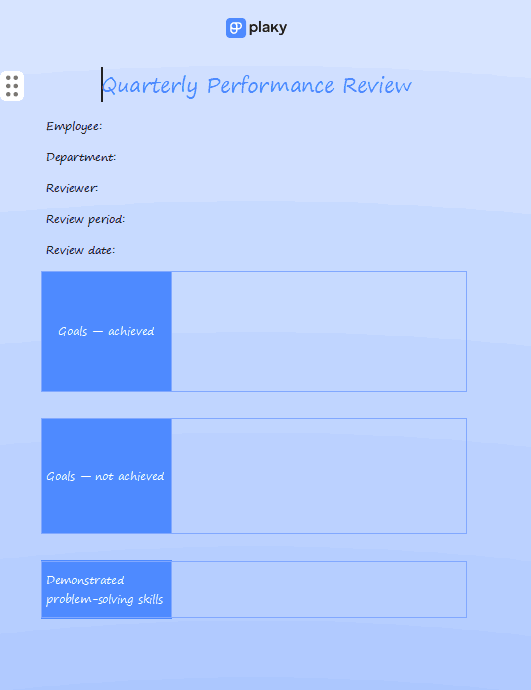
This Quarterly
Performance Review template provides a clean, two-column layout
for conducting structured employee evaluations. Designed to facilitate
comprehensive feedback, it includes clear sections for documenting Goals
as well as assessing key soft skills like problem-solving and
organizational skills. The layout is designed to be easily editable in
Microsoft Word, making it a flexible and professional tool for regular
employee performance check-ins.
Quarterly Performance Review
2. Monthly Performance Review
(Word)
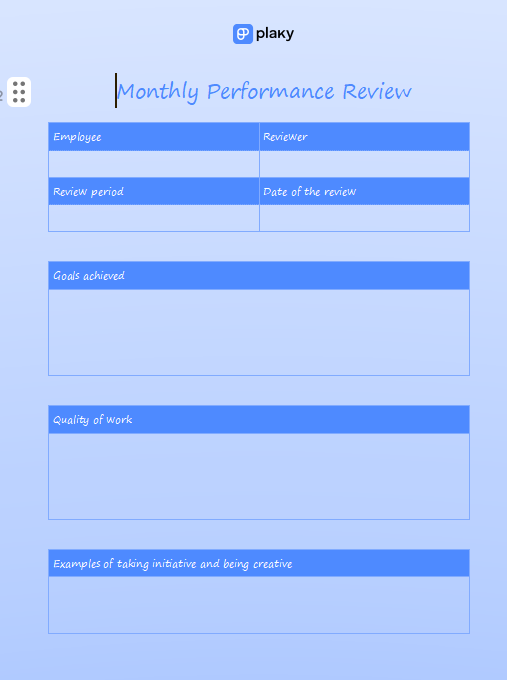
This Monthly
Performance Review template offers a simple, one-page format
ideal for frequent, informal employee check-ins. It is designed to
capture quick feedback on an employee’s short-term progress, with
dedicated sections for recording Goals achieved, assessing Quality of
work, and noting specific Examples of taking initiative. Its simple,
clean design helps managers deliver timely and focused feedback
efficiently.
Monthly Performance Review
3. Self-Evaluation Review
(Word)
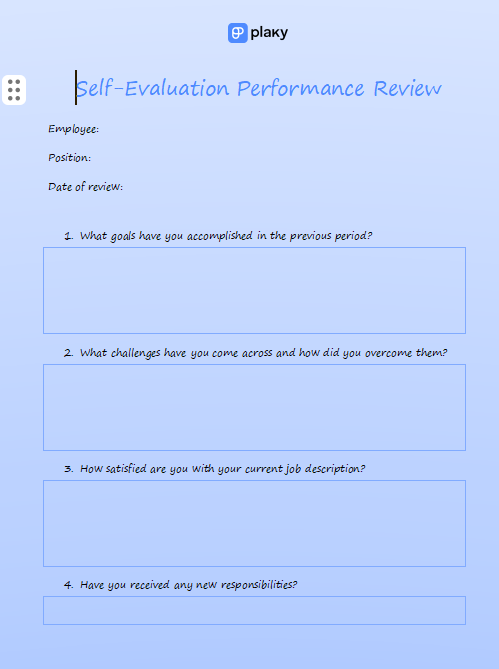
This Self
Evaluation Employee Review template offers a question-based
format that encourages deep employee reflection. It focuses on key areas
of professional development, prompting users to document accomplished
goals, detail challenges overcome, and assess their satisfaction with
their current job description. Its straightforward design ensures
employees provide meaningful input for a more productive and balanced
performance review discussion.
Self-Evaluation Performance Review
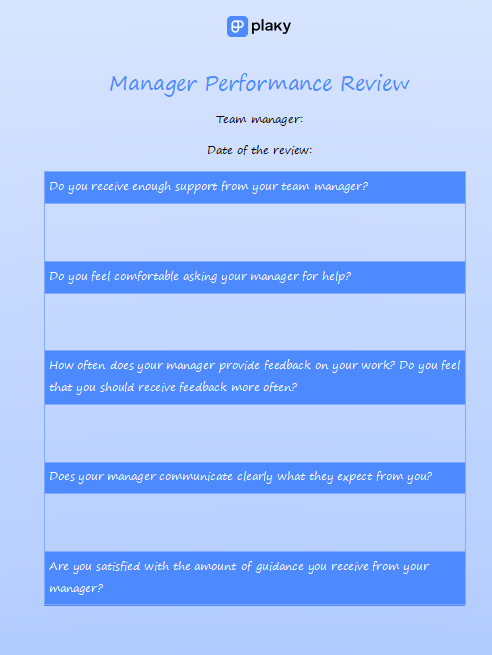
4. Manager Performance Review
(Word)
This Manager
Performance Review template is a valuable tool designed for
upward feedback, allowing team members to formally evaluate their
manager's effectiveness. The form uses a targeted, question-based format
to assess crucial areas, including the manager's level of support,
communication clarity, and the guidance they provide. This template is
essential for fostering an environment of transparent feedback and
improving leadership quality within the organization.
Manager Performance Review
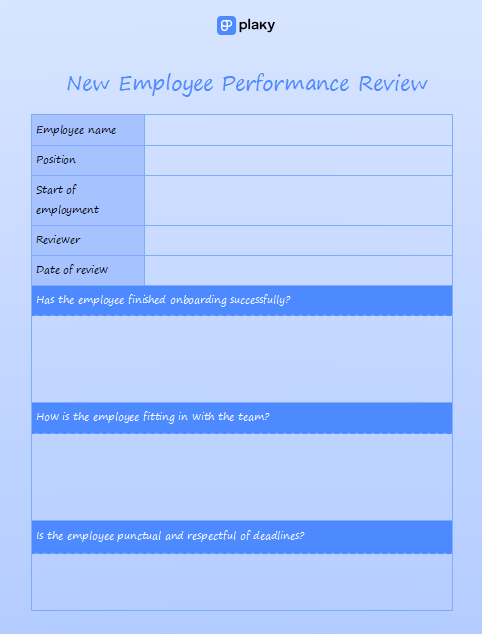
5. New Employee Review (Word)
This New
Employee Performance Review template is specifically designed
for evaluating employees during their initial onboarding or probationary
period. It focuses on critical early-stage factors such as successful
onboarding completion, team integration, and adherence to workplace
standards like punctuality and deadlines. This focused questionnaire
helps managers provide targeted feedback to ensure new hires start
strong and assimilate quickly into the company culture.
New Employee Review
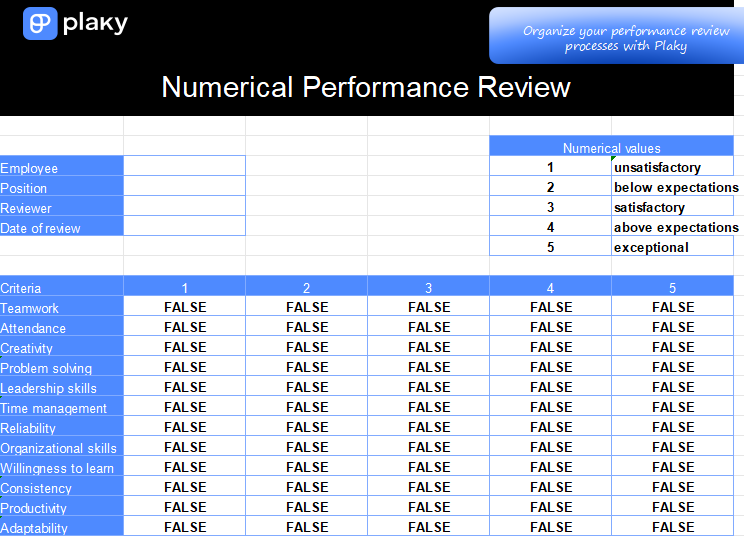
6. Numerical Performance
Review (Excel)
This Numerical
Performance Review template uses a clear, quantitative rating
system to evaluate employee performance. The Excel format allows
reviewers to score 15 different criteria, from Teamwork and Creativity
to Leadership skills and Adaptability, against a 1 to 5 scale
(unsatisfactory to exceptional). This data-driven approach is perfect
for generating objective, measurable feedback and comparing performance
across a team.
Numerical Performance Review
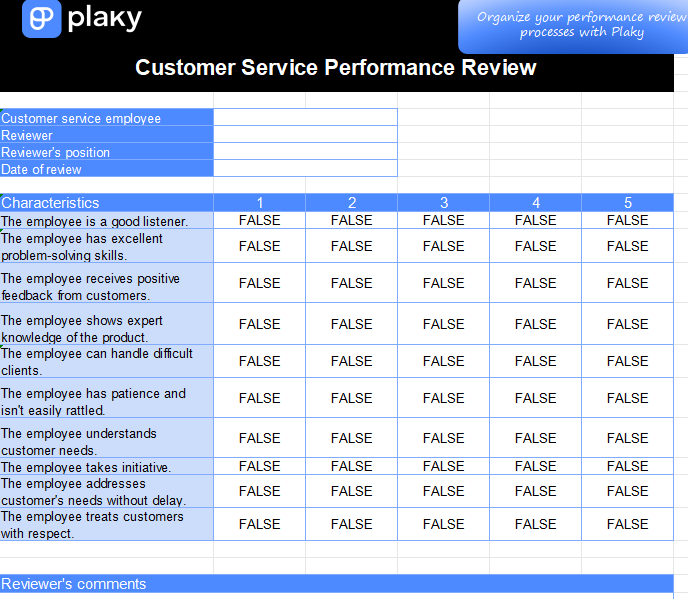
7. Customer Service Review
(Excel)
This Customer
Service Performance Review template is a specialized, numerical
evaluation tool designed to assess employees in customer-facing roles.
The Excel sheet uses a 1 to 5 rating scale to evaluate specific skills
vital for service success, such as listening, problem-solving, product
knowledge, and the ability to handle difficult clients. This focused
template is ideal for generating measurable feedback to improve the
quality of customer interactions.
Customer Service Review
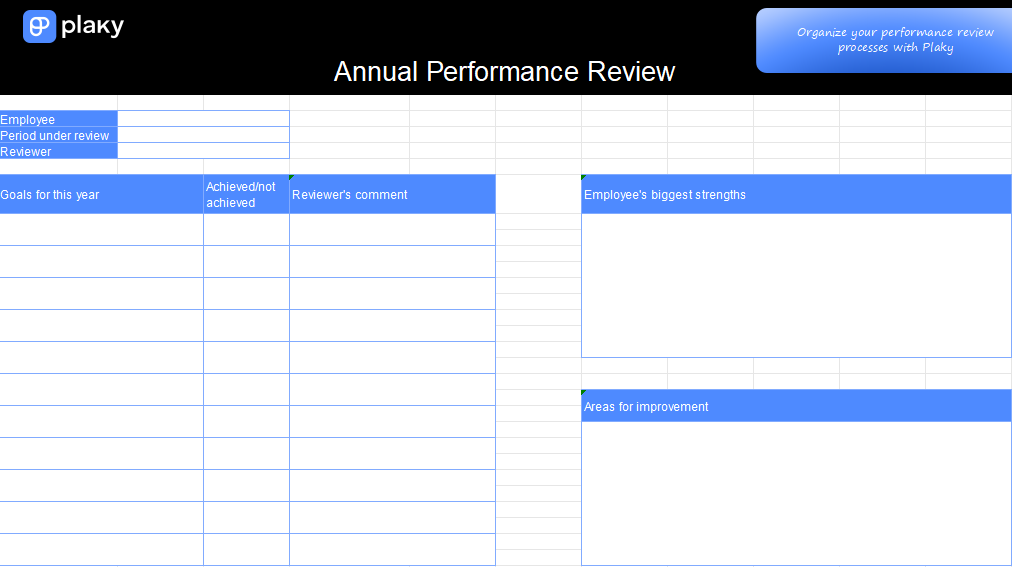
8. Annual Performance Review
(Excel)
This Annual
Employee Performance Review template offers a comprehensive,
goal-focused format for a yearly employee assessment. The Excel layout
includes dedicated sections to track Goals for this year (and whether
they were achieved), as well as provide narrative space for Employee's
biggest strengths and Areas for improvement. This structure ensures a
thorough, balanced discussion, making it an ideal tool for summarizing a
full year of work and planning for the future.
Annual Performance Review
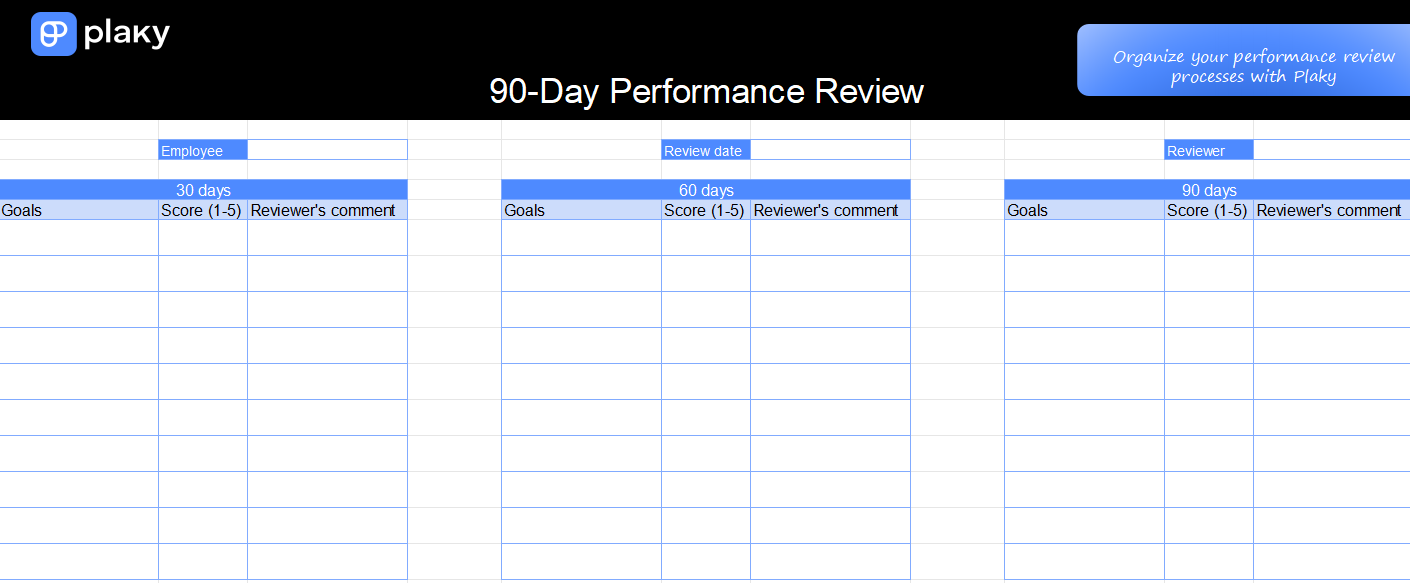
9. 90-Day Performance Review
(Excel)
This 90-Day
Performance Review template is an invaluable tool for structured
evaluation during a new employee's probationary period. Designed in a
clear Excel format, it tracks progress across three key milestones: 30
days, 60 days, and 90 days. For each period, managers can document
goals, assign a 1-5 score, and provide specific comments, ensuring
timely feedback and a well-documented path to successful full-time
employment.
90-Day Performance Review
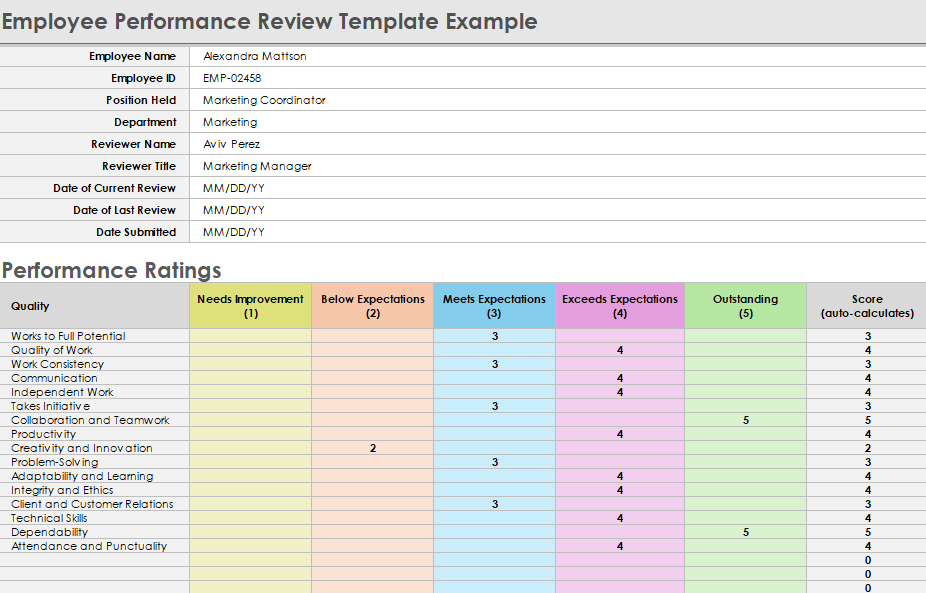
10. General Employee
Review (Excel - Smartsheet)
This General
Employee Review template is a highly detailed, data-driven tool
designed for comprehensive annual evaluations. Using a 1-5 color-coded
rating scale from "Needs Improvement" to "Outstanding", it allows
managers to quantitatively assess 15 different criteria, including
Technical Skills, Collaboration, and Problem-Solving. The structured
format is perfect for objective rating and ensures consistent,
well-documented performance feedback across the organization.
General Employee Review
How
to Edit and Print Employee Review Templates (WPS Word & Excel
Tutorial)
Whether it’s adjusting rating scales, adding your company logo, or
inserting new performance categories, editing is simple with WPS Office.
Most HR teams prefer WPS because it supports both Word and Excel
formats, allowing quick customization without compatibility issues. You
can adjust colors for department-specific forms, lock certain fields for
supervisors only, and even use preset formulas in Excelto calculate scores automatically. Once your edits are complete, you can
easily print or export the review for digital records, keeping
everything organized and ready for your next evaluation cycle.
WPS Writer (Word Templates)
WPS Writer offers an intuitive setup for handling employee review
templates, especially when you want professional formatting without
spending hours on adjustments. It keeps layouts clean, text aligned, and
ensures every section, from goals to comments, looks organized and ready
for review.
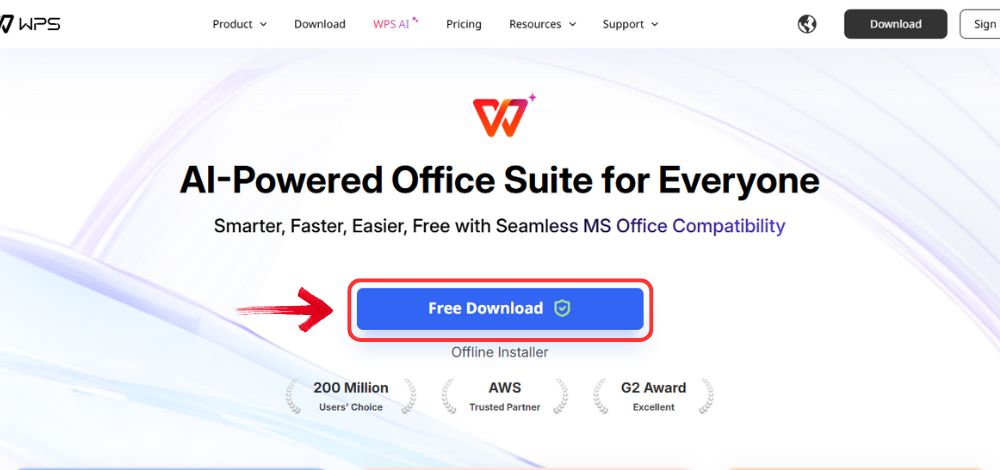
Step 1: First, open your browser to visit WPS Office and click the"Free Download" button to start the download.
Download WPS Office
Step 2: The download will finish in a few seconds.
Once done, run the installation file like you would for any other app or
software.
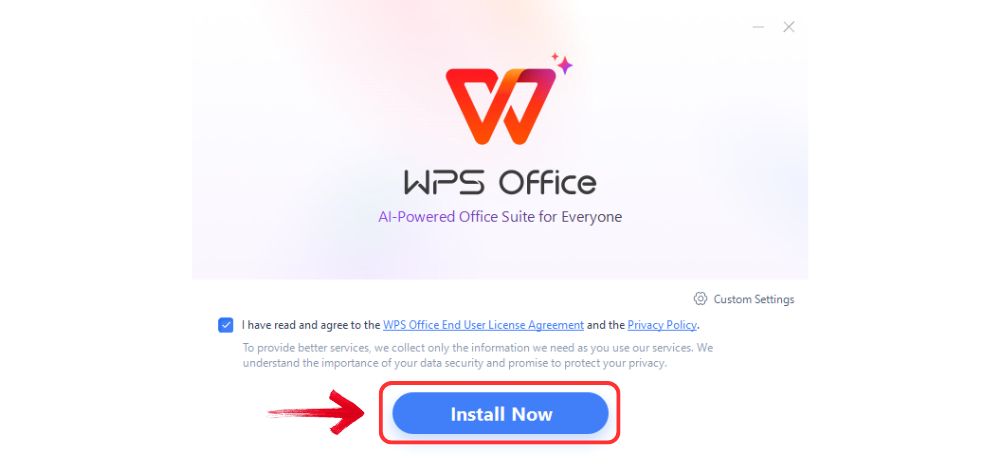
Step 3: WPS Office will show you a few simple terms
and conditions. Accept them, then click the "Install"button to begin the installation.
Install WPS Office
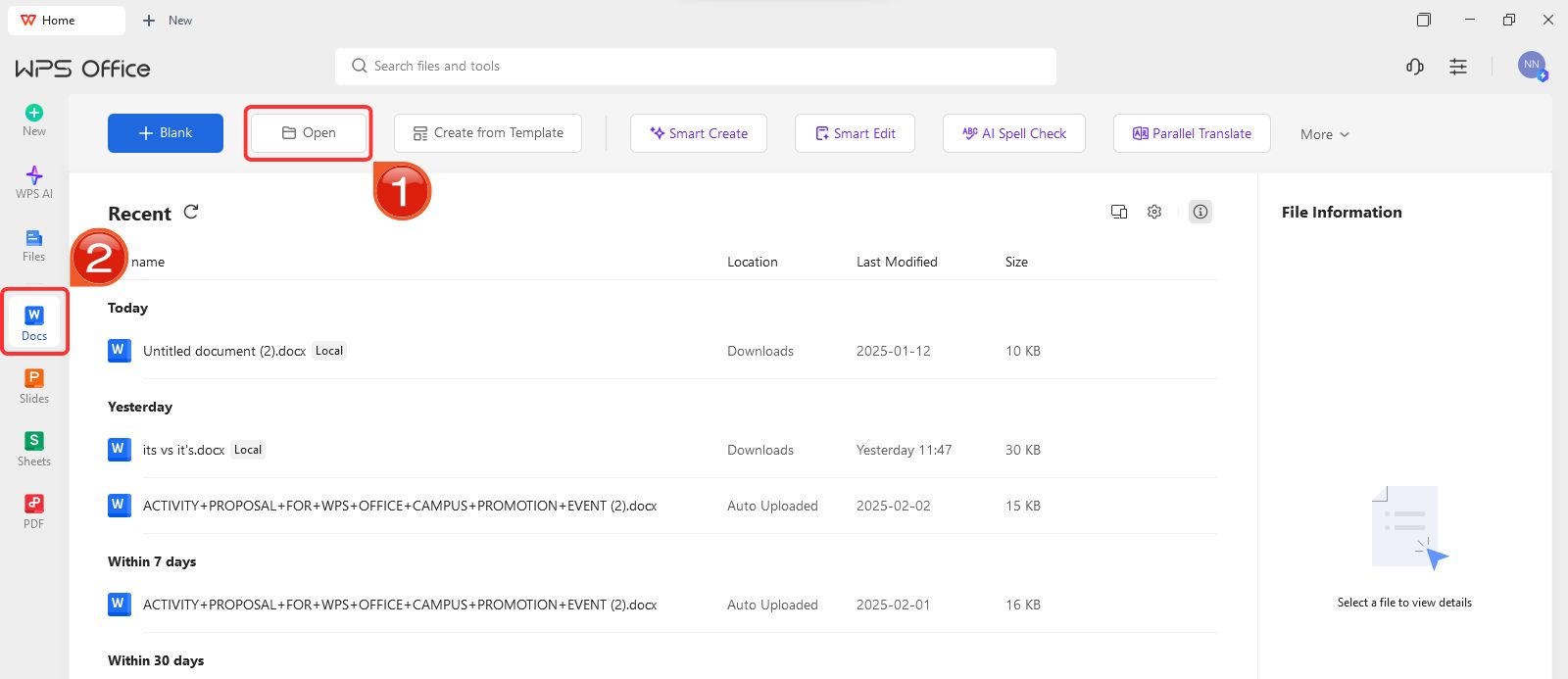
Step 4: After installation, on WPS Office, click on“Docs” from the left panel, then select“Open” to open a document in WPS Office.
Create new blank document
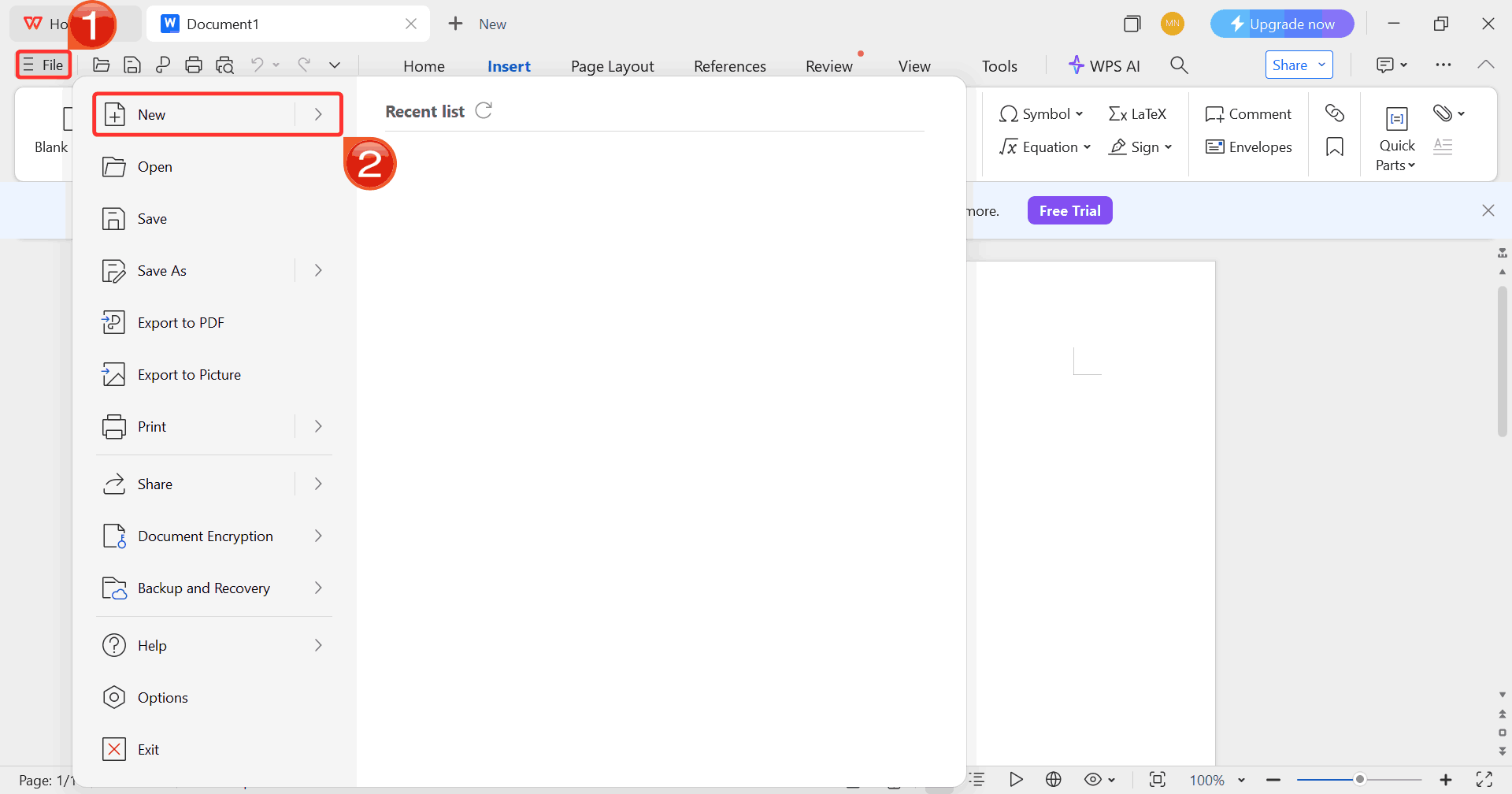
Step 5: Click on “File”, then click
on “New” to browse options for opening a blank document
or choosing from available templates.
Select New
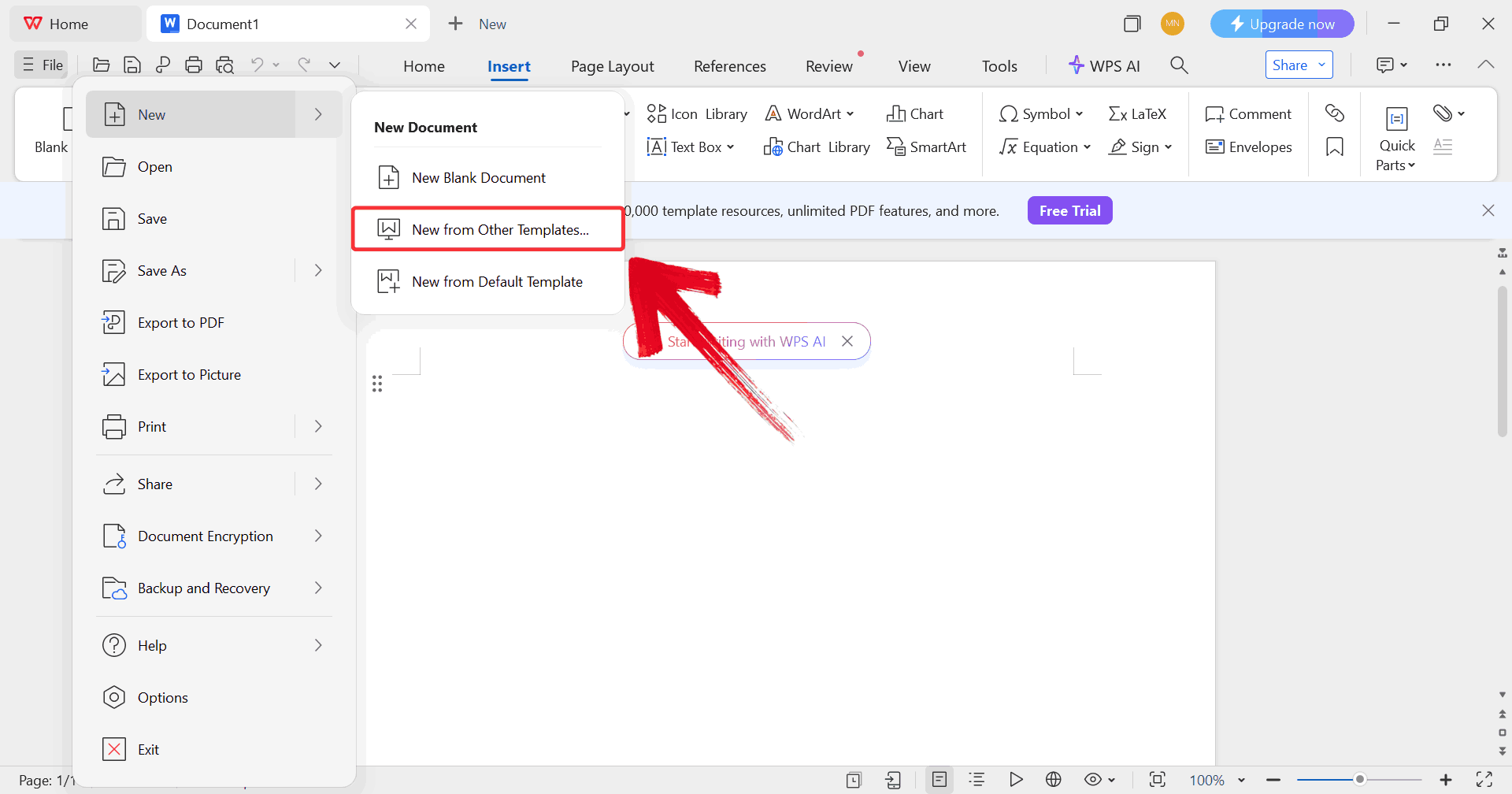
Step 6: Click on “New from other
templates” to upload your desired template, either from your
device or directly from the WPS template library.
Upload Template
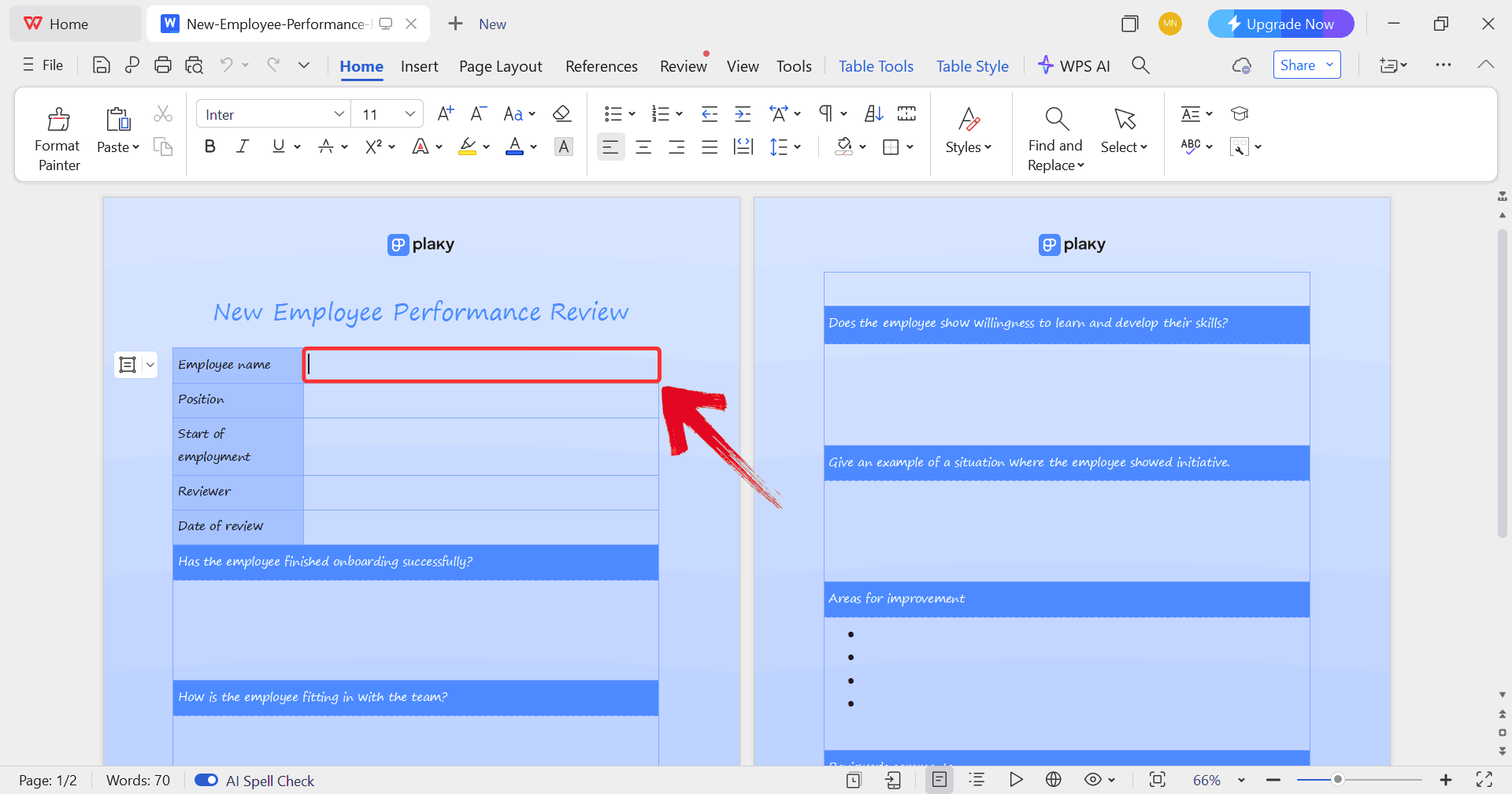
Step 7: In order to replace the sample text with
real details, just click on any blank section you want to fill, such as
the employee’s name, department, or review period.
Edit Template
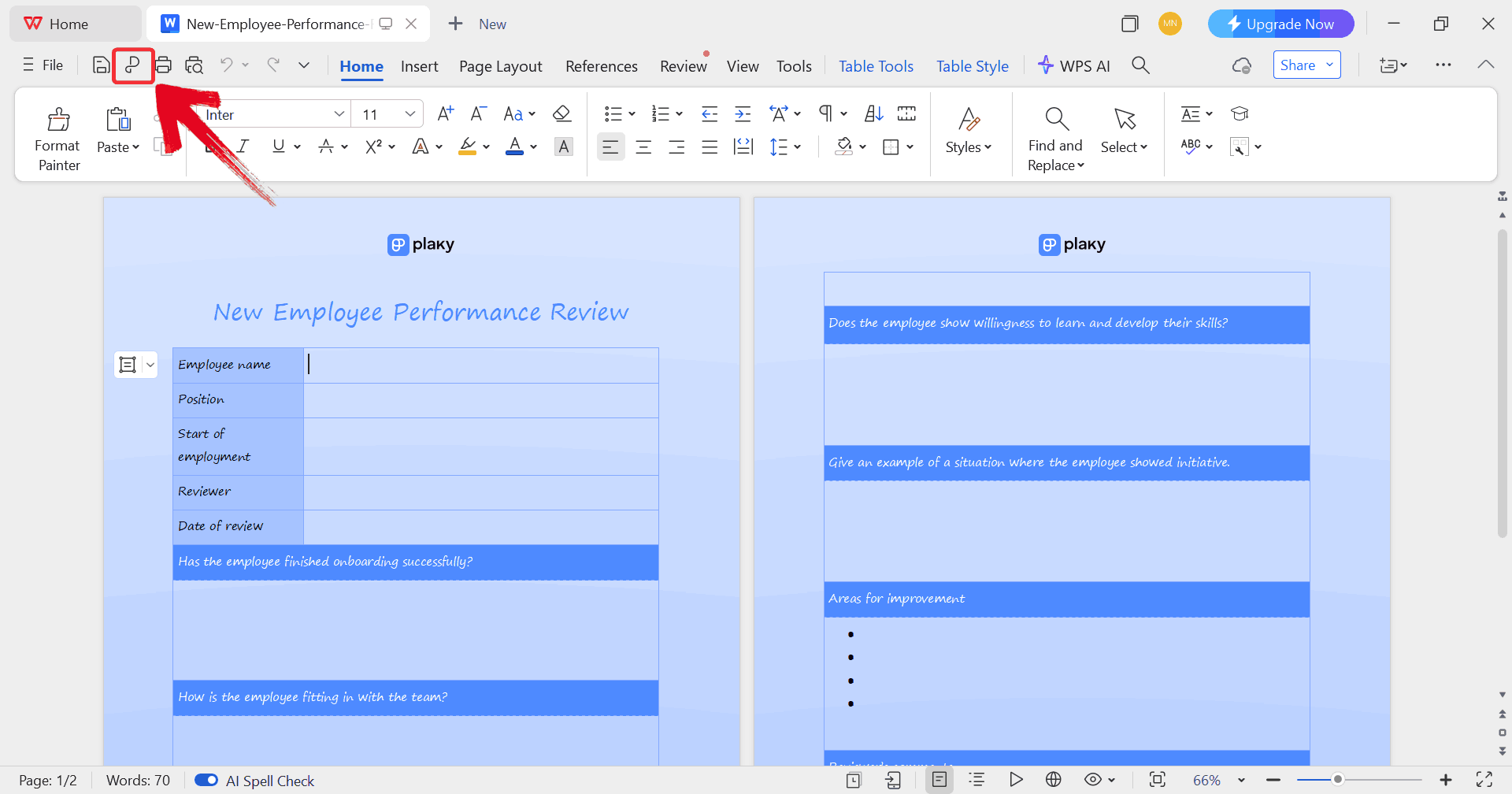
Step 8: Click on the “P” icon to
make sure your document is saved as a PDF, keeping the layout intact and
ready for printing or sharing digitally.
Print Template
WPS Spreadsheet (Excel
Templates)
For performance reviews that rely on numbers, ratings, or progress
tracking, WPS Spreadsheet is your best bet. Its flexible grid layout
makes it easy to calculate averages, compare scores across departments,
and visualize overall performance trends all while keeping data
organized and accessible for HR teams.
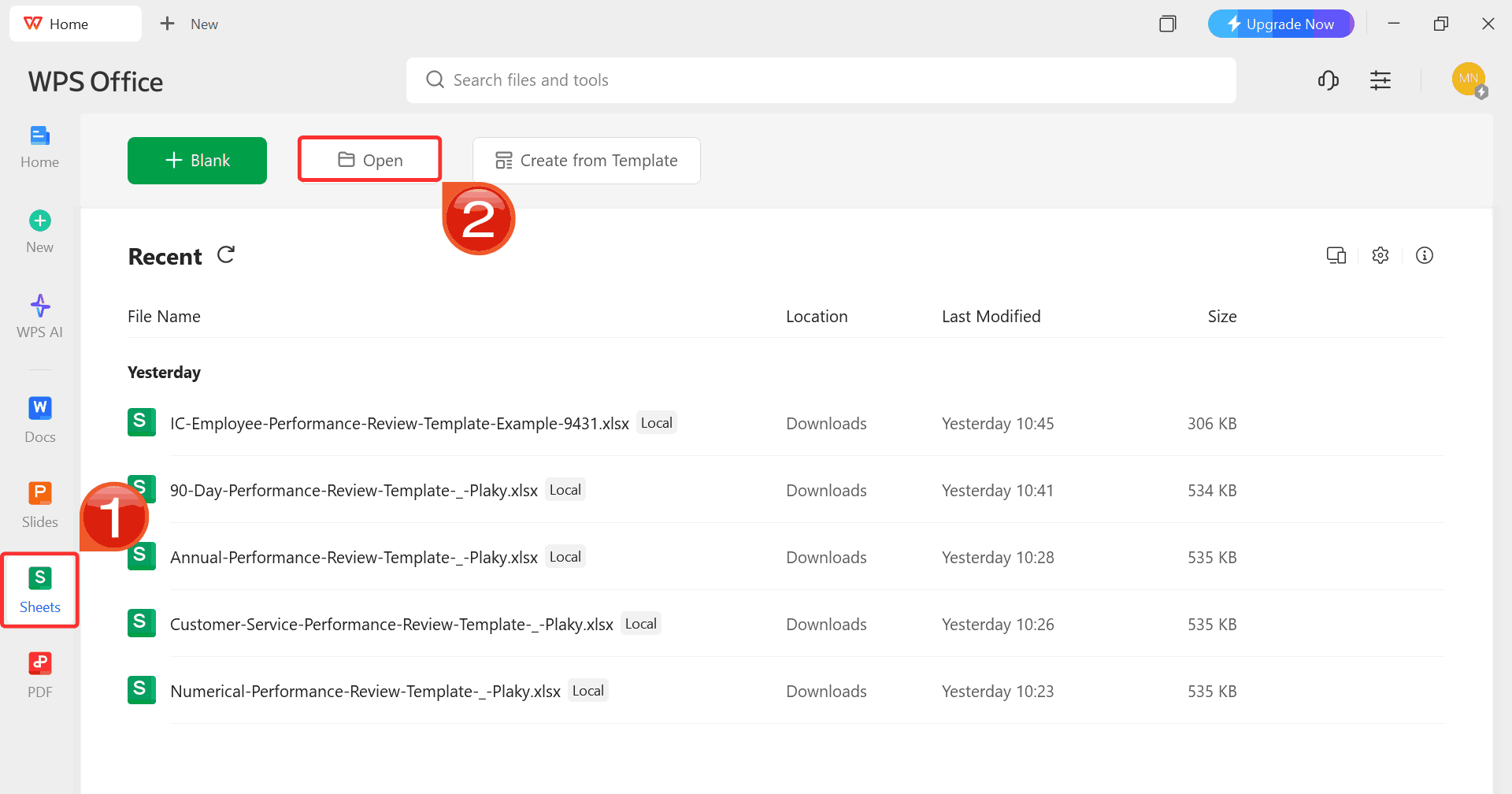
Step 1: On WPS Office, click“Sheets” from the left sidebar and hit“Open” to select your downloaded template.
WPS Spreadsheet Dashboard
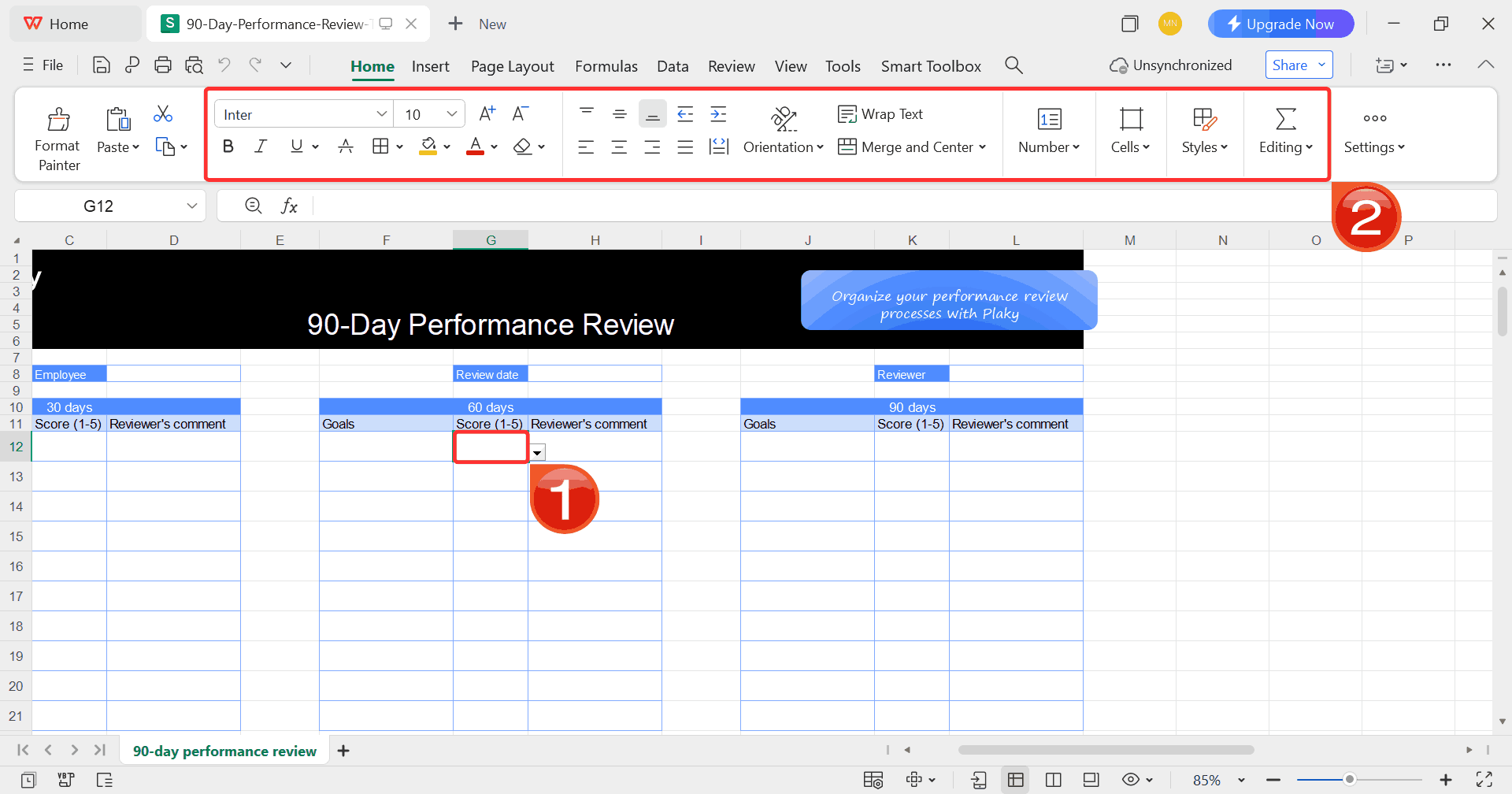
Step 2: Select any cell in your spreadsheet, and
then use the menu at the top to make whatever changes you need like
adjusting formatting, editing text, or changing formulas.
Customize Template
Step 3: Once you’re done customizing your template,
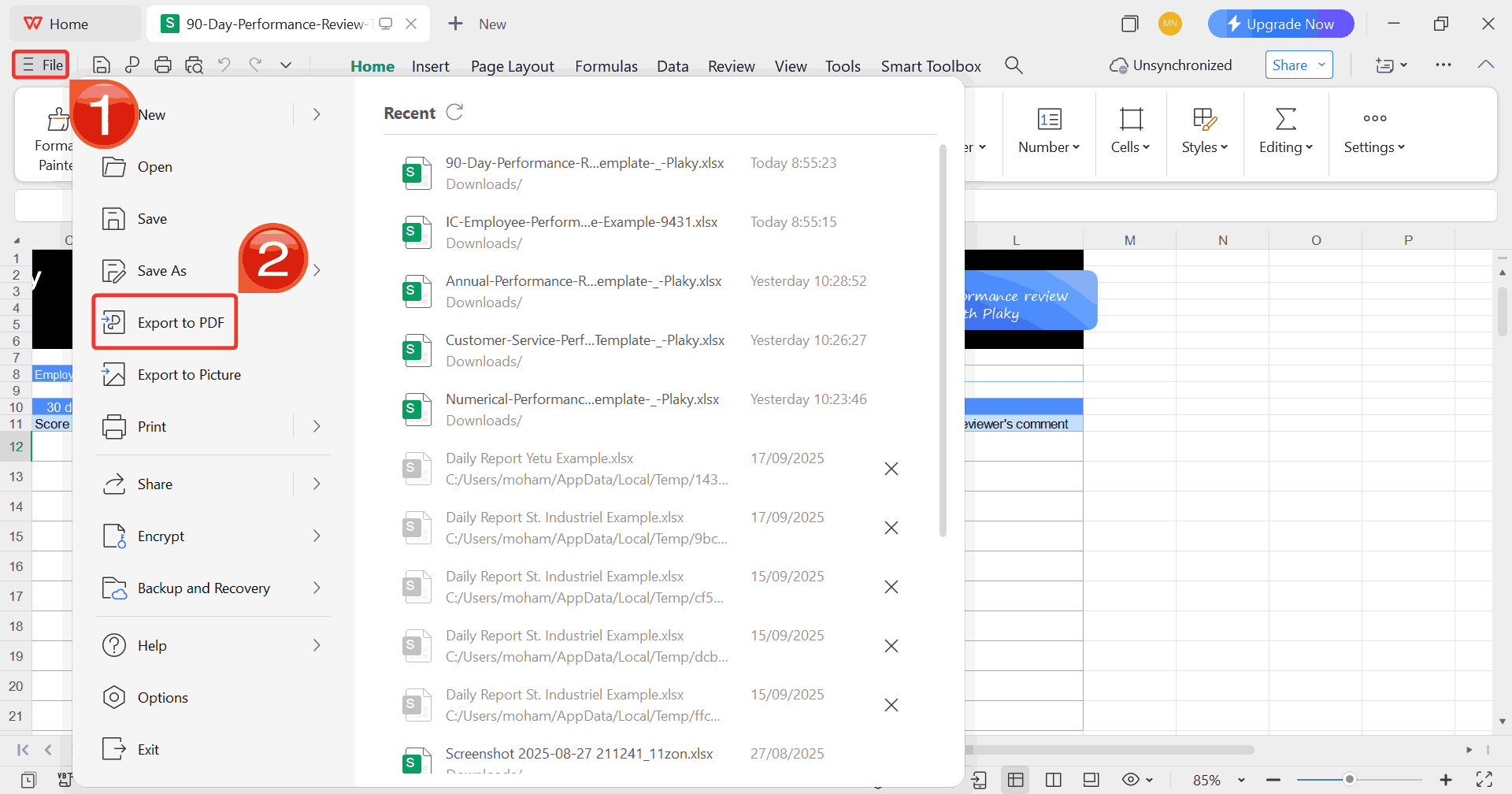
click on “File”, then select “Export to
PDF” to save your employee review in a refined, shareable
format.
Export Template
Free Office Suite
with Abundant Templates
Having a single, integrated office suite can make all the difference
when you’re managing multiple employee reviews. Switching back and forth
between different file formats often slows the process, which is why WPS Office remains a reliable
choice for handling HR-related tasks efficiently.
It supports both Word and Excel templates seamlessly, meaning you can
edit written evaluations and numerical score sheets without having to
stress about formatting issues. It also offers a built-in template
library that saves time when you need standardized forms for performance
tracking, goal setting, or development planning.
WPS Office
Advantages:
Free and lightweight software that runs steadily on most
devices
Offers dozens of editable employee review templates to jumpstart
your design
Supports easy PDF exportand printing directly from the suite
Available in both web and desktop versions for flexible
access
With WPS Office, you can open any employee review template, edit it,
and export it for secure distribution all of which can be done in just a
few clicks.
FAQs
1. What is an
employee review template used for?
It helps HR teams and managers evaluate employee performance
consistently, ensuring fair and structured feedback.
2. Are these templates free?
Yes, all listed Word and Excel templates are free to download, edit,
and use.
3. Can I customize the
template criteria?
Absolutely. Every template is fully editable in WPS Word or
Spreadsheet. You can adjust rating scales, add evaluation metrics, or
include additional sections.
4. Which format
should I choose: Word or Excel?
Use Word for qualitative feedback and narrative comments. Use Excel
if you want a quantitative review with scores and metrics.
5. Can I track
multiple employees in one template?
Yes. Excel-based templates allow you to manage multiple employees in
a single file with separate sheets or rows for each individual.
6. Is WPS
Office compatible with Microsoft Office files?
Yes. You can open, edit, and save DOCX, XLSX, and PPTX files without
losing formatting, making collaboration seamless.
Form to Feedback with WPS
Employee reviews are a vital part of tracking performance,
recognizing achievements, and planning growth. Using a free employee
review template boosts the process, helping HR teams and managers save
time while keeping evaluations structured and consistent. With
ready-to-use templates in Word and Excel, you can quickly record
feedback, track metrics, and encourage self-evaluation. It doesn't
matter if you’re working with qualitative comments or numerical scores,WPS Office makes editing,
customizing, and printing these templates straightforward. By
integrating these templates into your review process, you ensure
clarity, fairness, and actionable insights for every employee. You can
explore these templates and get started in WPS Office to make your
employee reviews simplified and more organized.
7+ years in productivity tech. I test and review the latest tools to simplify your workflow. Follow for honest app comparisons, practical guides, and curated tech picks to boost efficiency.


'%3e%3cpath%20d='M8%200C12.4183%200%2016%203.58172%2016%208C16%2012.4183%2012.4183%2016%208%2016C3.58172%2016%200%2012.4183%200%208C0%203.58172%203.58172%200%208%200ZM11.6162%204.38379C11.2257%203.99337%2010.5927%203.99338%2010.2021%204.38379L8%206.58594L5.79785%204.38379C5.40732%203.99334%204.77429%203.99329%204.38379%204.38379C3.99331%204.77429%203.99335%205.40733%204.38379%205.79785L6.58594%208L4.38379%2010.2021C3.99348%2010.5927%203.99341%2011.2257%204.38379%2011.6162C4.77426%2012.0066%205.40734%2012.0065%205.79785%2011.6162L8%209.41406L10.2021%2011.6162C10.5927%2012.0066%2011.2257%2012.0067%2011.6162%2011.6162C12.0067%2011.2257%2012.0066%2010.5927%2011.6162%2010.2021L9.41406%208L11.6162%205.79785C12.0066%205.40735%2012.0066%204.77429%2011.6162%204.38379Z'%20fill='%23080E17'%20fill-opacity='0.46'/%3e%3c/g%3e%3cdefs%3e%3cclipPath%20id='clip0_3761_713'%3e%3crect%20width='16'%20height='16'%20fill='white'/%3e%3c/clipPath%3e%3c/defs%3e%3c/svg%3e)




'%3e%3cpath%20fill-rule='evenodd'%20clip-rule='evenodd'%20d='M21.4999%2010.9993C21.4999%205.20009%2016.7986%200.498901%2010.9993%200.498901C5.19994%200.498901%200.498657%205.20009%200.498657%2010.9993C0.498657%2016.2404%204.33858%2020.5844%209.35855%2021.3722V14.0346H6.69238V10.9993H9.35855V8.68594C9.35855%206.05427%2010.9262%204.60062%2013.3248%204.60062C14.4736%204.60062%2015.6753%204.80571%2015.6753%204.80571V7.38979H14.3512C13.0468%207.38979%2012.64%208.19921%2012.64%209.0296V10.9993H15.5523L15.0867%2014.0346H12.64V21.3722C17.66%2020.5844%2021.4999%2016.2404%2021.4999%2010.9993Z'%20fill='%231568EA'/%3e%3c/g%3e%3c/svg%3e)


'%3e%3cpath%20d='M2.42045%2022.1876H6.31818V12.7217L0.75%208.54553V20.5171C0.75%2021.4414%201.49892%2022.1876%202.42045%2022.1876Z'%20fill='%234285F4'/%3e%3cpath%20d='M19.682%2022.1876H23.5797C24.5041%2022.1876%2025.2502%2021.4387%2025.2502%2020.5171V8.54553L19.682%2012.7217'%20fill='%2334A853'/%3e%3cpath%20d='M19.682%205.48293V12.7216L25.2502%208.54543V6.31816C25.2502%204.25236%2022.8921%203.07469%2021.2411%204.31361'%20fill='%23FBBC04'/%3e%3cpath%20d='M6.31824%2012.7217V5.48303L13.0001%2010.4944L19.6819%205.48303V12.7217L13.0001%2017.733'%20fill='%23EA4335'/%3e%3cpath%20d='M0.75%206.31816V8.54543L6.31818%2012.7216V5.48293L4.75909%204.31361C3.10534%203.07469%200.75%204.25236%200.75%206.31816Z'%20fill='%23C5221F'/%3e%3c/g%3e%3cdefs%3e%3cclipPath%20id='clip0_2954_7305'%3e%3crect%20width='24.5'%20height='18.375'%20fill='white'%20transform='translate(0.75%203.8125)'/%3e%3c/clipPath%3e%3c/defs%3e%3c/svg%3e)




'%3e%3cpath%20d='M19.9911%204.11386V6.471H18.5894C18.0775%206.471%2017.7322%206.57814%2017.5536%206.79243C17.3751%207.00671%2017.2858%207.32814%2017.2858%207.75671V9.44421H19.9019L19.5536%2012.0871H17.2858V18.8639H14.5536V12.0871H12.2769V9.44421H14.5536V7.49779C14.5536%206.39064%2014.8632%205.53201%2015.4822%204.92189C16.1013%204.31177%2016.9257%204.00671%2017.9554%204.00671C18.8304%204.00671%2019.509%204.04243%2019.9911%204.11386Z'%20fill='%23333333'/%3e%3c/g%3e%3cdefs%3e%3cclipPath%20id='clip0_2938_8199'%3e%3crect%20width='16'%20height='16'%20fill='white'%20transform='translate(8%204.00671)'/%3e%3c/clipPath%3e%3c/defs%3e%3c/svg%3e)
'%3e%3cpath%20d='M17.5237%2010.7813L23.4811%204H22.0699L16.8949%209.88693L12.7648%204H8L14.2469%2012.9029L8%2020.0133H9.4112L14.8725%2013.7952L19.2352%2020.0133H24M9.92053%205.04213H12.0885L22.0688%2019.0224H19.9003'%20fill='%23333333'/%3e%3c/g%3e%3cdefs%3e%3cclipPath%20id='clip0_2938_8200'%3e%3crect%20width='16'%20height='16.0134'%20fill='white'%20transform='translate(8%204)'/%3e%3c/clipPath%3e%3c/defs%3e%3c/svg%3e)


