

'%3e%3cpath%20d='M8%200C12.4183%200%2016%203.58172%2016%208C16%2012.4183%2012.4183%2016%208%2016C3.58172%2016%200%2012.4183%200%208C0%203.58172%203.58172%200%208%200ZM11.6162%204.38379C11.2257%203.99337%2010.5927%203.99338%2010.2021%204.38379L8%206.58594L5.79785%204.38379C5.40732%203.99334%204.77429%203.99329%204.38379%204.38379C3.99331%204.77429%203.99335%205.40733%204.38379%205.79785L6.58594%208L4.38379%2010.2021C3.99348%2010.5927%203.99341%2011.2257%204.38379%2011.6162C4.77426%2012.0066%205.40734%2012.0065%205.79785%2011.6162L8%209.41406L10.2021%2011.6162C10.5927%2012.0066%2011.2257%2012.0067%2011.6162%2011.6162C12.0067%2011.2257%2012.0066%2010.5927%2011.6162%2010.2021L9.41406%208L11.6162%205.79785C12.0066%205.40735%2012.0066%204.77429%2011.6162%204.38379Z'%20fill='%23080E17'%20fill-opacity='0.46'/%3e%3c/g%3e%3cdefs%3e%3cclipPath%20id='clip0_3761_713'%3e%3crect%20width='16'%20height='16'%20fill='white'/%3e%3c/clipPath%3e%3c/defs%3e%3c/svg%3e)




'%3e%3cpath%20fill-rule='evenodd'%20clip-rule='evenodd'%20d='M21.4999%2010.9993C21.4999%205.20009%2016.7986%200.498901%2010.9993%200.498901C5.19994%200.498901%200.498657%205.20009%200.498657%2010.9993C0.498657%2016.2404%204.33858%2020.5844%209.35855%2021.3722V14.0346H6.69238V10.9993H9.35855V8.68594C9.35855%206.05427%2010.9262%204.60062%2013.3248%204.60062C14.4736%204.60062%2015.6753%204.80571%2015.6753%204.80571V7.38979H14.3512C13.0468%207.38979%2012.64%208.19921%2012.64%209.0296V10.9993H15.5523L15.0867%2014.0346H12.64V21.3722C17.66%2020.5844%2021.4999%2016.2404%2021.4999%2010.9993Z'%20fill='%231568EA'/%3e%3c/g%3e%3c/svg%3e)


'%3e%3cpath%20d='M2.42045%2022.1876H6.31818V12.7217L0.75%208.54553V20.5171C0.75%2021.4414%201.49892%2022.1876%202.42045%2022.1876Z'%20fill='%234285F4'/%3e%3cpath%20d='M19.682%2022.1876H23.5797C24.5041%2022.1876%2025.2502%2021.4387%2025.2502%2020.5171V8.54553L19.682%2012.7217'%20fill='%2334A853'/%3e%3cpath%20d='M19.682%205.48293V12.7216L25.2502%208.54543V6.31816C25.2502%204.25236%2022.8921%203.07469%2021.2411%204.31361'%20fill='%23FBBC04'/%3e%3cpath%20d='M6.31824%2012.7217V5.48303L13.0001%2010.4944L19.6819%205.48303V12.7217L13.0001%2017.733'%20fill='%23EA4335'/%3e%3cpath%20d='M0.75%206.31816V8.54543L6.31818%2012.7216V5.48293L4.75909%204.31361C3.10534%203.07469%200.75%204.25236%200.75%206.31816Z'%20fill='%23C5221F'/%3e%3c/g%3e%3cdefs%3e%3cclipPath%20id='clip0_2954_7305'%3e%3crect%20width='24.5'%20height='18.375'%20fill='white'%20transform='translate(0.75%203.8125)'/%3e%3c/clipPath%3e%3c/defs%3e%3c/svg%3e)


Moving can quickly turn into one of the most chaotic experiences in life. From packing fragile items to arranging transportation and utility transfers, every detail demands attention. Without a structured plan, even the smallest task can slip through the cracks. A well-designed moving checklist transforms that stress into an organized process, keeping everything on track from start to finish. In this guide, I'll introduce practical moving list templates available in Word, Excel, and PDF formats, along with simple steps to edit and print them efficiently.
How to Create a Moving List Template
Creating a moving list template isn’t just about jotting tasks down, it’s about designing a clear plan that keeps your relocation stress-free and organized. In this section, I’ll walk you through how to build one that actually works for your timeline, budget, and peace of mind.
What is a Checklist for Moving?
A moving checklist is a detailed guide that lists every essential task before, during, and after a move. It helps you track deadlines, manage packing, handle paperwork, and plan logistics. It’s not just a list, it’s your personal roadmap for a smoother transition.
Why You Need a Checklist for Moving
Without structure, moving quickly becomes overwhelming. A checklist breaks down big responsibilities into manageable steps. It helps you remember small but crucial details, like forwarding mail or confirming cleaning services. Using a printable moving checklist makes the process even easier, giving you a clear, tangible guide that saves time and minimizes chaos.
Tips for Creating a Moving Checklist
Start Early: Begin your list at least two months in advance to space out tasks.
Categorize Tasks: Divide your checklist into sections like packing, paperwork, and utilities.
Keep It Editable: Use a digital format so you can make quick updates.
Set Deadlines: Assign due dates to prevent last-minute stress.
Prioritize: Focus first on tasks that have strict timelines—like notifying your landlord or arranging transport.
When I created my own moving checklist, the biggest game-changer was dividing it into weekly tasks. It made the entire move feel structured instead of overwhelming.
12 Free Moving List Templates [Word/Excel/PDF]
Each of these free moving checklist templates has a unique design and layout suited for different needs, from tracking budgets to organizing room-by-room moves. You can choose your preferred format and editit easily in moving list template Word/Excel/PDF versions, depending on which tool you’re most comfortable with.
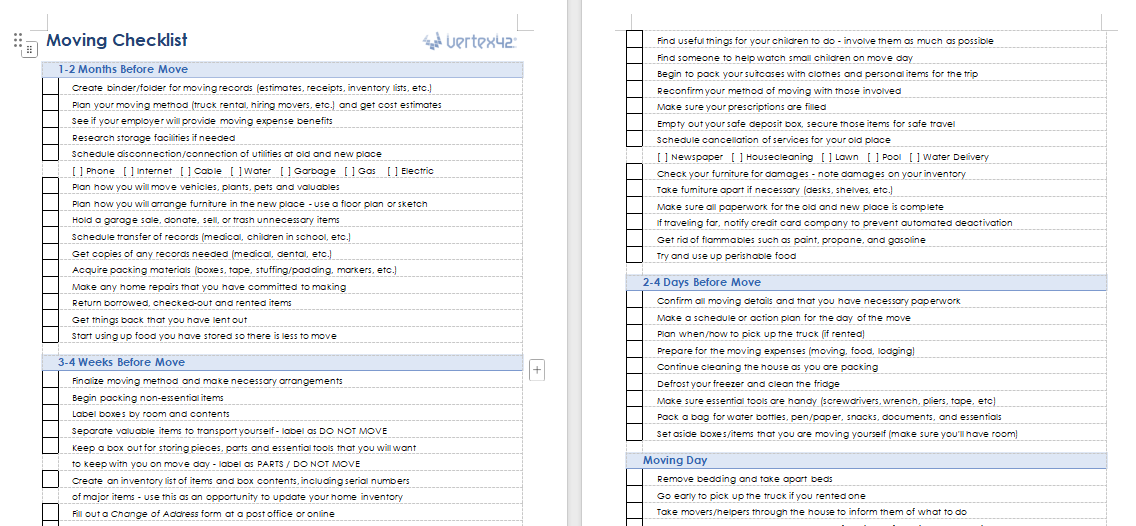
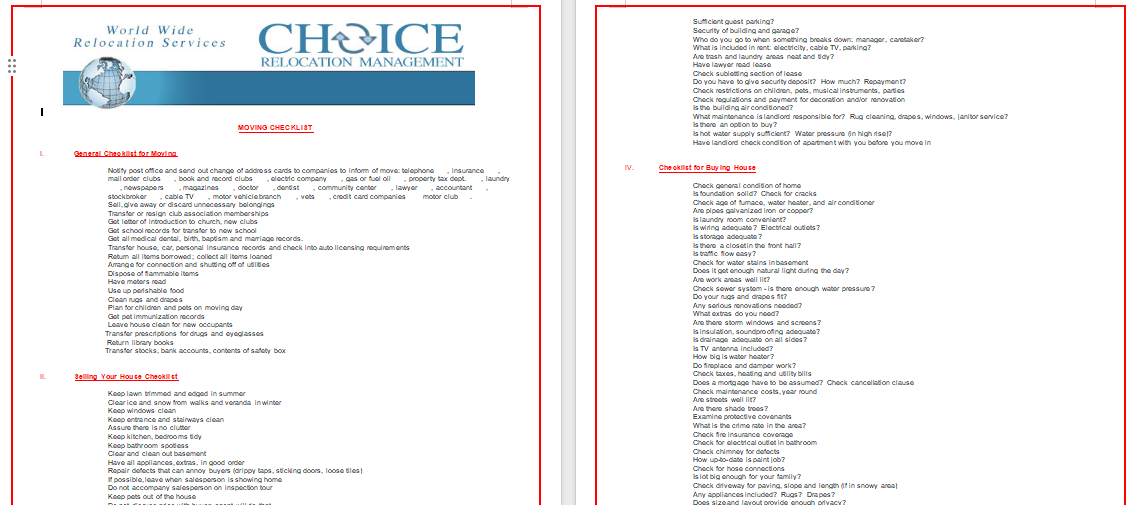
1. Moving Checklist (Word)
This Moving Checklist (Word) is an all-purpose checklist including key sections for pre-move planning, packing, and final-day tasks. It ensures nothing gets overlooked, helping you stay organized every step of the way. You can customize it with personal tasks and add notes for reminders. The clear layout makes it beginner-friendly and efficient for solo movers.
2. Household Moving Checklist (Word)
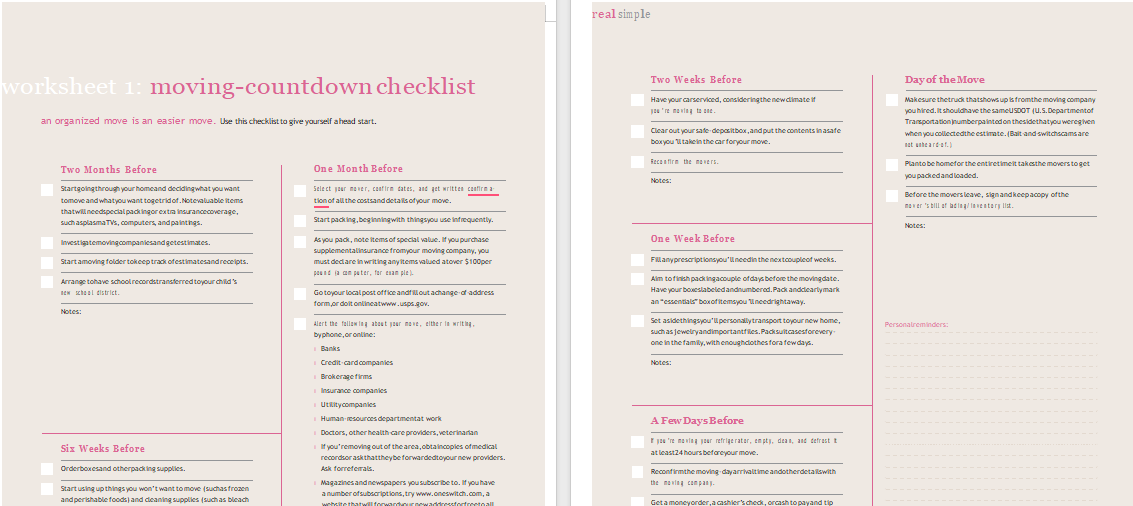
The Household Moving Checklist (Word) is designed for families shifting houses and includes item tracking and detailed reminders. It divides the tasks per room, letting you track boxes and fragile items. You can assign sections to each family member, keeping everyone on the same page. The structure helps large families coordinate efficiently without confusion.
3. Family Relocation Checklist (Word)
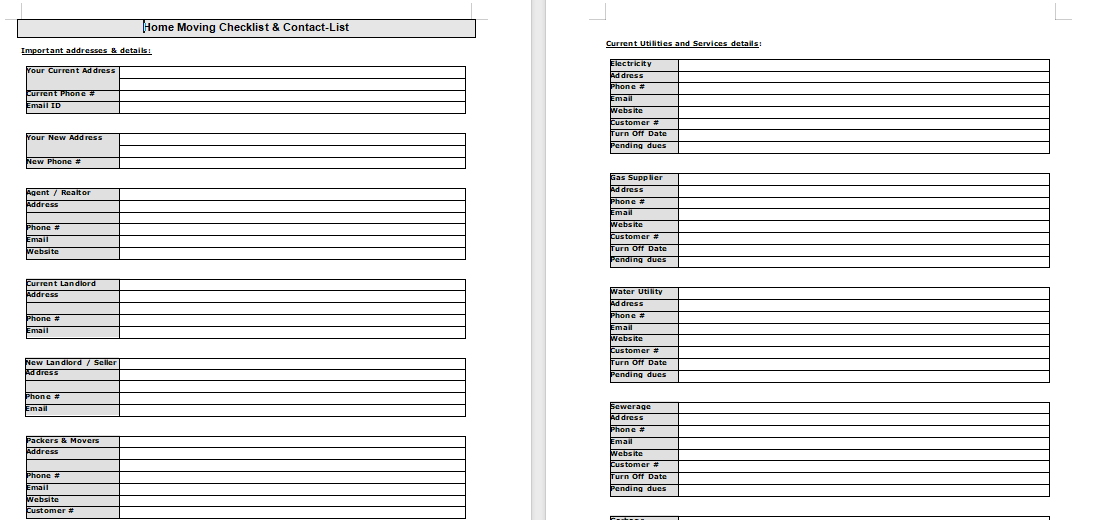
The Family Relocation Checklist (Word) is ideal for bigger households relocating long-distance. It outlines steps for each family member, from packing clothes to arranging school transfers. You can easily mark tasks as complete or add extra steps. This helps you handle every aspect of relocation in a well-planned order.
4. Room-by-Room Moving List (Word)
This Room-by-Room Moving List (Word) simplifies packing by dividing tasks based on individual rooms. It prevents mix-ups and ensures items from each room stay organized. You can also color-code categories to track fragile or priority boxes. It makes unpacking much faster once you reach your new home.
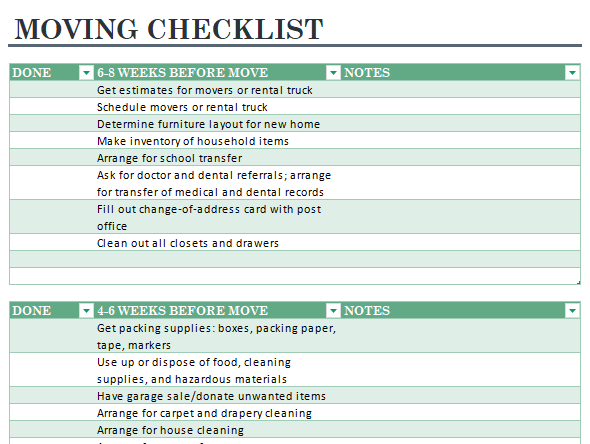
5. Weekly Moving Plan (Excel)
The Weekly Moving Plan (Excel) breaks down moving tasks into a week-by-week schedule. It’s great for visual planners who prefer to pace their move steadily. You can set due dates, track progress, and add comments for each week. It helps make large-scale moves feel achievable through smaller milestones.
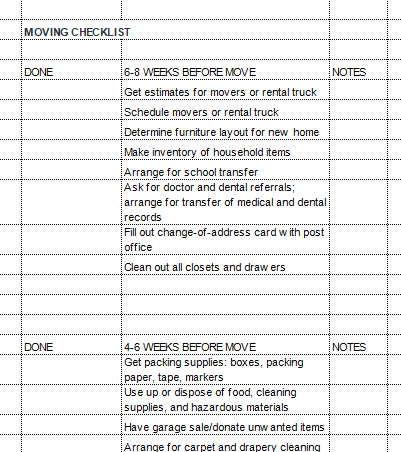
6. Task-Oriented Moving Checklist (Excel)
This Task-Oriented Moving Checklist (Excel) is for those who love detailed tracking. Each task can be marked as pending or completed, helping you measure progress visually. It’s perfect for anyone managing team relocations or multi-person moves. The built-in task column format keeps everything neat and professional.
7. Budget & Expenses Moving List (Excel)
The Budget & Expenses Moving List (Excel) tracks all your moving-related costs in one place. You can list expenses for transport, supplies, and services. It automatically calculates totals, saving you from manual math. Ideal for those on a tight budget who want to avoid overspending.
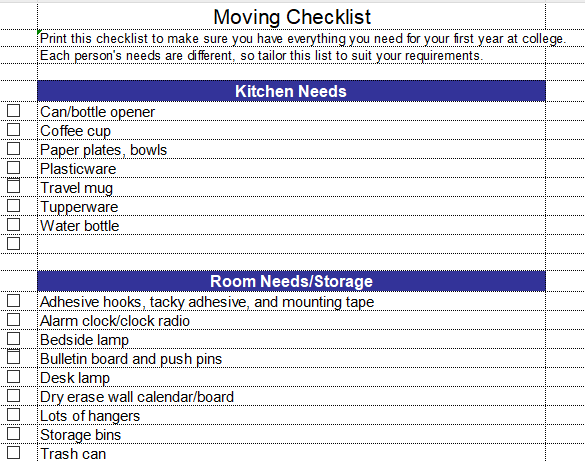
8. Packing Schedule Checklist (Excel)
This Packing Schedule Checklist (Excel) organizes packing by priority and timeline. You can plan which rooms to pack first and assign specific dates. The layout helps you avoid last-minute stress by keeping essential items accessible. It’s an efficient tool for anyone who values structure in packing.
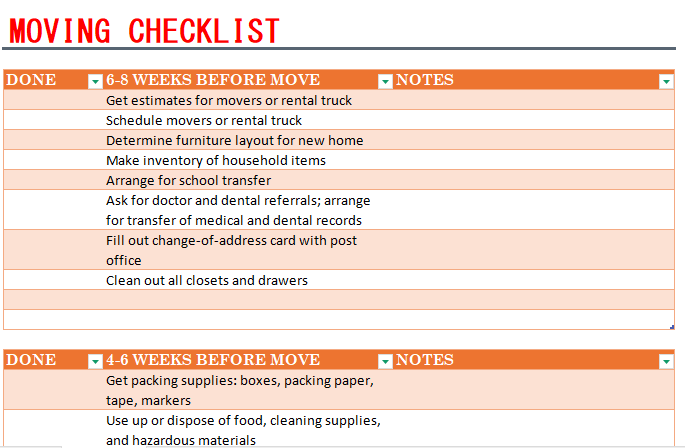
9. Pre-Move Essentials (PDF)
The Pre-Move Essentials (PDF) checklist focuses on all pre-moving preparations. It reminds you to update your address, cancel services, and sort paperwork. The format is easy to print and pin on your fridge for daily reminders. It helps ensure all important tasks are done before moving day.
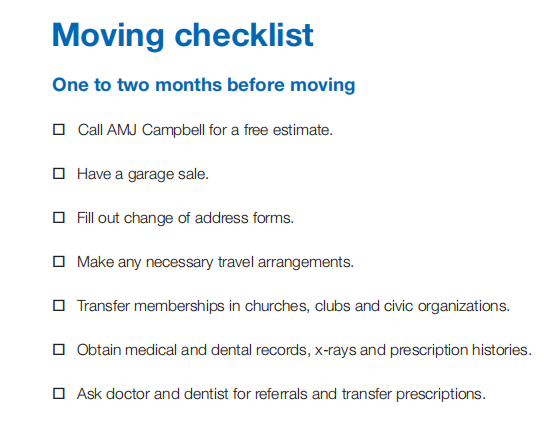
10. Moving Timeline Checklist (PDF)
This Moving Timeline Checklist (PDF) gives a visual plan from 8 weeks before the move to the final day. You can follow it chronologically, marking off milestones as you go. The structured timeline prevents procrastination and keeps your relocation on track. It’s perfect for long-term planners who want an overview of the entire process.
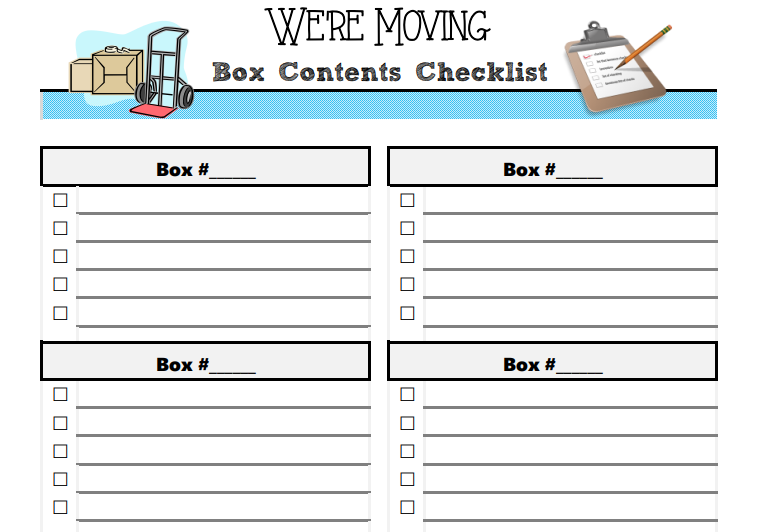
11. Apartment Move-Out List (PDF)
The Apartment Move-Out List (PDF) is designed for tenants to complete move-out tasks efficiently. It includes reminders for cleaning, inspections, and key returns. You can use it to ensure your deposit is refunded without disputes. The checklist format is clear and printable, ideal for renters.
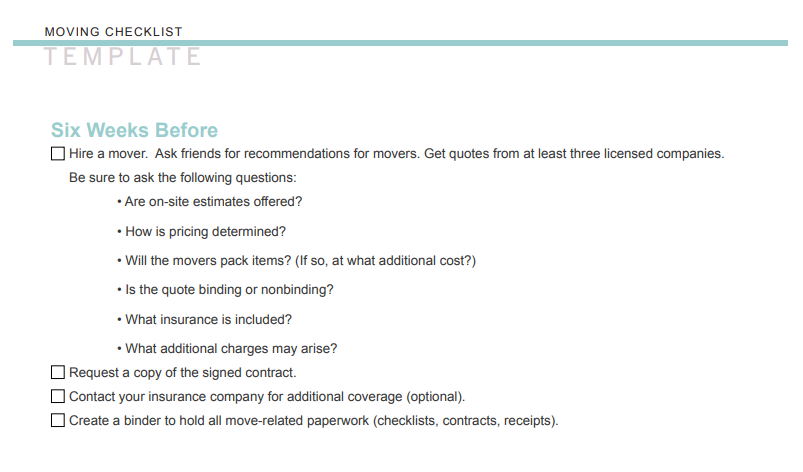
12. Office Relocation Checklist (PDF)
This Office Relocation Checklist (PDF) focuses on business moves with sections for IT, furniture, and communication setups. It helps coordinate departments and minimize downtime. You can assign responsibilities per section and note vendor contacts. It’s a practical solution for managers leading an office shift.
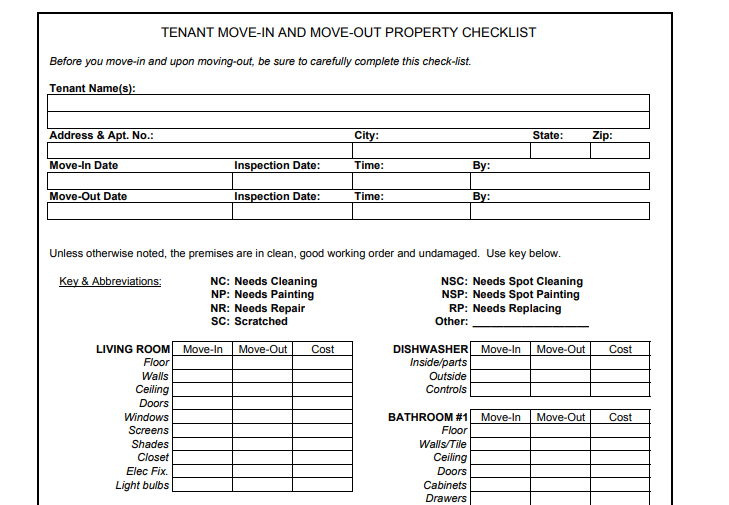
When I used an Excel moving list template, tracking progress visually made everything more motivating. Checking off tasks felt like actual milestones.
How to Edit and Print Moving List Templates
Once you’ve downloaded a template, the next step is customizing it. Let’s look at how to edit and print your free moving checklist templates in WPS Word, Excel, and PDF.
Edit in WPS Word
WPS Word is a lightweight yet feature-rich word processor perfect for editing moving templates. You can add, delete, and customize text effortlessly.
Step 1: First of all, open the Word version of the template.
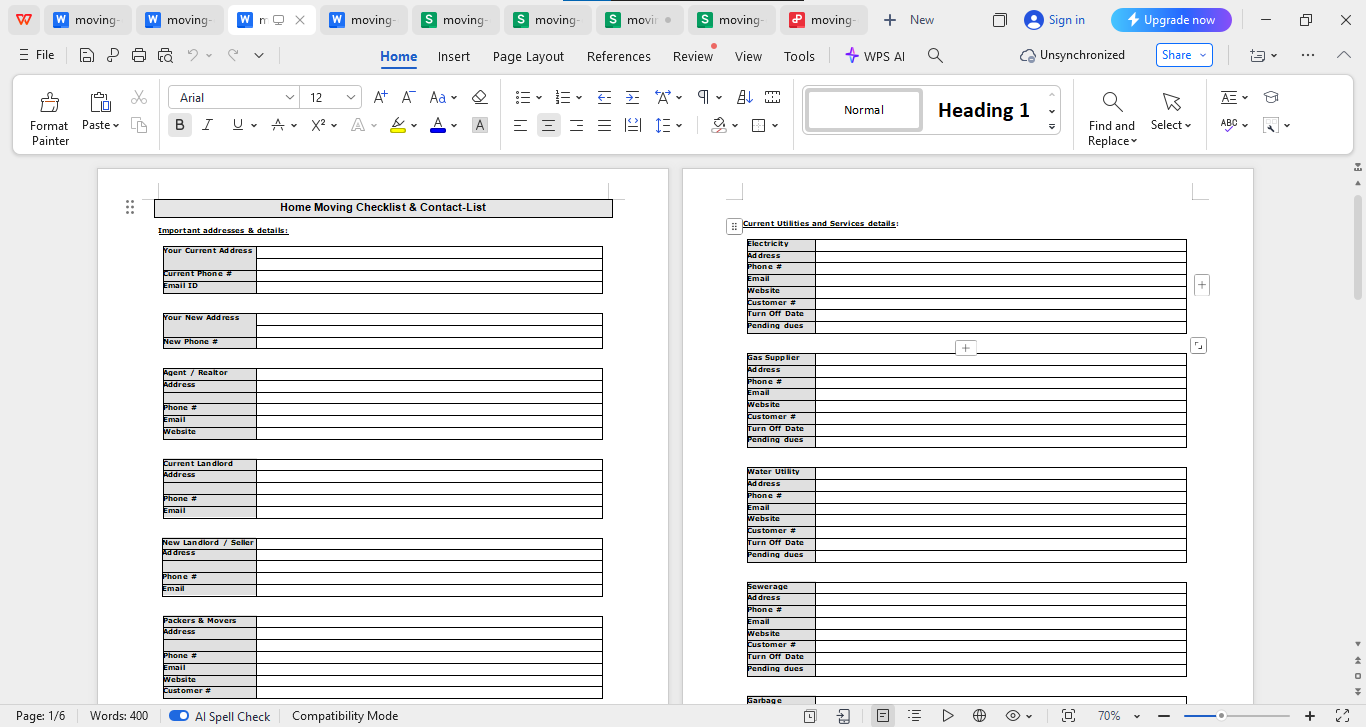
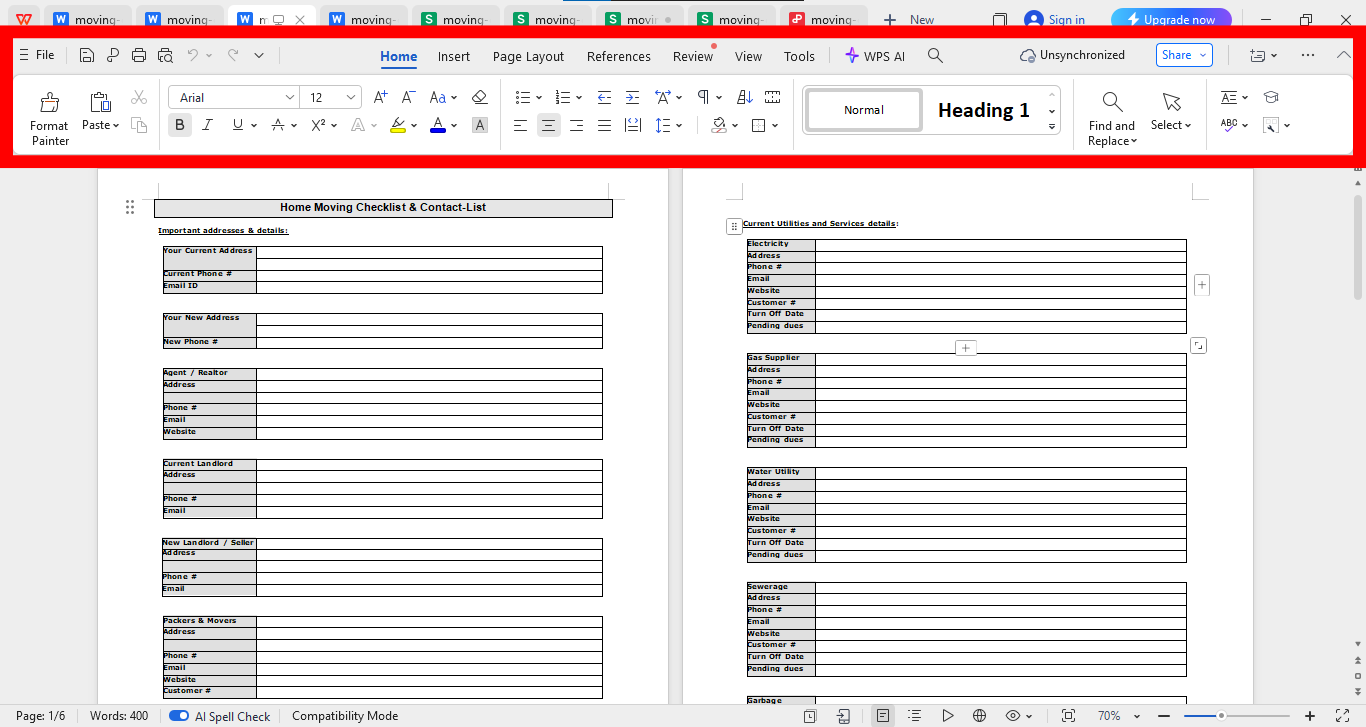
Step 2: Now click on any of the text that you want to alter and make changes with the help of the panel above your template.
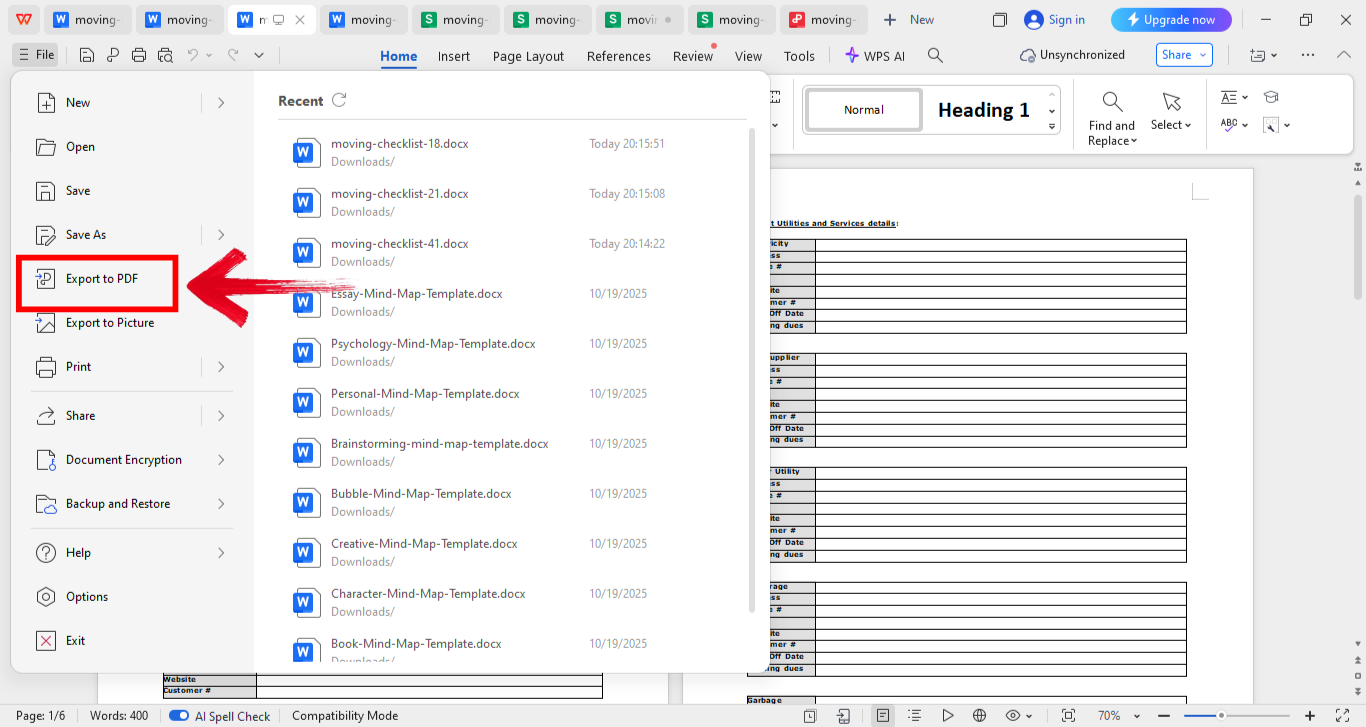
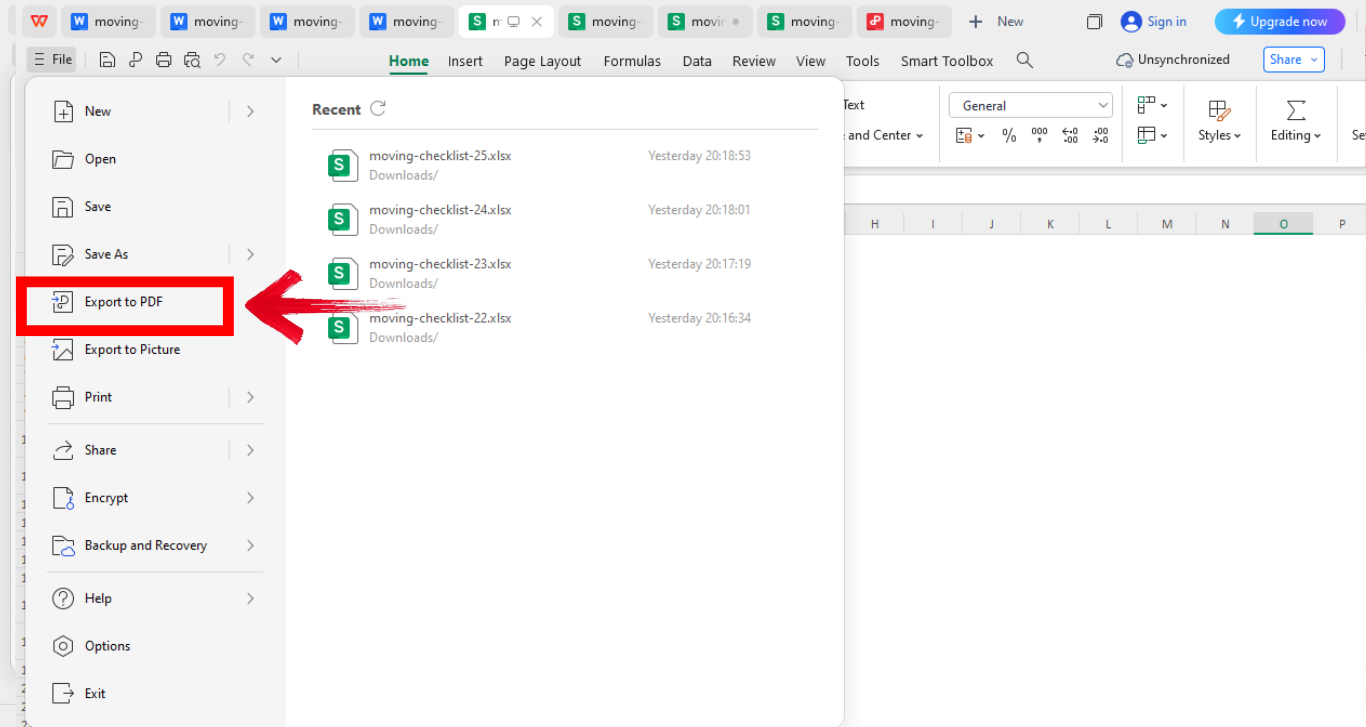
Step 3: Once you’re satisfied with the changes you’ve made, save as Word or PDF by first clicking“File” from the top left of your screen, and then click“Export to PDF.”
Editing in WPS Word felt intuitive, I could personalize the checklist to match my move without any hassle.
Edit in WPS Excel
WPS Excel gives you the power to plan, track, and analyze tasks more efficiently. It’s especially handy if you love seeing visual progress.
Step 1: Open the Excel moving checklist.
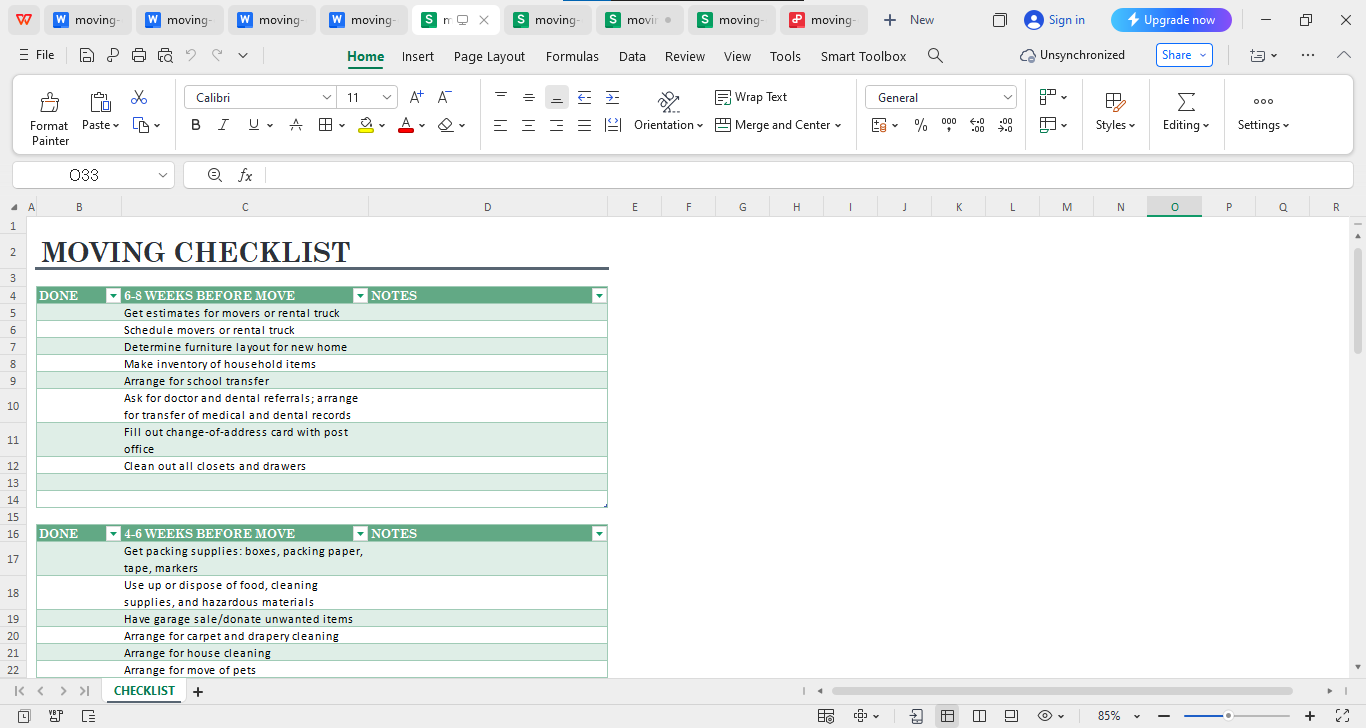
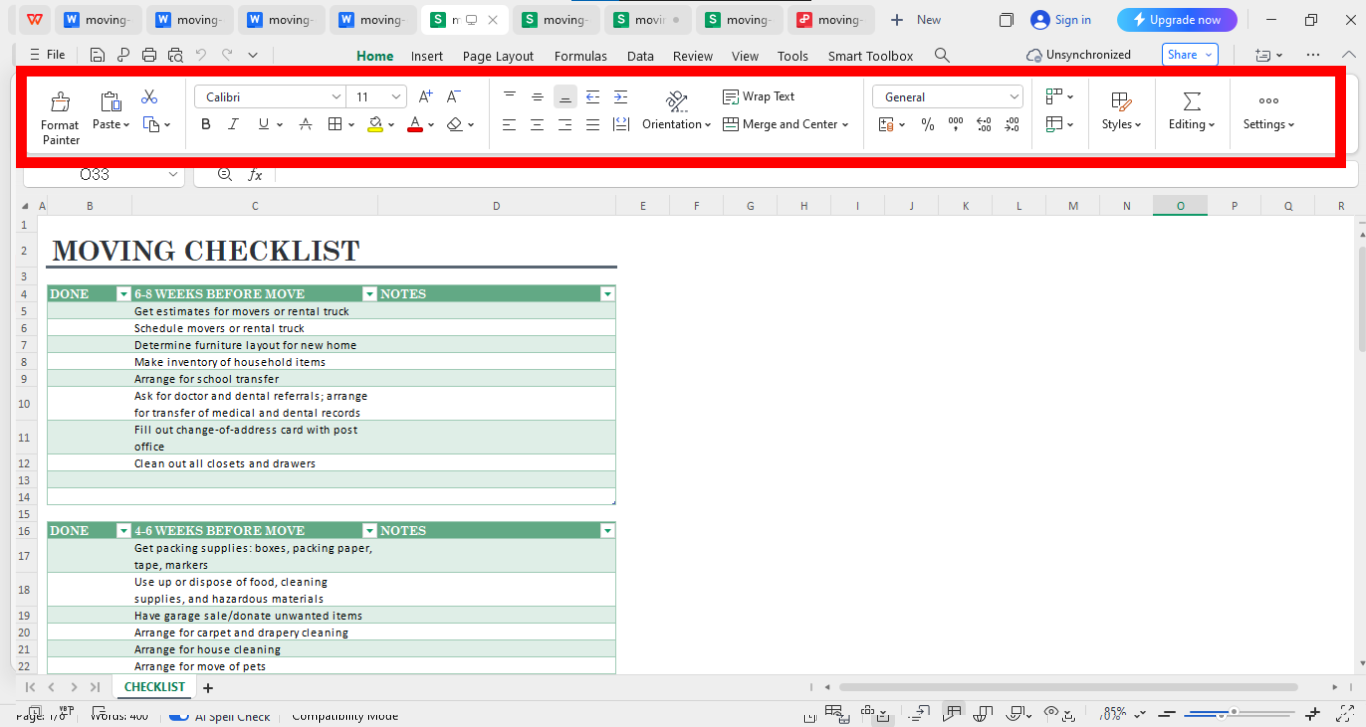
Step 2: Use filters and conditional formatting for task priority from the editing panel above your template on the excel sheet.
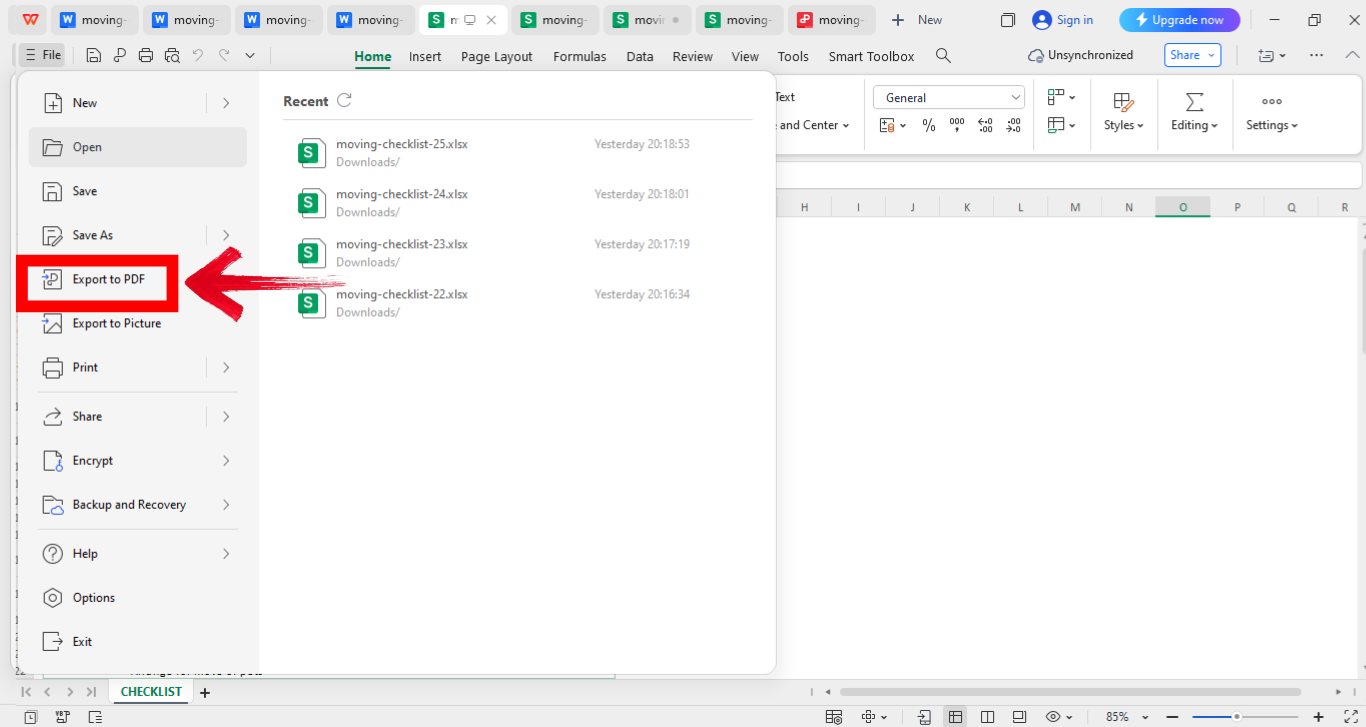
Step 3: Once you’re done customizing your checklist, go ahead and save it as a Word or PDF file. Simply click“File” in the top-left corner of your screen, then choose “Export to PDF” to finalize your moving list template.
Using conditional formatting to highlight completed tasks gave me a clear picture of what was left, it was actually satisfying.
Edit in WPS PDF
WPS PDF is your go-to for handling PDF versions of moving templates. It’s surprisingly flexible for editing, annotating, and printing documents.
Step 1: Firstly, open your file in WPS PDF.
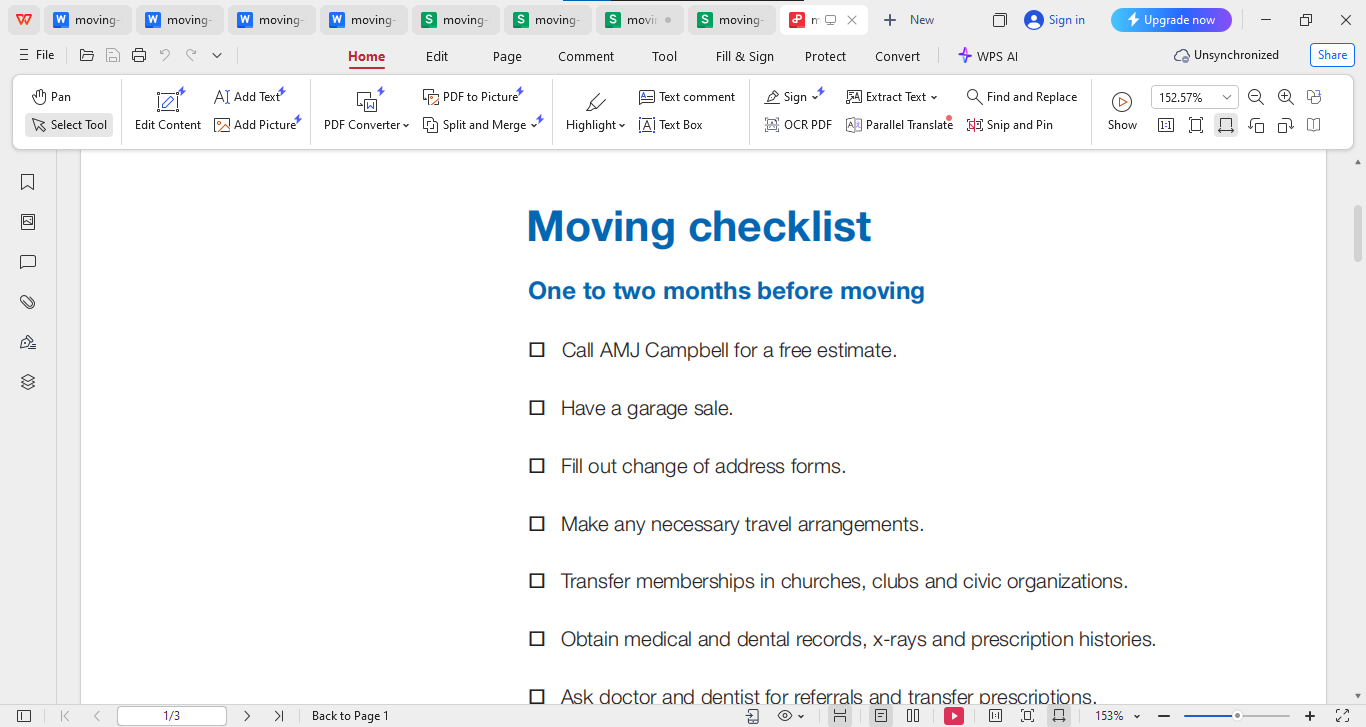
Step 2: Now you can use various tools to edit your file in the way you want it to be, explore the editing panel and get it done your way.
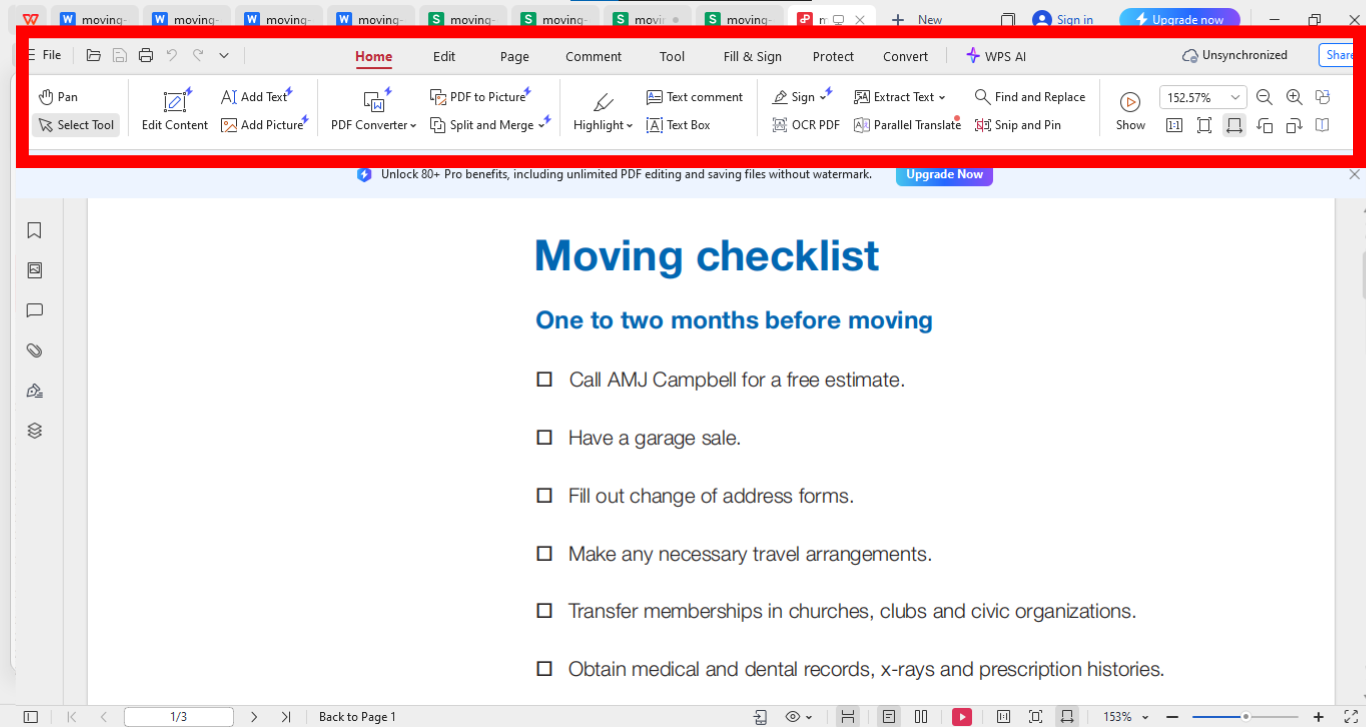
Step 3: Once you’re done customizing your checklist, go ahead and save it as a Word or PDF file. Simply click“File” in the top-left corner of your screen, then choose “Export to PDF” to finalize your moving list template.
I liked how WPS PDF allowed me to highlight urgent tasks quickly without changing file format.
Free Office Suite with Abundant Resume & Checklist Templates
WPS Office is an all-in-one productivity suite offering Writer, Spreadsheet, and PDF tools. Unlike many bulky office apps, it’s fast, lightweight, and accessible across devices. The built-in template library offers thousands of free resources, from resumes to moving checklists. What truly sets WPS apart is its ability to let you edit any file type seamlessly without compatibility issues.
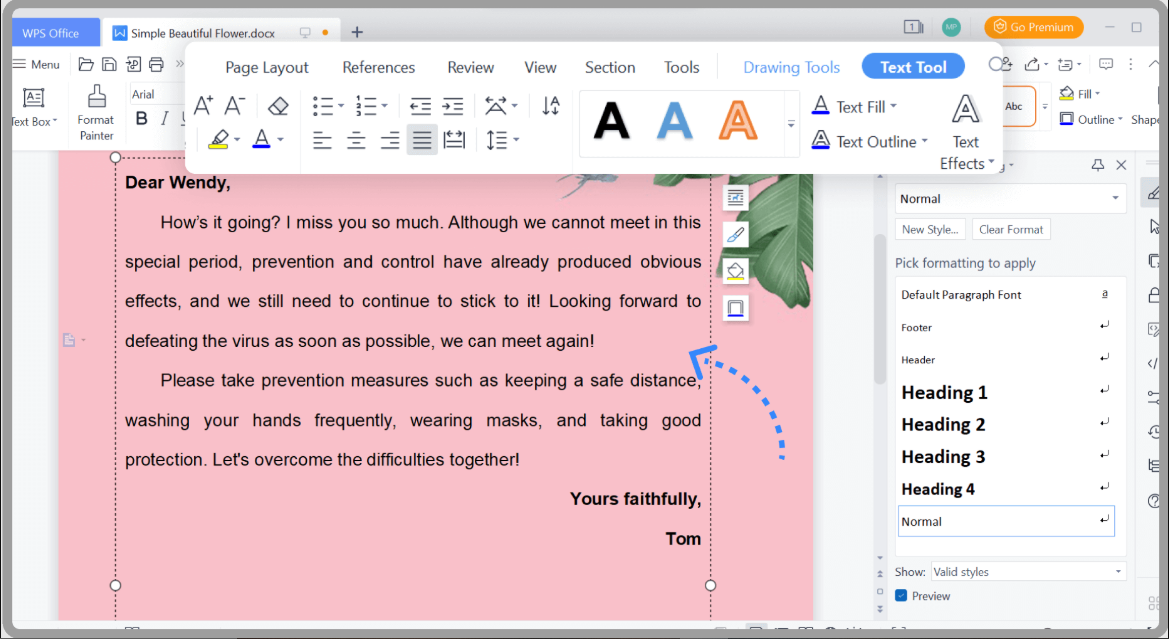
You can switch between Word, Excel, and PDF formats in seconds, saving time and effort. With cloud sync and an intuitive interface, WPS Office makes document creation and editing effortless, giving you everything you need to stay productive wherever you are.
Key Advantages:
Free & Lightweight: Uses less space without compromising performance.
Format Versatility: Supports DOC, PPT, PDF, andJPG.
Built-in Templates: Instant access to professional forms and lists.
User-Friendly Interface: Modern layout for easy navigation.
Cross-Platform: Available on PC, mobile, and web.
I’ve used WPS Office for years, it’s genuinely one of the most practical tools for anyone who wants simplicity with power. The ability to edit and print all template formats in one app saves tons of time.
FAQs
Q1: Why should I use a moving checklist?
It keeps you organized and reduces last-minute chaos by tracking each task in one place.
Q2: Can I edit a PDF moving checklist?
Yes, WPS PDF lets you modify text, highlight, and even convert files into editable Word or Excel versions.
Q3: How far in advance should I start using a moving checklist?
Ideally, start 6–8 weeks before your move so you can manage tasks calmly.
Q4: Can I use the same checklist for office and home moving?
Yes, but tailor the sections to your needs, home tasks differ from office setups.
Q5: What’s the best way to print my moving checklist?
After editing, save it as a PDF in WPS and print directly for clear formatting.
Q6: Are these moving list templates really free?
Yes, all listed templates are free to download and can be edited without extra cost.
The Smart Way to Stay Organized While Moving
Creating and using a moving list template can transform a chaotic relocation into a calm, organized process. Instead of juggling endless reminders or scattered notes, ready-made templates make it easier to plan every task with precision. With free moving checklist templates available in Word, Excel, and PDF, staying on top of packing, budgeting, and scheduling becomes effortless. To make the process even smoother, WPS Office offers the perfect platform to edit, customize, and manage these templates. From adding personal notes in Writer to tracking expenses in Spreadsheet or adjusting PDFs on the go, everything can be done in one place. Designed for simplicity and speed, WPS Office helps turn the stress of moving into a well-structured and achievable plan.

'%3e%3cpath%20d='M19.9911%204.11386V6.471H18.5894C18.0775%206.471%2017.7322%206.57814%2017.5536%206.79243C17.3751%207.00671%2017.2858%207.32814%2017.2858%207.75671V9.44421H19.9019L19.5536%2012.0871H17.2858V18.8639H14.5536V12.0871H12.2769V9.44421H14.5536V7.49779C14.5536%206.39064%2014.8632%205.53201%2015.4822%204.92189C16.1013%204.31177%2016.9257%204.00671%2017.9554%204.00671C18.8304%204.00671%2019.509%204.04243%2019.9911%204.11386Z'%20fill='%23333333'/%3e%3c/g%3e%3cdefs%3e%3cclipPath%20id='clip0_2938_8199'%3e%3crect%20width='16'%20height='16'%20fill='white'%20transform='translate(8%204.00671)'/%3e%3c/clipPath%3e%3c/defs%3e%3c/svg%3e)
'%3e%3cpath%20d='M17.5237%2010.7813L23.4811%204H22.0699L16.8949%209.88693L12.7648%204H8L14.2469%2012.9029L8%2020.0133H9.4112L14.8725%2013.7952L19.2352%2020.0133H24M9.92053%205.04213H12.0885L22.0688%2019.0224H19.9003'%20fill='%23333333'/%3e%3c/g%3e%3cdefs%3e%3cclipPath%20id='clip0_2938_8200'%3e%3crect%20width='16'%20height='16.0134'%20fill='white'%20transform='translate(8%204)'/%3e%3c/clipPath%3e%3c/defs%3e%3c/svg%3e)


