

'%3e%3cpath%20d='M8%200C12.4183%200%2016%203.58172%2016%208C16%2012.4183%2012.4183%2016%208%2016C3.58172%2016%200%2012.4183%200%208C0%203.58172%203.58172%200%208%200ZM11.6162%204.38379C11.2257%203.99337%2010.5927%203.99338%2010.2021%204.38379L8%206.58594L5.79785%204.38379C5.40732%203.99334%204.77429%203.99329%204.38379%204.38379C3.99331%204.77429%203.99335%205.40733%204.38379%205.79785L6.58594%208L4.38379%2010.2021C3.99348%2010.5927%203.99341%2011.2257%204.38379%2011.6162C4.77426%2012.0066%205.40734%2012.0065%205.79785%2011.6162L8%209.41406L10.2021%2011.6162C10.5927%2012.0066%2011.2257%2012.0067%2011.6162%2011.6162C12.0067%2011.2257%2012.0066%2010.5927%2011.6162%2010.2021L9.41406%208L11.6162%205.79785C12.0066%205.40735%2012.0066%204.77429%2011.6162%204.38379Z'%20fill='%23080E17'%20fill-opacity='0.46'/%3e%3c/g%3e%3cdefs%3e%3cclipPath%20id='clip0_3761_713'%3e%3crect%20width='16'%20height='16'%20fill='white'/%3e%3c/clipPath%3e%3c/defs%3e%3c/svg%3e)



'%3e%3cpath%20fill-rule='evenodd'%20clip-rule='evenodd'%20d='M21.4999%2010.9993C21.4999%205.20009%2016.7986%200.498901%2010.9993%200.498901C5.19994%200.498901%200.498657%205.20009%200.498657%2010.9993C0.498657%2016.2404%204.33858%2020.5844%209.35855%2021.3722V14.0346H6.69238V10.9993H9.35855V8.68594C9.35855%206.05427%2010.9262%204.60062%2013.3248%204.60062C14.4736%204.60062%2015.6753%204.80571%2015.6753%204.80571V7.38979H14.3512C13.0468%207.38979%2012.64%208.19921%2012.64%209.0296V10.9993H15.5523L15.0867%2014.0346H12.64V21.3722C17.66%2020.5844%2021.4999%2016.2404%2021.4999%2010.9993Z'%20fill='%231568EA'/%3e%3c/g%3e%3c/svg%3e)


'%3e%3cpath%20d='M2.42045%2022.1876H6.31818V12.7217L0.75%208.54553V20.5171C0.75%2021.4414%201.49892%2022.1876%202.42045%2022.1876Z'%20fill='%234285F4'/%3e%3cpath%20d='M19.682%2022.1876H23.5797C24.5041%2022.1876%2025.2502%2021.4387%2025.2502%2020.5171V8.54553L19.682%2012.7217'%20fill='%2334A853'/%3e%3cpath%20d='M19.682%205.48293V12.7216L25.2502%208.54543V6.31816C25.2502%204.25236%2022.8921%203.07469%2021.2411%204.31361'%20fill='%23FBBC04'/%3e%3cpath%20d='M6.31824%2012.7217V5.48303L13.0001%2010.4944L19.6819%205.48303V12.7217L13.0001%2017.733'%20fill='%23EA4335'/%3e%3cpath%20d='M0.75%206.31816V8.54543L6.31818%2012.7216V5.48293L4.75909%204.31361C3.10534%203.07469%200.75%204.25236%200.75%206.31816Z'%20fill='%23C5221F'/%3e%3c/g%3e%3cdefs%3e%3cclipPath%20id='clip0_2954_7305'%3e%3crect%20width='24.5'%20height='18.375'%20fill='white'%20transform='translate(0.75%203.8125)'/%3e%3c/clipPath%3e%3c/defs%3e%3c/svg%3e)


A page of notes can hold every fact about a topic and still leave you unable to explain how the pieces fit together. A concept map fixes that by drawing the relationships out loud: each idea becomes a node, and every connection gets a short linking phrase such as causes, requires, or is a part of. In this guide, you will learn what a concept map is, how it differs from a mind map, and how to build one step by step using tools you already have, including the free WPS Office suite.
The method works on paper, on a whiteboard, or in software. What matters is the discipline: name the concepts, rank them from general to specific, and label every link. Once you follow that routine, a concept map usually takes 15–30 minutes to build and immediately shows you where your understanding is thin.
How to Make a Concept Map (Step-by-Step with Examples)
What Is a Concept Map
A concept map is a diagram that shows relationships between ideas. Concepts sit inside nodes—usually boxes or ovals—arranged from the most general idea at the top to specific examples lower down. Connecting lines carry linking words that turn each pair of nodes into a readable statement, called a proposition. For example: Photosynthesis → produces → Glucose.
The technique was developed by Joseph Novak in the 1970s, based on research into how students build knowledge. The core idea: learning improves when you make relationships explicit instead of memorizing isolated facts. That is why concept maps appear everywhere from biology classrooms to business analysis—anywhere a topic has parts that interact.
Read a concept map by following the labels from node to node. If a chain of propositions reads as sensible sentences, the map captures real understanding. If a connection has no label or no clear direction, you have found a gap worth studying.
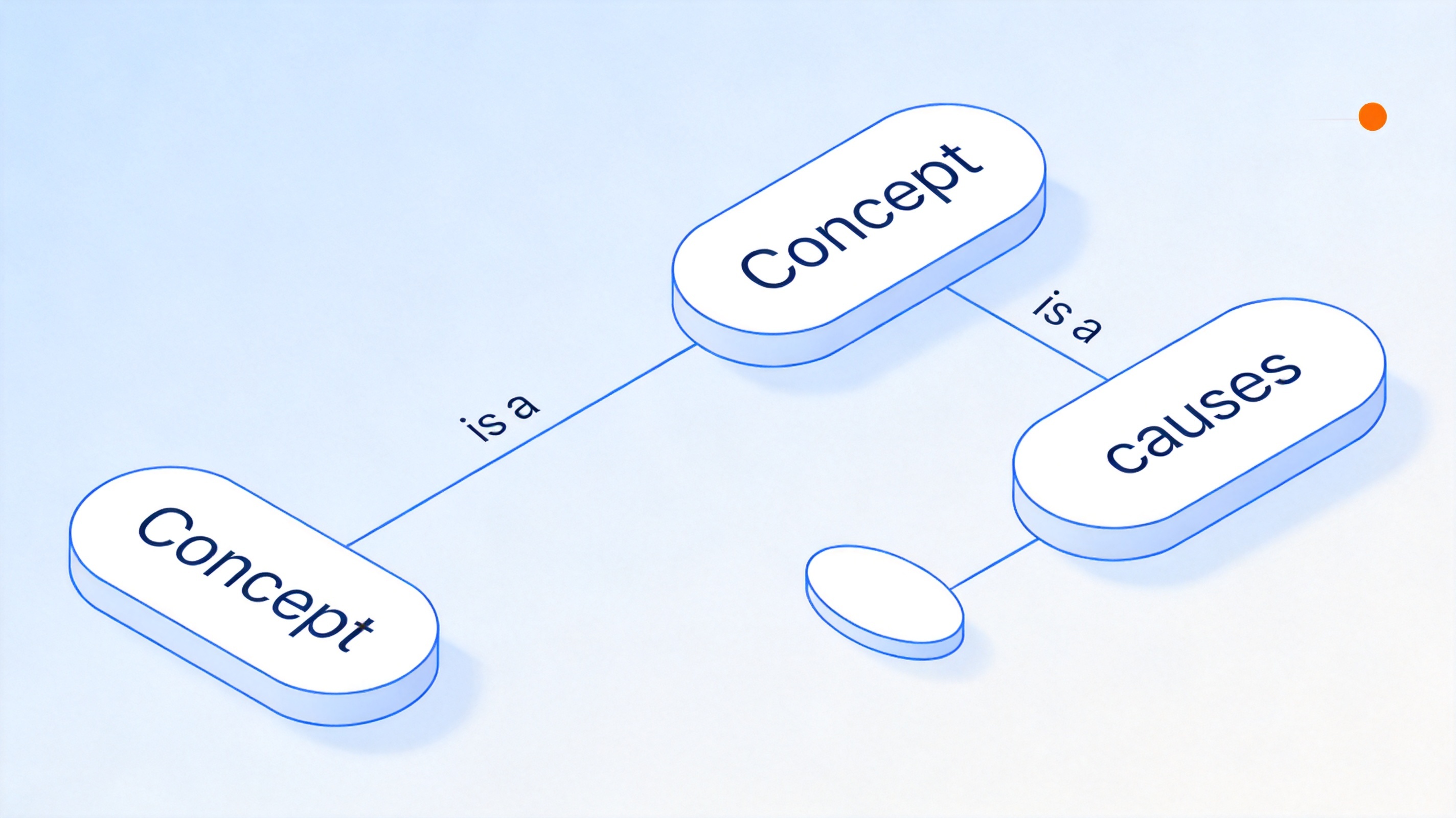
Concept map nodes with linking words


Concept Map vs. Mind Map
Concept maps and mind maps look similar on the page, but they answer different questions. A concept map is a network: any node can connect to any other, and every link carries a labeled relationship. It answers "How does this idea relate to that one?" A mind map is a tree: branches radiate from one central topic, usually without labels, and it answers "What belongs under this topic?"
Choose a concept map when you need to explain causal chains, compare theories, or prepare for an exam that tests understanding rather than recall. Choose a mind map for open brainstorming, note-taking, or planning a project outline. Many people do both: mind map first to gather ideas, then restructure them into a labeled concept map.
If you already work with mind maps, the fastest way to start is to convert an existing one—add a linking phrase to each branch and allow cross-connections between branches. For fresh templates, the top mind map templates in WPS Office give you editable starting points you can rework into concept maps.
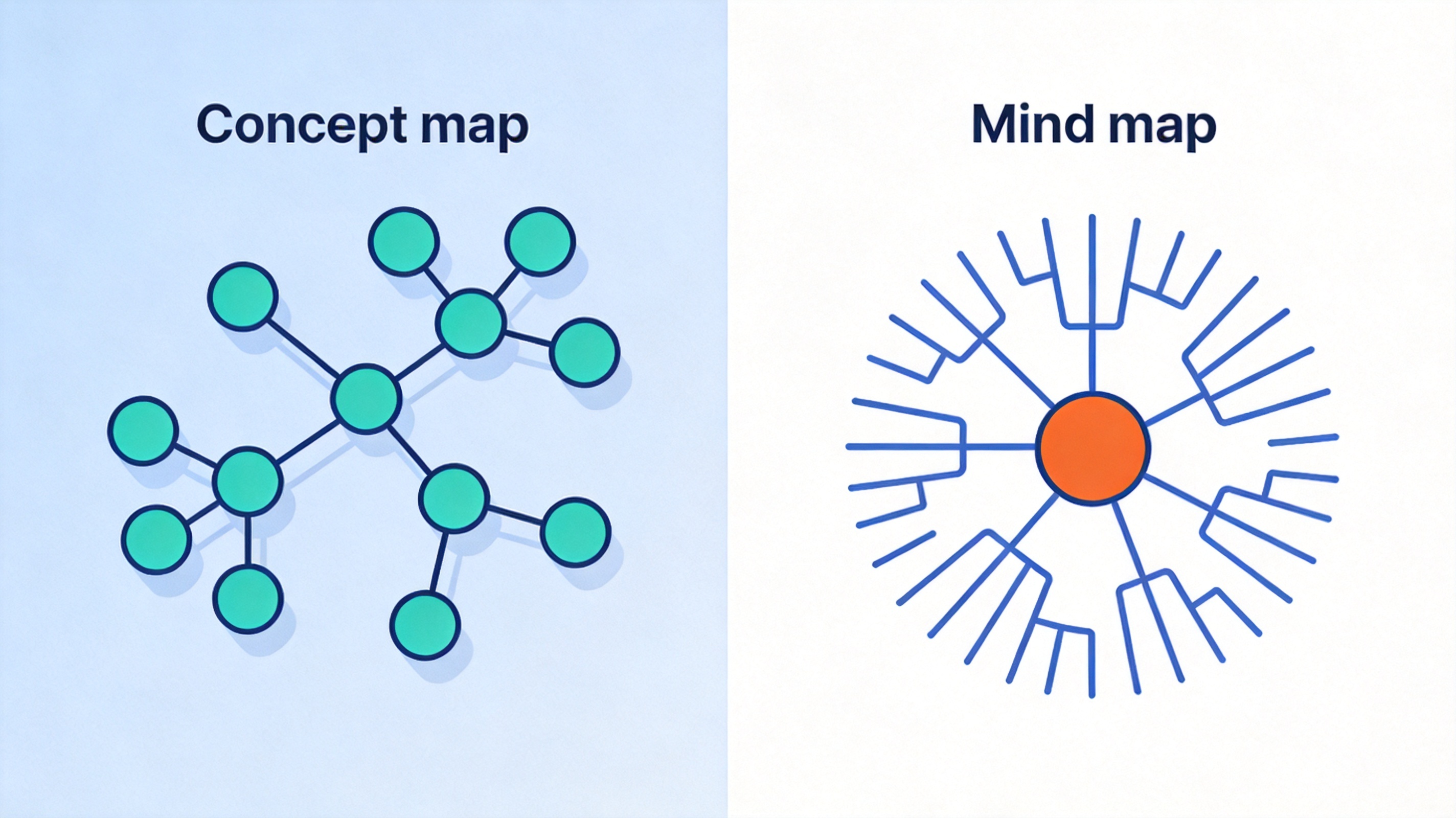
Concept map network versus mind map tree
How to Make a Concept Map in 5 Steps
Whether you draw on paper or in software, the same five steps produce a clean, readable map.
List the concepts. Write every important term for your topic on separate notes—aim for 10 to 20 at first. Do not filter yet; capture first, judge later.
Sort and park the leftovers. Set aside terms you do not understand yet and terms that connect to nothing else. What remains is your working set.
Rank from general to specific. Place the broadest, most inclusive concept at the top. Put concrete examples near the bottom. This top-down order is what makes a concept map easier to read than a tangle of sticky notes.
Connect and label every link. Draw a line between two related concepts and write a short linking phrase on it: is a, causes, requires, produces. Each link should read as a full proposition. Add cross-links between distant branches when you spot them—they are often the most valuable part of the map.
Review and revise. Read the map aloud, node to node. Fix labels that do not form sentences, and move concepts that sit in the wrong rank. A concept map is a working draft of your understanding, not a one-time artwork.
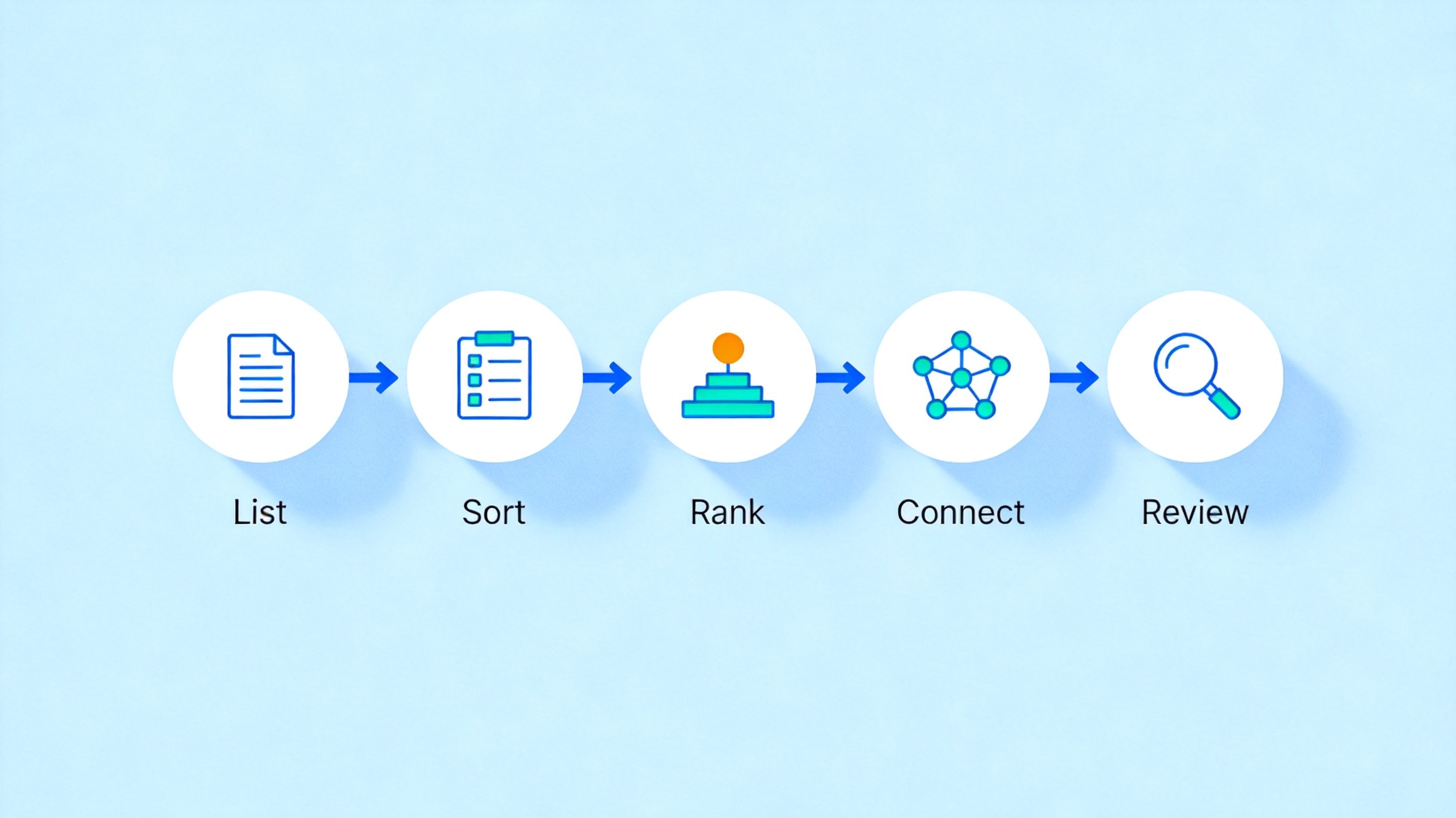
Five steps to build a concept map
Create Your Concept Map in WPS Office
You do not need special software to make a concept map. WPS Office—free on Windows, Mac, Linux, iOS, and Android—covers two practical routes: the built-in mind map tool for quick hierarchical maps, and shapes with connector lines in WPS Presentation when you need fully labeled, free-form links.
Route 1: quick map with the mind map tool.
Open WPS Office and create a new mind map, or press the New button and search "mind map."
Type your central topic in the root node, then press Tab or Enter to add child branches for each major concept.
Add labels to each branch by editing the node text, so every link reads as a proposition rather than a bare keyword.
Export or share the finished map as PNG or PDF when you need it in a report or slide.
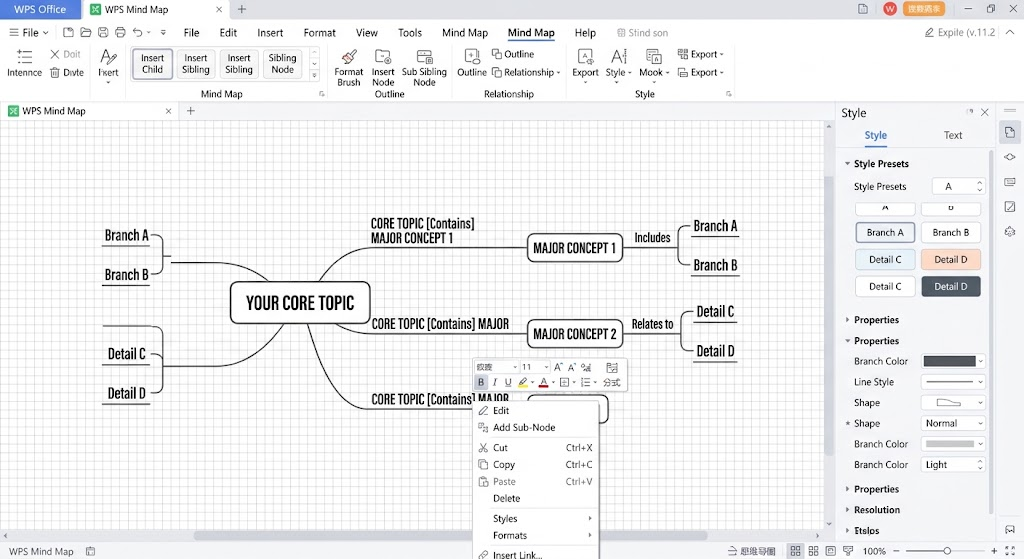
WPS Office mind map editor
Route 2: fully labeled map with shapes.
Open a blank presentation in WPS Presentation and pick a clean layout.
Insert shapes from the Insert menu—one rounded rectangle per concept. Keep the text short: one to three words per node.
Arrange from general to specific, broadest idea at the top.
Draw connector lines between related concepts, then add a text box on each line for the linking phrase, such as is a or causes.
Style and export. Use one accent color for cross-links, then export the slide as an image for handouts or notes.
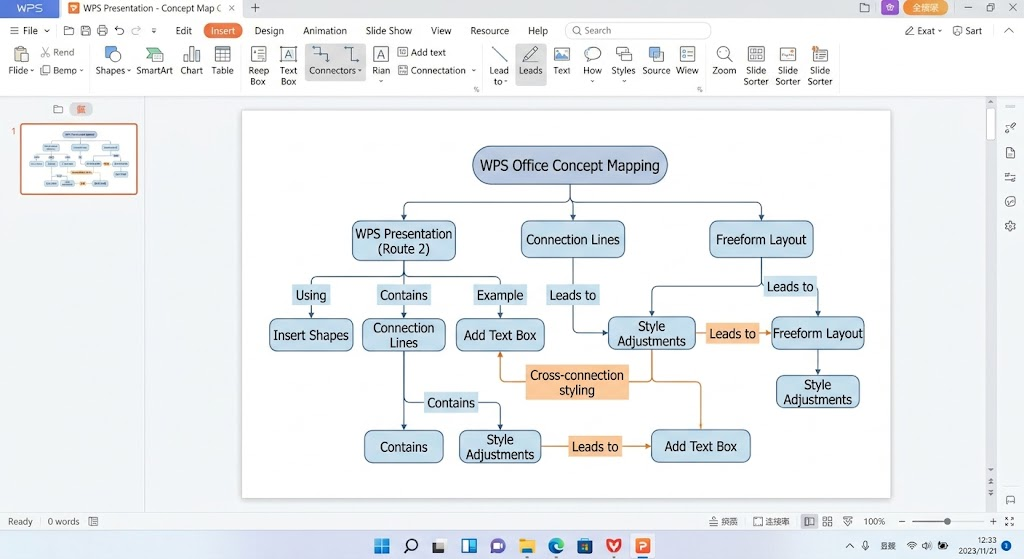
The Best Free Alternative: WPS Office
Dedicated diagramming tools often lock export behind a paywall or stamp watermarks on free plans. WPS Office takes a different approach: one free, lightweight suite that handles the whole workflow around your concept map.
Build anywhere. Mind map and shape tools run on Windows, Mac, Linux, mobile, and iPad, so the same file follows you between campus, home, and meetings.
Drop the map into your work. Paste the finished diagram straight into a report in WPS Writer or a deck in WPS Slides—no export round trip.
Compatible formats. Opens and saves .docx, .pptx, and .xlsx from Microsoft Office without conversion, so sharing with classmates or colleagues stays friction-free.
Free to start. Core editing features cost nothing, with optional AI and cloud upgrades when you need them.
WPS Office official website homepage
FAQs
What is a concept map in simple terms?
A concept map is a diagram of ideas connected by labeled links. Each link reads as a short sentence, such as "Rain causes erosion," which makes relationships between ideas visible at a glance.
How is a concept map different from a mind map?
A mind map branches from one central topic and rarely labels its links. A concept map is a network: any two ideas can connect, and every connection carries a linking phrase that states the relationship.
Can I make a concept map for free?
Yes. You can draw one on paper, or use WPS Office free of charge—its mind map tool and shape-based connector lines both work for concept maps, with free export to image or PDF.
How many concepts should a concept map have?
Most useful maps contain 10 to 30 concepts. More than that, split the topic into a main map and smaller sub-maps so each one stays readable.
What makes a good linking phrase?
Keep it short and directional—two or three words such as is a, requires, or leads to. If the phrase does not turn the two nodes into a sensible sentence, the link itself needs rethinking.

Summary
A concept map turns scattered facts into labeled relationships: list your concepts, rank them from general to specific, connect them, and write a linking phrase on every line. Build the first version on paper in 15 minutes, then keep it in WPS Office—mind map tool for speed, shapes for fully labeled links—so you can revise the map every time your understanding changes.

'%3e%3cpath%20d='M19.9911%204.11386V6.471H18.5894C18.0775%206.471%2017.7322%206.57814%2017.5536%206.79243C17.3751%207.00671%2017.2858%207.32814%2017.2858%207.75671V9.44421H19.9019L19.5536%2012.0871H17.2858V18.8639H14.5536V12.0871H12.2769V9.44421H14.5536V7.49779C14.5536%206.39064%2014.8632%205.53201%2015.4822%204.92189C16.1013%204.31177%2016.9257%204.00671%2017.9554%204.00671C18.8304%204.00671%2019.509%204.04243%2019.9911%204.11386Z'%20fill='%23333333'/%3e%3c/g%3e%3cdefs%3e%3cclipPath%20id='clip0_2938_8199'%3e%3crect%20width='16'%20height='16'%20fill='white'%20transform='translate(8%204.00671)'/%3e%3c/clipPath%3e%3c/defs%3e%3c/svg%3e)
'%3e%3cpath%20d='M17.5237%2010.7813L23.4811%204H22.0699L16.8949%209.88693L12.7648%204H8L14.2469%2012.9029L8%2020.0133H9.4112L14.8725%2013.7952L19.2352%2020.0133H24M9.92053%205.04213H12.0885L22.0688%2019.0224H19.9003'%20fill='%23333333'/%3e%3c/g%3e%3cdefs%3e%3cclipPath%20id='clip0_2938_8200'%3e%3crect%20width='16'%20height='16.0134'%20fill='white'%20transform='translate(8%204)'/%3e%3c/clipPath%3e%3c/defs%3e%3c/svg%3e)


