

'%3e%3cpath%20d='M8%200C12.4183%200%2016%203.58172%2016%208C16%2012.4183%2012.4183%2016%208%2016C3.58172%2016%200%2012.4183%200%208C0%203.58172%203.58172%200%208%200ZM11.6162%204.38379C11.2257%203.99337%2010.5927%203.99338%2010.2021%204.38379L8%206.58594L5.79785%204.38379C5.40732%203.99334%204.77429%203.99329%204.38379%204.38379C3.99331%204.77429%203.99335%205.40733%204.38379%205.79785L6.58594%208L4.38379%2010.2021C3.99348%2010.5927%203.99341%2011.2257%204.38379%2011.6162C4.77426%2012.0066%205.40734%2012.0065%205.79785%2011.6162L8%209.41406L10.2021%2011.6162C10.5927%2012.0066%2011.2257%2012.0067%2011.6162%2011.6162C12.0067%2011.2257%2012.0066%2010.5927%2011.6162%2010.2021L9.41406%208L11.6162%205.79785C12.0066%205.40735%2012.0066%204.77429%2011.6162%204.38379Z'%20fill='%23080E17'%20fill-opacity='0.46'/%3e%3c/g%3e%3cdefs%3e%3cclipPath%20id='clip0_3761_713'%3e%3crect%20width='16'%20height='16'%20fill='white'/%3e%3c/clipPath%3e%3c/defs%3e%3c/svg%3e)




'%3e%3cpath%20fill-rule='evenodd'%20clip-rule='evenodd'%20d='M21.4999%2010.9993C21.4999%205.20009%2016.7986%200.498901%2010.9993%200.498901C5.19994%200.498901%200.498657%205.20009%200.498657%2010.9993C0.498657%2016.2404%204.33858%2020.5844%209.35855%2021.3722V14.0346H6.69238V10.9993H9.35855V8.68594C9.35855%206.05427%2010.9262%204.60062%2013.3248%204.60062C14.4736%204.60062%2015.6753%204.80571%2015.6753%204.80571V7.38979H14.3512C13.0468%207.38979%2012.64%208.19921%2012.64%209.0296V10.9993H15.5523L15.0867%2014.0346H12.64V21.3722C17.66%2020.5844%2021.4999%2016.2404%2021.4999%2010.9993Z'%20fill='%231568EA'/%3e%3c/g%3e%3c/svg%3e)


'%3e%3cpath%20d='M2.42045%2022.1876H6.31818V12.7217L0.75%208.54553V20.5171C0.75%2021.4414%201.49892%2022.1876%202.42045%2022.1876Z'%20fill='%234285F4'/%3e%3cpath%20d='M19.682%2022.1876H23.5797C24.5041%2022.1876%2025.2502%2021.4387%2025.2502%2020.5171V8.54553L19.682%2012.7217'%20fill='%2334A853'/%3e%3cpath%20d='M19.682%205.48293V12.7216L25.2502%208.54543V6.31816C25.2502%204.25236%2022.8921%203.07469%2021.2411%204.31361'%20fill='%23FBBC04'/%3e%3cpath%20d='M6.31824%2012.7217V5.48303L13.0001%2010.4944L19.6819%205.48303V12.7217L13.0001%2017.733'%20fill='%23EA4335'/%3e%3cpath%20d='M0.75%206.31816V8.54543L6.31818%2012.7216V5.48293L4.75909%204.31361C3.10534%203.07469%200.75%204.25236%200.75%206.31816Z'%20fill='%23C5221F'/%3e%3c/g%3e%3cdefs%3e%3cclipPath%20id='clip0_2954_7305'%3e%3crect%20width='24.5'%20height='18.375'%20fill='white'%20transform='translate(0.75%203.8125)'/%3e%3c/clipPath%3e%3c/defs%3e%3c/svg%3e)


Integrating many pdf files into a single document increases productivity. For example, you don't want to send six different pdf files to accounting when you can only send one. Or maybe you printed multiple sections of a report from Word, Excel, and an image editor into separate pdf files. How can you organize them all in one file?
Individuals working from home or trying to go paperless should pay special attention to these aspects, as pdf files can easily replace physical papers. But if you have downloaded Pdf Xchange, you have nothing to worry about.
Features of PDF Xchange Combiner
1.Assemble pdfs into a single file
The PDF Xchange Combiner combines many pdf files quickly and easily into one document. You only need to add your files and merge them to finish.
2.Merge all pdfs into one
You can store and review multiple files more conveniently by combining them into one pdf. Sign in to manage individual pages or share your consolidated document after merging pdf files.
How to combine PDF Files with PDF Xchange Combiner?
Follow these detailed steps to combine (bind) multiple PDF files into one document with PDF Xchange Combiner. The workflow is similar whether you use the dedicated Combiner tool or the Combine/Merge feature inside PDF-XChange Editor.
Step 1: Install and open PDF Xchange Combiner
Download PDF-XChange / Combiner for Windows and finish the installer. Launch PDF Xchange Combiner (or open PDF-XChange Editor and go to the Combine / Merge Files tool). Make sure the PDFs you want to bind are saved locally and easy to find.
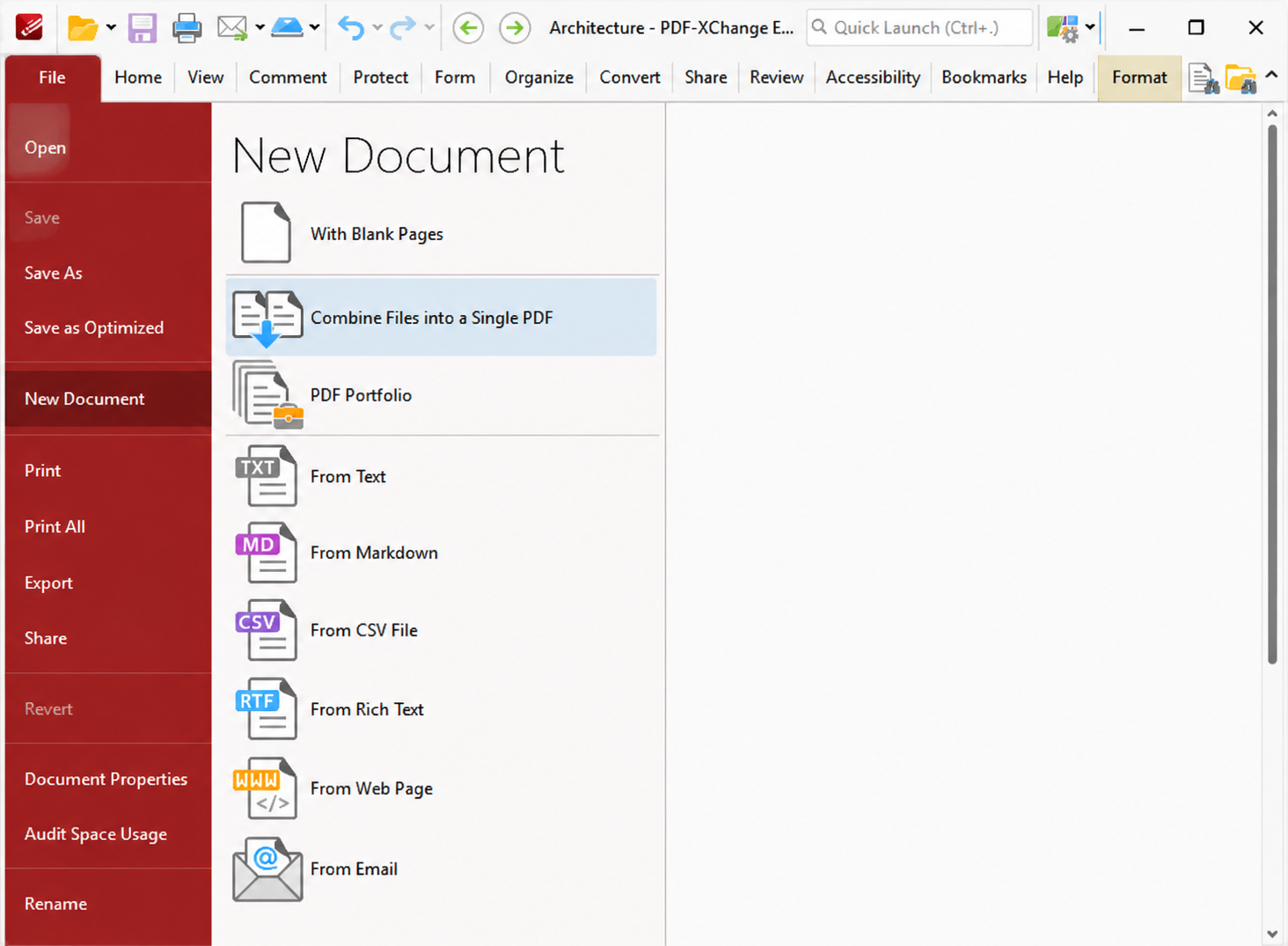
Step 2: Add PDF files to the combine list
Drag and drop your PDF documents into the drop zone, or click the button to browse and choose files. You can add several files in one batch. Supported inputs are typically PDF; if a file fails to appear, confirm it is a valid PDF and not locked by another program.
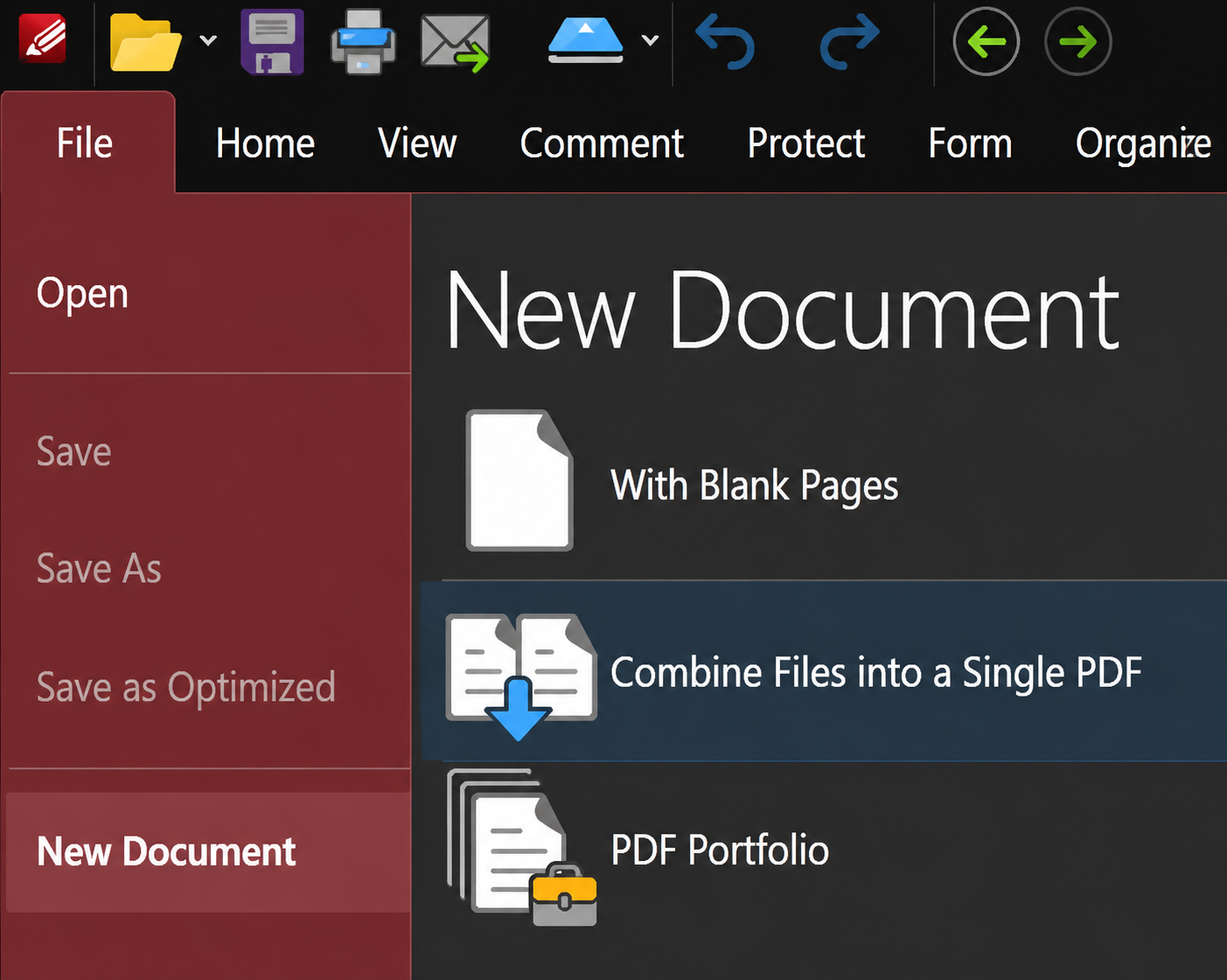
Step 3: Confirm which files will be merged
In the file list, check that every document you need is selected. Remove any extra files you added by mistake. If your project has many sections (cover, body, appendix), keep them all in the same session so you only run Combine once.
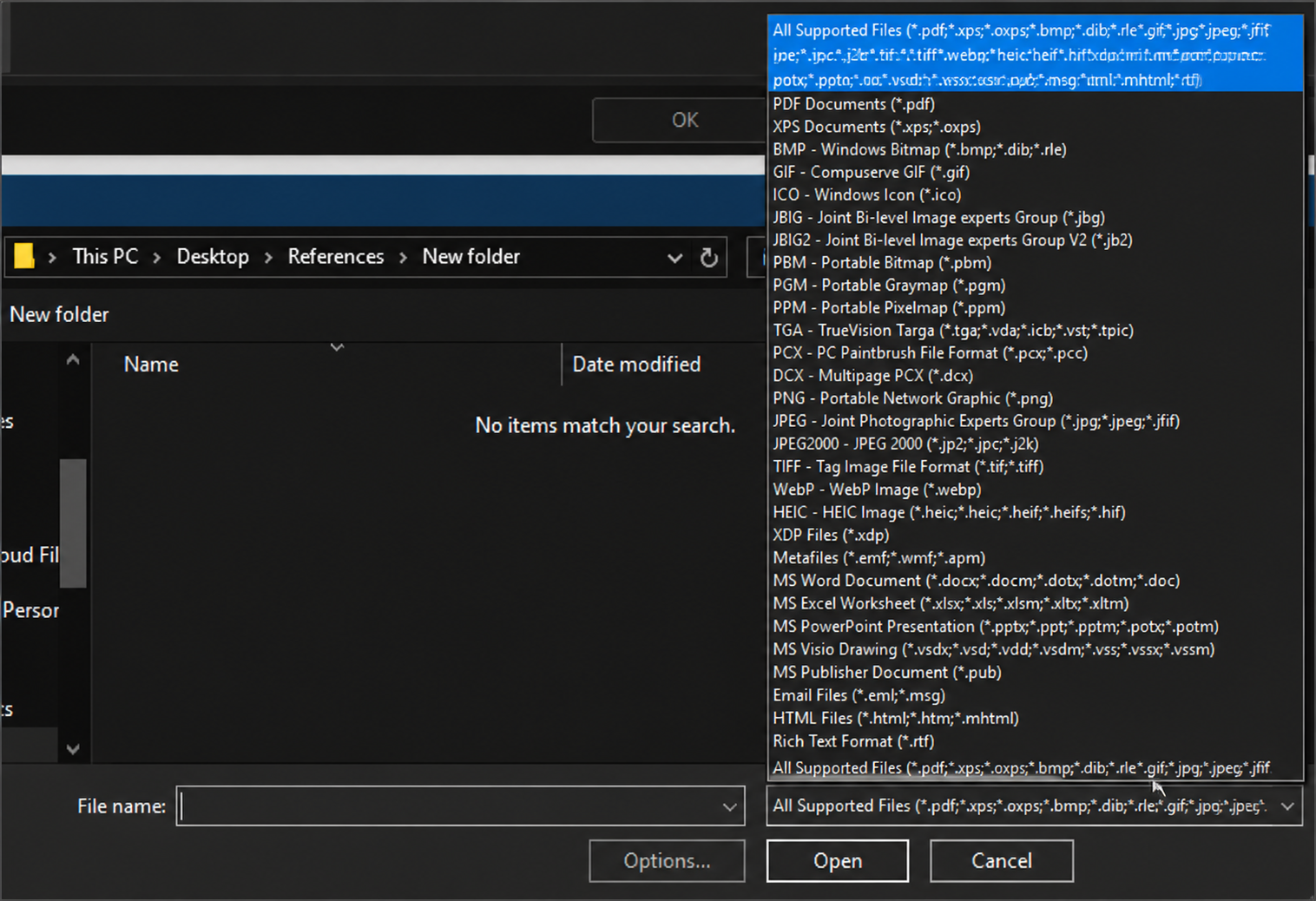
Step 4: Reorder files before merging
Drag items up or down so the final page order matches how you want the bound PDF to read (for example: cover → report → attachments). Reordering here is easier than fixing page order after export.
Step 5: Review options, then start File Merge / Combine
If the tool shows options (output name, page ranges, or bookmarks), set them as needed. Then click File Merge / Combine to start binding the selected PDFs into one file. Wait until processing finishes—large batches may take longer.
Step 6: Save and open the combined PDF
Choose a folder and file name for the merged PDF, then save. Open the result and skim the first and last pages plus any section breaks to confirm order and completeness.
Step 7: Share or arrange pages if needed
To share the file, attach the merged PDF or upload it to your usual cloud drive. If you still need to delete, rotate, or rearrange individual pages after combining, open the file in PDF-XChange Editor (or another PDF editor) and adjust pages there. Sign in only if your product build requires an account for sync or sharing features.
You can download the pdf Xchange editor or combiner for windows.
A Free Alternative: WPS PDF Editor
If you want a free-friendly way to merge PDFs and keep editing afterward, WPS PDF Editor is a practical alternative to PDF Xchange Combiner. Besides merge, you can view, annotate, compress, split, and convert PDFs in the same toolkit.
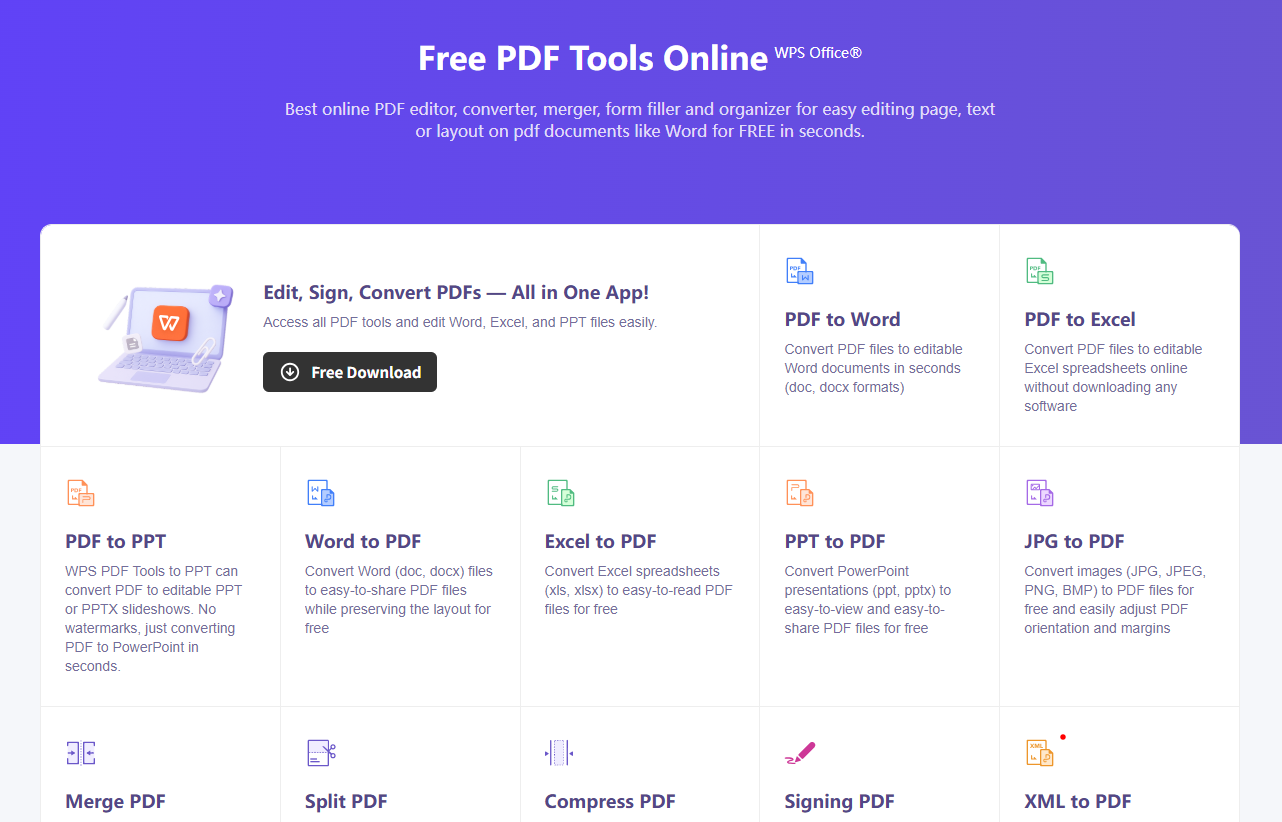
How to merge PDFs with WPS:
Download and open WPS Office, then go to the PDF tools area.
Choose Merge PDF (or Split/Merge → Merge).
Click Add Files, select the PDFs you want to combine, and drag them into the correct order.
Click Merge / Next, choose a save location, and export the combined PDF.
This keeps the merge workflow simple while giving you room to edit or convert the file next—without relying only on PDF Xchange.
WPS Office: Competitive with PDF Xchange Combiner
Do you want to combine several pdf files into one swiftly? You can use the Merge pdf feature that WPS Office 2022 offers. You will master the technique from here.
WPS Office free trial is one of the most popular, cross-platform, potent, all-in-one, and substantially less expensive solutions. It is compatible with and comparable to all the tools of MS Office, including Microsoft Word, PowerPoint, and Excel. It integrates all office word processor capabilities such as Word, pdf, Presentation, and Spreadsheet into one program.
Click here to start your WPS office 2022 free trial version of 7 days. P.s. no need to give out your card details.
WPS Office is available for mobile, too. Start your WPS mobile today by clicking here.
One of the best all-inclusive, compact free office suites is WPS Office. It works for Windows, for PC, MAC OS, Linux, Android, and iOS devices.
FAQ
What is PDF Xchange Combiner used for?
It is used to bind or merge multiple PDF files into one document so you can share, store, and review pages in a single file.
Is WPS Office a good alternative to PDF Xchange Combiner?
Yes. WPS PDF Editor can merge PDFs and also edit, compress, split, and convert files, which makes it a strong free-to-start alternative for everyday users.
Can I reorder pages before merging?
Yes. Both PDF Xchange Combiner and WPS Merge PDF let you arrange file order before you export the final PDF.
Do I need Adobe Acrobat to merge PDFs?
No. PDF Xchange Combiner and WPS Office can merge PDFs without Acrobat.


'%3e%3cpath%20d='M19.9911%204.11386V6.471H18.5894C18.0775%206.471%2017.7322%206.57814%2017.5536%206.79243C17.3751%207.00671%2017.2858%207.32814%2017.2858%207.75671V9.44421H19.9019L19.5536%2012.0871H17.2858V18.8639H14.5536V12.0871H12.2769V9.44421H14.5536V7.49779C14.5536%206.39064%2014.8632%205.53201%2015.4822%204.92189C16.1013%204.31177%2016.9257%204.00671%2017.9554%204.00671C18.8304%204.00671%2019.509%204.04243%2019.9911%204.11386Z'%20fill='%23333333'/%3e%3c/g%3e%3cdefs%3e%3cclipPath%20id='clip0_2938_8199'%3e%3crect%20width='16'%20height='16'%20fill='white'%20transform='translate(8%204.00671)'/%3e%3c/clipPath%3e%3c/defs%3e%3c/svg%3e)
'%3e%3cpath%20d='M17.5237%2010.7813L23.4811%204H22.0699L16.8949%209.88693L12.7648%204H8L14.2469%2012.9029L8%2020.0133H9.4112L14.8725%2013.7952L19.2352%2020.0133H24M9.92053%205.04213H12.0885L22.0688%2019.0224H19.9003'%20fill='%23333333'/%3e%3c/g%3e%3cdefs%3e%3cclipPath%20id='clip0_2938_8200'%3e%3crect%20width='16'%20height='16.0134'%20fill='white'%20transform='translate(8%204)'/%3e%3c/clipPath%3e%3c/defs%3e%3c/svg%3e)


