

'%3e%3cpath%20d='M8%200C12.4183%200%2016%203.58172%2016%208C16%2012.4183%2012.4183%2016%208%2016C3.58172%2016%200%2012.4183%200%208C0%203.58172%203.58172%200%208%200ZM11.6162%204.38379C11.2257%203.99337%2010.5927%203.99338%2010.2021%204.38379L8%206.58594L5.79785%204.38379C5.40732%203.99334%204.77429%203.99329%204.38379%204.38379C3.99331%204.77429%203.99335%205.40733%204.38379%205.79785L6.58594%208L4.38379%2010.2021C3.99348%2010.5927%203.99341%2011.2257%204.38379%2011.6162C4.77426%2012.0066%205.40734%2012.0065%205.79785%2011.6162L8%209.41406L10.2021%2011.6162C10.5927%2012.0066%2011.2257%2012.0067%2011.6162%2011.6162C12.0067%2011.2257%2012.0066%2010.5927%2011.6162%2010.2021L9.41406%208L11.6162%205.79785C12.0066%205.40735%2012.0066%204.77429%2011.6162%204.38379Z'%20fill='%23080E17'%20fill-opacity='0.46'/%3e%3c/g%3e%3cdefs%3e%3cclipPath%20id='clip0_3761_713'%3e%3crect%20width='16'%20height='16'%20fill='white'/%3e%3c/clipPath%3e%3c/defs%3e%3c/svg%3e)



'%3e%3cpath%20fill-rule='evenodd'%20clip-rule='evenodd'%20d='M21.4999%2010.9993C21.4999%205.20009%2016.7986%200.498901%2010.9993%200.498901C5.19994%200.498901%200.498657%205.20009%200.498657%2010.9993C0.498657%2016.2404%204.33858%2020.5844%209.35855%2021.3722V14.0346H6.69238V10.9993H9.35855V8.68594C9.35855%206.05427%2010.9262%204.60062%2013.3248%204.60062C14.4736%204.60062%2015.6753%204.80571%2015.6753%204.80571V7.38979H14.3512C13.0468%207.38979%2012.64%208.19921%2012.64%209.0296V10.9993H15.5523L15.0867%2014.0346H12.64V21.3722C17.66%2020.5844%2021.4999%2016.2404%2021.4999%2010.9993Z'%20fill='%231568EA'/%3e%3c/g%3e%3c/svg%3e)


'%3e%3cpath%20d='M2.42045%2022.1876H6.31818V12.7217L0.75%208.54553V20.5171C0.75%2021.4414%201.49892%2022.1876%202.42045%2022.1876Z'%20fill='%234285F4'/%3e%3cpath%20d='M19.682%2022.1876H23.5797C24.5041%2022.1876%2025.2502%2021.4387%2025.2502%2020.5171V8.54553L19.682%2012.7217'%20fill='%2334A853'/%3e%3cpath%20d='M19.682%205.48293V12.7216L25.2502%208.54543V6.31816C25.2502%204.25236%2022.8921%203.07469%2021.2411%204.31361'%20fill='%23FBBC04'/%3e%3cpath%20d='M6.31824%2012.7217V5.48303L13.0001%2010.4944L19.6819%205.48303V12.7217L13.0001%2017.733'%20fill='%23EA4335'/%3e%3cpath%20d='M0.75%206.31816V8.54543L6.31818%2012.7216V5.48293L4.75909%204.31361C3.10534%203.07469%200.75%204.25236%200.75%206.31816Z'%20fill='%23C5221F'/%3e%3c/g%3e%3cdefs%3e%3cclipPath%20id='clip0_2954_7305'%3e%3crect%20width='24.5'%20height='18.375'%20fill='white'%20transform='translate(0.75%203.8125)'/%3e%3c/clipPath%3e%3c/defs%3e%3c/svg%3e)


If you're looking for a PDF Xchange editor license key for Windows 11 and how to activate it, you're in the right place. PDF Xchange Editor is a feature-rich PDF software that allows you to view, edit, and annotate PDFs, with about 70% of its features available for free. To unlock all functions without a watermark, you’ll need a free license key. This guide will show you how to download, receive, and activate it hassle-free.
For users seeking an alternative, WPS Office is an excellent option, offering a complete PDF toolset and office suite with strong compatibility for Windows, making it a practical choice for everyday document editing and management.
Is there a free PDF Xchange Editor license key?
There is no legitimate free pdf xchange editor license key. If you purchase PDF‑XChange Editor from the official website, a subscription fee is required. You may also find a valid PDF Xchange Editor discount code during seasonal promotions or academic programs.
In the past, some non-official websites claimed to provide free keys, but these sources are no longer available. The current official price for a Single User License is USD $62.00.
How to Download and Activate Your PDF Xchange Editor License Key
System Requirements for PDF Xchange Editor
Before downloading and activating your PDF Xchange editor license key, make sure your system meets the following minimum requirements:
Windows XP, Vista, 7, 8, 8.1, 10, or 11 (32-bit or 64-bit)
Screen resolution: 1280x768 pixels or higher
Internet connection
At least 1GB of RAM or more
300MB of free hard disk space
Ensuring your system meets these requirements will help the software run smoothly and activate without issues.
Step-by-Step Activation for PDF Xchange Editor License Key
Step 1: Download the editor from the official website and install it on Windows PC if you already don't have this application.
After Installation, launch the software to access its main screen.
In the menu bar, navigate the Help option and hit the License Key from various available options.
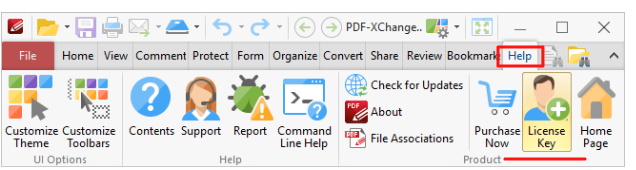
Step 2: A new dialogue box will pop up; you need to select the Add New License Key. It will redirect you to a new window (Activation code dialogue box).

Step 3: Copy the key that you have just secured /downloaded free from the above link to the clipboard, and then select copy from the clipboard and hit continue.
Step 4: Congratulations, the new activation key has been added to the software. Now you can access all the configurations and enjoy happy workings.
Note: This procedure activates the PDF Xchange editor, viewer, and lite printer on windows. Never forget to turn off the internet access to the device before adding this free license key.
The Best Alternative - WPS Office
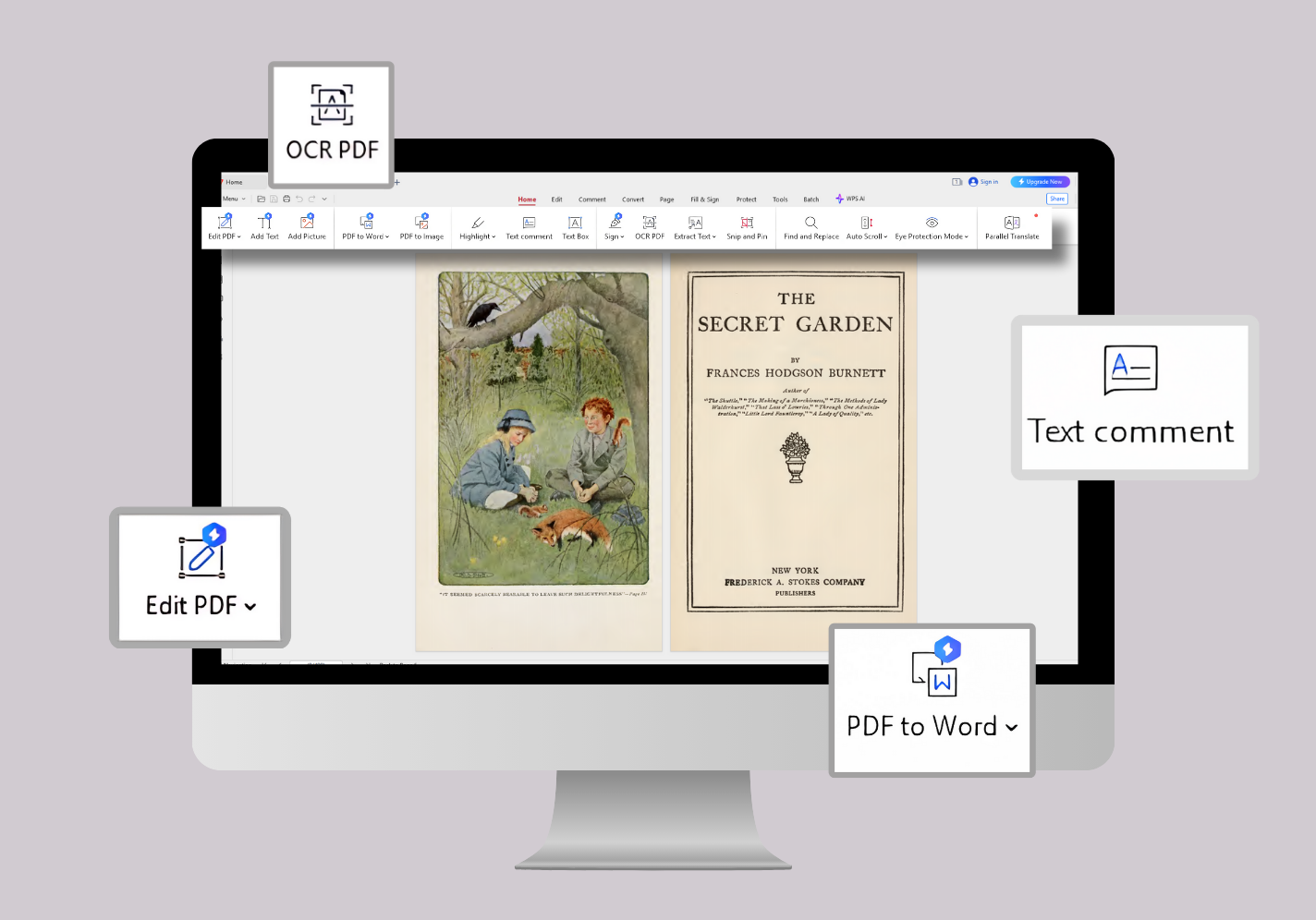
If you’re looking for a simpler, all-in-one PDF solution, WPS Office PDF Editor is an excellent alternative.
WPS Office is an all-in-one and feature-rich software suite to help read, create, convert and edit pdf files. It's a free offline application for Windows, Linux, Android, Mac, and iOS devices. The best alternative to PDF Xchange Editor is WPS Office, which offers a 7-day free trial and affordable monthly subscriptions. Especially, the PDF editor in WPS Office allow you to convert PDF files to and from Word, Excel, PowerPoint, and image files online for free or merge pdf online. So it is a powerful offline and online document editor. You can also view, edit, read, add pages from PDF, delete pages from PDF files and collaborate on PDF files on multiple platforms.
| Features | PDF-XChange | WPS Office |
|---|---|---|
| OCR Support | ✅ | ✅ |
| PDF Editing | ✅ | ✅ |
| Cloud Sync | ❌ | ✅ |
| Free Plan | Limited | Full Basic Tools |
| Cross-Platform | Windows Only | Windows / Mac / Mobile / Linux |
| Price | USD $62 / single user | Free basic, Paid premium |


FAQ
Q1: What should I do if my license key is invalid?
Double-check your key, ensure it’s for the correct version, and re-enter it without spaces. If it still fails, contact official support.
Q2: What are the main differences between the free version and the Pro version?
The free version of PDF-XChange Editor allows basic PDF viewing and annotation. However, the Pro PDF-Xchange Editor unlocks advanced features such as OCR (Optical Character Recognition), compress PDF, more annotation tools, advanced editing options, and the ability to remove watermarks. The Pro version also offers priority customer support.Plus the best thing found in it that it is provides a 7-day free trial for trying the premium version.
Q3: Can I use PDF-XChange Editor on multiple devices?
Each PDF-XChange Editor license is for a single user on a single device. However, you can transfer your license to another device, as long as it’s not being used on multiple devices at the same time.
Q4: Is PDF Xchange Editor compatible with Windows 7?
Yes, PDF Xchange Editor runs on Windows 7 and later versions. Just download it from the official site and activate your license key using the steps above.
Q5: How to create a fillable PDF with PDF Xchange Editor?
Use the Form tools in the Pro version to add text fields, checkboxes, and signature areas.
Q6: Can I find and replace text in PDF Xchange Editor?
Yes, the Pro version includes a Find and Replace tool for editing text in PDFs
Conclusion
We hope this article about free license key PDF Xchange Editor has fulfilled your needs. If you still face problems, you can happily try the other alternative software (WPS Office) for free and get full step by step guides for How to Edit PDFs in all platforms. You can also learn more about merging PDF files in other articles. You can also try the PDF Xchange Chrome extension for quick PDF viewing and basic edits
All-in-one lightweight office suite seamlessly integrates all the pdf tools you need.


'%3e%3cpath%20d='M19.9911%204.11386V6.471H18.5894C18.0775%206.471%2017.7322%206.57814%2017.5536%206.79243C17.3751%207.00671%2017.2858%207.32814%2017.2858%207.75671V9.44421H19.9019L19.5536%2012.0871H17.2858V18.8639H14.5536V12.0871H12.2769V9.44421H14.5536V7.49779C14.5536%206.39064%2014.8632%205.53201%2015.4822%204.92189C16.1013%204.31177%2016.9257%204.00671%2017.9554%204.00671C18.8304%204.00671%2019.509%204.04243%2019.9911%204.11386Z'%20fill='%23333333'/%3e%3c/g%3e%3cdefs%3e%3cclipPath%20id='clip0_2938_8199'%3e%3crect%20width='16'%20height='16'%20fill='white'%20transform='translate(8%204.00671)'/%3e%3c/clipPath%3e%3c/defs%3e%3c/svg%3e)
'%3e%3cpath%20d='M17.5237%2010.7813L23.4811%204H22.0699L16.8949%209.88693L12.7648%204H8L14.2469%2012.9029L8%2020.0133H9.4112L14.8725%2013.7952L19.2352%2020.0133H24M9.92053%205.04213H12.0885L22.0688%2019.0224H19.9003'%20fill='%23333333'/%3e%3c/g%3e%3cdefs%3e%3cclipPath%20id='clip0_2938_8200'%3e%3crect%20width='16'%20height='16.0134'%20fill='white'%20transform='translate(8%204)'/%3e%3c/clipPath%3e%3c/defs%3e%3c/svg%3e)


