



'%3e%3cpath%20fill-rule='evenodd'%20clip-rule='evenodd'%20d='M21.4999%2010.9993C21.4999%205.20009%2016.7986%200.498901%2010.9993%200.498901C5.19994%200.498901%200.498657%205.20009%200.498657%2010.9993C0.498657%2016.2404%204.33858%2020.5844%209.35855%2021.3722V14.0346H6.69238V10.9993H9.35855V8.68594C9.35855%206.05427%2010.9262%204.60062%2013.3248%204.60062C14.4736%204.60062%2015.6753%204.80571%2015.6753%204.80571V7.38979H14.3512C13.0468%207.38979%2012.64%208.19921%2012.64%209.0296V10.9993H15.5523L15.0867%2014.0346H12.64V21.3722C17.66%2020.5844%2021.4999%2016.2404%2021.4999%2010.9993Z'%20fill='%231568EA'/%3e%3c/g%3e%3c/svg%3e)


'%3e%3cpath%20d='M2.42045%2022.1876H6.31818V12.7217L0.75%208.54553V20.5171C0.75%2021.4414%201.49892%2022.1876%202.42045%2022.1876Z'%20fill='%234285F4'/%3e%3cpath%20d='M19.682%2022.1876H23.5797C24.5041%2022.1876%2025.2502%2021.4387%2025.2502%2020.5171V8.54553L19.682%2012.7217'%20fill='%2334A853'/%3e%3cpath%20d='M19.682%205.48293V12.7216L25.2502%208.54543V6.31816C25.2502%204.25236%2022.8921%203.07469%2021.2411%204.31361'%20fill='%23FBBC04'/%3e%3cpath%20d='M6.31824%2012.7217V5.48303L13.0001%2010.4944L19.6819%205.48303V12.7217L13.0001%2017.733'%20fill='%23EA4335'/%3e%3cpath%20d='M0.75%206.31816V8.54543L6.31818%2012.7216V5.48293L4.75909%204.31361C3.10534%203.07469%200.75%204.25236%200.75%206.31816Z'%20fill='%23C5221F'/%3e%3c/g%3e%3cdefs%3e%3cclipPath%20id='clip0_2954_7305'%3e%3crect%20width='24.5'%20height='18.375'%20fill='white'%20transform='translate(0.75%203.8125)'/%3e%3c/clipPath%3e%3c/defs%3e%3c/svg%3e)


There is no single most secure Linux distro for everyone—security depends on your threat model. For strong compartmentalization pick Qubes OS; for amnesic anonymous sessions pick Tails; for a hardened everyday desktop prefer a well-maintained mainstream system (Fedora/Debian/Ubuntu) with full-disk encryption, timely updates, and least privilege. Success means your chosen threats are mitigated in practice, not that a marketing page called a spin “unhackable.”
Shortest path: write your threat model → match Qubes / Tails / Whonix / mainstream hardened desktop → verify ISO signatures → enable disk encryption → automate updates. Home users defending against common malware often gain more from update hygiene than from exotic ISOs. Servers belong in best Linux server distro guidance, not desktop anonymity tools.
For first-install picks and beginner decision criteria, start with best Linux distros for beginners.
Start With Threat Model, Not Rankings
Ask: who might attack you, what they want, and what you can afford to lose. A student laptop needs encryption and updates. A journalist may need compartmentalization (Qubes OS) or amnesic live sessions (Tails). A developer laptop needs reproducible patching and careful SSH key hygiene more than five VPN apps.
“Most secure” listicles that ignore hardware, skill, and workflow create false confidence. A misconfigured Qubes install can be worse than a patched Ubuntu LTS with disk encryption and good backups.
Write the model down in plain language: “I want to reduce ransomware risk on a family laptop,” or “I handle sensitive source documents and need isolation,” or “I need a leave-no-trace session on borrowed hardware.” Those three sentences map cleanly to mainstream hardened desktops, Qubes, and Tails. If you cannot write the sentence, you are not ready to pick an ISO from a fear-based ranking.
Also separate privacy marketing from security engineering. A distro that routes traffic oddly but lags months on patches is not “more secure.” Prefer projects with clear disclosure processes, reproducible builds where offered, and active security advisories you can actually subscribe to. Popularity contests are not threat models.
High-Isolation Desktop: Qubes OS
Qubes uses Xen-based VMs so apps and activities live in separate qubes. Compromise in one domain is less likely to own the whole machine. Hardware requirements and learning curve are real—check the official hardware compatibility notes before buying a used ThinkPad for Qubes.
Qubes is for people who will follow operational guides. It is not the best first Linux for Windows switchers (Windows-user distro picks) or for a 4 GB old laptop (old laptop guide).
Amnesic / Anonymity-Oriented Systems
- Tails: live amnesic environment aimed at leaving minimal traces; not a daily driver for all files and games
- Whonix: Tor-centric workstation/gateway design, typically run inside virtualization
These tools address specific anonymity goals. Using them incorrectly (logging into personal accounts, installing random packages) can erase the benefit. Read project warnings end to end.
Practical Everyday Security
Most people should pick a mainstream distro they will actually update: Fedora Workstation/Atomic desktops with SELinux, Debian stable, or Ubuntu LTS with unattended security updates. Enable:
- Full-disk encryption at install
- Strong unique passwords + password manager
- Automatic security updates
- Limited sudo use; separate admin and daily accounts when practical
- Browser hygiene and fewer random PPAs
sudo apt update && sudo apt full-upgrade -y
# Debian/Ubuntu example — keep security patches current
Immutable desktops (Fedora Atomic family and similar) reduce “oops I broke /usr” risk and encourage Flatpak apps. They are excellent for some users; others prefer classic package managers. Choose knowingly.
Home users should prioritize: disk encryption, automatic security updates, unique passwords, and refusal to install pirated software. That quartet defeats more real-world incidents than switching from Ubuntu to a niche hardened spin you will never update. Enterprises add MDM-like Linux management, disk inventory, and phishing simulations—still not a special “secure distro” requirement for every employee laptop.
When evaluating SELinux or AppArmor, prefer the default that your distro documents well enough for you to troubleshoot. Disabling MAC frameworks to silence denials is a common self-own; learn to read denials or use containers instead of turning protections off globally.
What “Secure Distros” Are Not
Kali, Parrot, and similar pentest images are for security testing workflows—they increase tooling, not default safety for grandma’s email. Do not install a pentest distro thinking it is a hardened daily OS.
VPN ads and “incognito distros” cannot replace patching, phishing resistance, and backup discipline. Privacy ≠ security, though they overlap.
Baseline Hardening Checklist
- Download ISO from the official site; verify signatures/checksums.
- Encrypt the disk; store recovery keys offline.
- Turn on firewall defaults appropriate to your distro.
- Remove unused network services.
- Back up important data; test restore.
- Keep firmware (UEFI/BIOS) updated from the vendor.
Developers handling secrets should also review SSH agent habits and avoid pasting tokens into chat—see best Linux distro for developers for workstation fit, then harden on top.
Verify Success
- You can explain your threat model in two sentences.
- Disk encryption unlocks at boot as expected.
- Security updates apply without multi-week delays.
- Backups restore a sample folder successfully.
- You are not running as root for browsing.
After Hardening: Documents and Safer Sharing Habits
Threat models and isolations reduce risk at the OS layer. Day-to-day work still produces notes, checklists, and PDFs that need careful sharing without pasting secrets into random chat apps.
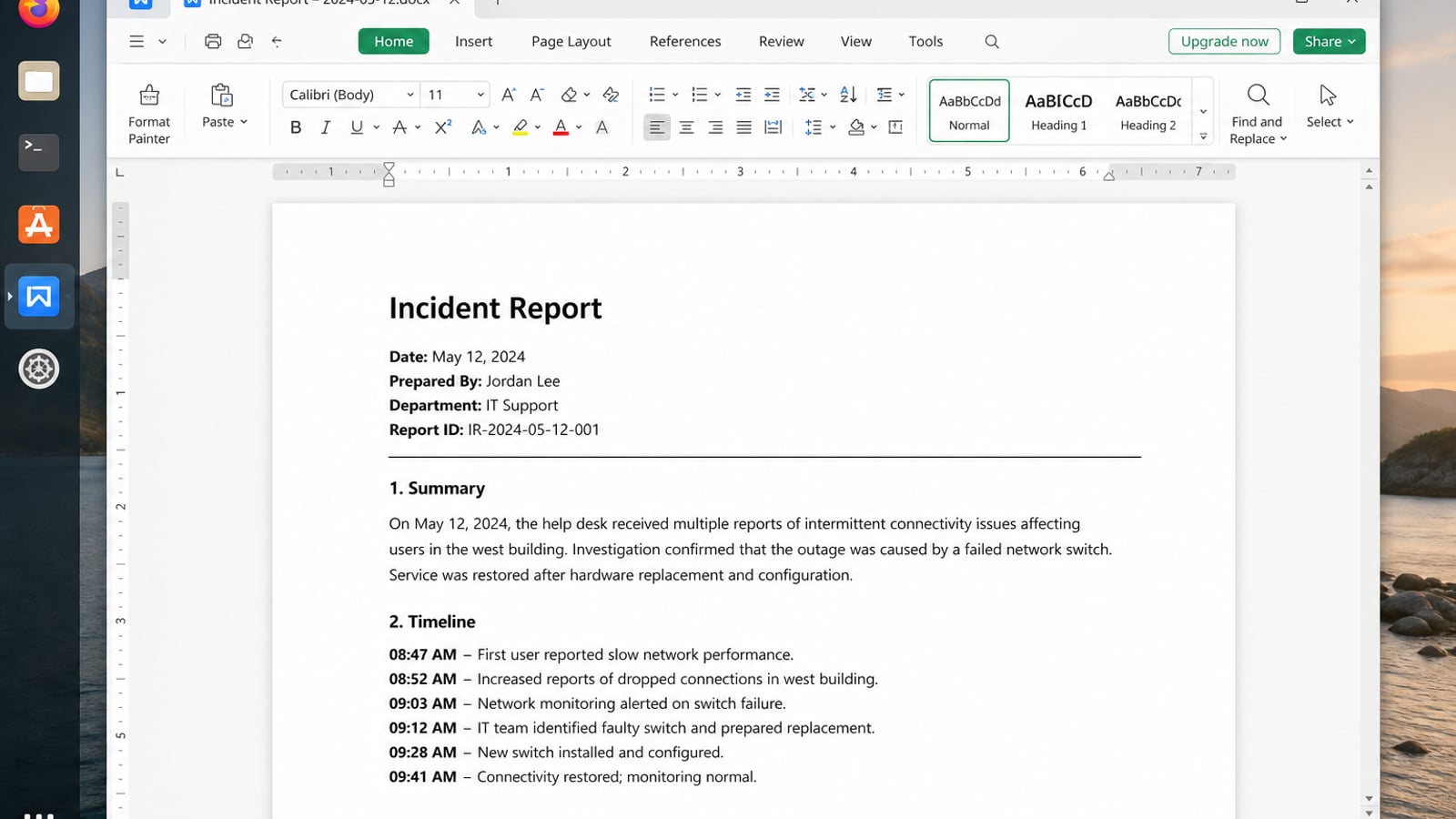
WPS Office for Linux helps that user-facing side: Writer for sanitized notes, Spreadsheet for asset lists, and PDF export when you want a fixed review copy before you send it.
| What you need next | What WPS gives you |
|---|---|
| Create shareable docs without abandoning basic security hygiene | Strong .docx / .xlsx / .pptx layout fidelity when files move between Linux, Windows, and macOS |
| One place for notes, sheets, slides, and PDFs | Free core suite: Writer, Spreadsheet, Presentation, plus PDF view/edit/convert tools |
| A familiar desktop UI for switchers | Ribbon-style apps with a lighter footprint than many heavy suites |
| A trusted install path | Official DEB (Ubuntu/Debian/Mint) and RPM packages from the vendor |
Install from the official WPS Office for Linux download page with sudo apt install ./wps-office_VERSION_amd64.deb, keep secrets out of documents, and prefer PDF or reviewed DOCX when you must hand files to someone else.


FAQ
Is Ubuntu less secure than Debian?
Both can be secure when updated and configured well. Differences are process and defaults, not magic immunity.
Do I need Qubes for online banking?
Usually no—updated mainstream Linux, encryption, and careful browsing suffice for typical banking risk.
Is Fedora more secure than Mint?
Fedora emphasizes newer stacks and SELinux defaults; Mint emphasizes usability. Security still hinges on updates and user behavior. See Mint vs Ubuntu for desktop trade-offs.
Should I disable Secure Boot?
Only when required and understood. Prefer keeping Secure Boot with proper enrollment when your distro supports it.
Are rolling releases insecure?
Not inherently—but faster change demands faster attention. Stable releases suit users who patch less often.
Can antivirus replace a secure distro?
No. Linux malware exists, but patching, least privilege, and careful downloads matter more than a Windows-style AV badge.
Is an immutable desktop required for security?
No, but atomic updates and easy rollback help some users avoid self-inflicted breakage. Classic apt/dnf systems remain secure when patched.
Should I compile a custom hardened kernel?
Only if you can maintain it. Most people are safer on distro kernels with timely CVE fixes than on a custom build that never gets updated.
Re-read your threat model every six months. If you only need ordinary privacy, stay on encrypted Fedora, Debian, or Ubuntu and practice good account hygiene. If your risk rises, invest time in Qubes training before you need it—not during an emergency. Security is a practice paired with a distro, not a one-time ISO download labeled “most secure.” Keep notes on what you enabled and why, then revisit them after major life or job changes.

'%3e%3cpath%20d='M19.9911%204.11386V6.471H18.5894C18.0775%206.471%2017.7322%206.57814%2017.5536%206.79243C17.3751%207.00671%2017.2858%207.32814%2017.2858%207.75671V9.44421H19.9019L19.5536%2012.0871H17.2858V18.8639H14.5536V12.0871H12.2769V9.44421H14.5536V7.49779C14.5536%206.39064%2014.8632%205.53201%2015.4822%204.92189C16.1013%204.31177%2016.9257%204.00671%2017.9554%204.00671C18.8304%204.00671%2019.509%204.04243%2019.9911%204.11386Z'%20fill='%23333333'/%3e%3c/g%3e%3cdefs%3e%3cclipPath%20id='clip0_2938_8199'%3e%3crect%20width='16'%20height='16'%20fill='white'%20transform='translate(8%204.00671)'/%3e%3c/clipPath%3e%3c/defs%3e%3c/svg%3e)
'%3e%3cpath%20d='M17.5237%2010.7813L23.4811%204H22.0699L16.8949%209.88693L12.7648%204H8L14.2469%2012.9029L8%2020.0133H9.4112L14.8725%2013.7952L19.2352%2020.0133H24M9.92053%205.04213H12.0885L22.0688%2019.0224H19.9003'%20fill='%23333333'/%3e%3c/g%3e%3cdefs%3e%3cclipPath%20id='clip0_2938_8200'%3e%3crect%20width='16'%20height='16.0134'%20fill='white'%20transform='translate(8%204)'/%3e%3c/clipPath%3e%3c/defs%3e%3c/svg%3e)


