



'%3e%3cpath%20fill-rule='evenodd'%20clip-rule='evenodd'%20d='M21.4999%2010.9993C21.4999%205.20009%2016.7986%200.498901%2010.9993%200.498901C5.19994%200.498901%200.498657%205.20009%200.498657%2010.9993C0.498657%2016.2404%204.33858%2020.5844%209.35855%2021.3722V14.0346H6.69238V10.9993H9.35855V8.68594C9.35855%206.05427%2010.9262%204.60062%2013.3248%204.60062C14.4736%204.60062%2015.6753%204.80571%2015.6753%204.80571V7.38979H14.3512C13.0468%207.38979%2012.64%208.19921%2012.64%209.0296V10.9993H15.5523L15.0867%2014.0346H12.64V21.3722C17.66%2020.5844%2021.4999%2016.2404%2021.4999%2010.9993Z'%20fill='%231568EA'/%3e%3c/g%3e%3c/svg%3e)


'%3e%3cpath%20d='M2.42045%2022.1876H6.31818V12.7217L0.75%208.54553V20.5171C0.75%2021.4414%201.49892%2022.1876%202.42045%2022.1876Z'%20fill='%234285F4'/%3e%3cpath%20d='M19.682%2022.1876H23.5797C24.5041%2022.1876%2025.2502%2021.4387%2025.2502%2020.5171V8.54553L19.682%2012.7217'%20fill='%2334A853'/%3e%3cpath%20d='M19.682%205.48293V12.7216L25.2502%208.54543V6.31816C25.2502%204.25236%2022.8921%203.07469%2021.2411%204.31361'%20fill='%23FBBC04'/%3e%3cpath%20d='M6.31824%2012.7217V5.48303L13.0001%2010.4944L19.6819%205.48303V12.7217L13.0001%2017.733'%20fill='%23EA4335'/%3e%3cpath%20d='M0.75%206.31816V8.54543L6.31818%2012.7216V5.48293L4.75909%204.31361C3.10534%203.07469%200.75%204.25236%200.75%206.31816Z'%20fill='%23C5221F'/%3e%3c/g%3e%3cdefs%3e%3cclipPath%20id='clip0_2954_7305'%3e%3crect%20width='24.5'%20height='18.375'%20fill='white'%20transform='translate(0.75%203.8125)'/%3e%3c/clipPath%3e%3c/defs%3e%3c/svg%3e)


The best Linux distro for developers is usually Ubuntu LTS for ecosystem and docs, Fedora Workstation for newer toolchains without full rolling release, or Arch if you already want pacman + AUR and accept maintenance. Match the distro to your deployment target (Ubuntu/Debian servers, RHEL family, or bleeding-edge), install git and your toolchain from official guides, and keep /home backups. Success means your editor, language SDK, containers, and browsers work with minimal weekly breakage.
Shortest path: default to Ubuntu Desktop LTS → follow Ubuntu for Developers toolchain docs → add Docker/Podman as needed. Targeting RHEL? Prefer Fedora/Rocky habits. Want rolling? Arch or an Arch installer distro—not as a first Linux.

For first-install picks and beginner decision criteria, start with best Linux distros for beginners.
Selection Criteria That Matter
- Package freshness vs stability
- Documentation and vendor “supports Ubuntu/Fedora” statements
- Container story (Docker, Podman, nerdctl)
- GPU/CUDA or ML stack needs
- Your willingness to fix breaks after updates
Desktop cosmetics are secondary. Mint is pleasant (Mint vs Ubuntu) but most cloud images and CI examples still say Ubuntu.
Top Picks by Developer Profile
Ubuntu LTS — default recommendation
Canonical publishes dedicated Ubuntu for Developers documentation covering Python, Go, Rust, GCC, Java, .NET, and more. LTS cadence aligns with many production servers. Snaps appear in Canonical’s story—plan for that or pin debs where required.
Ubuntu also shows up in countless Docker base images, GitHub Actions runners, and cloud marketplace AMIs. That gravity means fewer “works on my Fedora but CI is Ubuntu” surprises for web and backend teams. If your company already standardizes on Ubuntu images, matching your laptop to Ubuntu LTS is the low-drama move.
Fedora Workstation — modern workstation
Fedora Workstation ships newer GNOME, kernels, and compilers while remaining curated. Excellent if you deploy to RHEL/Alma/Rocky and want SELinux/Podman familiarity.
Debian stable — slow and sturdy
Choose Debian when you value long-lived bases and minimal surprise upgrades. Newer language versions often come from backports, containers, or version managers (pyenv, rustup) rather than Debian stable repos alone.
Arch Linux — rolling control
Arch Linux plus the Arch Wiki rewards experienced users. AUR coverage is unmatched for niche tools; you own breakage. Prefer EndeavourOS-class installers only if you already accept Arch update hygiene.
Pop!_OS — NVIDIA laptops that also code
Pop remains attractive when hybrid graphics setup is the blocker. Validate current release base age for libraries you need.
Recommended First-Week Setup (Ubuntu Example)
sudo apt update && sudo apt full-upgrade -y
sudo apt install -y build-essential git curl wget ca-certificates
Then install language toolchains from Ubuntu’s developer docs or upstream version managers—do not mix random PPAs without pinning reasons.
git config --global user.name "Your Name"
git config --global user.email "you@example.com"
Add your editor (VS Code/Cursor/JetBrains) via the vendor’s Linux instructions. Keep projects under your home directory; use containers for distro-specific dependencies.
Create a tiny smoke-test repo on day one: hello world in your primary language, a unit test, and a Dockerfile. Re-run it after every major OS upgrade. That ritual catches broken SDKs early. Store the smoke-test in the same forge you use for work so onboarding buddies can clone it too.
Editors and IDEs should be installed the way their vendors support—official .deb/.rpm, tarball, or Flatpak—not from abandoned third-party mirrors. Enable automatic updates for the editor separately from OS updates so a distro freeze does not pin you to an insecure IDE build.
Containers, Databases, and “Works on My Machine”
Develop against containers that mirror production. Ubuntu developers often use Docker Engine or Multipass; Fedora developers often prefer Podman. The distro should make cgroup/networking boring—not clever.
Local MySQL/Postgres installs are fine for learning; prefer composed services for team apps so onboarding is one command.
When Gaming or Light Hardware Intersects
If the same PC must game, read best Linux distro for gaming and decide whether dual-boot is cleaner than one overloaded box. On old laptops, use a lightweight Linux distro and remote into a stronger build machine.
What to Avoid
- Switching distros monthly instead of learning one toolchain
- Unofficial “developer spin” ISOs without a maintenance story
- Running
curl | sudo bashinstallers you cannot read - Putting critical repos only on fragile rolling systems without backups
Verify Success
git, compiler/SDK, and editor launch.- You can build/test a sample app offline from docs.
- Containers run hello-world equivalent.
- SSH keys work with Git hosting.
- Weekly updates do not destroy the toolchain (or you can roll back).
After the Dev Box Boots: Specs, Reports, and Shareable Docs
Containers and editors cover the code path. Specs, onboarding notes, incident write-ups, and review decks still need a desktop document format teammates on Windows or macOS can open.
WPS Office for Linux is a light office layer beside your IDE: Writer for specs, Spreadsheet for matrices, Presentation for demos, and PDF tools for fixed review copies.
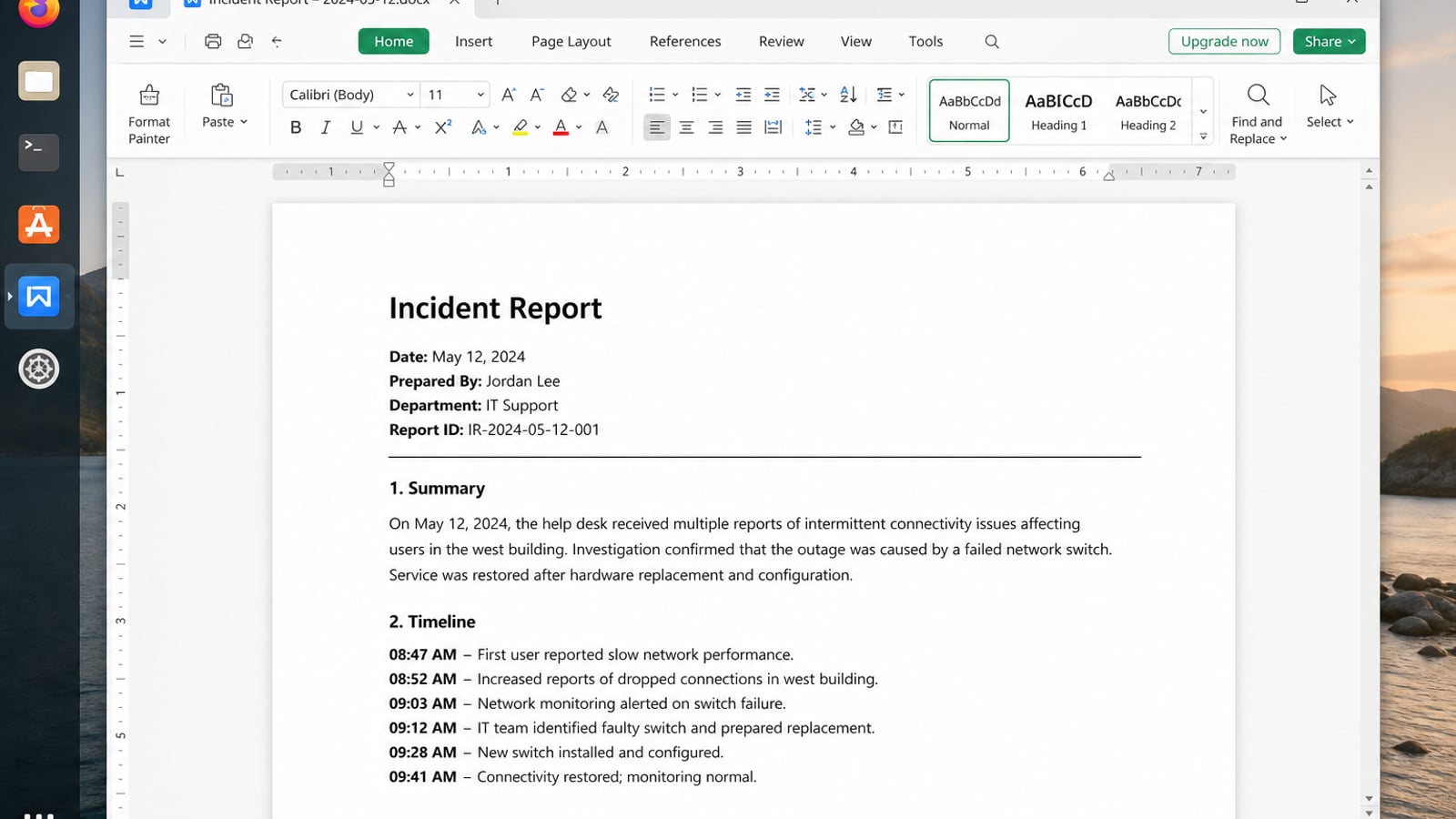
| What you need next | What WPS gives you |
|---|---|
| Turn developer notes into Office-compatible specs and reports | Strong .docx / .xlsx / .pptx layout fidelity when files move between Linux, Windows, and macOS |
| One place for notes, sheets, slides, and PDFs | Free core suite: Writer, Spreadsheet, Presentation, plus PDF view/edit/convert tools |
| A familiar desktop UI for switchers | Ribbon-style apps with a lighter footprint than many heavy suites |
| A trusted install path | Official DEB (Ubuntu/Debian/Mint) and RPM packages from the vendor |
Download from the official WPS Office for Linux download page, install with sudo apt install ./wps-office_VERSION_amd64.deb, then keep Markdown for source control and WPS for the shareable DOCX/PDF handoff.


FAQ
Is Ubuntu better than Fedora for web dev?
Ubuntu wins on tutorial coverage; Fedora wins on newer stacks. Both run Node, Python, and Docker/Podman well.
Should developers use Linux Mint?
You can—apt works—but expect more Ubuntu-shaped docs. Mint is fine if desktop comfort is the priority.
Do I need Arch to be a serious developer?
No. Most professional teams standardize on Ubuntu or RHEL-family hosts.
WSL instead of bare metal?
WSL is excellent on Windows hosts for CLI/devcontainers. For full desktop GPU workflows, native Linux or a dedicated gaming/dev dual-boot may still help.
How do I get newer compilers on Ubuntu LTS?
Use Ubuntu toolchains packages, snap channels, containers, or upstream installers as documented—avoid stacking conflicting PPAs.
What about immutable developer desktops?
Atomic desktops suit some workflows; layered package constraints can frustrate traditional apt install habits. Choose knowingly.
Should I use the same distro on laptop and desktop?
Yes when possible—shared scripts and muscle memory beat maintaining two package ecosystems unless hardware forces a split (for example NVIDIA laptop vs AMD desktop gaming image).
How often should I reinstall?
Rarely. Prefer upgrades along the distro’s supported path and rebuild from your package list plus dotfiles when the system is truly corrupted.
Default recommendation for most developers reading this: install Ubuntu LTS, follow Ubuntu for Developers toolchain guides, put project dependencies in containers, and keep weekly update hygiene. Move to Fedora when you need newer workstation stacks tied to RHEL-family skills, or to Arch when you already enjoy owning a rolling system. That is the practical answer to “best Linux distro for developers”—fit over fashion.
If you are switching from Windows or macOS solely for development, give Ubuntu LTS a full two-week trial with your real repositories before judging Linux. Most friction is unfamiliar package names, not missing capability. After that trial, refine with Fedora or Arch only if you have a concrete gap Ubuntu cannot close with containers or version managers.
Write your choice down next to your deployment targets and GPU needs. Re-read it when tempted to reinstall after a single broken package. Developers lose more time to curiosity reinstalls than to slightly older compilers—containers exist specifically so your host OS can stay boring while dependencies move fast.
Ship code first; ricing second. A calm Ubuntu or Fedora workstation with backups and a tested smoke repo beats an endlessly tuned Arch rice that is always “one update away” from real productivity. Choose the best Linux distro for developers the same way you choose a CI image: boring, documented, and shared with your team. Stay consistent.

'%3e%3cpath%20d='M19.9911%204.11386V6.471H18.5894C18.0775%206.471%2017.7322%206.57814%2017.5536%206.79243C17.3751%207.00671%2017.2858%207.32814%2017.2858%207.75671V9.44421H19.9019L19.5536%2012.0871H17.2858V18.8639H14.5536V12.0871H12.2769V9.44421H14.5536V7.49779C14.5536%206.39064%2014.8632%205.53201%2015.4822%204.92189C16.1013%204.31177%2016.9257%204.00671%2017.9554%204.00671C18.8304%204.00671%2019.509%204.04243%2019.9911%204.11386Z'%20fill='%23333333'/%3e%3c/g%3e%3cdefs%3e%3cclipPath%20id='clip0_2938_8199'%3e%3crect%20width='16'%20height='16'%20fill='white'%20transform='translate(8%204.00671)'/%3e%3c/clipPath%3e%3c/defs%3e%3c/svg%3e)
'%3e%3cpath%20d='M17.5237%2010.7813L23.4811%204H22.0699L16.8949%209.88693L12.7648%204H8L14.2469%2012.9029L8%2020.0133H9.4112L14.8725%2013.7952L19.2352%2020.0133H24M9.92053%205.04213H12.0885L22.0688%2019.0224H19.9003'%20fill='%23333333'/%3e%3c/g%3e%3cdefs%3e%3cclipPath%20id='clip0_2938_8200'%3e%3crect%20width='16'%20height='16.0134'%20fill='white'%20transform='translate(8%204)'/%3e%3c/clipPath%3e%3c/defs%3e%3c/svg%3e)


