

'%3e%3cpath%20d='M8%200C12.4183%200%2016%203.58172%2016%208C16%2012.4183%2012.4183%2016%208%2016C3.58172%2016%200%2012.4183%200%208C0%203.58172%203.58172%200%208%200ZM11.6162%204.38379C11.2257%203.99337%2010.5927%203.99338%2010.2021%204.38379L8%206.58594L5.79785%204.38379C5.40732%203.99334%204.77429%203.99329%204.38379%204.38379C3.99331%204.77429%203.99335%205.40733%204.38379%205.79785L6.58594%208L4.38379%2010.2021C3.99348%2010.5927%203.99341%2011.2257%204.38379%2011.6162C4.77426%2012.0066%205.40734%2012.0065%205.79785%2011.6162L8%209.41406L10.2021%2011.6162C10.5927%2012.0066%2011.2257%2012.0067%2011.6162%2011.6162C12.0067%2011.2257%2012.0066%2010.5927%2011.6162%2010.2021L9.41406%208L11.6162%205.79785C12.0066%205.40735%2012.0066%204.77429%2011.6162%204.38379Z'%20fill='%23080E17'%20fill-opacity='0.46'/%3e%3c/g%3e%3cdefs%3e%3cclipPath%20id='clip0_3761_713'%3e%3crect%20width='16'%20height='16'%20fill='white'/%3e%3c/clipPath%3e%3c/defs%3e%3c/svg%3e)




'%3e%3cpath%20fill-rule='evenodd'%20clip-rule='evenodd'%20d='M21.4999%2010.9993C21.4999%205.20009%2016.7986%200.498901%2010.9993%200.498901C5.19994%200.498901%200.498657%205.20009%200.498657%2010.9993C0.498657%2016.2404%204.33858%2020.5844%209.35855%2021.3722V14.0346H6.69238V10.9993H9.35855V8.68594C9.35855%206.05427%2010.9262%204.60062%2013.3248%204.60062C14.4736%204.60062%2015.6753%204.80571%2015.6753%204.80571V7.38979H14.3512C13.0468%207.38979%2012.64%208.19921%2012.64%209.0296V10.9993H15.5523L15.0867%2014.0346H12.64V21.3722C17.66%2020.5844%2021.4999%2016.2404%2021.4999%2010.9993Z'%20fill='%231568EA'/%3e%3c/g%3e%3c/svg%3e)


'%3e%3cpath%20d='M2.42045%2022.1876H6.31818V12.7217L0.75%208.54553V20.5171C0.75%2021.4414%201.49892%2022.1876%202.42045%2022.1876Z'%20fill='%234285F4'/%3e%3cpath%20d='M19.682%2022.1876H23.5797C24.5041%2022.1876%2025.2502%2021.4387%2025.2502%2020.5171V8.54553L19.682%2012.7217'%20fill='%2334A853'/%3e%3cpath%20d='M19.682%205.48293V12.7216L25.2502%208.54543V6.31816C25.2502%204.25236%2022.8921%203.07469%2021.2411%204.31361'%20fill='%23FBBC04'/%3e%3cpath%20d='M6.31824%2012.7217V5.48303L13.0001%2010.4944L19.6819%205.48303V12.7217L13.0001%2017.733'%20fill='%23EA4335'/%3e%3cpath%20d='M0.75%206.31816V8.54543L6.31818%2012.7216V5.48293L4.75909%204.31361C3.10534%203.07469%200.75%204.25236%200.75%206.31816Z'%20fill='%23C5221F'/%3e%3c/g%3e%3cdefs%3e%3cclipPath%20id='clip0_2954_7305'%3e%3crect%20width='24.5'%20height='18.375'%20fill='white'%20transform='translate(0.75%203.8125)'/%3e%3c/clipPath%3e%3c/defs%3e%3c/svg%3e)


When Word closes, you usually need how to open last saved word document in one of two situations: you already saved the file and want it back from Recent, or the app quit before you clicked Save and you need AutoRecover or backup copies. This guide covers both paths in Microsoft Word, then shows the same jobs inside WPS Writer with real product screenshots.
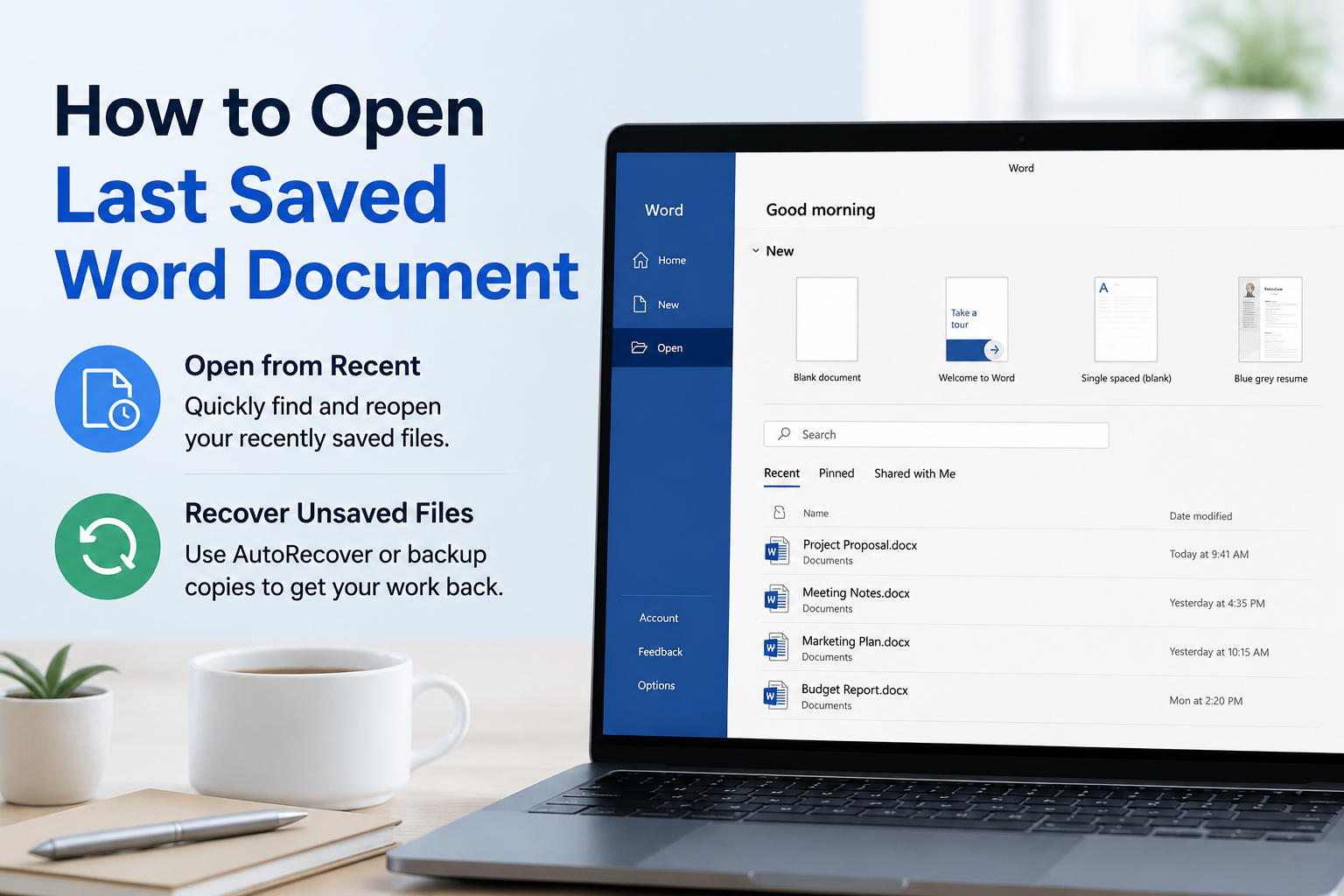
How to Open Last Saved Word Document from Recent Files
If you saved the file at least once, the fastest answer for how to open last saved word document is the Recent list.
Open Microsoft Word.
On the start screen, look under Recent and select the top file (usually the last one you saved).
If you are already editing another document, go to File → Open → Recent, then click the same file.
If the list is long, use the search box in the Open view, or choose Browse and open the folder where you saved it.
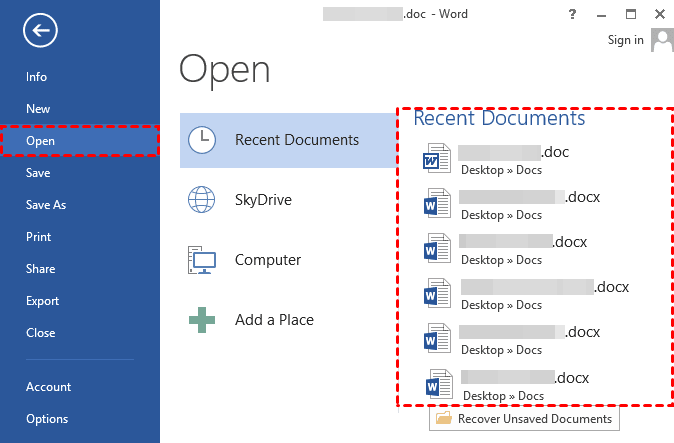
Word Recent documents open list
Tip: Hover a Recent item to confirm the full path before you open it, especially when you keep several copies of the same report.


How to Open Last Saved Word Document After a Crash
After a crash or power cut, how to open last saved word document often means recovering an AutoRecover draft—not only the last manual Save.
Restart Microsoft Word. If a Document Recovery pane appears, open the newest version and choose Save As immediately.
If the pane does not appear, go to File → Info → Manage Document → Recover Unsaved Documents.
Select the file that matches your work time, open it, then save it as a normal .docx in a known folder.
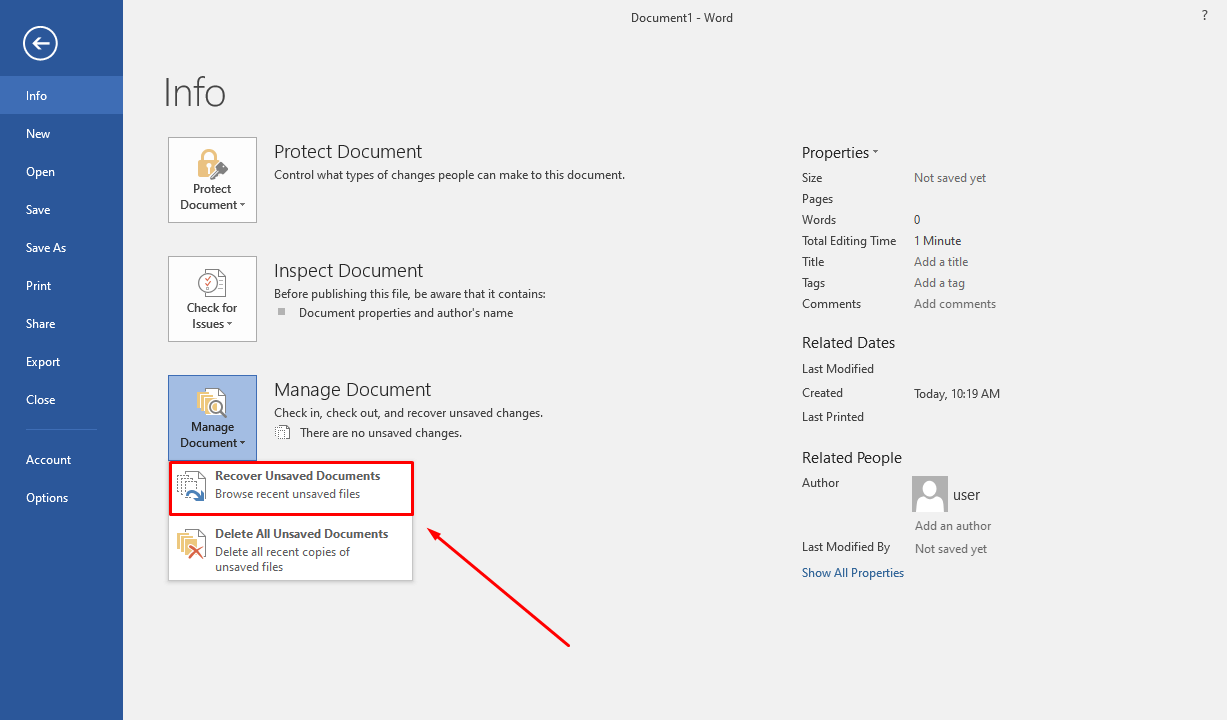
Word Manage Document recover option
AutoRecover only helps when it was enabled before the interruption. Keep the interval at 10 minutes or less under File → Options → Save so the next recovery is closer to your latest edits.
How to Open Last Saved Word Document with Version History
When the current file opened but an earlier save is better, how to open last saved word document can mean restoring a previous cloud version.
If the document lives on OneDrive or SharePoint, open it in Word or the OneDrive web view.
Select the file name in the title bar (or right-click the file in OneDrive) and choose Version History.
Open the version with the date and time you need, then restore it or save a separate copy.
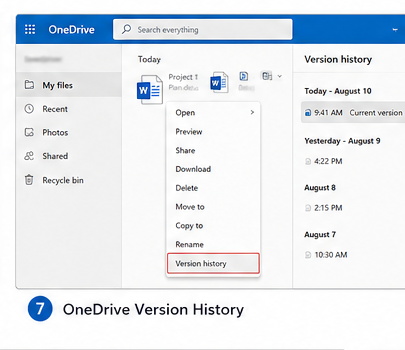
OneDrive version history for Word
Version history is especially useful after an accidental overwrite. Prefer saving the restored copy under a new name until you confirm the content.
A Faster Way in WPS: How to Open Last Saved Word Document from Home
If you want a free Word-compatible editor with a clear Recent list, WPS Office is a practical alternative. WPS Writer opens and saves .docx/.doc files, and the Home screen keeps recently used documents in one place—so how to open last saved word document often takes one click.
WPS Office is an all-in-one suite (Writer, Spreadsheets, Presentation, and PDF tools) with a Microsoft-like interface. Core editing and opening files are available on the free plan; some advanced extras may require a paid upgrade depending on your region.
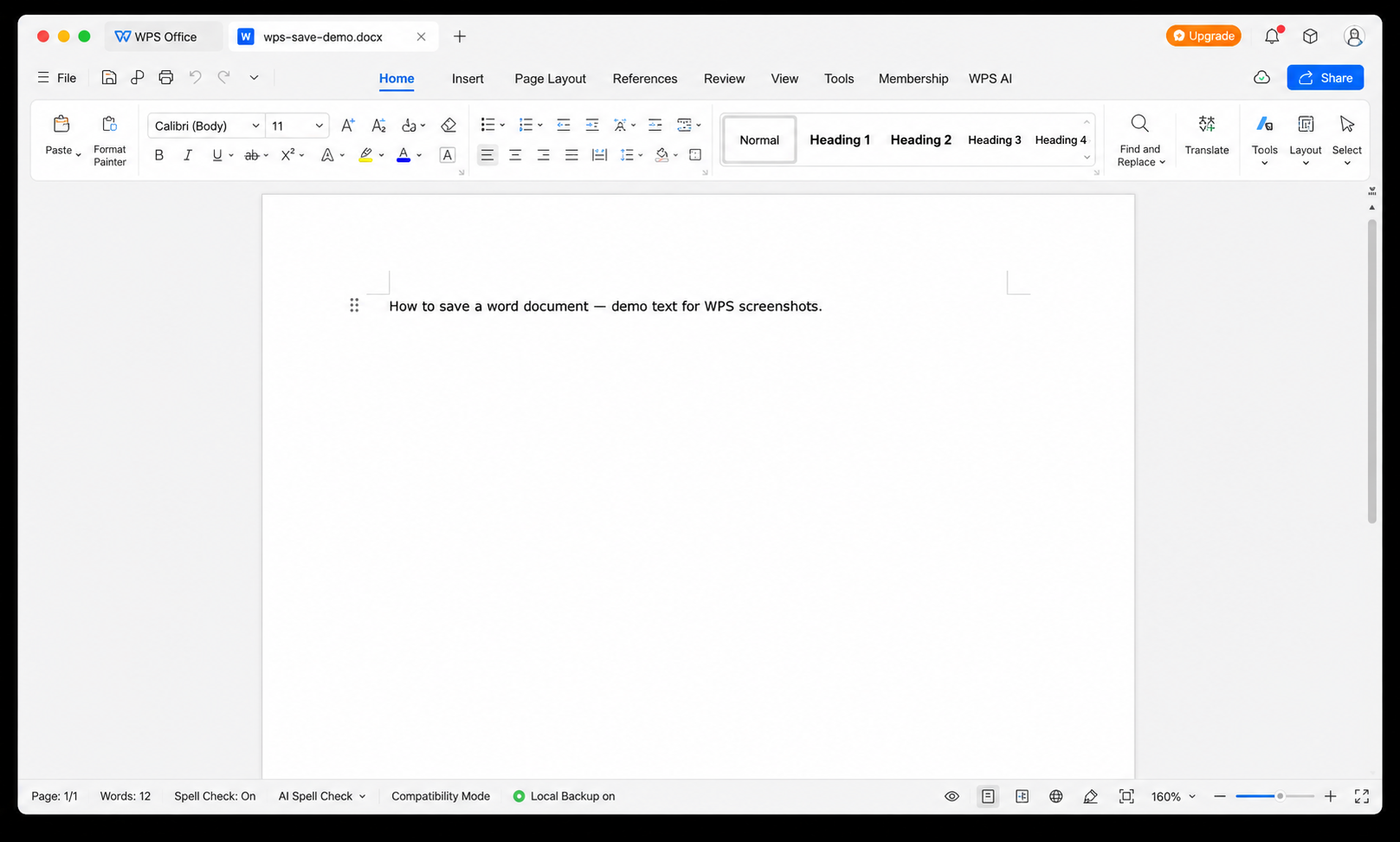
WPS Writer document editing view
Open the last saved file from WPS Home
Launch WPS Office.
On the Home screen, open the Recent list (or select Docs in the sidebar to focus on Word-style files).
Click the top document—usually the last file you saved or edited.
Select More Documents if you need an older entry.
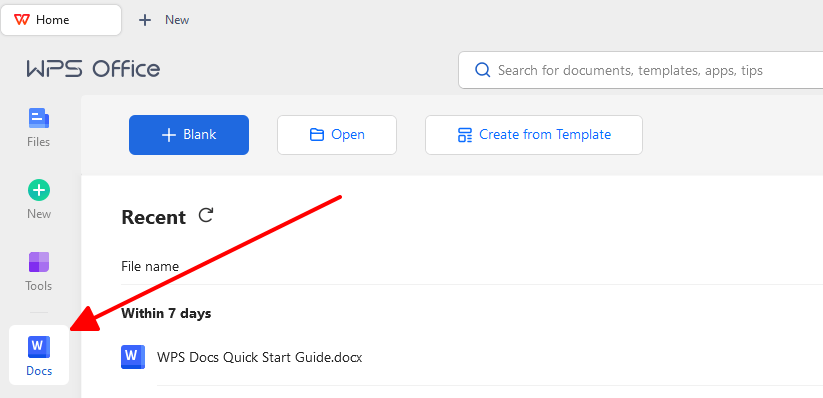
WPS Recent Docs file list
You can also use Open in the left pane, pick Recent or browse My Computer, then confirm with the blue Open button.
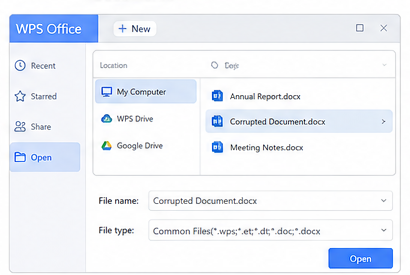
WPS Open dialog for documents
How to Open Last Saved Word Document from WPS Auto Backup
When the app closed before you pressed Save, how to open last saved word document in WPS usually goes through Auto Backup.
Restart WPS Writer. If you see View Backup, open the prompt and save the recovered file.
If nothing appears, go to Menu → Backup and Recovery → Auto Backup.
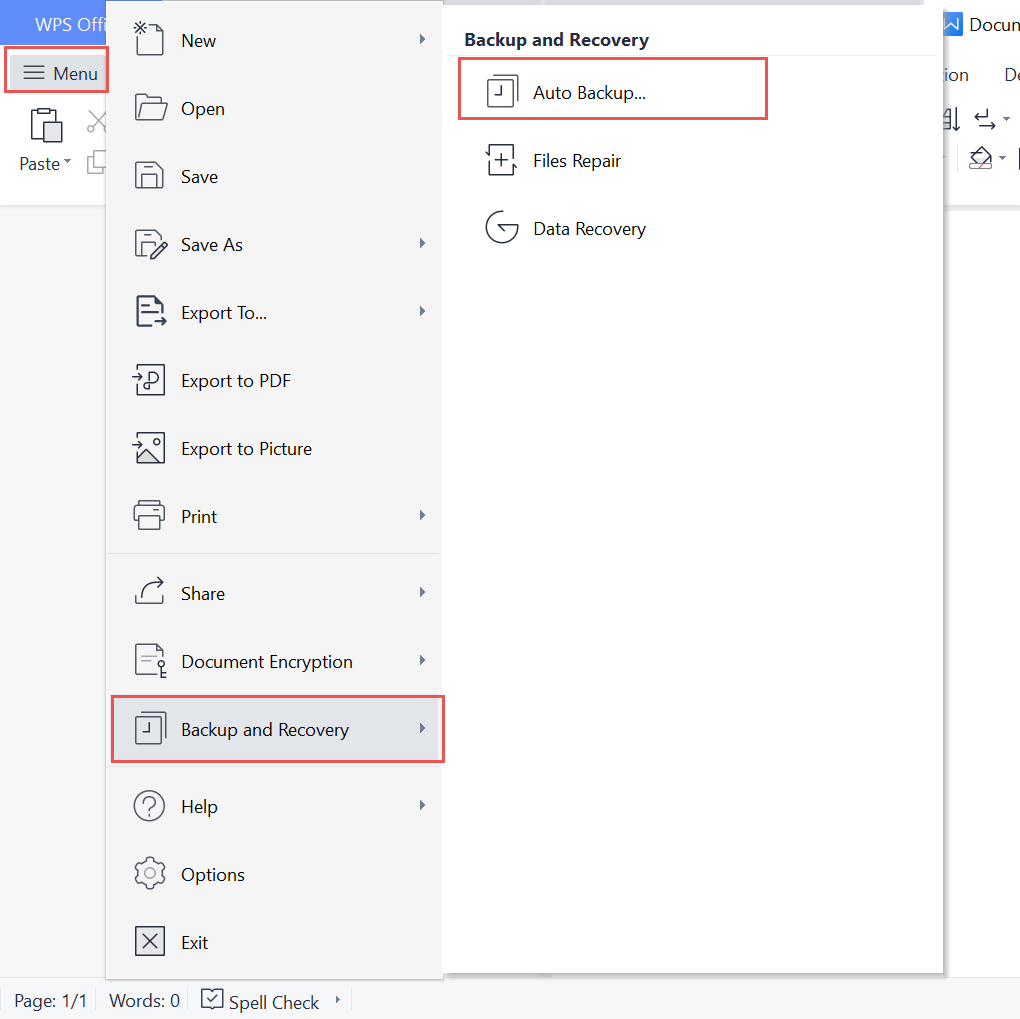
WPS menu Auto Backup path
In the backup panel, select View Details.
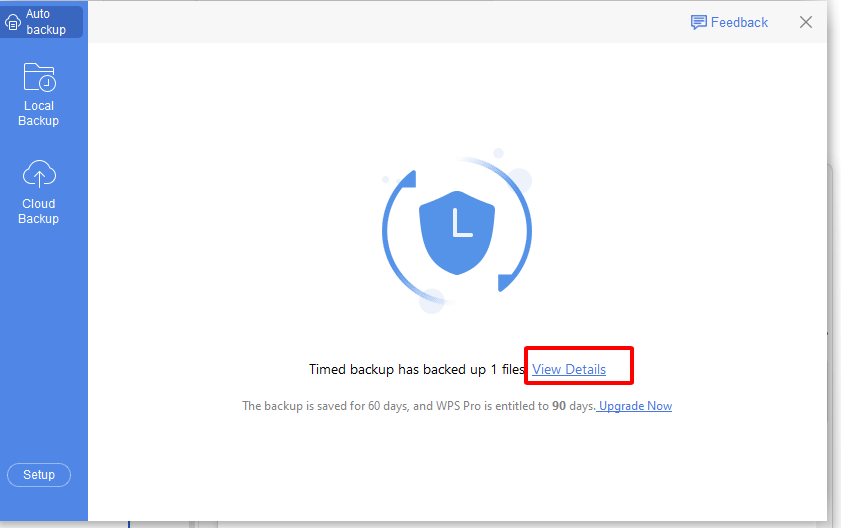
WPS Auto Backup View Details
Find the file by name or backup time, choose Open or Open All, then save a new .docx copy right away.
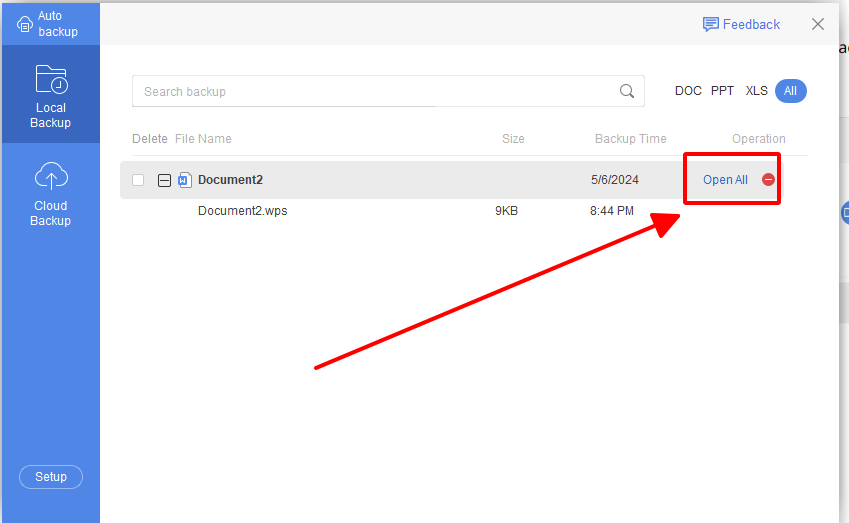
Open All WPS backup files
Keep Local Backup enabled so the next interruption still leaves a recoverable draft. Avoid aggressive PC cleaners that wipe backup folders.

FAQ:
Where does Word keep the last saved file?
In the folder you chose at Save time. Recent lists and File Explorer search by name are the quickest ways to reopen it.
Can I reopen a Word file I never saved?
Try Document Recovery or File → Info → Manage Document → Recover Unsaved Documents. In WPS, use Menu → Backup and Recovery → Auto Backup.
Why is my last saved document missing from Recent?
It may have been opened from a temporary path, cleared from the Recent list, renamed, or saved on another device or account.
Does WPS Writer open real Word .docx files?
Yes. WPS Writer is built to open and save common Word formats such as .docx and .doc for everyday work.

'%3e%3cpath%20d='M19.9911%204.11386V6.471H18.5894C18.0775%206.471%2017.7322%206.57814%2017.5536%206.79243C17.3751%207.00671%2017.2858%207.32814%2017.2858%207.75671V9.44421H19.9019L19.5536%2012.0871H17.2858V18.8639H14.5536V12.0871H12.2769V9.44421H14.5536V7.49779C14.5536%206.39064%2014.8632%205.53201%2015.4822%204.92189C16.1013%204.31177%2016.9257%204.00671%2017.9554%204.00671C18.8304%204.00671%2019.509%204.04243%2019.9911%204.11386Z'%20fill='%23333333'/%3e%3c/g%3e%3cdefs%3e%3cclipPath%20id='clip0_2938_8199'%3e%3crect%20width='16'%20height='16'%20fill='white'%20transform='translate(8%204.00671)'/%3e%3c/clipPath%3e%3c/defs%3e%3c/svg%3e)
'%3e%3cpath%20d='M17.5237%2010.7813L23.4811%204H22.0699L16.8949%209.88693L12.7648%204H8L14.2469%2012.9029L8%2020.0133H9.4112L14.8725%2013.7952L19.2352%2020.0133H24M9.92053%205.04213H12.0885L22.0688%2019.0224H19.9003'%20fill='%23333333'/%3e%3c/g%3e%3cdefs%3e%3cclipPath%20id='clip0_2938_8200'%3e%3crect%20width='16'%20height='16.0134'%20fill='white'%20transform='translate(8%204)'/%3e%3c/clipPath%3e%3c/defs%3e%3c/svg%3e)


