

'%3e%3cpath%20d='M8%200C12.4183%200%2016%203.58172%2016%208C16%2012.4183%2012.4183%2016%208%2016C3.58172%2016%200%2012.4183%200%208C0%203.58172%203.58172%200%208%200ZM11.6162%204.38379C11.2257%203.99337%2010.5927%203.99338%2010.2021%204.38379L8%206.58594L5.79785%204.38379C5.40732%203.99334%204.77429%203.99329%204.38379%204.38379C3.99331%204.77429%203.99335%205.40733%204.38379%205.79785L6.58594%208L4.38379%2010.2021C3.99348%2010.5927%203.99341%2011.2257%204.38379%2011.6162C4.77426%2012.0066%205.40734%2012.0065%205.79785%2011.6162L8%209.41406L10.2021%2011.6162C10.5927%2012.0066%2011.2257%2012.0067%2011.6162%2011.6162C12.0067%2011.2257%2012.0066%2010.5927%2011.6162%2010.2021L9.41406%208L11.6162%205.79785C12.0066%205.40735%2012.0066%204.77429%2011.6162%204.38379Z'%20fill='%23080E17'%20fill-opacity='0.46'/%3e%3c/g%3e%3cdefs%3e%3cclipPath%20id='clip0_3761_713'%3e%3crect%20width='16'%20height='16'%20fill='white'/%3e%3c/clipPath%3e%3c/defs%3e%3c/svg%3e)




'%3e%3cpath%20fill-rule='evenodd'%20clip-rule='evenodd'%20d='M21.4999%2010.9993C21.4999%205.20009%2016.7986%200.498901%2010.9993%200.498901C5.19994%200.498901%200.498657%205.20009%200.498657%2010.9993C0.498657%2016.2404%204.33858%2020.5844%209.35855%2021.3722V14.0346H6.69238V10.9993H9.35855V8.68594C9.35855%206.05427%2010.9262%204.60062%2013.3248%204.60062C14.4736%204.60062%2015.6753%204.80571%2015.6753%204.80571V7.38979H14.3512C13.0468%207.38979%2012.64%208.19921%2012.64%209.0296V10.9993H15.5523L15.0867%2014.0346H12.64V21.3722C17.66%2020.5844%2021.4999%2016.2404%2021.4999%2010.9993Z'%20fill='%231568EA'/%3e%3c/g%3e%3c/svg%3e)


'%3e%3cpath%20d='M2.42045%2022.1876H6.31818V12.7217L0.75%208.54553V20.5171C0.75%2021.4414%201.49892%2022.1876%202.42045%2022.1876Z'%20fill='%234285F4'/%3e%3cpath%20d='M19.682%2022.1876H23.5797C24.5041%2022.1876%2025.2502%2021.4387%2025.2502%2020.5171V8.54553L19.682%2012.7217'%20fill='%2334A853'/%3e%3cpath%20d='M19.682%205.48293V12.7216L25.2502%208.54543V6.31816C25.2502%204.25236%2022.8921%203.07469%2021.2411%204.31361'%20fill='%23FBBC04'/%3e%3cpath%20d='M6.31824%2012.7217V5.48303L13.0001%2010.4944L19.6819%205.48303V12.7217L13.0001%2017.733'%20fill='%23EA4335'/%3e%3cpath%20d='M0.75%206.31816V8.54543L6.31818%2012.7216V5.48293L4.75909%204.31361C3.10534%203.07469%200.75%204.25236%200.75%206.31816Z'%20fill='%23C5221F'/%3e%3c/g%3e%3cdefs%3e%3cclipPath%20id='clip0_2954_7305'%3e%3crect%20width='24.5'%20height='18.375'%20fill='white'%20transform='translate(0.75%203.8125)'/%3e%3c/clipPath%3e%3c/defs%3e%3c/svg%3e)


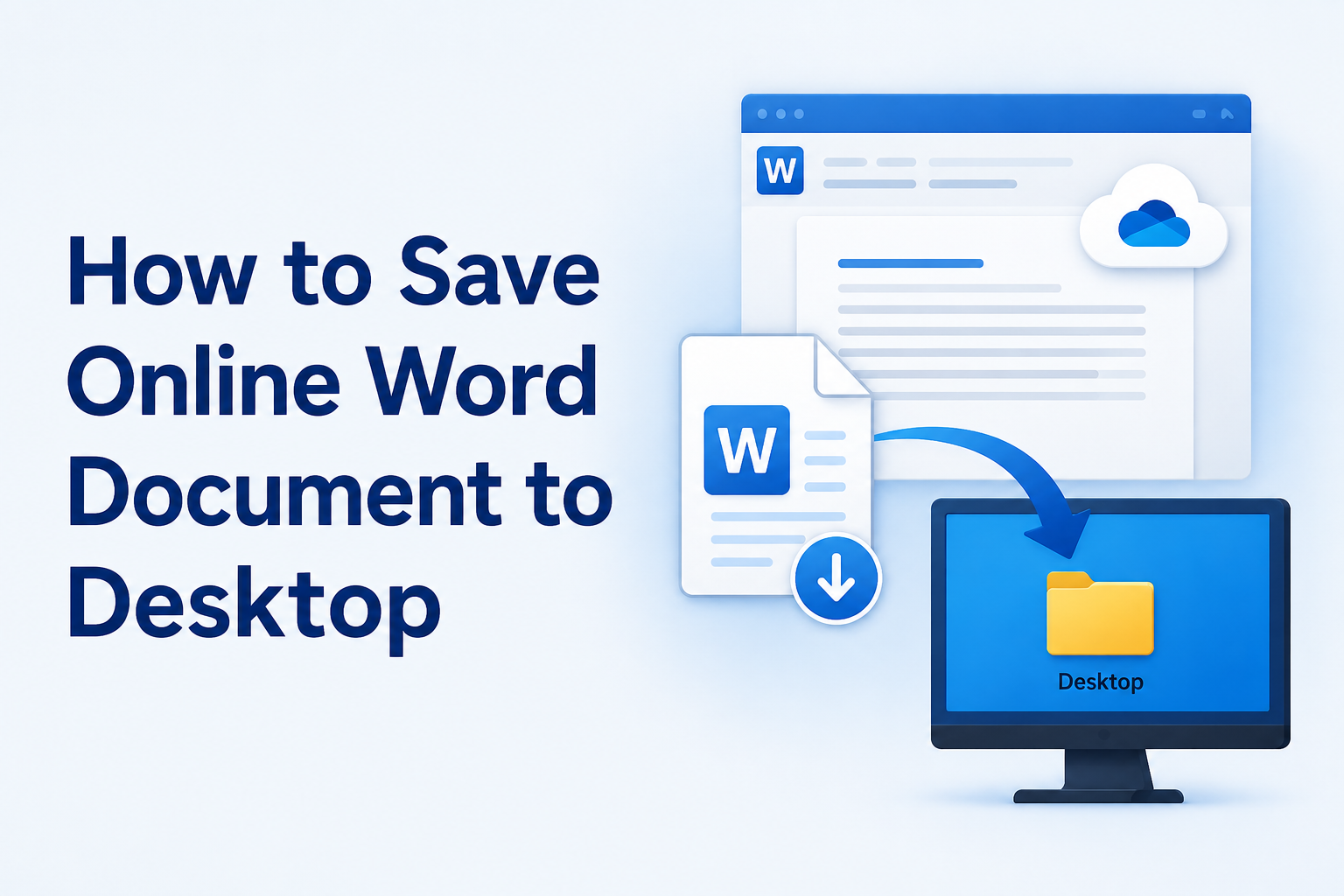
Looking up how to save online word document to desktop usually means one thing: the file lives in Word for the web or OneDrive, and you need a local .docx you can open offline. Word Online autosaves to the cloud; a local copy is a separate download step, then a short move from Downloads to Desktop if that is where you want it.
Why How to Save Online Word Document to Desktop Matters
Cloud Word is convenient for sharing, but travel, spotty Wi‑Fi, or a strict school/work PC policy can leave you stuck without a local file. Learning how to save online word document to desktop also helps when you want a backup before major edits, or when a teammate only accepts email attachments instead of OneDrive links.
Quick path most readers need:
Open the document in Word for the web (or find it in OneDrive).
Download a copy (.docx).
Move that file from Downloads to Desktop.
Optional: open and re-save the copy in a desktop editor such as WPS Writer.
How to Save Online Word Document to Desktop in Word for the Web
This is the primary answer for how to save online word document to desktop when the file is already open in the browser.
Sign in at Office.com and open the Word document in Word for the web.
Select File.
Choose Create a Copy (some builds show Save As).
Select Download a copy.
Confirm the browser download. The file usually lands in your default Downloads folder as a .docx.

Depending on browser settings, you may be asked to pick a folder. If your browser lets you choose the location, you can send it straight to Desktop and skip the next section. Otherwise, continue with the Downloads → Desktop move below.
Tip: if you only need a fixed layout for sharing, you can also download as PDF from the same File area. Keep the .docx when you still need to edit.
How to Save Online Word Document to Desktop from OneDrive
You do not always need to open Word first. For how to save online word document to desktop from the file list:
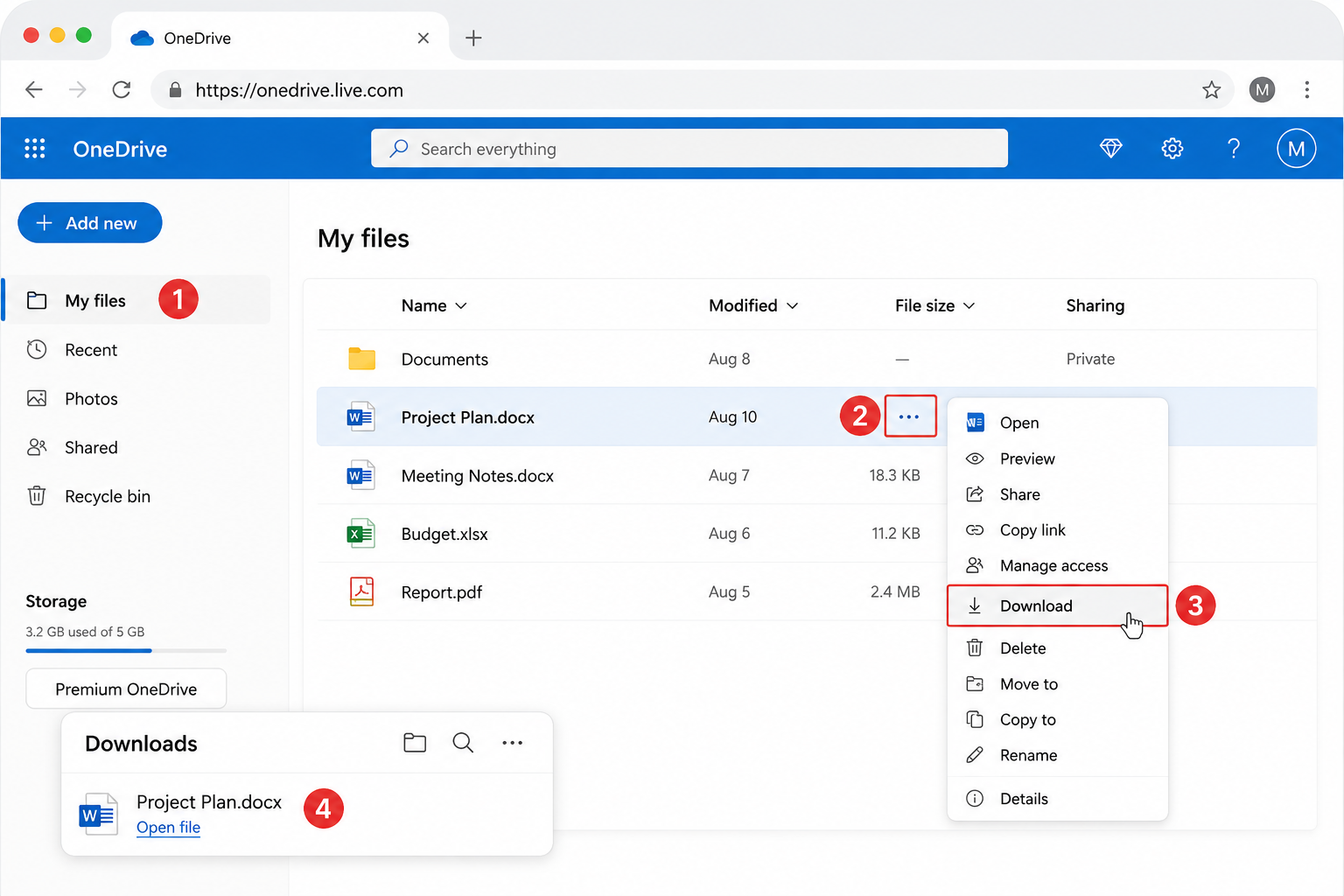
Open OneDrive in the browser and find the document.
Hover the file, then select the more actions menu (…).
Choose Download.
Check Downloads (or the folder your browser used).
This path is useful when you already know which file you want, and it also works well for downloading several documents one after another.
If you use the OneDrive desktop sync app, the same files may already appear in a local OneDrive folder. In that case, copy or move the file to Desktop from File Explorer / Finder instead of downloading through the browser.


Finish How to Save Online Word Document to Desktop from Downloads
Browsers often ignore “Desktop” and save to Downloads. Completing how to save online word document to desktop is then a short file-manager step.
Open your Downloads folder.
Find the new .docx (sort by Date modified if the list is long).
Drag it to Desktop, or cut and paste it there.
Rename the file if needed so you can find it later.

On Mac, use Finder → Downloads, then drag to Desktop. On Windows, use File Explorer the same way. After the move, double-click the Desktop icon to confirm the document opens.
The Best Save Online Word Document to Desktop Tool: WPS Office
Once the cloud file is local, you still need an app that can open .docx. WPS Office is a free-to-start suite with Writer for Word-compatible documents, plus Spreadsheets, Presentation, and PDF tools. Menus feel familiar if you already use Microsoft Office, and core Writer open/edit/save works for everyday files without a Microsoft 365 plan.
That makes WPS a practical next step after how to save online word document to desktop: open the Desktop .docx in Writer, edit offline, then Save As again if you want a second local copy or a cleaner file name. Premium extras (advanced PDF, templates, or AI features, depending on plan and region) are optional; basic save workflows stay available on the free tier.
How to Save Online Word Document to Desktop Again in WPS Writer
Use this when the downloaded file is open in WPS Writer and you want a clear Desktop path—or a renamed offline copy.
Open the downloaded file
Launch WPS Writer.
Use Open or the Recent list to load the .docx from Downloads or Desktop.
Save As to Desktop
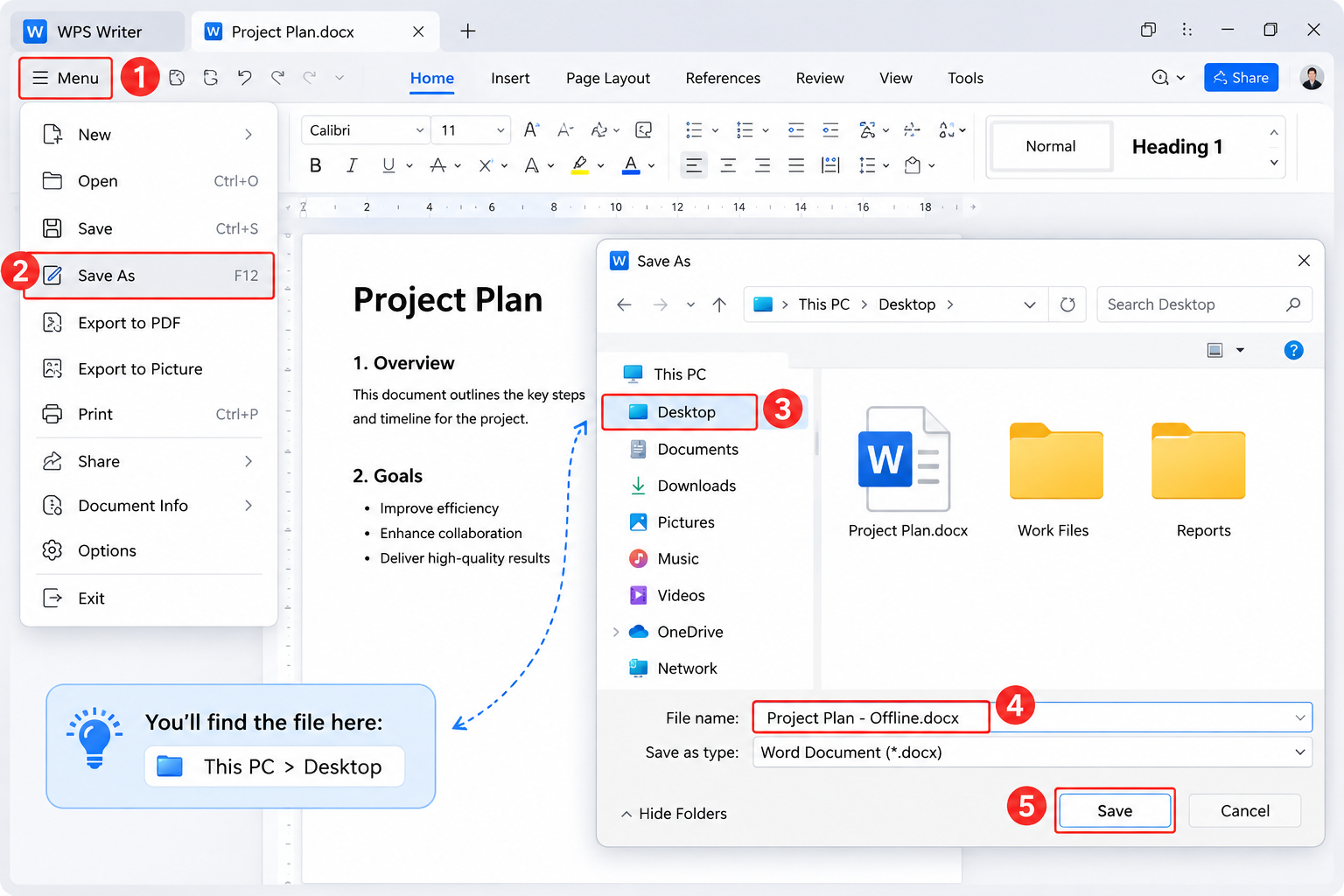
Select Menu (top-left), then Save As (F12 on many Windows builds).
In the Save As dialog, choose Desktop as the location.
Keep Word Document (.docx) unless you need another format.
Enter a clear name and select Save.
Save Online Word Document to Desktop in WPS Writer
Quick updates after that: use the Save icon or Ctrl + S / Command + S. If you only need a share-ready copy, use Export to PDF and keep the original .docx for editing.
FAQ: How to Save Online Word Document to Desktop
Where does Word Online save the download?
Usually your browser’s default Downloads folder—not Desktop—unless you pick a path in the save prompt.
Can I complete how to save online word document to desktop on a Mac?
Yes. Download a copy in Word for the web or OneDrive, then drag the .docx from Finder’s Downloads to Desktop.
Is Download a copy the same as Save As in the cloud?
No. Creating another online copy keeps the file in OneDrive. Download a copy creates a local file on your computer.
What if editing is locked after I open the downloaded file?
In Microsoft Word, use Enable Editing if the Protected View banner appears. In WPS Writer, open the trusted file from Desktop and save again if needed.
Do I need Microsoft Word after the download?
No. A compatible editor such as WPS Writer can open and save common .docx files for everyday offline work.
Summary:
How to save online word document to desktop is two jobs in one: download a .docx from Word for the web or OneDrive, then place that file on Desktop (or Save As to Desktop in WPS Writer). Start with File → Create a Copy → Download a copy, confirm Downloads, move to Desktop, and reopen once to verify. For offline edits without a Microsoft subscription, open the same file in WPS Writer and Save As to Desktop when you want a clean local copy.
Ready to edit the offline file? Download WPS Office, open your Desktop .docx in Writer, and save a practice copy to confirm the path.


'%3e%3cpath%20d='M19.9911%204.11386V6.471H18.5894C18.0775%206.471%2017.7322%206.57814%2017.5536%206.79243C17.3751%207.00671%2017.2858%207.32814%2017.2858%207.75671V9.44421H19.9019L19.5536%2012.0871H17.2858V18.8639H14.5536V12.0871H12.2769V9.44421H14.5536V7.49779C14.5536%206.39064%2014.8632%205.53201%2015.4822%204.92189C16.1013%204.31177%2016.9257%204.00671%2017.9554%204.00671C18.8304%204.00671%2019.509%204.04243%2019.9911%204.11386Z'%20fill='%23333333'/%3e%3c/g%3e%3cdefs%3e%3cclipPath%20id='clip0_2938_8199'%3e%3crect%20width='16'%20height='16'%20fill='white'%20transform='translate(8%204.00671)'/%3e%3c/clipPath%3e%3c/defs%3e%3c/svg%3e)
'%3e%3cpath%20d='M17.5237%2010.7813L23.4811%204H22.0699L16.8949%209.88693L12.7648%204H8L14.2469%2012.9029L8%2020.0133H9.4112L14.8725%2013.7952L19.2352%2020.0133H24M9.92053%205.04213H12.0885L22.0688%2019.0224H19.9003'%20fill='%23333333'/%3e%3c/g%3e%3cdefs%3e%3cclipPath%20id='clip0_2938_8200'%3e%3crect%20width='16'%20height='16.0134'%20fill='white'%20transform='translate(8%204)'/%3e%3c/clipPath%3e%3c/defs%3e%3c/svg%3e)


