One of the biggest issues creating slide decks from scratch isn't
just the complex design tools, but also coming up with new ideas every
time. For any professional or educator, the hours spent formatting could
rather be spent on improving the actual message. This is where
AI-powered tools can help shift focus from repetitive setup to structure
and storytelling. While Google Slides excels at collaboration, its
native features offer limited automation to speed up the process. This
Plus AI presentation maker review will show you how to create slides
faster and more efficiently with Plus AI for Google Slides.
Use Word, Excel, and PPT for FREE
Plus AI for Google Slides
Overview of Plus AI for
Google Slides
Plus AI is a
specialized AI assistant designed to live inside the tools you already
use, like Google Slides and PowerPoint.
Rather than forcing you to learn a new standalone platform, it functions
as an add-on that brings generative capabilities directly to your
existing slide deck. It is built for users who want to draft, edit, and
refine presentations without leaving the familiar Google Workspace
interface. Below, you’ll find out how it works, and you will understand
some of the best Plus AI features for slides.
Plus AI for Google Slides
How It Works:
Install: Add the tool from the Google Workspace Marketplace.
Launch: Open Google Slides, click Extensions, and select Plus AI.
Create: Type a prompt (e.g., "Q1 Marketing Strategy") or upload a document to generate a full deck in minutes.
Core Features:
Full Deck Generation: Creates complete presentations from simple text prompts or uploaded files (PDFs, Word docs).
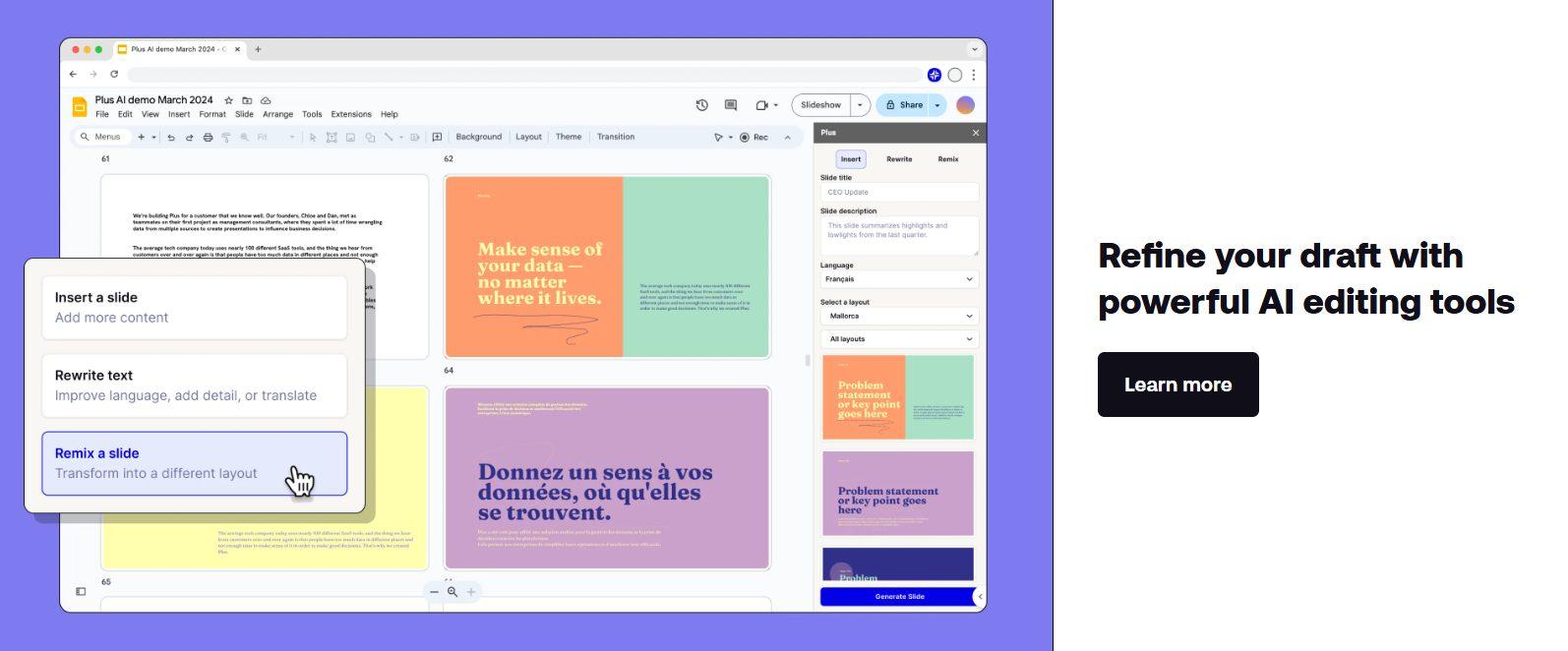
Slide Remixing: Reformats specific slides to change the layout or style without altering the content.
AI Writing Assistant: Rewrites text on your slides to improve clarity, tone, or conciseness.
Live Snapshots: Embeds live data from other apps directly into slides (a unique feature for reporting).
Key Pros and Cons of Plus AI
Integrating artificial intelligence directly into Google Slides
offers undeniable convenience, but it is important to weigh the benefits
against the limitations. While Plus AI simplifies the drafting process
by living inside your existing workspace, it is not a magic wand for
every design challenge. To help you decide if this add-on is the right
investment for your team, we have analyzed its performance to highlight
exactly where it excels and where it may leave you wanting more in this
Plus AI pros and cons.
Pros:
Operates entirely within Google Slides, eliminating the need to export or switch apps.
Generates outlines and full slide decks instantly from raw text or documents.
Allows you to remix layouts and rewrite text on the fly.
Leverages Google's inherent sharing features for real-time teamwork.
Cons:
Automated designs often require manual tweaking to look truly professional.
Advanced features like custom templates are still in beta or evolving.
Ongoing use requires a paid subscription plan after the trial ends.
How to Use Plus AI for
Google Slides
Getting started with Plus AI for Google Slides is straightforward
thanks to its integration with the Extensions menu.
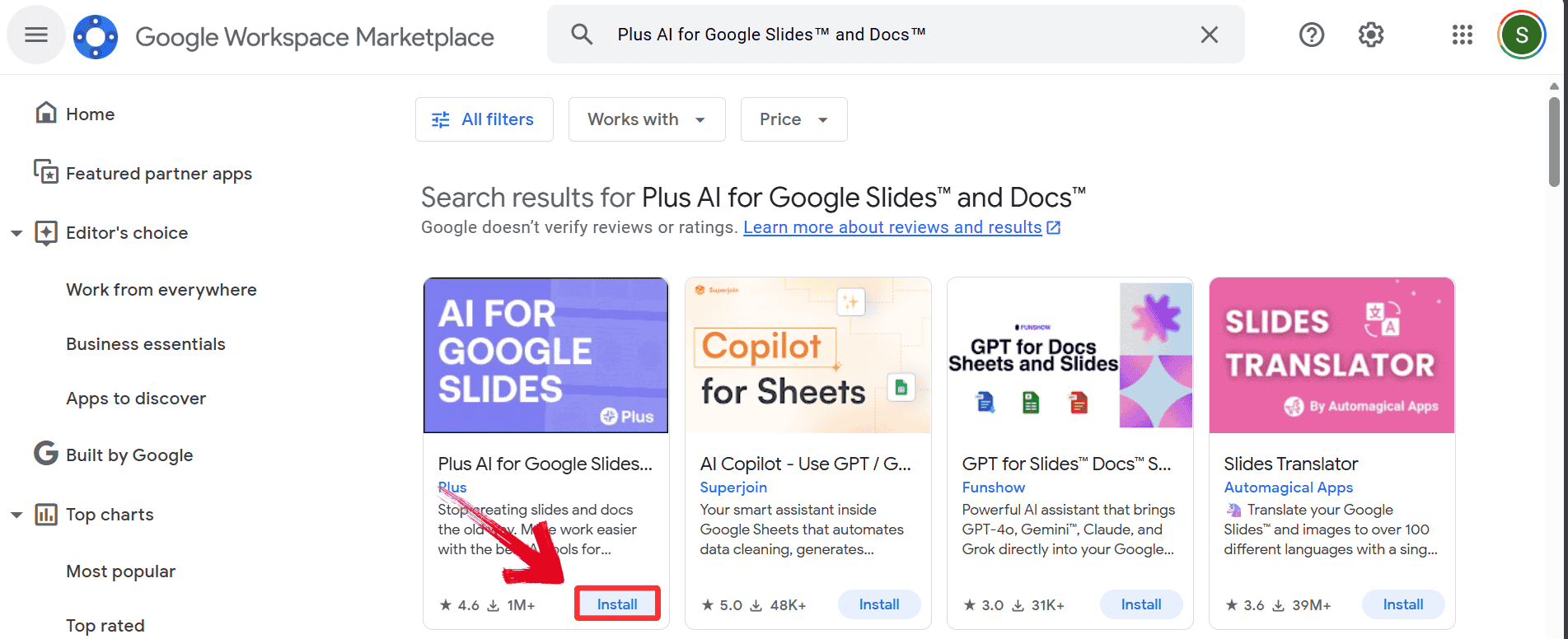
Step 1: First, head on over to the Google
Marketplace. Then search and click “Install”under the correct result. This will add the Plus AI Google Slides add-on
to your Google Slides
Install Plus AI
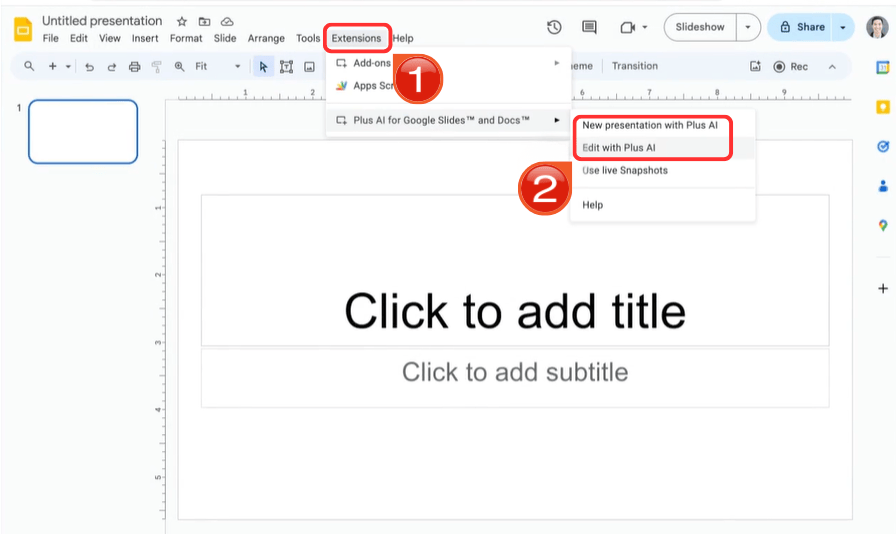
Step 2: Open your Google Slides and go to
“Extensions” in the top menu bar, hover over
“Plus AI”, and select “New
Presentation” or “Edit with Plus AI”.
Use the Plus AI extension in Google Slides
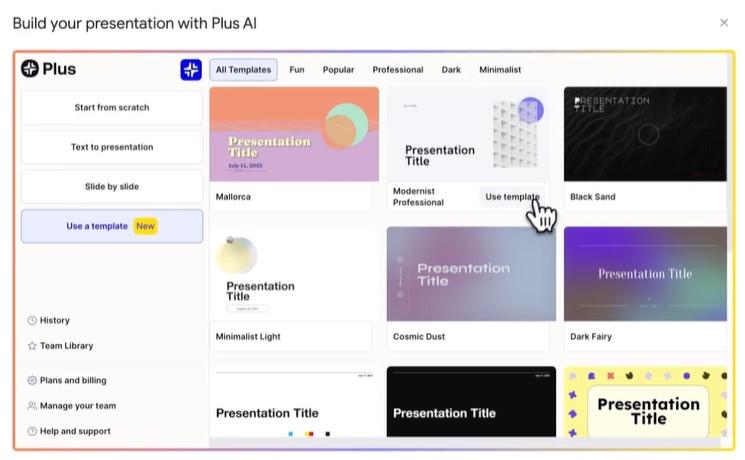
Step 3: In the sidebar or pop-up window, select a
template.
Select a template
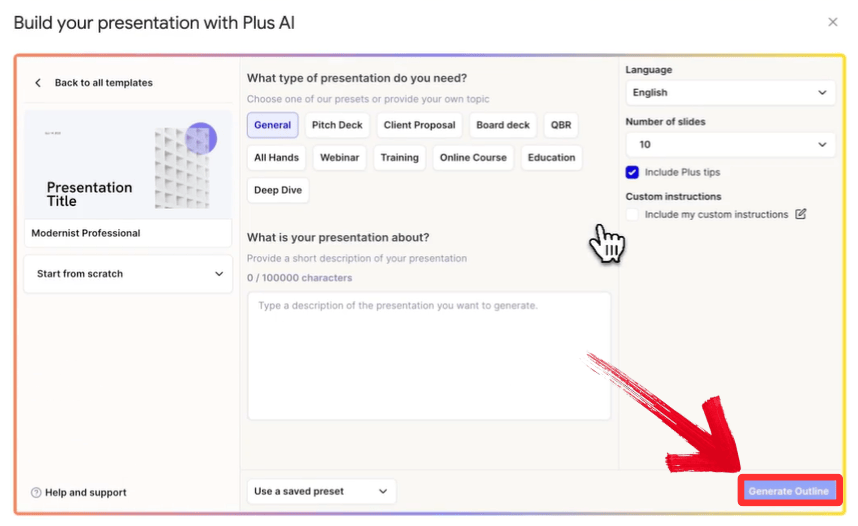
Step 4: Enter your prompt, then click
“Generate Outline.” Be specific, for example, "Create a
10-slide pitch
deck for a mobile app startup."
Generate your outline
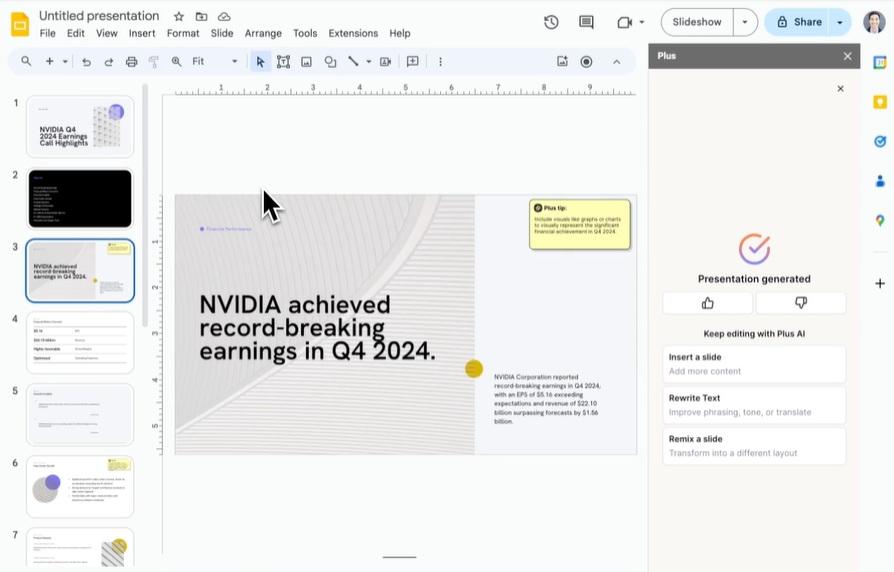
Step 5: Review the generated outline. You can add,
remove, or rearrange slide titles before finalizing.
Review and finalise
Plus AI Alternatives
Comparison Table
Plus AI is a strong contender for those deeply integrated into the
Google ecosystem, but it is not the only player in the field. The market is filled with Plus AI alternatives. To help you determine which tool
best fits your specific workflow, we have compared Plus AI against other
leading platforms in the table below.
Feature
Plus AI
SlidesAI
Gamma.app
Beautiful.ai
Native Google Slides Integration
✔
✔
❌
❌
Generate Full Presentations
✔
✔
✔
✔
Edit Existing Slides
✔
▲
✘
✘
Remix Slide Layouts
✔
✘
✔
✔
Custom Template Support
Beta
✘
✘
✘
Advanced Design Automation
▲
✘
✔
✔
Best Use Case
Professional Plug-in
Simple Drafts
Versatile Docs/Slides
Design-Focused Decks
Note: "▲" indicates limited support; "✔" indicates strong
support; "✘" indicates little or no support.
Why WPS
AI Slides Is a Smarter Alternative to Plus AI
Plus AI introduces helpful automation into Google Slides, but as an
add-on, it remains limited by the capabilities of Google Slides. When
you’re working with more complex presentations and concepts, this issue
gets even worse, as you have to constantly switch between AI suggestions
and manual slide adjustments.
WPS AI Slides
But if you’re someone who needs greater control and consistency, a
fully integrated environment, where AI drives everything from content
generation to final export, is often the better choice. WPS AI
Slides delivers this end-to-end approach, offering a smoother,
more powerful experience for producing polished, professional
presentations.
Key Advantages of WPS AI Slides:
Advanced AI Content Generation: Generates deeper, more context-aware content from topics or documents instantly.
Full Editing Control: Offers precise control over layouts, typography, and visuals that goes beyond simple remixing.
Standalone Power: Works offline and supports native .pptx export, making your files portable and compatible anywhere.
Cross-Suite Integration: Seamlessly pulls data and context from WPS Writer and Spreadsheets for a unified workflow.
How to Create Slides
with WPS AI Slides
Getting started is easy. Instead of struggling with manual
formatting, you can let the AI handle the heavy lifting in just a few
clicks.
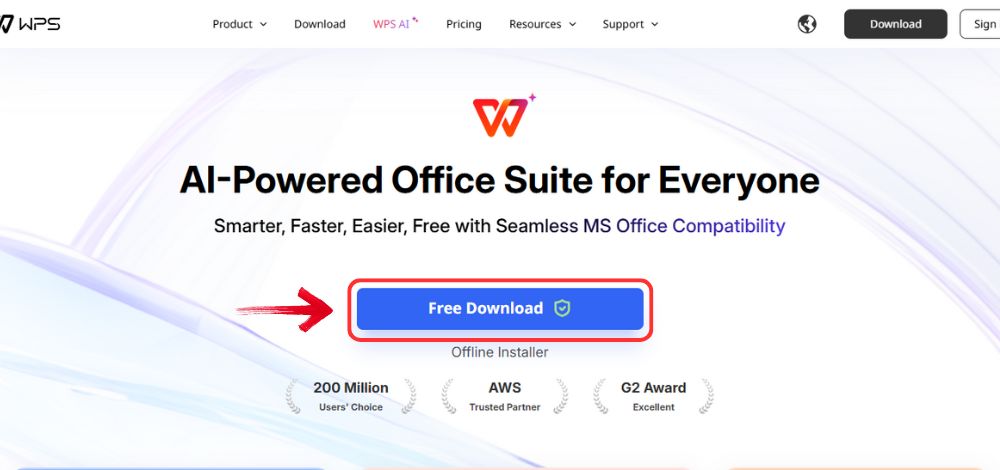
Step 1: Open your browser to visit WPS Office and click the "Free Download" button to start the download.
Download WPS Office
Step 2: The download will finish in a few seconds.
Once done, run the installation file like you would for any other app or
software.
Step 3: WPS Office will show you a few simple terms
and conditions. Accept them, then click the "Install
Now" button to begin the installation.
Install WPS Office
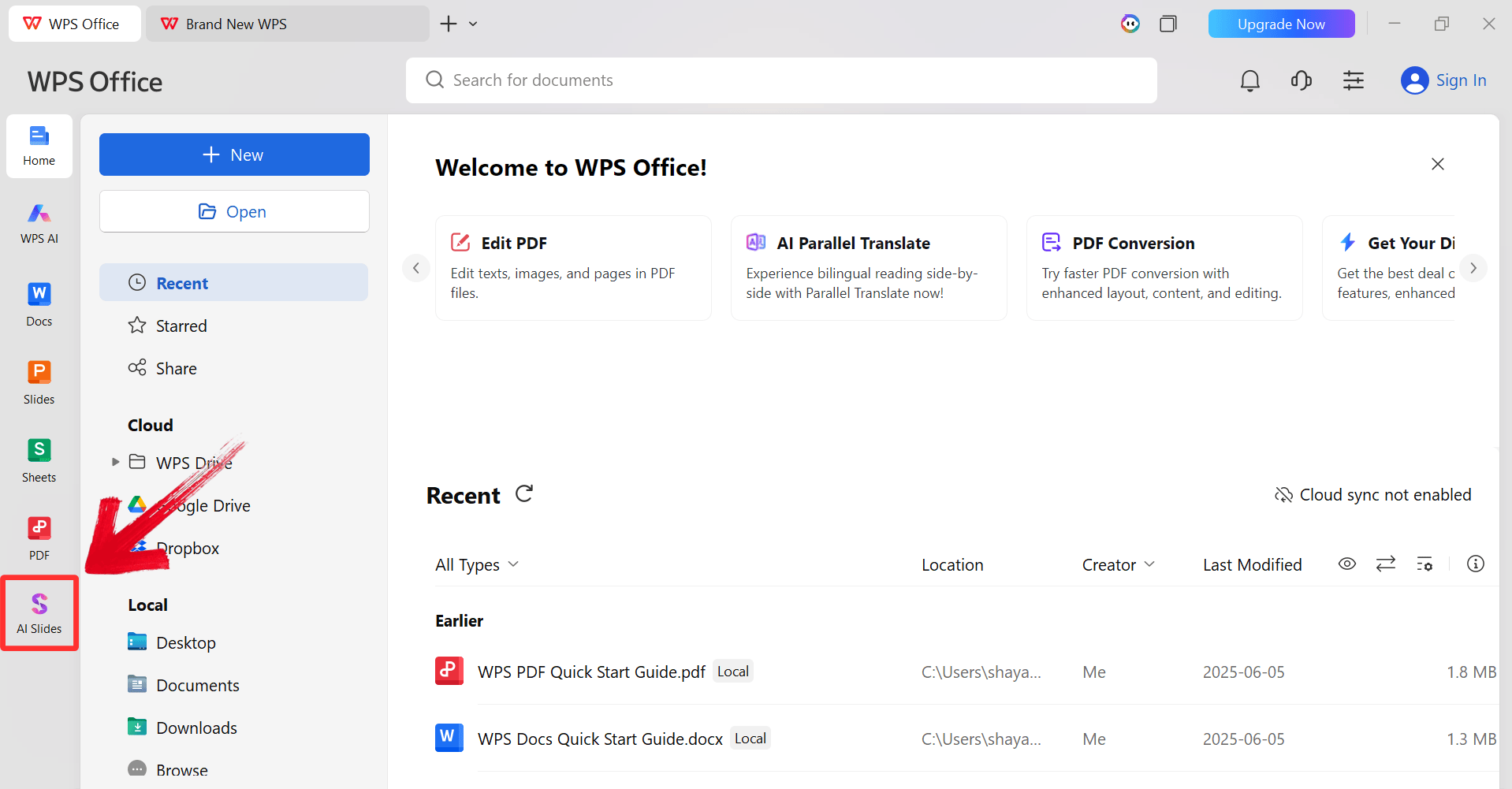
Step 4: After installation, in WPS Office, click “Slides” from the left sidebar.
WPS Slides Dashboard
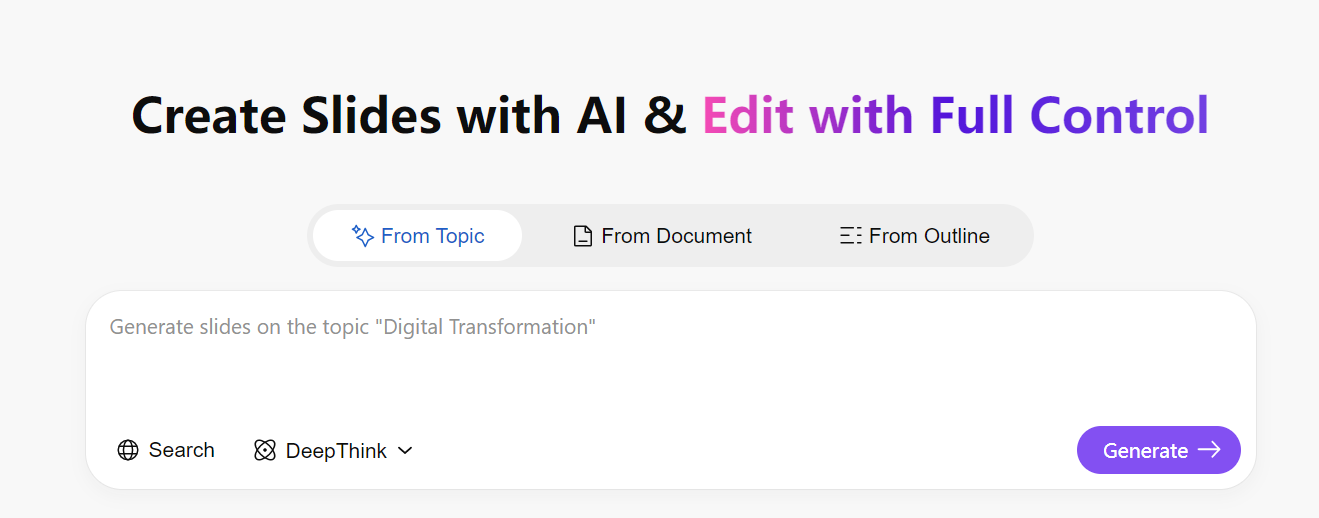
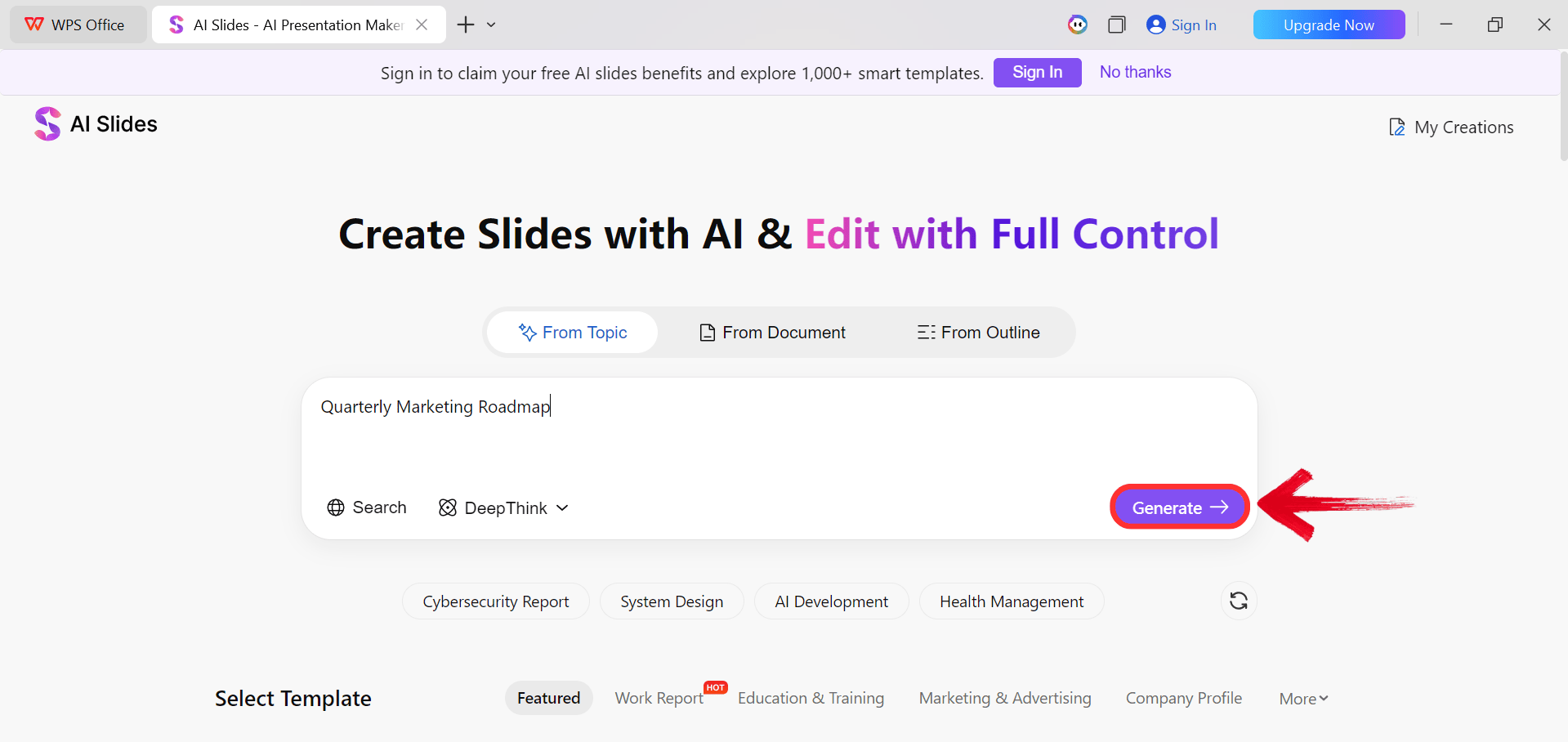
Step 5: Enter your presentation topic (e.g.,
"Quarterly Marketing Roadmap") into the dialogue box and click “Generate” to create the outline.
Click Generate
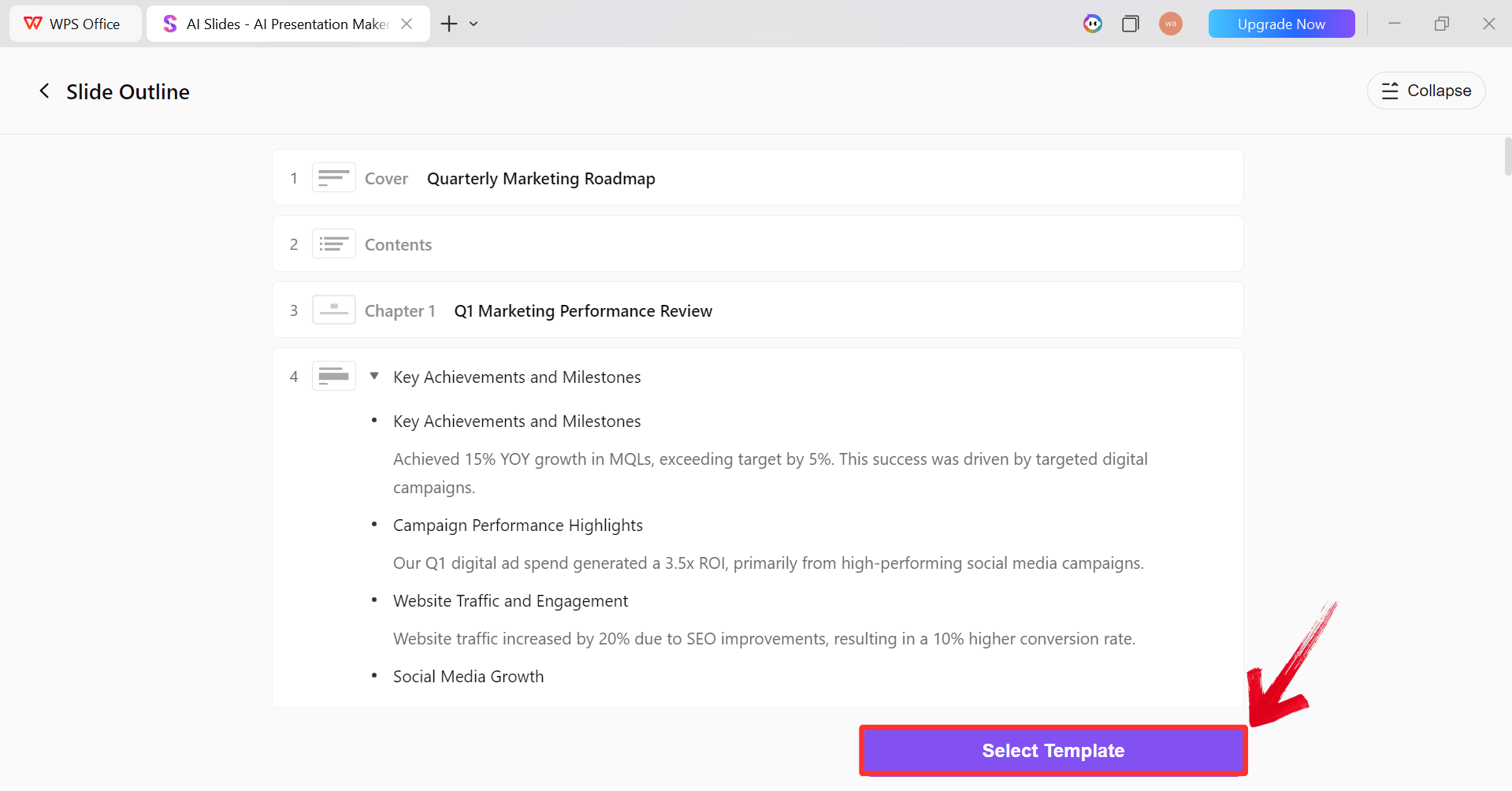
Step 6: After the AI creates the outline,
click “Select Template” to pick a template from the
already available ones.
AI Generated Outline
Step 7: Choose from the Wide template library and
click “Create Slides” to generate your
presentation.
Pick a Template
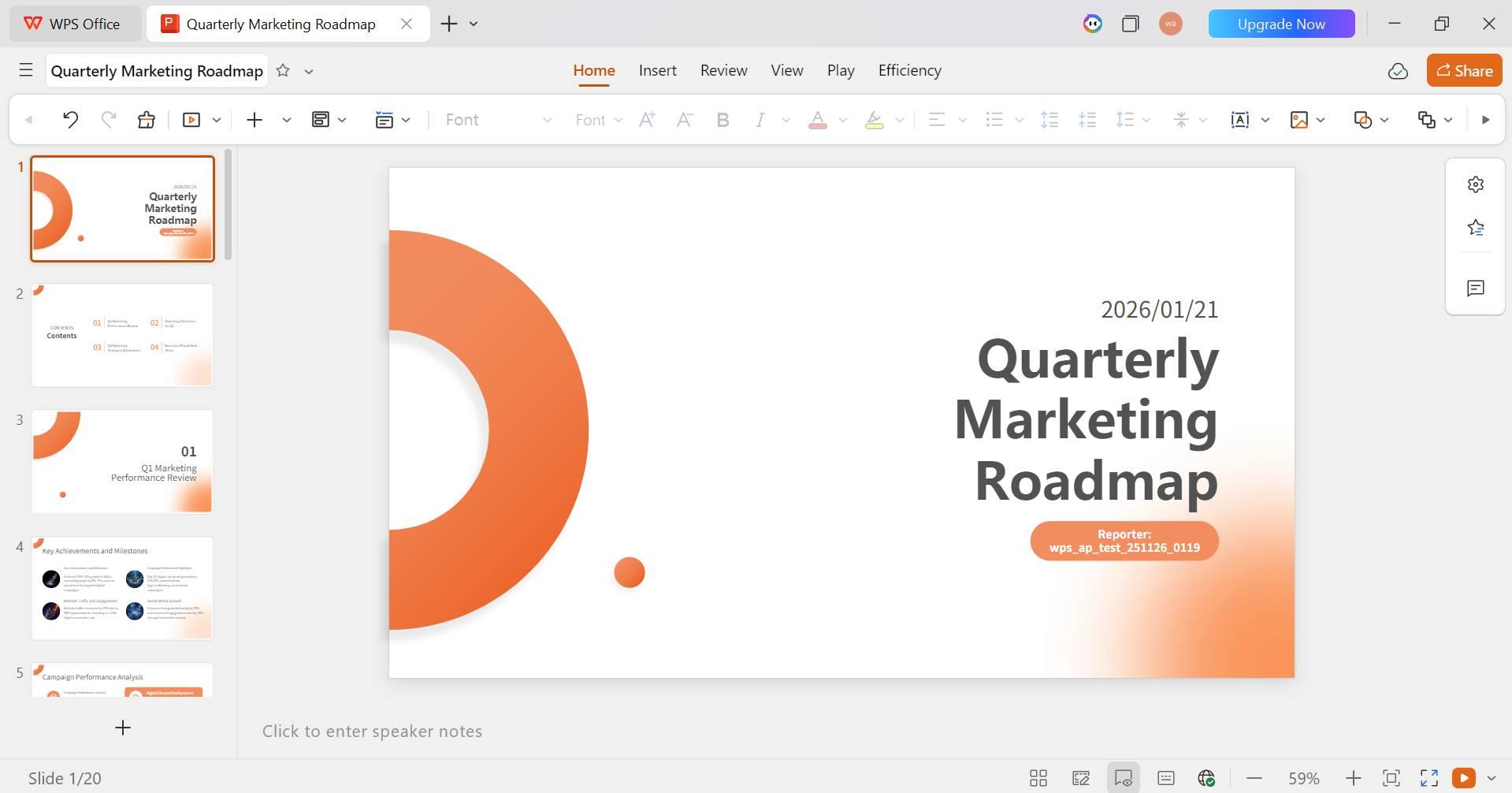
Step 8: Finally, your Slide deck will be generated
with the accurate content.
AI-generated PPT
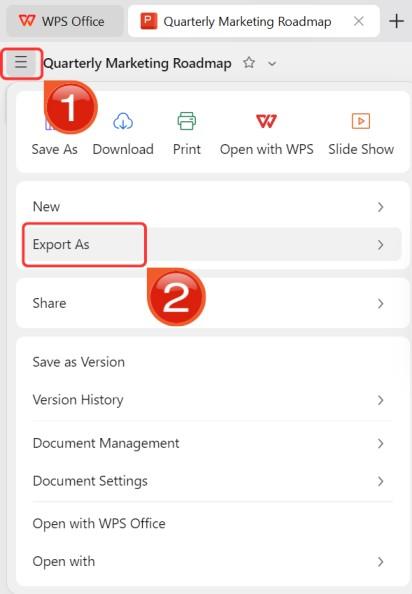
Step 9: Click on the File menu and then click “Export as” to download your PPT.
Export and Download
100% secure
FAQs
1. Is Plus AI free to use?
Plus AI typically offers a free trial period (e.g., 7 days) that
allows you to test its features. After the trial expires, you must
upgrade to a paid subscription plan to continue generating and editing
slides with AI.
2. Can
Plus AI work with existing Google Slides templates?
Yes. Plus AI supports custom themes and can generate slides using
your existing Google Slides templates, though some advanced template
features are part of their Team/Enterprise plans or currently in
beta.
3. Does Plus AI work
outside of Google Slides?
Plus AI is designed to integrate with Google Slides, Google Docs, and
PowerPoint. This allows you to generate content in a document and
convert it to slides, or use the tool directly within different
presentation platforms.
Why WPS AI Slides Goes Further
Plus AI for Google Slides is a convenient tool for users who want to inject AI automation directly into their existing Google Workspace workflow. It excels at quick drafting and formatting without requiring a platform switch. However, for professionals who need richer content generation, advanced design capabilities, and a distraction-free environment, WPS AI Slides stands out as a more complete and powerful alternative for creating standout presentations.
Khadija Khan is a tech writer who explores office suites and creates content to simplify everyday tools. She teaches and inspires through clear, engaging writing.


'%3e%3cpath%20d='M8%200C12.4183%200%2016%203.58172%2016%208C16%2012.4183%2012.4183%2016%208%2016C3.58172%2016%200%2012.4183%200%208C0%203.58172%203.58172%200%208%200ZM11.6162%204.38379C11.2257%203.99337%2010.5927%203.99338%2010.2021%204.38379L8%206.58594L5.79785%204.38379C5.40732%203.99334%204.77429%203.99329%204.38379%204.38379C3.99331%204.77429%203.99335%205.40733%204.38379%205.79785L6.58594%208L4.38379%2010.2021C3.99348%2010.5927%203.99341%2011.2257%204.38379%2011.6162C4.77426%2012.0066%205.40734%2012.0065%205.79785%2011.6162L8%209.41406L10.2021%2011.6162C10.5927%2012.0066%2011.2257%2012.0067%2011.6162%2011.6162C12.0067%2011.2257%2012.0066%2010.5927%2011.6162%2010.2021L9.41406%208L11.6162%205.79785C12.0066%205.40735%2012.0066%204.77429%2011.6162%204.38379Z'%20fill='%23080E17'%20fill-opacity='0.46'/%3e%3c/g%3e%3cdefs%3e%3cclipPath%20id='clip0_3761_713'%3e%3crect%20width='16'%20height='16'%20fill='white'/%3e%3c/clipPath%3e%3c/defs%3e%3c/svg%3e)



'%3e%3cpath%20fill-rule='evenodd'%20clip-rule='evenodd'%20d='M21.4999%2010.9993C21.4999%205.20009%2016.7986%200.498901%2010.9993%200.498901C5.19994%200.498901%200.498657%205.20009%200.498657%2010.9993C0.498657%2016.2404%204.33858%2020.5844%209.35855%2021.3722V14.0346H6.69238V10.9993H9.35855V8.68594C9.35855%206.05427%2010.9262%204.60062%2013.3248%204.60062C14.4736%204.60062%2015.6753%204.80571%2015.6753%204.80571V7.38979H14.3512C13.0468%207.38979%2012.64%208.19921%2012.64%209.0296V10.9993H15.5523L15.0867%2014.0346H12.64V21.3722C17.66%2020.5844%2021.4999%2016.2404%2021.4999%2010.9993Z'%20fill='%231568EA'/%3e%3c/g%3e%3c/svg%3e)


'%3e%3cpath%20d='M2.42045%2022.1876H6.31818V12.7217L0.75%208.54553V20.5171C0.75%2021.4414%201.49892%2022.1876%202.42045%2022.1876Z'%20fill='%234285F4'/%3e%3cpath%20d='M19.682%2022.1876H23.5797C24.5041%2022.1876%2025.2502%2021.4387%2025.2502%2020.5171V8.54553L19.682%2012.7217'%20fill='%2334A853'/%3e%3cpath%20d='M19.682%205.48293V12.7216L25.2502%208.54543V6.31816C25.2502%204.25236%2022.8921%203.07469%2021.2411%204.31361'%20fill='%23FBBC04'/%3e%3cpath%20d='M6.31824%2012.7217V5.48303L13.0001%2010.4944L19.6819%205.48303V12.7217L13.0001%2017.733'%20fill='%23EA4335'/%3e%3cpath%20d='M0.75%206.31816V8.54543L6.31818%2012.7216V5.48293L4.75909%204.31361C3.10534%203.07469%200.75%204.25236%200.75%206.31816Z'%20fill='%23C5221F'/%3e%3c/g%3e%3cdefs%3e%3cclipPath%20id='clip0_2954_7305'%3e%3crect%20width='24.5'%20height='18.375'%20fill='white'%20transform='translate(0.75%203.8125)'/%3e%3c/clipPath%3e%3c/defs%3e%3c/svg%3e)






'%3e%3cpath%20d='M19.9911%204.11386V6.471H18.5894C18.0775%206.471%2017.7322%206.57814%2017.5536%206.79243C17.3751%207.00671%2017.2858%207.32814%2017.2858%207.75671V9.44421H19.9019L19.5536%2012.0871H17.2858V18.8639H14.5536V12.0871H12.2769V9.44421H14.5536V7.49779C14.5536%206.39064%2014.8632%205.53201%2015.4822%204.92189C16.1013%204.31177%2016.9257%204.00671%2017.9554%204.00671C18.8304%204.00671%2019.509%204.04243%2019.9911%204.11386Z'%20fill='%23333333'/%3e%3c/g%3e%3cdefs%3e%3cclipPath%20id='clip0_2938_8199'%3e%3crect%20width='16'%20height='16'%20fill='white'%20transform='translate(8%204.00671)'/%3e%3c/clipPath%3e%3c/defs%3e%3c/svg%3e)
'%3e%3cpath%20d='M17.5237%2010.7813L23.4811%204H22.0699L16.8949%209.88693L12.7648%204H8L14.2469%2012.9029L8%2020.0133H9.4112L14.8725%2013.7952L19.2352%2020.0133H24M9.92053%205.04213H12.0885L22.0688%2019.0224H19.9003'%20fill='%23333333'/%3e%3c/g%3e%3cdefs%3e%3cclipPath%20id='clip0_2938_8200'%3e%3crect%20width='16'%20height='16.0134'%20fill='white'%20transform='translate(8%204)'/%3e%3c/clipPath%3e%3c/defs%3e%3c/svg%3e)


