

'%3e%3cpath%20d='M8%200C12.4183%200%2016%203.58172%2016%208C16%2012.4183%2012.4183%2016%208%2016C3.58172%2016%200%2012.4183%200%208C0%203.58172%203.58172%200%208%200ZM11.6162%204.38379C11.2257%203.99337%2010.5927%203.99338%2010.2021%204.38379L8%206.58594L5.79785%204.38379C5.40732%203.99334%204.77429%203.99329%204.38379%204.38379C3.99331%204.77429%203.99335%205.40733%204.38379%205.79785L6.58594%208L4.38379%2010.2021C3.99348%2010.5927%203.99341%2011.2257%204.38379%2011.6162C4.77426%2012.0066%205.40734%2012.0065%205.79785%2011.6162L8%209.41406L10.2021%2011.6162C10.5927%2012.0066%2011.2257%2012.0067%2011.6162%2011.6162C12.0067%2011.2257%2012.0066%2010.5927%2011.6162%2010.2021L9.41406%208L11.6162%205.79785C12.0066%205.40735%2012.0066%204.77429%2011.6162%204.38379Z'%20fill='%23080E17'%20fill-opacity='0.46'/%3e%3c/g%3e%3cdefs%3e%3cclipPath%20id='clip0_3761_713'%3e%3crect%20width='16'%20height='16'%20fill='white'/%3e%3c/clipPath%3e%3c/defs%3e%3c/svg%3e)




'%3e%3cpath%20fill-rule='evenodd'%20clip-rule='evenodd'%20d='M21.4999%2010.9993C21.4999%205.20009%2016.7986%200.498901%2010.9993%200.498901C5.19994%200.498901%200.498657%205.20009%200.498657%2010.9993C0.498657%2016.2404%204.33858%2020.5844%209.35855%2021.3722V14.0346H6.69238V10.9993H9.35855V8.68594C9.35855%206.05427%2010.9262%204.60062%2013.3248%204.60062C14.4736%204.60062%2015.6753%204.80571%2015.6753%204.80571V7.38979H14.3512C13.0468%207.38979%2012.64%208.19921%2012.64%209.0296V10.9993H15.5523L15.0867%2014.0346H12.64V21.3722C17.66%2020.5844%2021.4999%2016.2404%2021.4999%2010.9993Z'%20fill='%231568EA'/%3e%3c/g%3e%3c/svg%3e)


'%3e%3cpath%20d='M2.42045%2022.1876H6.31818V12.7217L0.75%208.54553V20.5171C0.75%2021.4414%201.49892%2022.1876%202.42045%2022.1876Z'%20fill='%234285F4'/%3e%3cpath%20d='M19.682%2022.1876H23.5797C24.5041%2022.1876%2025.2502%2021.4387%2025.2502%2020.5171V8.54553L19.682%2012.7217'%20fill='%2334A853'/%3e%3cpath%20d='M19.682%205.48293V12.7216L25.2502%208.54543V6.31816C25.2502%204.25236%2022.8921%203.07469%2021.2411%204.31361'%20fill='%23FBBC04'/%3e%3cpath%20d='M6.31824%2012.7217V5.48303L13.0001%2010.4944L19.6819%205.48303V12.7217L13.0001%2017.733'%20fill='%23EA4335'/%3e%3cpath%20d='M0.75%206.31816V8.54543L6.31818%2012.7216V5.48293L4.75909%204.31361C3.10534%203.07469%200.75%204.25236%200.75%206.31816Z'%20fill='%23C5221F'/%3e%3c/g%3e%3cdefs%3e%3cclipPath%20id='clip0_2954_7305'%3e%3crect%20width='24.5'%20height='18.375'%20fill='white'%20transform='translate(0.75%203.8125)'/%3e%3c/clipPath%3e%3c/defs%3e%3c/svg%3e)


Picture this: you spend hours on an article, and an editor flags a few sentences as copied. The work is strong, but those matching phrases put the whole piece at risk. You are not alone. Research by the International Center for Academic Integrity found that 95 percent of students admit to some form of academic dishonesty, and much of it is accidental. Most people do not set out to copy. They rush their research, take weak notes, and lose track of where their words came from. The fix is not talent. It is a workflow. This guide walks you through a complete draft-to-publish process for writing plagiarism-free content, with practical steps you can apply to an essay, a blog post, or a business report tomorrow.

The Plagiarism-Free Writing Workflow at a Glance
Originality is built in stages, not checked once at the end. Each step gives you a chance to keep your work clean before a similarity score can expose a problem. Keep this order in mind as you write.
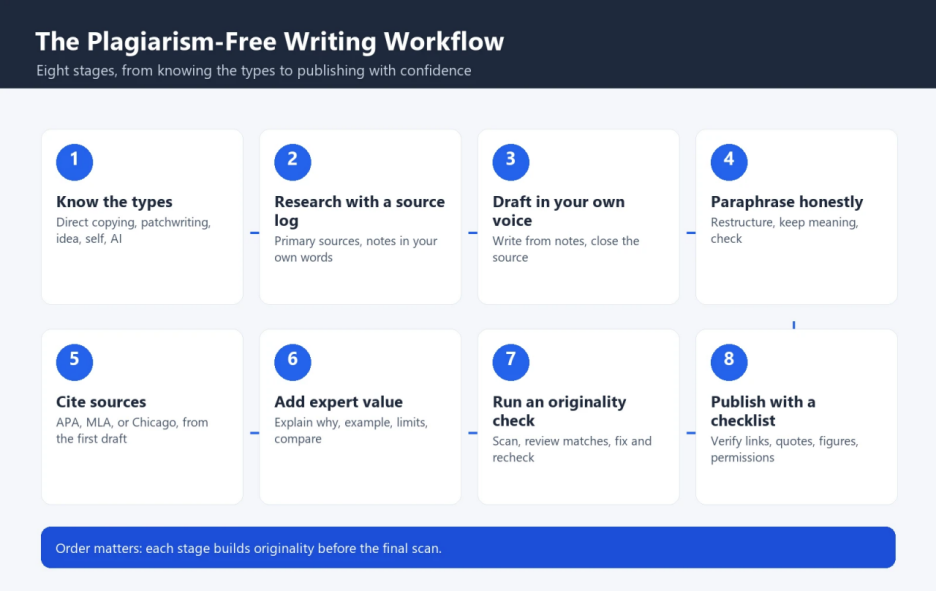
Know the types of plagiarism before you write
Research with a source log, not copy-paste
Draft in your own voice
Paraphrase honestly, not with find-and-replace
Cite sources and build credibility
Add your own expert value
Run an originality check and fix what it finds
Publish with a final pre-publish checklist


1. Know the Five Types of Plagiarism Before You Write
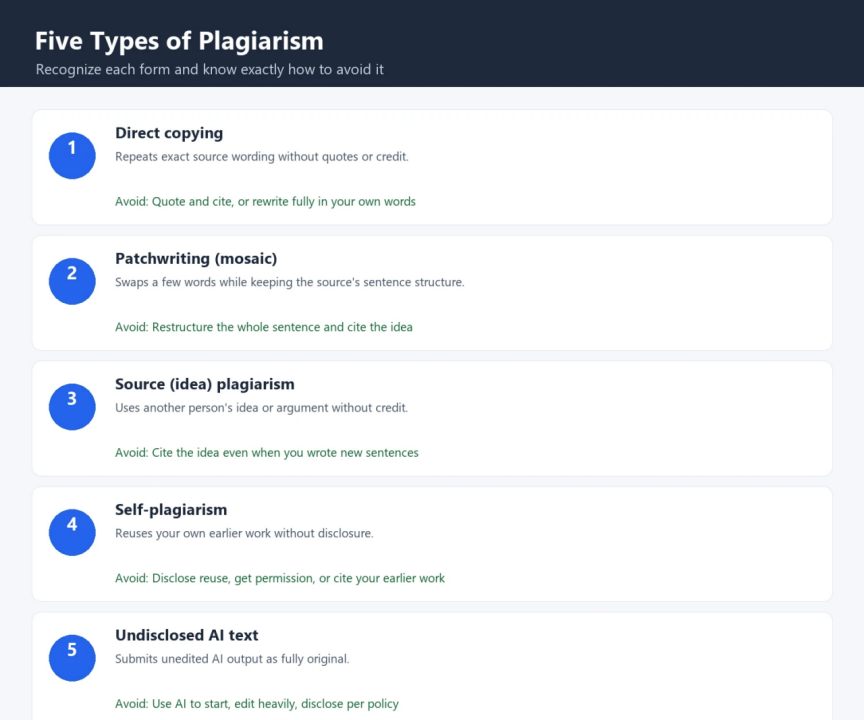
Plagiarism means presenting someone else's work, words, ideas, structure, or creative output as your own. It can be deliberate, but it is far more often accidental: rushed research, weak notes, or a misunderstanding of what needs to be credited. Understanding the forms of plagiarism tells you exactly where to be careful.
| Type of plagiarism | What it looks like | How to avoid it |
|---|---|---|
| Direct copying | Repeats the source's exact wording without quotation marks or credit | Quote precisely and cite, or rewrite fully in your own words |
| Patchwriting (mosaic) | Swaps a few words while keeping the source's sentence structure | Restructure the whole sentence and cite the idea |
| Source (idea) plagiarism | Uses another person's idea or argument without credit | Cite the idea even when you wrote new sentences |
| Self-plagiarism | Reuses your own earlier work without disclosure | Disclose reuse, get permission, or cite your earlier work |
| Undisclosed AI text | Submits unedited AI output as fully original | Use AI as a starting point, edit heavily, disclose per policy |
2. Research With a Source Log, Not Copy-Paste
Research works best when you collect evidence, not sentences. Start with primary sources: official records, original studies, and direct statements from experts. As you read, keep a source log. Record the title, author, publication date, and link for every source, add a short note in your own words, and mark any verbatim passage you plan to quote so it never blends into your ordinary notes.
Before you draft, compare important claims across at least two reliable sources. Check dates, numbers, definitions, and names against the original material. This habit catches outdated information and gives your major claims a real evidential base, which is exactly what editors and readers look for.
3. Draft in Your Own Voice
The biggest cause of accidental plagiarism is drafting while staring at a source. Close it and write from your notes and memory. Use your own vocabulary and sentence rhythm, and write for a reader you understand rather than trying to sound like the author you just read. You do not need exotic wording to be original; clear, plain language can still sound distinct.
Read each paragraph and ask whether the sentence order and phrasing are yours. Draft in a tool that gets out of your way so you can focus on your ideas instead of the mechanics, such as a free Word-compatible editor like WPS Writer that handles formatting, headings, and exports cleanly.
4. Paraphrase Honestly, Not With a Find-and-Replace
Paraphrasing restates a source's idea while keeping its meaning accurate. It is not synonym-swapping, and it is not a disguised copy. A strong paraphrase sounds like your own explanation. Use four moves:
Read, then close the source. Understand the passage before you write it from memory.
Change the structure. Rebuild the idea in a different sentence pattern.
Keep the meaning. Preserve the source's claim without adding unsupported detail.
Check against the original. Compare your version for copied phrasing and accuracy.
If the original still controls the order, rhythm, or key wording of your version, rewrite it again. When you genuinely need the exact wording, quote it and cite it instead. AI tools can help you start: an AI writer can rephrase or summarize a dense passage so you can see a fresh angle, but the version you publish must still be edited in your own voice and checked for accuracy.
5. Cite Sources and Build Credibility
Citations tell readers where your ideas, facts, statistics, and quotations come from. Plagiarism is not using others' work; it is using others' work and claiming it as your own. When you cite a source, you remove that claim and strengthen your credibility at the same time.
Follow one consistent style, such as APA, MLA, or Chicago, and apply it from the first draft so you do not hunt for details later. Cite facts, statistics, direct quotations, and any idea that is not your own. Visible citations are a clear sign of the research you actually did, and they are a core part of how editors and readers judge trustworthiness.
6. Add Your Own Expert Value
Expert value is what turns sourced information into useful content. It comes from adding judgment, not from repeating findings. Use these techniques to make every section worth the reader's time.
1. Explain why
Do more than repeat a finding. Explain why it helps with the reader's specific task. If research shows that a common habit causes errors, describe the mechanism and the exact point where a writer can change the process.
2. Add a concrete example
A short, realistic scenario clarifies an abstract point faster than several general statements. Choose an example that fits your audience and avoid details you cannot verify.
3. State the limits
Strong expertise includes clear boundaries. If a method works only under certain conditions, say so. Readers gain more from an honest limit than from advice that claims to work everywhere.
4. Compare sources
When reliable sources disagree, explain the difference instead of hiding it. Check their dates, methods, and definitions, and show why two credible sources reached different conclusions.
5. Describe the process
Mention the practical steps experienced writers actually follow: where to record sources, when to verify claims, and how to handle uncertain information. Specific process detail is easier to apply than vague advice.
7. Run an Originality Check and Fix What It Finds
Even careful writers can carry over a phrase without noticing. Confirm originality before you publish by running the final draft through a trusted plagiarism checker such as Duplichecker, which scans your text against indexed web and academic sources and highlights matching passages.
Review each highlighted match. Some will be legitimate, such as quotations, citations, titles, and reference entries. Others will reveal copied wording. For each flagged passage, you have four options:
Cite the source. Add credit for words or phrases that are not yours.
Rewrite the passage. Paraphrase it properly in your own voice, then cite it.
Remove the section. If it is not essential to your argument, cut it.
Add your own observation. After a direct quote, explain why it matters and what you think.
Then re-check the document. If it is clean, you are ready. If not, revise and scan again. With AI-generated text, many publishers and institutions now expect disclosure and may use AI detectors alongside plagiarism checkers, so be transparent about any AI assistance. To see how to keep AI-assisted output original and on-brand, our guide to using AI writing tools for original content covers the practical details.
8. Publish With Confidence: A Final Pre-Publish Checklist
Before you hit publish, run a final editorial pass. Confirm the headline matches the article, every section earns its place, and every claim has support. Remove anything that feels copied or unclear.
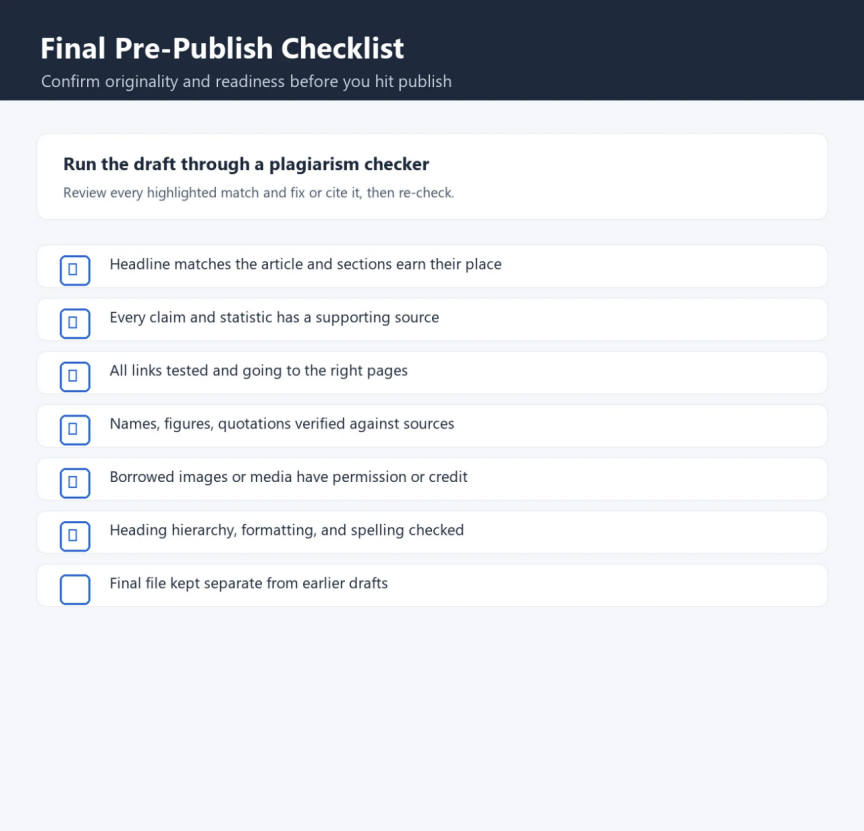
Test every link and confirm it goes to the right page
Verify names, figures, statistics, and quotations against sources
Confirm borrowed images or media have permission or credit
Check heading hierarchy, formatting, and spelling
Keep the final file separate from earlier drafts
Confidence comes from a sound process, not a perfect similarity score. It means knowing where your information came from, why each source supports your claim, and how the final wording became your own. That record also makes future revisions much easier.
Frequently Asked Questions
Is paraphrasing considered plagiarism?
Only when it is done poorly. True paraphrasing restates the idea in a new structure, keeps the meaning accurate, and credits the source. Swapping a few words while keeping the original sentence structure is patchwriting, which is a form of plagiarism.
Do I need to cite a source if I summarize in my own words?
Yes. Summarizing still uses someone else's idea, so it needs a citation. Your wording is new, but the underlying claim is not yours to claim.
How can I tell if I plagiarized accidentally?
Run the draft through a plagiarism checker and review every highlighted match. If a phrase matches a source and is not quoted and cited, treat it as plagiarism and either rewrite it or add a citation.
Is AI-generated content considered plagiarism?
It depends on your institution's or publisher's policy. Passing off unedited AI output as fully your own can raise originality and disclosure concerns. Use AI to draft and edit, then make the final version your own and follow the applicable policy.
What similarity percentage is safe?
There is no universal safe number. A low score can still contain one problematic copied paragraph, and a high score can be mostly legitimate citations. Judge the flagged matches themselves, not just the overall percentage.
Final Thoughts
Plagiarism prevention works best as a workflow, not a last-minute scan. Start with careful research and a source log, draft in your own voice, paraphrase honestly, and cite what you borrow. Add your own judgment so the content is genuinely yours, then check for originality and fix what the check reveals. A clear, repeatable process lets you publish original work with stronger evidence, real credibility, and full confidence.



'%3e%3cpath%20d='M19.9911%204.11386V6.471H18.5894C18.0775%206.471%2017.7322%206.57814%2017.5536%206.79243C17.3751%207.00671%2017.2858%207.32814%2017.2858%207.75671V9.44421H19.9019L19.5536%2012.0871H17.2858V18.8639H14.5536V12.0871H12.2769V9.44421H14.5536V7.49779C14.5536%206.39064%2014.8632%205.53201%2015.4822%204.92189C16.1013%204.31177%2016.9257%204.00671%2017.9554%204.00671C18.8304%204.00671%2019.509%204.04243%2019.9911%204.11386Z'%20fill='%23333333'/%3e%3c/g%3e%3cdefs%3e%3cclipPath%20id='clip0_2938_8199'%3e%3crect%20width='16'%20height='16'%20fill='white'%20transform='translate(8%204.00671)'/%3e%3c/clipPath%3e%3c/defs%3e%3c/svg%3e)
'%3e%3cpath%20d='M17.5237%2010.7813L23.4811%204H22.0699L16.8949%209.88693L12.7648%204H8L14.2469%2012.9029L8%2020.0133H9.4112L14.8725%2013.7952L19.2352%2020.0133H24M9.92053%205.04213H12.0885L22.0688%2019.0224H19.9003'%20fill='%23333333'/%3e%3c/g%3e%3cdefs%3e%3cclipPath%20id='clip0_2938_8200'%3e%3crect%20width='16'%20height='16.0134'%20fill='white'%20transform='translate(8%204)'/%3e%3c/clipPath%3e%3c/defs%3e%3c/svg%3e)


