

'%3e%3cpath%20d='M8%200C12.4183%200%2016%203.58172%2016%208C16%2012.4183%2012.4183%2016%208%2016C3.58172%2016%200%2012.4183%200%208C0%203.58172%203.58172%200%208%200ZM11.6162%204.38379C11.2257%203.99337%2010.5927%203.99338%2010.2021%204.38379L8%206.58594L5.79785%204.38379C5.40732%203.99334%204.77429%203.99329%204.38379%204.38379C3.99331%204.77429%203.99335%205.40733%204.38379%205.79785L6.58594%208L4.38379%2010.2021C3.99348%2010.5927%203.99341%2011.2257%204.38379%2011.6162C4.77426%2012.0066%205.40734%2012.0065%205.79785%2011.6162L8%209.41406L10.2021%2011.6162C10.5927%2012.0066%2011.2257%2012.0067%2011.6162%2011.6162C12.0067%2011.2257%2012.0066%2010.5927%2011.6162%2010.2021L9.41406%208L11.6162%205.79785C12.0066%205.40735%2012.0066%204.77429%2011.6162%204.38379Z'%20fill='%23080E17'%20fill-opacity='0.46'/%3e%3c/g%3e%3cdefs%3e%3cclipPath%20id='clip0_3761_713'%3e%3crect%20width='16'%20height='16'%20fill='white'/%3e%3c/clipPath%3e%3c/defs%3e%3c/svg%3e)




'%3e%3cpath%20fill-rule='evenodd'%20clip-rule='evenodd'%20d='M21.4999%2010.9993C21.4999%205.20009%2016.7986%200.498901%2010.9993%200.498901C5.19994%200.498901%200.498657%205.20009%200.498657%2010.9993C0.498657%2016.2404%204.33858%2020.5844%209.35855%2021.3722V14.0346H6.69238V10.9993H9.35855V8.68594C9.35855%206.05427%2010.9262%204.60062%2013.3248%204.60062C14.4736%204.60062%2015.6753%204.80571%2015.6753%204.80571V7.38979H14.3512C13.0468%207.38979%2012.64%208.19921%2012.64%209.0296V10.9993H15.5523L15.0867%2014.0346H12.64V21.3722C17.66%2020.5844%2021.4999%2016.2404%2021.4999%2010.9993Z'%20fill='%231568EA'/%3e%3c/g%3e%3c/svg%3e)


'%3e%3cpath%20d='M2.42045%2022.1876H6.31818V12.7217L0.75%208.54553V20.5171C0.75%2021.4414%201.49892%2022.1876%202.42045%2022.1876Z'%20fill='%234285F4'/%3e%3cpath%20d='M19.682%2022.1876H23.5797C24.5041%2022.1876%2025.2502%2021.4387%2025.2502%2020.5171V8.54553L19.682%2012.7217'%20fill='%2334A853'/%3e%3cpath%20d='M19.682%205.48293V12.7216L25.2502%208.54543V6.31816C25.2502%204.25236%2022.8921%203.07469%2021.2411%204.31361'%20fill='%23FBBC04'/%3e%3cpath%20d='M6.31824%2012.7217V5.48303L13.0001%2010.4944L19.6819%205.48303V12.7217L13.0001%2017.733'%20fill='%23EA4335'/%3e%3cpath%20d='M0.75%206.31816V8.54543L6.31818%2012.7216V5.48293L4.75909%204.31361C3.10534%203.07469%200.75%204.25236%200.75%206.31816Z'%20fill='%23C5221F'/%3e%3c/g%3e%3cdefs%3e%3cclipPath%20id='clip0_2954_7305'%3e%3crect%20width='24.5'%20height='18.375'%20fill='white'%20transform='translate(0.75%203.8125)'/%3e%3c/clipPath%3e%3c/defs%3e%3c/svg%3e)


Content creators, marketers, educators, and business professionals often search for Gamma AI seeking efficient AI tools to generate professional slides quickly without design skills. Traditional software demands hours of manual formatting and content organization, creating steep challenges for non-designers. This guide analyzes Gamma AI capabilities and positions WPS AI Slides as a superior alternative with full office suite integration for seamless workflows.
Introduction to Gamma AI

Gamma AI is a cloud-based presentation generator that transforms text prompts into complete slide decks within minutes. It uses artificial intelligence to automatically handle layout, content organization, and visual design, eliminating manual formatting hassles. The platform targets users frustrated with traditional software's steep learning curves and time-consuming design work, offering a streamlined solution focused on speed and modern aesthetics.
Features
Gamma AI packs powerful presentation tools into an intuitive interface. Key features include:
AI-powered slide generation from text prompts that builds complete decks instantly from basic instructions
Automatic layout and design suggestions tailored to content type for optimal visual presentation
Built-in template library covering business pitches, marketing decks, educational slides, and reports
Real-time collaboration tools for simultaneous team editing and instant change visibility
Cloud-based platform accessible from any internet-connected device without installations
Professional-looking results through AI-optimized fonts, colors, and spacing
Team collaboration features with centralized feedback, version history, and approval workflows
Pros and Cons
Gamma AI shines in several areas but carries limitations professionals should consider:
Pros:
Lightning-fast slide creation from simple prompts saves hours of manual work
Modern, visually impressive designs that rival professional agencies
Intuitive interface requires minimal learning curve for new users
Strong real-time collaboration beats traditional file-sharing hassles
Flexible export options including PPTX, PDF, and live web presentations
Cons:
PowerPoint exports often suffer formatting shifts and static elements
Limited design customization beyond template boundaries
Cloud-only access prevents offline work during travel or connectivity issues
Free tier restrictions push most users toward paid plans quickly
Less suited for complex data visualizations or intricate animations
Gamma AI delivers impressive speed and visual quality for prompt-based presentation needs, making it valuable for quick-turnaround projects where web sharing suffices. However, professionals requiring PowerPoint compatibility, offline access, and extensive customization may find its limitations significant. The following sections examine templates, use cases, and alternatives like WPS AI Slides, which address these gaps while maintaining AI-powered efficiency.
Gamma AI Templates and Use Cases

Gamma AI offers extensive templates across popular categories like business pitch decks, marketing presentations, educational materials, project reports, and portfolio showcases, each optimized for specific professional scenarios. Users start by inputting a topic or outline, then select a style where AI generates content-aware layouts with charts, lists, or images automatically adjusted for visual impact. The step-by-step process allows review and customization before direct export or live presentation, streamlining creation for busy teams but sometimes lacking flexibility for strict brand guidelines.
Step-by-Step Creation Process:
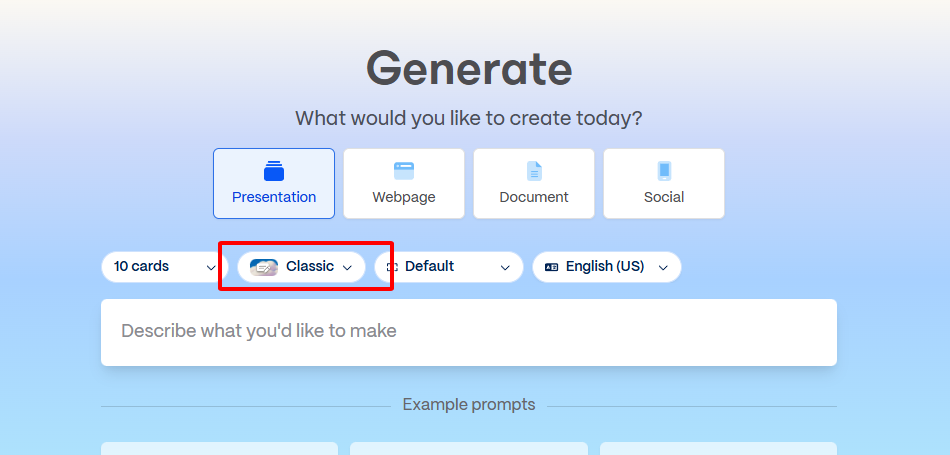
Step 1: Log into gamma.app and enter presentation topic like "2026 market trends analysis."

Step 2: Select style from minimalist or vibrant options as AI builds initial layout.3
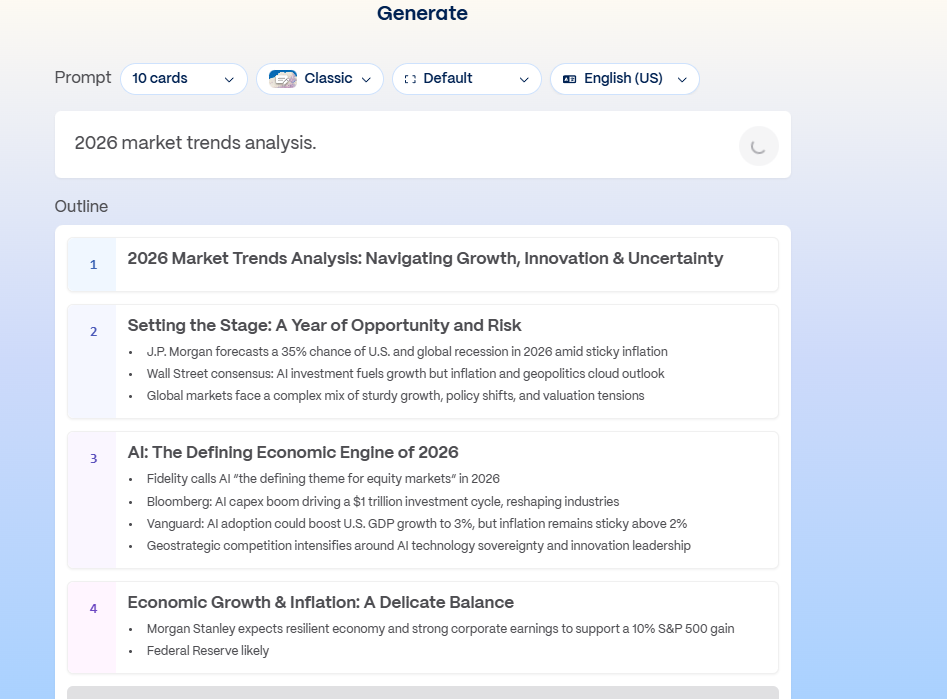
Step 3: Review generated outline, edit text inline, and add brand elements directly.
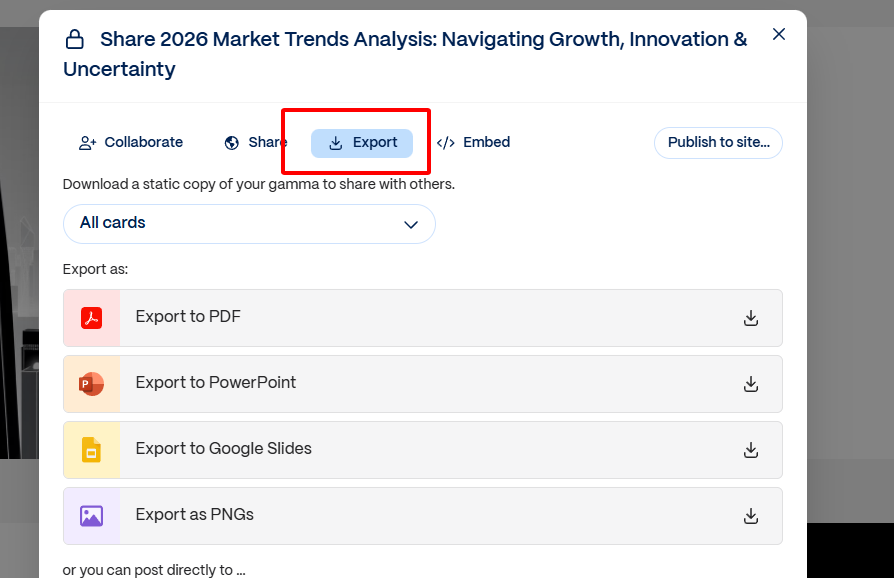
Step 4: Export to PPTX, PDF, or share live link for immediate use.
Gamma AI Alternatives Comparison

Gamma AI stands out for pure AI content generation from prompts, yet WPS AI Slides provides stronger design customization and office integration for comprehensive needs. The table below highlights key differences where WPS excels in offline access, template flexibility, and value.
| Feature | Gamma AI | WPS AI Slides |
| AI Content Generation | Excellent | Very Good |
| Design Customization | Limited | Excellent (custom template upload) |
| Office Integration | None | Complete Suite |
| Offline Access | No | Yes |
| Pricing | Pro: ~$10/mo | ~$5/mo (full suite) |
| Template Variety | Extensive | Custom upload + design your own |
| Collaboration | Real-time | Real-time + Comments |
WPS AI Slides offers unmatched convenience through PowerPoint-perfect exports and full editing tools, avoiding Gamma's common formatting glitches during team handoffs.
Detailed Price Comparison:
| Feature | Gamma AI | WPS AI Slides |
| Free Tier | Yes, limited (public content, basic exports) | Core editing free; AI requires paid plan |
| Personal/Pro | ~$10/user/mo annual | ~¥89/mo (~$12), includes full office + AI |
| Team Plan | ~$20/user/mo (min 2) | ~¥356/yr (~$50) for 1-6 users |
| Enterprise | Custom | Custom, private deployment options |
Gamma focuses on standalone AI creation at higher per-feature cost, while WPS delivers enterprise tools plus AI at better value for professionals handling multiple document types.
Why Choose WPS AI Slides
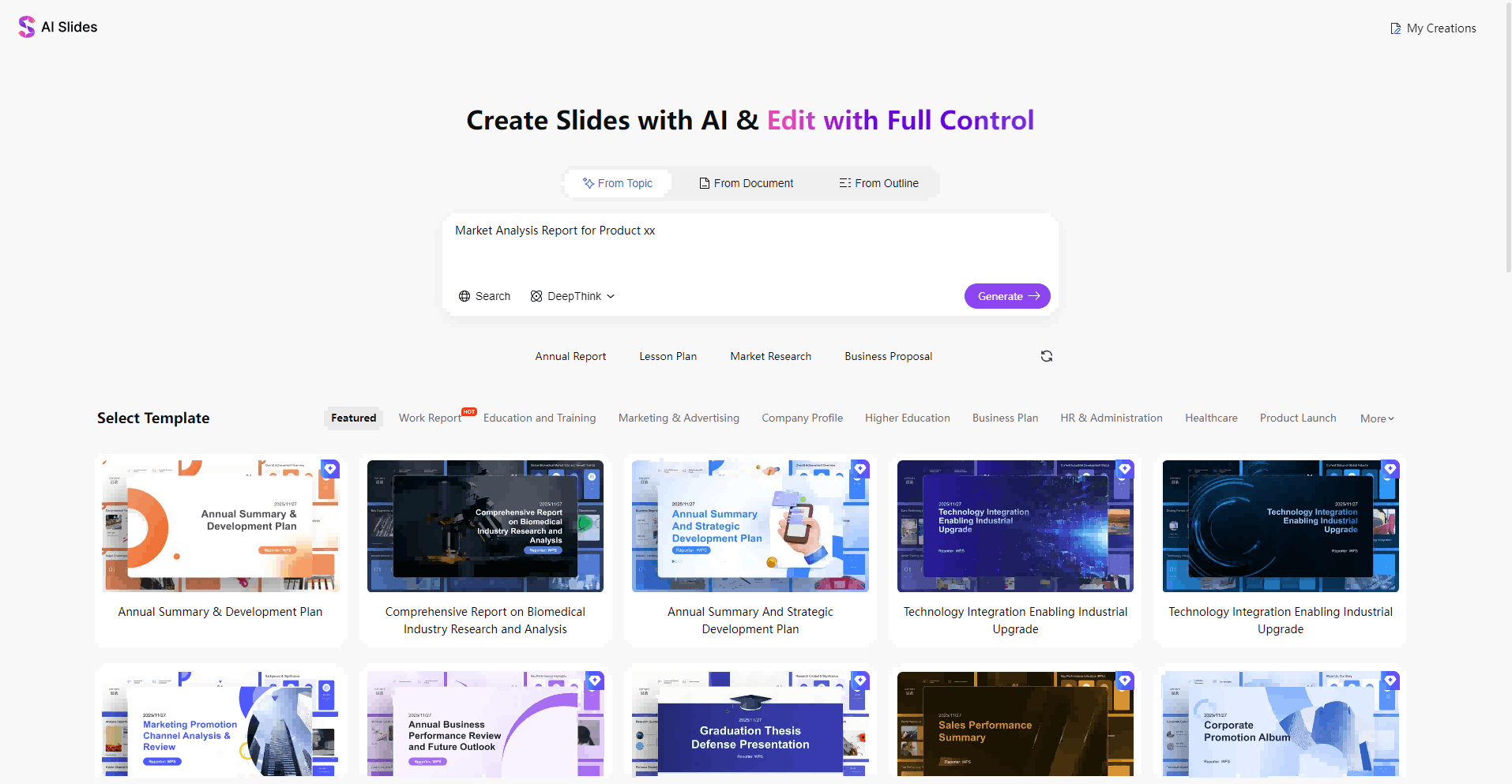
Gamma AI does quick slides from prompts pretty well, but WPS AI Slides gives professionals much better office integration and customization options for real work.
Overview
WPS AI Slides lives right inside WPS Office and uses AI to turn prompts or documents into nice presentations. You get offline access, custom templates, and it plays perfectly with Word docs and spreadsheets. Best part? One subscription covers the whole office suite instead of paying for separate apps.
Key Advantages
Here's why WPS AI Slides beats standalone tools like Gamma:
Seamless Office Integration: Jump between WPS Writer docs, spreadsheets, and slides without any hassle
Advanced Editing Tools: Full PowerPoint-level control with layers, animations, and exact positioning
Offline Functionality: Build presentations anywhere, no WiFi needed - perfect for flights or spotty signals
Cost-Effective: Just $4.99/month gets you AI features PLUS the complete office suite
Familiar Interface: Same ribbon layout as Microsoft Office, so you hit the ground running
How to Use WPS AI Slides
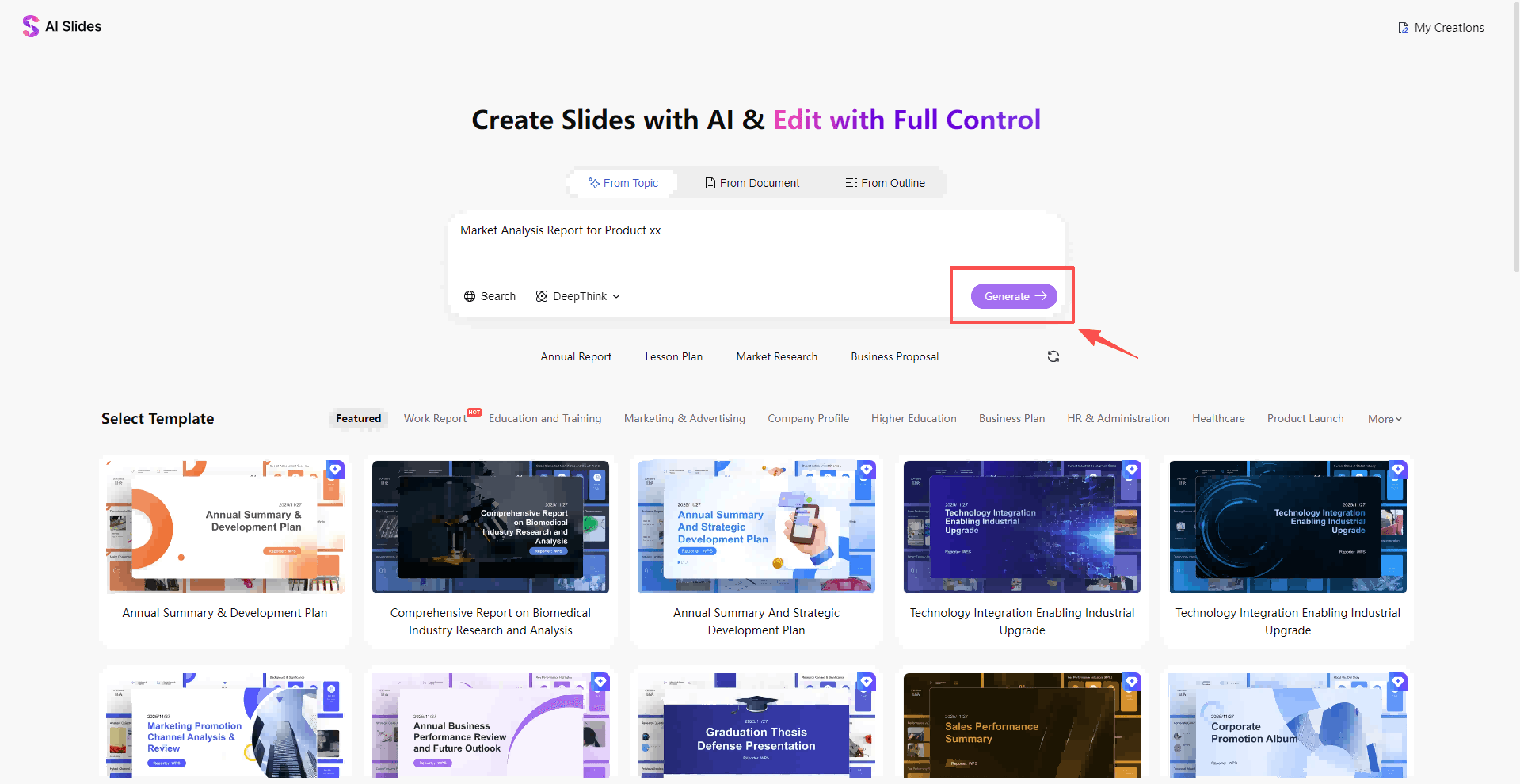
Step 1: Fire up WPS Presentation and hit the AI Slides button.
Step 2: Type your idea or drag in a Word/PDF file for AI to analyze.
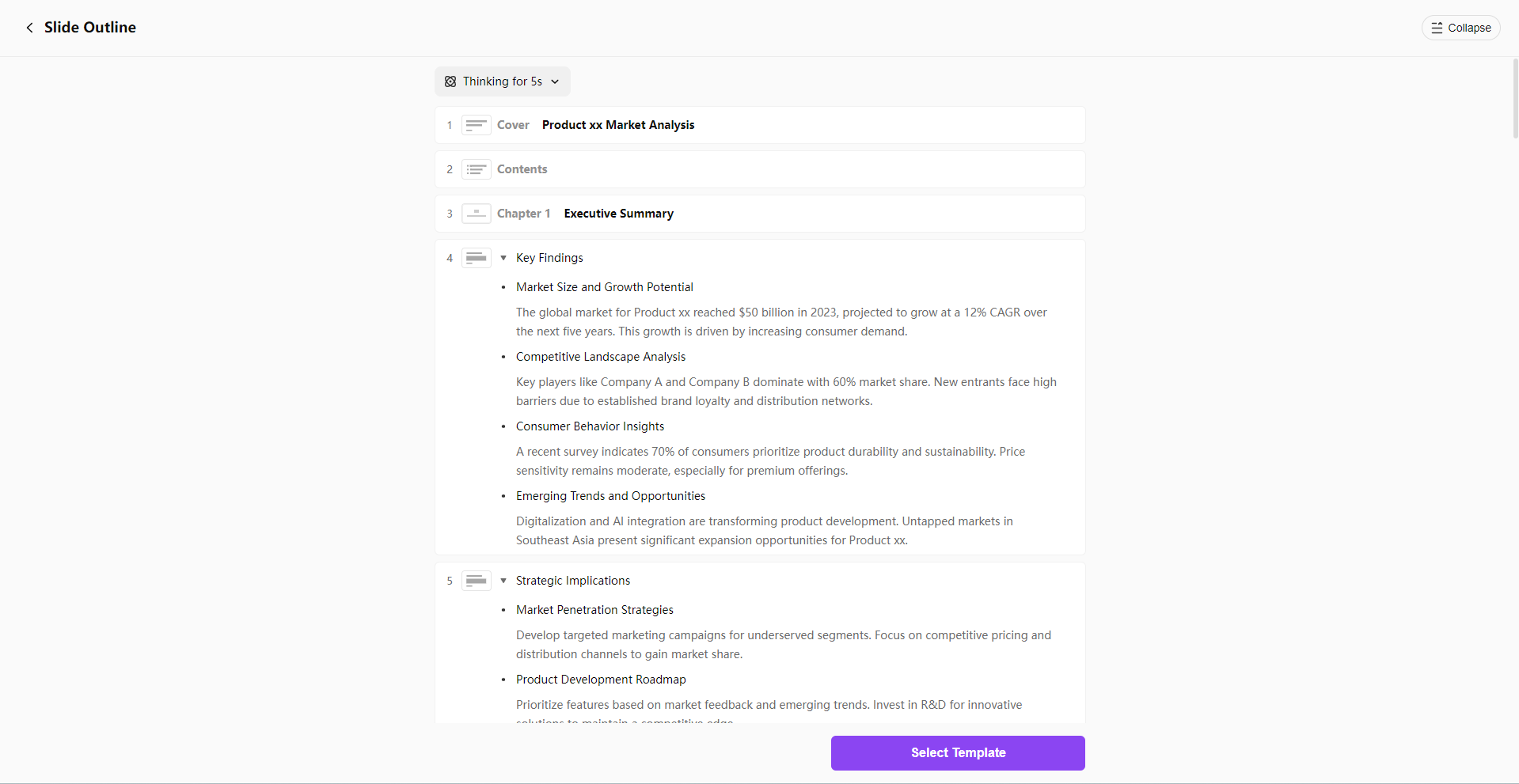
Step 3: Review what AI made, tweak the text, pick your template.
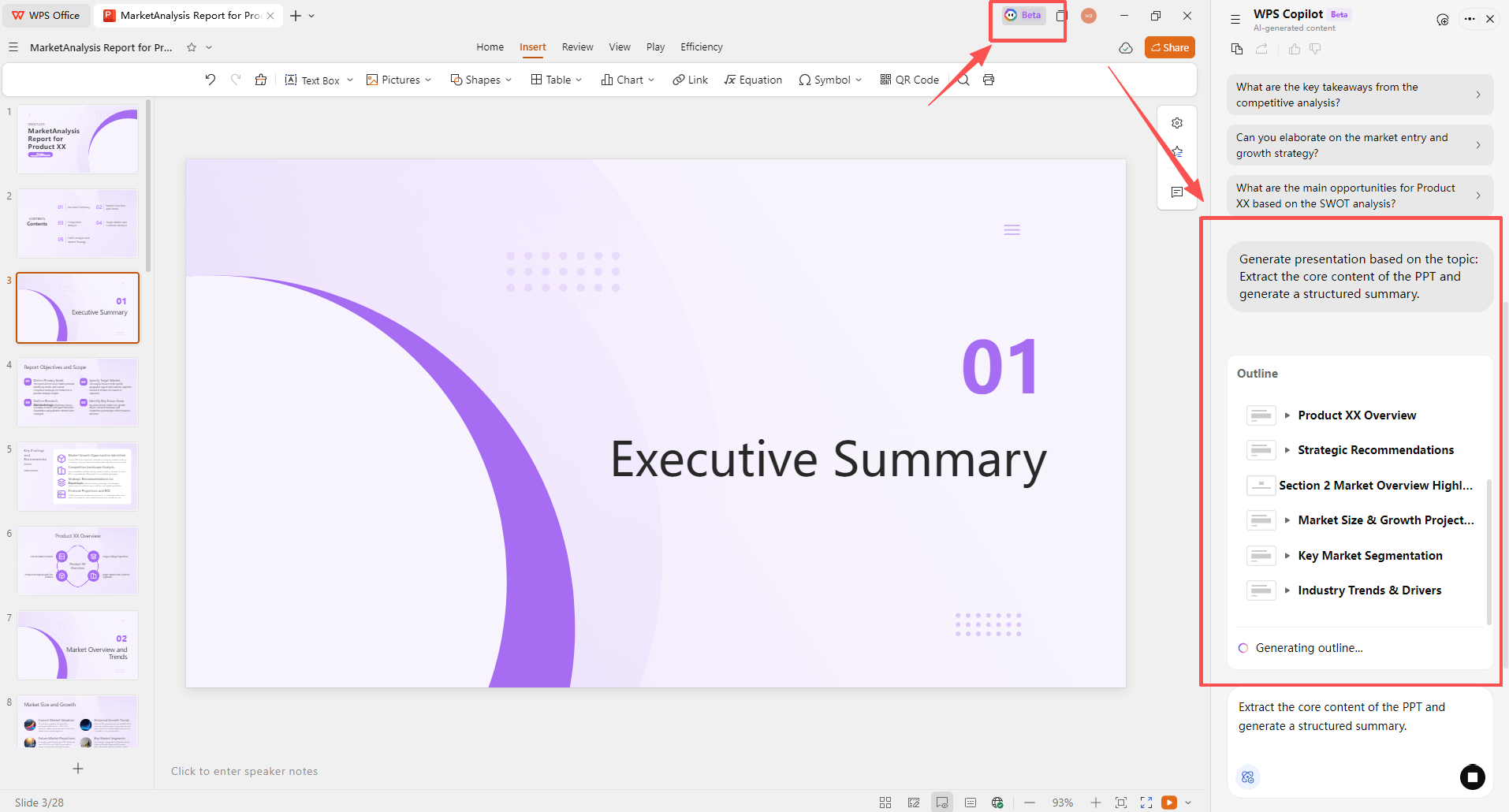
Step 4: Polish with editing tools, export clean PowerPoint files.
Why WPS Wins
Unlike Gamma, WPS exports to PowerPoint without messing up layouts. Upload your company template for perfect branding every time. Work offline when needed. And that price? You get AI slides PLUS Word, Excel, PDF tools - way better deal than presentations-only apps.
FAQs
1. Can I use Gamma AI for free?
Gamma AI provides a limited free tier with basic exports and public content visibility, suitable for testing simple decks. Full unlimited generations and private sharing require Pro subscription starting at $10 monthly. WPS AI Slides offers broader free core editing within its office suite, making initial trials more practical for everyday use.
2. Is WPS AI Slides suitable for business use?
WPS AI Slides delivers enterprise-grade templates, real-time collaboration, and advanced customization ideal for corporate presentations. Teams enforce brand standards via custom uploads while enjoying PDF tools and cloud storage in one package. This comprehensive approach supports professional workflows better than standalone generators.
3. Can I collaborate with team members in WPS AI Slides?
WPS AI Slides enables real-time editing, comments, and version history for smooth team projects without compatibility issues. Users share links or QR codes for instant access, integrating with WPS cloud for ongoing reviews. This exceeds basic real-time tools by adding structured feedback options.
4. How does Gamma AI export to PowerPoint?
Gamma AI exports to PPTX format, but users often face layout shifts, font mismatches, or static elements that limit further edits. WPS AI Slides ensures 100% fidelity with native PowerPoint compatibility, preserving animations and layers perfectly. Professionals avoid rework, saving hours on client deliverables.
Summary
Gamma AI provides fast AI-powered slide creation for web-focused users, with strong templates and prompt generation but limitations in customization and exports. WPS AI Slides emerges as the superior choice for professionals, offering full office integration, offline access, custom templates, and unmatched value. Download WPS Office to experience gamma ai presentations that scale from solo pitches to team collaborations without compromises.

'%3e%3cpath%20d='M19.9911%204.11386V6.471H18.5894C18.0775%206.471%2017.7322%206.57814%2017.5536%206.79243C17.3751%207.00671%2017.2858%207.32814%2017.2858%207.75671V9.44421H19.9019L19.5536%2012.0871H17.2858V18.8639H14.5536V12.0871H12.2769V9.44421H14.5536V7.49779C14.5536%206.39064%2014.8632%205.53201%2015.4822%204.92189C16.1013%204.31177%2016.9257%204.00671%2017.9554%204.00671C18.8304%204.00671%2019.509%204.04243%2019.9911%204.11386Z'%20fill='%23333333'/%3e%3c/g%3e%3cdefs%3e%3cclipPath%20id='clip0_2938_8199'%3e%3crect%20width='16'%20height='16'%20fill='white'%20transform='translate(8%204.00671)'/%3e%3c/clipPath%3e%3c/defs%3e%3c/svg%3e)
'%3e%3cpath%20d='M17.5237%2010.7813L23.4811%204H22.0699L16.8949%209.88693L12.7648%204H8L14.2469%2012.9029L8%2020.0133H9.4112L14.8725%2013.7952L19.2352%2020.0133H24M9.92053%205.04213H12.0885L22.0688%2019.0224H19.9003'%20fill='%23333333'/%3e%3c/g%3e%3cdefs%3e%3cclipPath%20id='clip0_2938_8200'%3e%3crect%20width='16'%20height='16.0134'%20fill='white'%20transform='translate(8%204)'/%3e%3c/clipPath%3e%3c/defs%3e%3c/svg%3e)


