


'%3e%3cpath%20fill-rule='evenodd'%20clip-rule='evenodd'%20d='M21.4999%2010.9993C21.4999%205.20009%2016.7986%200.498901%2010.9993%200.498901C5.19994%200.498901%200.498657%205.20009%200.498657%2010.9993C0.498657%2016.2404%204.33858%2020.5844%209.35855%2021.3722V14.0346H6.69238V10.9993H9.35855V8.68594C9.35855%206.05427%2010.9262%204.60062%2013.3248%204.60062C14.4736%204.60062%2015.6753%204.80571%2015.6753%204.80571V7.38979H14.3512C13.0468%207.38979%2012.64%208.19921%2012.64%209.0296V10.9993H15.5523L15.0867%2014.0346H12.64V21.3722C17.66%2020.5844%2021.4999%2016.2404%2021.4999%2010.9993Z'%20fill='%231568EA'/%3e%3c/g%3e%3c/svg%3e)


'%3e%3cpath%20d='M2.42045%2022.1876H6.31818V12.7217L0.75%208.54553V20.5171C0.75%2021.4414%201.49892%2022.1876%202.42045%2022.1876Z'%20fill='%234285F4'/%3e%3cpath%20d='M19.682%2022.1876H23.5797C24.5041%2022.1876%2025.2502%2021.4387%2025.2502%2020.5171V8.54553L19.682%2012.7217'%20fill='%2334A853'/%3e%3cpath%20d='M19.682%205.48293V12.7216L25.2502%208.54543V6.31816C25.2502%204.25236%2022.8921%203.07469%2021.2411%204.31361'%20fill='%23FBBC04'/%3e%3cpath%20d='M6.31824%2012.7217V5.48303L13.0001%2010.4944L19.6819%205.48303V12.7217L13.0001%2017.733'%20fill='%23EA4335'/%3e%3cpath%20d='M0.75%206.31816V8.54543L6.31818%2012.7216V5.48293L4.75909%204.31361C3.10534%203.07469%200.75%204.25236%200.75%206.31816Z'%20fill='%23C5221F'/%3e%3c/g%3e%3cdefs%3e%3cclipPath%20id='clip0_2954_7305'%3e%3crect%20width='24.5'%20height='18.375'%20fill='white'%20transform='translate(0.75%203.8125)'/%3e%3c/clipPath%3e%3c/defs%3e%3c/svg%3e)


Forget hunting for one “best AI forever.” In 2026, the smart move is matching the right system to the job—deep research, coding agents, creative media, or everyday paperwork. This AI tier list ranks popular AI tools into S, A, B, and C tiers, then maps them to real use cases so students, freelancers, and U.S. office teams can choose faster.
The market also shifted from single chat models to multi-part systems: routers that escalate hard prompts, “thinking” modes that spend more compute on tough questions, and long-context windows that can hold full reports or codebases. Rankings below weigh quality, price, speed, learning curve, and how cleanly each option fits study and work—not launch-day hype.

Quick Picks: Best AI by Use Case (2026)
If you only need a shortcut, start here—then scroll for the full tier breakdown.
| Use case | Strong default | Value / practical pick |
|---|---|---|
| General chat, research, complex writing | GPT-class / Claude / Gemini flagship models | Paid mid-tier plans when cost matters |
| Coding agents & multi-step debugging | Claude / GPT coding-focused variants | Smaller “good enough” models for cheap retries |
| Long documents & multi-file context | 1M+ context flagship models; open long-context options for bulk files | Office AI inside the actual DOCX/PDF |
| Images & video drafts | Specialized image/video generators | Creator tools with faster edit controls |
| School & office paperwork (Word/Excel/PDF) | WPS AI + a flagship chat model when needed | Free chat for light asks only |
Industry roundups (including technical model guides) keep repeating the same lesson: the “winner” depends on the event. A model that feels best in blind chat rankings is not automatically the best coding agent—or the best place to finish a client-ready spreadsheet.
How We Ranked This 2026 AI Tier List
Every tool below was scored with the same checklist so the ranking stays useful for real users—not lab demos alone:
Output accuracy and content quality — Does the draft hold up for essays, reports, and client-facing work?
Reasoning under pressure — Can it handle multi-step logic, citations-style synthesis, and “think harder” modes when the prompt is hard?
Free quota and paid pricing — What works without a card, and what does a fair monthly plan unlock?
Built-in help for study, work, and creation — Summaries, rewrite, translate, tables, coding, images, and agents.
Stability and response speed — Peak-hour reliability matters as much as peak benchmark scores.
Fit with office workflows — Can you move from chat to Word, Excel, PDF, or slides without constant copy-paste?
We also treat “systems” as systems: unified routers, extended thinking, agent SDKs, and long context windows change daily experience more than a single marketing model name.
Full 2026 AI Tier List Breakdown
S-Tier — Premium All-Rounders & Specialists
Examples: Flagship ChatGPT / GPT systems, Claude Opus/Sonnet-class models, Gemini Advanced / Pro-class models, top coding-agent variants, and leading creative media tools (image/video) for specialized jobs.
Why they sit here: Strong reasoning, large context windows, multimodal options (text + files/images/video depending on product), and excellent results on complex documents, research synthesis, professional writing, and agent-style coding.
What “S” looks like in practice:
General intelligence chat: Clear answers, better formatting, and deeper follow-ups for strategy memos or literature-style summaries.
Thinking / test-time compute: Hard questions get more processing time instead of a shallow first draft.
Agentic coding: Plan → edit → test → fix loops on real tasks, not just autocomplete one line.
Creative media: Prompt-faithful images or video with usable controls—not only pretty samples.
Trade-offs: Higher monthly fees, usage caps on top features, and diminishing returns if your real bottleneck is formatting a DOCX—not inventing a new idea.
Best for: Enterprise workflows, academic writing, deep analysis, software agents, and high-stakes creative production.
A-Tier — Excellent Value for Daily Work
Examples: Strong mid-tier chat plans, capable open-weight models for cost-sensitive teams, Mistral Large–class options, and WPS AI for document-native office work.
Why they sit here: Reliable quality for everyday writing and study, fair pricing, and features that map cleanly to school and office tasks. Many teams pair an A-tier (or S-tier) chat model for brainstorming with an office AI for the final file.
Standout for paperwork: WPS AI is built into Word, Excel, and PDF inside WPS Office. You can summarize documents, rewrite paragraphs, translate text, generate tables, and analyze spreadsheet data without bouncing between a chat tab and your file.
Trade-offs: Frontier research, long autonomous coding sessions, or cutting-edge video generation may still favor S-tier specialists.
Best for: Students, teachers, freelancers, and office workers who live in documents, sheets, and PDFs.
B-Tier — Solid Basics for Casual Use
Examples: Free ChatGPT tiers, free Gemini chat, and other limited free assistants.
Why they sit here: Fine for quick answers, short drafts, and everyday Q&A. Useful as a second opinion or a “try the idea first” sandbox.
Trade-offs: Tighter usage limits, slower responses at peak times, weaker long-context performance, and uneven results on multi-step reasoning or formal reports.
Best for: Casual questions and light brainstorming—not your only stack for graded papers or client deliverables.
C-Tier — Entry-Level, Limited Tools
These tools handle only the simplest prompts. Expect rigid phrasing, repetitive wording, and uneven uptime. Skip them for anything you would put your name on.
| Tier | What you get | Who it fits |
|---|---|---|
| S | Top reasoning, agents, multimodal specialists | Pros, researchers, high-stakes work |
| A | Strong value + practical office AI | Students and everyday office work |
| B | Free/light chat for simple asks | Casual users |
| C | Bare-minimum generation | Not recommended for serious work |
AI Tools by Use Case (Where Tiers Actually Matter)
1. Writing, research, and long-context analysis
Flagship chat models win when you need expert-level reasoning, clean structure, and careful tone. Large context windows help when the input is a full report pack—not a single paragraph. If your deliverable is still a graded essay or a manager-ready brief, draft in chat, then polish inside a document editor so formatting survives the handoff.
2. Coding agents and automation
2026 coding AI is less “complete this line” and more “fix the ticket.” Specialized agent models shine at multi-file edits and iterative debugging. Cost still matters: a cheaper model that is “good enough” for first passes, with escalation to a premium agent only when tests fail, is a common production pattern.
3. Creative media (image and video)
Image tools split between artistic style and strict prompt fidelity (counts, positions, typography). Video tools compete on physics realism, native audio, and creator workflow speed. Treat these as S-tier specialists for media teams—not replacements for your office writing stack.
4. Everyday office documents (the missing middle)
Most people do not ship GitHub patches or cinematic clips after lunch. They summarize PDFs, rewrite emails, translate sections, build tables, and export DOCX/XLSX/PPTX. That is where an A-tier office AI like WPS AI earns its place: the model sits next to the file, so glossary-level AI features become finished paperwork.
Concepts That Explain the 2026 Rankings
Systems over single models: Routers may send easy prompts to a fast model and hard ones to a deeper “thinking” path.
Context window: How much text/history the system can hold; bigger helps long reports and multi-file packs.
RAG (retrieval-augmented generation): Pull relevant notes from your own files before answering—great for company docs without full retraining.
Open vs closed: Closed flagships often lead polished chat; open long-context options can win on bulk private data and cost control.
You do not need to master every architecture. You do need to ask: Is my bottleneck reasoning, context length, cost, creative control—or getting the answer into a shareable Office file?
How to Choose the Right AI Tool
Choose S-tier when the work is high-stakes: complex analysis, agentic coding, or specialized media—and the subscription ROI is clear.
Choose A-tier—especially WPS AI—when most days are document editing, office writing, spreadsheets, and study notes. You avoid paying for a separate AI chat product just to polish files you already open.
Keep B-tier free tools for simple lookups and short drafts only.
Build a small stack: one strong chat/agent model + one document-native AI often beats chasing a single champion.
Turn AI Drafts Into Finished Office Files With WPS AI
Chat windows are great for brainstorming. The bottleneck shows up later—when you still need a clean DOCX, XLSX, or PDF that classmates, managers, or clients can open without reformatting headaches.
WPS AI inside WPS Office keeps summarization, rewriting, translation, and data help next to the document you are already editing, so generated text lands where the work happens.
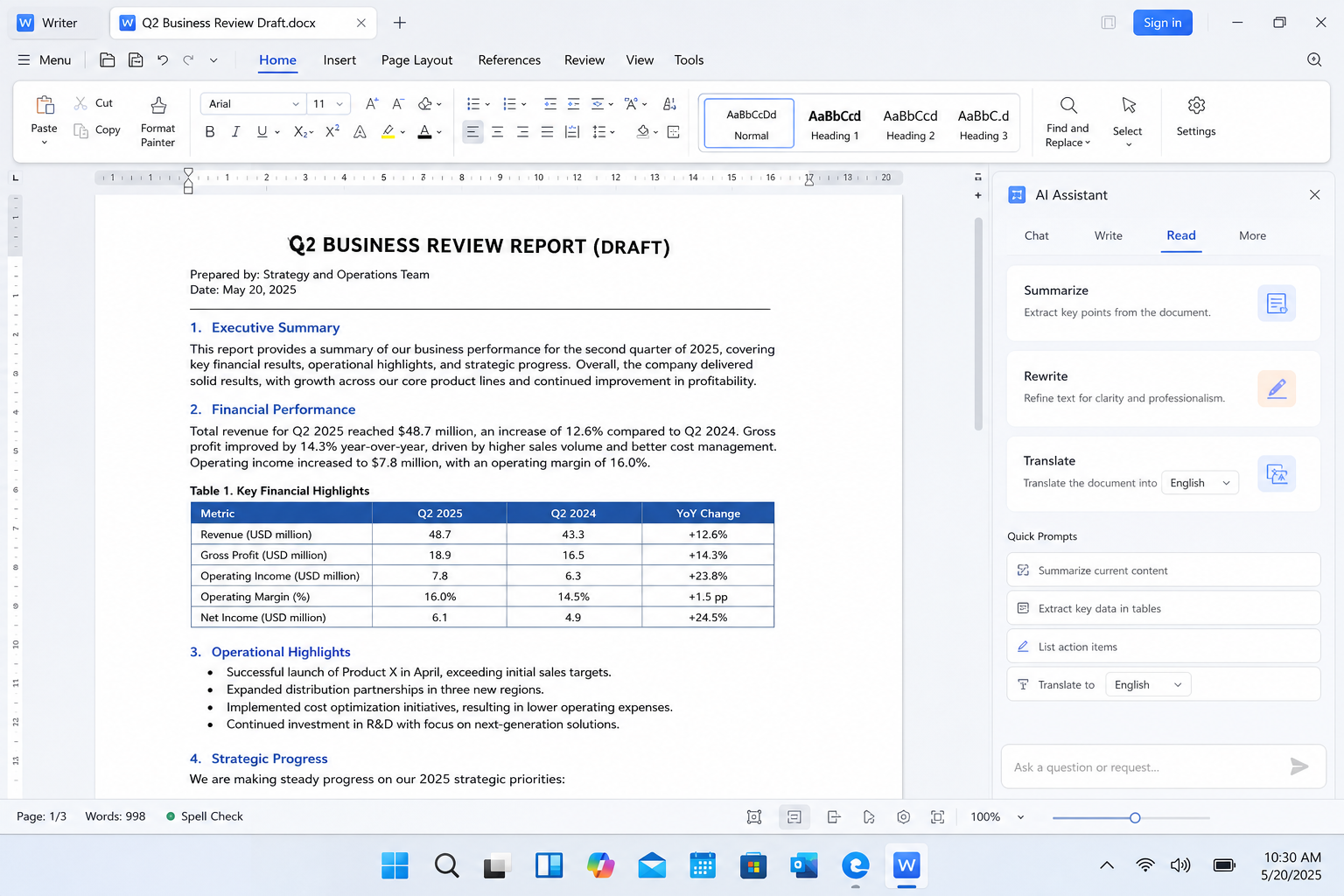
| What you need after the AI chat | What WPS AI + WPS Office gives you |
|---|---|
| Edit generated copy in the real document | Rewrite and polish paragraphs directly in Writer |
| Summarize long PDFs or reports | In-app AI help for PDF and document summaries |
| Build tables or review sheet data | Spreadsheet-friendly AI for forms, tables, and analysis |
| One suite for Word, Excel, PPT, and PDF | Free core WPS Office apps with familiar ribbon-style UI |
Download WPS Office, open your file, and run the AI steps you need—summarize, rewrite, translate, or draft—then save as DOCX, XLSX, PPTX, or PDF for sharing.


FAQ
Is there a single best AI model in 2026?
No. Treat 2026 like a multi-event race: pick the system that wins your use case—chat reasoning, coding agents, long context, creative media, or office documents.
Is office-built WPS AI worth using compared with standalone chatbots?
Yes—especially if your end product is a document. Unlike a separate AI website, WPS AI lets you review and edit generated content right on the page, which cuts copy-paste friction and speeds up real paperwork.
Can free-tier AI fully replace paid AI tools?
Free tiers are fine for simple questions and short drafts. For long reports, academic papers, agent workflows, and multi-step analysis, paid or office-integrated options usually offer better context length, consistency, and workflow fit.
What is the best AI tier for students and office workers?
Most people land in A-tier: strong enough quality for daily writing and studying, without overpaying for enterprise-only features. WPS AI is a strong fit when documents and spreadsheets are the main job—optionally paired with an S-tier chat model for hard research.
Should I only use S-tier AI tools?
No. Match the tool to the task. S-tier shines for high-stakes reasoning and specialists; A-tier often wins for routine office output; B-tier is enough for casual Q&A.
Conclusion
This 2026 AI tier list prioritizes real daily usage over a mythical single champion. S-tier systems cover premium reasoning, agents, and creative specialists. A-tier practical tools—especially WPS AI—are the smarter default for most students and office staff who live in documents, sheets, and PDFs. Build a small stack that matches your workload, then finish the work in files people can actually open.

'%3e%3cpath%20d='M19.9911%204.11386V6.471H18.5894C18.0775%206.471%2017.7322%206.57814%2017.5536%206.79243C17.3751%207.00671%2017.2858%207.32814%2017.2858%207.75671V9.44421H19.9019L19.5536%2012.0871H17.2858V18.8639H14.5536V12.0871H12.2769V9.44421H14.5536V7.49779C14.5536%206.39064%2014.8632%205.53201%2015.4822%204.92189C16.1013%204.31177%2016.9257%204.00671%2017.9554%204.00671C18.8304%204.00671%2019.509%204.04243%2019.9911%204.11386Z'%20fill='%23333333'/%3e%3c/g%3e%3cdefs%3e%3cclipPath%20id='clip0_2938_8199'%3e%3crect%20width='16'%20height='16'%20fill='white'%20transform='translate(8%204.00671)'/%3e%3c/clipPath%3e%3c/defs%3e%3c/svg%3e)
'%3e%3cpath%20d='M17.5237%2010.7813L23.4811%204H22.0699L16.8949%209.88693L12.7648%204H8L14.2469%2012.9029L8%2020.0133H9.4112L14.8725%2013.7952L19.2352%2020.0133H24M9.92053%205.04213H12.0885L22.0688%2019.0224H19.9003'%20fill='%23333333'/%3e%3c/g%3e%3cdefs%3e%3cclipPath%20id='clip0_2938_8200'%3e%3crect%20width='16'%20height='16.0134'%20fill='white'%20transform='translate(8%204)'/%3e%3c/clipPath%3e%3c/defs%3e%3c/svg%3e)


