

'%3e%3cpath%20d='M8%200C12.4183%200%2016%203.58172%2016%208C16%2012.4183%2012.4183%2016%208%2016C3.58172%2016%200%2012.4183%200%208C0%203.58172%203.58172%200%208%200ZM11.6162%204.38379C11.2257%203.99337%2010.5927%203.99338%2010.2021%204.38379L8%206.58594L5.79785%204.38379C5.40732%203.99334%204.77429%203.99329%204.38379%204.38379C3.99331%204.77429%203.99335%205.40733%204.38379%205.79785L6.58594%208L4.38379%2010.2021C3.99348%2010.5927%203.99341%2011.2257%204.38379%2011.6162C4.77426%2012.0066%205.40734%2012.0065%205.79785%2011.6162L8%209.41406L10.2021%2011.6162C10.5927%2012.0066%2011.2257%2012.0067%2011.6162%2011.6162C12.0067%2011.2257%2012.0066%2010.5927%2011.6162%2010.2021L9.41406%208L11.6162%205.79785C12.0066%205.40735%2012.0066%204.77429%2011.6162%204.38379Z'%20fill='%23080E17'%20fill-opacity='0.46'/%3e%3c/g%3e%3cdefs%3e%3cclipPath%20id='clip0_3761_713'%3e%3crect%20width='16'%20height='16'%20fill='white'/%3e%3c/clipPath%3e%3c/defs%3e%3c/svg%3e)




'%3e%3cpath%20fill-rule='evenodd'%20clip-rule='evenodd'%20d='M21.4999%2010.9993C21.4999%205.20009%2016.7986%200.498901%2010.9993%200.498901C5.19994%200.498901%200.498657%205.20009%200.498657%2010.9993C0.498657%2016.2404%204.33858%2020.5844%209.35855%2021.3722V14.0346H6.69238V10.9993H9.35855V8.68594C9.35855%206.05427%2010.9262%204.60062%2013.3248%204.60062C14.4736%204.60062%2015.6753%204.80571%2015.6753%204.80571V7.38979H14.3512C13.0468%207.38979%2012.64%208.19921%2012.64%209.0296V10.9993H15.5523L15.0867%2014.0346H12.64V21.3722C17.66%2020.5844%2021.4999%2016.2404%2021.4999%2010.9993Z'%20fill='%231568EA'/%3e%3c/g%3e%3c/svg%3e)


'%3e%3cpath%20d='M2.42045%2022.1876H6.31818V12.7217L0.75%208.54553V20.5171C0.75%2021.4414%201.49892%2022.1876%202.42045%2022.1876Z'%20fill='%234285F4'/%3e%3cpath%20d='M19.682%2022.1876H23.5797C24.5041%2022.1876%2025.2502%2021.4387%2025.2502%2020.5171V8.54553L19.682%2012.7217'%20fill='%2334A853'/%3e%3cpath%20d='M19.682%205.48293V12.7216L25.2502%208.54543V6.31816C25.2502%204.25236%2022.8921%203.07469%2021.2411%204.31361'%20fill='%23FBBC04'/%3e%3cpath%20d='M6.31824%2012.7217V5.48303L13.0001%2010.4944L19.6819%205.48303V12.7217L13.0001%2017.733'%20fill='%23EA4335'/%3e%3cpath%20d='M0.75%206.31816V8.54543L6.31818%2012.7216V5.48293L4.75909%204.31361C3.10534%203.07469%200.75%204.25236%200.75%206.31816Z'%20fill='%23C5221F'/%3e%3c/g%3e%3cdefs%3e%3cclipPath%20id='clip0_2954_7305'%3e%3crect%20width='24.5'%20height='18.375'%20fill='white'%20transform='translate(0.75%203.8125)'/%3e%3c/clipPath%3e%3c/defs%3e%3c/svg%3e)


Taking time off for health reasons is natural, but communicating that to your employer can feel stressful. I know many people struggle with writing or finding a proper doctors note for work template. Sometimes you’re unsure what to include, and other times you just need a professional format that employers recognize. So, are there free doctors note for work templates to reference? And how do you edit them quickly without errors? In this guide, I’ll share ready-to-use templates and also walk you through how to customize them effectively.
How to Write a Doctors Note for Work
Before diving into templates, let’s talk about what a doctor’s note really is and why it matters.
What is a Doctors Note for Work
A doctor’s note is a formal statement from a medical professional verifying that you’ve been ill or under treatment. Employers usually require this when you take sick leave or request modified duties. In many cases, companies have policies that clearly outline how soon you must provide documentation after calling in sick. Using a free doctor's note for work template can help you meet those requirements quickly without confusion. Here’s when to Submit it:
If you miss more than one workday due to illness.
When your employer requests documentationfor leave.
If you’re returning after a major illness or surgery.
What to Include in Doctors Note for Work
Patient’s Name: To identify the employee.
Date of Visit: Proves the timing of treatment.
Reason for Absence (general, not private details): Usually stated as “illness” or “medical condition.”
Duration of Leave: How long the employee needs to stay away.
Doctor’s Information: Clinic name, doctor’s name, and contact.
Signature/Seal: Makes it authentic.
When I had to submit a note, the clarity of dates and doctor’s details really mattered. Keeping it simple but official worked best. Adding precise information avoids unnecessary back-and-forth with HR and ensures your absence is documented without delays.
Doctors Note for Work Templates [Free Download]
It can feel overwhelming to figure out the right formatwhen you’re pressed for time. That’s where ready-made templates come in handy and give you a solid starting point. Here are 10 templates you can download and adapt easily. Using doctors note for work examples as a reference ensures that your document looks professional and is accepted without confusion.
1. Doctor Note Template (Generic)
The Doctor Note Template (Generic) is a simple option that covers all the basic details an employer may need. It works well if you want a professional format without unnecessary complexity. This template is easy to adapt for different situations, from short absences to extended recovery. By using the Doctor Note Template (Generic), you’ll save time while keeping your note clear and credible.
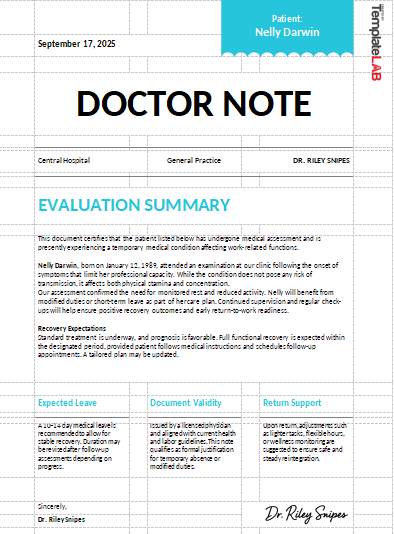
2. Doctor Note For Work Template (1)
The Doctor Note For Work Template (1) is designed for straightforward medical absences that need quick documentation. It includes the essential sections like patient details, dates, and the doctor’s information. This makes it a reliable choice when you need something professional but not overly detailed. Using the Doctor Note For Work Template (1) ensures your absence is recorded without confusion.
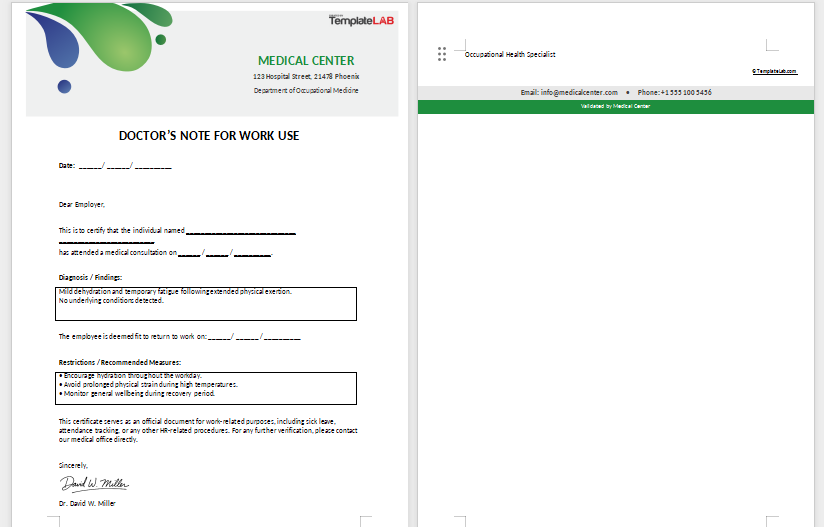
3. Doctor Note For Work Template (2)
The Doctor Note For Work Template (2) is a practical choice if you want a note that feels formal yet easy to adapt. It balances professionalism with simplicity, making it suitable for most workplaces. The layout clearly presents medical details and timelines, so your employer has no room for doubt. By using the Doctor Note For Work Template (2), you ensure your documentation looks polished and reliable.
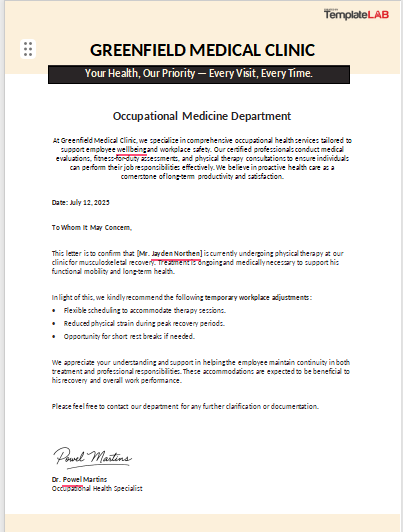
4. Physician Release to Work Form
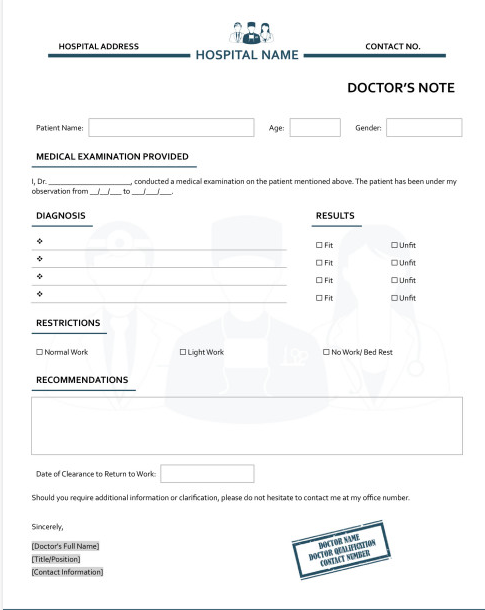
The Physician Release to Work Form is essential when you’re returning to your job after medical treatment or recovery. It formally confirms that you’re fit to resume work, sometimes with restrictions if needed. Employers often rely on this form to ensure workplace safety and compliance with health policies. By using the Physician Release to Work Form, you provide clear proof of your readiness to return.
5. Return to Work Doctor’s Note Template
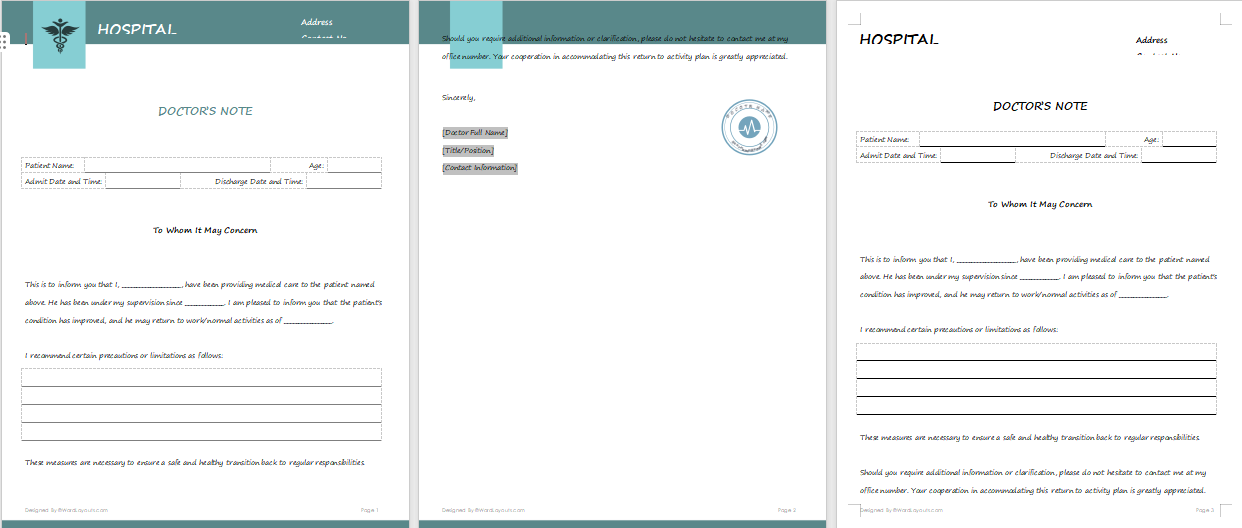
The Return to Work Doctor’s Note Template is used to show that you’re medically cleared to rejoin your job after an illness or injury. It highlights the recovery period and confirms your ability to handle regular tasks again. Some versions also mention restrictions or adjusted duties, depending on your condition. With the Return to Work Doctor’s Note Template, you give your employer confidence in your safe return.
6. Chiropractor Doctor Note Template
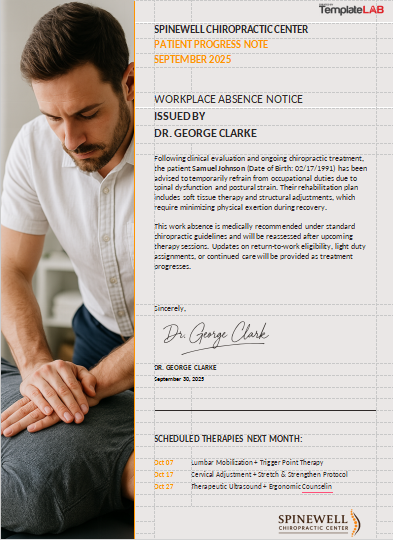
The Chiropractor Doctor Note Template is designed for situations where you’ve received chiropractic care and need official documentation. It’s especially helpful for absences related to back pain, posture issues, or spinal treatments. This template includes all the standard details while noting the type of care you received. Using the Chiropractor Doctor Note Template ensures your time off is validated with proper medical proof.
7. Dentist Doctor Note Template
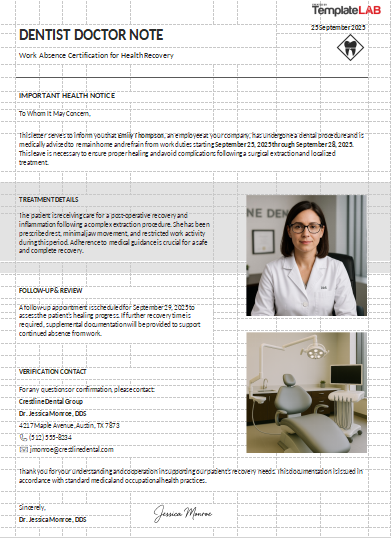
The Dentist Doctor Note Template is ideal when you miss work due to dental treatments, surgeries, or severe tooth pain. It provides clear confirmation of your appointment and recovery needs. Employers often accept this format as valid proof since dental issues can directly impact your ability to work. By using the Dentist Doctor Note Template, you present a professional and credible record of your absence.
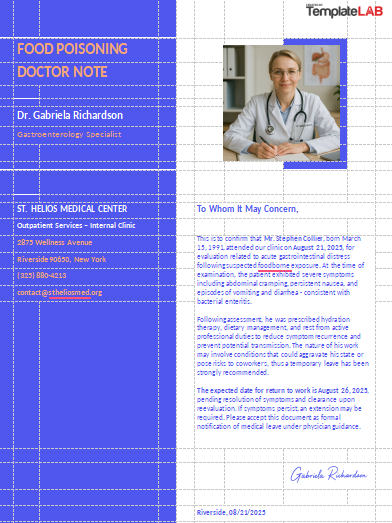
8. Food Poisoning Doctor Note Template
The Food Poisoning Doctor Note Template is helpful for short-term illnesses that require sudden rest and recovery. Since food poisoning often comes unexpectedly, this template ensures you have a professional document ready for your employer. It highlights the diagnosis, recovery period, and need for time off. With the Food Poisoning Doctor Note Template, you can justify your absence with clarity and credibility.
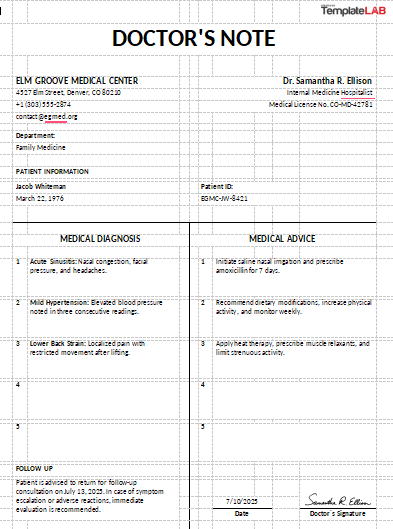
9. Hospital Doctor Note Template
The Hospital Doctor Note Template is used when your absence is due to hospitalization or treatment at a medical facility. It covers key details like admission dates, discharge dates, and follow-up care instructions. Employers typically view this format as highly credible because it comes from a hospital setting. By using the Hospital Doctor Note Template, you provide strong evidence for your medical leave.
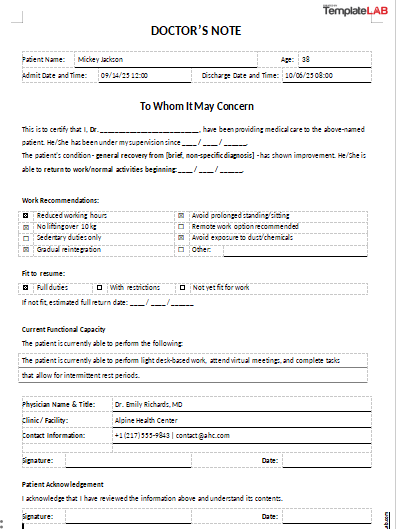
10. Return To Work Note From Doctor Template
The Return To Work Note From Doctor Template is designed to officially confirm that you’re fit to resume work after a period of illness or treatment. It often includes the date you can rejoin and any restrictions to keep in mind. This format helps employers balance workplace safety with your recovery needs. With the Return To Work Note From Doctor Template, you give clear documentation of your readiness.
I’ve found that hospital and return-to-work notes often carry more weight with HR. Their structured format not only builds credibility but also reduces the chance of follow-up questions or delays in approval. If you need more variety, check out WPS Office templates, which have hundreds of editable options.
How to Edit Doctors Note for Work Template in Word
Editing is often where people get stuck. Let me walk you through WPS Writer, which is my go-to. It makes formatting and customizing simple, especially when you’re learning how to write doctors note for work template without overcomplicating things. The clean interfacehelps you focus on the content instead of struggling with the tools, so you can finish faster and with more confidence.
Steps:
Here’s an easy step-by-step guide on how to edit your template.
Step 1: First of all, open WPS Writer and load your chosen template.
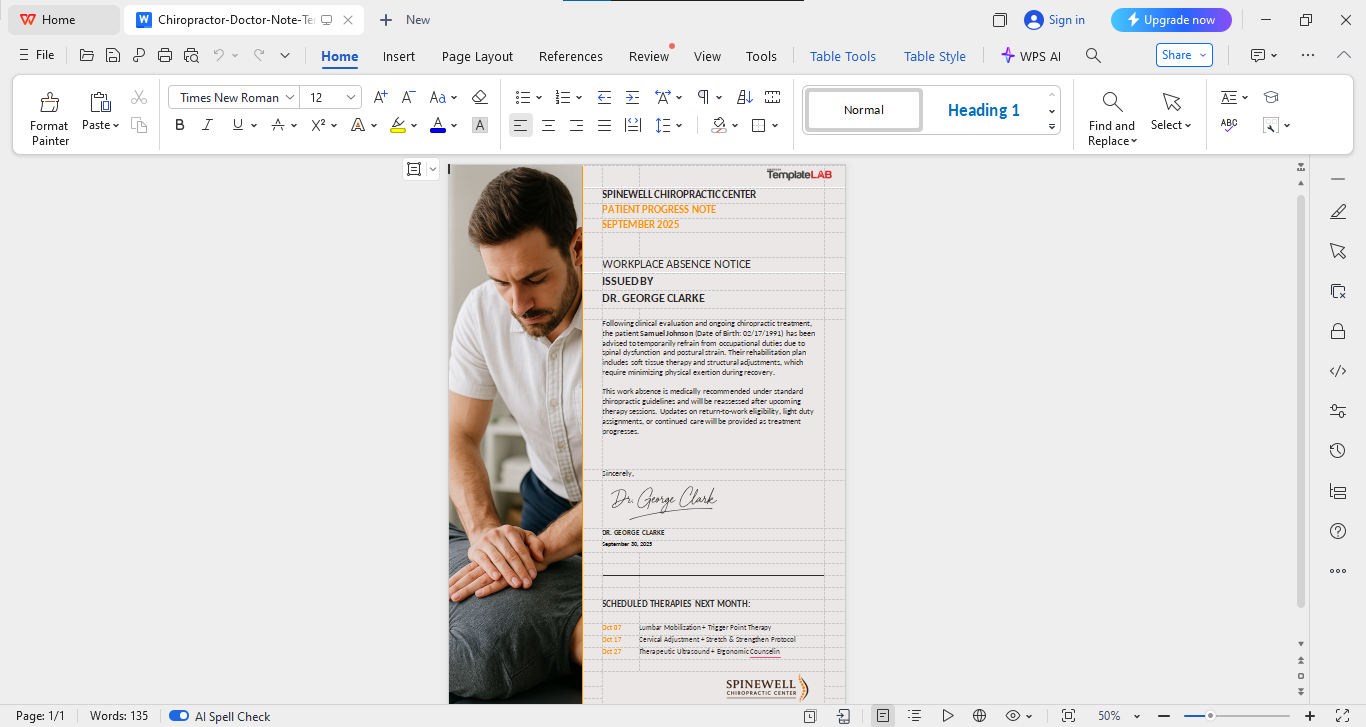
Step 2: Now replace placeholder text with your details: name, dates, and doctor info. You can customise everything in the template as per your choice and preference.
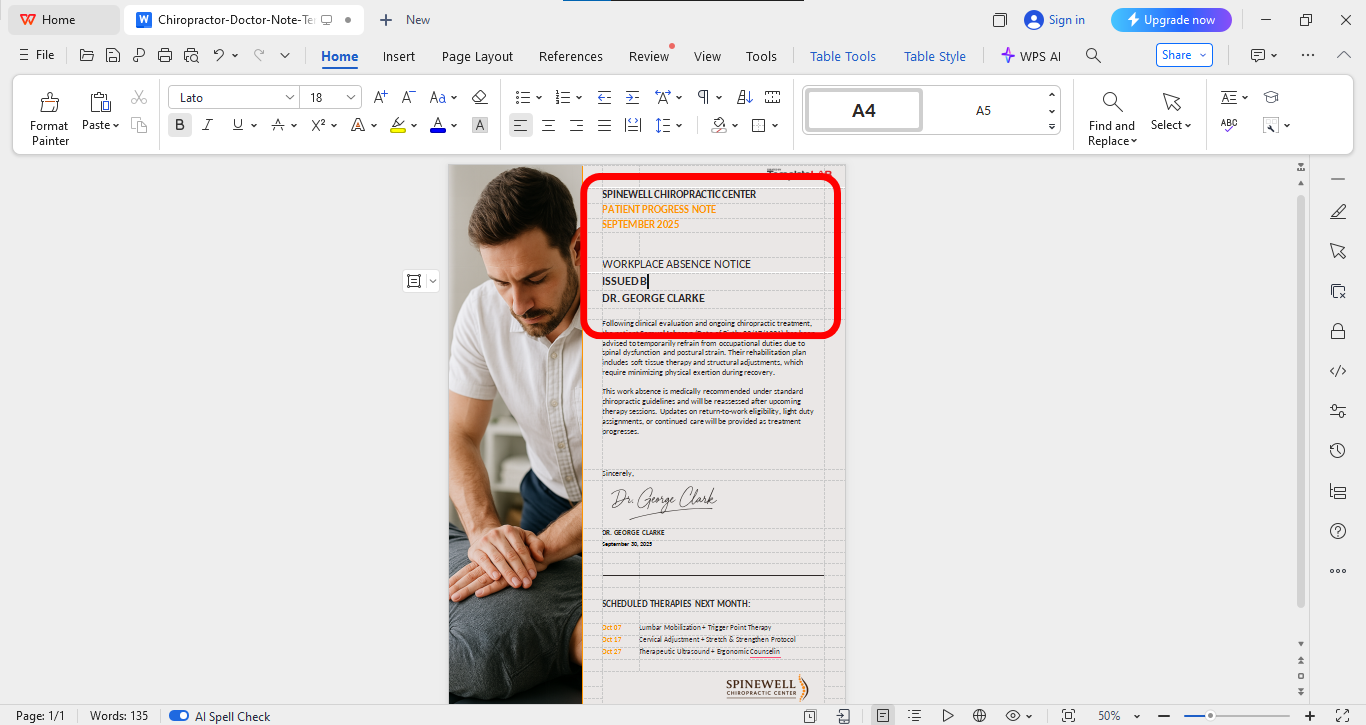
Step 3: Once finalized, go to the“File” option on the top left of your interface and then click “Export to PDF” to save the ID card in PDF form.
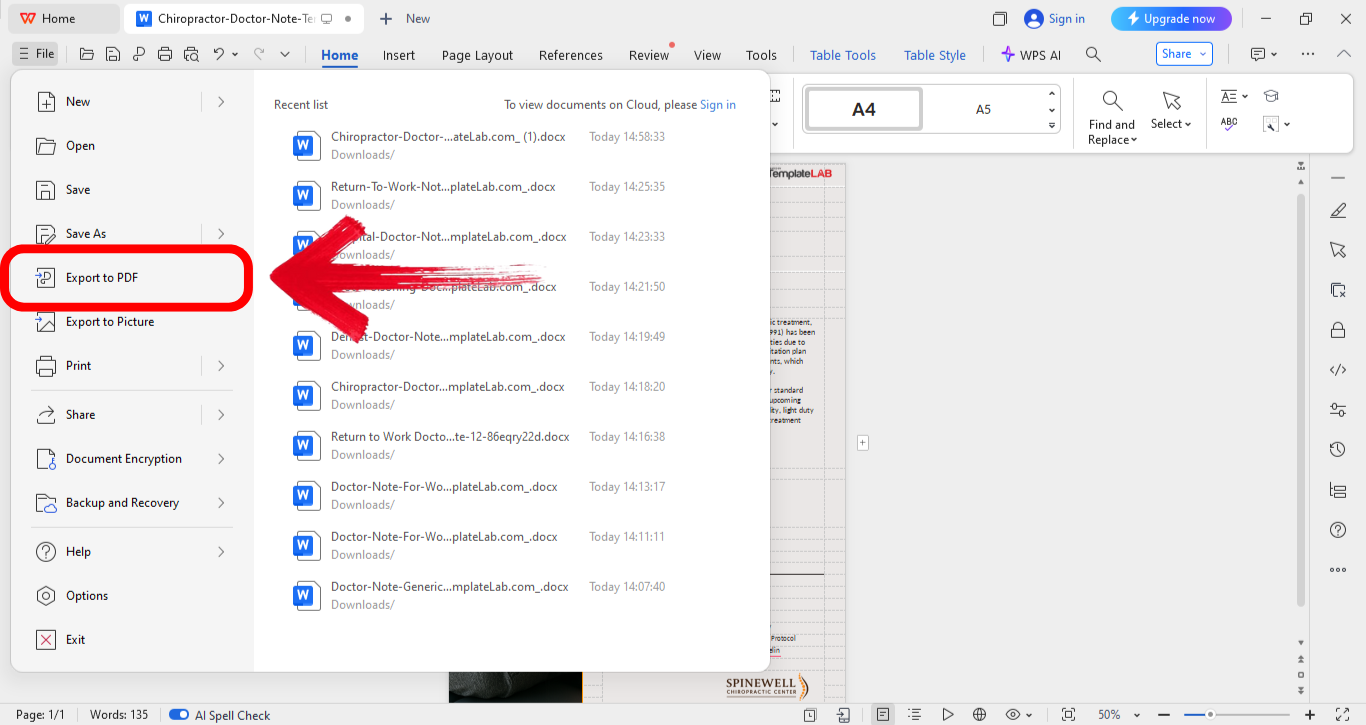
Saving the document as a PDF helped me avoid editing issues. It ensured the file couldn’t be altered by others and presented my note in a clean, polished format.
Free Office Suite with Editable Templates
After going through templates and editing steps, the next question is which tool makes this process easiest. Having the right platform means you can open, edit, and finalize a doctor’s note for work without unnecessary obstacles. Instead of struggling with compatibility or limited features, you need software that keeps things simple yet professional.
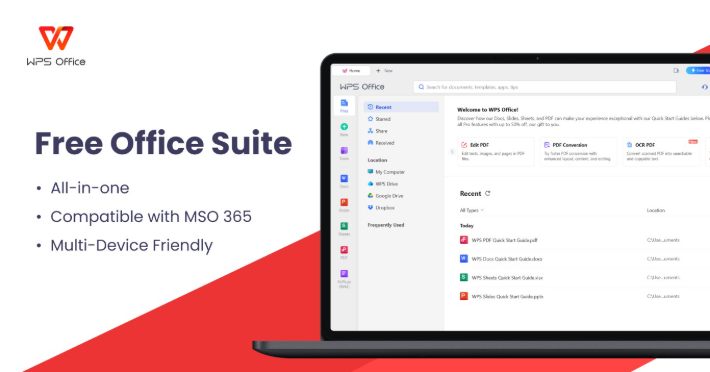
WPS Office is one of the best options I’ve worked with for handling templates. It’s a free, full-featured suite that includes Writer, Spreadsheet, and Presentation tools, making it a complete alternative to expensive office software. The experience is smooth, with a modern interface that feels professional from the start. One of its strongest assets is the template store, which provides ready-made designs you can edit and use right away.
Features:
AI Assistance: The built-in AI helps polish and reformat content quickly. I’ve found this especially useful when adjusting a doctor’s note for work template to meet employer requirements without spending too much time on formatting.
Rich Template Store: WPS Office includes a wide variety of free templates, including free doctors note for work templates. Having these ready-made options saves time and gives your documents a professional finish right away.
Online Sharing: You can generate secure links to share your edited notes directly with employers or colleagues. This makes collaboration easy and avoids the hassle of repeatedly sending attachments over email.
Pros:
Easy editing with lots of templates.
Free to use without hidden fees.
Cloud sync across devices.
Cons:
Some advanced templates need premium.
Heavy files can lag.
Limited third-party app integration.
I’ve used WPS for editing everything from doctor’s notes to resumes and reports. It’s proven reliable, and the built-in templates consistently cut my work time in half while keeping documents professional.
FAQs
1. Are there different types of doctor’s notes for work?
Yes, there are return-to-work notes, work restriction notes, and detailed FMLA certifications.
2. Can I get a doctor’s note from an online doctor or virtual visit?
Yes, telehealth services often provide digital notes after an online consultation.
3. Do employers verify doctor’s notes?
Some do, but usually only if the note seems incomplete or suspicious.
4. Can a doctor refuse to write me a note?
Yes, if they feel your condition doesn’t justify absence. Doctors must stay professional.
5. Should I keep a copy of my doctor’s note?
Always. Keeping a copy protects you if questions arise later.
Keeping digital copies has saved me more than once. On one occasion, HR misplaced my note, but having a backup ready meant I avoided delays and unnecessary stress.
Notes That Work for You
We’ve gone over what makes a doctor’s note effective, explored free doctors note for work template examples, and even looked at how to edit them using WPS Office. Templates save time, but knowing how to adapt them ensures you’re always ready. If you want even more template options, the WPS template store has a huge collection you can download and edit directly. With the right tools and preparation, you’ll always be able to provide professional, polished documentation.

'%3e%3cpath%20d='M19.9911%204.11386V6.471H18.5894C18.0775%206.471%2017.7322%206.57814%2017.5536%206.79243C17.3751%207.00671%2017.2858%207.32814%2017.2858%207.75671V9.44421H19.9019L19.5536%2012.0871H17.2858V18.8639H14.5536V12.0871H12.2769V9.44421H14.5536V7.49779C14.5536%206.39064%2014.8632%205.53201%2015.4822%204.92189C16.1013%204.31177%2016.9257%204.00671%2017.9554%204.00671C18.8304%204.00671%2019.509%204.04243%2019.9911%204.11386Z'%20fill='%23333333'/%3e%3c/g%3e%3cdefs%3e%3cclipPath%20id='clip0_2938_8199'%3e%3crect%20width='16'%20height='16'%20fill='white'%20transform='translate(8%204.00671)'/%3e%3c/clipPath%3e%3c/defs%3e%3c/svg%3e)
'%3e%3cpath%20d='M17.5237%2010.7813L23.4811%204H22.0699L16.8949%209.88693L12.7648%204H8L14.2469%2012.9029L8%2020.0133H9.4112L14.8725%2013.7952L19.2352%2020.0133H24M9.92053%205.04213H12.0885L22.0688%2019.0224H19.9003'%20fill='%23333333'/%3e%3c/g%3e%3cdefs%3e%3cclipPath%20id='clip0_2938_8200'%3e%3crect%20width='16'%20height='16.0134'%20fill='white'%20transform='translate(8%204)'/%3e%3c/clipPath%3e%3c/defs%3e%3c/svg%3e)


