


Readers notice an ellipsis long before they can name it. In a report, three dots can show that part of a quote was cut; in dialogue, the same mark can suggest hesitation. When the dots are spaced wrong or dropped into a sentence without a clear job, the line reads careless rather than intentional. This guide explains what an ellipsis does in real documents, when it helps, and how to insert and check it in WPS Writer without turning punctuation into guesswork.
Ellipsis Meaning and When to Use It in Writing
Ellipsis meaning in professional writing and email
An ellipsis is the punctuation mark that shows something has been left out, paused, or left unfinished. In formal U.S. prose you will usually see it as three dots, often typed as the single character … (Unicode U+2026). Chicago and MLA both treat it as a precision tool: in citations it marks removed words inside a quotation; in narrative it can signal a trailing thought, but only when the tone truly calls for that effect.
It is not a substitute for a comma, a colon, or an em dash. Teams run into trouble when writers use three periods because they are unsure what else to do. A quick read-aloud test helps: if the sentence does not need a deliberate pause or an omission, another mark is probably clearer.
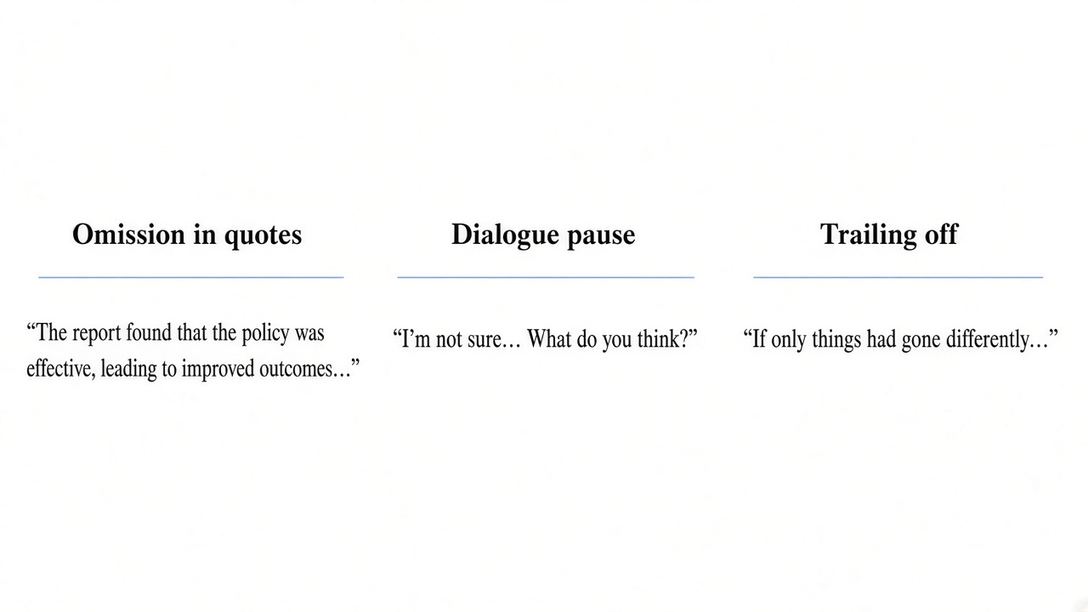
Three common jobs for an ellipsis: omission, dialogue pause, and trailing off


When an ellipsis fits quotations and dialogue
Omissions in quoted material
When you shorten a source, an ellipsis tells readers that words were removed. Keep the surrounding grammar intact and do not change the author’s meaning. If you delete text at the end of one sentence and continue into the next, MLA expects a four-dot ellipsis—the period for the first sentence plus the three-dot mark—when the first sentence was complete. For a deeper walkthrough of long quotes, see our guide on formatting block quotes in MLA.
Dialogue and informal tone
In scripts, interviews, or internal email, an ellipsis can show hesitation (“I thought we agreed …”) or a thought that trails off. Overuse makes copy feel vague. One or two well-placed ellipses read as voice; a paragraph full of them reads unfinished.
Lists and marketing lines
Some teams use an ellipsis to hint that more items exist (“Templates, exports, sharing …”). That can work in a headline if the next screen or section delivers the payoff. If nothing follows, swap in a colon or rewrite the sentence so it stands on its own.

Indented MLA quote with citation after omitted text
How to insert an ellipsis in WPS Writer
Use one consistent glyph across the file so spacing stays even at line breaks. These methods work in WPS Writer on Windows; macOS shortcuts are noted where they differ.
Keyboard and Unicode character
Place the cursor where the mark belongs. On Windows, press Alt + 0133 on the numeric keypad (Num Lock on). On Mac, press Option + ; (semicolon). WPS inserts the single-character ellipsis rather than three separate periods.
Insert > Symbol
Open the Insert tab, choose Symbol, pick the horizontal ellipsis (…) from the set, and insert. The same dialog path works for other special characters; see our walkthrough on using the Symbol menu in WPS if you want step-by-step screenshots.

Symbol dialog in WPS Writer for inserting an ellipsis
Autocorrect or replace rules
If your edition includes autocorrect or text-replace options, you can map a short trigger (for example ... → …) so scripts stay consistent. Open the spelling or autocorrect settings from the application menu, add the pair once, and confirm the rule does not fire inside code snippets or URLs.
After insertion, run spell check or read the paragraph aloud. WPS flags some spacing issues around punctuation; pair that with your style guide so omissions in quotes still match MLA or APA rules.

Spell check and review tools in WPS Writer
Ellipsis vs dash and colon when you edit
Choosing between an ellipsis, an em dash, and a colon changes how confident the sentence sounds. An em dash cuts in sharply—useful for an interruption or a quick aside. An ellipsis softens the line and leaves space for the reader to infer what was unsaid. A colon announces what comes next; an ellipsis only hints.
Compare these pairs:
Soft pause: “I can send the file … if legal approves it.”
Hard turn: “I can send the file—if legal approves it.”
Direct setup: “We need three items: budget, timeline, and owner.” (A colon fits; an ellipsis would sound incomplete.)
In academic drafts, default to omission or documented pause. Reach for dashes when you are adding emphasis, not when you are deleting source text.
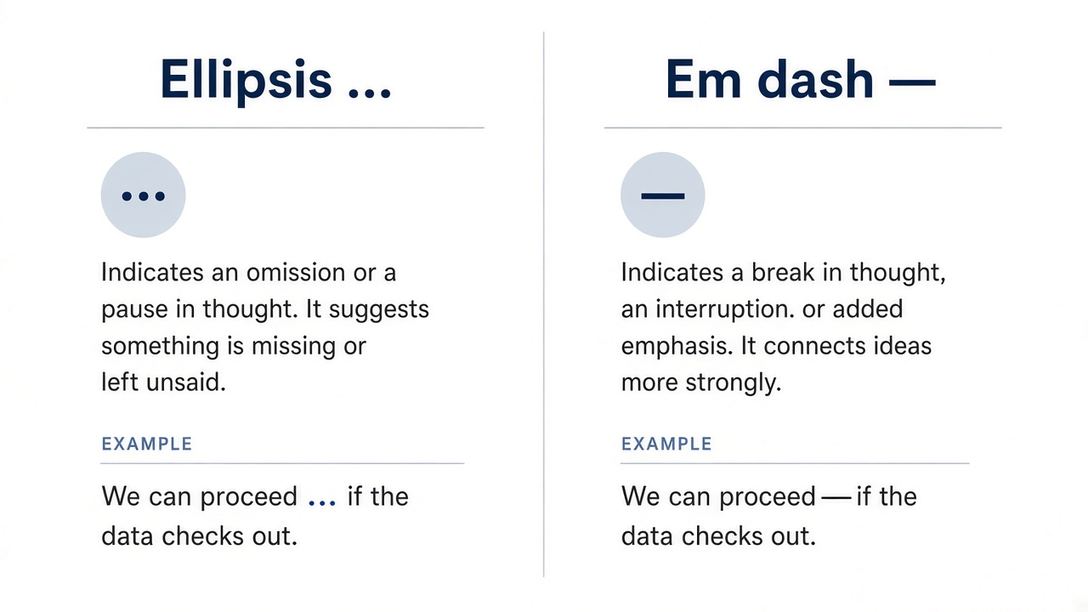
Ellipsis softens a sentence; an em dash signals a sharper turn
Common ellipsis mistakes writers should fix
Most ellipsis errors are spacing and intent problems, not missing vocabulary.
Spacing and character choice
Three loose periods. Typing
. . .can break across a line and look uneven. Prefer the … character everywhere except when your style guide explicitly calls for spaced dots.Stacked ellipses. More than one ellipsis in a row rarely adds meaning. Cut the duplicate or rewrite the sentence.
Source and tone errors
Omissions that skew the source. If removing words changes the claim, keep the words or paraphrase with a citation instead of ellipsizing.
Replacing commas for “style.” Social posts sometimes overuse ellipses for rhythm. In reports and client email, that habit makes commitments sound uncertain.
Run spell check in WPS Writer for spacing glitches, then read each ellipsis against the source. Software can flag odd dots; only you can confirm the mark matches the quote and tone.
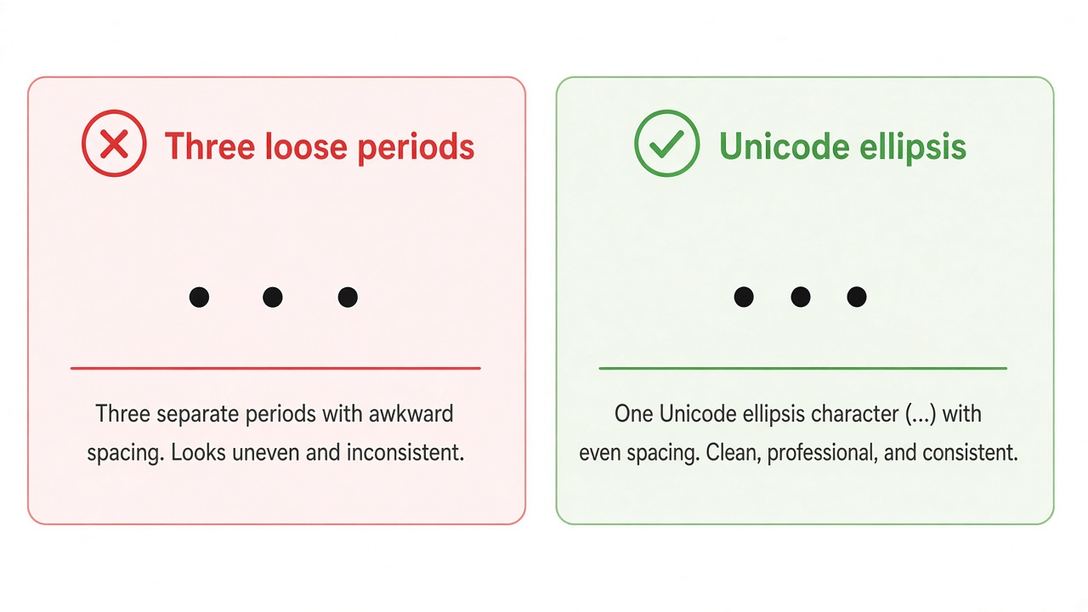
Loose periods versus a single Unicode ellipsis character
The Best Free Alternative: WPS Office
Writer workflow for quotes and scripts
Ellipsis work rarely stops at typing the character. You still need stable formatting for quotes, comments from reviewers, and exports to PDF. WPS Office keeps Writer, PDF tools, and spell check in one install, which matters when legal or academic reviewers mark up punctuation in the same file you will submit.
Writer supports standard Unicode entry and symbol insertion, so teams can align on the … character instead of three periods. Pair this page with the MLA block-quote workflow above when citations run long.
PDF review before you share
When a draft moves to PDF for approval, open it in WPS PDF, add notes, and send a clean copy without rebuilding the layout in another app. That keeps ellipsis spacing visible to reviewers who will not edit the source file.
WPS Office Writer, Spreadsheet, Presentation, and PDF in one suite
FAQs
Is an ellipsis always three dots?
In everyday U.S. writing, yes—the mark is three dots, usually typed as one character. When an omission follows a complete sentence, some styles use four dots (period plus ellipsis). Follow the guide your course or publisher requires.
Can I use an ellipsis at the end of a business email?
You can, but it often reads as hesitation. For requests, deadlines, or approvals, a direct sentence or bullet list is usually clearer unless you deliberately want a softer tone.
Does MLA allow ellipses inside block quotes?
Yes, when you remove words from a quotation. Place the ellipsis where the omission occurs and keep the author’s meaning intact. Use the four-dot form when you omit material after a full sentence.
How is an ellipsis different from “etc.”?
“Etc.” names a known type of item that continues (things in the same category). An ellipsis marks missing words or a trailing thought. They solve different problems and are not interchangeable in formal quotes.
Why type … instead of three periods in WPS Writer?
The single glyph keeps spacing consistent and prevents the dots from splitting awkwardly at the end of a line. It also matches what most style guides expect in published work.




