

'%3e%3cpath%20d='M8%200C12.4183%200%2016%203.58172%2016%208C16%2012.4183%2012.4183%2016%208%2016C3.58172%2016%200%2012.4183%200%208C0%203.58172%203.58172%200%208%200ZM11.6162%204.38379C11.2257%203.99337%2010.5927%203.99338%2010.2021%204.38379L8%206.58594L5.79785%204.38379C5.40732%203.99334%204.77429%203.99329%204.38379%204.38379C3.99331%204.77429%203.99335%205.40733%204.38379%205.79785L6.58594%208L4.38379%2010.2021C3.99348%2010.5927%203.99341%2011.2257%204.38379%2011.6162C4.77426%2012.0066%205.40734%2012.0065%205.79785%2011.6162L8%209.41406L10.2021%2011.6162C10.5927%2012.0066%2011.2257%2012.0067%2011.6162%2011.6162C12.0067%2011.2257%2012.0066%2010.5927%2011.6162%2010.2021L9.41406%208L11.6162%205.79785C12.0066%205.40735%2012.0066%204.77429%2011.6162%204.38379Z'%20fill='%23080E17'%20fill-opacity='0.46'/%3e%3c/g%3e%3cdefs%3e%3cclipPath%20id='clip0_3761_713'%3e%3crect%20width='16'%20height='16'%20fill='white'/%3e%3c/clipPath%3e%3c/defs%3e%3c/svg%3e)




'%3e%3cpath%20fill-rule='evenodd'%20clip-rule='evenodd'%20d='M21.4999%2010.9993C21.4999%205.20009%2016.7986%200.498901%2010.9993%200.498901C5.19994%200.498901%200.498657%205.20009%200.498657%2010.9993C0.498657%2016.2404%204.33858%2020.5844%209.35855%2021.3722V14.0346H6.69238V10.9993H9.35855V8.68594C9.35855%206.05427%2010.9262%204.60062%2013.3248%204.60062C14.4736%204.60062%2015.6753%204.80571%2015.6753%204.80571V7.38979H14.3512C13.0468%207.38979%2012.64%208.19921%2012.64%209.0296V10.9993H15.5523L15.0867%2014.0346H12.64V21.3722C17.66%2020.5844%2021.4999%2016.2404%2021.4999%2010.9993Z'%20fill='%231568EA'/%3e%3c/g%3e%3c/svg%3e)


'%3e%3cpath%20d='M2.42045%2022.1876H6.31818V12.7217L0.75%208.54553V20.5171C0.75%2021.4414%201.49892%2022.1876%202.42045%2022.1876Z'%20fill='%234285F4'/%3e%3cpath%20d='M19.682%2022.1876H23.5797C24.5041%2022.1876%2025.2502%2021.4387%2025.2502%2020.5171V8.54553L19.682%2012.7217'%20fill='%2334A853'/%3e%3cpath%20d='M19.682%205.48293V12.7216L25.2502%208.54543V6.31816C25.2502%204.25236%2022.8921%203.07469%2021.2411%204.31361'%20fill='%23FBBC04'/%3e%3cpath%20d='M6.31824%2012.7217V5.48303L13.0001%2010.4944L19.6819%205.48303V12.7217L13.0001%2017.733'%20fill='%23EA4335'/%3e%3cpath%20d='M0.75%206.31816V8.54543L6.31818%2012.7216V5.48293L4.75909%204.31361C3.10534%203.07469%200.75%204.25236%200.75%206.31816Z'%20fill='%23C5221F'/%3e%3c/g%3e%3cdefs%3e%3cclipPath%20id='clip0_2954_7305'%3e%3crect%20width='24.5'%20height='18.375'%20fill='white'%20transform='translate(0.75%203.8125)'/%3e%3c/clipPath%3e%3c/defs%3e%3c/svg%3e)


Moving xlsm to google sheets is usually about the grid, not the VBA. An .xlsm workbook is an Excel Open XML file that can store macros. Google Sheets can import the sheets, values, and most formulas, but it does not run Visual Basic for Applications. Plan for data first, then rebuild any automation in Apps Script if you still need it.
This guide shows practical xlsm to google sheets paths: upload in Google Drive, import from an open Sheet, and a clean prep step in WPS Spreadsheets when you want a macro-free .xlsx before the cloud handoff.
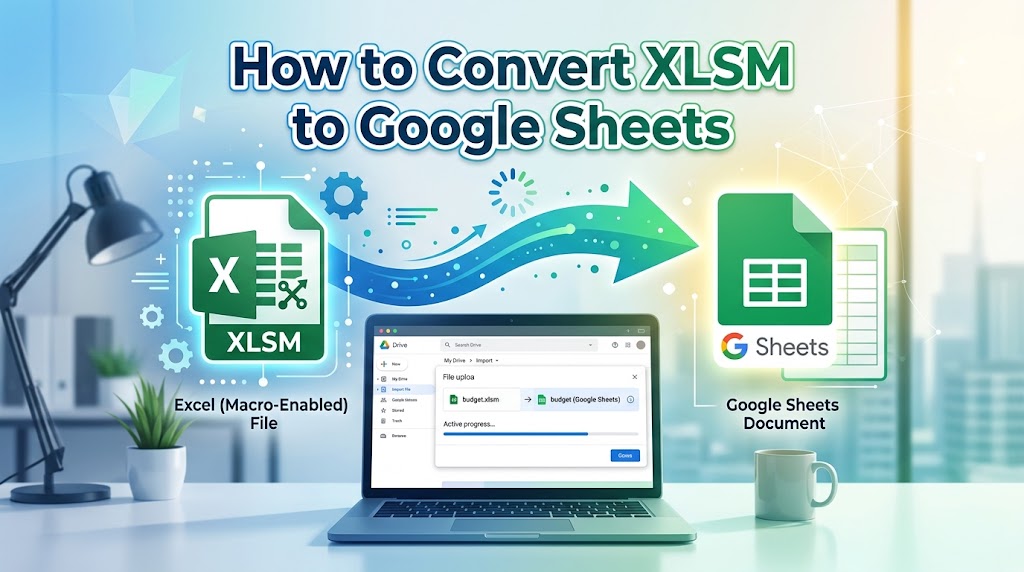
What XLSM to Google Sheets conversion keeps and drops
Before you start xlsm to google sheets, separate what travels from what does not. Cells, tabs, charts, and standard formulas usually arrive. VBA projects, ActiveX controls, and Excel-only add-ins do not. Google Sheets speaks Apps Script (JavaScript-based), not VBA, so the macro project is stripped during conversion.
Data ranges and sheet tabs typically convert
Common formulas recalculate in Sheets with only minor differences
VBA macros never run after xlsm to google sheets
Complex named ranges, forms, or printer macros may need rebuilding
If teammates only need the numbers, that trade-off is fine. If the file is a button-driven dashboard, list what each macro does before you convert, so you know what to replace later.
Fastest XLSM to Google Sheets path with Google Drive
The simplest xlsm to google sheets flow is a Drive upload, then Open with Google Sheets. Your original .xlsm stays in Drive; Sheets creates a separate Google Sheets file.
Open Google Drive and sign in.
Click New > File upload and choose the .xlsm workbook.
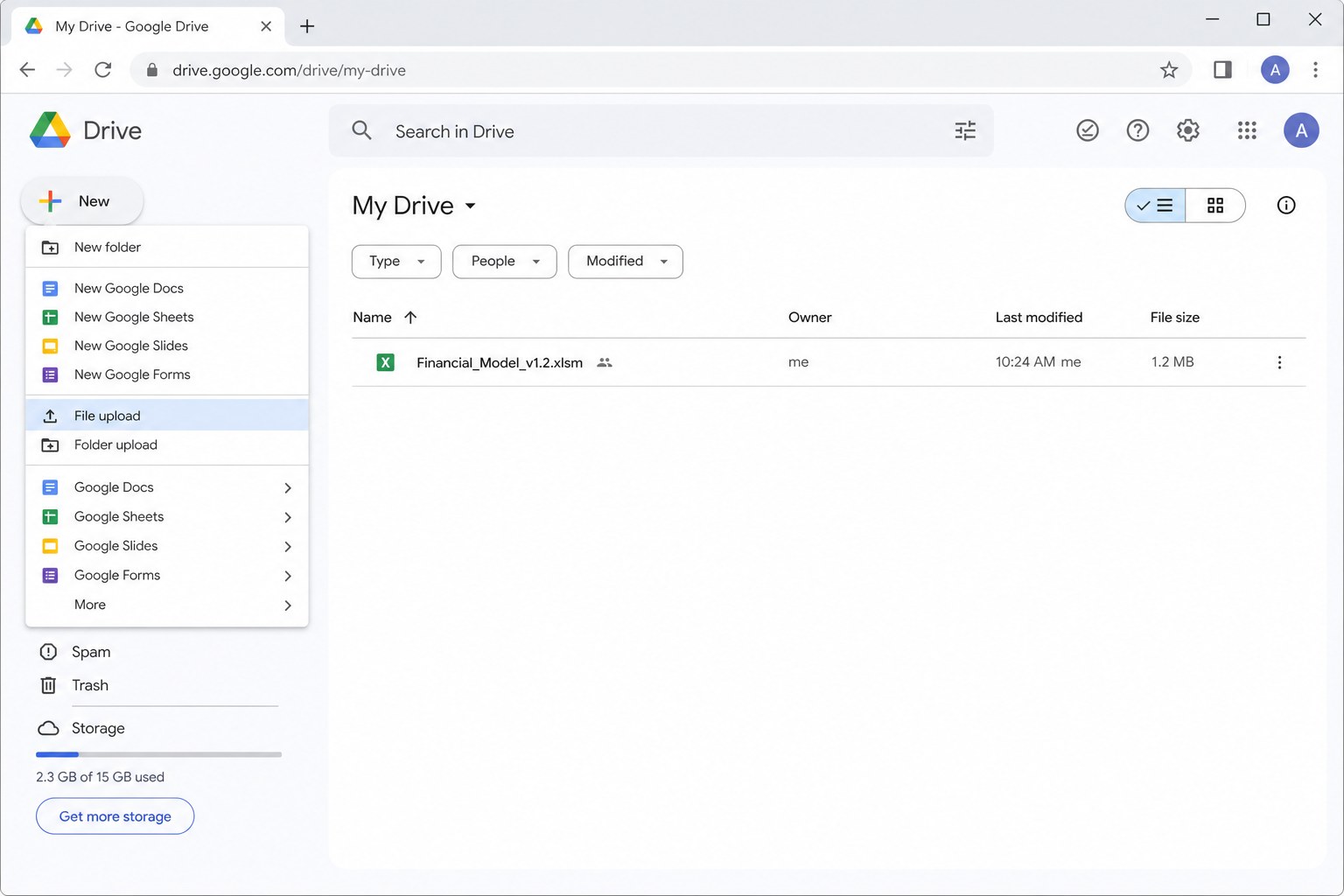
Google Drive file upload menu When the upload finishes, right-click the file and choose Open with > Google Sheets.
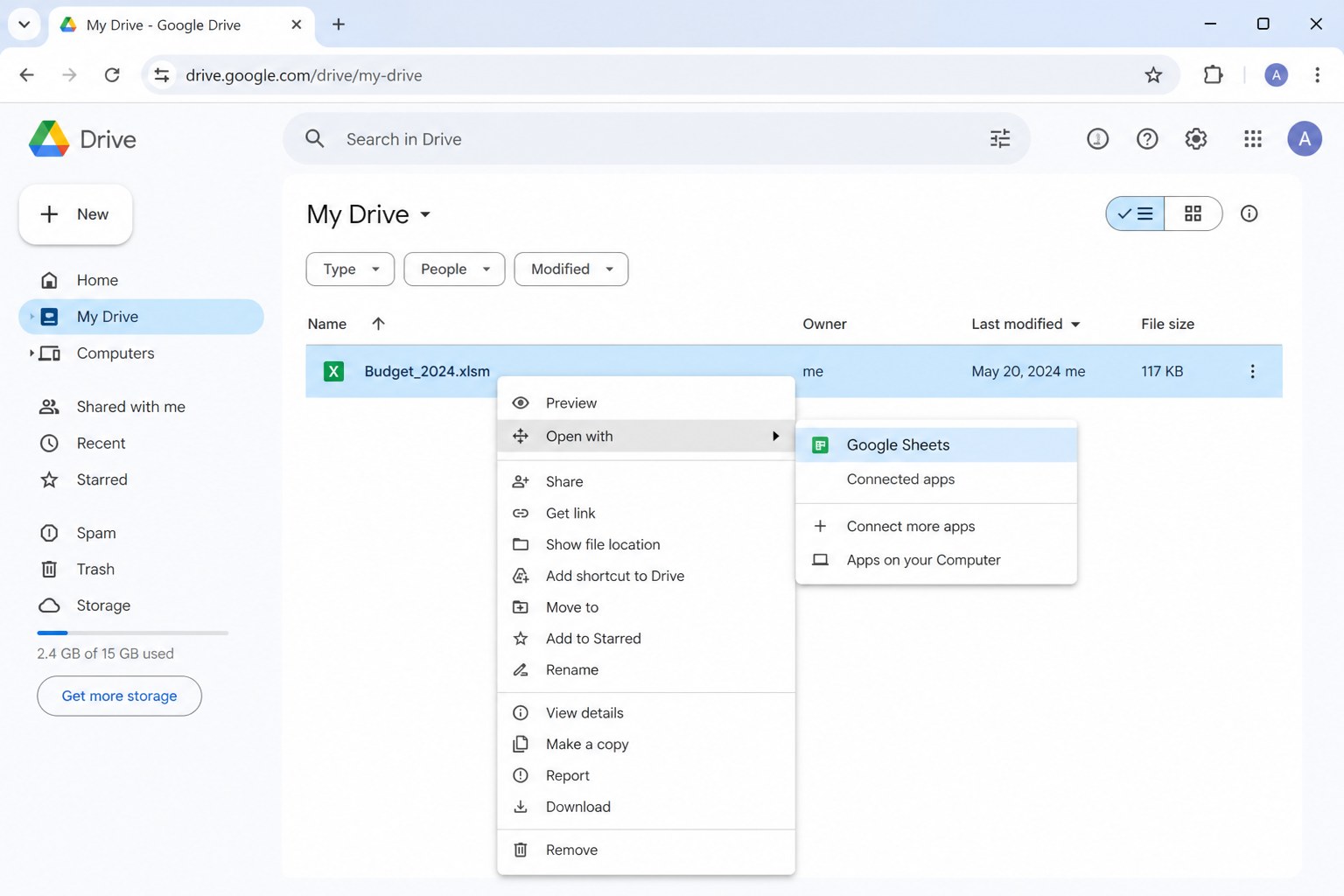
Sheets opens an editable copy. Expect a notice that macros are not supported. That message is normal for xlsm to google sheets and confirms you are working on data only.


Import XLSM to Google Sheets from an open workbook
Use File > Import when you already have a Sheet open and want more control. This xlsm to google sheets method lets you create a new file, insert tabs into the current file, or replace the spreadsheet.
In Google Sheets, go to File > Import.
Open the Upload tab and drop in the .xlsm file.
Pick an import location: Create new spreadsheet, Insert new sheet(s), or Replace spreadsheet.
Click Import data.
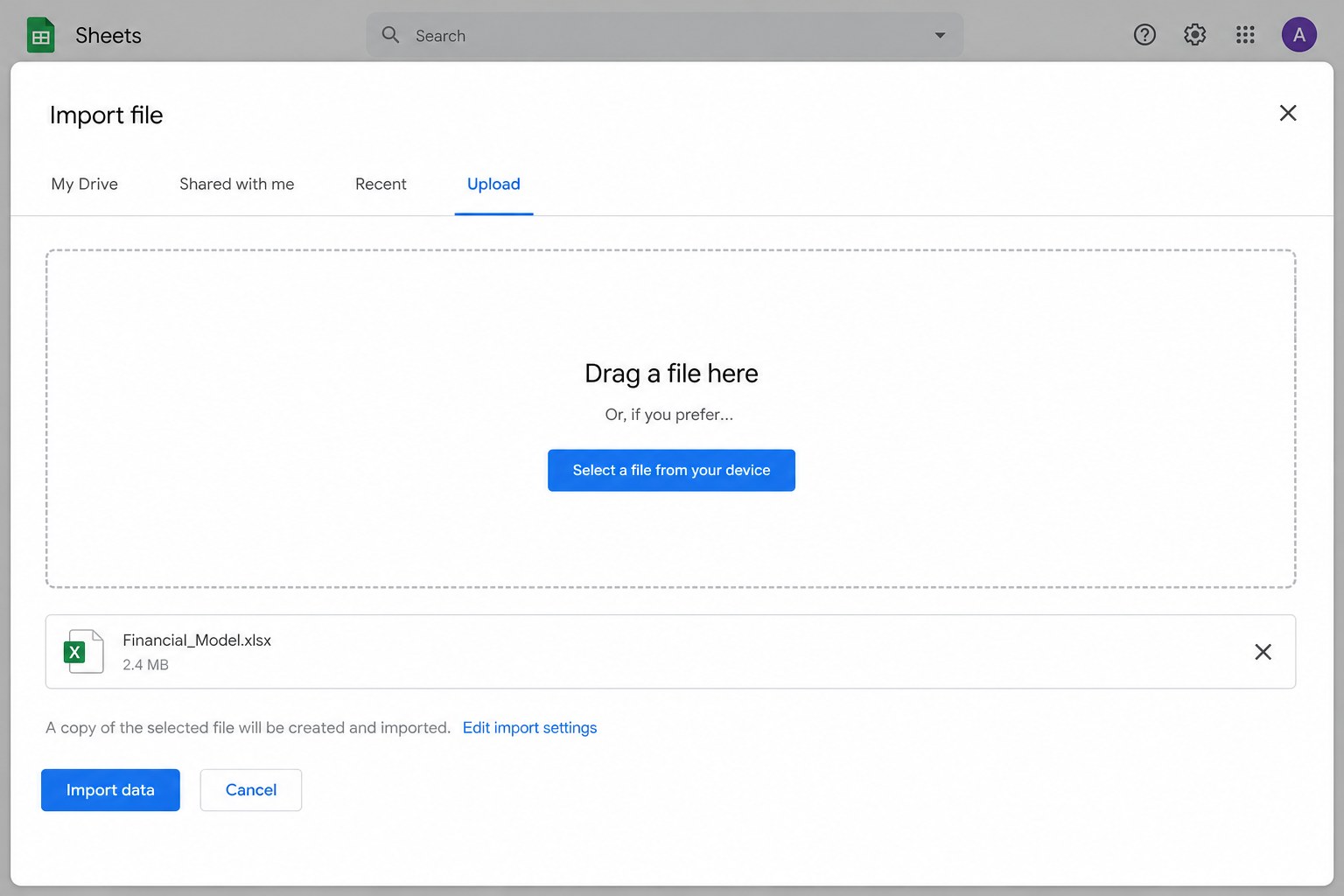
Choose Insert new sheet(s) when consolidating monthly .xlsm dumps into one master file. Avoid Replace unless you mean to wipe the current book. After import, spot-check dates, currency formats, and any array formulas that looked different in Excel.
Prep XLSM to Google Sheets by saving XLSX in WPS Spreadsheets
Some teams prefer a macro-free file before cloud upload. You can open the workbook locally in WPS Office, review the data, then save as .xlsx. That prep step makes later xlsm to google sheets uploads predictable because VBA is already removed.
Launch WPS Office and open Spreadsheets.
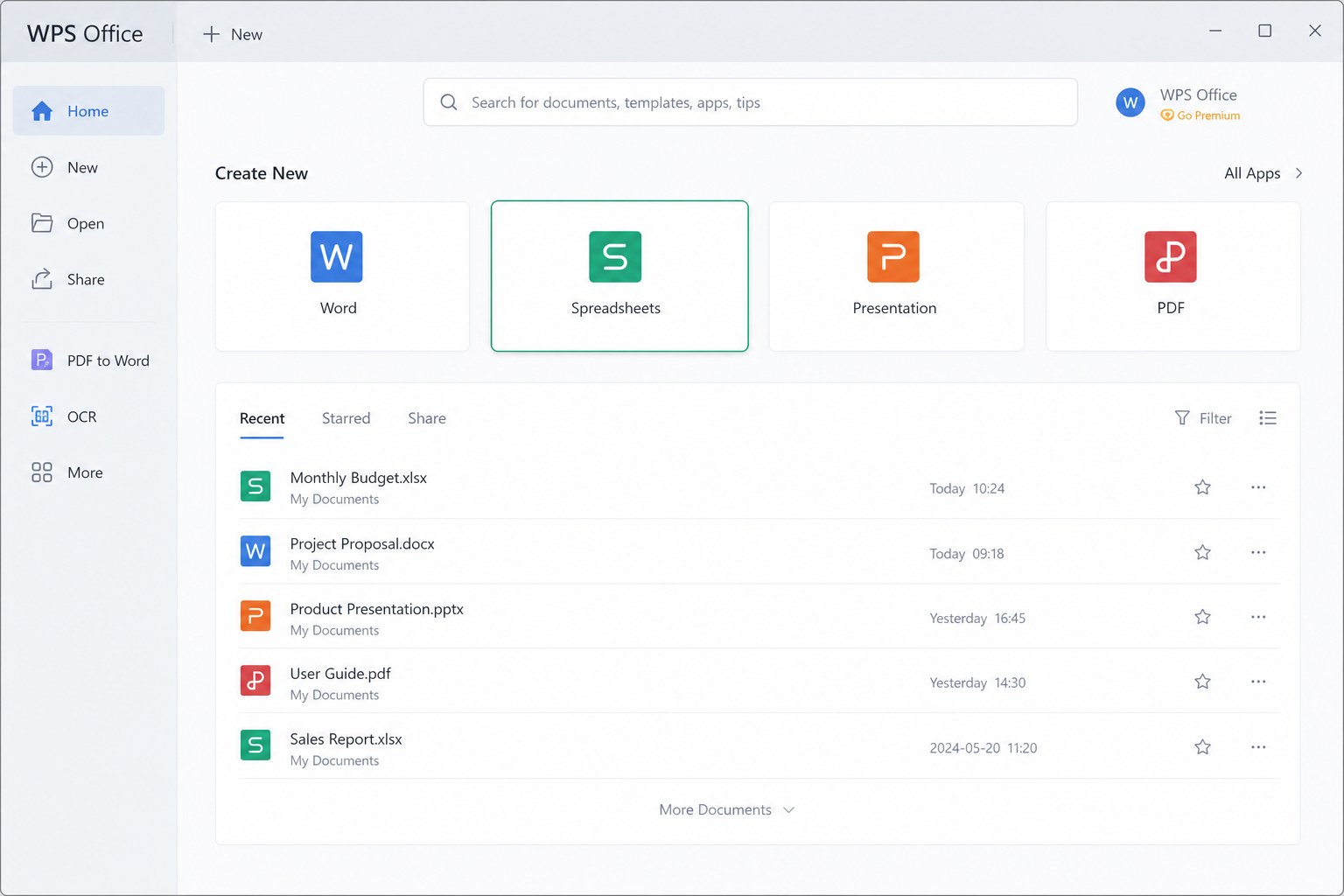
WPS home Spreadsheets tile selected Open the .xlsm file and confirm the sheets look correct.
Use Save As and choose Excel Workbook (*.xlsx).
Upload the .xlsx with Drive or File > Import to finish xlsm to google sheets.
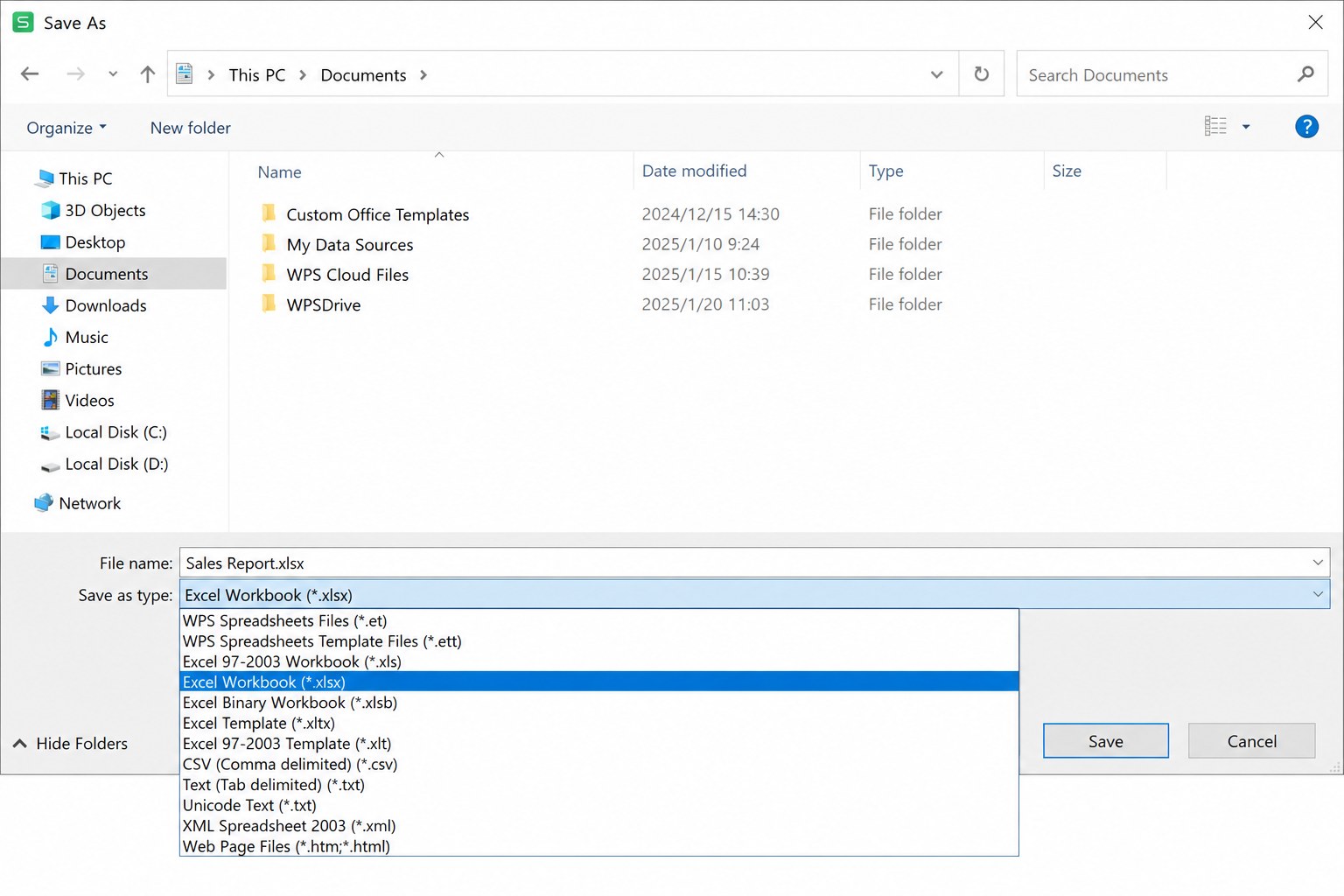
Keep the original .xlsm if anyone still needs the macros in Excel. The .xlsx copy is only for sharing and for a clean xlsm to google sheets conversion.
Rebuild automation after XLSM to Google Sheets conversion
After xlsm to google sheets, recreate workflows with native Sheets tools first. Conditional formatting, data validation, filters, and QUERY often replace simple formatting macros. For heavier logic, open Extensions > Apps Script and rewrite the steps in JavaScript.
Google Workspace Enterprise Plus and Education Plus accounts can try Google’s Macro Converter add-on for VBA-to-Apps Script migration. Even then, UserForms, some triggers, and desktop-only APIs need manual work. Always test the converted Sheet against the Excel output on a sample dataset.
Map each old macro to a Sheets feature or a short Apps Script function
Retest onOpen / onEdit behavior after xlsm to google sheets
Document what still requires desktop Excel so the team does not expect parity
FAQ
Will formulas survive XLSM to Google Sheets?
Most standard formulas do. Check volatile functions, structured table references, and Excel-only functions after import.
Can macros run after XLSM to Google Sheets?
No. VBA does not execute in Sheets. Rebuild with Apps Script or keep a desktop Excel copy for automation.
Is WPS useful before XLSM to Google Sheets?
Yes. Opening and saving as .xlsx in WPS Spreadsheets is a practical local prep step when you want a clean, macro-free file before uploading.
Should I keep the original XLSM?
Yes, if anyone still depends on the macros. Treat the Google Sheets file as the collaboration copy after xlsm to google sheets.
Once the data is in Sheets, share with view or edit links, lock critical ranges, and only then invest in Apps Script. That order keeps xlsm to google sheets migrations short and avoids rebuilding automation you no longer need.


'%3e%3cpath%20d='M19.9911%204.11386V6.471H18.5894C18.0775%206.471%2017.7322%206.57814%2017.5536%206.79243C17.3751%207.00671%2017.2858%207.32814%2017.2858%207.75671V9.44421H19.9019L19.5536%2012.0871H17.2858V18.8639H14.5536V12.0871H12.2769V9.44421H14.5536V7.49779C14.5536%206.39064%2014.8632%205.53201%2015.4822%204.92189C16.1013%204.31177%2016.9257%204.00671%2017.9554%204.00671C18.8304%204.00671%2019.509%204.04243%2019.9911%204.11386Z'%20fill='%23333333'/%3e%3c/g%3e%3cdefs%3e%3cclipPath%20id='clip0_2938_8199'%3e%3crect%20width='16'%20height='16'%20fill='white'%20transform='translate(8%204.00671)'/%3e%3c/clipPath%3e%3c/defs%3e%3c/svg%3e)
'%3e%3cpath%20d='M17.5237%2010.7813L23.4811%204H22.0699L16.8949%209.88693L12.7648%204H8L14.2469%2012.9029L8%2020.0133H9.4112L14.8725%2013.7952L19.2352%2020.0133H24M9.92053%205.04213H12.0885L22.0688%2019.0224H19.9003'%20fill='%23333333'/%3e%3c/g%3e%3cdefs%3e%3cclipPath%20id='clip0_2938_8200'%3e%3crect%20width='16'%20height='16.0134'%20fill='white'%20transform='translate(8%204)'/%3e%3c/clipPath%3e%3c/defs%3e%3c/svg%3e)


