


In short
the best way is a four-sheet workbook — Transactions, Categories, Dashboard and Vendors — with a fixed category list and SUMIFS or a pivot for totals. It holds up for one or two people recording fewer than about 300 expenses a month in a single currency. Past that, software is cheaper than the hours you lose.
Which of the five setups fits you comes down to two things: what you sell, and how closely you need to watch spending. A freelancer needs a clean record for tax season; a five-person agency needs budget-versus-actual control. Pick the lightest setup that answers your monthly question, because heavier models get abandoned rather than upgraded.
How much detail do you actually need to record?
Start from the question you ask every month, not from a template. If you just need to justify what you spent, four fields are enough: date, vendor, amount and a receipt. If you also need to know where the money went, add a category, a payment method and a tax flag.
If you need to stop overspending, add a budget per category and compare it to the actual every week. And if someone else has to approve or audit the result, that is a workflow rather than a spreadsheet — no amount of clever formatting replaces an approval log.
Which of the five Excel setups fits your business?
Each row below is a complete setup that a small business can run on its own. Start at the top and stop at the first row whose answer is good enough.
| Setup | Best for | Effort | What you get | Where it breaks |
|---|---|---|---|---|
| 1. Single-sheet log | Solo owners, under 50 expenses a month | 15 min | A clean record | No totals, no trends, no budget |
| 2. Category summary | Freelancers, 50–150 expenses a month | 1 hour | Monthly totals by category | A misspelt category quietly drops rows |
| 3. Budget vs. actual | Owners who overspend in one area | 2 hours | Warning before month-end | A stale budget gives confident wrong answers |
| 4. Pivot dashboard | Teams at 100+ expenses a month | Half a day | Trends at a glance | Needs refreshing; breaks if columns are renamed |
| 5. Power Query import | Steady volume with bank CSVs | 1 day | A month becomes a refresh | Breaks when the bank changes its export |
Most small businesses belong in rows 2 or 3. Row 1 suits someone with a handful of receipts and no interest in analysis. Rows 4 and 5 pay off only when the volume already hurts — a dashboard for 30 expenses a month is a weekend spent making a chart nobody reads.
None of these need to be built from scratch. WPS Spreadsheet ships expense and reimbursement templates that already cover rows 1 to 3, which is usually the difference between a file that gets started tonight and one that stays a plan.
How WPS Spreadsheet handles it, in practice
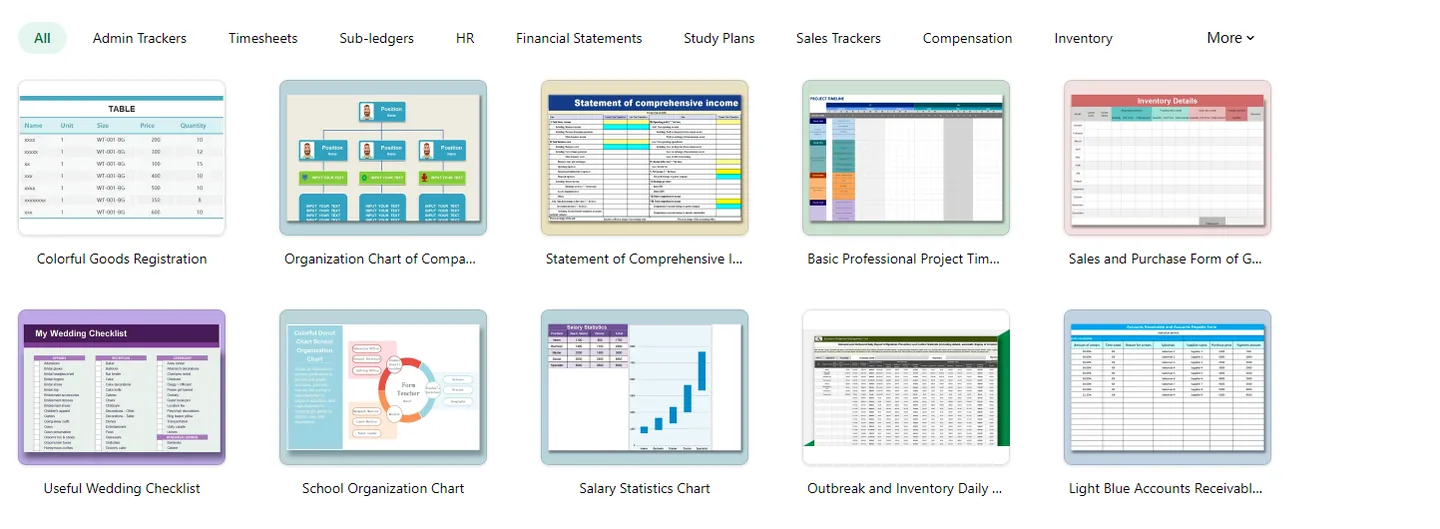
Start from a template. The template library carries expense reports, reimbursement sheets and travel expense forms as ordinary spreadsheet files — the kind you can open, rename and edit. Replace the sample rows with your own categories and the structure is done.
Convert the range to a table once. One click makes new rows inherit formulas and formatting, which is the step that prevents totals from silently stopping at row 200.
Lock categories behind a dropdown. Point the category column at your list with data validation. A minute of setup removes the most common source of wrong totals.
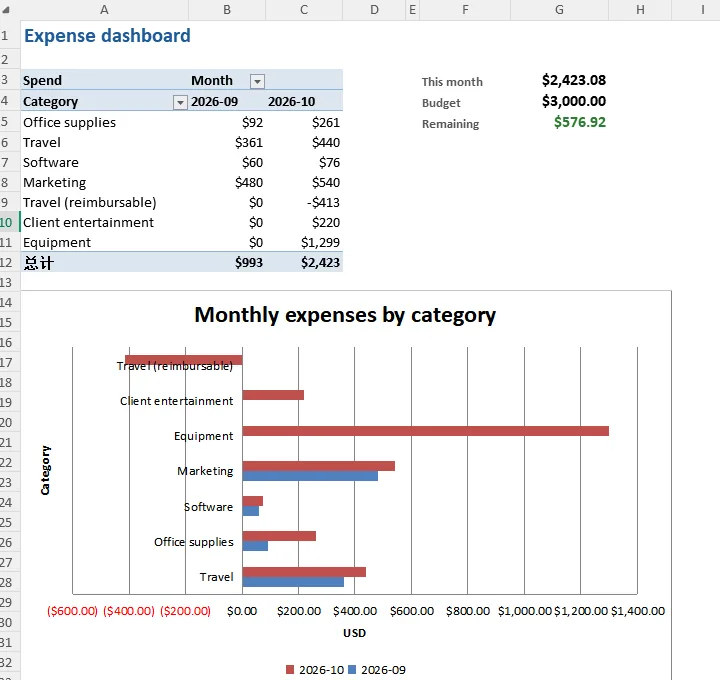
Let a pivot do the monthly summary. Category down the side, month across the top, one chart beside it. Refreshing is a click, and the layout survives a year-end review without being rebuilt.
Get receipts in where they happen. Take a photo of a paper receipt or a printed statement and use the image-to-table feature to turn it into editable rows instead of typing amounts by hand. Clean, straight tables convert well; handwriting and angled photos still need a check.
Keep one file for everyone. Because the workbook lives in the cloud and opens on phone, tablet and desktop, the owner, the bookkeeper and whoever is claiming an expense all work on the same version instead of emailing final_v3.
What a working expense sheet actually looks like
The layout matters more than the formulas. Below is a real WPS Spreadsheet file set up for this job — transaction rows on the left, category totals on the right.
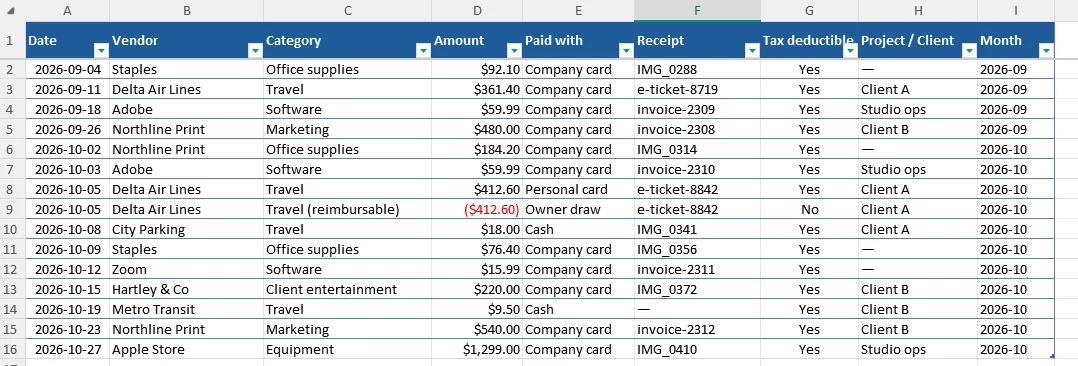
Two details in that layout do most of the work. One row is a negative amount that cancels a personal card payment, so the company total stays true; and the receipt column holds a file name or a link, which is what turns a number into evidence at tax time. Get those right and the summary is just arithmetic.
How do you track expenses in Excel by business type?
The core sheet stays the same. What changes is three or four columns, and the mistake each type tends to make.
| Business type | Add these fields | What usually goes wrong |
|---|---|---|
| Freelancer or sole proprietor | Tax line, client, billable flag | Personal spending mixed into business rows |
| LLC or S-corp | Owner draw, approver, date paid | Reimbursements counted twice |
| E-commerce | Cost of goods, platform fee, refund | Refunds netted instead of logged |
| Service business | Project code, phase, mileage | Client costs counted as overhead |
| Retail or food | Daily cash deposit, card fee, waste | Cash leakage hidden in daily totals |
Two of these matter more than the rest. Freelancers should map categories to the exact lines on the tax return rather than inventing their own vocabulary, which saves an afternoon in April. E-commerce sellers should record refunds as their own row with a negative amount, so gross revenue and refunds stay auditable instead of quietly cancelling out.
When should you stop using Excel to track business expenses?
Not at a row limit — at the point where the work around the file outgrows the file. In practice that is around 300 to 500 entries a month per person, or the moment a second person needs to touch it.
- More than 500 expenses a month, or growth you can already see coming.
- Three or more people entering data, or anyone entering it from a phone.
- More than one entity or currency in the same file.
- A lender, auditor or investor asking for an approval trail.
- Two hours a month reconciling, every month.
Two of those together and a subscription is the cheaper option. One alone is usually a sign to tighten the spreadsheet, not replace it. And when the approval trail is the problem, the fix is usually a form-and-approval layer on top of the same numbers — the spreadsheet does not have to be thrown away to get it.
Why do Excel expense trackers fail? 3 common mistakes
Free-typed categories. Two spellings of one category, two totals, no error message. A dropdown prevents the entire class of problem.
No monthly close. A year reconstructed in April is slower and less accurate than twelve short sessions, and by then the receipts are gone.
One file, one copy. Most spreadsheet losses are an overwrite, not a disk failure. A dated copy each month is the cheapest insurance in bookkeeping.
FAQs
Is Excel good enough to track business expenses?
For one entity, one or two people, and under about 300 transactions a month, yes. It stops being good enough when you need approvals, multiple currencies, or several people editing the same file at once.
What columns should an expense tracker have?
Date, vendor, category, amount, payment method, tax-deductible flag and a receipt link cover most businesses. Add project or client only if you bill clients or run jobs.
How many categories should I use?
Ten to fifteen, mapped to the lines on your tax return. Beyond twenty, nobody remembers the difference between two similar options at the moment of entry.
Can I import bank transactions automatically?
Yes, with Power Query and a CSV export. It removes the typing, not the judgement — someone still has to confirm what each vendor was for.
How many expenses a month can Excel handle before it stops working?
Around 300 to 500 entries a month per person, or as soon as a second person needs to edit the same file. Past that the limits are approvals, multiple currencies and shared editing rather than the row count.



