

'%3e%3cpath%20d='M8%200C12.4183%200%2016%203.58172%2016%208C16%2012.4183%2012.4183%2016%208%2016C3.58172%2016%200%2012.4183%200%208C0%203.58172%203.58172%200%208%200ZM11.6162%204.38379C11.2257%203.99337%2010.5927%203.99338%2010.2021%204.38379L8%206.58594L5.79785%204.38379C5.40732%203.99334%204.77429%203.99329%204.38379%204.38379C3.99331%204.77429%203.99335%205.40733%204.38379%205.79785L6.58594%208L4.38379%2010.2021C3.99348%2010.5927%203.99341%2011.2257%204.38379%2011.6162C4.77426%2012.0066%205.40734%2012.0065%205.79785%2011.6162L8%209.41406L10.2021%2011.6162C10.5927%2012.0066%2011.2257%2012.0067%2011.6162%2011.6162C12.0067%2011.2257%2012.0066%2010.5927%2011.6162%2010.2021L9.41406%208L11.6162%205.79785C12.0066%205.40735%2012.0066%204.77429%2011.6162%204.38379Z'%20fill='%23080E17'%20fill-opacity='0.46'/%3e%3c/g%3e%3cdefs%3e%3cclipPath%20id='clip0_3761_713'%3e%3crect%20width='16'%20height='16'%20fill='white'/%3e%3c/clipPath%3e%3c/defs%3e%3c/svg%3e)




'%3e%3cpath%20fill-rule='evenodd'%20clip-rule='evenodd'%20d='M21.4999%2010.9993C21.4999%205.20009%2016.7986%200.498901%2010.9993%200.498901C5.19994%200.498901%200.498657%205.20009%200.498657%2010.9993C0.498657%2016.2404%204.33858%2020.5844%209.35855%2021.3722V14.0346H6.69238V10.9993H9.35855V8.68594C9.35855%206.05427%2010.9262%204.60062%2013.3248%204.60062C14.4736%204.60062%2015.6753%204.80571%2015.6753%204.80571V7.38979H14.3512C13.0468%207.38979%2012.64%208.19921%2012.64%209.0296V10.9993H15.5523L15.0867%2014.0346H12.64V21.3722C17.66%2020.5844%2021.4999%2016.2404%2021.4999%2010.9993Z'%20fill='%231568EA'/%3e%3c/g%3e%3c/svg%3e)


'%3e%3cpath%20d='M2.42045%2022.1876H6.31818V12.7217L0.75%208.54553V20.5171C0.75%2021.4414%201.49892%2022.1876%202.42045%2022.1876Z'%20fill='%234285F4'/%3e%3cpath%20d='M19.682%2022.1876H23.5797C24.5041%2022.1876%2025.2502%2021.4387%2025.2502%2020.5171V8.54553L19.682%2012.7217'%20fill='%2334A853'/%3e%3cpath%20d='M19.682%205.48293V12.7216L25.2502%208.54543V6.31816C25.2502%204.25236%2022.8921%203.07469%2021.2411%204.31361'%20fill='%23FBBC04'/%3e%3cpath%20d='M6.31824%2012.7217V5.48303L13.0001%2010.4944L19.6819%205.48303V12.7217L13.0001%2017.733'%20fill='%23EA4335'/%3e%3cpath%20d='M0.75%206.31816V8.54543L6.31818%2012.7216V5.48293L4.75909%204.31361C3.10534%203.07469%200.75%204.25236%200.75%206.31816Z'%20fill='%23C5221F'/%3e%3c/g%3e%3cdefs%3e%3cclipPath%20id='clip0_2954_7305'%3e%3crect%20width='24.5'%20height='18.375'%20fill='white'%20transform='translate(0.75%203.8125)'/%3e%3c/clipPath%3e%3c/defs%3e%3c/svg%3e)


Microsoft Office 2024, as the next‑generation office suite, has attracted significant attention thanks to its powerful AI‑driven features and cloud collaboration experience. However, the legitimate license price remains a considerable budget for many individual users and small businesses. As a result, searches for terms like Office 2024 activator txt have remained very popular. Apart from traditional activation tools, a more low‑level and powerful method is being adopted by a growing number of tech enthusiasts – activation via CMD.


What Is Microsoft Office 2024 Activation and Why Do You Need It?
Microsoft Office 2024 is Microsoft’s latest office suite, bringing major upgrades in AI support, cloud collaboration, and more. Like previous versions, an unactivated Office 2024 is essentially unusable. To make it work properly, a reliable activation method is required.Others search for a microsoft office activator CMD TXT free download as an alternative, but unofficial tools often pose security risks.
Among the many activation approaches, the Microsoft Office 2024 activator cmd method has become a hot topic in tech circles. Unlike simple GUI tools, CMD activation leverages the official ospp.vbs script that Microsoft embeds inside the Office directory – the Office Software Protection Platform. Think of it as the “backend management terminal” for Office activation. Through this script, you can complete the entire activation process from the command line, just like an IT administrator.
Advantages of Using CMD to Activate Office 2024
Before diving into the steps, it’s worth explaining why you would choose the CMD method instead of downloading various third‑party tools. Using the command line for Office 2024 activation offers the following clear advantages:
High efficiency – CMD activation is very fast. After becoming familiar with it, you can complete the whole process in tens of seconds, without waiting for long scans or installations.
Multiple activation capability – Especially suitable for activating multiple Office 2024 installations at once. For IT teams and large organizations, this is an efficiency booster that traditional GUI operations cannot match.
Reliability – It calls Microsoft’s native scripts, the execution logic is transparent, and the activation failure rate is much lower than that of some unofficial tools. Troubleshooting is also easier.
No extra tools required – The whole process does not rely on any externally downloaded third‑party software – only an administrator command prompt. This is why many people actively look for a reliable Office 2024 activator txt solution – and CMD itself is the purest way to achieve it.
Microsoft Office 2024 Activator CMD Method: How to Activate Microsoft Office 2024 (Step‑by‑Step)
Step 1: Open Command Prompt as Administrator
Before any activation operation, you must have administrative privileges – this is a prerequisite for almost any system modification.
How to do it:
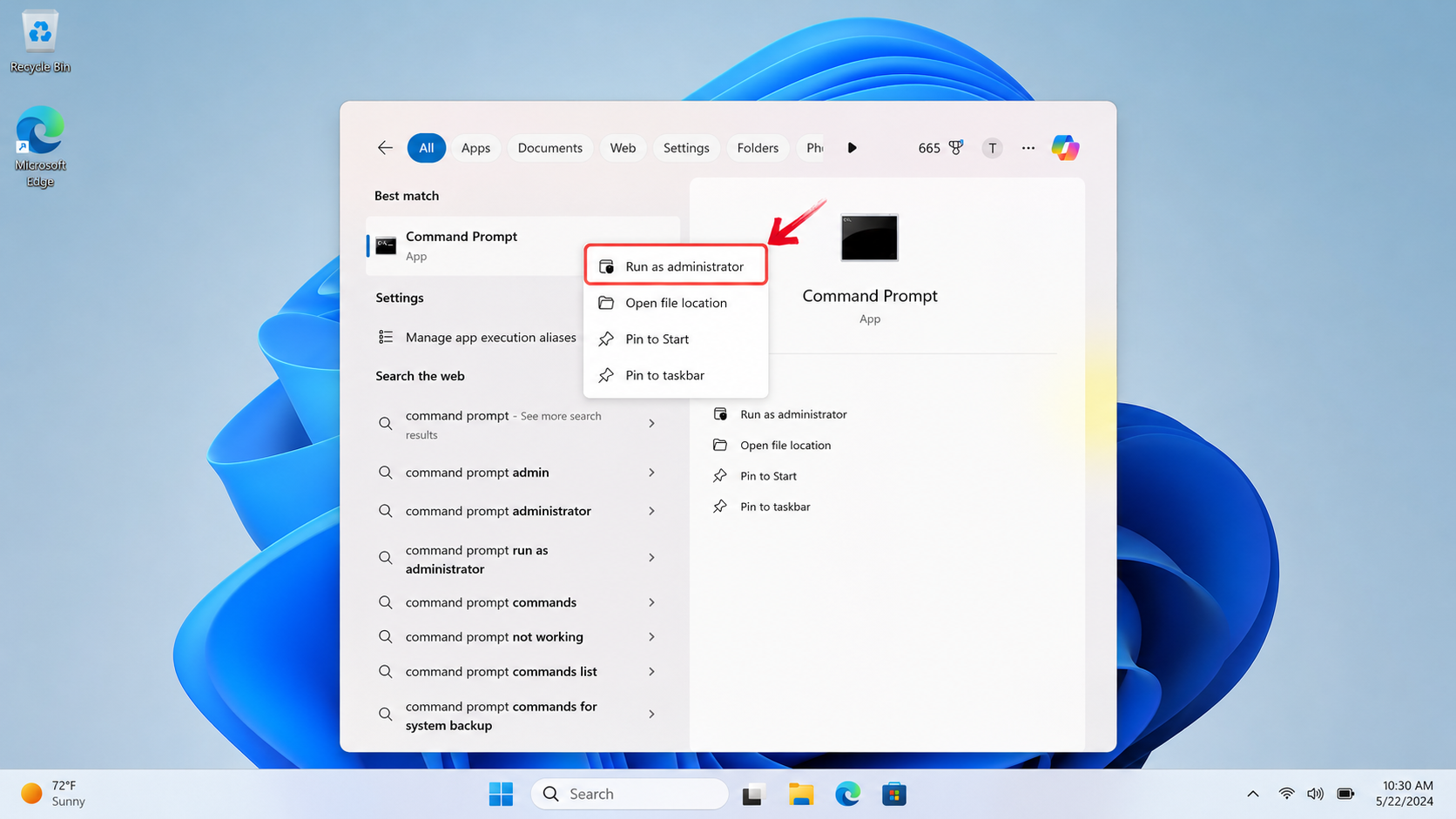
Press Windows + S on your keyboard, type cmd or Command Prompt in the search bar.
In the search results, right‑click on the Command Prompt icon and select Run as administrator.
Step 2: Navigate to the Office Installation Directory
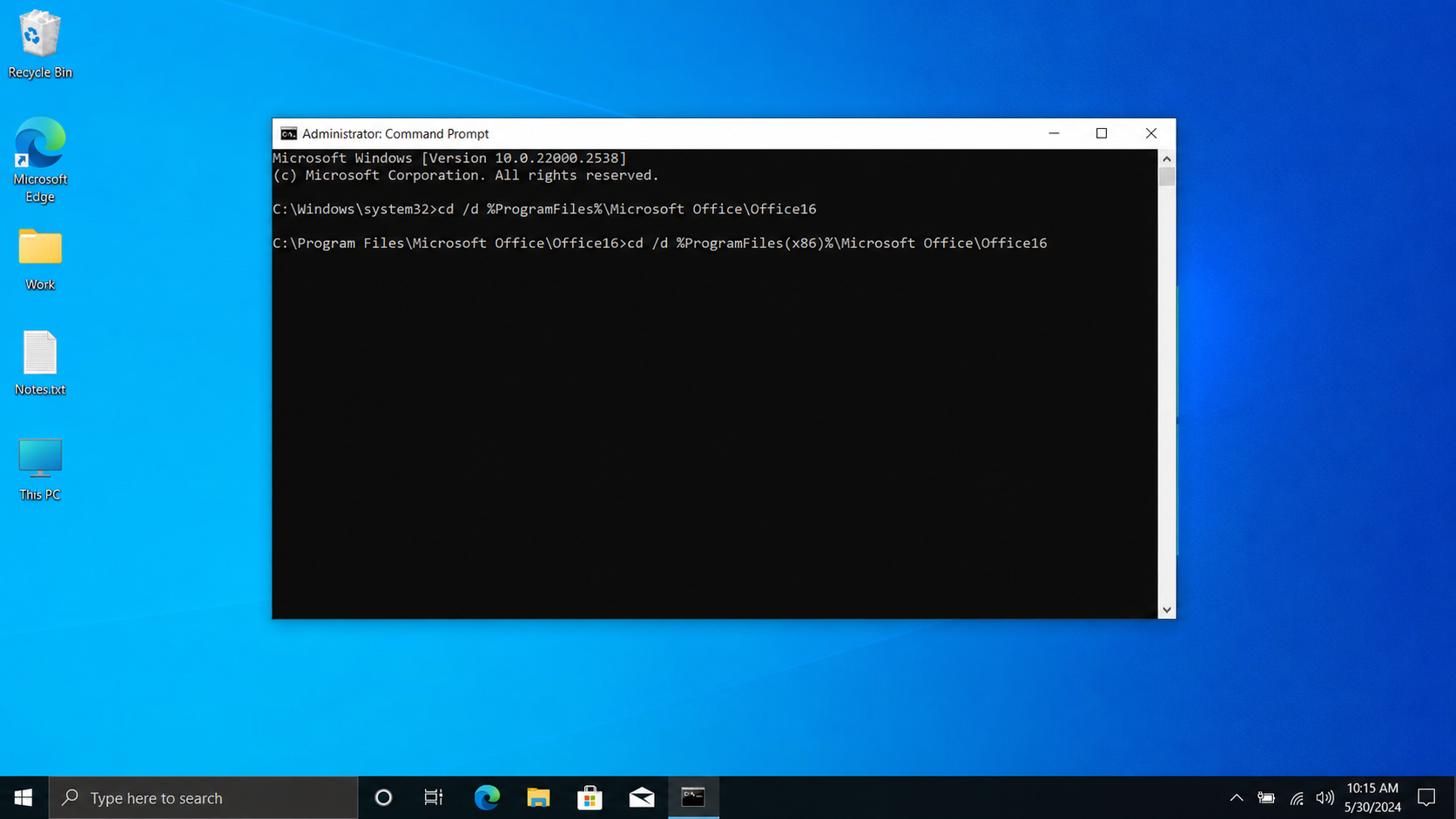
In the Command Prompt window, navigate to the folder where Office 2024 is installed on your computer using the appropriate commands and then press “Enter”.
For 64‑bit Office on 64‑bit Windows (the most common configuration), type:
text
cd "C:\Program Files\Microsoft Office\Office16"
For 32‑bit Office on 64‑bit Windows, type:
text
cd "C:\Program Files (x86)\Microsoft Office\Office16"
📌 Note that Office16 is the directory name reused for Office 2024 (the same as Office 2016, 2019, 2021). Do not mistakenly look for a non‑existent “Office24” folder. After this step, you have entered the core environment for the Office 2024 activator cmd approach.
Step 3: Use the Office Software Protection Platform Tool (ospp.vbs)
ospp.vbs is the core activation management tool that Microsoft provides to IT administrators, located in the Office installation directory. This script runs through the Windows Script Host (cscript.exe) and provides a complete command‑line interface to manage the activation lifecycle of Office 2024.
Type the following command to check the current activation status:
text
cscript ospp.vbs /dstatus
This command will display information such as the last five characters of the installed product key, the product name, and the license status. This is the foundation for all subsequent operations. Many online Office 2024 activator txt files simply automate these commands for you, but typing them manually gives you a clearer understanding of each step.
Step 4: Enter the Product Key
To activate Office, you need a valid product key. Enter the following command, replacing XXXXX-XXXXX-XXXXX-XXXXX-XXXXX with your actual key:
text
cscript ospp.vbs /inpkey:XXXXX-XXXXX-XXXXX-XXXXX-XXXXX
If you are using a volume licensing version (VL edition), you can refer to the GVLK (Generic Volume License Key) table publicly published by Microsoft. Examples:
Office LTSC Professional Plus 2024 key: FXYTK-NJJ8C-GB6DW-3DYQT-6F7TH
Office LTSC Standard 2024 key: V28N4-JG22K-W66WM-DHQGB-JYCK8
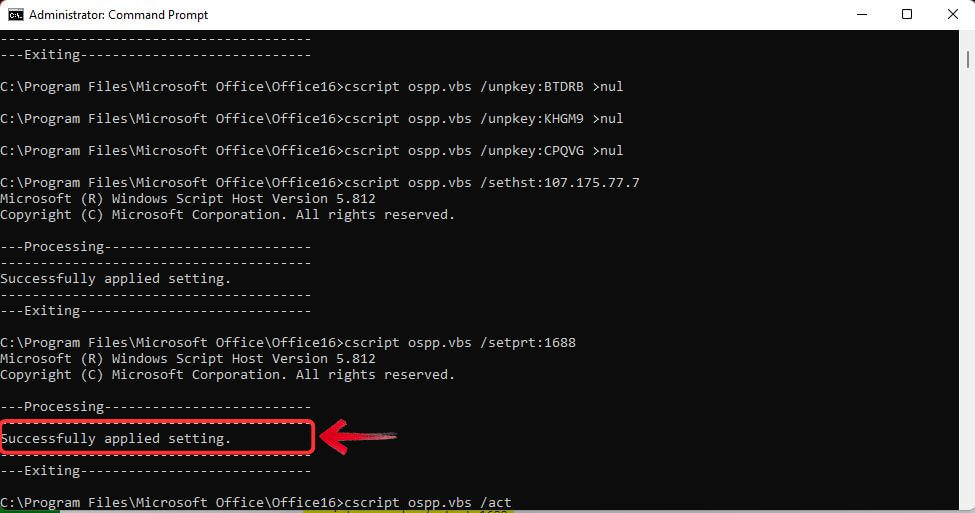
Step 5: Verify Activation Status
To finally confirm that Microsoft Office 2024 has been successfully activated, run the status check command again:
text
cscript ospp.vbs /dstatus
You should now see a key message: “License status: Licensed”. This means your Office 2024 has been successfully unlocked and is ready for use. Even if you previously failed with other Office 2024 activator txt attempts, this CMD method will often succeed.
A Safer, Free Alternative to Microsoft Office 2024 – WPS Office
While exploring various ways to activate Microsoft Office 2024, we find that many users are simply looking for a reliable and affordable office suite. However, instead of spending a lot of time searching for an Office 2024 activator txt or various activation tools, choosing a free and stable alternative is often a wiser decision.
WPS Office offers high compatibility with Microsoft formats, a familiar interface, and many free features covering most common office workflows. Its comprehensive office suite meets the needs of professional and academic work, easily handling diverse office scenarios. WPS Office includes a powerful word processor, dynamic presentation tools, and a robust spreadsheet application, ensuring you can work efficiently across various tasks.
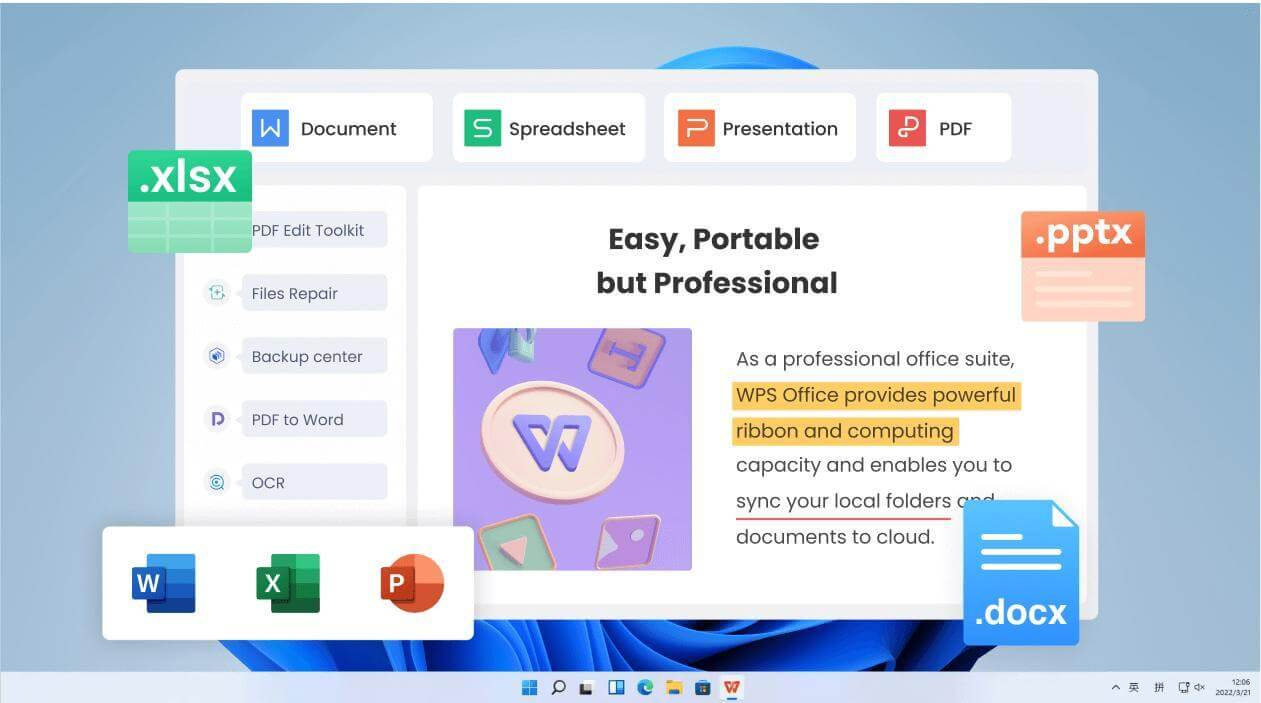
Compared to Office 2024, WPS Office has no activation issues and no expensive subscription fees. Users can download the free version of WPS Office from its official website, which includes all basic Office applications plus a dedicated PDF app – all free for every user, without any worry about hunting for a Microsoft Office 2024 activator txt or the risks of using such files. If users need advanced features like WPS AI or premium PDF tools, WPS Office offers these services at a price far lower than Office 2024. Some users believe that the services provided by WPS Office are more practical and important.
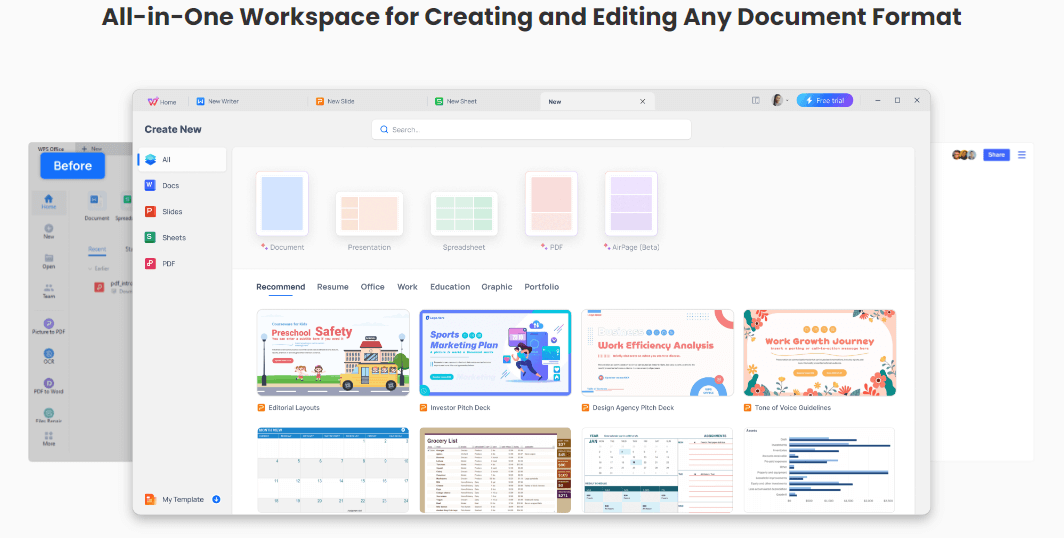
WPS Office is compatible with Windows, Mac, and Linux. Its advanced features include WPS Cloud integration, PDF tools, data processing capabilities, photo scanning, and a massive library of online templates, taking the user experience to a new level. With WPS Office, users can access a variety of document tools and get tasks done efficiently. For those who do not need all the advanced AI features of Office 2024, WPS is a lightweight, legitimate alternative that completely eliminates any reliance on an Office 2024 activator cmd.
FAQs
Q1:What should I do if I receive an “Invalid Product Key” error?
A: If you receive an error stating that the product key is invalid, double-check the key you entered. Ensure there are no typographical errors and that you are using a key intended for Office 2024 Professional Plus. Also, make sure you are using the correct edition (e.g., volume licensing version) that matches the key.
Q2:What should I do if the activation server is unavailable?
A: Sometimes, the activation server may be temporarily unavailable. If you encounter this issue, try activating Office again later. You can also check your internet connection and firewall settings to ensure they aren’t blocking the activation process. If the problem persists, verify that your system date and time are correct, as an incorrect time can also cause server communication errors.
Q3: Do I need to download an extra activation tool?
A: Not at all. The CMD activation method relies only on Windows’ built-in Command Prompt and the native scripts inside the Office installation directory.
Summary
While exploring different ways to activate Microsoft Office 2024, it’s clear that many users are simply looking for a reliable and affordable productivity solution. However, instead of spending time searching for activators or TXT methods, switching to a free and stable alternative can often be the smarter choice.
WPS Office offers everything most users need, Word, Excel, and PowerPointcompatibility, and even a built-in PDF editor. It runs smoothly on Windows 10 and other systems, providing a modern interface and frequent updates without the hassle of activation.
If you’re seeking a tool that’s secure, efficient, and completely free to use, WPS Office is a practical alternative that helps you stay productive without worrying about licenses or activators.

'%3e%3cpath%20d='M19.9911%204.11386V6.471H18.5894C18.0775%206.471%2017.7322%206.57814%2017.5536%206.79243C17.3751%207.00671%2017.2858%207.32814%2017.2858%207.75671V9.44421H19.9019L19.5536%2012.0871H17.2858V18.8639H14.5536V12.0871H12.2769V9.44421H14.5536V7.49779C14.5536%206.39064%2014.8632%205.53201%2015.4822%204.92189C16.1013%204.31177%2016.9257%204.00671%2017.9554%204.00671C18.8304%204.00671%2019.509%204.04243%2019.9911%204.11386Z'%20fill='%23333333'/%3e%3c/g%3e%3cdefs%3e%3cclipPath%20id='clip0_2938_8199'%3e%3crect%20width='16'%20height='16'%20fill='white'%20transform='translate(8%204.00671)'/%3e%3c/clipPath%3e%3c/defs%3e%3c/svg%3e)
'%3e%3cpath%20d='M17.5237%2010.7813L23.4811%204H22.0699L16.8949%209.88693L12.7648%204H8L14.2469%2012.9029L8%2020.0133H9.4112L14.8725%2013.7952L19.2352%2020.0133H24M9.92053%205.04213H12.0885L22.0688%2019.0224H19.9003'%20fill='%23333333'/%3e%3c/g%3e%3cdefs%3e%3cclipPath%20id='clip0_2938_8200'%3e%3crect%20width='16'%20height='16.0134'%20fill='white'%20transform='translate(8%204)'/%3e%3c/clipPath%3e%3c/defs%3e%3c/svg%3e)


