



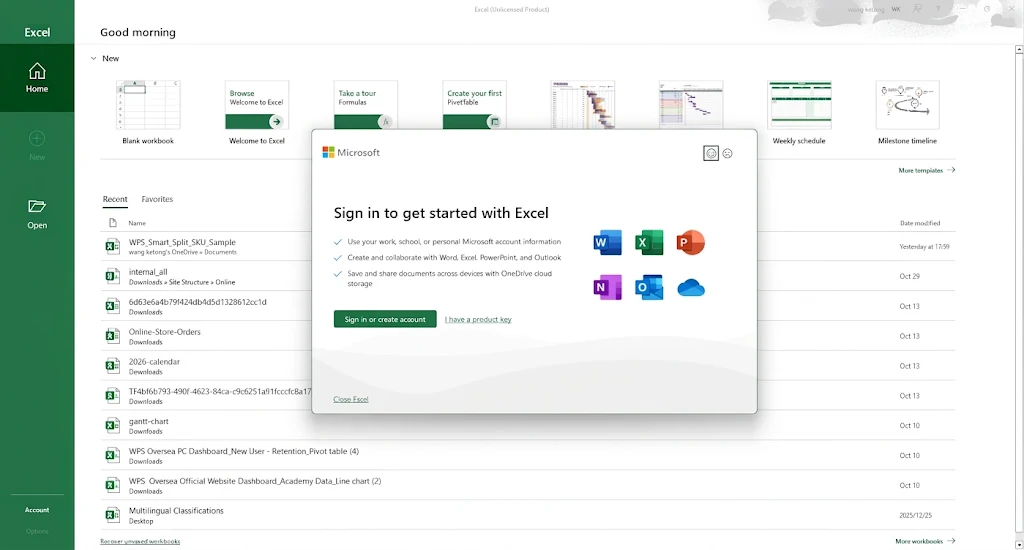
Almost every new Windows laptop now ships with the Microsoft 365 apps already sitting in the Start menu, but the apps and the licence are two different things. On first launch Office asks you to sign in and attach a payment method to start the 30-day trial. Decline that, and the suite drops into reduced-functionality mode: you can open and print documents, but you cannot create, edit or save anything. That is the point where most people start searching for Ohook Office activation.
This guide explains what Ohook actually does inside Windows, walks through the one-command installation from Microsoft Activation Scripts (MAS), compares Ohook with HWID and Online KMS, and is equally clear about what it does not give you — the Microsoft account entitlement, the 1 TB OneDrive quota, mobile apps and Copilot.


Why a Preinstalled Office Still Asks You to Pay
The copy in your Start menu is a preinstalled image, not a licence. Microsoft's arrangement with laptop makers puts the binaries on the disk and leaves the entitlement to you: either a subscription (Microsoft 365 Personal/Family), a one-time retail key, or the trial. Three consequences follow, and they explain most of the confusion around activation:
Reinstalling the apps does not reset anything — the trial is tied to your Microsoft account, not to the installation.
Reduced-functionality mode is not a bug and not a "bad install"; Office is behaving exactly as licensed.
The licence check runs locally against the Software Protection Platform (SPP) on your own machine, which is precisely the mechanism Ohook targets.
What Is Ohook Office Activation?
Microsoft Activation Scripts (MAS) is an open-source project that automates several different activation methods for Windows and Office. Ohook is the Office-specific one. Where Online KMS talks to a remote server, Ohook never leaves your PC, and that is why it is permanent rather than renewable.
The mechanism is easier to follow than the name suggests. When Office checks whether it is licensed, it does not ask Microsoft directly — it calls sppc.dll in the system folder, which in turn queries the SPP service. Ohook places its own small, open-source sppc.dll inside the Office program folder. Windows loads libraries from the application's own directory first, so Office picks up the local copy, which simply reports "activated" every time. The system-wide DLL is left untouched, which is why Windows itself keeps its own activation state and why the patch survives Office updates and Windows feature upgrades.
What that means in practice for Ohook Office activation:
Local and offline. No KMS host, no port 1688, no server that can disappear.
Permanent, not 180-day. There is no renewal cycle and no re-activation reminder, unlike Online KMS.
Wide version coverage. Office 2010, 2013, 2016, 2019, 2021, 2024 and Microsoft 365 Apps on Windows Vista and later. Office UWP apps from the Microsoft Store are the exception — they need the TSforge option instead.
Silent about your account. It changes the licence state of the copy installed on this PC only; your Microsoft account stays a free account.
Ohook vs HWID vs Online KMS: Which One Do You Need?
MAS bundles four methods, and the most common mistake is picking the wrong one — HWID does nothing for Office, and Ohook does nothing for Windows. The table below is the short version:
| Method | Activates | Permanence | Internet | Best for |
|---|---|---|---|---|
| HWID | Windows only | Permanent, tied to the motherboard | Needed once | Windows on a normal PC |
| Ohook | Office only | Permanent until Windows is reinstalled or the patch is removed | Needed once | Office 2010–2024 and Microsoft 365 Apps |
| TSforge | Windows, Office, ESU | Permanent | Offline | LTSC/Server builds and Office UWP apps |
| Online KMS | Windows and Office | Renewable, 180 days per cycle | Required on every renewal | Legacy builds, last-resort fallback |
So: HWID for Windows, Ohook for Office, TSforge when the normal option throws an error on LTSC or Store apps, and Online KMS only when nothing else fits.
How to Activate Office with Ohook: Step by Step
Close Word, Excel, Outlook and PowerPoint before you start — the patch has to replace a DLL that Office keeps loaded while it runs.
Open PowerShell as administrator. Right-click the Start button and choose Terminal (Admin) or Windows PowerShell (Admin). Do not use Command Prompt: the one-liner below is a PowerShell command, and CMD will answer with "irm is not recognized".
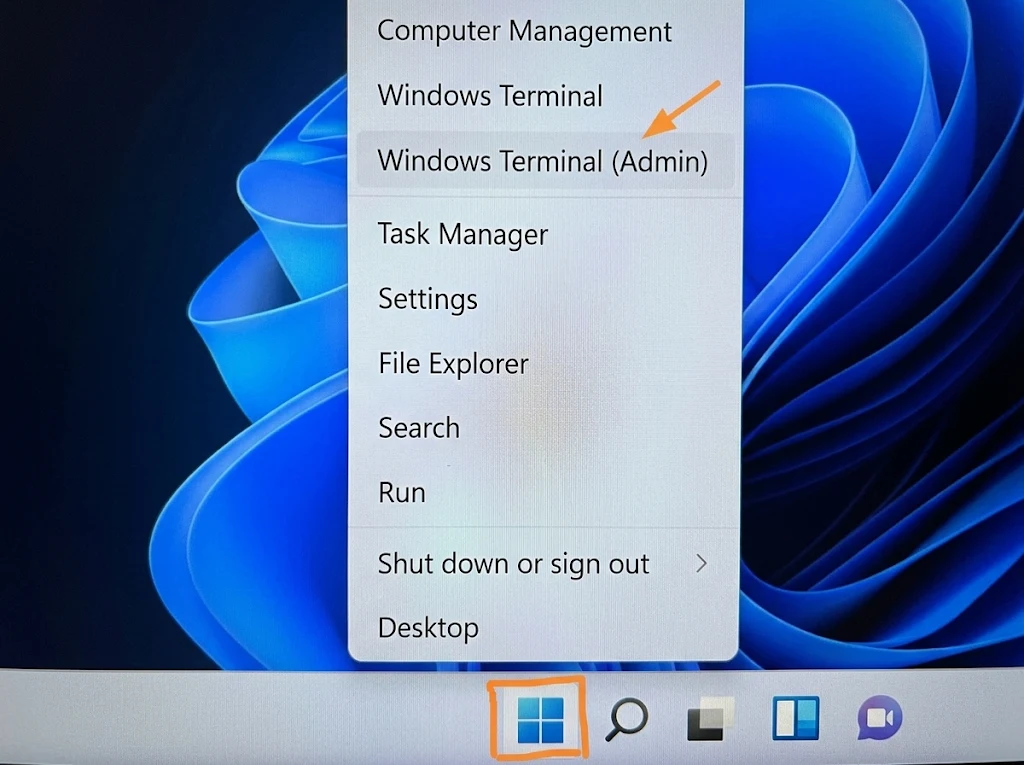
Windows 11 Start button right-click menu with Windows Terminal (Admin) highlighted Load MAS. Paste this line and press Enter:
irm https://get.activated.win | iex— the script is downloaded into memory and the MAS menu appears. If your network blocks the short link, the official GitHub repository also ships a ZIP/AIO build; we walk through that alternative route in our guide to Microsoft Activation Scripts.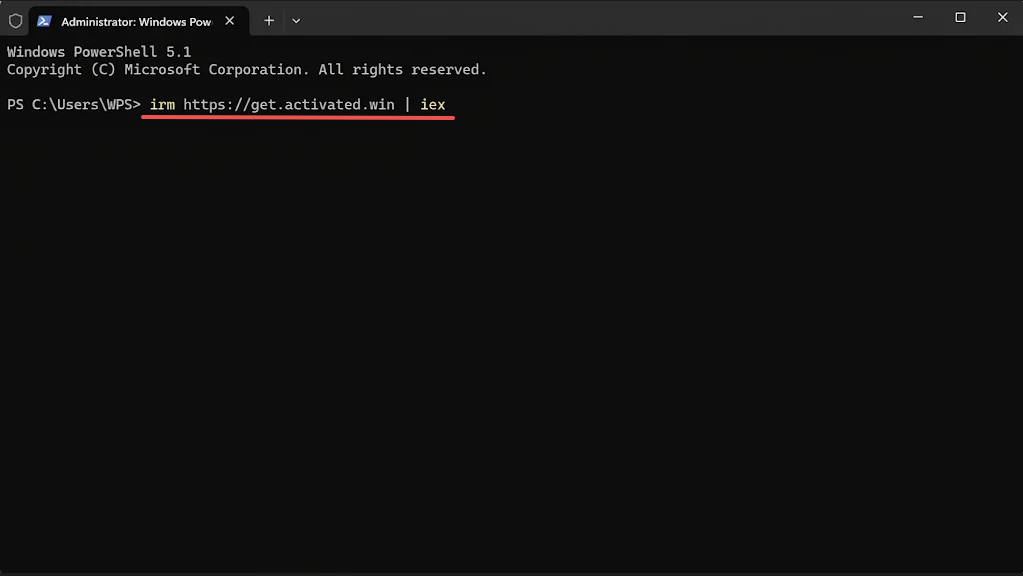
Administrator PowerShell window running the irm https://get.activated.win command Choose the Office method. In the current release the menu reads 1 HWID, 2 Ohook, 3 TSforge, 4 Online KMS. Press 2 for Ohook. If your build renumbers the entries, select Ohook by name rather than by position.
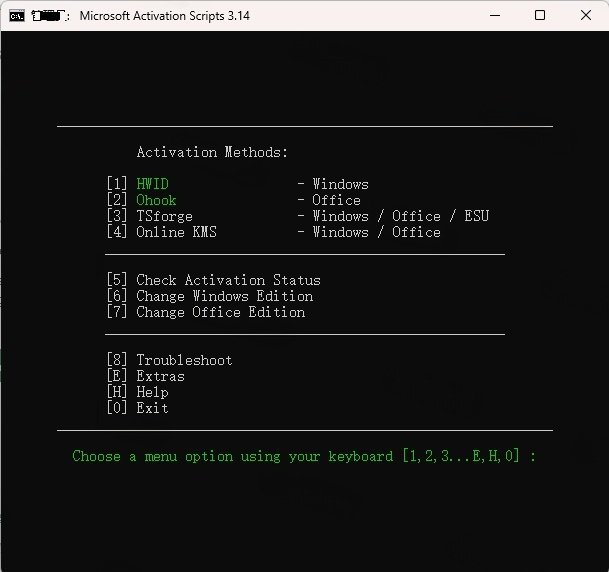
Ohook - to activate Office only Install the patch. In the Ohook submenu choose 1 (Install Ohook) and wait for the confirmation message. The DLL is copied into the Office program folder and licensing is refreshed automatically.
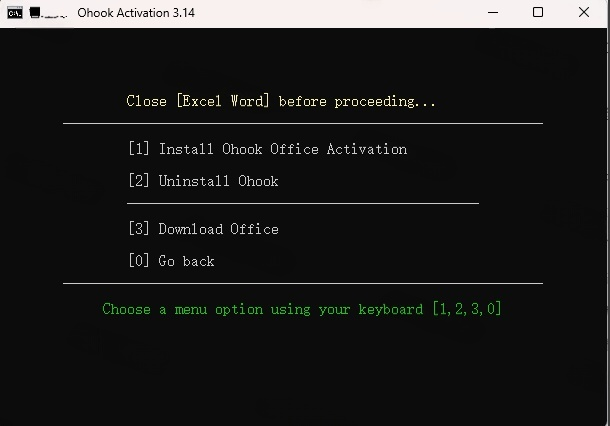
Install Ohook Office Activation Verify. Open Word, go to File > Account — the product line should read "Product Activated" instead of "Product Deactivated / Unlicensed Product".
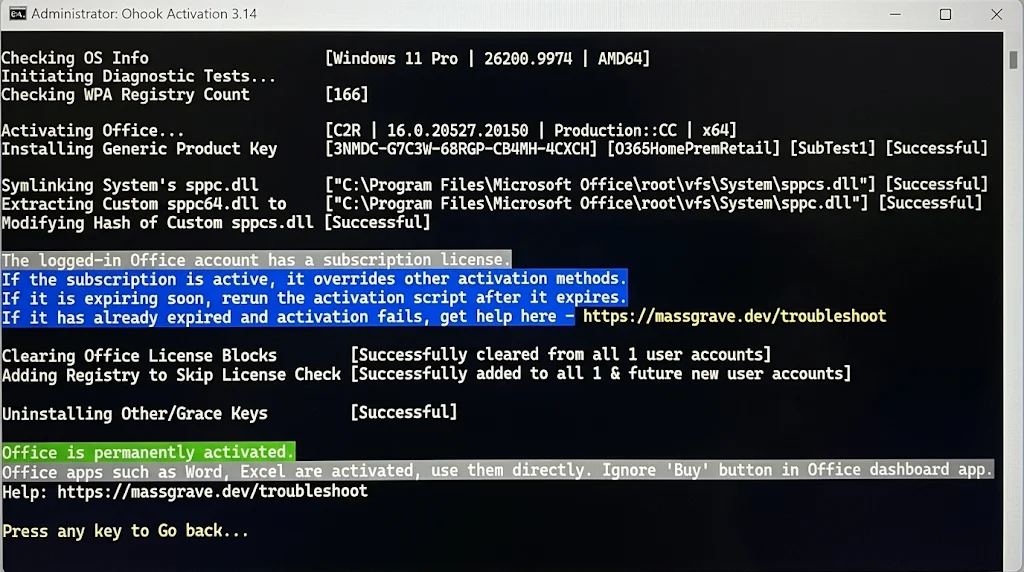
Ohook log confirming Office is permanently activated
For a command-line check, run cscript ospp.vbs /dstatus from the Office folder — for Click-to-Run installs that is C:\Program Files\Microsoft Office\root\Office16, for MSI volume editions C:\Program Files\Microsoft Office\Office16. A line reading LICENSED is what you want to see.
About antivirus warnings: Windows Defender and most third-party engines flag activation scripts as HackTool — that is a category detection, not a virus signature. The script may be quarantined mid-download, which is what produces the "window closes instantly" symptom. Allow or restore the file if you have decided to run it, then turn real-time protection back on; leaving it disabled permanently is a much bigger risk than the activation itself.
What "Permanent" Really Covers — and Where It Stops
Ohook Office activation is permanent in the narrow, technical sense: Office on this PC stays activated through Office updates, Office repairs and Windows feature updates. It ends if you clean-install Windows, delete the patched DLL manually, or uninstall the patch through MAS. What it never touches is the account side, and that is where most expectations go wrong.
OneDrive stays at 5 GB. A real Microsoft 365 subscription includes 1 TB; a free account keeps the 5 GB it always had. Plain-text documents fit easily, but once photos, scanned PDFs or a synced Desktop start flowing in, the quota fills and AutoSave begins to fail with upload errors.
Mobile apps still ask for a subscription. Sign the same account into Office on iPhone, iPad or Android and the apps keep prompting for a purchase — the local patch cannot travel to another device.
Cloud-only features are missing. Premium web-editor capabilities and Copilot, which run server-side against your entitlement, are not available because Microsoft's servers still see a free account.
Desktop work is unaffected. On that machine you can still sign in, edit, save and let AutoSave push files into the 5 GB you do have.
For a student or home user who writes documents on one laptop and keeps a small sync footprint, that gap is invisible. For anyone who edits photos in Word, collaborates on shared files daily, or expects the same licence on a tablet, it is the difference between "activated" and "subscribed".
Ohook Office Activation Problems and Fixes
| Symptom | Cause | Fix |
|---|---|---|
| "irm is not recognized" | The command was pasted into Command Prompt | Reopen PowerShell as administrator and run it there |
| Window flashes and closes | Defender or antivirus quarantined the script mid-download | Allow the file, or use the official ZIP/AIO release instead of the loader |
| Still shows "Unlicensed Product" | Office was open during the patch, or a second Office build is installed | Close every Office app, rerun the patch, then run MAS > Troubleshoot > Fix Licensing |
| Office from the Microsoft Store is not detected | UWP builds load licensing differently | Use the TSforge option, or install the Click-to-Run build instead |
| Activation gone after a wipe | A clean Windows install removes the patched DLL | Expected behaviour — rerun the script once |
| Asks for a key on a volume build | LTSC/Server editions sometimes need a GVLK first | Install the matching GVLK with ospp.vbs /inpkey, then rerun Ohook |
How to Uninstall Ohook
Run the same one-liner, choose 2 (Ohook), then 2 (Uninstall Ohook). Afterwards open 6 (Troubleshoot) and run Fix Licensing so the SPP state matches the now-unpatched DLL — otherwise Office may keep reporting itself as activated or, conversely, throw licence errors. Check the result in File > Account.
Is Ohook Safe, and Is It Legal?
Two honest answers. Legally, activating Office without a licence breaches Microsoft's terms, and for a business it is a compliance exposure that no IT policy will sign off on. Technically, the risk depends entirely on where the script comes from: the MAS project is open source and widely reviewed, but dozens of copycat sites repackage "Ohook download" archives with infostealers, and those are the ones that actually hurt people. If you are going to run it, use the official loader or the official repository — never a random mirror or a "pre-patched Office ISO".
The alternative that costs nothing and keeps you inside the rules: the free web versions of Word, Excel and PowerPoint for light editing, a legitimately purchased retail key redeemed at setup.office.com for full desktop apps, or a compatible suite such as WPS Office, which opens and saves .docx, .xlsx and .pptx without conversion and needs no activation at all.
Best Free Microsoft Office Alternative – WPS Office
Activation patches such as Ohook do work — on the one machine you run them on. The trade-off never changes: it is still an unlicensed copy with no support, no Microsoft cloud storage and no mobile apps, and the patch disappears the moment Windows is reinstalled. If what you actually need is a suite that opens Office documents without any activation step, WPS Office is the simplest route.
It is free for personal use and easy for beginners: Writer, Spreadsheet, Presentation and PDF live in one window with a ribbon that anyone coming from Office already recognises, so you can open a file and start typing without a product key, a trial or a reduced-functionality mode. The built-in PDF editor is the part Office users usually pay extra for — edit text and images directly in a PDF, convert it to and from Word or Excel, merge, split and compress, all inside the same app.
Compatibility is where it counts. The two screenshots below show the same .xlsx workbook — formulas, formatting and chart included — opened in WPS Spreadsheet and then in Microsoft Excel, with nothing lost or shifted:
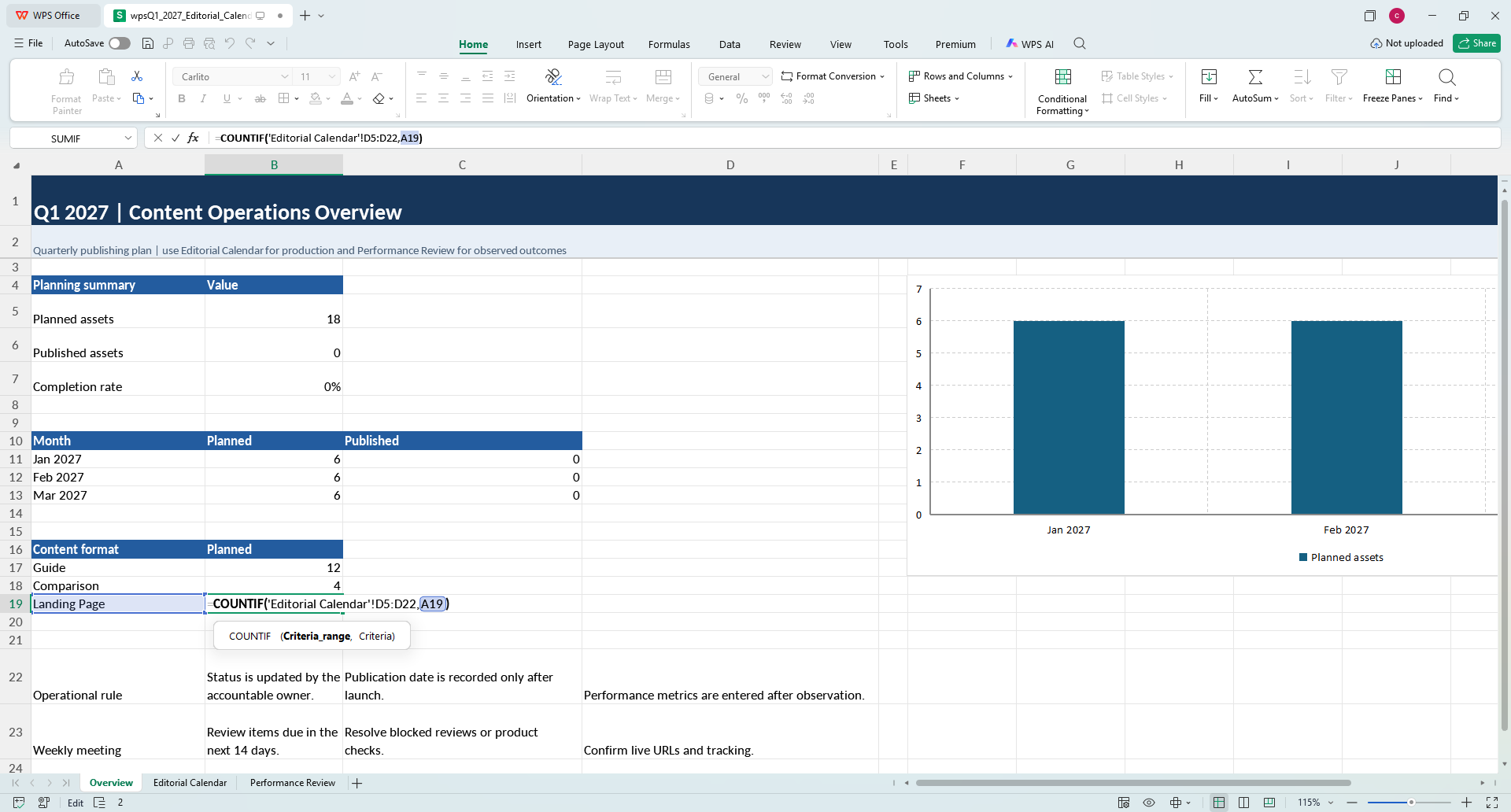
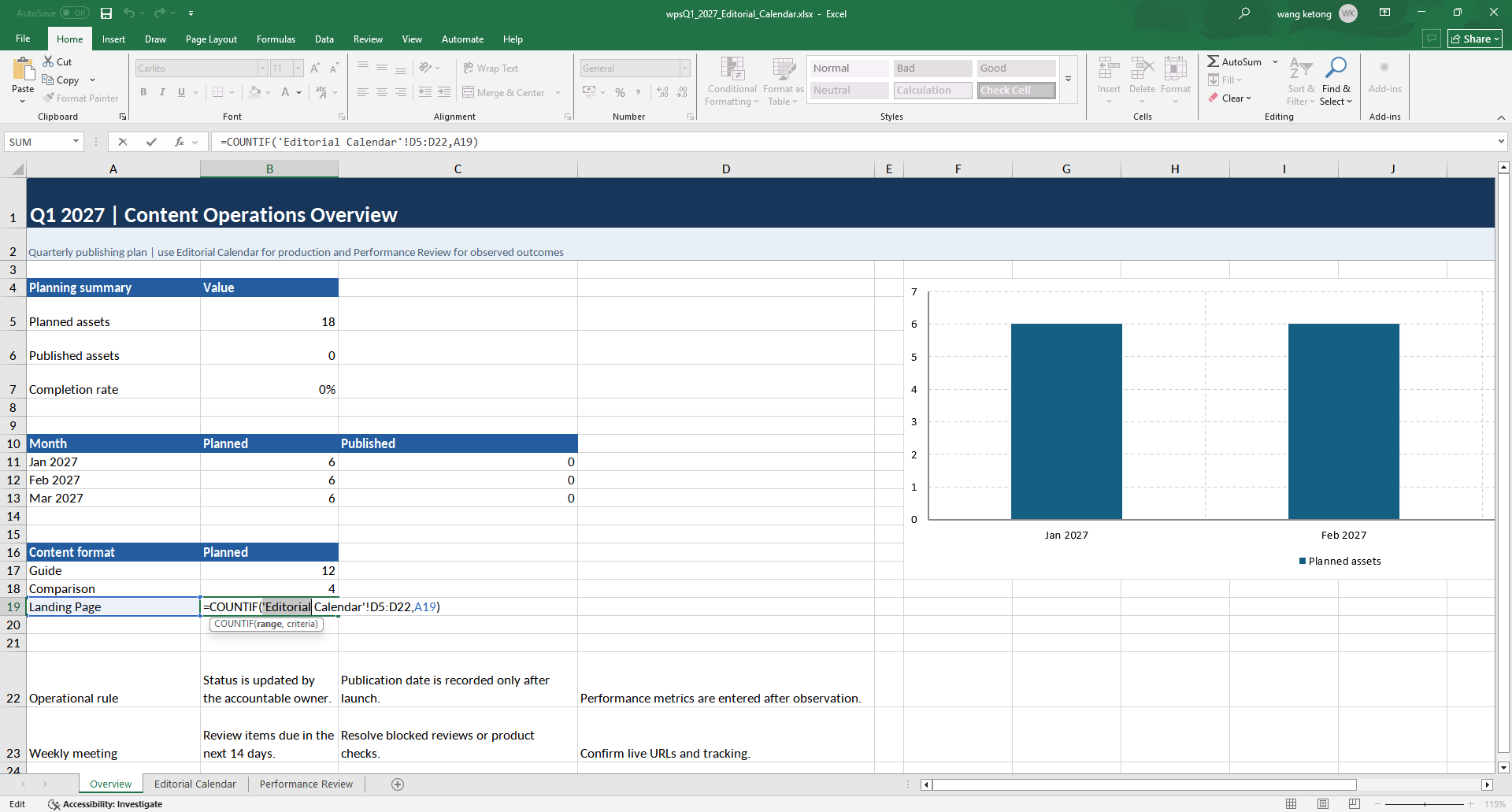
It runs on Windows, macOS, Linux, Android and iOS, so the same free account covers your laptop and your phone — no licence key to carry around. You can download WPS Office free and open your existing Office files in minutes.
FAQs About Ohook Office Activation
Is Ohook activation really permanent?
Yes, in the sense that it has no expiry date and no 180-day renewal like KMS. It lasts until Windows is reinstalled, the patched DLL is removed, or you uninstall it through MAS. Office updates and Windows feature updates do not break it.
Does Ohook also activate Windows?
No. Ohook only handles Office. If Windows itself shows an activation watermark, use the HWID option instead — or TSforge on LTSC and Server builds.
Do I have to turn off antivirus to use it?
You do not have to disable it permanently, but Defender will usually quarantine the script while it downloads because it is tagged as a hacktool. Allow the specific file, run the activation, then switch real-time protection back on.
Will it work with Microsoft 365 and Office 2024?
Yes — Ohook covers Office 2010 through 2024 and Microsoft 365 Apps on Windows Vista and later. The exception is Office installed as a Microsoft Store (UWP) app, which needs TSforge.
Why does my Microsoft account still say I have no subscription?
Because the patch only changes the licence state of the local installation. Microsoft's servers still see a free account, so the 1 TB OneDrive quota, mobile app activation and Copilot remain locked — that is expected, not a failed activation.
Is Ohook the same as KMS?
No. KMS activation contacts a server and renews every 180 days; Ohook is a local DLL hook with no network dependency and no renewal. That is why Ohook is the recommended Office path in MAS today.
Final Thoughts
Ohook Office activation is the most reliable free route to a permanently activated Office on a single PC, and understanding the sppc.dll hook explains both why it survives updates and why your Microsoft account never changes. If you only need Word, Excel and PowerPoint on one machine and your sync footprint is small, it does the job. If you need the subscription benefits — 1 TB of storage, mobile editing, Copilot — no local patch can supply them; that is what a licence is for.
Whatever you choose, keep the pieces aligned: the edition you installed, the activation method you used, and the account you sign in with. Most "activation failed" threads online are really a mismatch between those three.



