

'%3e%3cpath%20d='M8%200C12.4183%200%2016%203.58172%2016%208C16%2012.4183%2012.4183%2016%208%2016C3.58172%2016%200%2012.4183%200%208C0%203.58172%203.58172%200%208%200ZM11.6162%204.38379C11.2257%203.99337%2010.5927%203.99338%2010.2021%204.38379L8%206.58594L5.79785%204.38379C5.40732%203.99334%204.77429%203.99329%204.38379%204.38379C3.99331%204.77429%203.99335%205.40733%204.38379%205.79785L6.58594%208L4.38379%2010.2021C3.99348%2010.5927%203.99341%2011.2257%204.38379%2011.6162C4.77426%2012.0066%205.40734%2012.0065%205.79785%2011.6162L8%209.41406L10.2021%2011.6162C10.5927%2012.0066%2011.2257%2012.0067%2011.6162%2011.6162C12.0067%2011.2257%2012.0066%2010.5927%2011.6162%2010.2021L9.41406%208L11.6162%205.79785C12.0066%205.40735%2012.0066%204.77429%2011.6162%204.38379Z'%20fill='%23080E17'%20fill-opacity='0.46'/%3e%3c/g%3e%3cdefs%3e%3cclipPath%20id='clip0_3761_713'%3e%3crect%20width='16'%20height='16'%20fill='white'/%3e%3c/clipPath%3e%3c/defs%3e%3c/svg%3e)




'%3e%3cpath%20fill-rule='evenodd'%20clip-rule='evenodd'%20d='M21.4999%2010.9993C21.4999%205.20009%2016.7986%200.498901%2010.9993%200.498901C5.19994%200.498901%200.498657%205.20009%200.498657%2010.9993C0.498657%2016.2404%204.33858%2020.5844%209.35855%2021.3722V14.0346H6.69238V10.9993H9.35855V8.68594C9.35855%206.05427%2010.9262%204.60062%2013.3248%204.60062C14.4736%204.60062%2015.6753%204.80571%2015.6753%204.80571V7.38979H14.3512C13.0468%207.38979%2012.64%208.19921%2012.64%209.0296V10.9993H15.5523L15.0867%2014.0346H12.64V21.3722C17.66%2020.5844%2021.4999%2016.2404%2021.4999%2010.9993Z'%20fill='%231568EA'/%3e%3c/g%3e%3c/svg%3e)


'%3e%3cpath%20d='M2.42045%2022.1876H6.31818V12.7217L0.75%208.54553V20.5171C0.75%2021.4414%201.49892%2022.1876%202.42045%2022.1876Z'%20fill='%234285F4'/%3e%3cpath%20d='M19.682%2022.1876H23.5797C24.5041%2022.1876%2025.2502%2021.4387%2025.2502%2020.5171V8.54553L19.682%2012.7217'%20fill='%2334A853'/%3e%3cpath%20d='M19.682%205.48293V12.7216L25.2502%208.54543V6.31816C25.2502%204.25236%2022.8921%203.07469%2021.2411%204.31361'%20fill='%23FBBC04'/%3e%3cpath%20d='M6.31824%2012.7217V5.48303L13.0001%2010.4944L19.6819%205.48303V12.7217L13.0001%2017.733'%20fill='%23EA4335'/%3e%3cpath%20d='M0.75%206.31816V8.54543L6.31818%2012.7216V5.48293L4.75909%204.31361C3.10534%203.07469%200.75%204.25236%200.75%206.31816Z'%20fill='%23C5221F'/%3e%3c/g%3e%3cdefs%3e%3cclipPath%20id='clip0_2954_7305'%3e%3crect%20width='24.5'%20height='18.375'%20fill='white'%20transform='translate(0.75%203.8125)'/%3e%3c/clipPath%3e%3c/defs%3e%3c/svg%3e)


If you still use Windows 7 and need a free Adobe Reader for Windows 7, Adobe Acrobat Reader remains one of the most recognized options for opening PDF files. Support for older Windows versions is limited today, so it helps to know what the free reader can still do, where it falls short, and which free PDF tools work better for everyday work in 2026.
This overview covers Adobe Reader features, common PDF tasks, pricing, and a practical comparison with WPS PDF, a free alternative that works across modern Windows versions and covers viewing, editing, converting, and form filling.
Features of Adobe Reader for Windows 7
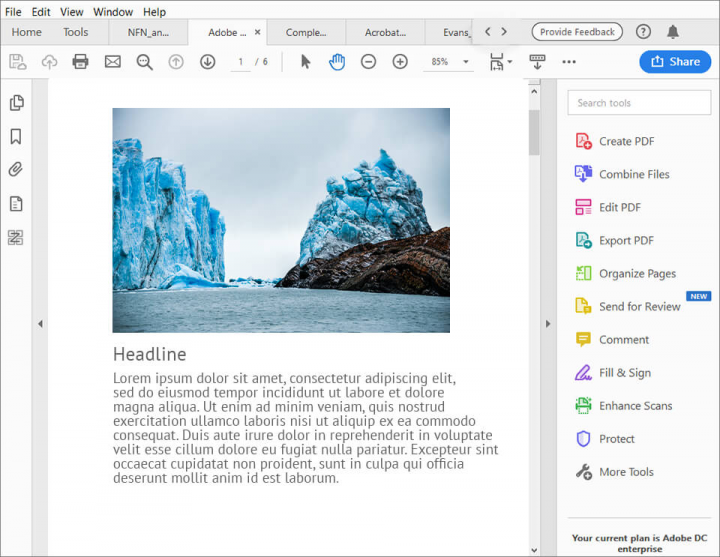
Adobe Acrobat Reader (free) focuses on PDF viewing and lightweight interaction. On Windows 7 machines that still run a compatible build, you can typically:
Open and view PDF files with zoom, page navigation, and search
Print PDF documents
Add comments, highlights, and basic annotations
Fill interactive PDF forms
Sign documents with a simple electronic signature
Share files and apply basic password protection where supported
These features make Adobe Reader useful for reading and light review. Advanced editing, conversion, and heavy form workflows usually require paid Adobe tools or a stronger free alternative.
Core PDF Functions You Need Day to Day
Most Windows users need more than open-and-print. A practical PDF workflow usually includes:
View: open contracts, invoices, manuals, and scanned documents
Annotate: highlight text, leave comments, and mark revisions
Fill and sign: complete PDF forms and add signatures
Convert: turn PDFs into Word, Excel, or images when you need to reuse content
Edit: fix typos, rearrange pages, or extract pages without reprinting
Adobe Reader covers viewing and annotation well. For convert and edit tasks, many users look at free tools such as WPS PDF so they do not need a paid Acrobat subscription.


Benefits of Using Adobe Reader
Why people still search for Adobe Reader on Windows 7:
Familiar interface: easy for users who already know Acrobat
Reliable viewing: handles most standard PDFs consistently
Free core reader: no charge for basic open, print, annotate, fill, and sign
Broad format support: works with common PDF layouts and multilingual documents
The trade-off is age. Windows 7 is end of support, and modern Adobe installs target newer Windows versions. If your PC cannot install the latest Reader, or you need edit and convert features, a free all-in-one PDF suite is often the better path.
Price: Is Adobe Reader Free?
Yes. Adobe Acrobat Reader is free for viewing, printing, commenting, filling forms, and basic signing. Paid Acrobat plans unlock advanced edit, organize, and convert features.
If you want those advanced PDF tasks without an Adobe subscription, try a free alternative such as WPS PDF, which is included with WPS Office.
Adobe PDF Reader vs WPS PDF: Which Is Better?
Adobe Reader is strong for classic viewing and annotation. WPS PDF is built as a free daily driver for viewing, editing, converting, and form work inside one office suite.
| Capability | Adobe Acrobat Reader (Free) | WPS PDF (Free) |
|---|---|---|
| Open and view PDFs | Yes | Yes |
| Print PDFs | Yes | Yes |
| Annotate and comment | Yes | Yes |
| Fill PDF forms | Yes | Yes |
| Edit PDF text and pages | Limited / paid | Yes |
| Convert PDF to Word/Excel | Limited / paid | Yes |
| Works with Word, Excel, PPT | No (PDF-focused) | Yes (full WPS Office suite) |
| Price for core PDF work | Free reader; advanced tools paid | Free for everyday PDF tasks |
If you only need to open PDFs, Adobe Reader is enough. If you also need to edit, convert, or manage office files in one place, WPS PDF is usually the better free choice in 2026.
Try WPS Office Free

WPS Office includes Word, Excel, PowerPoint, and PDF tools in one free suite. Files stay compatible with Microsoft Office formats, so sharing with coworkers stays simple. Download WPS Office if you want a free Adobe Reader alternative that also covers edit, convert, and full office work.


FAQ
Is Adobe Reader free for Windows 7?
Yes. Adobe Acrobat Reader is free for viewing, printing, commenting, form filling, and basic signing. Advanced edit and convert features are paid.
Can I still install Adobe Reader on Windows 7 in 2026?
Support depends on the Reader build and your system updates. Windows 7 is end of support, so many users move to a free PDF tool that runs on newer Windows while keeping the same daily PDF workflow.
What is the best free alternative to Adobe Reader?
WPS PDF is a strong free option for viewing, annotating, editing, converting, and filling PDFs, plus Word, Excel, and PPT in the same suite.
'%3e%3cpath%20d='M19.9911%204.11386V6.471H18.5894C18.0775%206.471%2017.7322%206.57814%2017.5536%206.79243C17.3751%207.00671%2017.2858%207.32814%2017.2858%207.75671V9.44421H19.9019L19.5536%2012.0871H17.2858V18.8639H14.5536V12.0871H12.2769V9.44421H14.5536V7.49779C14.5536%206.39064%2014.8632%205.53201%2015.4822%204.92189C16.1013%204.31177%2016.9257%204.00671%2017.9554%204.00671C18.8304%204.00671%2019.509%204.04243%2019.9911%204.11386Z'%20fill='%23333333'/%3e%3c/g%3e%3cdefs%3e%3cclipPath%20id='clip0_2938_8199'%3e%3crect%20width='16'%20height='16'%20fill='white'%20transform='translate(8%204.00671)'/%3e%3c/clipPath%3e%3c/defs%3e%3c/svg%3e)
'%3e%3cpath%20d='M17.5237%2010.7813L23.4811%204H22.0699L16.8949%209.88693L12.7648%204H8L14.2469%2012.9029L8%2020.0133H9.4112L14.8725%2013.7952L19.2352%2020.0133H24M9.92053%205.04213H12.0885L22.0688%2019.0224H19.9003'%20fill='%23333333'/%3e%3c/g%3e%3cdefs%3e%3cclipPath%20id='clip0_2938_8200'%3e%3crect%20width='16'%20height='16.0134'%20fill='white'%20transform='translate(8%204)'/%3e%3c/clipPath%3e%3c/defs%3e%3c/svg%3e)


