


If you write the file in Word, check a number in Excel, and then have to correct the PDF a client sends back, you are usually paying for two products to finish one job. Microsoft Office is where the document, the spreadsheet, and the slides live. Adobe Acrobat is what you open when that PDF needs a real change, not just a comment in the margin. You can try both of those jobs together in one free trial, with the document tools and the PDF editor already in the same app.
The situation is ordinary. You finish a quote or a short report, export a PDF so the layout stays put, and the reply is a single correction: the price is wrong, a date has moved, or a product name needs updating. Acrobat Reader will open the file, let you highlight a line, and let you leave a note. Changing the text that is already printed on the page is a separate step, and that step is the one Adobe sells on its own.
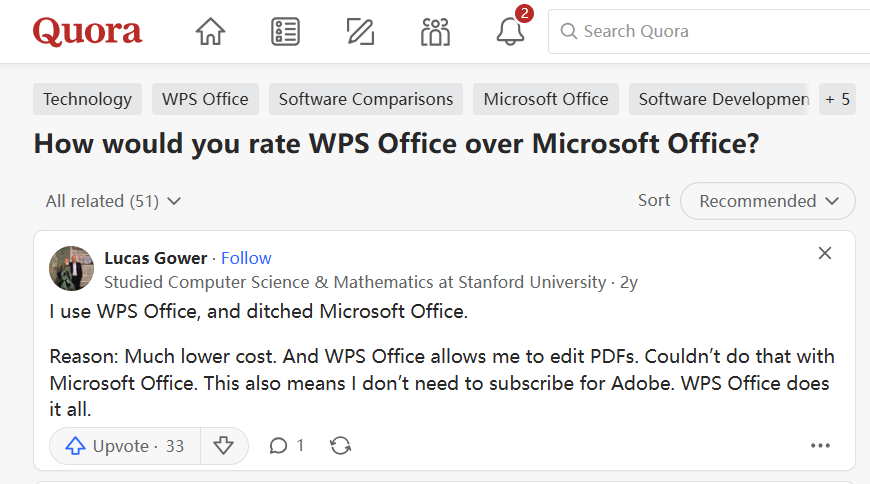
A comment on Quora describes the same choice in plain language. The writer had left Microsoft Office because the cost was much lower, and stayed because the same app could edit PDFs. There was no reason to keep paying for Adobe as well. The sections below stay with that situation: when one suite is enough, which clicks actually change a PDF, and what Microsoft 365 and Acrobat cost if you keep both.
Quora comment on Office and PDFs
Microsoft 365 is still the right home when a company account requires it, or when a workbook depends on advanced Excel. Acrobat Pro is still the right home for redaction, for comparing two versions of a PDF, and for sending a stack of signature requests. For the reports, quotes, and decks most people pass around, a free trial is enough to start. It already includes the document, spreadsheet, and presentation tools together with PDF editing, so a normal correction does not need a second subscription.
Why Microsoft Office and Adobe Acrobat Stay Two Apps
Microsoft Office became the file other people expect. You can prefer another program and still save a .docx, an .xlsx, or a .pptx, because that is what opens cleanly on a client's computer. A proposal goes out as a Word document, a budget as Excel, and the meeting deck as PowerPoint. Adobe Acrobat sits beside that habit. Once the work is exported to PDF, the page is meant to look the same everywhere, which is useful right up until someone asks you to change a line on it.
Acrobat Reader, the free app, covers the reading side. You can open the file, leave a comment, fill in a form, and add a basic signature. Rewriting a sentence that is already there, replacing a picture, or reorganizing pages is a different product. Adobe puts that editing on Acrobat Standard. Turning a scanned page into text you can search, comparing two PDFs, and blacking out sensitive information sit further up, on Acrobat Pro. So the moment a "quick PDF fix" is actually an edit, the free reader is no longer the tool you are using.
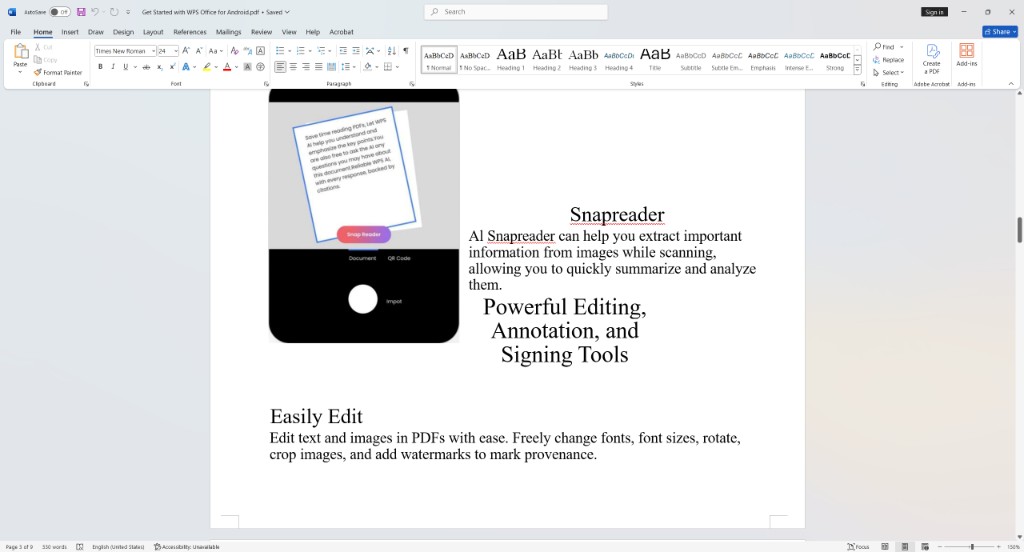
Word looks like a way around that, and it is easy to treat it as the same job. Open a PDF in Word and Word rebuilds it as a document. The words usually come across. Spacing, columns, and the position of a logo often do not, so a one-line correction can turn into a layout repair. You also end up with two files: the document Word just created, and the PDF you still have to send back. If the client is waiting on the PDF, you return to Acrobat to finish it. A longer look at that conversion, including where the layout tends to move, is in how to edit a PDF in Word.
The page below is that conversion. Word is open, and Acrobat is still a tab on the ribbon. The words survived, but the phone picture has pulled away from the headings, and the text sits in a block underneath.
PDF layout shifted in Word
The bill splits along the same line. Microsoft 365 Personal is the subscription for Word, Excel, and PowerPoint. Acrobat Standard or Pro is a second annual charge, even if you only need it a few times a month to correct a quote. Between those two windows you export, reopen, and check the page again. On one file that is a small delay. When you are also matching the PDF against a spreadsheet, it becomes the part of the afternoon that feels longer than the edit itself.
Edit Files When Microsoft Office and Adobe Acrobat Are Separate
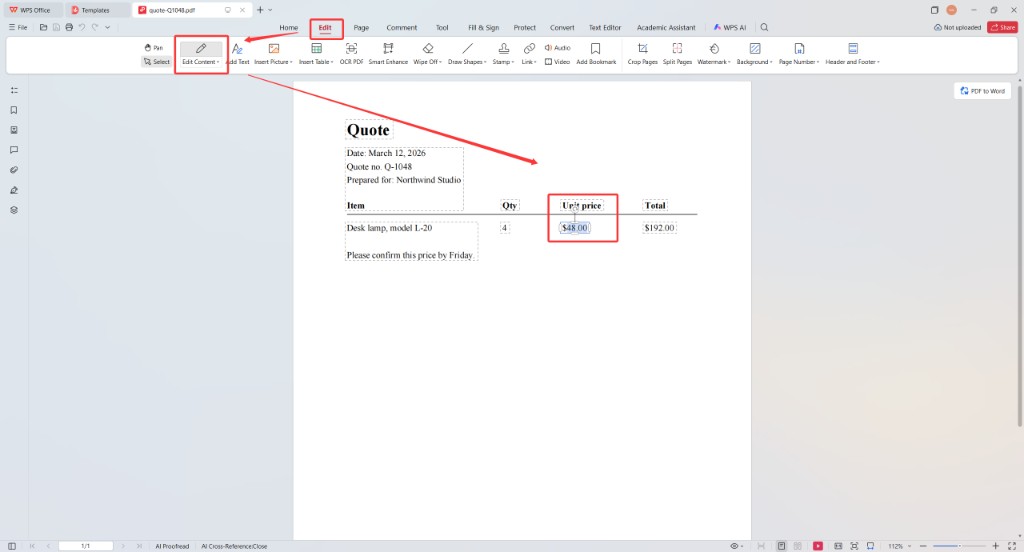
A calmer way to work is to leave the draft in the word processor and open the returned PDF in the same app. You are not converting the page into a new document just to fix a line, and you are not starting Acrobat for that one change. The screenshots are that quote. The unit price on the page is $48.00, and the edit changes that number where it already sits.
- Open the PDF. From the home screen, choose a recent file or use Open. If you are still writing the piece, finish it as a document first and export a PDF only when you want a fixed copy to send. The edit below is for the PDF that comes back, when the layout is already the one the other person has seen.
- Turn on content editing. On the PDF, open the Edit tab and choose Edit Content. Add Text places a new line that was not on the page before. Edit Content is the control that lets you click a price, a date, or a sentence already on the page.
Edit Content selected on the quote
- Change the unit price. Click $48.00. It opens as text, so you can type $52.00 where the cursor sits. The price stays on one line. The total beside it is still $192.00, because this edit changes the number you clicked and does not recalculate the row.
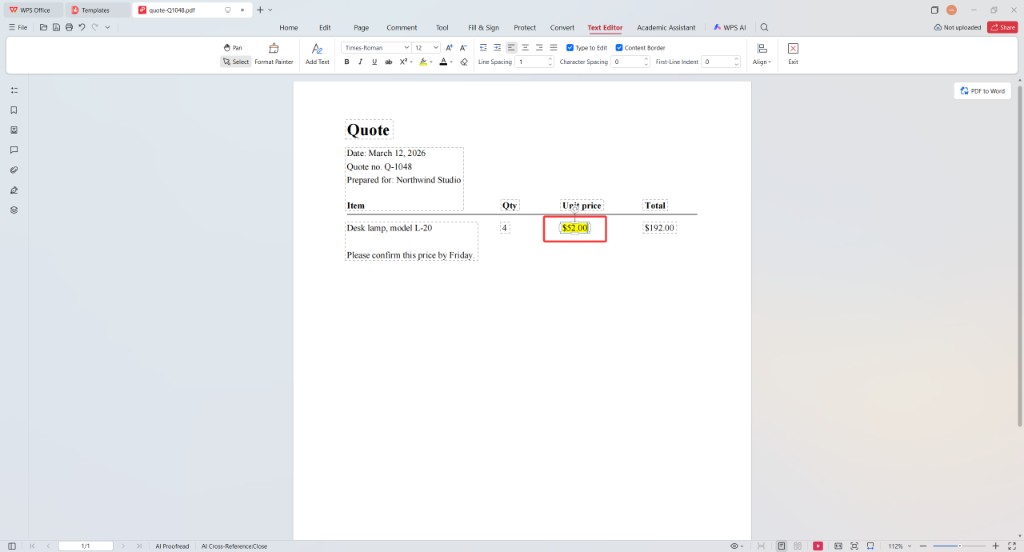
Unit price changed to $52.00
- Keep the original if you may need it. Save writes over the file you have open. Save As leaves the PDF you received untouched and stores the corrected one under a new name. That second choice is the safer one when someone might still refer to the first version.
A scanned page behaves differently, because the words are part of a picture. The page has to be recognized before those words can be rewritten. On a PDF that already contains real text, as in the quote above, you can select the price and edit it directly. The same desktop clicks are written out again in how to edit a PDF on Windows.
Once the files share one window, you can keep them open together. In the view below, a PDF, a Word document, and a spreadsheet are tabs in the same app, so you can check a figure against the sheet and adjust the sentence in the PDF without lining up separate programs.

PDF document and spreadsheet tabs


What Microsoft Office and Adobe Acrobat Cost in a Year
The Quora comment turned on cost as much as on editing, so the competitor bills are worth putting side by side. These are the US prices shown on Adobe's plan page, plus Microsoft 365 Personal at $99.99 for the year. They change with country, tax, and promotions. What stays the same is the shape of the cost: one paid subscription for the Office apps, and another paid subscription if you want to edit the PDF.
On the Acrobat page, Standard is US$14.99 a month and Pro is US$19.99 a month. Both sit on an annual plan: the page notes that canceling after 14 days can leave a fee of up to half the remaining commitment. Studio, the plan that adds Acrobat's AI assistant, is US$24.99 a month on the same kind of plan. Standard is the tier for creating, editing, converting, organizing, and signing PDFs. Pro adds redaction, web forms, and turning scans into editable text.
A year at those monthly rates is $179.88 for Standard and $239.88 for Pro. Microsoft 365 Personal is a separate $99.99 subscription for Word, Excel, PowerPoint, and Outlook. Keeping Personal and Standard for a year comes to $279.87. Keeping Personal and Pro comes to $339.87. That is the pair of bills if you want the Office apps and a PDF editor that can change an existing page.
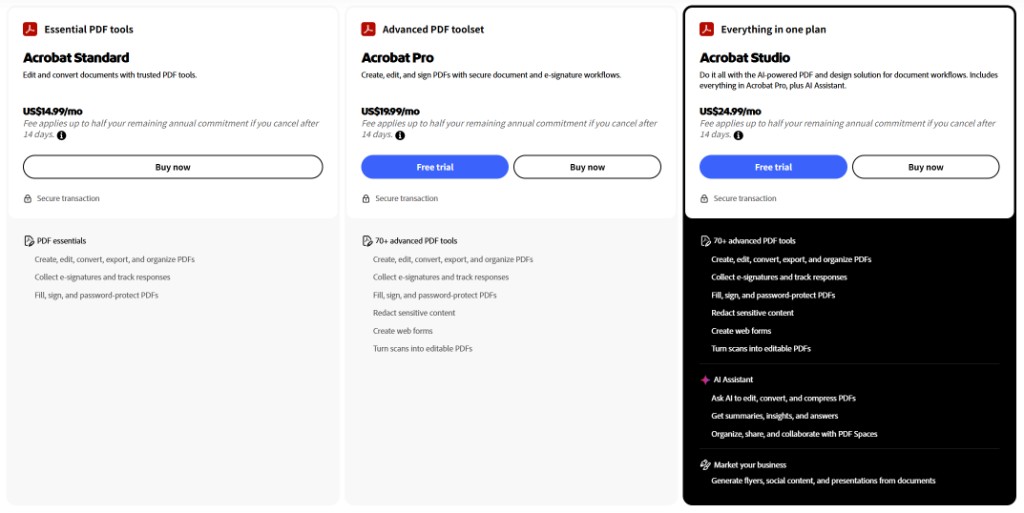
Acrobat Standard and Pro monthly prices
| Plan | US price | What the price covers |
|---|---|---|
| Microsoft 365 Personal | $99.99 a year | Word, Excel, PowerPoint, Outlook, and 1 TB of cloud storage |
| Acrobat Standard | US$14.99 a month | Create, edit, convert, organize, and sign PDFs, on an annual plan |
| Acrobat Pro | US$19.99 a month | Standard, plus redaction, web forms, and editable scans |
| Acrobat Studio | US$24.99 a month | Pro, plus Acrobat's AI assistant |
| 365 Personal + Standard for a year | $279.87 | Office apps plus standard PDF editing |
| 365 Personal + Pro for a year | $339.87 | Office apps plus Pro PDF tools |
You can try the same daily work in one free trial instead of starting those two subscriptions. The trial includes documents, spreadsheets, presentations, and PDF editing, which is the set used in the steps above. Keep Microsoft 365 or Acrobat when the workplace, or a Pro-only job such as redaction, actually requires them.
The Best Free Alternative: WPS Office
WPS Office is a free trial that keeps the document, the spreadsheet, the slides, and the PDF together. You can open the same DOCX, XLSX, and PPTX files you already exchange with people on Microsoft Office, then edit a PDF in that same trial. A quote that starts as a document and comes back as a PDF does not need a second program, and it does not need an Acrobat subscription just to change a paragraph.
The useful comparison is the job in front of you, not a checklist of features both products can claim.
| Job | Microsoft 365 + Acrobat | WPS Office |
|---|---|---|
| Getting started | Subscribe before the desktop Office apps download | Free trial, with documents, sheets, slides, and PDF editing together |
| Everyday files | Word, Excel, and PowerPoint in Microsoft 365 | Writer, Spreadsheet, and Presentation in the same free trial |
| Change a PDF line | Acrobat Standard or Pro, or a Word conversion that can reflow | Edit → Edit Content on the PDF you already opened |
| Switching files | Separate Office and Acrobat windows | PDF, document, and spreadsheet as tabs in one window |
| Yearly cost for both jobs | $279.87 to $339.87 | Free trial, instead of the two paid subscriptions |
| Keep the other product | Company Microsoft 365, heavy Excel, redact, compare, bulk e-sign | Those specific jobs still belong in Microsoft or Acrobat |
- A free trial for the daily files. Writer, Spreadsheet, Presentation, and PDF editing are in the same trial, so ordinary office work does not start with a Microsoft 365 subscription.
- Edit the PDF you were sent. Edit Content changes text that is already on the page, so a small correction does not have to become a Word conversion and a second layout check.
- One app instead of two bills. Microsoft 365 and Acrobat are separate paid products. The trial lets you try the document and the PDF edit together before you commit to either one.
The home screen keeps those pieces in one place. Recent files sit in the list, and Docs, Slides, Sheets, and PDF sit together along the side, so opening a document and opening a PDF are the same app.
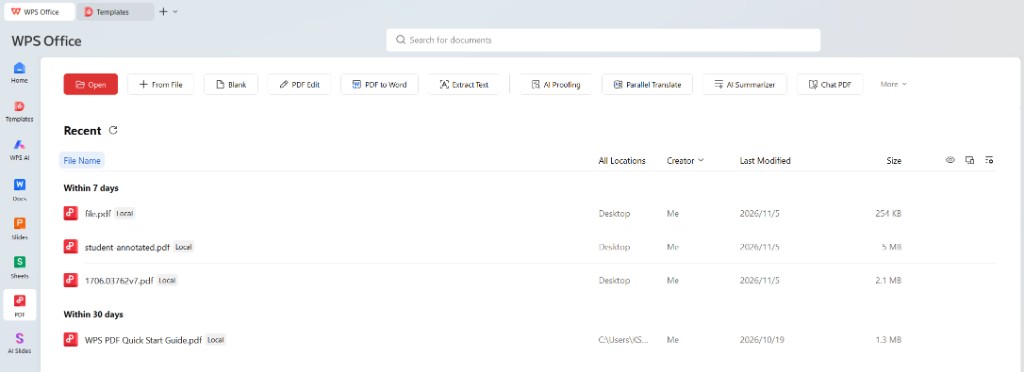
Docs slides sheets and PDF together
FAQs
Can a free trial replace Microsoft Office and Adobe Acrobat for daily work?
For everyday documents, spreadsheets, decks, and for reading or lightly correcting a text PDF, a free trial covers the job. Open the same DOCX, XLSX, PPTX, and PDF files you already use. Keep Microsoft 365 when your workplace requires that account, or when a workbook depends on advanced Excel. Keep Acrobat Pro when the file needs redaction, a side-by-side comparison, or a batch of signature requests.
Can the free trial change existing PDF text?
On a normal text PDF, the free trial includes Edit Content, so you can change a price or a sentence that is already on the page. The quote above changes $48.00 to $52.00 in place, and the total next to it stays $192.00 until you edit that number too. If the page is a scan, the words are part of a picture and have to be recognized before they can be rewritten. Acrobat Pro is the plan Adobe lists for turning scans into editable text.
Will Word and Excel files still open?
Common DOCX, XLSX, and PPTX files open for editing, and on an ordinary report or budget the layout stays close to what you see in Microsoft Office. A workbook built on deep macros, or a very large data model, can still be more at home in Excel. For those files, keeping Microsoft 365 is the practical choice.
When should I keep Adobe Acrobat?
Keep Acrobat Pro if you black out sensitive information, compare two versions of a long PDF, or send signature requests in bulk. Acrobat Reader is still enough when you only need to view a file, leave a comment, or fill in a form. The switch is worth making when the work is a small edit to a PDF you already have, not when your process depends on those Pro tools.
How much do the two subscriptions cost next to one suite?
Microsoft 365 Personal is $99.99 a year. Acrobat Standard is US$14.99 a month and Acrobat Pro is US$19.99 a month on an annual plan, which is $179.88 or $239.88 for the year. Keeping Personal with Standard comes to $279.87. Keeping Personal with Pro comes to $339.87. A free trial lets you try the documents and the PDF edit together before you start both subscriptions. Prices vary by country and by promotion.




